Can you run AI on your phone offline?
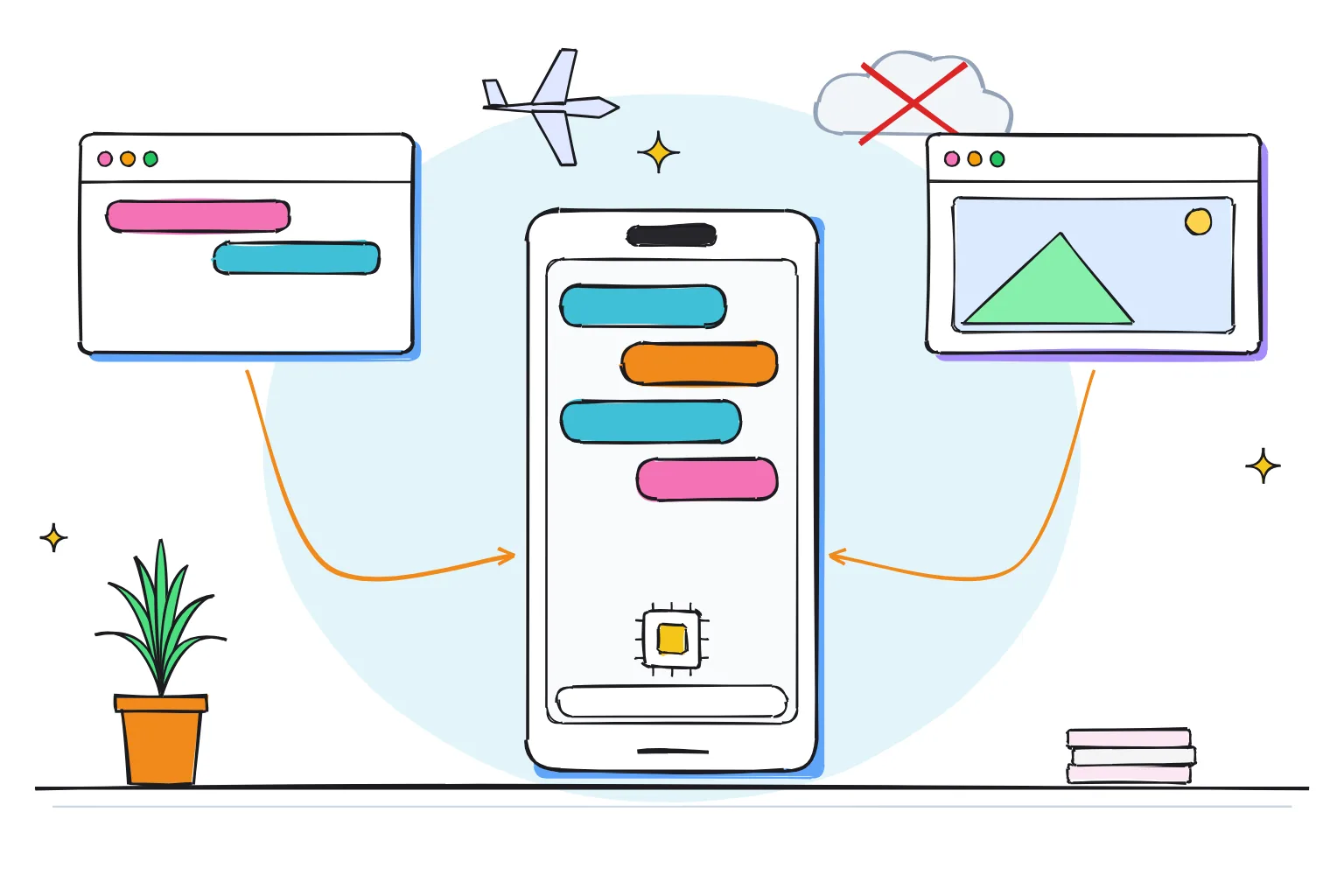
Yes. Install a free app such as Google AI Edge Gallery or PocketPal AI, download a small open model once over Wi-Fi, and your phone can chat, describe photos and transcribe speech in airplane mode. Expect a helpful assistant for drafts and questions, not ChatGPT: PocketPal's own listing says your phone runs smaller models.
This guide follows one reader: someone with a recent Android phone with 8-12GB of memory, such as a Pixel 10a with 8GB or a Pixel 11 with 12GB, or an iPhone 15 Pro or newer, who wants a ChatGPT-style assistant that works on a plane and keeps chats off the internet. This is the hub of our phone guides: each section gives the key facts and links to a deeper page.
Three terms first. A model is the file of trained numbers an app runs, and its size is counted in parameters, so a 4B model has about 4 billion of them. Quantization stores each number in fewer bits, often 4, to shrink the file. Our plain-English guide to how LLMs work covers the rest.
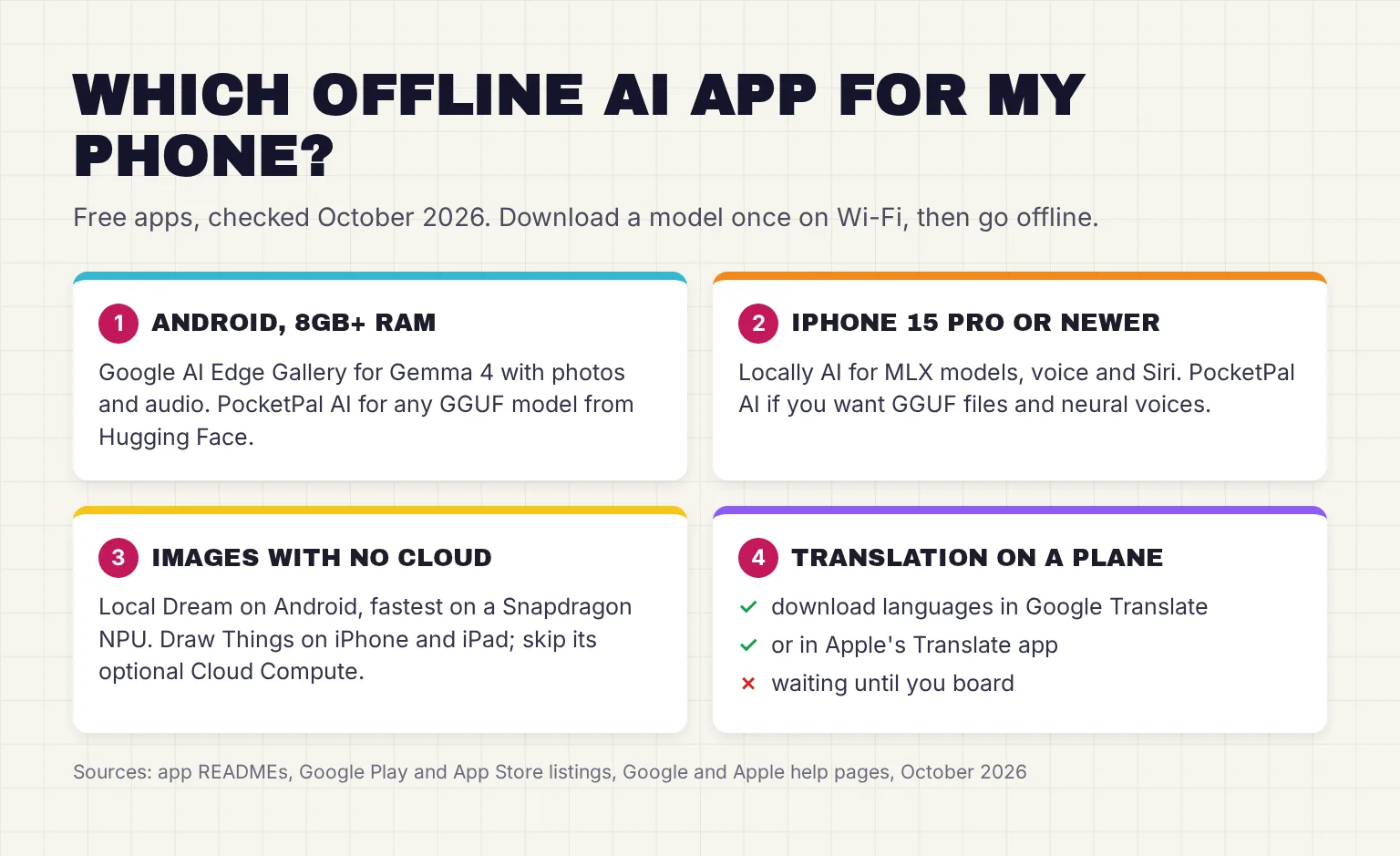
Choose Google AI Edge Gallery if:
- You want Google's own app, open source under Apache 2.0, on Android 12 and up or iOS 17 and up.
- You want one model for text, photos and audio: the app's model list marks Gemma 4 E2B and E4B for chat, Ask Image and audio tasks.
- You prefer a short, curated model list to picking files yourself.
Choose PocketPal AI if:
- You want any GGUF model, the file format of the llama.cpp engine, which PocketPal searches and downloads from Hugging Face in the app.
- You want MIT-licensed code, no account and on-device voices that read replies aloud.
- You own a Snapdragon 8 Gen 2 or newer phone and want to try its experimental NPU path.
Choose Locally AI if:
- You use an iPhone and want an app powered by Apple MLX, Apple's machine learning framework, with Siri and Shortcuts integration.
- You also want Apple's built-in model: the version 1.65.0 notes say Apple Foundation Models now support vision.
Which free offline AI apps work in October 2026?
These are the main free apps that run models on the phone itself, checked against their store listings and code pages on October 27-28, 2026. Open source here means the code is public under a license that allows reuse.
| App | Platform | Maker | Open source? | What it does offline | Model format |
|---|---|---|---|---|---|
| PocketPal AI | Android, iPhone, iPad | Asghar Ghorbani (LLM Ventures) | Yes, MIT | Chat, pals, on-device voices, benchmarks | GGUF (llama.cpp) |
| Google AI Edge Gallery | Android 12+,iPhone (iOS 17+) | Yes, Apache 2.0 | Chat, Ask Image, Audio Scribe, Prompt Lab, photo search | LiteRT-LM (.litertlm) | |
| Locally AI | iPhone, iPad, Mac (iOS 18.1+) | LM Studio (Element Labs) | No | Chat, vision, voice mode, Siri, Apple Foundation Models | MLX |
| SmolChat | Android | Shubham Panchal | Yes, Apache 2.0 | Chat with small models | GGUF |
| Local Dream | Android (Snapdragon NPU, or CPU/GPU) | xororz | Source available, non-commercial (CC BY-NC 4.0) | Stable Diffusion images | SD1.5 and SDXL |
| Draw Things | iPhone, iPad, Mac | Draw Things, Inc. | Partly: community code under GPL-3.0 | Images and video | SDXL, FLUX, Qwen Image, Wan 2.2 and more |
| Google Translate | Android, iPhone | No, proprietary | Text and camera translation | Downloaded language packs |
The main chat apps are current. On the App Store, PocketPal v1.21.2 and AI Edge Gallery 1.0.14 shipped on October 27, 2026, and Locally AI 1.66.0 on October 15. On Google Play, Gallery was updated on October 27 and PocketPal on October 25. Google still calls Gallery an experimental Beta release. Check dates before you install anything else: MLC Chat for iPhone was last updated in September 2024.
Is there a free offline AI chatbot?
Yes, every chat app above is free for local use, and the paid parts are optional extras. PocketPal sells PocketPal Plus, which adds hands-free voice mode, and premium pals. Enclave, an iPhone app that requires iOS 27, keeps local models free and charges $9.99 a month for cloud models. Draw Things charges $8.99 a month for Draw Things+, which buys more cloud compute, not local use.
For a deeper comparison, read our guides to local LLM apps on Android and local LLM apps on iPhone and iPad, and the app guides for PocketPal AI and Google AI Edge Gallery.
What can AI do on your phone without internet?
Chat, writing and questions
Drafting, rewriting, summarizing pasted text and answering questions work in every chat app above. Gemma 4 has multilingual support in over 140 languages, according to Google. In my view, small models are best at reworking text you give them and weakest at recalling facts, so check anything that matters.
Describing photos and making images
Gallery's Ask Image can identify objects or describe a photo from your camera or gallery, and Locally AI offers language and vision models. To make images, Local Dream runs Stable Diffusion on Android, using the NPU for SD1.5 on Snapdragon chips with Hexagon V68 or newer, and SDXL on Snapdragon 8 Gen 3 or newer. Other phones fall back to the slower CPU/GPU path, which in the stable release runs SD1.5 only. On iPhone, Draw Things creates images and video 100% offline by its own description. Our offline AI image generator guide and Draw Things guide go further.
Speech, voice and transcription
Gallery's Audio Scribe can transcribe and translate voice recordings into text on the phone, and Gemma 4's small models handle speech recognition and speech-to-translated-text. PocketPal reads answers aloud with on-device neural voices such as Kokoro, and Locally AI has a voice mode that runs completely on-device.
Translation on a plane
The simplest offline AI is translation. In Google Translate, download a language and you can translate it without an internet connection on Android, with the same option on iPhone. Apple's Translate app also lets you download languages to translate entirely on your iPhone. Do it on Wi-Fi before you fly. The same download-ahead habit helps in storms and outages, as our guide to offline AI for emergencies and power cuts explains.
Which phones can run AI offline, and how much RAM do you need?
Memory decides which offline AI models fit. At 4-bit, budget about 0.55-0.65GB per billion parameters for the model, plus room for Android or iOS and your other apps. Qwen 3.5 4B, for example, has 4.66 billion parameters and its 4-bit Q4_K_M file is 2.74GB. Google's own floor in Gallery's model list is 6GB for its 1-1.5B models, 8GB for Gemma 4 E2B and 12GB for Gemma 4 E4B, and PocketPal asks for 6GB+ RAM for smaller models, 8GB+ for the good stuff.
| Phone RAM | What fits comfortably | Example downloads, October 2026 | Phones with this RAM |
|---|---|---|---|
| 6GB | 1-2B models | Qwen 3.5 2B, 1.28GB; Gemma 3 1B, 0.58GB | Older and budget phones |
| 8GB | 2-4B models | Gemma 4 E2B, 2.59GB; Qwen 3.5 4B, 2.74GB | Pixel 10a |
| 12GB | Up to about 5B | Gemma 4 E4B, 3.66GB | Pixel 11; Galaxy S26 Ultra, 256GB or 512GB |
| 16GB | Up to about 9B | Qwen 3.5 9B, 5.68GB | Pixel 11 Pro or Pro XL, 512GB or 1TB; Galaxy S26 Ultra, 1TB |
| Not published | Let the app decide | Locally AI limits Gemma 4 to devices with enough RAM | iPhone 15 Pro or newer |
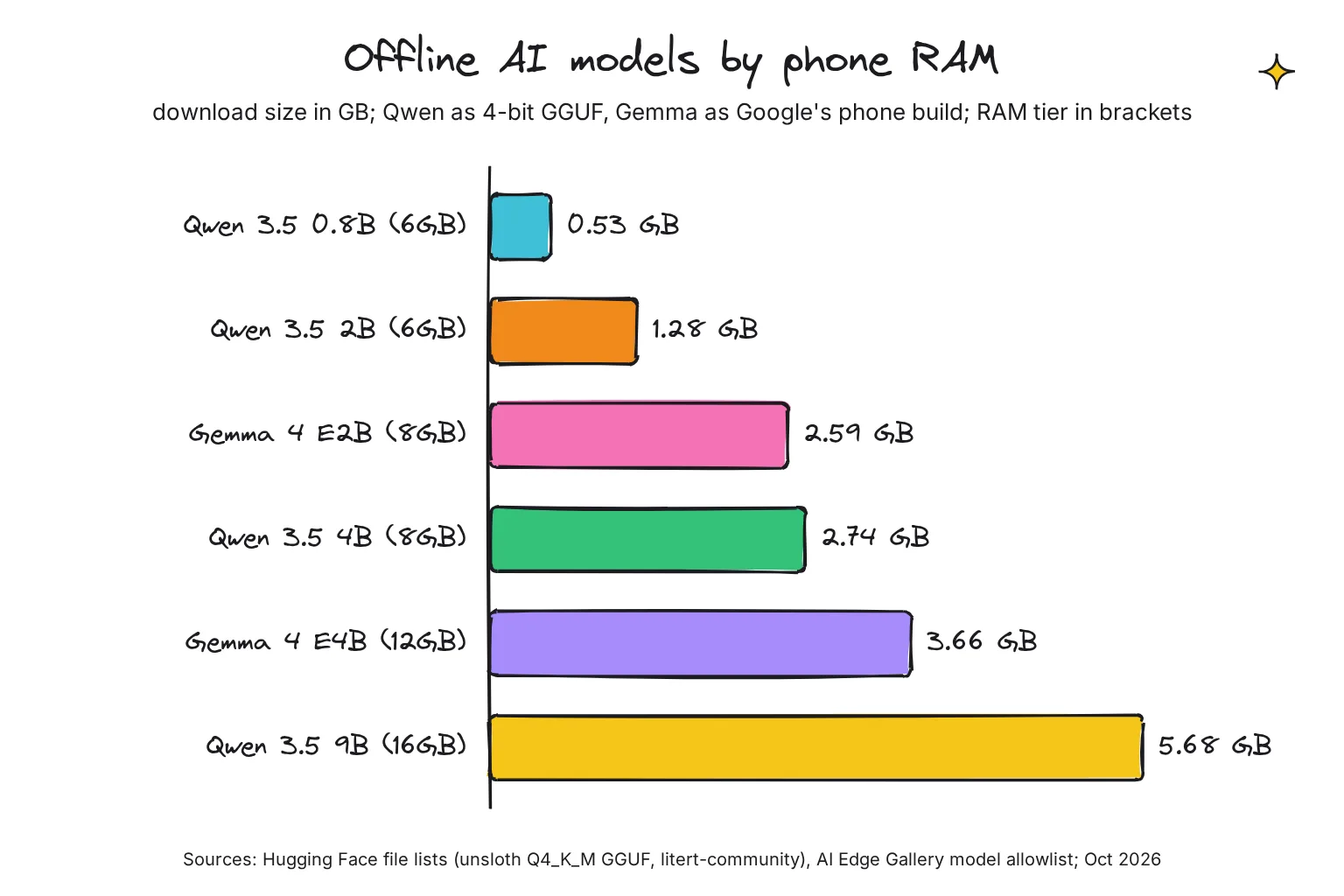
The middle column applies the rule of thumb; when an app sets its own limit, follow the app. The same model can come in different files. Gallery's Gemma 4 E2B is a 2.59GB LiteRT-LM file, while the 4-bit GGUF builds that PocketPal can load are 3.11GB for E2B and 4.98GB for E4B. The smallest useful chat model in the chart, Qwen 3.5 0.8B, is 0.53GB. Another small option is LFM3, Liquid AI's phone-sized model, which Liquid AI says needs about 1GB of memory at 4-bit.
Apple does not list memory on its iPhone comparison page, so on an iPhone let the app filter models for you. Our iPhone guide covers memory by model, and our guide to the best phone for local AI helps if you are choosing your next phone.
How fast is AI on a phone?
Speed is counted in tokens per second, where a token is a word or a piece of one; our local vs cloud AI speed guide explains the measure. Google's own tests of Gemma 4 E2B with its LiteRT-LM engine show 52.1 tokens per second on a Galaxy S26 Ultra GPU and 56.5 on an iPhone 17 Pro GPU. The bigger E4B shows 22.1 and 25.1. Google ran a short test, 1,024 tokens in and 256 out, so treat these as best cases.
The chip matters. On the iPhone 17 Pro, the same E2B model on the CPU managed 25.0 tokens per second, less than half its GPU speed, while the Galaxy S26 Ultra's CPU reached 46.9, close to its GPU. Google's card notes that its CPU path uses XNNPack and its GPU path uses ML Drift, the engine's two hardware back ends.
Do you need a phone with an NPU?
An NPU, or neural processing unit, is a part of the chip built for AI math. Chat apps lean mostly on the GPU and CPU: Gallery's model list runs its Gemma models on the GPU or CPU. PocketPal claims 2,725 tokens per second reading a prompt on a Snapdragon 8 Elite Gen 5 NPU, 6.5 times its CPU, with a 1.2B model, but labels the NPU path experimental. That number is for reading your prompt, not writing the reply. Image apps lean on the NPU more, as Local Dream shows.
Built-in AI vs apps you install: what really stays on the phone?
Phone makers ship their own AI, and it mixes on-device and cloud processing. Our guide to on-device AI on phones goes feature by feature; here is the short version.
- Apple Intelligence runs on iPhone 15 Pro, iPhone 15 Pro Max, iPhone 16 models or later, iPhone Air and iPhone Duo. Apple says it combines on-device processing with Private Cloud Compute for larger server-based models, and features that rely on server-side models, such as Siri AI and Image Playground, have daily usage limits. Apps can use the on-device model through the Foundation Models framework, and Apple says those features work offline.
- Gemini Nano runs in Android's AICore service, which Google says does not have direct internet access and does not keep a record of inputs or outputs. Phones that support its developer APIs include the Pixel 9, 10 and 11 series and the Galaxy S26 series. The Gemini app itself is different: Google says human reviewers read a subset of chats and keeps reviewed chats for up to three years.
- Galaxy AI lets you decide whether your data is processed on device or in the cloud, and Samsung's Advanced Intelligence settings include an option to disable online processing.
Built-in AI is convenient, but you cannot choose the model or see which request leaves the phone. An app with a downloaded model, tested in airplane mode, is the setup you can check yourself.
How to set up offline AI on your phone
Every offline app has the same parts: the app, an engine that does the math (llama.cpp in PocketPal, LiteRT in Gallery, MLX in Locally AI), a model file, and the phone's CPU, GPU or NPU. The internet is needed once, to fetch the model.
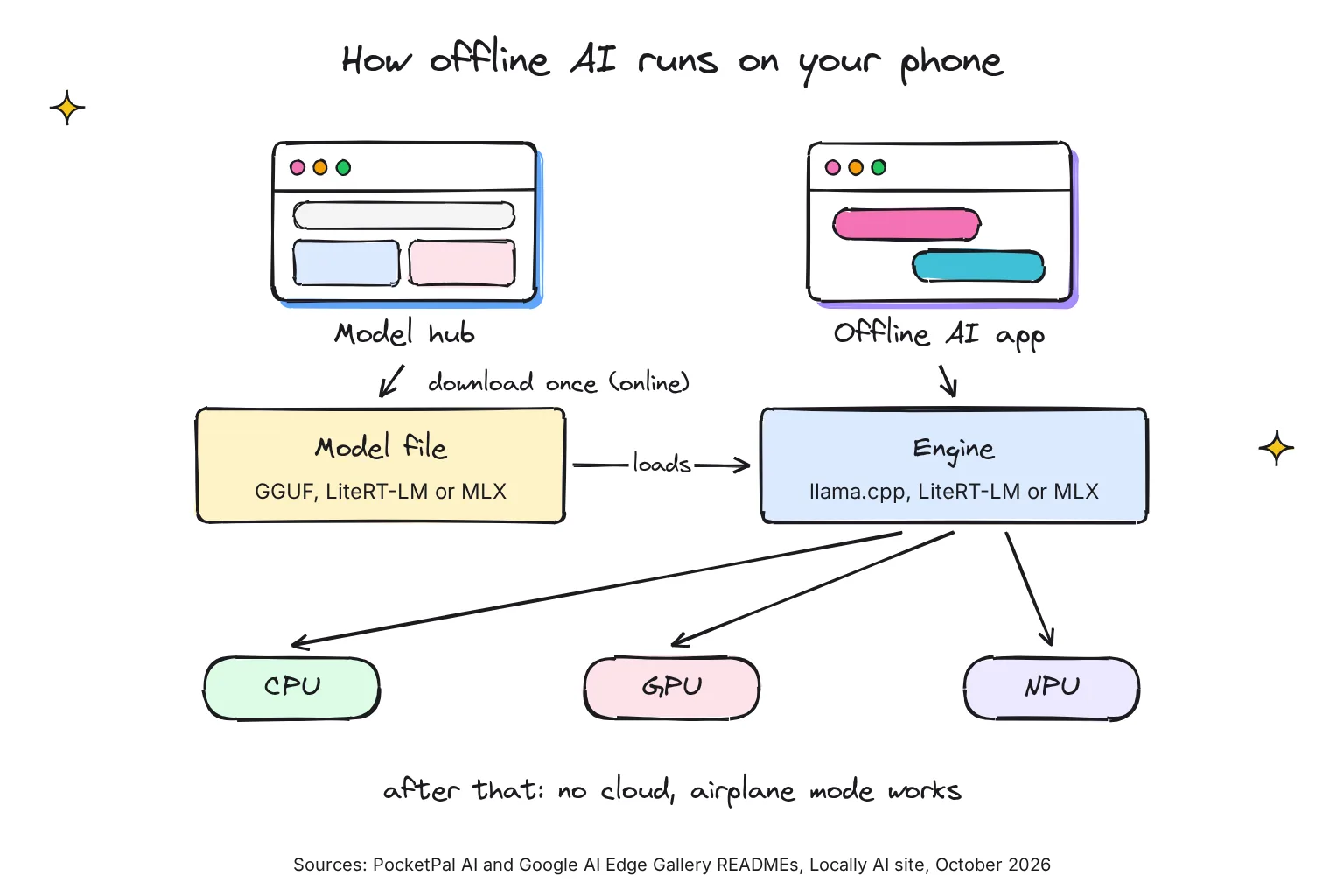
- Check your free space. Models in this guide run from 0.53GB to 5.68GB, on top of the app: Gallery is 122.2MB and PocketPal 137.2MB on the App Store.
- Install from the official store. Get Gallery from Google Play or the App Store; without Google Play, Google offers the APK on its GitHub releases page. PocketPal is on Google Play and the App Store.
- Download one model on Wi-Fi. In Gallery, pick Gemma 4 E2B on an 8GB phone or Gemma 4 E4B on 12GB, matching Google's memory floor. In PocketPal, tap the menu, then Models, pick one that fits your phone and tap Download.
- Load it and ask something you can check. In PocketPal, tap Load, then ask it to summarize a note you wrote, so you can judge the answer.
- Turn on airplane mode and ask again. If replies keep coming, the model is running on your phone.
If your phone is too small for the model you want, you can chat from the phone with bigger models running on your own computer, which needs a network connection to it; our guide to using Ollama from your phone shows how to do that safely.
Is offline AI private? A checklist
A model that runs on the phone keeps your prompts off the app maker's servers, but apps differ in what else they collect. Store privacy labels are the developers' own declarations, which Apple notes it has not verified. Our guide to private AI options covers the wider picture.
- Do the airplane-mode test. Load a model, switch on airplane mode, then chat. An app that stops answering is probably using the cloud.
- Read the labels. PocketPal and Locally AI declare Data Not Collected on the App Store. Gallery's App Store label lists device ID and diagnostics linked to you, and coarse location and usage data not linked to you, while its Google Play entry says no data shared with third parties. PocketPal's Google Play entry says it may collect personal and financial info, so read both stores.
- Know where chats live. PocketPal keeps chat history in a database on the phone and added bulk delete and export of chats in version 1.11.21. Enclave says conversation history is saved locally as simple files you control.
- Switch off features that go online. PocketPal's web search and remote servers, Locally AI's LM Link to your computer, Enclave's Pro cloud models and Draw Things' Cloud Compute all send work off the phone.
- Grant permissions only when needed. My rule: the microphone for voice, photos only when you attach one, and nothing else for chat.

Battery, heat and storage
Running a model keeps the chip busy, and phones protect themselves when they warm up. Google says a Pixel that is too hot may reduce CPU performance and charging speeds, and lists using resource-heavy apps while charging among the causes. Apple says iPhones work best at 32° to 95° F ambient temperatures, and that charging the device in high ambient temperatures can damage it further. PocketPal also keeps the screen awake while it generates.
My general advice, not a measured result: keep sessions short, avoid generating while the phone charges, and use the smallest model that does the job. For images, Local Dream says its DMD2 models are about 4 times faster, with much less heat. Watch storage too: Apple Intelligence alone takes up to 8GB, or up to 14GB on iPhone 17 Pro models and later, iPhone Air and iPhone Duo, so delete models you no longer use.
Common questions about offline AI on your phone
Is there an offline AI app that works without internet?
Yes. Free apps such as Google AI Edge Gallery and PocketPal AI on Android and iPhone, and Locally AI on iPhone, run open models on the phone itself. You need the internet once to download the app and a model of about 0.5 to 6GB, and after that chat works in airplane mode.
What is the best free offline AI app for Android?
For most people, Google AI Edge Gallery. It is free, open source under Apache 2.0, made by Google, and offers Gemma 4 models that handle text, photos and audio. PocketPal AI is the better pick if you want to choose from many GGUF models on Hugging Face or have answers read aloud.
How much RAM does a phone need to run AI offline?
Plan on 8GB for a useful assistant. Google AI Edge Gallery asks for 6GB for 1B-class models, 8GB for Gemma 4 E2B and 12GB for Gemma 4 E4B. A 4-bit model needs about 0.55 to 0.65GB per billion parameters, plus room for the system and your other apps.
Can an offline AI app replace ChatGPT?
Not fully. As PocketPal says in its own store listing, cloud services run far larger models on server farms, while your phone runs smaller ones. Phone models are good for drafting, rewriting, summarizing pasted text and private questions, and they keep working with no signal, but check any facts they give you.
Is offline AI on a phone private?
Mostly, if the model runs on the phone and you leave online extras such as web search and cloud models switched off. Your prompts then never reach a server, which you can confirm by chatting in airplane mode. Apps still differ on analytics, so read the App Store privacy label or Google Play data safety section.
Does running AI on a phone drain the battery or cause heat?
It works the chip hard, so expect extra battery use and warmth during long sessions. Google says a Pixel that gets too hot may reduce CPU performance and charging speed, and Apple warns against charging in high heat. Keep sessions short, avoid generating while charging, and choose a smaller model.
My verdict for an 8-12GB Android or iPhone 15 Pro owner: one official app, one small model
On Android, start with Google AI Edge Gallery and Gemma 4 E2B on an 8GB phone, or E4B on 12GB. It is free, open source, made by Google, handles text, photos and audio, and its model list sets a minimum phone memory for each model. Add PocketPal AI later for other GGUF models or spoken answers. On an iPhone, start with Locally AI, which declares no data collected, or PocketPal if open source matters to you. Either way, download Translate language packs before you travel.
Your next step: install one app on Wi-Fi tonight, download the model this guide suggests for your phone's memory, then switch on airplane mode and ask it to summarize something you wrote, so you can judge both the answer and the privacy for yourself.
Sources
- google-ai-edge/gallery README - Google, GitHub
- Releases - google-ai-edge/gallery, GitHub
- model_allowlists/1_0_20.json - google-ai-edge/gallery, GitHub
- Google AI Edge Gallery - Google Play
- Google AI Edge Gallery - App Store
- PocketPal AI README - a-ghorbani/pocketpal-ai, GitHub
- PocketPal AI - Google Play
- PocketPal AI - App Store
- PocketPal AI: Own your AI - PocketPal
- Locally AI by LM Studio - App Store
- Locally AI - Locally AI
- Locally AI joins LM Studio - LM Studio
- Terms and Conditions - Locally AI
- Enclave: Local AI Assistant - App Store
- Pricing - Enclave AI
- SmolChat-Android - shubham0204, GitHub
- SmolChat - Google Play
- Local Dream - xororz, GitHub
- Local Dream LICENSE - xororz, GitHub
- Device Compatibility - Local Dream User Guide
- Getting Started - Local Dream User Guide
- Local Dream - Google Play
- Draw Things: Offline AI Art - App Store
- Draw Things: AI-assisted Image Generation - Draw Things
- draw-things-community - drawthingsai, GitHub
- MLC Chat - App Store
- Google Terms of Service - Google
- Download languages to use offline (Android) - Google Translate Help
- Download languages to use offline (iPhone and iPad) - Google Translate Help
- Translate words and phrases on iPhone - Apple Support
- google/gemma-4-E2B-it model card - Google, Hugging Face
- litert-community/gemma-4-E2B-it-litert-lm - Hugging Face
- litert-community/gemma-4-E4B-it-litert-lm - Hugging Face
- Qwen/Qwen3.5-4B - Qwen, Hugging Face
- unsloth/Qwen3.5-0.8B-GGUF - Hugging Face
- unsloth/Qwen3.5-2B-GGUF - Hugging Face
- unsloth/Qwen3.5-4B-GGUF - Hugging Face
- unsloth/Qwen3.5-9B-GGUF - Hugging Face
- unsloth/gemma-4-E2B-it-GGUF - Hugging Face
- unsloth/gemma-4-E4B-it-GGUF - Hugging Face
- Pixel 10a tech specs - Google Store
- Pixel 11 tech specs - Google Store
- Pixel 11 Pro and Pro XL tech specs - Google Store
- Galaxy S26 Ultra - Samsung US
- Compare iPhone models - Apple
- Get started with the next generation of Apple Intelligence - Apple Support
- Apple Intelligence - Apple
- Foundation Models - Apple Developer
- Gemini Nano - Android Developers
- ML Kit GenAI APIs - Google for Developers
- Gemini Apps Privacy Hub - Google
- Galaxy AI - Samsung US
- Your Privacy, Secured: How Galaxy AI Empowers You to Take Control of Your Data - Samsung Newsroom
- Help keep your Pixel phone from feeling too warm or hot - Pixel Phone Help
- Batteries: Maximizing Performance - Apple
On a Chromebook instead? See local AI on a Chromebook.