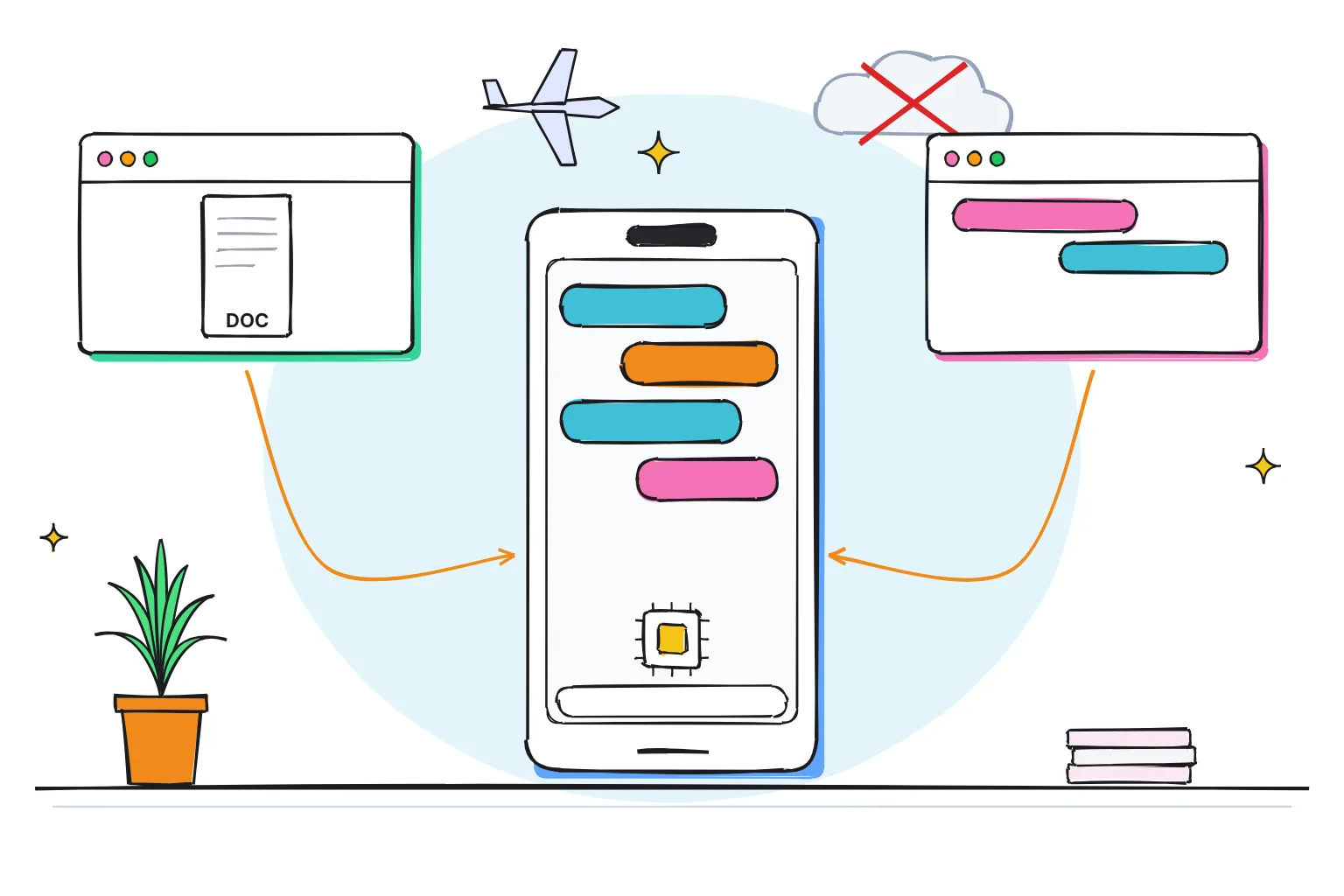
How do you run a local LLM on an iPhone?
Install a free app such as Locally AI by LM Studio or PocketPal AI, download a small open model over Wi-Fi, then chat with it in airplane mode. On an iPhone 15 Pro, 16 or 17, a 2-4 billion parameter model at 4-bit is a 1.3-3.1GB download, and Apple's own on-device model is built in too.
This guide follows one reader: someone with an iPhone 15 Pro, 16 or 17, which have 8GB of memory according to MacRumors and 9to5Mac, who wants a private assistant for drafting messages, summarizing notes and answering questions on a flight, with nothing leaving the phone. If you have an iPhone 17 Pro with 12GB, the same advice applies, with room for a bigger model.
An LLM, or large language model, is the kind of AI behind ChatGPT; a local LLM is an open model file that runs on your own device. Our explainer on how LLMs work covers the basics, and our guide to running AI on your phone offline covers Android too.
Choose Locally AI if:
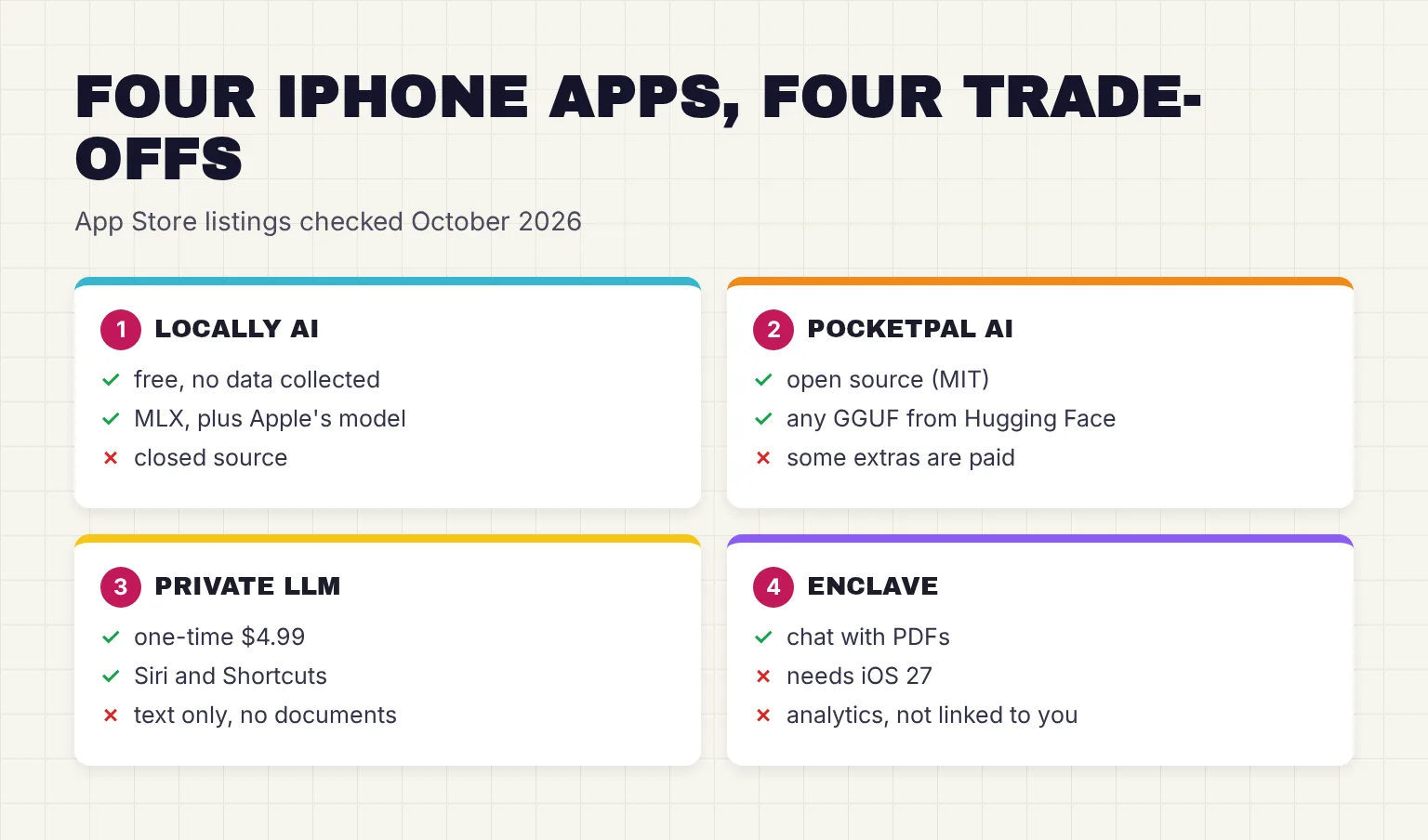
- You want a free app whose App Store label says the developer does not collect any data from this app.
- You want open models powered by Apple's MLX and Apple's own model in one app.
- You use Siri and Shortcuts, or run LM Studio on a computer and want LM Link to reach it.
Choose PocketPal AI if:
- You want open-source software: PocketPal is MIT licensed.
- You want to search for GGUFs on Hugging Face directly within the app rather than pick from a fixed list.
- You also own an Android phone, or you want a built-in benchmark that measures tokens per second and memory.
Choose Private LLM if:
- You will pay $4.99 once, with Family Sharing, for its own engine and tuned models.
- Your iPhone predates Apple Intelligence: it requires iOS 17.0 or later and an A12 Bionic chip or later, though its FAQ no longer recommends buying it for devices older than the iPhone 12.
- You only need text: its FAQ says it does not currently support reading documents or files.
Choose Enclave if:
- You are on iOS 27, which the current version requires, and want to attach PDFs, text files, images, and source code to a chat.
- You might later want cloud models in the same app: local AI is free and Pro costs $9.99 a month for cloud credits.
Which apps run a local LLM on iPhone in October 2026?
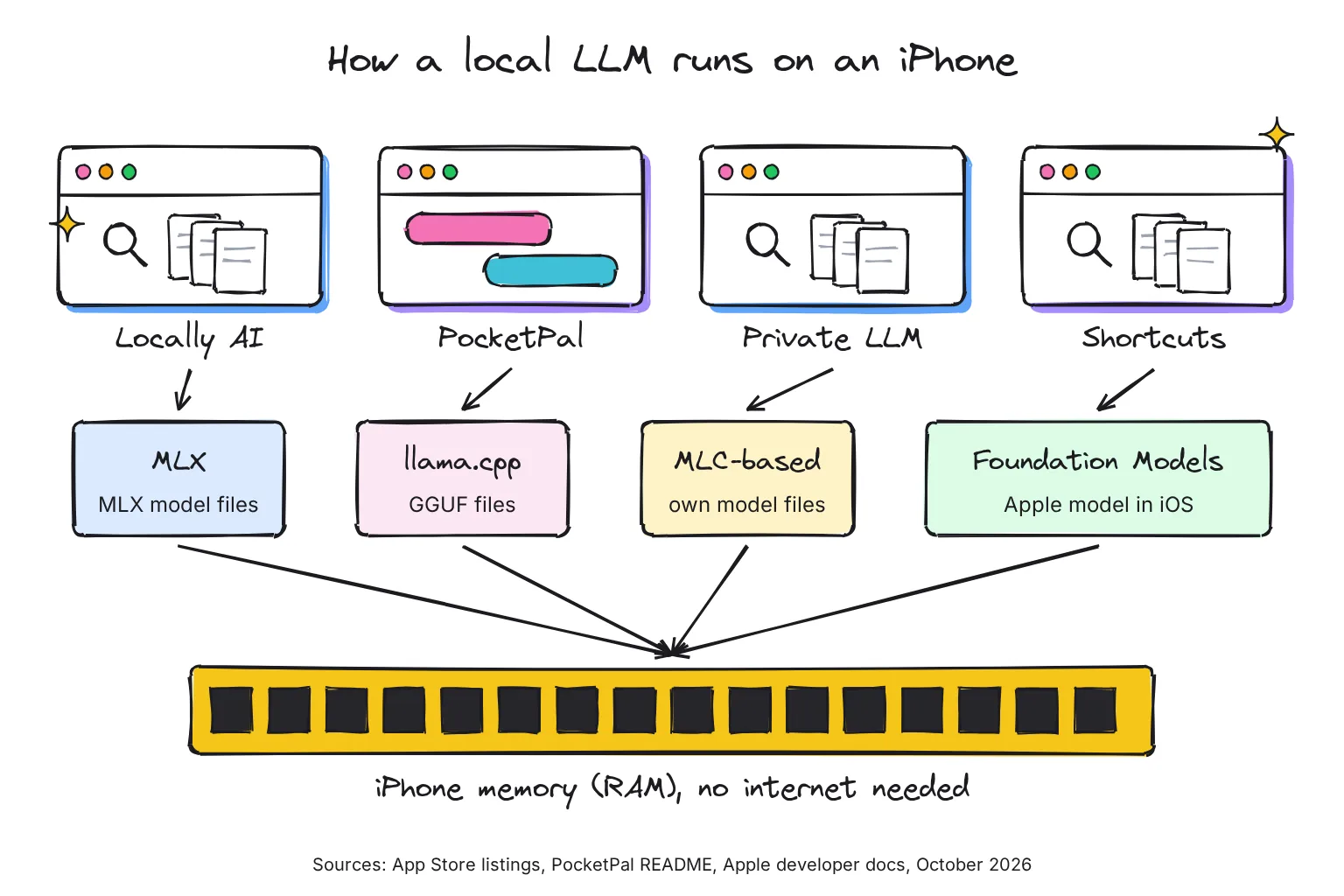
Five apps are current, maintained and on the US App Store as of October 28, 2026. An engine is the code that actually runs the model: MLX is Apple's machine learning framework for its own chips, and llama.cpp is an open-source engine that runs GGUF files, a widely used format for downloadable models. Prices, developers and requirements below come from each app's US App Store listing; the minimum iOS version is 15.1 for PocketPal, 17.0 for Private LLM and Google AI Edge Gallery, 18.1 for Locally AI and 27.0 for Enclave.
| App | Price | Developer | Engine | Open source | Models | Documents, Shortcuts, vision | Apple Intelligence needed? |
|---|---|---|---|---|---|---|---|
| Locally AI by LM Studio (1.66.0, Oct 15) | Free | Element Labs Inc (LM Studio) | MLX, plus Apple Foundation Models | No | In-app list: Llama, Gemma, Qwen, LFM and more | Text, CSV and code files; Shortcuts; image input | No; only for Apple's own model |
| PocketPal AI (v1.21.2, Oct 27) | Free; optional in-app purchases | Gooya UG | llama.cpp via llama.rn | Yes, MIT | Any GGUF from Hugging Face | Shortcuts; vision models | No |
| Private LLM (1.9.17, Oct 27) | $4.99 once | Numen Technologies | Its own, mlc-llm based | No | Its own quantized catalog only | Siri and Shortcuts; text only | No |
| Enclave (1.77.0, Oct 1) | Free local; Pro $9.99 a month for cloud | Piotr Gorzelany | GGUF models; engine not named | No | Recommended list plus GGUF search | PDFs, text, images; Siri and Shortcuts | No; needs iOS 27 |
| Google AI Edge Gallery (1.0.14, Oct 27) | Free | LiteRT-LM | Yes, Apache 2.0 | Gemma and other LiteRT models | Ask Image, audio; iPhone only | No |
Private LLM says it is not based on llama.cpp or MLX but on a mlc-llm based inference engine. Enclave added Hugging Face GGUF search in May 2025 but does not name its engine. Locally AI's terms forbid attempts to extract its source code. Google's app has its own Google AI Edge Gallery guide.
Who makes Locally AI?
Adrien Grondin built it, and LM Studio announced on April 8, 2026 that it had acquired Locally AI. In June it became the LM Studio mobile app and gained LM Link, which reaches models on your computer over an end-to-end encrypted connection made possible in partnership with Tailscale. That part needs a network.
What happened to LLM Farm, MLC Chat and fullmoon?
LLM Farm, an open-source llama.cpp app, says on its GitHub page that the app is temporarily unavailable in TestFlight and Appstore. MLC Chat is still listed, but its last version is 1.6 from September 27, 2024, and fullmoon's is 1.2.0 from January 28, 2025. Neither has been updated since, so neither lists this year's models such as Gemma 4, and I would not start with either.
What is Apple's on-device model, and can you chat with it?
Every Apple Intelligence iPhone already holds a language model. Apple's Foundation Models framework gives apps access to the on-device and Private Cloud Compute models designed for Apple Intelligence, from iOS 26. Private Cloud Compute is Apple's own server option; our guide to what on-device AI really means explains where each request goes. Apple's third generation includes AFM 3 Core, the next generation of its 3-billion-parameter dense model.
It needs Apple Intelligence, which on iOS 27 runs on iPhone Duo, iPhone 16 models or later, iPhone 15 Pro, iPhone 15 Pro Max and iPhone Air. The on-device model has a context window of 4096 tokens per session, where a token is typically three to four characters of English, while the server model offers 32K tokens but needs a network and has a daily limit. Apple advises against using the small model to do basic math, create code or perform logical reasoning.
Apple also has a larger on-device model, AFM 3 Core Advanced, with 20 billion parameters, activating just 1 to 4 billion at a time. Apple limits it to, and optimizes it for, "our most capable Apple silicon systems", but gives no device list. Apple Intelligence itself takes up to 8 GB of storage, or up to 14 GB on iPhone Duo, iPhone 17 Pro models and later, and iPhone Air.
How to use Apple's model without a third-party app
Open Shortcuts, add the Use Model action and choose On-Device, which uses the on-device Apple Intelligence model to handle simple requests without the need for a network connection. Cloud and Cloud Pro use Private Cloud Compute and Extension Model uses ChatGPT, so pick On-Device to stay on the phone. Locally AI also offers Apple's model in a chat window, and version 1.65.0 says Apple Foundation Models now support vision.
Which model fits your iPhone's memory?
Memory, or RAM, decides which models load, and Apple does not advertise RAM amounts in iPhones. The figures below are reports: MacRumors read them from Xcode, Apple's developer tool, in September 2025 and September 2026, and 9to5Mac reported Apple's Johny Srouji confirming 8GB in all iPhone 16 models and noted 6GB for the iPhone 15 and 8GB for the 15 Pro.
| iPhone | Reported RAM | Source, date | Apple Intelligence |
|---|---|---|---|
| iPhone 15, 15 Plus | 6GB | 9to5Mac, Sep 2024 | No |
| iPhone 15 Pro, 15 Pro Max | 8GB | 9to5Mac, Sep 2024 | Yes |
| iPhone 16, 16 Plus, 16 Pro, 16 Pro Max | 8GB | 9to5Mac (Apple's Johny Srouji), Sep 2024 | Yes |
| iPhone 17 | 8GB | MacRumors (Xcode), Sep 2025 | Yes |
| iPhone Air, 17 Pro, 17 Pro Max | 12GB | MacRumors (Xcode), Sep 2025 | Yes |
| iPhone 18 Pro, 18 Pro Max | 12GB | MacRumors (Xcode), Sep 2026 | Yes |
| iPhone Duo | 12GB expected | MacRumors, Sep 2026 (not yet in Xcode) | Yes |
An app never gets all of that memory. Apple says the limit at which iOS ends an app depends on the device, an increased memory limit is only available on some device models, and memory limits can change during the app life cycle. Apple publishes no per-model figure, so treat any number online as an estimate.
Model size is counted in parameters, the learned numbers inside the model. Quantization stores each in fewer bits, so a 4-bit file is about a quarter of the original; Q4_K_M is a common 4-bit GGUF type. The model also needs memory for its context, the conversation it keeps in view, so leave a margin.
| Model (4-bit Q4_K_M) | Download | Good fit for | Notes |
|---|---|---|---|
| Qwen3.5 2B | 1.28 GB | 6GB iPhones and up | Smallest here; image input with its extra vision file |
| Llama 3.2 3B Instruct | 2.02 GB | 6GB iPhones and up | Text only, widely supported |
| Qwen3.5 4B | 2.74 GB | 8GB: 15 Pro, 16, 17 | My first pick for the 8GB reader |
| Gemma 4 E2B | 3.11 GB | 8GB and up | Text, images and audio, 128K context |
| Gemma 4 E4B | 4.98 GB | 12GB: Air, 17 Pro, 18 Pro | Larger and slower than E2B; strongest easy fit |
| Qwen3.5 9B | 5.68 GB | 12GB, with care | Close the other apps first; keep context short |
Gemma 4 E2B runs like a 2.3B model but holds 5.1B parameters with embeddings, so its file is larger than Qwen3.5 4B's. 4-bit MLX builds, the format Locally AI runs, are a little bigger: the mlx-community versions are about 3.1GB for Qwen3.5 4B and 3.6GB for Gemma 4 E2B, and Locally AI says Gemma 4 is only available on supported devices with enough RAM.
Private LLM's FAQ claims 8GB iPhones can run Llama 3.1 8B or Qwen 2.5 7B with ease using its own quantization. That is the maker's claim; I have not seen an independent test.

Buying a new phone? See our guide to the best phone for local AI.
What about iPad?
All four chat apps run on iPad; Google AI Edge Gallery is iPhone only. Private LLM's FAQ says a 16GB iPad Pro supports even larger models like Qwen 2.5 14B, again the maker's claim.
How to set up Locally AI and run your first model
Locally AI is my top free pick for the reader in this guide: no account, no data collection on its label, and Apple's model in the same app.
- Check your iOS version. Locally AI requires iOS 18.1 or later. Apple's model inside the app also needs Apple Intelligence turned on.
- Install the app. Get Locally AI by LM Studio from the App Store. The app is 116.9 MB; models download separately.
- Download one model. Open the app and choose an AI model to download. On an 8GB iPhone, start with a Qwen 3.5 or Gemma 4 E2B option, on Wi-Fi.
- Turn on airplane mode and test it. Ask it to summarize a note you wrote yourself, so you can judge the answer. If it replies, the model is running on your phone.
- Add a shortcut. Locally AI works from Control Center, the Lock Screen, the Action Button and the Shortcuts app, its site says.
If you want PocketPal instead, its README describes three steps: install, download a model, then load it and start chatting, fully offline. Our PocketPal AI guide covers its settings, pals and benchmarks in detail.
Why does a reply stop when I switch apps?
iOS limits heavy graphics work in the background. Private LLM's FAQ explains that on iPhone its tasks are constrained to CPU processing when the app is not in the foreground, which it says is more than 10 times slower, and PocketPal's guide says it can offload the model when in the background and reload it when you return. Keep the app open until the answer finishes.
How fast is a local LLM on iPhone?
Speed is measured in tokens per second, where a token is a word or part of a word. Our local vs cloud AI comparison explains the unit. Few makers publish speed figures for a named iPhone, so the numbers below come from model and platform makers rather than the chat apps.
Google's model cards are the clearest source: on an iPhone 17 Pro, Gemma 4 E2B generated 56.5 tokens per second on the GPU and 25.0 on the CPU, and Gemma 4 E4B managed 25.1 on the GPU and 9.7 on the CPU. Those tests used Google's LiteRT-LM engine, the one in Google AI Edge Gallery, with 1,024 prompt tokens, 256 generated tokens and a 2,048-token context. Apple, back in June 2024, reported a generation rate of 30 tokens per second on iPhone 15 Pro for its first on-device model.
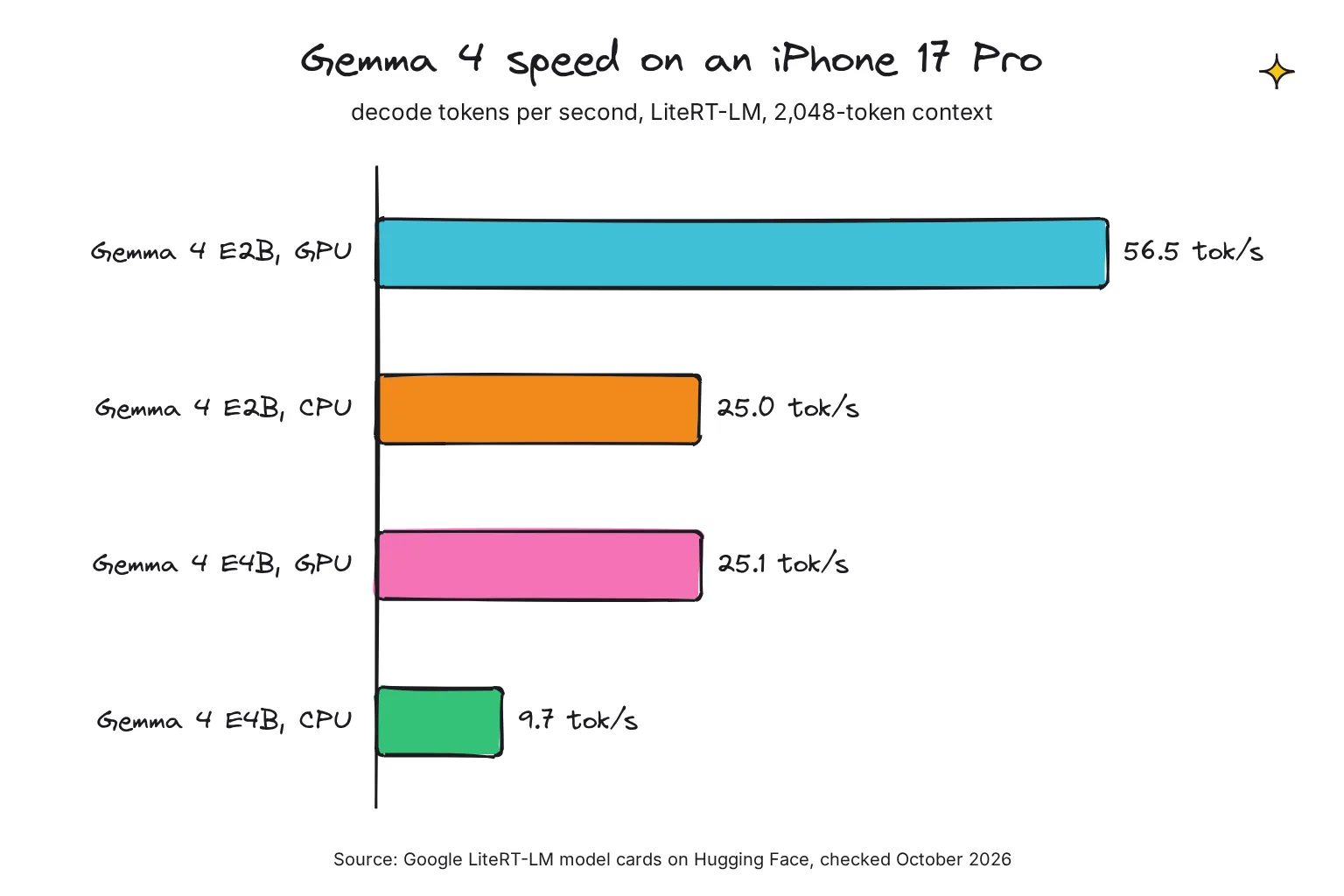
In Google's figures, model size and the GPU make the biggest difference. MLX is Apple's framework built around a unified memory model shared by CPU and GPU. llama.cpp is a C/C++ engine that treats Apple silicon as a first-class citizen through Metal and reads the GGUF files most model makers publish. I know of no like-for-like test of the iPhone apps that I trust.
Is a local LLM on iPhone really private?
With a downloaded model, your prompts are processed on the phone, but the apps differ in what else they send. Each App Store listing carries a privacy label written by the developer, and Apple notes on every one that this information has not been verified by Apple. Here is what each label said on October 28, 2026.
| App | App Store privacy label (quoted) | What else goes online |
|---|---|---|
| Locally AI | Data Not Collected: The developer does not collect any data from this app. | Model downloads; LM Link only if you connect a computer |
| PocketPal AI | Data Not Collected: The developer does not collect any data from this app. | Hugging Face downloads; optional web search, sign-in, leaderboard and feedback |
| Private LLM | Data Not Collected: The developer does not collect any data from this app. | Model downloads from its CDN |
| Enclave | Data Not Linked to You: User Content, Identifiers, Usage Data, Diagnostics | Firebase Analytics and Crashlytics; cloud chats if you pick a cloud model |
| Google AI Edge Gallery | Data Linked to You: Identifiers, Diagnostics, Other Data; Data Not Linked to You: Location, Usage Data, Diagnostics | Model downloads and the data in its label |
PocketPal's README says the only data that ever leaves your device is what you explicitly choose to share: opt-in benchmark results and feedback. Recent updates added optional Sign in with Apple and web search. Private LLM's policy, effective October 16, 2026, lists no account, no analytics SDK, no advertising SDK, and no crash-reporting service.
Enclave is clear about its split. With a local model, your prompts and attachments are not sent to Enclave, OpenRouter, or an AI model provider, but Firebase Analytics receives app usage events such as screen views and button taps. A cloud model sends your message through Enclave's servers to OpenRouter and the provider, so stick to models marked local if privacy is the point. Our private AI guide covers the wider choices.
How to check that nothing leaves your iPhone
- Do the airplane-mode test. Download the model, switch on airplane mode with Wi-Fi off, and chat. A reply proves the model runs on the phone; if the app stalls or asks for a connection, that feature is not local.
- Turn on App Privacy Report. In Settings, tap Privacy & Security, then App Privacy Report; it lists domains that apps contacted in the past 7 days, and the report data stays on your device.
- Use the app for a day, then look. Expect a model host after downloads; other domains point to analytics or optional features, so compare them with the app's label.
What else can your iPhone do offline?
For images, Draw Things generates them on the phone with models such as FLUX.1; see our Draw Things guide. If Ollama or LM Studio runs on your computer, PocketPal can connect to OpenAI-compatible servers (LM Studio, Ollama, etc.), which uses your network, not the phone's chip; our guide to using Ollama from your phone shows how.
Common questions about running a local LLM on iPhone
Can an iPhone run an LLM offline?
Yes. Apps such as Locally AI, PocketPal AI, Private LLM and Enclave download an open model once, then run it on the phone with no internet connection. An iPhone 15 Pro or newer handles 2-4 billion parameter models at 4-bit, which are roughly 1.3-3.1GB downloads.
What is the best free local LLM app for iPhone?
For most people, Locally AI by LM Studio: it is free, needs no account, uses Apple's MLX engine, also offers Apple's own on-device model, and its App Store label says no data is collected. PocketPal AI is the best free open-source choice if you want any GGUF model from Hugging Face.
How much RAM does my iPhone have for AI?
Apple does not advertise iPhone RAM. Based on Xcode data and Apple interviews reported by MacRumors and 9to5Mac, the iPhone 15 has 6GB, the 15 Pro, all iPhone 16 models and the iPhone 17 have 8GB, and the iPhone Air, 17 Pro and 18 Pro models have 12GB. The new iPhone Duo is expected to have 12GB too.
Is Private LLM worth paying for?
It suits people who want a one-time $4.99 purchase with Family Sharing, Siri and Shortcuts support and its own quantized models; the maker recommends an iPhone 12 or newer. It handles text only, cannot read documents and cannot load models from Hugging Face, so try a free app first.
Can I chat with Apple Intelligence's on-device model?
Yes, on an iPhone that supports Apple Intelligence. In Shortcuts, the Use Model action with On-Device selected runs Apple's model without a network connection, and Locally AI offers it in a chat window. It has a 4,096-token context and Apple advises against using it for math, code or logic.
Do local AI apps on iPhone send my chats anywhere?
With a downloaded model, chats are processed on the phone. Locally AI, PocketPal and Private LLM list Data Not Collected on the App Store, while Enclave reports analytics data not linked to you. Test any app in airplane mode and check App Privacy Report in Settings to see which domains it contacts.
My verdict for an iPhone 15 Pro, 16 or 17: start with Locally AI
For the reader in this guide, Locally AI is the best first app: free, no account, no data collected on its label, MLX models and Apple's own model in one place. Add PocketPal when you want any GGUF model or open-source code. Pay for Private LLM only for Siri-first use, and choose Enclave if you are on iOS 27 and need to chat with PDFs.
Your next step: install Locally AI, download a Qwen 3.5 or Gemma 4 E2B model on Wi-Fi, switch on airplane mode, and ask it to summarize a note you wrote yourself, so you can judge the answer.
Sources
- Locally AI by LM Studio - Apple App Store
- PocketPal AI - Apple App Store
- Private LLM - Local AI Chat - Apple App Store
- Enclave - Local AI Assistant - Apple App Store
- Google AI Edge Gallery - Apple App Store
- MLC Chat - Apple App Store
- fullmoon: local intelligence - Apple App Store
- Draw Things: Offline AI Art - Apple App Store
- Locally AI: Run AI models locally on your iPhone, iPad, and Mac - Locally AI
- Terms & Conditions - Locally AI
- Locally AI joins LM Studio - LM Studio
- Run (your largest) local models from your iPhone - LM Studio
- LM Link - LM Studio
- pocketpal-ai README - a-ghorbani, GitHub
- pocketpal-ai LICENSE - a-ghorbani, GitHub
- Getting Started - a-ghorbani/pocketpal-ai, GitHub
- Private LLM FAQ - Numen Technologies
- Privacy Policy - Private LLM
- Pricing - Enclave AI
- How Enclave Uses Your Data - Enclave AI
- Privacy Policy for Enclave AI - Enclave AI
- Enclave AI on iOS: Search and Run Any GGUF Model from Hugging Face - Enclave AI
- google-ai-edge/gallery - Google, GitHub
- LLMFarm - guinmoon, GitHub
- MLX - ml-explore, GitHub
- llama.cpp - ggml-org, GitHub
- Foundation Models - Apple Developer Documentation
- Managing the context window - Apple Developer Documentation
- Adding server-side intelligence with Private Cloud Compute - Apple Developer Documentation
- Generating content and performing tasks with Foundation Models - Apple Developer Documentation
- Introducing the Third Generation of Apple's Foundation Models - Apple Machine Learning Research
- Introducing Apple's On-Device and Server Foundation Models - Apple Machine Learning Research
- Get started with the next generation of Apple Intelligence - Apple Support
- Use Apple Intelligence in Shortcuts on iPhone or iPad - Apple Support
- About App Privacy Report - Apple Support
- Reducing your app's memory use - Apple Developer Documentation
- Increased Memory Limit entitlement - Apple Developer Documentation
- os_proc_available_memory - Apple Developer Documentation
- iPhone 17, Air, and iPhone 17 Pro: Here's How Much RAM in Each Model - MacRumors
- iPhone 18 Pro and iPhone 18 Pro Max: Here's How Much RAM Each Has - MacRumors
- Apple's Johny Srouji confirms all iPhone 16 models have 8GB RAM - 9to5Mac
- Qwen3.5-2B-GGUF - unsloth, Hugging Face
- Llama-3.2-3B-Instruct-GGUF - bartowski, Hugging Face
- Qwen3.5-4B-GGUF - unsloth, Hugging Face
- gemma-4-E2B-it-GGUF - unsloth, Hugging Face
- gemma-4-E4B-it-GGUF - unsloth, Hugging Face
- Qwen3.5-9B-GGUF - unsloth, Hugging Face
- gemma-4-E2B-it model card - Google, Hugging Face
- Qwen3.5-4B-4bit - mlx-community, Hugging Face
- gemma-4-e2b-it-4bit - mlx-community, Hugging Face
- gemma-4-E2B-it-litert-lm - litert-community, Hugging Face
- gemma-4-E4B-it-litert-lm - litert-community, Hugging Face