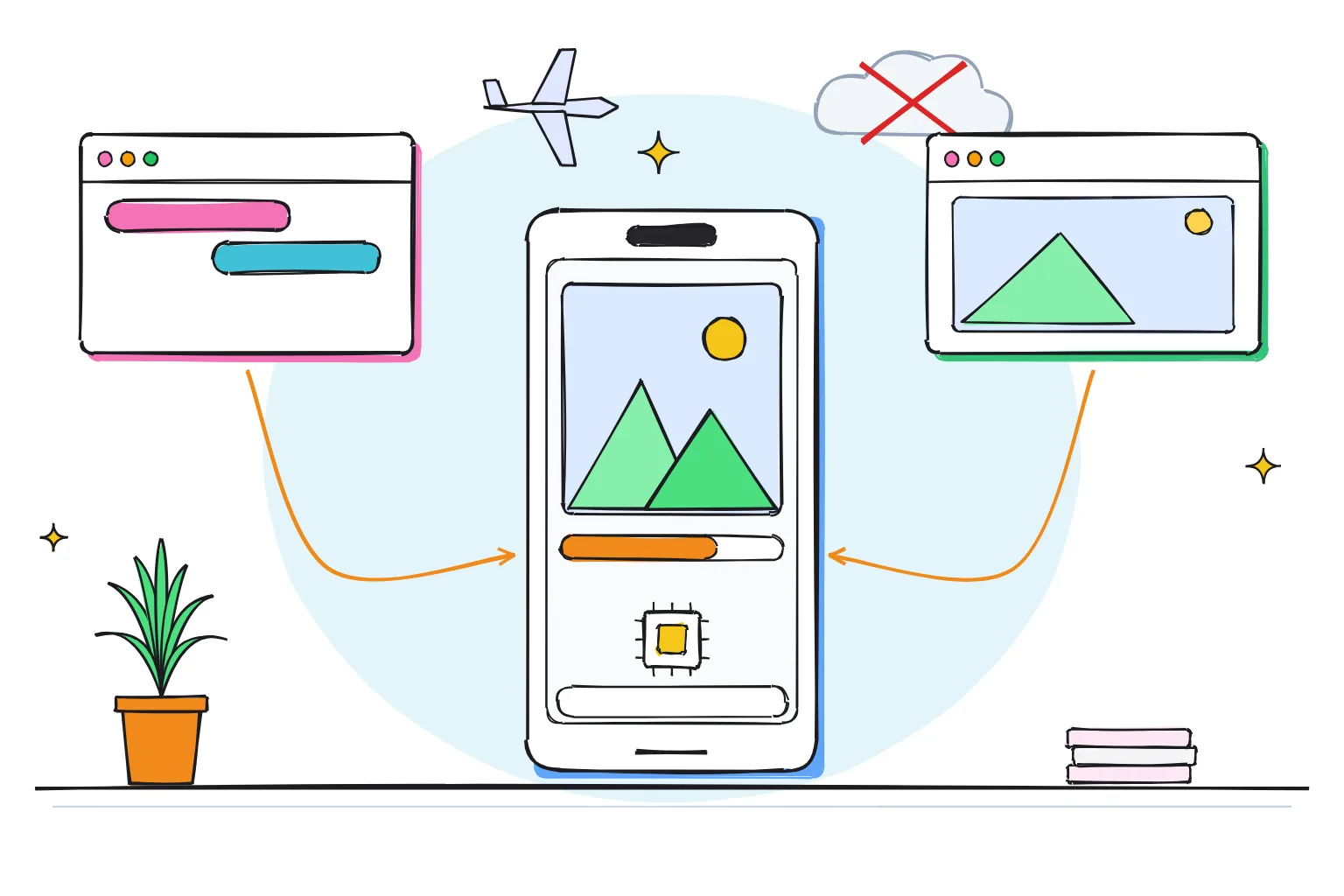
Can you run an AI image generator offline on your phone?
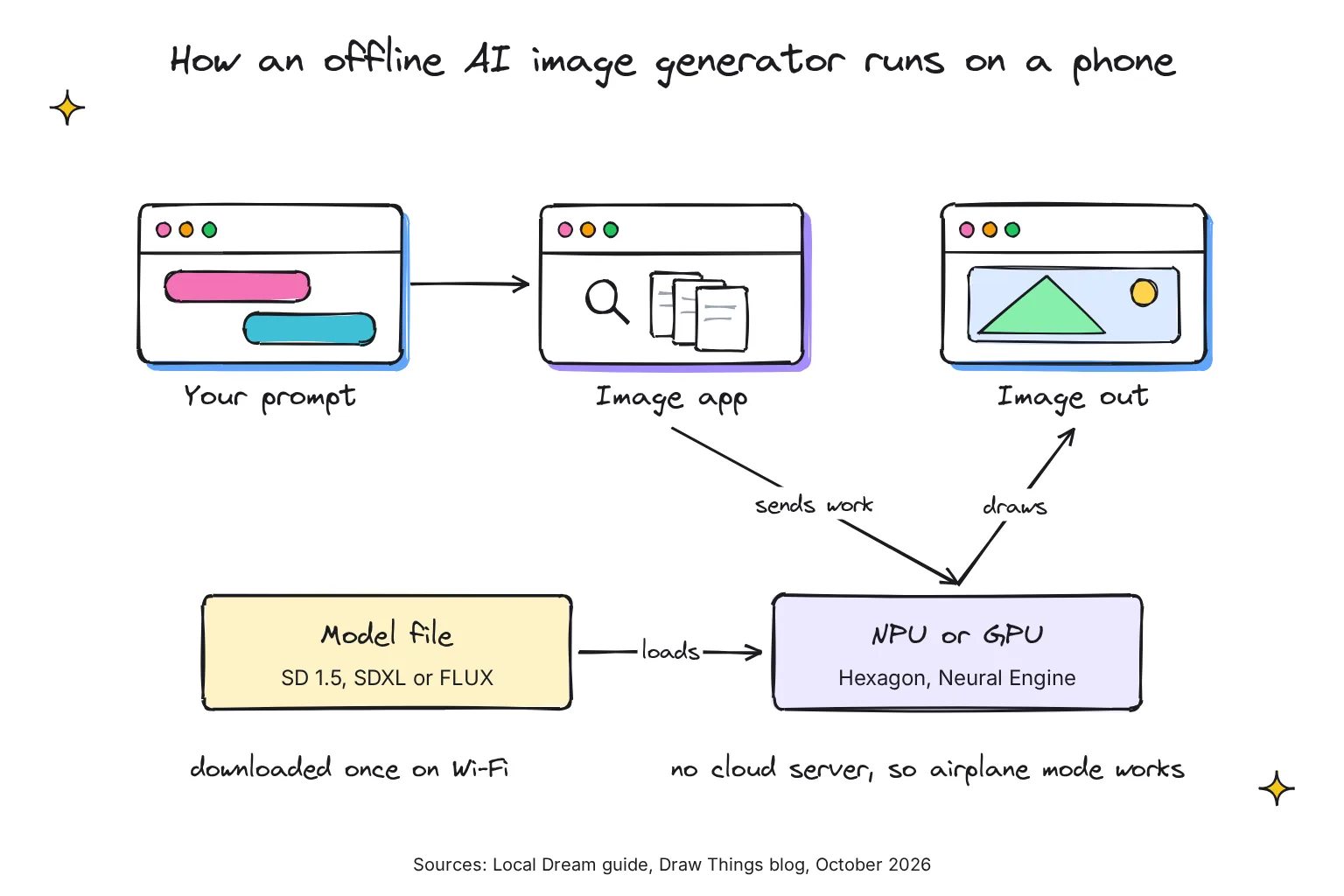
Yes. On Android, Local Dream runs Stable Diffusion fastest on a Snapdragon NPU, and SD 1.5 on the CPU or GPU of other phones; its SDXL models need a Snapdragon 8 Gen 3 or newer. On iPhone, Draw Things says you can create art 100% offline. Download one model over Wi-Fi; after that, the app keeps working in airplane mode.
This guide follows one reader: a traveler with a recent flagship phone, either an Android on a Snapdragon 8 Gen 3 or newer chip, a Google Pixel, or an iPhone 15 Pro or newer, who wants to make pictures on a long flight and keep prompts off cloud servers. Our guide to offline AI tools for your phone covers chat and translation.
Choose Local Dream if:
- You have an Android phone. It is fastest on a Snapdragon: Stable Diffusion 1.5 runs on the NPU of chips with Hexagon V68 or newer, from the 8 Gen 1 on, and other phones use the slower CPU/GPU path.
- You want SDXL, the larger model family that runs at 1024x1024 internally, on a Snapdragon 8 Gen 3 or newer.
- You want a free app with built-in upscalers, inpainting and img2img.
Choose Draw Things if:
- You use an iPhone or iPad. It needs iOS 15.4 or later and is free, with optional in-app purchases.
- You want the widest choice of models, from SDXL to FLUX.1, FLUX.2, Qwen Image and Z Image.
- You are happy to ignore its optional Cloud Compute, which needs a sign-in.
Choose Off Grid AI if:
- You want chat and images in one free app on Android and iPhone, under the MIT license. An optional Pro tier, $119 once or $7.99 a month, adds voice replies, personas, actions and device sync.
- Small 512x512 pictures are enough: its iPhone version offers Stable Diffusion 1.5 and 2.1 at 512x512 and leaves SDXL out.
How the offline AI image generator apps compare in October 2026
Every app pairs an engine, the code that does the math, with a model, a downloadable file of trained weights. Stable Diffusion 1.5 (SD 1.5) works at a base of 512x512 and SDXL at 1024x1024; FLUX and Qwen Image are bigger again. These offline AI models run from under 1GB to about 10GB.
An NPU, or neural processing unit, is the part of a phone chip built for AI math: Qualcomm's is the Hexagon NPU in Snapdragon chips, and the iPhone 15 Pro has a 16-core Neural Engine. To fit, models are quantized, storing weights in fewer bits; Local Dream's NPU models use W8A16 static quantization, meaning 8-bit weights.
| App | Platform | Open source | Image models | Runs on | Device needs | Latest release |
|---|---|---|---|---|---|---|
| Local Dream | Android | Source on GitHub under CC BY-NC 4.0, a non-commercial license | SD 1.5, SDXL; Z-Image Turbo, FLUX.2 Klein 4B, Qwen Image and Krea 2 in 3.0 test builds | Snapdragon NPU (Qualcomm QNN); CPU/GPU (MNN) | NPU: Hexagon V68+ for SD 1.5, 8 Gen 3+ for SDXL, 8 Elite+ for the new models; CPU/GPU: about 2GB free RAM | v2.8.1, July 12; 3.0.0 alpha 6 test build, October 20 |
| Draw Things | iPhone, iPad, Mac | Engine code public under GPLv3; app free with in-app purchases | SDXL, FLUX.1, FLUX.2, Qwen Image, Z Image, plus video models | GPU and Neural Engine, depending on model and chip | iOS 15.4 or later | 26.1020.0, October 22 |
| Off Grid AI | Android, iPhone | Yes, MIT | Android: 20+ SD 1.5 models; iPhone: SD 1.5 and 2.1 | Android: Local Dream's engine on NPU or CPU; iPhone: Core ML on the Neural Engine | NPU on Snapdragon, with lighter models for non-flagship chips; iOS 17 or later | 0.0.117 on Google Play and the App Store, October 23 |
| SDAI | Android, iPhone | Yes, AGPL-3.0 | Local ONNX, MediaPipe and SDXL engines, plus cloud services | Android: CPU, OpenCL or Vulkan GPU for SDXL; iPhone: Core ML | Varies by engine; the app has an on-device benchmark | 1.1.2 on GitHub, July 19; 1.1.0 in the app stores |
| MNN Chat | Android | Yes, Apache 2.0 | Stable Diffusion 1.5, alongside chat models | Alibaba's MNN engine | Tested only on OnePlus 13 and Xiaomi 14 Ultra | 0.8.3 APK in the README;0.8.4 on Google Play, August 4 |
Local Dream's 3.0 alpha builds are marked as pre-releases, so expect rough edges. SDAI works offline only once you pick one of its local engines. Its README and store description say the app has no ads, yet its Google Play listing showed a Contains ads label on October 28, 2026.
What about Apple's Image Playground?
It is not an offline option. Apple says ADM 3 Cloud, one of its server-based models on Private Cloud Compute, powers the all-new Image Playground, and its privacy page says your device sends your description to Private Cloud Compute to create the image. On a plane, use a dedicated app.
Which phones can make AI images offline?
The chip decides first, then memory. Local Dream's NPU path uses the Qualcomm QNN SDK, so it only exists on Snapdragon phones. Other phones fall back to the CPU (main processor) or GPU (graphics processor), which is slower but runs on most recent Android phones.
- Snapdragon 8 Gen 3, 8 Elite and 8 Elite Gen 5: SD 1.5 and SDXL on the NPU. The 3.0 test builds add Z-Image Turbo and FLUX.2 Klein 4B on Snapdragon 8 Elite and newer, and the latest adds Qwen Image 2.1 Turbo and Krea 2 Turbo.
- Snapdragon 8 Gen 1, 8 Gen 2 and chips such as 7 Gen 1 or 8s Gen 3: SD 1.5 on the NPU, because they have Hexagon V68 or newer.
- Pixel phones and other non-Snapdragon Android phones: in the stable release, SD 1.5 only, on the CPU/GPU path, at 128x128 up to 512x512, with about 2GB of available memory recommended. The 3.0 test builds can also import SDXL packages and run them without an NPU, though the README warns that large SDXL models need substantially more memory than SD 1.5. The Pixel 11, for example, runs on Google Tensor G6, not a Snapdragon.
- iPhone: Draw Things needs iOS 15.4 or later. Its team wrote in 2025 that the Neural Engine handled Stable Diffusion 1.5 at 512x512 but fell short on large models such as FLUX.1, and that the iPhone 17 Pro's A19 Pro chip, with new GPU Neural Accelerators, doubled its speed. Off Grid AI needs iOS 17 or later.
How do I know if my Android phone's NPU is supported?
Install Local Dream and open its model list. NPU models only appear if your chip supports them, and the app picks the right chip-specific version for you. If you see only CPU/GPU models, as on a Pixel, you still get SD 1.5. Its Device link can also let a phone without a Qualcomm chip run generation through another device's models on the same network.
How much memory does a phone need for AI images?
For SDXL, Local Dream turns on Low RAM Mode by default, loading the model for each run and releasing it afterward. Its guide says devices with 16GB of RAM or more are the main candidates for turning it off, which speeds up repeat images. Shopping for a handset? Our guide to the best phone for local AI compares chips and RAM.
How to make your first image offline on Android with Local Dream
These steps suit the Snapdragon reader. On a Pixel, follow the same steps and pick an SD 1.5 model, which runs on the CPU/GPU path.
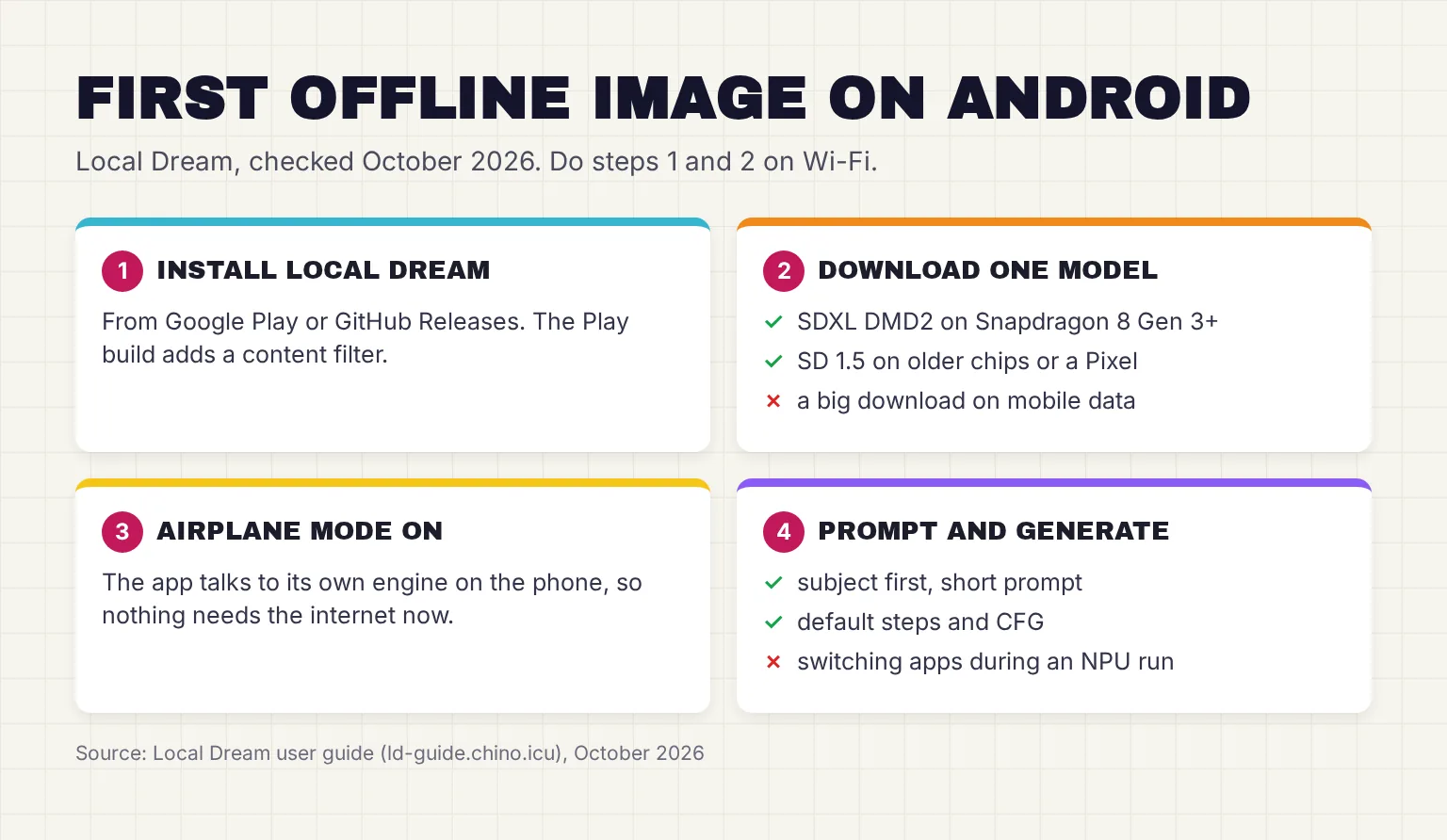
- Install Local Dream. Get it from Google Play (developer xororzdev) or GitHub Releases. The guide says both versions are functionally the same, but the Play build adds content filtering.
- Download one model on Wi-Fi. Tap a model in the built-in list. On a Snapdragon 8 Gen 3 or newer, try CyberRealistic v10 DMD2, an SDXL package of 3.75GB. Otherwise pick Absolute Reality, an SD 1.5 model of about 1.05GB for the NPU or 1.19GB for CPU/GPU. Downloads come from Hugging Face by default.
- Switch on airplane mode. The app's screen talks to its built-in engine at 127.0.0.1:8081, an address that means the phone itself.
- Write a short prompt and keep the defaults. For regular models the guide suggests 20-30 steps and a CFG of 5-8; CFG sets how closely the picture follows your words. DMD2 models ship their own fast settings, so leave them alone.
- Keep the app on screen while it works. On the NPU path, some devices stall a run if the app is switched to the background.
- Save, enlarge or fix the result. Try the built-in 4x upscalers, or inpaint to redraw one area, such as a hand.
How to write an AI image generator prompt offline
Keep prompts short. Local Dream counts tokens, the words and word pieces a model reads, against the 77-token limit of the SD 1.5 and SDXL text encoder, and greys out anything past it. Put the subject first, then style and light. The negative prompt, a list of things to avoid, comes from the guide's own starter:
Prompt: a lighthouse on a cliff at sunset, oil painting, warm light, wide shot

Negative prompt: low quality, blurry, bad anatomy, extra fingers
To stress a word, use AUTOMATIC1111-style weights such as (oil painting:1.3), and check each model's own page, since models can prefer different settings.
Local Dream will not generate, or the image is garbled
If no model runs at all, a VPN, proxy or aggressive battery policy can block the app's local connection. The guide's fix is to disable VPNs and proxies and grant Local Dream unrestricted network access. On some MediaTek phones the GPU produces garbled images because an OpenCL library is missing, so switch to CPU.
How to make AI images offline on iPhone with Draw Things
Draw Things is the iPhone pick for this reader: a 342.3MB free app with the widest model choice of the apps here. Our full Draw Things guide covers models and settings; here is the short version.
- Install Draw Things from the App Store. Paid extras such as Draw Things+ at $8.99 a month are optional.
- Pick a model from the model menu and let it download on Wi-Fi. The docs say to let the app download all the files and not send it to the background on iOS. Models range from about 800MB for 8-bit versions to almost 10GB.
- Skip the sign-in. An account is only needed for Cloud Compute; the on-device features work without it.
- Turn on airplane mode, type a prompt and tap Generate. The app opens with a random prompt you can try first.
Off Grid AI is the simpler alternative if you also want a chat assistant, but it sticks to 512x512 SD 1.5 and 2.1 models, and its compressed 6-bit versions run about 2x slower, its makers say.
How long does an offline AI image take on a phone?
Only the app makers and Qualcomm publish figures, each with different models and settings, so compare rows with care; I know of no like-for-like test I trust. Every row is the app maker's or Qualcomm's own published figure, checked in October 2026; the Draw Things numbers date from September 2025.
| Source | Device | Model and settings | Published time |
|---|---|---|---|
| Local Dream guide | Phone with 16GB+ RAM, Low RAM Mode off | SDXL DMD2 model, LCM sampler, CFG 1, 8 steps | About 6-7 seconds per image |
| Off Grid AI docs | Snapdragon NPU, chipset-dependent | SD 1.5, 512x512, 20 steps | About 5-10 seconds |
| Off Grid AI docs | Snapdragon 8 Gen 3, CPU only | SD 1.5, 512x512, 20 steps | About 15 seconds |
| Off Grid AI docs | A17 Pro or M-series chip, Neural Engine | SD 1.5, 512x512, 20 steps | About 8-15 seconds; 6-bit models about 2x slower |
| Draw Things | iPhone 17 Pro | FLUX.1 [schnell], 768x768, 2 steps, including model loading | Under 35 seconds |
| Draw Things | iPhone 17 Pro | Qwen Image with Lightning LoRA, 768x768, 2 steps | Just over 45 seconds |
| Draw Things | iPhone 17 Pro | FLUX models at 1024x1024 | Just over 50 seconds |
| Qualcomm AI Hub | Snapdragon 8 Gen 3 / 8 Elite for Galaxy / 8 Elite Gen 5 for Galaxy | One SD 1.5 denoising pass (the UNet), 8-bit weights, on the NPU | 76 / 58 / 45 milliseconds |
The Qualcomm row is one slice of the work: a full image repeats that pass at every step, then decodes the result, which takes 153 milliseconds on the Snapdragon 8 Gen 3. It shows why newer chips help, not your total time.
What makes phone image generation faster or slower?
- Steps. DMD2 models use 8 steps instead of 20-30 and end up around 4x faster, at roughly 80-90% of the original model's quality, by the guide's estimate.
- CFG of exactly 1. On Local Dream's NPU path this skips a second pass and roughly halves step time.
- Repeats. Reusing a prompt skips the text encoder, saving about 1 second, plus about 4 more under Low RAM Mode, in Local Dream's SDXL figures.
- Heat. In Draw Things' iPhone 16 Pro tests at 70°F, thermal throttling began after about a minute for 1024x1024 and 1280x1280 images; the iPhone 17 Pro held its speed better. Local Dream says short DMD2 runs keep the device cool.
Phone or PC: when is a computer with a graphics card the better tool?
The phone wins when you are away from a desk: one free app, no setup, and a picture in seconds to a minute. Draw Things even claims the iPhone 17 Pro delivers MacBook Pro-like performance. For the traveler in this guide, that covers ideas and sketches.
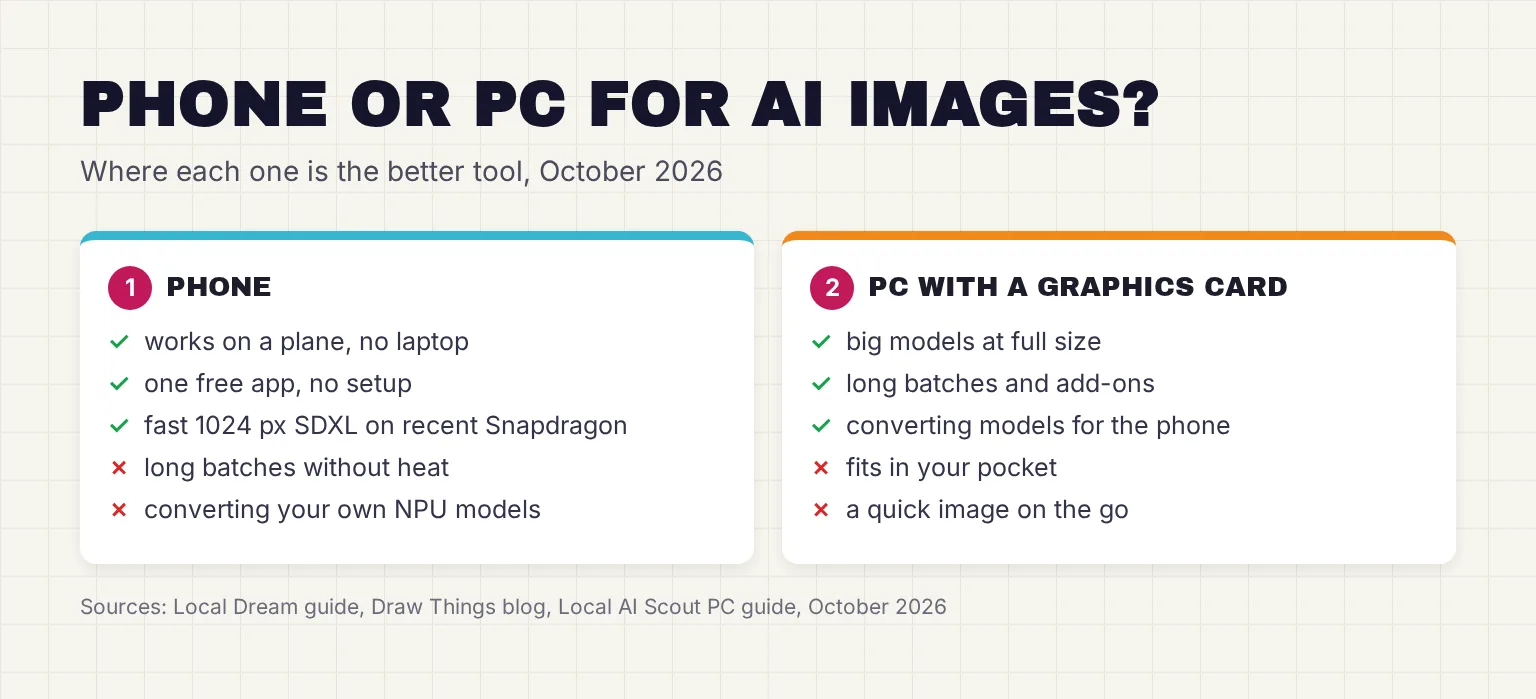
A PC with a graphics card is better in three cases. First, long sessions and big models at full size, where a phone heats up. Second, your own models: converting a checkpoint for Local Dream's NPU happens on a Linux or WSL computer, with about 20GB of RAM plus swap for SD 1.5 at 512x512 and 64GB or more for SDXL, and one SD 1.5 run takes several hours of CPU time. Third, add-ons: on Local Dream's CPU/GPU path, a LoRA (a small add-on file that teaches a style) must be merged into the checkpoint before import.
Our guide to making AI images on your own computer explains what graphics memory you need. To print a phone picture larger, an AI upscaler on your computer can enlarge it after the trip.
Privacy, storage space and licenses for commercial use
What stays on the phone?
Local Dream's Play listing declares no data collected and none shared with third parties. It still goes online for model downloads, and two options open it to your network: an Allow LAN access setting and Device link host mode. I would leave both off on airport or hotel Wi-Fi.
Draw Things says your prompts and images stay securely on your device, a maker's claim. Its App Store label lists purchases, user content and identifiers as data not linked to you, and its policy ties sign-in and uploads to the optional Cloud Compute. Off Grid AI's App Store label says Data Not Collected. These labels come from the developers, not an audit, so do the airplane-mode test.
How much storage space do you need?
Plan for the model, not the app. An SD 1.5 package is about 1-1.2GB, an SDXL package for Local Dream's NPU is 3.4-3.75GB in the xororz/sdxl-qnn collection, and the new Krea 2 Turbo in the 3.0 test build is about 9.6GB. Draw Things itself is 342.3MB and Off Grid AI is 114.1MB. For one trip, one model is enough.
Can you use the images commercially?
The app's license and the model's license are separate. Local Dream's CC BY-NC 4.0 license covers its code; what you may do with a picture depends mostly on the model. The SDXL license says Stability AI claims no rights in the Output you generate, subject to a list of banned uses, and SD 1.5 uses the similar CreativeML OpenRAIL-M license.
Newer models vary. FLUX.2 [klein] 4B has open weights for commercial use under Apache 2.0, while its 9B sibling is non-commercial. Z-Image Turbo and the original Qwen Image are Apache 2.0. Qwen Image 2.1, the version in Local Dream's 3.0 test build, uses Qwen's research license, which allows non-commercial use only, and the Krea 2 license permits commercial use only if your total yearly revenue is under $1 million. The FLUX.1 [dev] model card says outputs can be used commercially as its non-commercial license describes. Local Dream's built-in models are community checkpoints from Civitai, so read the exact model's page before you sell anything.
Common questions about offline AI image generators
Is there a free AI image generator that works offline?
Yes. Local Dream is free on Android and uses the Snapdragon NPU where supported. Draw Things is free on iPhone and iPad, with optional paid extras, and Off Grid AI is free on both. Each needs one model download over Wi-Fi, then works in airplane mode.
Can a Google Pixel make AI images offline?
Yes, but more slowly. Pixels use Google Tensor chips, not Snapdragon, so Local Dream runs Stable Diffusion 1.5 on the CPU or GPU instead, at up to 512 by 512 pixels, with about 2 GB of free memory recommended. Its built-in SDXL models need a Snapdragon 8 Gen 3 or newer.
How long does an offline AI image take on a phone?
It depends on the chip, model and settings. Local Dream quotes about 6 to 7 seconds for an SDXL DMD2 image on a 16 GB phone, Off Grid AI quotes 5 to 10 seconds for a 512 pixel image on a Snapdragon NPU, and Draw Things reports under 35 seconds for FLUX.1 on an iPhone 17 Pro.
Does Draw Things work without internet?
Yes, once a model has downloaded. Draw Things says local creation needs no internet or subscription, and sign-in is only for its optional Cloud Compute. Download a model on Wi-Fi with the app kept open, then switch on airplane mode to confirm generation stays on the iPhone.
Can I sell images made with an offline AI image generator?
Check the model license, not just the app. The SDXL license claims no rights in your output but lists banned uses. FLUX.2 klein 4B, Z-Image Turbo and the original Qwen Image use Apache 2.0, while FLUX.2 klein 9B and Qwen Image 2.1 are non-commercial. Community fine-tunes add their own terms, so read the exact model's page.
Will making AI images heat up my phone?
Long runs can. In Draw Things tests, an iPhone 16 Pro began to throttle after about a minute at 70 degrees Fahrenheit on large images, while the iPhone 17 Pro held its speed better. Local Dream says its fast DMD2 models keep the phone cool.
My verdict for a flagship phone on a flight: Local Dream on Android, Draw Things on iPhone
For the Snapdragon 8 Gen 3 reader, Local Dream is the first install: it is free, uses the NPU, and a DMD2 model makes SDXL pictures quickly without overheating the phone. Use the Play Store build and the stable release. For the iPhone 15 Pro reader, Draw Things is the clear pick, with far more models than any rival; just skip Cloud Compute. On a Pixel, Local Dream's CPU/GPU path gives you 512x512 SD 1.5 images, and anything bigger belongs on a PC.
Your next step: before your trip, install the app, download one model on Wi-Fi, switch on airplane mode and make one test image at the default settings, so you know it works before you board.
Sources
- Local Dream: Android Stable Diffusion with Snapdragon NPU acceleration - xororz, GitHub
- Device Compatibility - Local Dream User Guide
- Draw Things: Offline AI Art - App Store, Draw Things, Inc.
- Getting Started - Local Dream User Guide
- Features - Local Dream User Guide
- Privacy Policy - Draw Things
- Off Grid AI README - off-grid-ai, GitHub
- src/services/coreMLModelBrowser.ts - off-grid-ai/OGAM, GitHub
- iPhone 15 Pro - Tech Specs - Apple Support
- Available Models - Local Dream User Guide
- LICENSE (Attribution-NonCommercial 4.0 International) - xororz/local-dream, GitHub
- Releases - xororz/local-dream, GitHub
- LICENSE.md (GNU General Public License v3) - drawthingsai/draw-things-community, GitHub
- Off Grid AI - Private Local AI - App Store, Wednesday Solutions, Inc
- Off Grid AI - Private Local AI - Google Play, Wednesday Solutions
- SDAI README - ShiftHackZ, GitHub
- Releases - ShiftHackZ/Stable-Diffusion-Android, GitHub
- SDAI, AI Image generator - Google Play, Dmitriy Moroz
- MNN Chat README - alibaba/MNN, GitHub
- MNN Chat - Google Play
- Release v3.0.0-alpha.1 - xororz/local-dream, GitHub
- Introducing the Third Generation of Apple's Foundation Models - Apple Machine Learning Research
- Apple Intelligence & Privacy - Apple
- Release v3.0.0-alpha.6 - xororz/local-dream, GitHub
- Google Pixel 11 Specs - Google Store
- iPhone 17 Pro doubles AI performance for the next wave of generative models - Draw Things
- Low RAM Mode - Local Dream User Guide
- Local Dream - Google Play, xororzdev
- cyber_realistic_v10_dmd2_qnn2.28_8gen3.zip - xororz/sdxl-qnn, Hugging Face
- AbsoluteReality_qnn2.28_8gen2.zip - xororz/sd-qnn, Hugging Face
- xororz/sdxl-qnn file list - Hugging Face
- AbsoluteReality.zip - xororz/sd-mnn, Hugging Face
- Download Sources - Local Dream User Guide
- Known Issues - Local Dream User Guide
- Generation Parameters - Local Dream User Guide
- Prompting - Local Dream User Guide
- Models - Draw Things Documentation
- Basic UI - Draw Things Documentation
- docs/ARCHITECTURE.md - off-grid-ai/OGAM, GitHub
- DMD2 Models - Local Dream User Guide
- Stable-Diffusion-v1.5: Optimized for Qualcomm Devices - Qualcomm, Hugging Face
- NPU Model Conversion - Local Dream User Guide
- Stable Diffusion XL Base 1.0 license (CreativeML Open RAIL++-M) - Stability AI, Hugging Face
- stable-diffusion-v1-5 model card - Hugging Face
- FLUX.2 [klein] 4B model card - Black Forest Labs, Hugging Face
- Z-Image-Turbo model card - Tongyi-MAI, Hugging Face
- Qwen-Image model card - Qwen, Hugging Face
- Qwen-Image-2.1 model card - Qwen, Hugging Face
- Krea 2 Community License Agreement - Krea
- FLUX.1 [dev] model card - Black Forest Labs, Hugging Face