
What is offline AI for survival, and what can it do with no internet?
Offline AI for survival is a chat assistant and reference library stored on your laptop or phone, so it keeps answering when the internet goes down. You download a local model, offline Wikipedia and medical guides, maps and a first aid app in advance. It helps you look things up; in an emergency, call 911 (999 in the UK) first.
This guide follows one reader: a rural household with a 16GB Windows laptop with no graphics card and an Android phone with 8GB of memory. Winter storms cut their power and signal for a day or two, and they want answers to "is the freezer food still safe?" or "how do I purify this water?" offline. The plan also suits travelers and preppers with a Mac.
Choose Survival LLM if:
- You want one free app that downloads a model and an emergency library for you and shows the article behind each answer.
- Your computer has at least 16GB of memory and runs 64-bit Windows 10 or 11, or macOS 14 on an Apple Silicon Mac.
- You are comfortable with a project that is only days old and that your computer warns about on first launch.
Choose a do-it-yourself kit (Kiwix plus a local AI app) if:
- You want long-established tools: Kiwix reads offline libraries on Windows, macOS, Linux, Android and iOS, and Ollama, LM Studio, Jan or GPT4All run the model.
- You want to pick exactly which libraries and which model you store, and you are fine reading the library yourself rather than having the AI search it.
Choose a phone-only kit if:
- You travel light or have no laptop. Our guide to running AI on your phone offline covers the apps, and a phone is the easiest device to keep charged from a small power bank.
What is Survival LLM, and why is everyone talking about it?
Survival LLM describes itself as a free AI assistant and emergency library that runs entirely on your own computer. Its Hacker News post from October 27, 2026 had 532 points and 196 comments by October 29. The code is open source under the MIT license, with the license in the name of Ronny Fernandez.
It is very new: version 0.3.0 arrived on October 26, 2026, and four updates followed on October 27, up to 0.3.4. Because it is not sold through an app store, macOS and Windows warn you on first launch.
How does Survival LLM work?
You ask a question, a local model running in Ollama searches a full-text index of the library, reads the best passages and answers. The README says every answer lists the articles it read, with the cited passage highlighted. The app serves its chat page on 127.0.0.1 only, which means it is reachable from your own computer and not from the network.
You can add your own PDFs, Word files and ebooks, such as a generator manual, and it searches them with the library, though not scans or photos of pages yet. If you add health details such as a medicines list, our page on what is safe to upload to an AI explains why keeping it on your own machine matters.
What is in the Survival LLM library?
According to the README, the library holds about 1.5 million articles (500,000 in the smaller download): about 930,000 of Wikipedia's most-read articles, WikiMed, MedlinePlus, a UK medicines guide, WikEM, Ready.gov, CDC guidance, US military and FEMA survival and first-aid manuals, the USDA canning guide, wikiHow, iFixit, Appropedia, Energypedia and practical Q&A from Stack Exchange. Each source keeps its own license, and some are for non-commercial use only.
Which model will Survival LLM download for my computer?
It checks your memory and suggests a model. For our 16GB Windows laptop, that is IBM Granite 4.2 8B, a 6 GB download. In October 2026, the maker lists these tiers:
| Your computer | Model it picks | Download | Maker's test: main point right |
|---|---|---|---|
| Mac with 128 GB or more | NVIDIA Nemotron 3.5 Super | 80 GB | 21 of 22 |
| Mac with 32-96 GB | Qwen3.8 27B | 18 GB | 21 of 22 |
| Windows PC with 32 GB or more | NVIDIA Nemotron 3.5 Lightning | 25 GB | 19 of 22 |
| Mac or PC with 16-31 GB | IBM Granite 4.2 8B | 6 GB | 14 of 22 |
| 8 GB computer | No model recommended; library search only | None | Not offered |
The README also offers Gemma 4 E4B (listed at 10 GB) as a faster option for 16 GB, and found no model both small enough and safe enough for 8 GB.
How accurate is Survival LLM?
Treat these as the maker's own numbers. Each model answered 22 blackout and first-aid questions, and AI judges graded the answers blind against official guidance from USDA, CDC, FEMA, EPA, NHS, WHO and the Red Cross. The tests ran on an earlier build of the library, before Wikipedia was added, and the README says to treat the table as a comparison between models, not a guarantee.

The detail matters more than the scores. Granite 4.2 8B scored 55% accuracy with 0 harmful answers, and Gemma 4 E4B 48% with 0 harmful answers. The smaller Granite 4.2 3B gave 5 harmful answers, 2 of which could kill: it told people not to use a tourniquet on an arm and to stay 3 feet from a downed power line, where the guidance is 35. That is why the app does not offer it.
Models also named sources they never saw, Nemotron Super 6 times in 14 questions, so the app now checks each answer's source line and replaces one that names anything the model did not open or see with the articles it actually read. That the README publishes these failures is the best argument for checking every answer.
How does an offline AI emergency kit fit together?
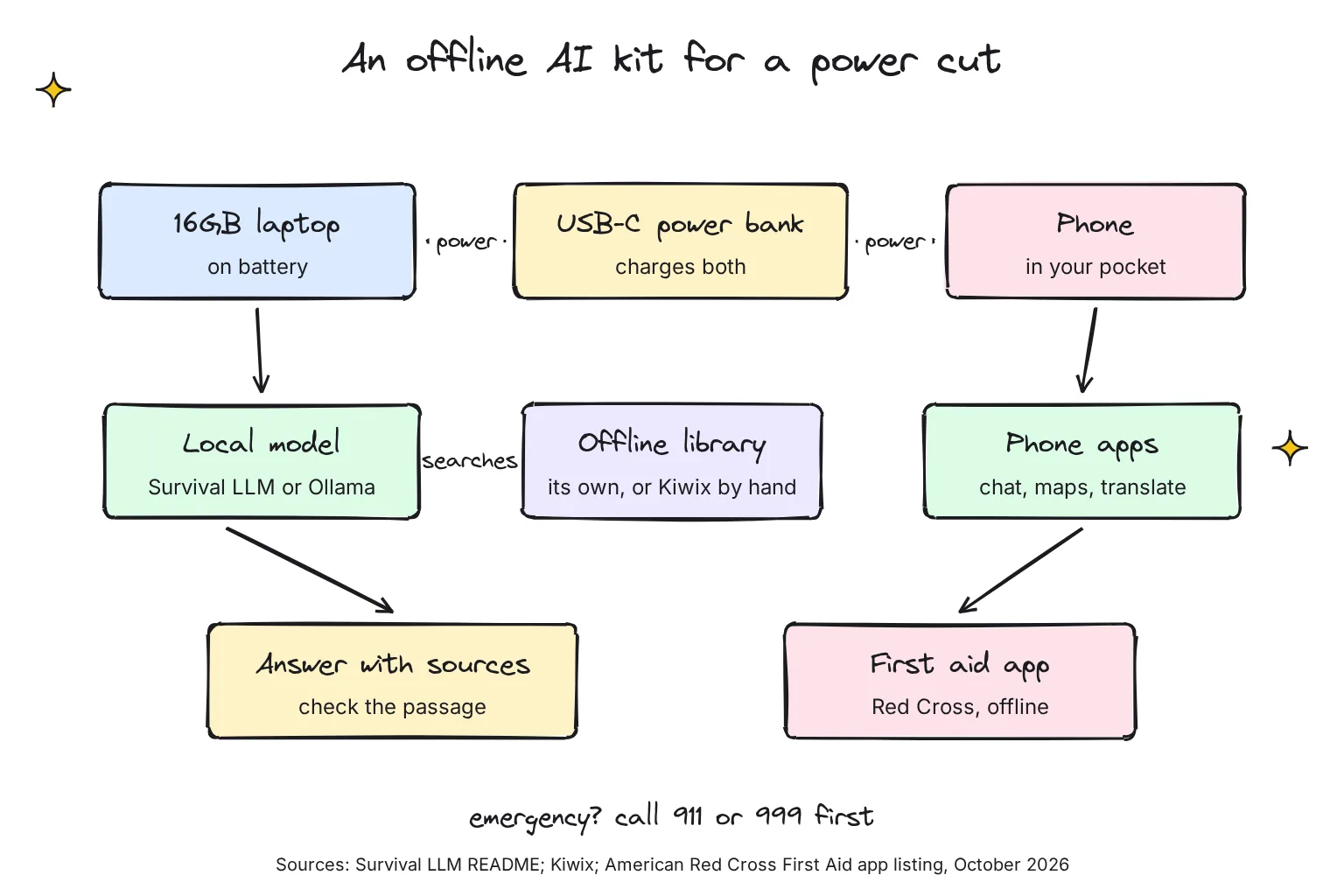
Think of three layers: a model that writes answers, a library that holds facts, and power. Survival LLM joins the first two in one app; a do-it-yourself kit keeps them separate, which is less convenient but easier to swap piece by piece.
What is Kiwix, and what is a ZIM file?
Kiwix is a free offline reader for ZIM files, which its FAQ describes as highly compressed archives of web content: you download a ZIM once and browse it like a website with no connection. On Windows, Kiwix is available from the Microsoft Store, Winget or a standalone installer, and on Android and iPhone it is a normal app.
Wikipedia comes in three flavors. Per the Kiwix FAQ, maxi is the full version, nopic has full articles without images and is about 75% smaller, and mini keeps only each article's introduction and infobox, saving about 95%.

Which ZIM files are most useful in an emergency?
These are the English files I would pick. File names and sizes are as shown in the download.kiwix.org directory listings on October 29, 2026, which round sizes:
| Library (Kiwix file) | What it is | Size |
|---|---|---|
| WikiMed (wikipedia_en_medicine_maxi_2026-10.zim) | "The largest medical encyclopedia, from Wikipedia", per the Kiwix library | 1.7 GB |
| Post Disaster Resource Library (zimgit-post-disaster_en_2024-05.zim) | A collection of post-disaster resources, tagged for preppers | 615 MB |
| Medical Library (zimgit-medicine_en_2024-08.zim) | Books on field and emergency medicine | 67 MB |
| Water Treatment Library (zimgit-water_en_2024-08.zim) | Water collection and purification | 20 MB |
| Food for Preppers (zimgit-food-preparation_en_2025-04.zim) | Recipes and techniques for preparing food | 93 MB |
| Best of Wikipedia (wikipedia_en_top_maxi_2026-09.zim) | The best 50,000 Wikipedia articles | 6.5 GB |
| iFixit (ifixit_en_all_2025-12.zim) | Repair guides, optional | 3.3 GB |
| Wikivoyage (wikivoyage_en_all_maxi_2026-09.zim) | Travel guide, optional for travelers | 1.0 GB |
For the 16GB laptop, the first six rows come to about 9.0 GB. Full English Wikipedia with images is 119 GB, which most people do not need in a blackout. Note that the Post Disaster, Medical and Water collections were last updated in 2024, and Food for Preppers in April 2025.
Which local AI app should you use offline: Ollama, LM Studio, Jan or GPT4All?
Any of them works offline once a model, a downloadable file of trained weights, is on your disk. Pick by how you like to work.
- Ollama runs in the background and is the engine Survival LLM itself uses. It needs Windows 10 22H2 or newer and at least 4GB of space for the install. Our Ollama install guide covers first errors.
- LM Studio is one window for search, download and chat, and its docs say chatting with models, chatting with documents and running a local server do not require the internet.
- Jan is open source under Apache 2.0, with macOS, Windows and Linux apps with full offline support and no account needed. See our Jan guide.
- GPT4All offers local document chat called LocalDocs on Windows, macOS and Linux; our GPT4All guide notes that its last release came out in February 2025.
For the reader's laptop, I would use Granite 4.2 8B, the same model Survival LLM picks for 16GB. In Ollama it is a 5.3GB download released under Apache 2.0. Download it while you are online, then test it with the Wi-Fi off:
ollama pull granite4.2:8b
ollama run granite4.2:8b
Can the AI search my Kiwix library?
Not in a plain do-it-yourself setup: the model answers from its own training while you check facts in Kiwix. That joined-up search is Survival LLM's main trick. A middle path is to drop a few key PDFs into LM Studio, which processes documents locally, or GPT4All's LocalDocs; our guide to chatting with a PDF locally shows how.
What should you put on your phone for offline use?
The phone is the device you will actually carry, and the easiest one to keep charged. Four kinds of app cover most needs.
An AI chat app that works offline
PocketPal AI is open source and its README says download a model once and it just works, with no connection and no account. Google AI Edge Gallery runs Gemma models with Android 12 and up, and iOS 17 and up as its requirement. In its October 2026 model list, Gemma 4 E2B is a 2.59 GB download for phones with at least 8GB of memory, which suits our reader's phone.
Offline maps
Organic Maps is a free, open-source map app built on OpenStreetMap data, and its makers say it supports 100% of features without an active Internet connection, including turn-by-turn navigation, hiking trails and offline search. Download your county or region before a storm. Map size varies by region, so check it in the app.
Offline translation
On Android, Google Translate lets you download languages to translate without an internet connection; tap Download next to each language while on Wi-Fi. On iPhone, Apple's Translate app can translate entirely on your iPhone, even without an internet connection, once languages are downloaded. On the laptop, Whisper does multilingual speech recognition and speech translation; see our guide to running Whisper locally.
A first aid app with preloaded content
This is the most important app on the list. The American Red Cross First Aid app says its preloaded content means you have instant access to all safety information at anytime, even without reception or an Internet connection, and it is integrated with 9-1-1. The Android version on Google Play makes the same offline claim, which matters for our reader's phone. In the UK, the British Red Cross says its First aid app works when you are offline. I could not find a current St John Ambulance app page that confirms offline use, so I would not rely on one without testing it in airplane mode.
Can you trust an AI in a medical or safety emergency?
No, not on its own. Language models can state wrong things confidently, and small models more so; Survival LLM's own page says smaller models make more mistakes, so the app always shows the source to check. Use the AI to find and explain information, then act on the official guidance it points to.
- Call first when you can. In the US, call 911; in the UK, the NHS says to stay with the person and call 999 again if the person's condition changes.
- Open the first aid app before the chat app for bleeding, burns, choking or CPR.
- Check numbers against an official source. FEMA's Ready.gov says a refrigerator keeps food cold for about four hours and a full freezer for about 48 hours; if a model gives different numbers, trust Ready.gov.
- Never take a "just this once" exception on carbon monoxide. Ready.gov says generators and fuel should always be used outdoors and at least 20 feet away from windows, doors and attached garages, with CO detectors on every level of the home.
How do you power offline AI during an outage?
Running a model is hard work for a laptop. The Survival LLM maker measured about 100 W on a MacBook Pro while it answers, for 5 to 40 seconds per question, and estimates a full battery answers roughly 100 to 300 questions. That is the maker's figure on a high-end Mac, so time a few questions on your own laptop.
- Keep the laptop for hard questions and use Kiwix or the phone for quick lookups, so the battery goes on the questions that need a model.
- Pick a USB-C power bank that supports USB Power Delivery at your laptop charger's wattage. USB PD was limited to 100W until Revision 3.1, which allows up to 240W.
- Charge from a generator only outdoors, following the Ready.gov rules above, and keep phones topped up before a storm arrives.
What should you download before you need it?
Do this on a normal day. Sizes are from the official sources linked here, in October 2026.
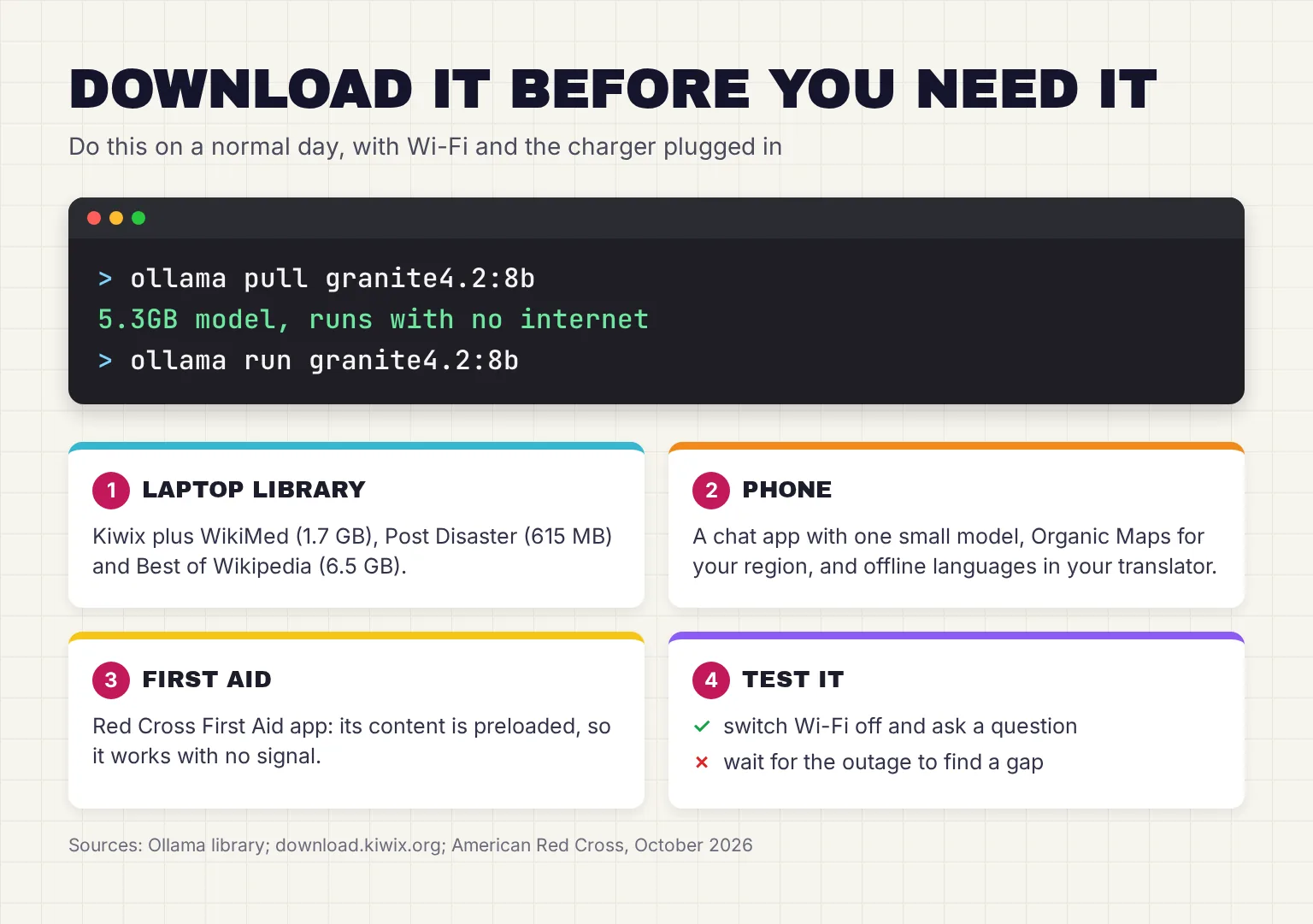
- Install a local AI app. Ollama needs at least 4GB for the install. Survival LLM instead downloads its own copy of Ollama on Windows, 1.6 GB, plus a 25 MB app.
- Download one model. Granite 4.2 8B is 5.3GB in Ollama, or 6 GB as Survival LLM lists it. Gemma 4 E4B is 6.6GB to 9.5GB in Ollama depending on the version, and Survival LLM lists it at 10 GB.
- Get a library. Either Kiwix with the emergency files above, about 9.0 GB, or Survival LLM's Everything library, which its web page lists as a 9 GB download that takes 19 GB once installed and its README as an 8.8 GB download that takes 21 GB, or Essentials at 1.3 GB (3 GB installed).
- Add your own documents, such as manuals, medicines lists and your emergency plan.
- Set up the phone. Google AI Edge Gallery (122 MB on iPhone) with Gemma 4 E2B (2.59 GB), Organic Maps (142 MB on iPhone) plus your region, and offline languages in your translator.
- Install the Red Cross First Aid app (264 MB on iPhone), then open it once in airplane mode to check that it works.
- Test everything in airplane mode: ask the model, open WikiMed, search the map and open the first aid app. Repeat after updates.
Here is what that adds up to for the reader in this guide:
| Kit | What it includes | Storage |
|---|---|---|
| Laptop, do-it-yourself | Ollama install space (4GB), Granite 4.2 8B (5.3GB), Kiwix emergency files (9.0 GB) | About 18.3 GB, plus the Kiwix app |
| Laptop, do-it-yourself with extras | The above plus iFixit (3.3 GB) and Wikivoyage (1.0 GB) | About 22.6 GB |
| Laptop, Survival LLM Everything | Ollama (1.6 GB), Granite 4.2 8B (6 GB), library (19 GB installed per the web page, 21 GB per the README) | About 26.6-28.6 GB; free 38 GB during setup |
| Laptop, Survival LLM Essentials | Ollama (1.6 GB), Granite 4.2 8B (6 GB), library (3 GB installed) | About 10.6 GB; free 21 GB during setup |
| Phone | Edge Gallery and Gemma 4 E2B, Organic Maps, Red Cross First Aid | About 3.1 GB, plus maps and languages |
Survival LLM asks for the model's size plus 5 GB, plus about 27 GB while the full library installs (10 GB for the smaller one). The two figures for the full library differ: the web page says 19 GB once installed and the README says 21 GB, so plan for the larger one.
Common questions about offline AI for survival
Can I get a ChatGPT-like assistant without internet?
Yes. Download an open model such as Granite 4.2 8B into Ollama, LM Studio, Jan or GPT4All while you are online. After that, the model runs on your own computer with the internet switched off. Answers come from the model alone unless the app can also search a library or your documents.
What is Survival LLM?
Survival LLM is a free, open-source app for Mac and Windows that runs a local AI model and an offline emergency library on your own computer. It downloads a model that fits your memory, searches medical, FEMA, CDC, how-to and Wikipedia articles, and shows the article behind each answer.
How much storage does offline AI for emergencies need?
For a 16GB laptop, plan on about 18 GB for a do-it-yourself kit: Ollama, the 5.3GB Granite 4.2 8B model and about 9 GB of Kiwix emergency libraries. Survival LLM with its full library takes about 27 to 29 GB installed and needs 38 GB free during setup. A phone kit needs about 3 GB.
Can I run offline AI on an 8GB laptop?
You can, but expect weaker answers. Survival LLM recommends no model for 8 GB computers because none it tested was both small enough and safe enough, though the library search still works. On 8 GB, rely on Kiwix and a first aid app, and treat any model answer as a starting point only.
Is offline AI safe to use for first aid?
Only as a backup to proper first aid guidance. Models can be wrong, and small models more often. Call 911 in the US or 999 in the UK when you can, use the Red Cross First Aid app, which works with no signal, and check any AI answer against an official source.
How long will a laptop run a local AI model on battery?
It depends on the laptop and model. The Survival LLM maker measured about 100 W on a MacBook Pro while answering, for 5 to 40 seconds per question, and estimates 100 to 300 answers per charge. Time a few questions on your own laptop on battery before an outage.
My verdict for a rural household: build the kit, but put first aid first
For a 16GB Windows laptop and an 8GB Android phone, I would start with the parts that cannot be wrong in the way a model can: the Red Cross First Aid app, Kiwix with WikiMed and the Post Disaster library, and Organic Maps. Then add a model. Survival LLM is the easiest way to get an assistant that cites its library, but it is days old; Ollama with Granite 4.2 8B gives you the same model with established tools. Our LM Studio vs Ollama comparison helps you choose an app.
Your next step: this weekend, install the Red Cross First Aid app and Kiwix, download WikiMed (1.7 GB), then switch on airplane mode and look up how to treat a burn in both. If that works, add the model.
Sources
- Index of /zim/wikipedia - Kiwix
- First Aid: American Red Cross - App Store
- Survival LLM - brangus.io
- Kiwix Reader - Kiwix
- Survival LLM: AI assistant and emergency library that runs on your own computer - Hacker News
- survival-llm README and LICENSE - anonnerdfrenzy, GitHub
- FAQ - Kiwix
- Kiwix library catalog - Kiwix
- Index of /zim/other - Kiwix
- Index of /zim/ifixit - Kiwix
- Index of /zim/wikivoyage - Kiwix
- Windows - Ollama
- Offline Operation - LM Studio
- Jan Desktop - Jan
- GPT4All - Nomic
- granite4.2 - Ollama
- pocketpal-ai README - a-ghorbani, GitHub
- Google AI Edge Gallery README - google-ai-edge, GitHub
- model_allowlists/1_0_22.json - google-ai-edge, GitHub
- Organic Maps: Offline Hike, Bike, Trails and Navigation - Organic Maps
- Download languages to use offline - Google Translate Help
- Translate text, voice, and conversations on iPhone - Apple Support
- Whisper README - openai, GitHub
- First aid by British Red Cross - App Store
- First Aid: American Red Cross - Google Play
- When to call 999 - NHS
- Power Outages - Ready.gov, FEMA
- USB Charger (USB Power Delivery) - USB-IF
- gemma4 - Ollama
- Google AI Edge Gallery - App Store
- Organic Maps: Offline Maps, GPS - App Store