How do you run LFM3 locally?
Install Ollama v0.40.13, released October 28, 2026, which runs LFM3 on Windows, Linux and Apple silicon, then type ollama run lfm3. The text model is a 1.1GB to 1.7GB download. LFM3 is Liquid AI's new family of small open-weight models, and lfm3-audio can also speak its answers.
This guide follows one reader: someone with an 8GB Windows laptop that has no separate graphics card, who wants a fast, private assistant that can read screenshots and talk back, and who also wonders whether the same model will run on their phone. Big models crawl or fail on that laptop. LFM3 is built for exactly this class of machine, so it is a fair test of the maker's claims.
Choose LFM3 if:
- You have 8GB of memory or less, or a phone, and want a model that Liquid AI says takes about 1 GB of memory at 4-bit precision.
- You want tool calling, structured outputs and agents, which is what the text model is designed for.
- You want one small local model that hears and speaks: LFM3-Audio-2B takes text or audio and answers with text, speech, or both.
Choose Gemma 4 or Qwen3.5 instead if:
- Your business earns $10 million a year or more, because the LFM license does not cover commercial use above that threshold, while Gemma 4 and Qwen3.5 are listed as Apache 2.0.
- You mostly ask knowledge questions or write code: Liquid AI itself says the text model is not recommended for agentic coding or complex multi-step reasoning and should use retrieval or search for knowledge-heavy tasks.
- You have 16GB or more and want the strongest all-rounder that fits; our best Ollama models guide ranks them by memory.
What is LFM3?
LFM3 is the third generation of Liquid Foundation Models, announced by Liquid AI on October 27, 2026. The first release covers models in the 2B parameter range. A parameter is one of the numbers a model learns in training, and the count is a rough guide to how much memory a model needs and how capable it is.
Every model in the family branches from one base model, LFM3-1.7B-Base, pre-trained on 22T tokens. Liquid AI calls the design tri-hybrid: of its 24 layers, 13 are short convolutions, 5 are sliding-window attention and 6 are global attention. In plain terms, most layers only look at nearby words, which keeps the model fast and its memory use low on long inputs, and a few layers look at everything.
The weights are open: you can download them from Hugging Face and run them offline. Liquid AI's headline claim, which is its own, is that LFM3-1.7B outperforms its previous LFM2.5-2.6B while using 35% fewer parameters.
Which LFM3 models are there, and what can each one do?
Six models came out at launch: four cover text, vision, audio and omni input, and two are decision models built from the vision and omni models. "Omni" means one model that takes text, pictures, video and sound together.
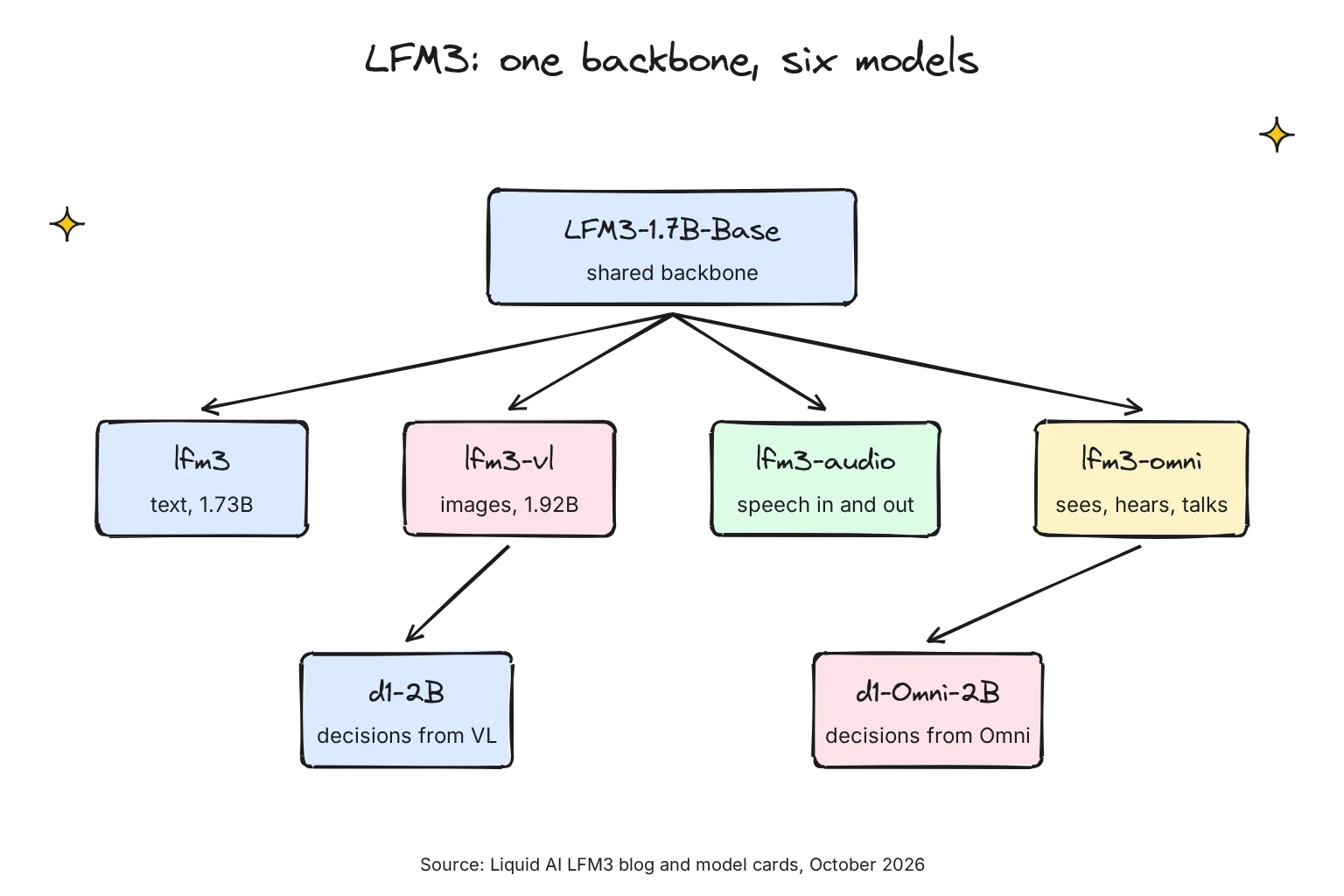
| Model (Ollama name) | Parameters | Takes in | Gives back | Context (model card) |
|---|---|---|---|---|
LFM3-1.7B (lfm3) | 1.73B | Text | Text, tool calls | 256K tokens |
LFM3-VL-2B (lfm3-vl) | 1.92B | Text, images; video "soon" in Ollama | Text | 128K tokens |
LFM3-Audio-2B (lfm3-audio) | 2B | Text or 16 kHz audio | Text, 24 kHz speech, or both | 32K tokens |
LFM3-Omni-2B (lfm3-omni) | 2.17B | Text, images, video with sound, audio | Text, speech, or both | 32K tokens |
d1-2B and d1-Omni-2B (d1:2b, d1-omni:2b) | About 2B | A situation plus questions | Answers with probabilities | - |
Context is how much text the model can keep in view at once, counted in tokens, which are word pieces. The sources do not agree on every figure. The model cards say 256K tokens for LFM3-1.7B, 128K for LFM3-VL-2B, and 32K for LFM3-Audio-2B and LFM3-Omni-2B. Ollama's tag pages show 256K for lfm3 but 125K for lfm3-vl, lfm3-audio and lfm3-omni. For the audio and omni models, plan around the card's 32K. The decision models do not write prose: d1 answers a list of questions in a single forward pass, each with a calibrated probability, which suits triage and routing jobs rather than chat. In Ollama, add the :2b tag: plain d1 and d1-omni still point to Liquid AI's older 3B decision model and a 600M omni version.
Is LFM3 free for commercial use?
Only below a revenue line. Every LFM3 model ships under the LFM Open License v1.0, which Liquid AI says is based on Apache 2.0 with only a few changes. The key change is Section 5: "The rights granted under this License for Commercial Use are conditioned upon You or Your Legal Entity not exceeding the Threshold", and the Threshold "shall mean annual revenue of 10 million United States dollars ($10,000,000) or more".
Commercial Use is defined as any use "for direct or indirect commercial advantage or monetary compensation". A Legal Entity includes every entity that controls yours, is controlled by it, or is under common control with it, so a small subsidiary of a large group counts the group's revenue. The Threshold does not apply to a Qualified Non-Profit Organization's use for Non-Commercial or Research Purposes; the license defines those as 501(c)(3) organizations or their equivalent. Above the threshold, Liquid AI says you must contact it to buy a commercial license.
The rest is familiar Apache-style terms: you must pass on a copy of the license and mark modified files, there is no requirement to open-source your fine-tuned models, and the license terminates automatically if you fail to comply. My reading is that private use at home is not Commercial Use at all, so the cap does not touch the reader of this guide; a company should have a lawyer read Section 5.
How much memory does LFM3 need on a laptop or phone?
Very little by local AI standards. The download is the floor: the model's weights must fit in memory, plus a cache for the conversation that grows with context length. The default tags range from 1.1-1.7GB for lfm3, 1.5-1.7GB for lfm3-vl and 1.7-2.1GB for lfm3-audio to 2.0-2.4GB for lfm3-omni. Ollama lists these sizes in October 2026:
| Ollama tag | 4-bit download | 8-bit download | Full BF16 |
|---|---|---|---|
lfm3 | 1.1GB (q4_K_M), 1.0GB (qad-q4_0) | 1.8GB | 3.5GB |
lfm3-vl | 1.5GB (q4_K_M), 1.4GB (qad-q4_0) | 2.2GB | 3.8GB |
lfm3-audio | 1.7GB | 2.4GB | 4.0GB |
lfm3-omni | 2.0GB | 2.8GB | 4.4GB |
Quantization stores each weight in fewer bits to shrink the file, at some cost in accuracy; our guide to GGUF and quantization explains tags like Q4_K_M. The qad-q4_0 tag is worth knowing: Liquid AI's GGUF card says that Q4_0 file is a Quantization-Aware Distillation checkpoint trained to recover the accuracy lost to Q4_0 quantization. Ollama also lists MLX tags such as lfm3:1.7b-nvfp4 (1.7GB), which run on Ollama's MLX engine, the default on Apple silicon Macs.
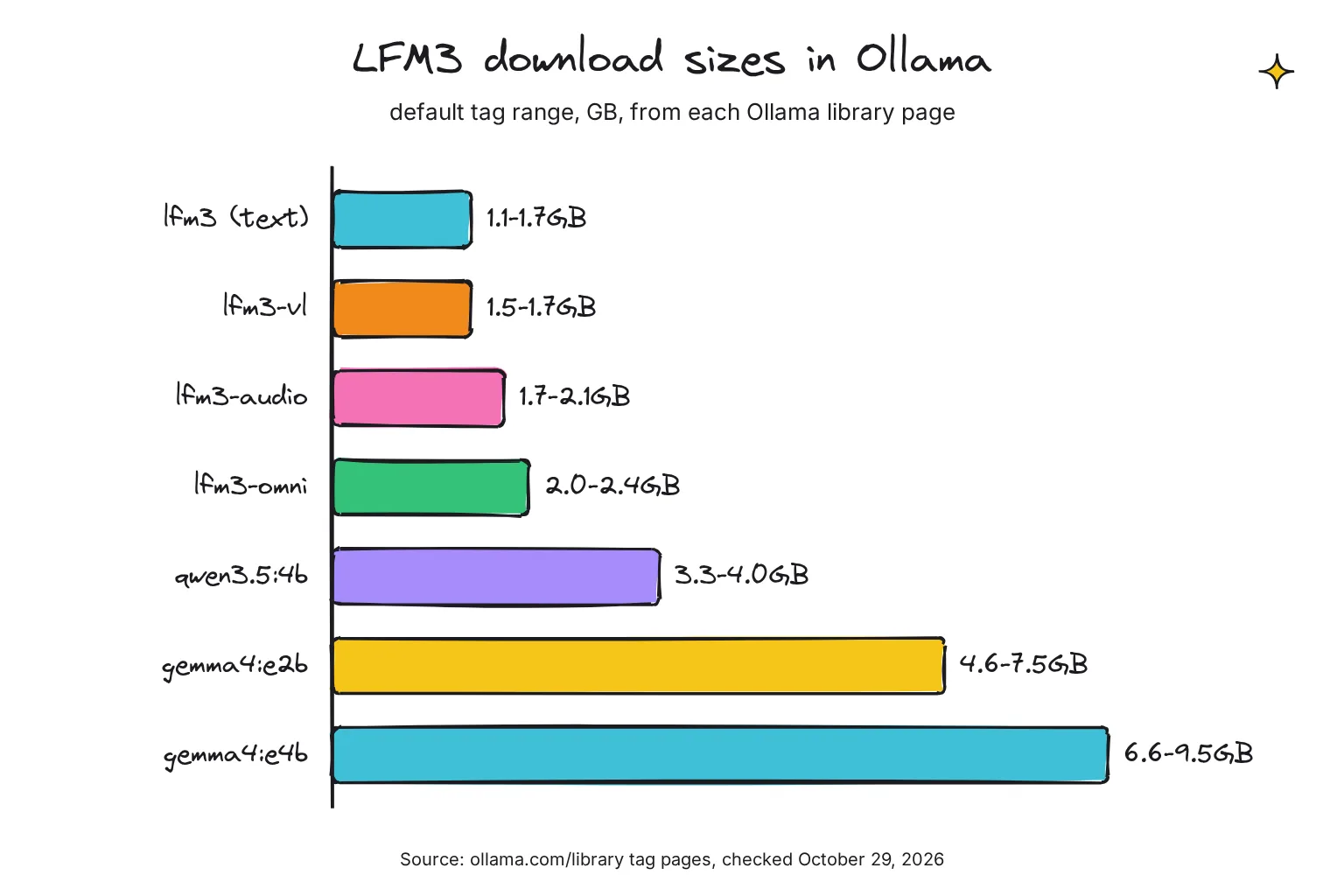
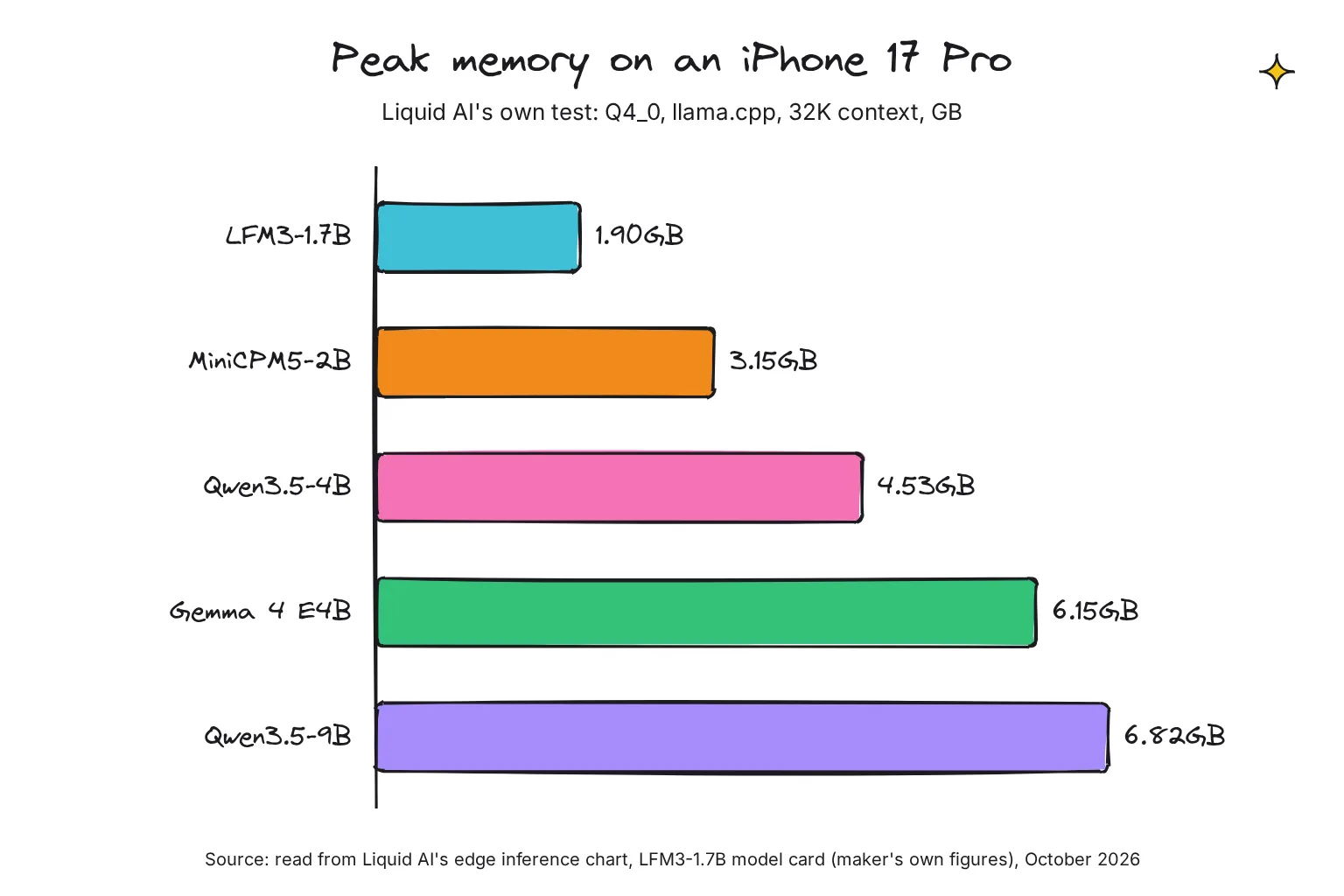
Liquid AI also measured peak memory with a 32K-token context, running Q4_0 files in llama.cpp. These are the maker's own figures, read from the edge inference chart on its model card; the card's text gives the method but not the numbers. On an iPhone 17 Pro, LFM3-1.7B peaked at 1.90GB, against 3.15GB for MiniCPM5-2B, 4.53GB for Qwen3.5-4B, 6.15GB for Gemma 4 E4B and 6.82GB for Qwen3.5-9B. On an AMD Ryzen AI Max+ 395 (Radeon 8060S integrated graphics) the same test showed 2.75GB for LFM3, 6.00GB for Qwen3.5-4B and 9.52GB for Gemma 4 E4B.
Long context stays cheap too: Liquid AI says a full 128K-token context needs 1.6 GB of KV cache, against 4.3 GB for Qwen3.5-4B. The KV cache is the model's working memory for the conversation so far.
Will LFM3 run on 8GB of RAM?
Yes, with room to spare. On the 8GB Windows laptop in this guide, Windows and a browser take a good share of memory, but even lfm3-omni at 2.0GB leaves headroom. Run one model at a time. LM Studio's own page says the smallest LFM3 needs at least 1 GB of RAM.
Can LFM3 run on a phone?
Liquid AI built it for phones: its architecture search used 14 device and backend combinations, including the Samsung Galaxy S26 Ultra and OnePlus 15, and its iPhone figures come from an iOS app built on llama.cpp. Ollama itself does not run on phones, so you need a phone app with a new enough engine: the GGUF files are supported in llama.cpp b11960 and newer. Until your app's release notes mention LFM3 or that build, expect it to fail to load. Our guide to running AI on your phone covers the apps.
How to run LFM3 with Ollama, step by step
Ollama is a free runner: it downloads models and serves them on your own computer. The v0.40.13 release note reads in full: "Liquid AI's LFM3 models, including text-to-speech in lfm3-audio and lfm3-omni, now run on Linux and Windows as well as Apple silicon." Liquid AI's GGUF card still says v0.40.12 for macOS. That matches the Mac-friendly MLX tags, which Ollama's registry marks as needing 0.40.12; the default GGUF tags, including lfm3:latest, are marked as needing 0.40.13 on every system.
- Install or update Ollama. On Windows or macOS, download it from ollama.com/download. On Linux, run the official install script below. Our Ollama install guide covers first errors.
- Check the version. Run
ollama -v. You need 0.40.13 or newer for the default LFM3 tags, on Windows, Linux and Mac. - Run the text model. Type
ollama run lfm3. The first run downloads the model, then opens a chat at a>>>prompt. Type/byeto leave. - Try the vision model. Put the image path after the model name, as Ollama's vision docs show:
ollama run lfm3-vl ./image.png what is in this image?It is designed for reading documents, charts and app screens. - Check where it runs. While a model is loaded, run
ollama ps. On a laptop with no graphics card, CPU is normal; if you have a GPU and it sits idle, see our fix for Ollama not using the GPU.
# Linux install (Windows and macOS: use the installer from ollama.com/download)
curl -fsSL https://ollama.com/install.sh | sh

ollama -v
ollama run lfm3
ollama run lfm3-vl
ollama run lfm3-audio
ollama run lfm3-omni
ollama ps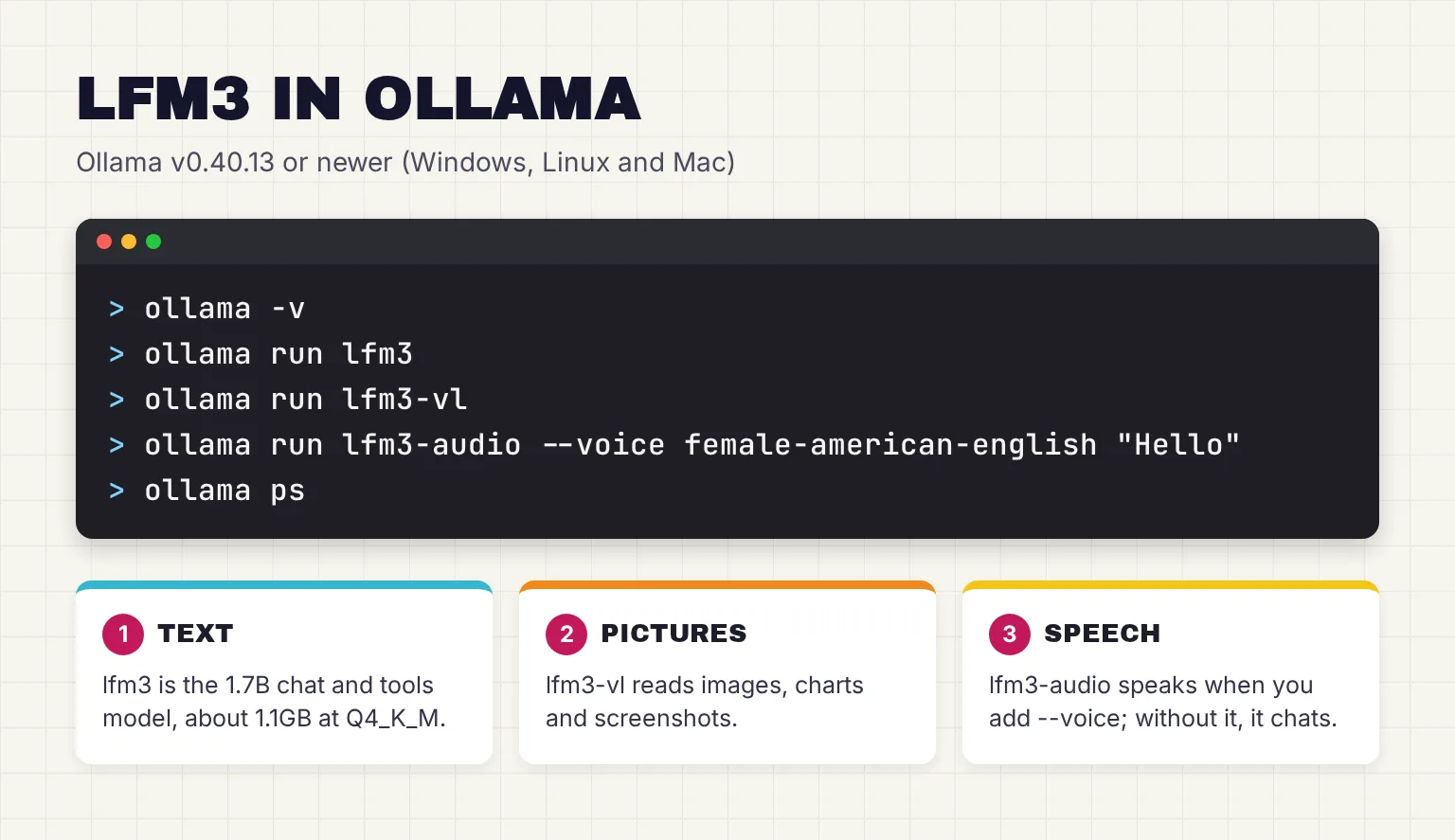
Each library page also shows the API call. Ollama listens on localhost:11434, so other apps on your computer can use the model:
curl http://localhost:11434/api/chat \
  -d '{
  "model": "lfm3",
  "messages": [{"role": "user", "content": "Hello!"}]
}'
Does LFM3 think before it answers?
The text model does by default: "Reasoning is enabled by default", and Ollama tags lfm3 with thinking. That adds a pause before short answers. LFM3-Omni is a non-reasoning model. For everyday chat and tool use, Liquid AI recommends temperature 0.1, top_k 50 and a repetition penalty of 1.1.
Can I use LFM3 with an agent such as OpenClaw or Hermes?
Yes. The text model is post-trained for agentic harnesses such as Hermes Agent, Pi, and OpenClaw, and the Ollama page lists launch commands such as ollama launch openclaw --model lfm3 and ollama launch hermes --model lfm3. The same page lists Claude Code, but Liquid AI does not recommend LFM3 for agentic coding.
How do you use LFM3 for speech?
Use lfm3-audio for voice work, and lfm3-omni when pictures or video are involved too. Liquid AI says LFM3-Audio can transcribe, synthesize, and translate speech across 18 languages, though spoken voice chat currently supports English only. Text-to-speech (TTS) turns text into a voice; speech recognition (ASR) turns a recording into text.
Ollama has not documented LFM3 speech yet. The lfm3-audio library page only shows a plain ollama run lfm3-audio, which opens a text chat, and Ollama's speech documentation uses only its own Phonon model: ollama run phonon --voice Zoey "Hi, this is Zoey." in the terminal, and the OpenAI-compatible /v1/audio/speech endpoint for apps.
The v0.40.13 source fills the gap. ollama run treats a model that both chats and speaks as a speech model only when --voice is given, and LFM3's voices are named default plus a female and a male voice per language, such as female-american-english or male-british-english. The lfm3-audio package in Ollama's registry declares the speech capability. Run ollama show lfm3-audio to list the voices on your install.
# Speak through your speakers
ollama run lfm3-audio --voice female-american-english "Hello from Ollama."

# Save a WAV file instead of playing it
ollama run lfm3-audio --voice male-british-english "Save this to a file." > speech.wav

# OpenAI-compatible API
curl http://localhost:11434/v1/audio/speech \
  -H "Content-Type: application/json" \
  -d '{
    "model": "lfm3-audio",
    "input": "Hello from Ollama.",
    "voice": "default"
  }' --output speech.wav
These are Ollama's documented Phonon commands with the LFM3 model name and an LFM3 voice swapped in. The source code supports them, but they do not appear in Ollama's docs or on the model page, so if one fails, run ollama show lfm3-audio and check the docs for changes. The speech docs list the limits: up to 4,096 characters per API request, WAV or raw PCM output at 24 kHz, and playback through your system's built-in player, which is PowerShell on Windows. Ollama also offers /v1/audio/transcriptions for models that accept audio input, taking WAV files.
Outside Ollama, llama.cpp has a dedicated tool. Liquid AI's GGUF card gives this command, where --tts-voice is female (default) or male:
llama-tts -m LFM3-Audio-2B-Q4_K_M.gguf -mm mmproj-LFM3-Audio-2B-Q8_0.gguf \
  -p "Hello world" --tts-voice male -o out.wav
How good is LFM3's voice?
On Liquid AI's own English tests, LFM3-Audio-2B scored 3.8 on UTMOSv2, a 1-5 naturalness score, with a 1.4% word error rate, ahead of its older LFM2.5-Audio at 3.2. For transcription, its English word error rate was 6.2%, against 8.3% for Gemma 4 E2B and 7.8% for Gemma 4 E4B; lower is better. Our local TTS models guide compares dedicated voice models if speech quality matters more than having one model do everything.
Can you run LFM3 in LM Studio, llama.cpp or MLX?
Yes, and Liquid AI lists llama.cpp, LM Studio, MLX and Ollama among its launch ecosystem.
- LM Studio: LM Studio has an LFM3 model page featuring
liquid/lfm3-vl-2bat 1.10 GB. Liquid AI's card says it requires LM Studio with llama.cpp engine 2.65.1 or newer, so update the runtime if a load fails. See our LM Studio vs Ollama comparison to choose an app. - llama.cpp: supported from build b11960 (v0.8.0); the card's command is below.
- MLX on a Mac: Liquid AI publishes MLX builds, but its card says support for LFM3 in mlx-lm is in progress. On a Mac, Ollama's MLX tags are the simpler route for now.
llama-cli -hf LiquidAI/LFM3-1.7B-GGUF:Q4_K_M \
  --temp 0.1 --top-k 50 --repeat-penalty 1.1
LFM3 benchmarks: what Liquid AI reports
Every number in this section is Liquid AI's own, from its launch post and model card, with all models served in BF16 by vLLM. I know of no independent test yet, so treat them as the maker's case, not a verdict. Here is how the 1.7B text model compares with the two small rivals readers ask about most:
| Benchmark (Liquid AI's runs) | LFM3-1.7B | Qwen3.5 4B | Gemma 4 E4B |
|---|---|---|---|
| BFCL V4 (function calling) | 71.39 | 55.12 | 48.25 |
| IFEval (following instructions) | 96.66 | 92.52 | 90.02 |
| GPQA Diamond (science knowledge) | 63.37 | 75.76 | 57.88 |
| SWE-bench Verified (coding agent) | 43.40 | 41.20 | 0.50 |
| RULER 128K (long context) | 65.56 | 84.63 | 18.82 |
| Average of every test in Liquid AI's table | 49.37 | 39.27 | 31.74 |
The pattern matches Liquid AI's own summary: LFM3 leads on instruction following and function calling, while "larger models still win on agentic coding and knowledge". Qwen3.5 4B is clearly ahead on science questions and long-context recall.
For speed, Liquid AI's llama.cpp test on the AMD Ryzen AI Max+ 395 showed LFM3 generating 129.6 tokens per second, against 51.2 for Qwen3.5-4B and 37.6 for Gemma 4 E4B. That chip has a large integrated GPU, so the 8GB laptop in this guide will be much slower; the ratio is the useful part. For vision, LFM3-VL-2B averaged 71.4 across 62 benchmarks, against 64.0 for Qwen 3.5 2B, 53.6 for Gemma 4 E2B and 71.7 for Gemma 4 12B.
LFM3 vs Gemma 4 and Qwen3.5 small models
Here are the facts side by side, in October 2026, from the model cards and Ollama's library:
| Model | Ollama download | Inputs | Speaks? | License |
|---|---|---|---|---|
LFM3 1.7B (lfm3) | 1.1-1.7GB | Text | No (use lfm3-audio) | LFM Open License, $10M revenue cap |
LFM3-Omni-2B (lfm3-omni) | 2.0-2.4GB | Text, images, video, audio | Yes | LFM Open License, $10M revenue cap |
Qwen3.5 2B (qwen3.5:2b) | 2.7-3.1GB | Text, images | No | Apache 2.0 |
Qwen3.5 4B (qwen3.5:4b) | 3.3-4.0GB | Text, images | No | Apache 2.0 |
Gemma 4 E2B (gemma4:e2b) | 4.6-7.5GB | Text, images, audio | No, text output | Apache 2.0 |
Gemma 4 E4B (gemma4:e4b) | 6.6-9.5GB | Text, images, audio | No, text output | Apache 2.0 |
Google's card says Gemma 4 handles text and image input, with audio on E2B, E4B and 12B, and generates text output, so it can transcribe but not talk back. Qwen3.5 2B has a 262,144-token native context. Neither rival comes with a revenue cap.
For the 8GB laptop, the practical difference is size. Gemma 4 E4B's 6.6GB minimum download leaves almost nothing for Windows, while LFM3 leaves room for a browser and a second task. Qwen3.5 4B at 3.3GB is the closest rival in fit, and the stronger pick for general knowledge on Liquid AI's own numbers.
Common questions about running LFM3 locally
What is LFM3?
LFM3 is Liquid AI's third generation of small open-weight models, announced on October 27, 2026. The first release has six models around 2B parameters, covering text, vision, audio, omni and decisions, all built on one 1.7B base model designed to run fast on phones and laptops.
How do I run LFM3 with Ollama?
Install or update Ollama to version 0.40.13 or newer, which added LFM3 on Windows and Linux as well as Apple silicon. Then run ollama run lfm3 for the text model, or lfm3-vl, lfm3-audio or lfm3-omni for images, speech and mixed input. The first run downloads the model.
How much RAM does LFM3 need?
Very little. The Ollama text model is a 1.1GB to 1.7GB download and the largest, lfm3-omni, is 2.0GB to 2.4GB. Liquid AI measured a peak of 1.90GB on an iPhone 17 Pro at a 32K context, so an 8GB laptop or a recent phone has room.
Is LFM3 free for commercial use?
Only for smaller organizations. The LFM Open License v1.0 grants commercial rights only while your organization, counted with the companies that control it or that it controls, stays below the threshold of 10 million US dollars in annual revenue. Larger companies need a paid license. Qualified non-profits are exempt for research and non-commercial use.
Can LFM3 speak its answers?
Yes, the audio and omni models can. LFM3-Audio-2B and LFM3-Omni-2B output 24 kHz speech, and Ollama v0.40.13 supports their text-to-speech on Windows, Linux and Apple silicon. Speech output covers 18 languages, while spoken voice chat currently supports English only, according to Liquid AI.
Is LFM3 better than Gemma 4 or Qwen3.5?
On Liquid AI's own tests, LFM3-1.7B beats Qwen3.5 4B and Gemma 4 E4B at function calling and instruction following, while Qwen3.5 4B wins on science knowledge and long-context recall. LFM3 is also much smaller, but Gemma 4 and Qwen3.5 use Apache 2.0 with no revenue cap.
My verdict for an 8GB laptop: install LFM3 and keep a bigger model for facts
For the reader in this guide, LFM3 is the most sensible new local model of the month. It is small enough to leave the laptop usable, it reads screenshots, and lfm3-audio gives it a voice without a second program. I would use it for drafting, sorting, extracting details from documents and tool-driven tasks, and keep Qwen3.5 4B for questions where facts matter, as Liquid AI's own table suggests.
The two caveats are real. The benchmarks are all the maker's, and the license stops being free for companies earning $10 million or more. For personal use at home, neither should stop you.
Your next step: update Ollama, run ollama -v to confirm 0.40.13, then ollama run lfm3 and give it a task you know the answer to, such as pulling the dates out of an email you paste in, so you can judge it yourself.
Sources
- Introducing LFM3: Every Modality for Specialized Intelligence - Liquid AI
- Release v0.40.13 - ollama/ollama, GitHub
- lfm3 - Ollama
- lfm3 tags - Ollama
- lfm3-vl - Ollama
- lfm3-vl tags - Ollama
- lfm3-audio - Ollama
- lfm3-audio tags - Ollama
- lfm3-omni - Ollama
- lfm3-omni tags - Ollama
- d1 tags - Ollama
- d1 - Ollama
- d1-omni tags - Ollama
- LiquidAI/LFM3-1.7B - Hugging Face
- LiquidAI/LFM3-1.7B-GGUF - Hugging Face
- LiquidAI/LFM3-1.7B-MLX-4bit - Hugging Face
- LiquidAI/LFM3-Audio-2B - Hugging Face
- LiquidAI/LFM3-Audio-2B-GGUF - Hugging Face
- LiquidAI/LFM3-Omni-2B - Hugging Face
- LFM Open License v1.0 (LICENSE file) - Liquid AI, Hugging Face
- LFM License - Liquid AI
- Speech - Ollama
- OpenAI compatibility - Ollama
- cmd/cmd.go at v0.40.13 - ollama/ollama, GitHub
- model/renderers/lfm3_speech.go at v0.40.13 - ollama/ollama, GitHub
- Download Ollama - Ollama
- Linux - Ollama
- Vision - Ollama
- LFM3 - LM Studio
- gemma4 tags - Ollama
- qwen3.5 tags - Ollama
- google/gemma-4-E2B-it - Hugging Face
- Qwen/Qwen3.5-2B - Hugging Face
- Qwen/Qwen3.5-4B - Hugging Face