
What is Google AI Edge Gallery?
Google AI Edge Gallery is Google's free, open-source app for running open AI models such as Gemma 4 on your phone. Once a model is downloaded, no internet is required for chat, image questions or transcription. It is on Google Play, the App Store and GitHub as an APK.
This guide follows one reader: someone with a Pixel 10, which has 12GB of RAM and a Google Tensor G5 chip, who wants to try Gemma offline in an official Google app, perhaps before a long flight. They want to know which model to download, how fast it will be, and what the app sends back to Google. Where an iPhone or a Galaxy differs, I say so.
Choose Google AI Edge Gallery if:
- You want Google's own showcase of Gemma 4 on a phone, with image and audio input, Thinking Mode and Agent Skills in one free app.
- You want models that arrive converted and tuned for phones, with the app warning you when a model may exceed your device's memory.
- You are curious about on-device agents: it runs tools through JavaScript skills and Android intents, and can connect to MCP servers, which is still experimental.
Choose PocketPal instead if:
- You want to run almost any model from Hugging Face, not just Google's list: PocketPal runs GGUF files with llama.cpp. Our PocketPal AI guide walks through it.
- You want an MIT-licensed app that says the only data that leaves your device is what you choose to share.
Rely on Gemini Nano if:
- You only want AI features inside other apps. Gemini Nano runs in Android's AICore system service, and other apps call it. Our explainer on what on-device AI really means on phones covers where it runs.
Google AI Edge Gallery at a glance in October 2026
Treat it as a demo that happens to be useful. Google's README calls it an experimental Beta release, and the Play listing says the app is in active development.
| Item | Google AI Edge Gallery in October 2026 |
|---|---|
| Maker | Google: Research at Google on Play, Google LLC on the App Store |
| License and price | Free; app code under Apache 2.0 |
| Android | Android 12 or later; Play listing updated October 27, 2026, with 1M+ downloads |
| GitHub APK | Release 1.0.20, published October 6, 2026 |
| iPhone | iOS 17 or later; version 1.0.14 from October 27, 2026; 122.2 MB; listed as only for iPhone |
| Engine | LiteRT-LM, Google's on-device runtime for language models |
| Model files | .litertlm, plus older .task files you import |
Is Google AI Edge Gallery available on iPhone?
Yes. The App Store version needs iOS 17.0 or later, and its version history shows Gemma 4 arriving in version 1.0.2 in April. The listing also offers it on Macs with an M1 chip or later, as an iPhone app Apple marks not verified for macOS, and Google's README links a separate macOS download, version 0.1.0. iPad is not among the listed devices, and iPhone version numbers are separate from Android's. For other iPhone options, see our guide to running an LLM on an iPhone.
Is there a Google AI Edge Gallery APK on GitHub?
Yes, for phones without Google Play: the README says to install the apk from the latest release. Release 1.0.20 carries a general ai-edge-gallery.apk of 57.6 MB, plus builds named for Qualcomm chips (sm8550 to sm8850) and for Tensor G5 and G6. Release 1.0.12 explains that these chip builds came with NPU support, that Play users need no action, and that sm8850 covers the Galaxy S26 series.
Play is also the more current route. Its listing was updated on October 27 with on-device speech models, an XR language teacher, context management and a live metrics HUD, none of which appear in the 1.0.20 notes. The iPhone app's version 1.0.14 brought the same features that day. On the Pixel 10, install from Play.
What can Google AI Edge Gallery do?
Each feature is a home-screen tile listing the models that suit it. Everything below runs on the phone unless I say otherwise.
AI Chat, Ask Image and Audio Scribe
AI Chat is a multi-turn conversation with an optional Thinking Mode that shows the model's step-by-step reasoning, which works with Gemma 4. Since version 1.0.18, AI Chat also accepts images and audio. Ask Image answers questions about camera shots or gallery photos, up to 10 images per chat. Audio Scribe transcribes or translates a recording, limited to one clip of up to 30 seconds, so it suits voice notes rather than meetings. For long recordings, see running Whisper locally on a computer.
Prompt Lab, Stats and Benchmark
Prompt Lab is a single-turn workspace with control over settings such as temperature and top-k, which decide how adventurous the wording is. After any reply, a Stats button shows time to first token, prefill speed, decode speed and latency. The Benchmark tool tests how each model performs on your specific hardware.
Agent Skills, Mobile Actions and MCP: the function calling features
Function calling means the model replies with a structured request to run a tool, and the app runs it. Agent Skills launched with Gemma 4 on April 2, 2026, and Google called it one of the first applications to run multi-step, autonomous agentic workflows entirely on-device. Skills add tools such as Wikipedia look-ups, interactive maps and visual summary cards. Skills run code in a hidden webview or through Android intents, and you add them from a featured list, a URL or a local folder.
Mobile Actions uses a fine-tune of FunctionGemma 270M to control the phone offline. The source code defines seven actions: flashlight on and off, create a contact, send an email, show a place on a map, open Wi-Fi settings and create a calendar event. Tiny Garden is a mini-game built on the same small model.
MCP, the Model Context Protocol, is a standard way to plug outside tools into an AI app. The Gallery's support is experimental, needs a StreamableHTTP server at a publicly routable URL, and asks before each tool call unless you set always allow. Google recommends Gemma 4 E4B for it.
Instant Media Search and Video Moment Finder
Version 1.0.20 added two search tools powered by EmbeddingGemma 2, a 740M open-weight multimodal embedding model. An embedding model turns a photo, a video frame or a phrase into numbers, so similar things can be matched. Instant Media Search finds photos as you type, with the image embeddings stored in a local SQLite database. Video Moment Finder jumps to the moments in a video that match a description.
Which models does AI Edge Gallery offer?
The app's model list comes from an allowlist file on GitHub, which also sets a minimum phone RAM for each model. RAM is the phone's working memory, shared by the model and everything else that is open. These are the main Android entries for release 1.0.20.
| Model | Download | App's minimum RAM | Inputs | Hugging Face sign-in |
|---|---|---|---|---|
| Gemma 4 E2B | 2.59 GB | 8 GB | Text, image, audio; up to 32K context | No (Apache 2.0) |
| Gemma 4 E4B | 3.66 GB | 12 GB | Text, image, audio; up to 32K context | No (Apache 2.0) |
| Gemma 3n E2B | 3.66 GB | 8 GB | Text, image, audio; 4K context | Yes (Gemma terms) |
| Gemma 3n E4B | 4.92 GB | 12 GB | Text, image, audio; 4K context | Yes (Gemma terms) |
| Gemma 3 1B | 0.58 GB | 6 GB | Text | Yes (Gemma terms) |
| Qwen2.5 1.5B Instruct | 1.60 GB | 6 GB | Text | No |
| DeepSeek R1 Distill Qwen 1.5B | 1.83 GB | 6 GB | Text | No |
| EmbeddingGemma 2 | 0.48 GB | Not set | Media search features | No |
| FunctionGemma 270M (two fine-tunes) | 0.29 GB each | 6 GB | Mobile Actions, Tiny Garden | Yes (Gemma terms) |
The E in E2B and E4B stands for effective parameters: Google describes them as 2B and 4B effective parameter models built for ultra-mobile, edge, and browser deployment. Context is how much text the model can keep in view at once; Gemma 4's small models support 128K, but Google's LiteRT-LM phone files support up to 32K, and the app sets 32,000 tokens.
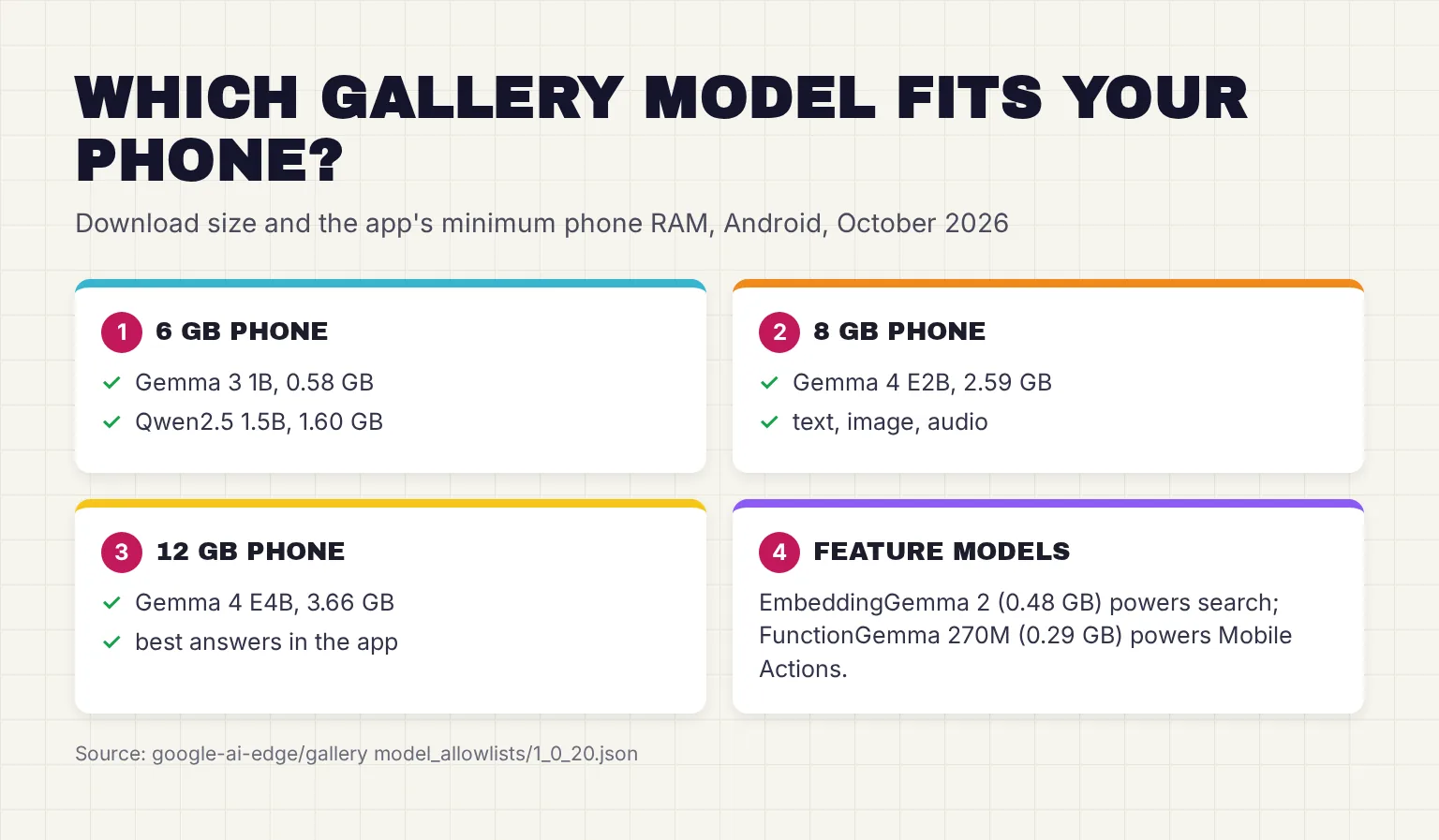
If your phone has less RAM than the listed minimum, the app shows a Memory Warning saying the model may exceed your device's memory, which can cause the app to crash, with a Proceed anyway button. The Pixel 10's 12GB clears both Gemma 4 sizes, as does a Galaxy S26 Ultra with 12GB or 16GB. An 8GB phone such as the Pixel 10a should stay with E2B.
Do you need a Hugging Face account?
Not for Gemma 4: its phone files are published under Apache 2.0 with no sign-in gate, and Gemma 4 itself is available under the Apache 2.0 license. Gated models are different: Google's wiki says models such as Gemma 3 require you to log in with your Hugging Face account and agree to their license terms. The app opens a browser sign-in once and stores your token. Gemma 3 and 3n come under the Gemma Terms of Use.
Can you load your own models?
Yes, within limits. You can import a local file, and the app accepts only .task or .litertlm files, or paste a Hugging Face model card URL, supported since version 1.0.18. GGUF, the llama.cpp format that PocketPal uses, does not load. If you want a wider choice of models, PocketPal is the better tool.
How does AI Edge Gallery run models on your phone?
The engine is LiteRT-LM, which Google describes as an orchestration layer built directly on top of LiteRT, its runtime for on-device models. LiteRT supplies hardware acceleration through XNNPack for CPU and ML Drift for GPU. LiteRT-LM adds the language model parts: the KV cache (the model's memory of the chat so far), prompt templates and function calling. The model card calls this the same technology powering the Google AI Edge Gallery showcase app.
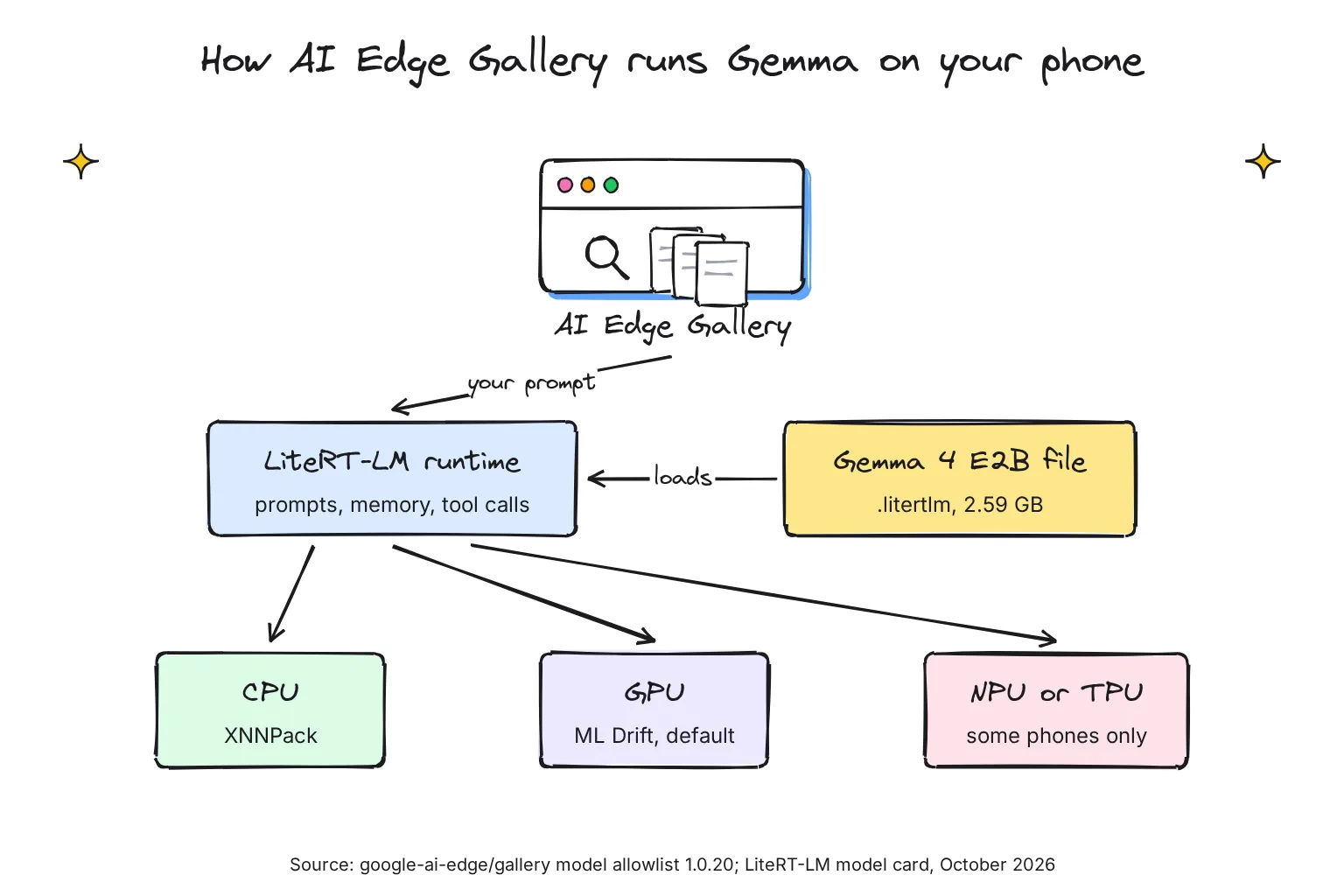
Models come as .litertlm files, already quantized: stored with fewer bits per weight so they fit in a phone. Gemma 4 E2B uses a mixture of 2bit, 4bit and 8 bit weights, so text-only use can need as little as 0.8 GB for weights, with 1.12 GB of embedding parameters memory-mapped. That means they are read from storage as needed rather than held in RAM. Vision and audio parts load only when you use them.
Older .task files came from the MediaPipe LLM Inference API, which Google has put in maintenance-only mode, recommending LiteRT-LM instead.
CPU or GPU: which backend should you pick?
Each model's configuration has an Accelerator setting. The allowlist lists GPU first for Gemma 4 and CPU first for Gemma 3n, and the FunctionGemma models run on CPU only. On a Galaxy S26 Ultra, Google's Gemma 4 E2B figures show why GPU is worth keeping: prefill at 3,808 tokens per second against 557 on CPU, a first word after 0.3 seconds against 1.8, and 676 MB of CPU memory against 1,733.
Prefill is the model reading your prompt; decode is writing the reply. Some phones go further with an NPU, a chip built for AI maths. Android release 1.0.12, in April, added Gemma 3 1B NPU support on Qualcomm chips, in Prompt Lab, and Android 1.0.14, in May, enabled execution support for models on Pixel TPUs, Google's AI accelerator. On the Pixel 10, and the 10a, the app's code removes the GPU option, so Gemma 4 runs on the CPU.
How to install and set up Google AI Edge Gallery
These steps follow the Pixel 10; on an iPhone, start from the App Store and skip the Android settings switch.
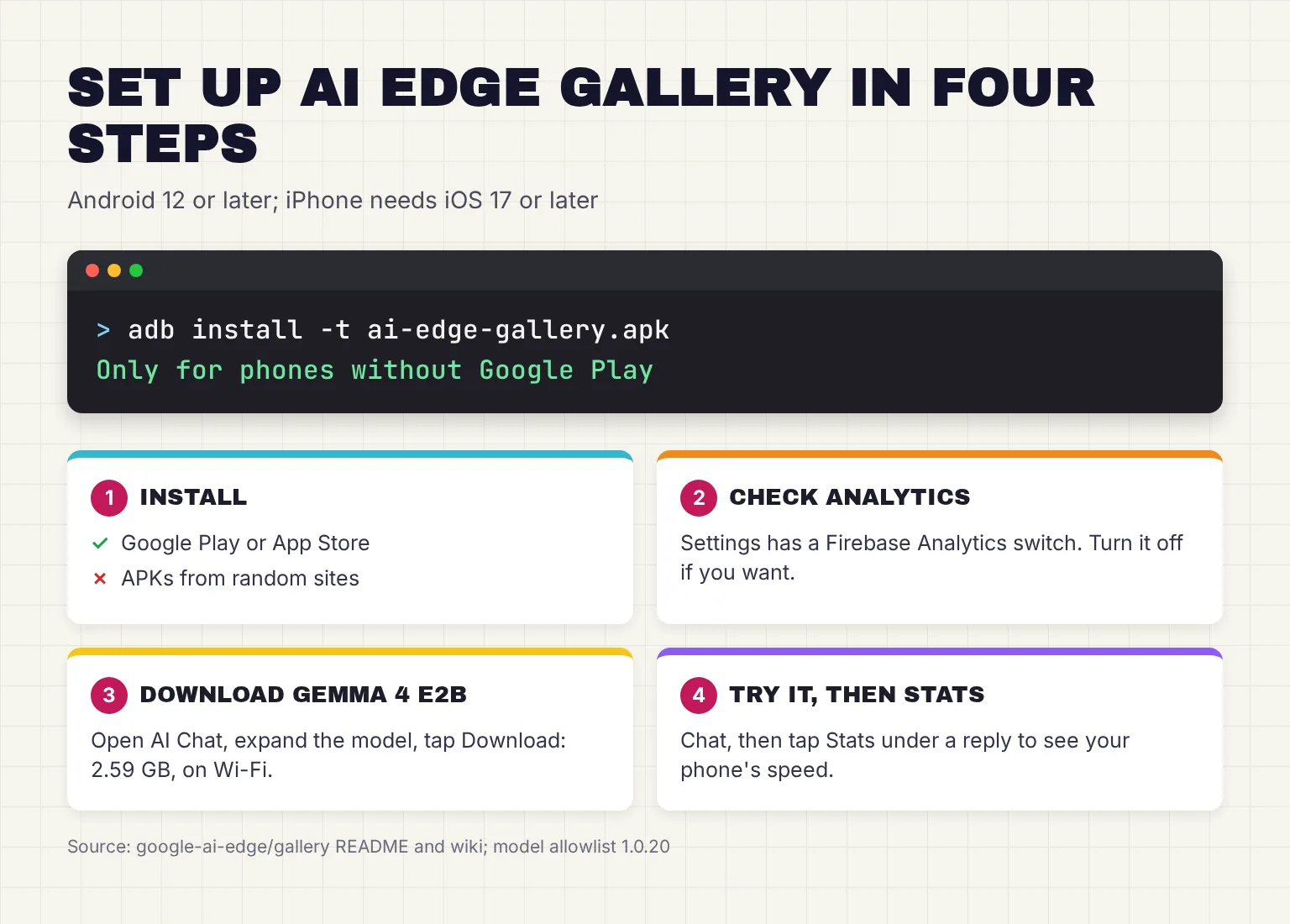
- Install the app. Get it from Google Play or the App Store. Your phone needs Android 12 or iOS 17 or later.
- Read the welcome screen. It says the app collects aggregated usage metrics. On Android, Settings has a Firebase Analytics switch labeled Send usage data to help improve AI Edge Gallery; turn it off if you prefer.
- Download a model. Open AI Chat, expand Gemma-4-E2B-it (2.59 GB), and tap Download. The download continues in the background, with a notification when it is done. On a 12GB phone, add Gemma-4-E4B-it (3.66 GB) later.
- Tap Try It and check the settings. In the model's configuration, check Accelerator (GPU where offered, CPU only on the Pixel 10), turn on Thinking if you want to see reasoning, and switch on the Multi Token Prediction (MTP) toggle for faster replies.
- Ask a question, then tap Stats. Note the decode speed: that is your phone's real figure.
- Test it offline. Switch on airplane mode and ask again. Chat, Ask Image and Audio Scribe should still answer; skills that look things up online will not.
Installing the APK instead
Only use the APK if your phone has no Google Play. Google's wiki gives two routes. Download the APK from the GitHub release, tap it in your file manager, and allow installs from unknown sources if prompted. Or, with USB debugging on and the phone connected to a computer, run this from the folder holding the file:
adb install -t ai-edge-gallery.apkThe -t flag comes from Google's wiki; Android's adb documentation says it is there to allow test APKs to be installed. Download APKs only from the google-ai-edge GitHub page, never from mirror sites.
How fast is Gemma in AI Edge Gallery?
Fast enough to read along on a recent flagship, going by Google's own numbers. They come from the LiteRT-LM engine the app uses, measured with 1024 prefill tokens and 256 decode tokens at a 2048-token context. These are the maker's figures, not independent tests, and real chats vary.
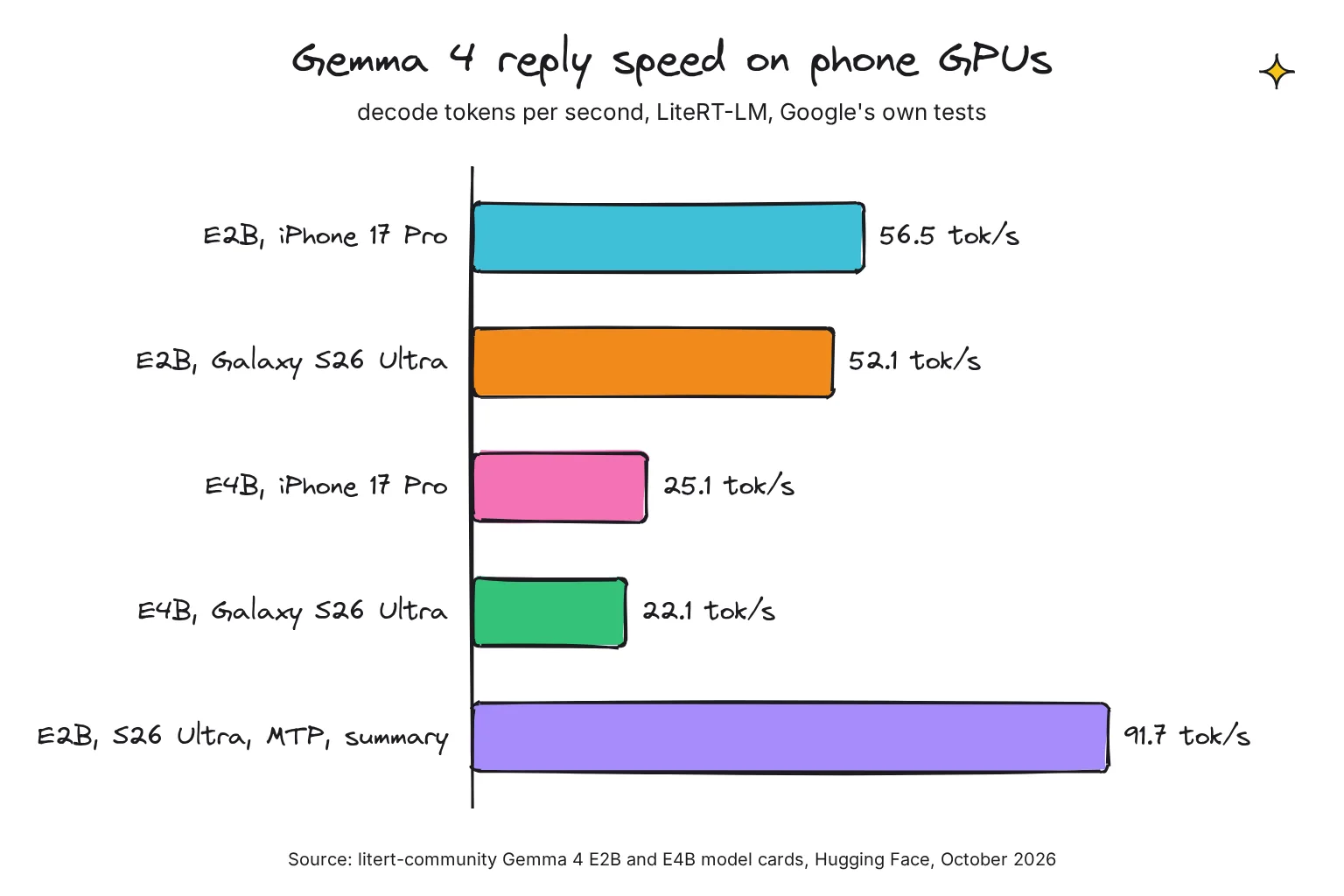
On GPU, Gemma 4 E2B decodes at 52.1 tokens per second on a Galaxy S26 Ultra and 56.5 on an iPhone 17 Pro. On CPU it manages 46.9 and 25.0. Gemma 4 E4B is slower: 22.1 and 25.1 tokens per second on GPU, and 17.7 and 9.7 on CPU. A token is a word or a piece of one.
Multi Token Prediction uses a small draft model to guess several words ahead. On the S26 Ultra's GPU it lifted E2B from a 51.5 tokens per second baseline to 91.7 when summarizing text, with smaller gains on free-form chat. If you downloaded E2B before May 5, 2026, re-download it to get this. Google lists no Pixel 10 figure, so trust your own Stats screen; our local vs cloud AI speed comparison explains what these numbers feel like.
Is Google AI Edge Gallery private?
Your prompts are processed on the phone. Google says all model inferences happen directly on your device hardware. But the app is not silent.
The welcome text says it collects aggregated usage metrics such as error messages, app actions, IP inferred approximate location and OS version. Google Play's Data safety section says the app may collect app interactions, diagnostics and other app performance data for analytics, shares no data with third parties, and encrypts data in transit. Apple's label lists Device ID and diagnostics as linked to you, and coarse location, usage data and crash data as not linked.
In the Android source, the analytics events cover things like model downloads, button taps, settings changes and inference metrics such as model name, decode speed, token counts and peak memory. None of the defined fields carries your prompt text. Turn off the Firebase Analytics switch if you would rather send nothing.
Some features go online by design: model downloads, the Hugging Face sign-in, skills that look things up and MCP servers. Release 1.0.17 also added a Feedback Collector for sharing feedback on model responses, so skip it for anything private. For private documents on the plane, download the model, switch on airplane mode and leave skills off. Our hub on running AI on your phone offline covers the wider picture.
AI Edge Gallery vs PocketPal vs Gemini Nano
They do different jobs, as this October 2026 table shows.
| Feature | AI Edge Gallery | PocketPal | Gemini Nano (built in) |
|---|---|---|---|
| What it is | Google's app for trying on-device models | Open-source chat app for local models | A model inside Android that other apps call |
| License | Apache 2.0 | MIT | Part of Android; ML Kit GenAI terms for developers |
| Where to get it | Google Play, App Store, GitHub APK | App Store, Google Play | Already on supported phones |
| Models | Google's list: Gemma 4, Gemma 3n, Qwen2.5 and more | GGUF models from Hugging Face | Gemini Nano only |
| Engine | LiteRT-LM | llama.cpp | AICore system service |
| Hardware | CPU, GPU, some NPUs and Pixel TPUs | CPU, GPU and Qualcomm NPU | Managed by AICore |
| Phones | Android 12+, iOS 17+ | Android and iPhone | Listed devices, such as Pixel 9 to 11 and Galaxy S26 |
| Data | Usage analytics with an off switch | Only what you choose to share | AICore doesn't store any record of the input data or the resulting outputs |
| Best for | Trying Gemma 4 with images, audio and tools | Choosing your own models | Summaries and rewrites inside apps |
The two are related: Google's Gemma 4 model cards note that on supported Android devices, Gemma 4 is available through Android AI Core as Gemini Nano, which Google recommends for production apps. The Pixel 10 is on Google's Gemini Nano device list, so it already has Nano for app features, and the Gallery adds a place to chat with Gemma directly. For more Android apps side by side, see our guide to running an LLM on Android.
Common questions about Google AI Edge Gallery
Is Google AI Edge Gallery free and open source?
Yes. The app is free on Google Play and the App Store, and its source code is on GitHub under the Apache 2.0 license. The models carry their own licenses: Gemma 4 uses Apache 2.0, while Gemma 3 and Gemma 3n use the Gemma Terms of Use and need a Hugging Face sign-in.
Is Google AI Edge Gallery available on iPhone?
Yes. The iPhone app is on the App Store, needs iOS 17 or later and runs Gemma 4 on the device. Version 1.0.14 arrived on October 27, 2026. The App Store also lists it for Macs with an M1 chip or later, though Apple marks it as an iPhone app not verified for macOS.
Does Google AI Edge Gallery work offline?
Yes, once a model is downloaded. Chat, image questions and transcription run on the phone, so they work in airplane mode. You need a connection to download models, to sign in to Hugging Face for gated models, and for skills or MCP servers that fetch information from the web.
Which phones can run Google AI Edge Gallery?
Any phone on Android 12 or later, or an iPhone on iOS 17 or later, can install it. The model decides what runs well: on Android the app sets 6GB of RAM for Gemma 3 1B, 8GB for Gemma 4 E2B and 12GB for Gemma 4 E4B, and warns you below that.
Do I need a Hugging Face account for AI Edge Gallery?
Not for Gemma 4. Its E2B and E4B files are published under Apache 2.0 without a sign-in gate. Gated models such as Gemma 3 1B and Gemma 3n ask you to sign in to Hugging Face in a browser and accept the license once; the app then stores your token for later downloads.
Is AI Edge Gallery the same as Gemini Nano?
No. AI Edge Gallery is an app that downloads open models such as Gemma 4 and runs them with Google's LiteRT-LM engine. Gemini Nano is a model built into Android through the AICore system service, which other apps call for features such as summaries, rather than a chat app you open.
My verdict for a Pixel 10 owner: install it from Play and start with Gemma 4 E2B
For the reader in this guide, AI Edge Gallery is the right first app. It is free, made by Google, which also makes Gemma, needs no account for Gemma 4, and keeps chats on the phone. Start with E2B, because it is more than twice as quick as E4B in Google's CPU and GPU tests, then try E4B on the Pixel's 12GB when you want better answers. Turn off the analytics switch if that matters to you, and treat Agent Skills and MCP as experiments. If you outgrow Google's model list, move to PocketPal. If you want Gemma 4 on a laptop too, our Gemma 4 and Open WebUI guide covers the desktop side.
Your next step: install the app from Google Play, download Gemma 4 E2B on Wi-Fi, switch on airplane mode, and ask it to summarize a long email you know well, then tap Stats to see your own speed.
Sources
- google-ai-edge/gallery README - Google AI Edge, GitHub
- Google AI Edge Gallery - Google Play
- Google AI Edge Gallery: Data safety - Google Play
- Google AI Edge Gallery - App Store
- Release 1.0.20 - google-ai-edge/gallery, GitHub
- Releases - google-ai-edge/gallery, GitHub
- Release 1.0.14 - google-ai-edge/gallery, GitHub
- Release 1.0.12 - google-ai-edge/gallery, GitHub
- 2. Getting Started - google-ai-edge/gallery wiki, GitHub
- 5. Model Management - google-ai-edge/gallery wiki, GitHub
- Android Debug Bridge (adb) - Android Developers
- model_allowlists/1_0_20.json - google-ai-edge/gallery, GitHub
- Android app strings.xml - google-ai-edge/gallery, GitHub
- Analytics.kt - google-ai-edge/gallery, GitHub
- ModelAllowlist.kt - google-ai-edge/gallery, GitHub
- Mobile Actions Actions.kt - google-ai-edge/gallery, GitHub
- AI Edge Gallery Agent Skills - google-ai-edge/gallery, GitHub
- Model Context Protocol (MCP) in Google AI Edge Gallery - google-ai-edge/gallery, GitHub
- Bring state-of-the-art agentic skills to the edge with Gemma 4 - Google Developers Blog
- Bring multimodal semantic search to the edge with EmbeddingGemma 2 - Google Developers Blog
- litert-community/gemma-4-E2B-it-litert-lm - Hugging Face
- litert-community/gemma-4-E4B-it-litert-lm - Hugging Face
- google/gemma-3n-E2B-it-litert-lm - Hugging Face
- LiteRT-LM overview - Google AI Edge
- LLM Inference guide - Google AI Edge
- Gemma 4 model overview - Google AI for Developers
- Gemma Terms of Use - Google AI for Developers
- Gemini Nano - Android Developers
- ML Kit GenAI APIs - Google for Developers
- pocketpal-ai - a-ghorbani, GitHub
- Pixel 10 tech specs - Google Store
- Pixel 10a tech specs - Google Store
- Galaxy S26 Ultra - Samsung US