
How do you run an LLM on an Android phone?
Install a free app such as PocketPal AI or Google AI Edge Gallery, download one small model over Wi-Fi, and chat with no connection at all. An 8GB phone runs 1-4 billion parameter models; Google measured 46.9-52.1 tokens per second for Gemma 4 E2B on a Galaxy S26 Ultra.
This guide follows one reader: someone with a 12GB Pixel 11 or Galaxy S26, or an 8GB Pixel 10a, who wants a private chatbot for drafting messages and answering questions on a flight or out of signal. One detail shapes their choices. Google lists the Pixel 11 with 12 GB of RAM and a Tensor G6 chip, so it lacks the Qualcomm Snapdragon chip that some app speed-ups need. The Galaxy S26 has 12 GB, and its chip depends on where it is sold. Samsung's US launch specs list the Snapdragon 8 Elite Gen 5 for Galaxy, the S26 Ultra's chip, as do its Canadian and Japanese pages. In Europe, the UK, Korea, India, Australia and other markets, the S26 and S26+ use the Exynos 2600. Samsung's US product page FAQ also says Exynos 2600, so check the exact model if Snapdragon speed-ups matter to you.
An LLM (large language model) is the kind of model behind ChatGPT; our guide to how LLMs work explains tokens, the word pieces it reads and writes. On a phone you run a small open model instead, and everything happens on the phone's own chips. For iPhone and the wider picture, start at our guide to running AI on your phone offline.
Choose PocketPal AI if:
- You want to try almost any open model: it searches and downloads GGUF models from Hugging Face and is open source under the MIT license.
- Privacy comes first: its policy says the app does not use analytics or crash-reporting SDKs.
- You own a Snapdragon phone such as a US Galaxy S26 or any S26 Ultra, where it adds GPU and Hexagon NPU paths, the NPU one experimental and for Snapdragon 8 Gen 2 or newer.
Choose Google AI Edge Gallery if:
- You want Google's Gemma 4 models with photo questions, audio transcription and agent skills in one official app.
- You want GPU speed on a Pixel 11 or Exynos Galaxy: its Gemma 4 entries offer GPU or CPU, though the app removes the GPU option on Pixel 10 phones, the 10a included.
- You accept usage analytics, which its Play data safety label declares.
Choose ChatterUI, SmolChat or Maid if:
- You want character chats and a switch to Ollama on your PC: ChatterUI does both.
- You want the plainest chat screen and a Play label of no data collected: SmolChat, or Maid, which is MIT licensed with no telemetry and no ads.
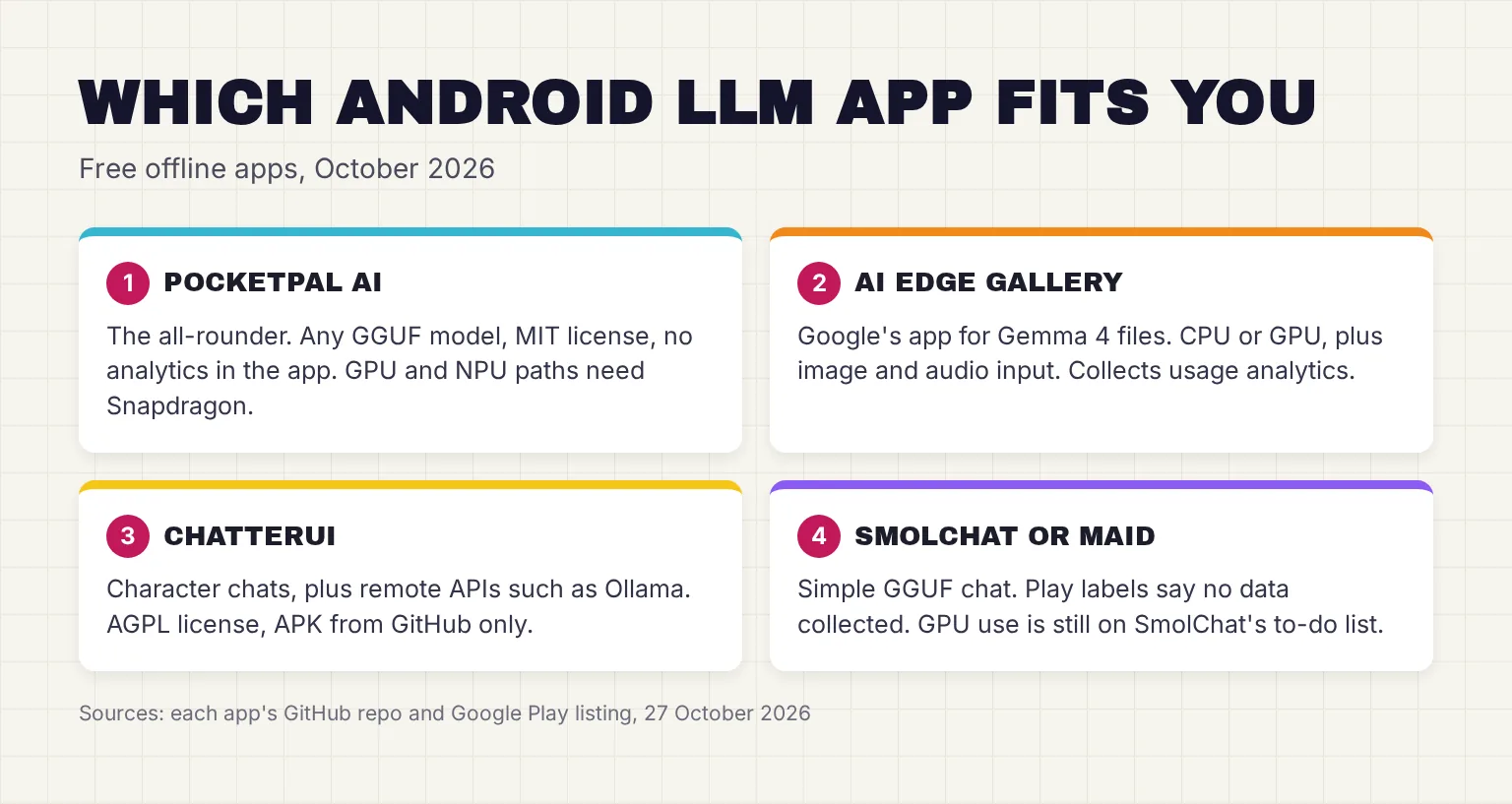
Which offline AI apps for Android are current in October 2026?
Each app pairs a chat screen with an engine, the code that does the math. Most use llama.cpp, an open-source engine that runs GGUF files: single-file models, usually quantized, meaning their numbers are stored in about 4 bits instead of 16 so they fit in a phone's memory. Google's app uses LiteRT-LM, which runs .litertlm files on GPU and NPU accelerators. I checked every row on 27 October 2026.
| App | License | Engine and format | Where models come from | Extras | Latest release |
|---|---|---|---|---|---|
| PocketPal AI | MIT | llama.cpp; GGUF | Hugging Face search in the app, or a file | Vision models, voices, voice input, tools | v1.21.2, October 26, 2026; Play 1.21.1, October 25 |
| Google AI Edge Gallery | Apache 2.0 | LiteRT-LM; .litertlm | Built-in list from Hugging Face, or import your own | Ask Image, Audio Scribe, Agent Skills, Prompt Lab | 1.0.20, October 6, 2026; Play build October 27 |
| ChatterUI | AGPL-3.0 | llama.cpp; GGUF | A file on your phone | Character cards, phone text-to-speech, remote APIs | v0.10.0 (APK v0.10.1), September 22, 2026 |
| SmolChat | Apache 2.0 | llama.cpp; GGUF | Hugging Face search in the app, or a file | Saved system prompts, home-screen shortcuts | v16, June 21, 2026 |
| Maid | MIT | llama.cpp; GGUF | Curated Hugging Face list, or a file | Vision, system speech, remote APIs | v3.0.0, March 10, 2026; Play update September 2 |
| MNN Chat | Apache 2.0 | Alibaba MNN | The app's own list | Image and audio input, image generation | 0.8.3 APK; Play 0.8.4, August 4, 2026 |
| MLC Chat | Apache 2.0 | MLC LLM; MLC-converted models | Preset list from Hugging Face | Text chat | Demo APK from September 2024, not on Play |
| Layla | Closed, $19.99 | Not published; loads GGUF | A 4GB model at first start | Characters, 100+ voices, Python agents | 7.6.0, Play update October 19, 2026 |
Release dates come from each GitHub release page and its tag. Gallery's Play build is newer than its GitHub release: its notes add on-device speech recognition and text-to-speech. PocketPal's Play notes add voice input, an optional one-time PocketPal Plus purchase and web search through You.com; web search, of course, goes online.
Is MLC Chat still maintained?
The engine is; the app is not, as an everyday download. The MLC LLM docs still link a demo APK that is built for Samsung S23 with Snapdragon 8 Gen 2 chip, and that file sits in a release tagged September 2024. The MLC LLM repo itself, Apache 2.0 licensed, lists OpenCL GPU support for Adreno and Mali on Android. I would treat it as a developer tool, not a chat app.
Is Layla free?
No. Layla is a $19.99 purchase on Google Play, with in-app purchases on top, and says it supports only the latest flagship phones with 8GB or more of RAM. Its privacy policy says it uses third-party SDKs to track analytics such as install rate, and advertising IDs to track marketing campaigns. Its Play label lists device IDs and crash and performance data shared for analytics, and says you cannot ask for that data to be deleted. A separate Layla (Cloud) app runs in the cloud, so check which one you install.
How to set up PocketPal AI on Android, step by step
PocketPal is my top pick for this reader because it runs on any recent Android phone, takes any GGUF model and keeps chats on the phone. Its Play listing asks for 6GB+ RAM for smaller models, 8GB+ for the good stuff. These steps follow the project's README; our full PocketPal AI guide covers pals, benchmarks and every setting.
- Install the app. Get PocketPal AI from Google Play, where it is listed under LLM Ventures with Gooya UG of Nuremberg, Germany, as the developer. No account is needed.
- Download a model on Wi-Fi. Tap the menu (☰), then Models, and download one from the list, or tap + to search Hugging Face and pick a quantization that fits your memory. On a 12GB Pixel 11 or Galaxy S26, start with gemma-3-4b-it-Q4_0.gguf, 2.37 GB, the first pick in PocketPal's own device rules for phones with more than 8GB and a mid-range or flagship chip. On an 8GB Pixel 10a the app suggests a shorter list led by SmolLM3 3B, because the same rules class every Google Tensor chip through Tensor G5 as mid-range.
- Load it. Tap Load on the model card, or use the chevron beside the chat box. Loading brings the model into memory, ready to chat.
- Check the compute device. In the settings, PocketPal lets you select the compute device: CPU, GPU or Hexagon NPU. The GPU option needs an Adreno GPU plus the i8mm and dotprod CPU features and is meant for Q4_0 or Q6_K files, and the Hexagon option, labeled experimental, appears only when the app finds a Qualcomm NPU. So a Pixel or Exynos Galaxy uses CPU.
- Keep the context modest. Context size is how much of the chat the model keeps in view, and more context uses more RAM. If a long chat stops, the app tells you to start a new chat or raise the context size.
- Test it offline. Turn on airplane mode, ask a question, then open the Benchmark page, which measures tokens per second and memory. Sharing results to the leaderboard is optional.
Setting up Google AI Edge Gallery instead
Gallery needs Android 12 and up. Install it from Google Play, tap AI Chat, expand a model and tap Download; it becomes Try It when ready. Gated models require you to log in with your Hugging Face account and accept the license, while the Gemma 4 files are Apache 2.0. Without Play, the wiki explains installing the APK from GitHub. Our Google AI Edge Gallery guide walks through each feature.
Which models fit 6, 8, 12 and 16GB phones?
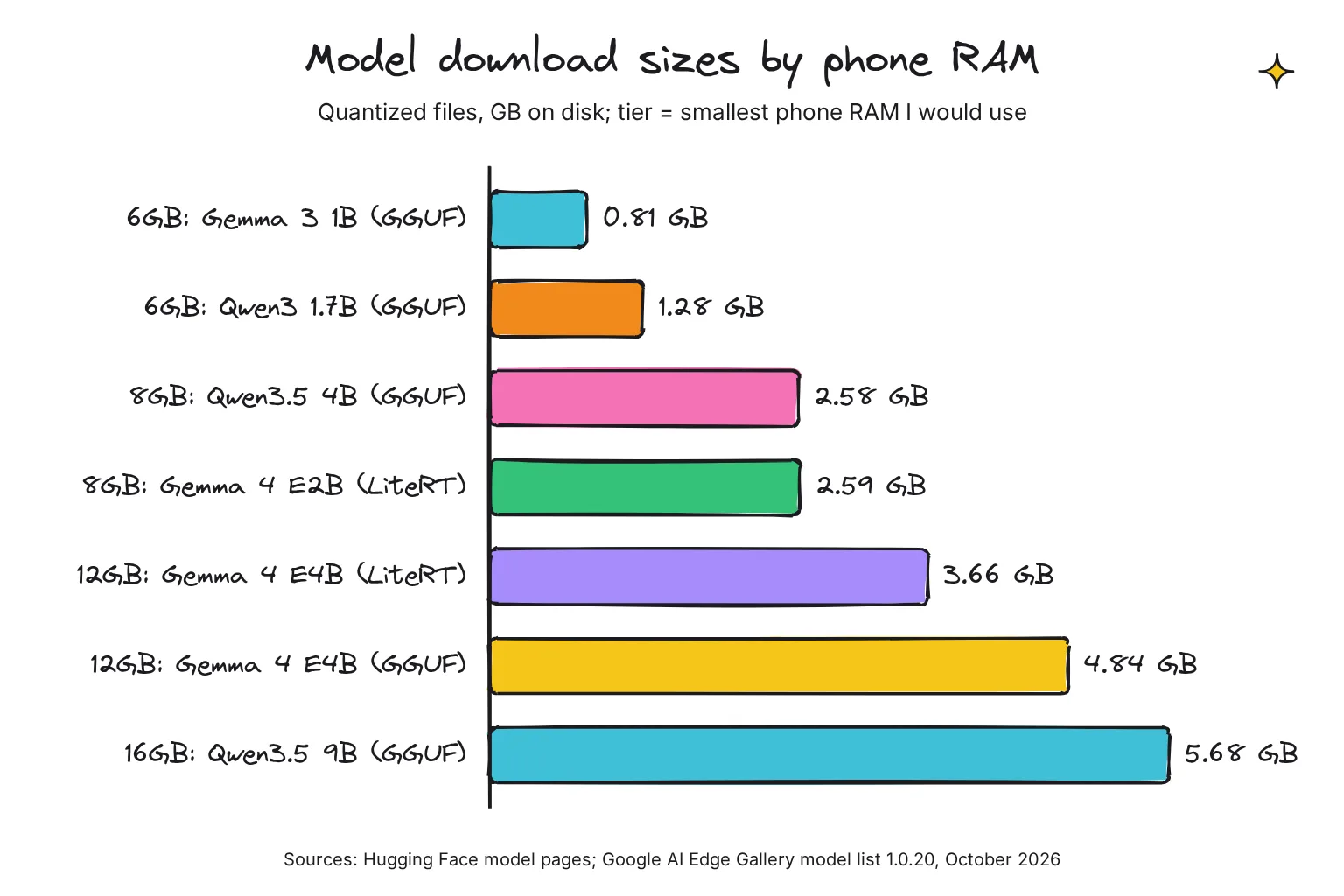
RAM decides model size. Android, your open apps and the chat's context all share it, and PocketPal's rules say to leave about 25-35% of physical RAM as headroom so Android does not close the app. Our rule of thumb is about 0.55-0.65 GB per billion parameters at 4-bit. Gallery sets its own minimums: 8GB for Gemma 4 E2B and 12GB for E4B.
| Phone RAM | Example phones | Models to try | Download size |
|---|---|---|---|
| 6GB | Older mid-range phones | Gemma 3 1B, Q4_K_M; Qwen3 1.7B, Q4_K_M | 0.81 GB; 1.28 GB |
| 8GB | Pixel 10a | Gemma 3 4B, Q4_0; Qwen3.5 4B, Q4_0; Gemma 4 E2B in Gallery | 2.37 GB; 2.58 GB; 2.59 GB |
| 12GB | Pixel 11, Galaxy S26, S26 Ultra 256GB or 512GB | Gemma 4 E4B in Gallery; Gemma 4 E4B, Q4_0 GGUF | 3.66 GB; 4.84 GB |
| 16GB | Pixel 11 Pro or Pro XL 512GB or 1TB, S26 Ultra 1TB | Qwen3.5 9B, Q4_K_M; Gemma 4 12B, Q4_0 | 5.68 GB; 6.74 GB |
Sizes are from each Hugging Face file list and Gallery's model list in October 2026. RAM figures are from Google's Pixel 11 Pro specs and Samsung's S26 Ultra page, where 16GB comes only with the biggest storage. The 16GB row is my judgment: PocketPal's rules exclude Qwen3.5 9B on 8GB phones, and I know of no published phone speed for these models.
What does the E in Gemma 4 E2B mean?
Effective parameters. Gemma 4 E2B has 2.3B effective parameters, or 5.1B with embeddings, lookup tables that each layer consults. That is why the GGUF file is bigger than a 2B model's: gemma-4-E2B-it-Q4_0.gguf is 3.04 GB. LiteRT-LM memory-maps those embeddings, reading them from storage as needed, which Google says saves working memory on some platforms.
Do models that read photos need more space?
Yes, in GGUF apps. A vision model needs a second projection file: for Gemma 4 E2B, mmproj-F16.gguf adds 0.99 GB. Gallery's .litertlm files include image and audio input in the one download and load the vision and audio parts on demand.
How fast is a local LLM on Android?
Two numbers matter. Prefill is how fast the model reads your prompt, which sets the wait before the first word. Decode is how fast it writes, in tokens per second. Our local vs cloud AI speed comparison puts these numbers in context.
The best published phone figures come from Google's LiteRT model cards, measured on a Galaxy S26 Ultra with a 1,024-token prompt, 256 generated tokens and 4 CPU threads. Gemma 4 E2B decoded at 46.9 tokens per second on the CPU and 52.1 on the GPU, but prefill jumped from 557 to 3,808 tokens per second on the GPU. Gemma 4 E4B managed 17.7 on the CPU and 22.1 on the GPU, with prefill of 195 and 1,293.
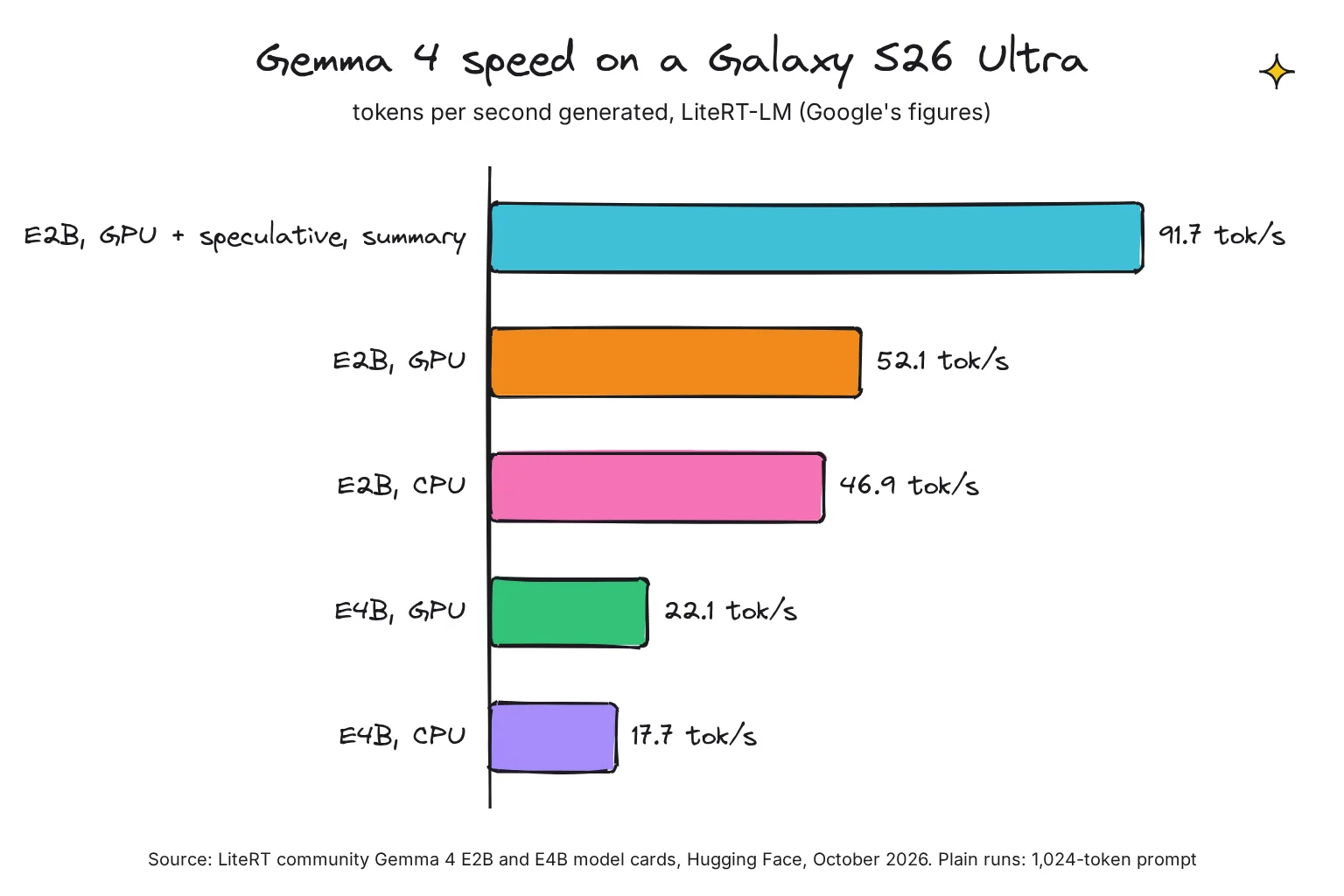
Speculative decoding, where a small draft guesses several tokens and the main model checks them, lifted E2B on the GPU to 91.7 tokens per second when summarizing text, and E4B to 46.0. Gallery's model list says its updated Gemma 4 E2B uses built-in Multi Token Prediction for faster decoding, with a toggle in chat configuration. The GPU run also used less CPU memory: 676 MB against 1,733 MB for E2B.
Other figures are makers' claims. PocketPal's site shows LFM2.5-1.2B on a Snapdragon 8 Elite Gen 5 NPU reading the prompt at 2,725 tokens per second, 6.5 times the CPU, and calls the NPU path experimental. Alibaba says MNN beats llama.cpp on Android CPUs with 8.6 times the prefill speed and 2.3 times the decoding speed. I know of no like-for-like test of these apps on one phone that I trust.
CPU, GPU or NPU: which does each app use?
The CPU is the phone's main processor and works everywhere. The GPU, the graphics chip, is good at the parallel math models need. The NPU, a neural processing unit, is a chip block built for AI, but apps can only use one their engine supports.
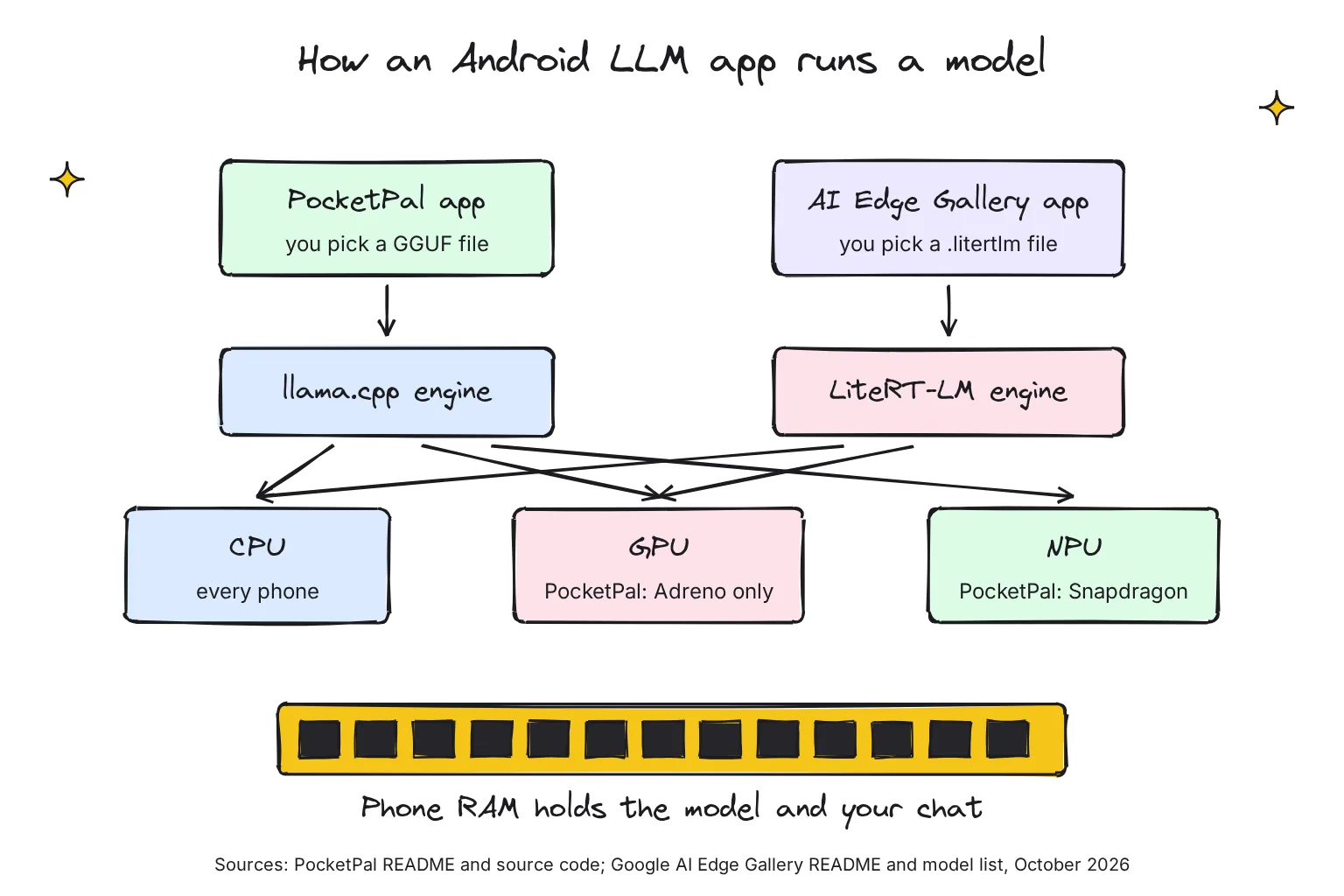
- PocketPal: CPU everywhere, GPU through OpenCL on Qualcomm Adreno, and the Qualcomm Hexagon NPU, falling back gracefully. Its own settings text says the GPU gives faster prompt processing, but generation may not always be faster.
- Google AI Edge Gallery: GPU or CPU per model, with XNNPack on the CPU and ML Drift on the GPU. Its code drops the GPU option on any phone whose model name contains Pixel 10, so a Pixel 10a runs Gemma 4 on the CPU.
- ChatterUI: llama.cpp, with a tip to use Q4_0 files on Snapdragon 8 Gen 1 and Exynos 2200 or newer.
- SmolChat: CPU; using the GPU through Vulkan is still on its future list.
- MLC Chat: OpenCL on Adreno and Mali GPUs.
If you are still choosing a phone, our guide to the best phone for local AI compares RAM and chips.
How private is an offline AI chatbot on Android?
With a downloaded model in local mode, the chat itself is worked out on the phone in every app here. The differences are in what else the app sends. Gallery's wiki says it runs without needing an internet connection once the model is loaded, and the airplane-mode test in step 6 is the simplest check for any app.
- PocketPal: conversations never leave your device. Data goes out only when you act: Hugging Face downloads, opt-in benchmark results with your device model, RAM and chipset, feedback tagged with a random installation ID, and optional PalsHub sign-in. Chats are stored in a WatermelonDB database on the phone. Its Play label lists purchase history and an optional email address, the email shared for account management.
- Google AI Edge Gallery: Google says all model inferences happen directly on your device, but its source uses Firebase Analytics with events such as model_download and inference_metrics; the inference_metrics fields are timings, speeds and token counts. The Play label lists app interactions, diagnostics and performance data for analytics, with no sharing.
- SmolChat and Maid: SmolChat's policy says it does not obtain any information, and Maid's Play label shows no data collected.
- MLC Chat and MNN Chat: MLC says all data stays in users' device. MNN Chat's policy says chat text, images and audio are processed only on the phone, but that the app may collect service logs including device model, IP address and crash logs, while its Play label says no data collected.
Permissions are the other check. PocketPal's manifest asks for internet, camera, microphone and notifications. Gallery's lists 19 permissions, including photos and videos, camera, microphone and calendar. Grant camera and microphone only when you use a feature that needs them. Our guide to using Ollama from your phone covers the other route: a bigger model on your home PC.
Battery and heat: what the phone makers say
Running a model works the chip hard, much like a game. Google says a hot Pixel may reduce CPU performance, so replies slow down, and lists heavy use while charging as a cause of warmth. On a Pixel 6 or later you can check under Settings, Battery, Battery diagnostics.
Samsung's advice is to close apps that run in the background, lower screen brightness, and unplug the charger if the phone heats up while charging; it also warns that performance may be limited until it cools. Two app settings help: PocketPal keeps the screen awake only during a reply, and Auto Offload/Load frees the model's RAM when the app is in the background. Shorter answers and a smaller model mean less work, my general advice rather than a published figure.
Common questions about running an LLM on Android
Can I run an LLM on Android without internet?
Yes. Apps such as PocketPal AI and Google AI Edge Gallery need the internet only to download the app and the model. After that, the model runs on the phone's own chips, so you can chat in airplane mode. Download the model on Wi-Fi first, because most files are 1-5 GB.
What is the best offline AI app for Android?
For most people, PocketPal AI: it is free, open source under the MIT license, runs any GGUF model from Hugging Face and uses no analytics in the app. Google AI Edge Gallery is the better pick for Gemma 4 with photo and audio input and GPU speed, if you accept its usage analytics.
How much RAM do I need to run an LLM on my phone?
Six gigabytes runs 1-2 billion parameter models such as Gemma 3 1B. Eight gigabytes handles 4 billion parameter models or Gemma 4 E2B, and 12GB fits Gemma 4 E4B. Leave about a quarter to a third of RAM free for Android, as PocketPal's own rules advise.
Is PocketPal AI private?
Its privacy policy says conversations never leave the phone and the app has no analytics or crash-reporting tools. Data goes out only when you choose: model downloads from Hugging Face, optional benchmark results, feedback, optional PalsHub sign-in, a PocketPal Plus purchase and the newer web search feature.
Can an Android phone's NPU run a chatbot?
Sometimes. PocketPal can use the Qualcomm Hexagon NPU on Snapdragon 8 Gen 2 or newer phones, and its site calls that path experimental. Google's LiteRT-LM engine supports NPUs, but Gallery's Gemma 4 entries offer GPU or CPU. On a Pixel or an Exynos Galaxy, expect the CPU or GPU to do the work.
Can I use Ollama on my Android phone?
You can connect to Ollama rather than run it on the phone. ChatterUI and Maid both list Ollama as a remote backend, so your phone sends prompts to Ollama on your home computer over your network. That gives you bigger models, but the chat leaves the phone.
My verdict for a 12GB Pixel or Galaxy: start with PocketPal, add Gallery for Gemma 4
For the reader in this guide, PocketPal AI is the right first app. It is open source, keeps chats on the phone with no analytics, and lets you try any GGUF model as your needs change. On a Pixel 11, or a Galaxy S26 with the Exynos chip sold outside the US, it will run on the CPU, slower than a GPU but workable for a 4B model; on a US Galaxy S26 with Snapdragon, try its GPU and experimental NPU options too. Add Google AI Edge Gallery when you want Gemma 4 with photo questions and GPU speed, and accept its usage analytics. Skip MLC Chat, whose app is out of date, and check Layla's price and tracking before paying.
Your next step: install PocketPal on Wi-Fi, download gemma-3-4b-it-Q4_0 (2.37 GB), turn on airplane mode, and ask it to draft a message you would normally type yourself, so you can judge the answer.
Sources
- PocketPal AI - Google Play
- PocketPal AI data safety - Google Play
- Google AI Edge Gallery - Google Play
- Google AI Edge Gallery data safety - Google Play
- litert-community/gemma-4-E2B-it-litert-lm - Hugging Face
- litert-community/gemma-4-E4B-it-litert-lm - Hugging Face
- Google Pixel 11 tech specs - Google Store
- Google Pixel 11 Pro and 11 Pro XL tech specs - Google Store
- Pixel 10a specs - Google Store
- Galaxy S26 and S26+ - Samsung US
- Galaxy S26 Ultra - Samsung US
- Galaxy S26 and S26+ - Samsung Canada
- Galaxy S26 and S26+ - Samsung Japan
- Samsung Unveils Galaxy S26 Series: The Most Intuitive Galaxy AI Phone Yet - Samsung Newsroom US
- Samsung Unveils Galaxy S26 Series: The Most Intuitive Galaxy AI Phone Yet - Samsung Global Newsroom
- pocketpal-ai README - a-ghorbani, GitHub
- Release v1.21.2 - a-ghorbani/pocketpal-ai, GitHub
- rules.android.json - a-ghorbani/pocketpal-ai, GitHub
- deviceCapabilities.ts - a-ghorbani/pocketpal-ai, GitHub
- deviceSelection.ts - a-ghorbani/pocketpal-ai, GitHub
- PocketPal AndroidManifest.xml - a-ghorbani/pocketpal-ai, GitHub
- PocketPal AI: Own your AI - PocketPal
- Privacy Policy - PocketPal AI (Gooya UG)
- Google AI Edge Gallery README - google-ai-edge, GitHub
- Release 1.0.20 - google-ai-edge/gallery, GitHub
- Model allowlist 1_0_20.json - google-ai-edge/gallery, GitHub
- Google AI Edge Gallery: User Guide - Google AI Edge Gallery wiki, GitHub
- 5. Model Management - Google AI Edge Gallery wiki, GitHub
- 2. Getting Started - Google AI Edge Gallery wiki, GitHub
- Analytics.kt - google-ai-edge/gallery, GitHub
- ModelAllowlist.kt - google-ai-edge/gallery, GitHub
- Utils.kt - google-ai-edge/gallery, GitHub
- Gallery AndroidManifest.xml - google-ai-edge/gallery, GitHub
- LiteRT-LM README - google-ai-edge, GitHub
- ChatterUI README - Vali-98, GitHub
- ChatterUI releases - Vali-98, GitHub
- SmolChat-Android README - shubham0204, GitHub
- SmolChat-Android releases - shubham0204, GitHub
- SmolChat - Google Play
- SmolChat privacy policy - shubham0204, GitHub
- Maid README - Mobile-Artificial-Intelligence, GitHub
- Maid releases - Mobile-Artificial-Intelligence, GitHub
- Maid - Google Play
- MNN Chat Android App README - alibaba/MNN, GitHub
- MNN Chat - Google Play
- MNN Chat Privacy Policy - Alibaba MNN
- Android SDK - MLC LLM docs
- MLC Chat App Privacy - MLC LLM docs
- mlc-llm README - mlc-ai, GitHub
- Layla - Google Play
- Privacy Policy - Layla Network
- google/gemma-4-E2B-it - Hugging Face
- ggml-org/gemma-3-1b-it-GGUF files - Hugging Face
- bartowski/Qwen_Qwen3-1.7B-GGUF files - Hugging Face
- unsloth/gemma-3-4b-it-GGUF files - Hugging Face
- unsloth/Qwen3.5-4B-GGUF files - Hugging Face
- unsloth/gemma-4-E2B-it-GGUF files - Hugging Face
- unsloth/gemma-4-E4B-it-GGUF files - Hugging Face
- unsloth/Qwen3.5-9B-GGUF files - Hugging Face
- unsloth/gemma-4-12b-it-GGUF files - Hugging Face
- Help keep your Pixel phone from feeling too warm or hot - Pixel Phone Help
- What to do when your phone heats up - Samsung