What is PocketPal AI?
PocketPal AI is a free, open-source app that runs small language models entirely on your phone, with no account and no internet once a model is downloaded. It is MIT licensed, runs GGUF models through llama.cpp, and is on Android and iPhone. Version 1.21.2, released October 26, 2026, is current.
This guide follows one reader: someone with an 8GB Android phone, such as a recent Galaxy or Pixel, or an iPhone 15 Pro or newer, who heard PocketPal runs AI offline and wants to set it up correctly the first time. That phone has room for a useful 4B model (about 4 billion parameters, the learned numbers that make up a model), but no memory to waste.
Choose PocketPal if:
- You want one free, open-source app on both Android and iPhone that can search and download any GGUF model from Hugging Face, including gated ones.
- You want control over settings such as context size, GPU layers and chat templates.
- You like the idea of custom personas (Pals), simple tools and a benchmark that shows what your phone can handle.
Choose Google AI Edge Gallery instead if:
- You mainly want Google's Gemma models with image, audio and agent demos in one app, and do not need other GGUF models. Our Google AI Edge Gallery guide covers it.
Choose Locally AI instead if:
- You only use Apple devices and want an app powered by Apple's MLX framework, and a closed-source app is fine with you.
Who makes PocketPal AI, and which version is current?
PocketPal began as Asghar Ghorbani's project: the MIT license is dated 2024 in his name, and the getting-started guide still calls it a personal project worked on in spare time. The app is now published by Gooya UG (haftungsbeschränkt) in Nuremberg, Germany, with Ghorbani as managing director. Google Play shows LLM Ventures as the developer name, Gooya UG as the company, and 1M+ downloads.
Updates arrive often: version 1.21.2 fixed slower Metal decoding on iPhones. Version 1.21.0, on October 23, added on-device voice input (Whisper), a hands-free voice mode, the Phonon voice and PocketPal Plus. Version 1.20.0, on October 14, made Android model downloads resumable.
The App Store lists version 1.21.2, which followed 1.20.1, so iPhone users got the 1.21 features and the fix together. The Google Play listing was last updated October 25, 2026, with version 1.21.1; the 1.21.2 change was for the iPhone build.
Is PocketPal AI free?
Yes: the README says PocketPal is free and ad-free, with no subscription or pro tier for the AI. PocketPal Plus is an optional one-time purchase where you pick the price and every amount gets the same features; the US App Store lists it at $3.99, $8.99, $22.99 and $44.99. It currently adds hands-free voice mode, with a local API server still unshipped. Some premium Pals cost $0.99 to $2.99.
What phone do you need for PocketPal?
The App Store version requires iOS 15.1 or later and also runs on iPad, but the app says Metal acceleration requires iOS 18 or higher. On Android the build targets minimum SDK 24, which is Android 7.0. Memory matters more: the maker's own listing says you'll need 6GB+ RAM for smaller models, 8GB+ for the good stuff.
Apple does not publish RAM, but MacRumors reported 8GB in the iPhone 15 Pro and Pro Max, 8GB in every iPhone 16 and the iPhone 17, and 12GB in the iPhone Air and 17 Pro models. So the iPhone reader and the 8GB Android reader sit in the same memory class.
What engine does PocketPal use?
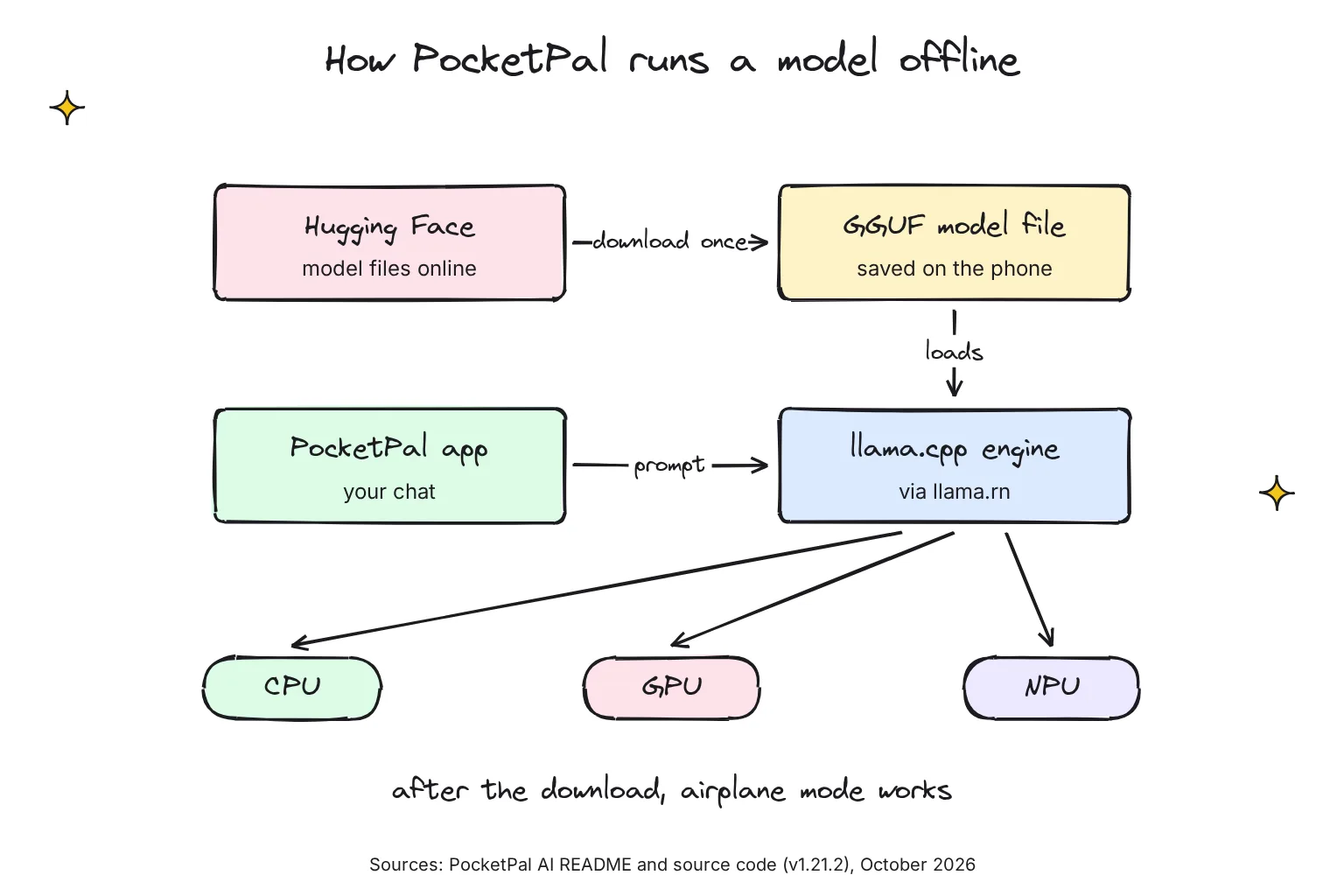
PocketPal uses llama.cpp, an open-source engine that runs models stored as GGUF, a single-file format for quantized models (models whose numbers are stored at lower precision so they fit in less memory). It reaches llama.cpp through llama.rn, an MIT-licensed React Native binding; the README lists llama.rn 0.13.0-rc.7 and llama.cpp build b11385, and ONNX Runtime for text-to-speech voices.
The README says it targets the CPU as a universal fallback, the GPU through Metal on iOS and OpenCL on Qualcomm Adreno, and the NPU on Qualcomm Hexagon, falling back gracefully when one is missing. An NPU (neural processing unit) is a part of the chip built for AI math. The maker's own site claims 2,725 tokens per second reading a prompt on a Snapdragon 8 Elite Gen 5 NPU, 6.5 times the CPU, with the small LFM2.5-1.2B model, and labels NPU support experimental, for Android phones with a Snapdragon 8 Gen 2 or newer.
How do you install PocketPal and load your first model?
Install only from the official listings, and check the seller name before you tap Get or Install. The whole setup takes a few taps plus the download time.
- Install the app. Get it from the App Store, where the seller is Gooya UG, or Google Play, where the developer is LLM Ventures.
- Pick a pal in the welcome screens. The app asks what your pal is for (Smart Chat, Coding, Education, Roleplay or Creative Writing) and offers Quick, Balanced and Best models. For the general pal, Pip, those are LFM2.5 1.2B, Gemma 3 1B and Qwen3.5 4B, downloads of 0.73 GB, 1.07 GB and 2.71 GB. The code notes that Balanced is pre-selected on every phone for now; on an 8GB phone, pick Best.
- Or download from the Models page. Tap the menu, go to Models, pick one that fits your phone, and tap Download. Use Wi-Fi, since files run from under 1 GB to about 5 GB.
- Load the model. Tap Load on the model card, or use the chevron icon left of the chat input, then start typing on the Chat page.
- Test it offline. Turn on airplane mode and send a message. The README promises that once you download a model once, it just works, with no connection and no account.
How do I add any GGUF model from Hugging Face?
Hugging Face is a website where model makers publish their files. On the Models page, tap + and choose Add from Hugging Face, then search GGUF models and choose a quantization that fits your device's memory and storage, and download it or bookmark it for later. Add Local Model imports a file already on the phone.
Gated models need you to accept the maker's terms on Hugging Face first. Create an access token in your account, then in PocketPal go to Settings, Set Token. The privacy policy says the token is stored in your device's secure keychain and sent only to Hugging Face. Vision models also need a projection file (mmproj), and the app offers download with vision or text only.
Can I install the PocketPal APK instead?
On Android, yes. The release workflow sends the APK to GitHub and the app bundle to Google Play, and version 1.21.2 carries app-prod-release.apk, 255 MB. Take it only from the official releases page, and use Google Play if you can. There is no equivalent for iPhone.
Which PocketPal model is best for your phone's memory?
The best PocketPal model is the largest one that fits comfortably in RAM, the phone's working memory (not its storage). The app now does the sorting for you: it places your phone in one of four tiers by memory and chip, using a rules file, version 2026-09-24.1, that ships with the app and is refreshed online from the developer's pocketpal-device-rules repository.
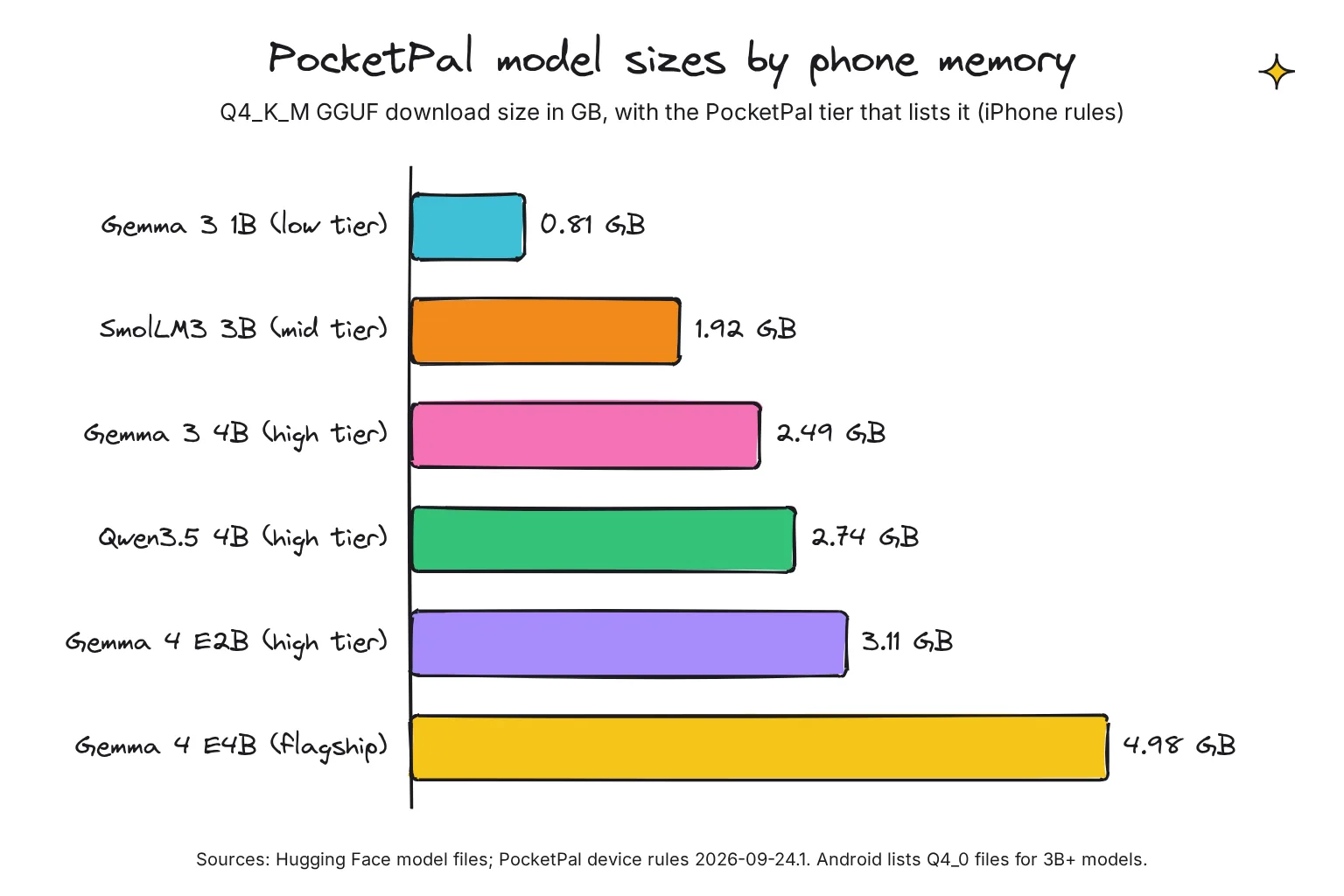
The same file explains the headroom it keeps. On Android it leaves about 25-35% of physical RAM free, and on iOS it notes that an 8 GiB iPhone tolerates a peak of about 3-3.5 GB, because the system closes apps that use more. That is why both readers top out around 3 GB models. Sizes below are the Q4_K_M files the iPhone list uses, from each model's Hugging Face file list in October 2026; for models of 3B and up, the Android list points to slightly smaller Q4_0 files.
| PocketPal tier | Example phones in the rules file | Models to try | Download (Q4_K_M) |
|---|---|---|---|
| Low (4-6GB Android, 3-4GB iPhone) | OnePlus 6; iPhone XR, iPhone 11 | Gemma 3 1B | 0.81 GB |
| Mid (6-8GB Android, 4-6GB iPhone) | Pixel 7a, Pixel 8; iPhone 13 Pro | SmolLM3 3B | 1.92 GB |
| High (6-8GB, depending on the chip) | Galaxy S23, POCO X7 Pro; iPhone 15, iPhone 16 | Gemma 3 4B first, then Gemma 4 E2B; Qwen3.5 4B on the iPhone list only | 2.49 GB, 3.11 GB, 2.74 GB |
| Flagship (over 8GB with a flagship chip) | POCO F8 Ultra; iPhone 17 Pro, Pro Max, Air; iPad Pro M2+, iPad Air M3+ | Gemma 3 4B first; Gemma 4 E4B as the step up | 2.49 GB, 4.98 GB |
For the 8GB reader, start with Gemma 3 4B, the first pick in the high tier on both platforms. On iPhone, Qwen3.5 4B is on the same list; the Android rules keep it for flagship phones, though the welcome screens still offer it as Best. Add Gemma 4 E2B if you want to ask about photos, since it pairs with a 0.99 GB vision file. The rules file lists Gemma 4 E4B only in the flagship tier, with a minimum of 7.3 GB of RAM on iOS and 7.9 GB on Android.
The chip matters as much as the memory. Every 8GB iPhone from the iPhone 15 Pro on should get the high-tier list, because the iOS classifier puts 6-8GB phones with mid-range or flagship chips there. On Android, an 8GB Galaxy with a Snapdragon 8-series chip lands in the high tier, but the rules file classes every Google Tensor chip, up to Tensor G5, as mid-range, so an 8GB Pixel gets the mid list, led by SmolLM3 3B.
What do Q4_K_M and Q4_0 mean?
They are quantization labels, which say how many bits store each weight: Q4 files use about 4, Q8 about 8. Gemma 3 4B is 4.13 GB as Q8_0 against 2.49 GB as Q4_K_M, and Q4_K_M and Q4_0 are two different 4-bit recipes. On Snapdragon phones the Android rules file makes Q4_0 the primary pick for models of 3B and up, citing faster prompt processing on the Hexagon NPU and lower load memory. Gemma 3 4B in Q4_0 is 2.37 GB.
Which PocketPal settings should you change?
Very few. The model settings sit under Model Initialization Settings, and the app warns that a model reload is needed for changes to take effect. The defaults below come from the app's source code.

- Context size is how much text the model keeps in view, counted in tokens (word pieces), including the chat so far. The default is 2048 tokens. Raise it for long chats if memory allows; when it fills, the app says the conversation ran out of room.
- GPU and NPU. Layers on GPU defaults to 99, meaning all layers. On Android you select CPU, GPU or Hexagon NPU; the GPU option, OpenCL, is marked experimental, needs an Adreno GPU with i8mm and dotprod CPU features, and gives faster prompt processing, but generation may not always be faster.
- CPU threads. The app uses all cores on chips with four or fewer, and 80% of cores, rounded down, above that. Leave it.
- Chat template is the text pattern that marks who is speaking. It uses Nunjucks; leave it empty to use the model's template, because editing it may alter the start and end tokens and the system prompt.
- Auto Offload/Load is on by default: it frees memory when the app goes to the background and reloads the model when you return.
What can Pals, Talents and the benchmark do?
Pals and PalsHub
A Pal is a saved persona. An Assistant Pal has a default model, a system prompt you write or have the app generate, and its own input color; a Roleplay Pal adds a location, the AI's role and other context. You switch Pals from the chat page. PalsHub is the in-app store for community Pals, some paid, and its sign-in is optional: the privacy policy says sign-in is not required to use PocketPal AI itself.
Talents: tools and web search
Talents are tools a capable model can call mid-chat: a calculator, date and time, and HTML rendering. Web search and page reading are opt-in. You pick a provider, such as Brave, Tavily or Exa with your own key, or You.com, which works with no key, and accept a disclosure that your query goes to that provider over the internet.
Benchmark and the AI Phone Leaderboard
The Benchmark page measures tokens per second and memory use: prompt processing (reading your message), token generation (writing the reply) and peak memory. The app warns a test could run for up to 2-5 minutes for larger models and cannot be interrupted. Sharing is opt-in per result, through a Submit to Leaderboard button, and results for models imported from phone storage cannot be shared.
A shared result holds device model and brand, CPU architecture, RAM, chipset, GPU, scores, app version and model settings, but no name, email or identifier unique to you. The leaderboard ranks 397 devices with the Glicko-2 rating system, using only a standard test of a 512-token prompt and 128 generated tokens. On October 27, 2026, the iPhone 17 Pro ranked 6th, the iPhone 15 Pro 22nd and the best Android phone, the POCO F8 Ultra, 29th.
Does PocketPal handle images, voice and documents?
Images, yes, with a vision model and its projection file; the app can use the camera to analyze images. Voice, yes: replies can be read aloud by 40 on-device neural voices from Kitten, Kokoro and Supertonic, plus the system voice, and since 1.21.0 you can dictate with Whisper. The README does not list document or PDF chat, so for files, a desktop app is the better tool.
PocketPal can also connect to OpenAI-compatible servers such as LM Studio or Ollama on your computer. Those chats are not on-device: the app warns that messages sent to remote servers leave your device. Our guide to using Ollama from your phone covers that setup safely.
How private is PocketPal AI?
Very private for chats with downloaded models. The privacy policy, effective April 18, 2026, says that with on-device inference your conversations, prompts, and model outputs never leave your device or reach our servers, and that we do not use analytics or crash-reporting SDKs in the app itself. The App Store label reads Data Not Collected, a declaration by the developer that Apple has not verified.
The policy lists what does leave, and only when you trigger it:
- Model searches and downloads, which go directly between your device and Hugging Face.
- Benchmark results you choose to submit.
- Feedback, content reports and model-load error reports, with a random installation ID that resets if you reinstall, kept for up to 24 months.
- PalsHub sign-in, handled by Supabase, and purchases.
- Web searches, where the app says pages may be read through r.jina.ai, and keys and queries are never sent to PocketPal.
Google Play's data safety section, also the developer's own declaration, lists more: the app may collect an email address (optional) and purchase history, may share the email address for app functionality and account management, encrypts data in transit and lets you request deletion. Those entries match the optional PalsHub account and in-app purchases, and neither store's label lists chat content. From the source code, the app also fetches its model recommendations from the jsDelivr CDN when online, and the Android build declares camera, microphone, internet, storage and notification permissions.
For private work, keep web search and remote servers off, and skip benchmark sharing if you prefer. Our guide to private AI options compares this with cloud services.
PocketPal vs Google AI Edge Gallery and other offline AI apps
Of the apps below, PocketPal and ChatterUI are the most flexible, because both take any GGUF file, and PocketPal is the one of the two that also runs on iPhone. This is how they compare in October 2026; our guides to running an LLM on Android and running an LLM on iPhone cover more apps.
| App | Platforms | License | Engine and models | App Store privacy label | Latest update |
|---|---|---|---|---|---|
| PocketPal AI | Android 7.0+, iOS 15.1+, iPad | MIT | llama.cpp; any GGUF from Hugging Face | Data Not Collected | 1.21.2 on GitHub, October 26 |
| Google AI Edge Gallery | Android 12+, iOS 17+ | Apache 2.0 | LiteRT; its model list or your own custom models | Device ID and diagnostics linked to you | Google Play, October 27 |
| Locally AI | iPhone, iPad, Mac; iOS 18.1+ | Closed source | Apple MLX; Llama, Gemma, Qwen, DeepSeek and more | Data Not Collected | 1.66.0, October 15 |
| ChatterUI | Android only; iOS unavailable | AGPL-3.0 | llama.cpp; GGUF files, or remote APIs | Not on the App Store; APK from GitHub | v0.10.0, September 22 |
Gallery is published by Google LLC and runs Google's own model format, while Locally AI's terms forbid attempts to extract its source code. If you are still choosing hardware, see the best phone for local AI, and for the bigger picture start at how to run AI on your phone.
How do you fix common PocketPal problems?
The app crashes or warns about memory when loading
The model is too big for free memory. The app warns when a model may exceed available memory, which could cause instability. Close other apps, return the context to 2048, or pick a smaller model from your tier's list. If it still fails, the app can send a model-load error report with the details you choose to include.
Model not loaded after switching apps
Before 1.21.0, a quick switch away and back could leave the model unloaded, so every send replied Model not loaded. Update the app. If you switch apps a lot on a phone with spare memory, you can also turn off Auto Offload/Load.
Replies are slow on iPhone
Check that you have 1.21.2. In the developers' tests, the 1.21.1 build made Metal decode on a warm iPhone 13 Pro average 14-20% below 1.21.0, and 1.21.2 fixed it before the update reached the App Store. If speed or stability is still poor, the getting-started guide says Metal is on by default, and to try deactivating it if you experience any hiccups.
Gibberish, endless replies or failed downloads
If answers come out garbled or never stop, check the chat template first: clear any custom template so the model's own is used, and avoid files the app flags as legacy quantization that may not run. If a gated download fails, set your Hugging Face token, or turn off Use HF Token if the token itself is causing authentication issues.
Common questions about PocketPal AI
Is PocketPal AI free?
Yes. PocketPal AI is free on Google Play and the App Store, with no ads and no subscription needed to chat. PocketPal Plus is an optional one-time purchase, listed from $3.99 to $44.99 on the US App Store, that adds hands-free voice mode. Some community Pals cost $0.99 to $2.99.
Is PocketPal AI safe and private?
Chats with downloaded models run on your phone, and the privacy policy says prompts and replies never reach the developer's servers and the app has no analytics SDK. Data leaves only when you choose: model downloads from Hugging Face, benchmark sharing, feedback, PalsHub sign-in, web search or a remote server.
What is the best PocketPal model for an 8GB phone?
Start with Gemma 3 4B, about 2.5 GB as a Q4_K_M file, or Gemma 4 E2B at 3.11 GB if you want to ask about photos. On iPhone, Qwen3.5 4B at 2.74 GB is on the same list. Leave Gemma 4 E4B, about 5 GB, for flagship phones. An 8GB Pixel gets a smaller list, led by SmolLM3 3B.
Does PocketPal work offline?
Yes, once a model is downloaded. The download needs internet, but loading the model and chatting run entirely on the phone, so airplane mode works. Optional extras such as web search, PalsHub, benchmark sharing and remote servers need a connection, and the app refreshes its model recommendations when online.
Can I download the PocketPal APK?
Yes, for Android. Each GitHub release includes an APK, and version 1.21.2 carries app-prod-release.apk at about 255 MB. Google Play is the simpler route. Download the APK only from the official a-ghorbani/pocketpal-ai releases page on GitHub, never from mirror sites. There is no iPhone equivalent.
Why does PocketPal crash when loading a model?
Usually the model is too big for free memory. Close other apps, pick a smaller model or a 4-bit file, and keep the default 2048-token context. The developer's notes put the safe peak on an 8GB iPhone at about 3 to 3.5 GB. Updating the app also fixes known loading bugs.
My verdict for an 8GB phone: install PocketPal and start with a 4B model
For the reader in this guide, PocketPal is the right first offline AI app. It is free, open source and available on both Android and iPhone, its privacy claims can be checked against the code, and its tier list stops you from downloading a model your phone cannot hold. I would skip Plus until you know you want voice, and leave web search off until you need it. If you want the phone in a no-internet backup plan, see our guide to a phone and laptop kit for emergencies.
Your next step: install PocketPal from the official store listing, download Gemma 3 4B on Wi-Fi, switch to airplane mode, and ask it to summarize a paragraph you know well, so you can judge the answer for yourself.
Sources
- PocketPal AI README - a-ghorbani/pocketpal-ai, GitHub
- LICENSE at v1.21.2 - a-ghorbani/pocketpal-ai, GitHub
- Release v1.21.2 - a-ghorbani/pocketpal-ai, GitHub
- Release v1.21.0 - a-ghorbani/pocketpal-ai, GitHub
- Release v1.20.0 - a-ghorbani/pocketpal-ai, GitHub
- Releases - a-ghorbani/pocketpal-ai, GitHub
- Model stays unloaded after a quick app switch (#1008) - a-ghorbani/pocketpal-ai, GitHub
- iOS Metal decode slower since llama.rn is built from source (#1026) - a-ghorbani/pocketpal-ai, GitHub
- Getting Started - a-ghorbani/pocketpal-ai, GitHub
- English app strings (en.json) at v1.21.2 - a-ghorbani/pocketpal-ai, GitHub
- contextInitParamsVersions.ts at v1.21.2 - a-ghorbani/pocketpal-ai, GitHub
- deviceCapabilities.ts at v1.21.2 - a-ghorbani/pocketpal-ai, GitHub
- Android device rules at v1.21.2 - a-ghorbani/pocketpal-ai, GitHub
- iOS device rules at v1.21.2 - a-ghorbani/pocketpal-ai, GitHub
- rulesUrls.ts at v1.21.2 - a-ghorbani/pocketpal-ai, GitHub
- onboardingPals.ts at v1.21.2 - a-ghorbani/pocketpal-ai, GitHub
- Plus catalog (catalog.ts) at v1.21.2 - a-ghorbani/pocketpal-ai, GitHub
- android/build.gradle at v1.21.2 - a-ghorbani/pocketpal-ai, GitHub
- AndroidManifest.xml at v1.21.2 - a-ghorbani/pocketpal-ai, GitHub
- Release workflow (release.yml) at v1.21.2 - a-ghorbani/pocketpal-ai, GitHub
- PocketPal AI - Google Play
- PocketPal AI data safety - Google Play
- PocketPal AI - Apple App Store
- PocketPal AI: Own your AI - PocketPal AI
- Privacy Policy - PocketPal AI (Gooya UG)
- Impressum - PocketPal AI (Gooya UG)
- Device Rankings - PocketPal AI
- PalsHub - Gooya UG
- llama.cpp - ggml-org, GitHub
- llama.rn - mybigday, GitHub
- User access tokens - Hugging Face
- LFM2.5-1.2B-Instruct-GGUF files - Liquid AI, Hugging Face
- gemma-3-1b-it-GGUF files - lmstudio-community, Hugging Face
- Qwen3.5-4B-GGUF files - lmstudio-community, Hugging Face
- gemma-3-1b-it-GGUF files - ggml-org, Hugging Face
- SmolLM3-3B-GGUF files - bartowski, Hugging Face
- gemma-3-4b-it-GGUF files - ggml-org, Hugging Face
- gemma-3-4b-it-GGUF files - unsloth, Hugging Face
- Qwen3.5-4B-GGUF files - unsloth, Hugging Face
- gemma-4-E2B-it-GGUF files - unsloth, Hugging Face
- gemma-4-E4B-it-GGUF files - unsloth, Hugging Face
- uses-sdk element (API levels) - Android Developers
- iPhone 15 Pro and iPhone 15 Pro Max Feature Increased 8GB of RAM - MacRumors
- iPhone 17, Air, and iPhone 17 Pro: Here's How Much RAM in Each Model - MacRumors
- Google AI Edge Gallery README - google-ai-edge, GitHub
- Google AI Edge Gallery - Google Play
- Google AI Edge Gallery - Apple App Store
- Locally AI - Element Labs
- Locally AI by LM Studio - Apple App Store
- Terms and Conditions - Locally AI
- ChatterUI README - Vali-98, GitHub
- ChatterUI releases - Vali-98, GitHub