How to install Ollama on Windows, Mac and Linux
To install Ollama, get it from ollama.com/download. On Windows, run OllamaSetup.exe. On a Mac, drag the app from Ollama.dmg into Applications. On Linux, run one curl command. Then download a model, chat, and check that the server answers on port 11434.
An Ollama install takes minutes, plus the model download. This guide follows one reader: someone with a Windows 11 laptop, 16GB of RAM and no separate graphics card, who has never opened a terminal and wants a private ChatGPT-style assistant for letters, summaries and questions they would rather keep to themselves. Still choosing an app? See how to run a local LLM on Windows with LM Studio, Ollama or Jan. A partner's 16GB MacBook Air gets its own notes along the way.
Ollama is the app that runs a model, and the model is a separate file, often several gigabytes, that writes the text. Our guide to running ChatGPT locally explains that split and compares Ollama with LM Studio. This page reflects Ollama 0.40.13, the latest release as of October 29, 2026, and Ollama is free, open-source software under the MIT license.
What your computer needs first
- Windows: Ollama needs Windows 10 22H2 or newer, Home or Pro, and at least 4GB of space for the app itself, plus room for models that can run to tens or hundreds of gigabytes. NVIDIA cards need driver 551.61 or newer, and AMD Radeon cards use ROCm v7 or Vulkan drivers.
- Mac: Ollama needs macOS Sonoma 14 or newer. Apple M-series Macs use the processor and the GPU, while Intel Macs run on the processor only.
- Linux: the install script handles 64-bit x86 and ARM machines. NVIDIA cards need compute capability 5.0 or newer and driver 550 or newer, and AMD cards need the ROCm v7 driver.
Memory decides which models fit. VRAM, the memory on a separate graphics card, is the fastest place for a model. Without it, Ollama uses ordinary RAM and the processor, and responses may be slower. Our reader's laptop meets every requirement and will run small models on the processor.
Install Ollama on Windows 11
Use the installer. It does not need administrator rights and installs in your home folder.
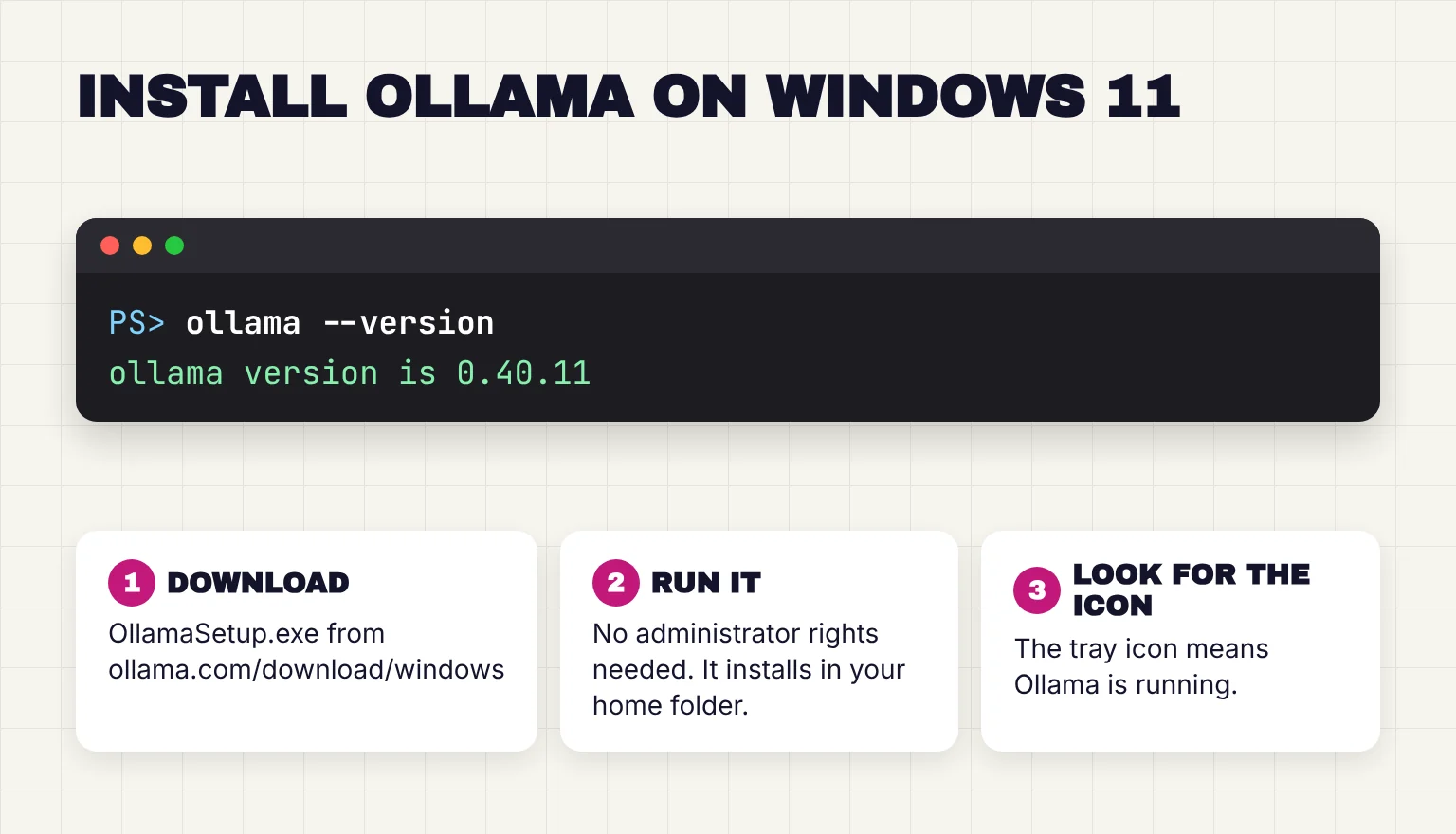
- Open ollama.com/download/windows in your browser and click Download manually. That saves OllamaSetup.exe to your Downloads folder.
- Double-click OllamaSetup.exe and follow the short setup window. If a SmartScreen warning appears, see the troubleshooting section first.
- When setup ends, the installer starts Ollama for you. It keeps running in the background with an icon in the system tray near the clock, and a notification saying Ollama is running may pop up.
- Open Ollama from the Start menu to get its chat window. The Windows and Mac apps can download and chat with models without a terminal.
Ollama also registers itself to start when you log in. If you would rather start it by hand, disable it in Task Manager's Startup apps tab.
The one-line PowerShell install
Ollama's README lists a PowerShell command as the main Windows install, with the installer as the manual option: irm https://ollama.com/install.ps1 | iex. The script downloads the same OllamaSetup.exe, checks that it is signed by Ollama Inc. and installs it silently. One user's post on Bitdefender's community forum reports the antivirus blocking that command, which the poster calls a probable false positive. Our reader should stick to the installer.
Install Ollama on a Mac, on Linux or in Docker
Mac
- Download Ollama.dmg from ollama.com/download/mac and open it.
- Drag Ollama into Applications, which the docs call the preferred method.
- Open Ollama. On first start, the app checks for the ollama command and asks permission to link it into /usr/local/bin. Allow it, so Terminal can find
ollama. - Find the Ollama icon in the menu bar. Its menu includes Open Ollama, Settings and Quit Ollama.
The README also gives a curl script for macOS, which puts the app in /Applications and starts it. Homebrew's ollama-app cask is maintained by Homebrew, not Ollama, so I would use the DMG. One recent change matters for the MacBook Air: since 0.40.0, models run on MLX on Apple Silicon by default when MLX supports their architecture. MLX is Apple's machine learning framework for Apple silicon, and it changes Mac download sizes.
Linux
One command installs Ollama and sets it up as a background service:
curl -fsSL https://ollama.com/install.sh | shThe script asks for your sudo password, creates an ollama user and a systemd service, and starts it. It needs zstd and says how to install it if missing. It usually ends by confirming the API at 127.0.0.1:11434, and on a machine with no NVIDIA or AMD GPU it adds a warning that Ollama will run in CPU-only mode. On some distributions it also tries to install NVIDIA's CUDA driver.
The manual install unpacks an archive into /usr and has you create the user and service yourself, with an extra ROCm package for AMD cards. For NVIDIA, nvidia-smi should print details about your GPU.
Docker
Ollama publishes an official ollama/ollama image on Docker Hub. The docs give this CPU-only command:
docker run -d -v ollama:/root/.ollama -p 11434:11434 --name ollama ollama/ollamaDocker warns that publishing container ports is insecure by default, because the port becomes reachable from outside your machine, so I would write -p 127.0.0.1:11434:11434 instead. NVIDIA GPUs need the NVIDIA Container Toolkit and --gpus=all, and Docker Desktop on a Mac gets no GPU acceleration. For GPU setup, Compose with Open WebUI and updates, see how to run Ollama in Docker with a GPU. Docker suits a shared home machine, which our local AI server guide covers.
Download your first model and start a chat
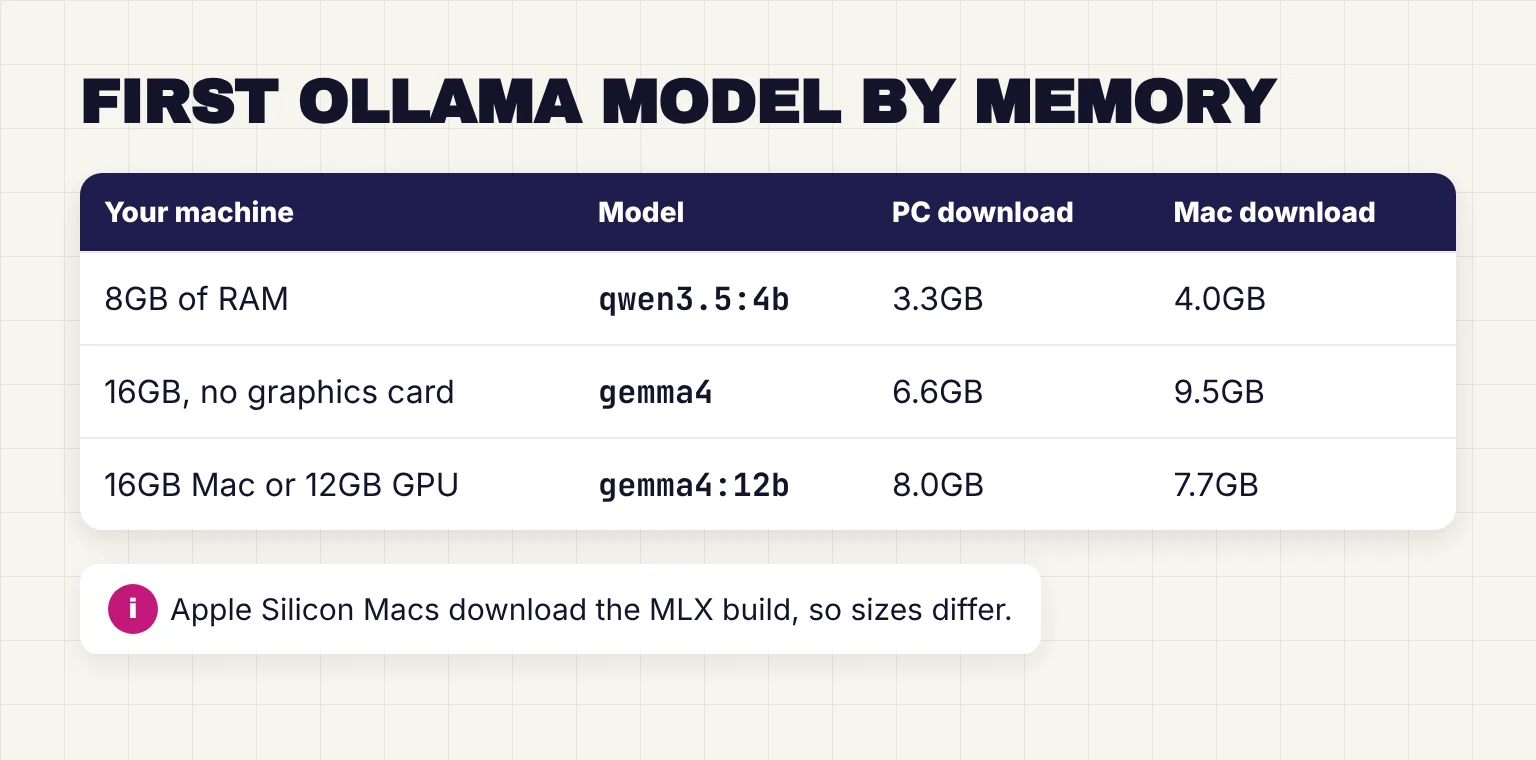
Ollama installs with no models. The tag after the colon picks the size, and memory decides which size fits. For more picks by task, see which Ollama models to download first. On an 8GB machine, try LFM3 as a lighter first model, a 1.1GB to 1.7GB download.
| Your machine | First model | Download on Windows or Linux | Download on an Apple Silicon Mac |
|---|---|---|---|
| 8GB of RAM | qwen3.5:4b | 3.3GB | 4.0GB |
| 16GB of RAM, no graphics card | gemma4 | 6.6GB | 9.5GB |
| 16GB Mac, or a PC with a 12GB graphics card | gemma4:12b | 8.0GB | 7.7GB |
Ollama's library lists ranges (6.6 to 9.5GB for gemma4, 7.7 to 8.0GB for gemma4:12b, 3.3 to 4.0GB for qwen3.5:4b) because each tag holds two builds. The gemma4:e4b page lists a llamacpp build at 6.6GB and an MLX build at 9.5GB, and Apple Silicon Macs pick the MLX build first. Plain gemma4 is the same model as gemma4:e4b. Both gemma4:e4b and qwen3.5:4b ship under the Apache 2.0 license, and our Gemma 4 guide compares every size.
For our reader, my pick is gemma4. It takes one trip to PowerShell:
- Click Start, type PowerShell and press Enter. The window with a blinking cursor is the terminal.
- Type
ollama run gemma4and press Enter. Ollama downloads the model and starts a chat. - At the
>>>prompt, type a request such asDraft a polite note asking my landlord to fix the heating. Type/byeto leave. - Back in the Ollama app, pick the gemma4 model you just downloaded in the model menu. From now on you can chat there and leave PowerShell closed. A downloaded model keeps working with no internet connection, so you can also use Ollama as an offline assistant in an outage.
The app's menu also suggests models. Cloud models run on Ollama's servers, not on your laptop, and need you to sign in. The app treats any model name ending in cloud as a cloud model, such as gemma4:cloud or gemma4:31b-cloud. With downloaded models, Ollama says it does not see your prompts or data. For a private assistant, turn Cloud off in Settings, which switches off cloud models and web search, or set OLLAMA_NO_CLOUD=1. On the MacBook Air, run ollama run gemma4:12b in Terminal, the smaller download on a Mac.
Check that Ollama works: version, ps and port 11434
Ollama's server binds to 127.0.0.1, port 11434, by default, which means only your own computer can reach it.

| Check | Type this | A healthy result |
|---|---|---|
| Version | ollama --version | ollama version is 0.40.13 |
| Downloaded models | ollama list | Columns NAME, ID, SIZE and MODIFIED, with gemma4 listed |
| Loaded model | ollama ps | A gemma4 row, with PROCESSOR reading 100% GPU, 100% CPU or a split |
| Server | http://localhost:11434 in a browser | The words Ollama is running |
| API | curl http://localhost:11434/api/tags | A JSON list of local models, starting {"models":[ |
If ollama --version prints Warning: could not connect to a running Ollama instance and only a client version, the command is installed but the server is not running. Start Ollama from the Start menu or Applications. On Linux, run sudo systemctl start ollama, then sudo systemctl status ollama.
In ollama ps, 100% GPU means the model sits on the graphics card and 100% CPU means system memory, while a split such as 48%/52% CPU/GPU means both. An empty list only means nothing is loaded, since models unload after 5 minutes by default. On our reader's laptop, 100% CPU is the expected answer.
On Windows, type curl.exe http://localhost:11434/api/tags in PowerShell. Windows PowerShell treats plain curl as an alias for Invoke-WebRequest, while the real curl ships with Windows. A reply of {"models":[]} means the server works but has no models yet. Simpler still, paste http://localhost:11434/api/tags into a browser.
Where models go, the app's settings and port 11434
Where Ollama stores models
Models live in ~/.ollama/models on a Mac, /usr/share/ollama/.ollama/models on Linux and C:\Users\%username%\.ollama\models on Windows. To keep them on another drive, set the OLLAMA_MODELS environment variable to a new folder, or use Model location in the app's Settings, which has a Browse button. Our guide to deleting Ollama models covers moving and removing them.
The desktop app's settings
Open Settings from the tray icon menu on Windows or the menu bar on a Mac. In 0.40.13, the settings screen includes these settings:
- Cloud: turns cloud models and web search on or off.
- Auto-download updates: fetches new versions in the background.
- Expose Ollama to the network: lets other devices reach Ollama by setting OLLAMA_HOST to 0.0.0.0. Leave it off.
- Model location: the models folder.
- Context length: a slider from 4k to 256k. Context is how much of the conversation the model keeps in view, counted in tokens, which are words or word pieces. Ollama defaults to 4k when a machine has under 24GiB of VRAM, and more context needs more memory.
OLLAMA_HOST, and why port 11434 stays private
OLLAMA_HOST sets the server's address and port, 127.0.0.1:11434 by default. The ollama command reads the same variable to find the server, so if you move Ollama to port 11435, set OLLAMA_HOST=127.0.0.1:11435 for both. The FAQ shows how to set it on each system.
Opening the port to your network is the risky change. Local requests need no API key, so anyone who can reach port 11434 can use your models, and the same API can download or delete models on your disk. In one 2025 internet scan, Cisco researchers found 1,139 exposed Ollama servers. For our reader, the default is right: the laptop talks only to itself.
Updating and uninstalling
On Windows and Mac, Ollama downloads updates automatically, and you click the tray or menu bar icon and choose Restart to update. On Linux, re-run the install script. To uninstall on Windows, use Add or remove programs in Settings. The uninstaller shows a Remove models box, checked by default. On a Mac or Linux, you delete the files the docs list, as the delete guide shows.
Fix the common Ollama install errors
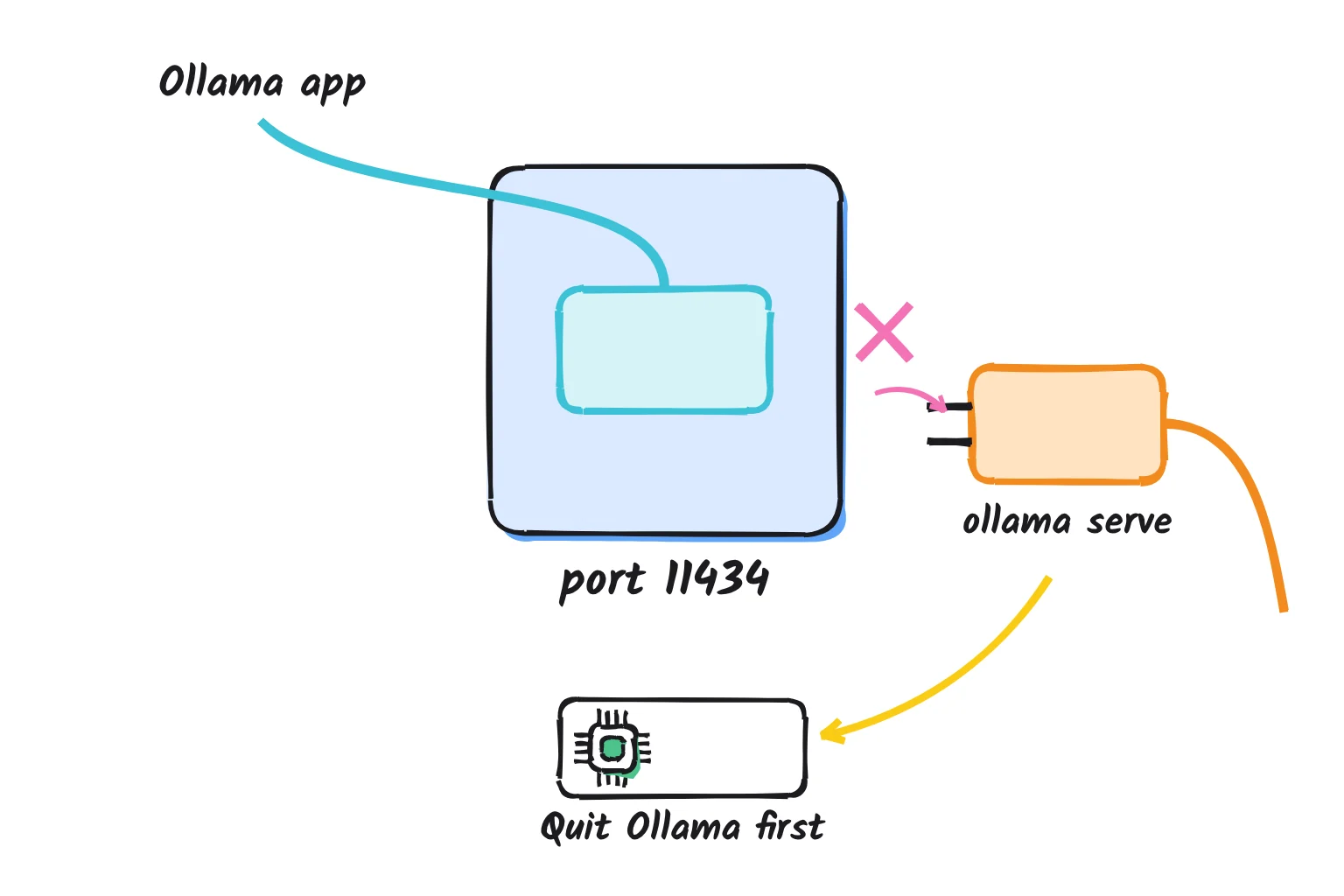
Error: listen tcp 127.0.0.1:11434: bind: address already in use
This error means something already holds port 11434, and usually that something is Ollama. ollama serve tries to claim the address and stops if it cannot. Windows words the same problem as only one usage of each socket address being permitted.
| System | Usual cause | Fix |
|---|---|---|
| Windows | The Ollama tray app is already serving | Skip ollama serve, or choose Quit Ollama from the tray icon first |
| Mac | The menu bar app is running | Choose Quit Ollama from the menu bar icon first |
| Linux | The systemd service is running | Skip ollama serve, or run sudo systemctl stop ollama first |
| Any system | Another program or a Docker container holds the port | Stop it, or give Ollama another port with OLLAMA_HOST |
On Windows, this PowerShell line pairs Get-NetTCPConnection with Get-Process to name the program holding the port:
Get-Process -Id (Get-NetTCPConnection -LocalPort 11434 -State Listen).OwningProcessOn a Mac or Linux, sudo lsof -i :11434 lists what has that port open. If it shows ollama, quit the app or stop the service instead.
'ollama' is not recognized, or command not found
The Windows installer adds Ollama to your user PATH, the list of folders Windows searches for commands, but a PowerShell window opened before the install keeps the old list. Close it and open a new one. If a fresh window still cannot find it, our ollama not recognized guide works through the PATH checks and the missing-file cases one by one. On a Mac, the app checks for the command when it starts and offers the /usr/local/bin link again, so quit and reopen Ollama and accept it.
Ollama is not using the GPU
Check ollama ps while a reply is being written. On a laptop with only built-in graphics, 100% CPU is normal: Ollama skips most integrated GPUs by default and logs that OLLAMA_IGPU_ENABLE=1 turns them on. I would leave that alone at first.
With a separate NVIDIA card, update the driver: Ollama needs 551.61 or newer on Windows and 550 or newer on Linux, and 570 or newer for cards of compute capability 5.0 to 6.2. A CPU/GPU split means the model and its context outgrew VRAM, so pick a smaller tag or a shorter context. The server log names the hardware Ollama found on a line containing inference compute. The log sits in %LOCALAPPDATA%\Ollama on Windows, ~/.ollama/logs on a Mac and the systemd journal on Linux, read with journalctl -u ollama. For AMD and Intel cards, Docker and multi-GPU setups, see our full guide to Ollama not using your GPU.
SmartScreen or antivirus warnings on Windows
Microsoft Defender SmartScreen warns about downloaded files that are not on its list of well-known files, so a fresh Ollama release can trigger a prompt. Continue only if the file came from ollama.com. The installer is signed by Ollama Inc. If your antivirus quarantines Ollama, restore it only for a file from ollama.com, and Microsoft accepts files for review when a warning looks wrong.
A model download stalls
Run the same command again. Ollama keeps the partial file and resumes on the next try.
Common questions about installing Ollama
What port does Ollama use?
Ollama uses port 11434. By default the server listens on 127.0.0.1:11434, so only programs on the same computer can reach it. You can change the address or port with the OLLAMA_HOST environment variable, for example 127.0.0.1:11435, and the ollama command reads the same variable to find the server.
How do I check if Ollama is running?
Open http://localhost:11434 in a browser, and a running server replies with the words Ollama is running. In a terminal, ollama --version prints the version, ollama ps shows loaded models, and curl http://localhost:11434/api/tags lists downloaded models as JSON. In Windows PowerShell, type curl.exe instead of curl.
How do I fix the Ollama address already in use error?
The error means port 11434 is taken, usually by Ollama itself. On Windows or a Mac the app already runs the server, so skip ollama serve, or quit the app from the tray or menu bar first. On Linux, run sudo systemctl stop ollama before ollama serve.
Does Ollama need a graphics card?
No. Ollama runs models on the processor and system memory when there is no usable graphics card, though replies are slower. It supports NVIDIA and AMD cards and Apple Silicon GPUs, but skips most integrated graphics by default, so laptops without a separate card usually show 100% CPU.
How do I install a local LLM on Windows?
Download OllamaSetup.exe from ollama.com/download and run it. It needs Windows 10 22H2 or newer and no administrator rights. Then open PowerShell and run ollama run gemma4, which downloads a 6.6GB model and starts a chat. Afterwards you can chat in the Ollama app's own window.
Is Ollama free and private?
Ollama is free, open-source software under the MIT license. With downloaded models, Ollama says it does not see your prompts or data. Cloud models, whose names end in :cloud or -cloud, run on Ollama's servers, so turn Cloud off in Settings or set OLLAMA_NO_CLOUD=1 to keep everything on your computer.
My verdict for the Windows laptop
For the 16GB Windows laptop, the simplest setup is also the right one: the installer from ollama.com, gemma4 as the first model, Cloud switched off, and the app's own chat window. Leave the port on 127.0.0.1, skip ollama serve, and treat 100% CPU as normal. The MacBook Air needs the DMG and gemma4:12b, nothing more. The one real trade-off is speed: without a graphics card, replies come more slowly than they would from a GPU, in exchange for prompts that stay on the laptop.
Your one next step: open PowerShell, run ollama run gemma4, and ask it to draft one real email you would otherwise have pasted into ChatGPT. Later, if you want to ask questions about your own PDFs, you can connect Ollama to AnythingLLM.
Sources
- Download Ollama - Ollama
- Windows - Ollama docs
- macOS - Ollama docs
- Linux - Ollama docs
- FAQ - Ollama docs
- Releases - Ollama on GitHub
- LICENSE (MIT) - Ollama on GitHub
- Linux and macOS install script (install.sh) - Ollama
- Hardware support - Ollama docs
- Quickstart - Ollama docs
- Download Ollama on Windows - Ollama
- Windows installer and uninstaller script (ollama.iss) - Ollama on GitHub
- Windows tray menu text (messages.go) - Ollama on GitHub
- Ollama's new app - Ollama Blog
- Ollama README - Ollama on GitHub
- Windows install script (install.ps1) - Ollama
- Can't install Ollama - Bitdefender Expert Community
- Download Ollama on macOS - Ollama
- macOS menu bar menu (app_darwin.m) - Ollama on GitHub
- ollama-app cask - Homebrew Formulae
- Release v0.40.0 - Ollama on GitHub
- MLX - Apple machine learning research on GitHub
- Docker - Ollama docs
- Port publishing and mapping - Docker Docs
- gemma4 - Ollama library
- qwen3.5 - Ollama library
- gemma4:e4b - Ollama library
- manifest/manifest.go (build selection) - Ollama on GitHub
- qwen3.5:4b - Ollama library
- Desktop app cloud model check (api.ts) - Ollama on GitHub
- Desktop app settings screen (Settings.tsx) - Ollama on GitHub
- cmd/cmd.go (CLI commands) - Ollama on GitHub
- server/routes.go (API routes) - Ollama on GitHub
- List models - Ollama API reference
- Invoke-WebRequest (PowerShell 5.1) - Microsoft Learn
- Tar and Curl Come to Windows - Microsoft Command Line blog
- Desktop app server launcher (server.go) - Ollama on GitHub
- Context length - Ollama docs
- envconfig/config.go (environment variables) - Ollama on GitHub
- api/client.go (CLI client) - Ollama on GitHub
- API introduction - Ollama API reference
- Pull a model - Ollama API reference
- Delete a model - Ollama API reference
- Detecting Exposed LLM Servers: A Shodan Case Study on Ollama - Cisco Blogs
- Windows Sockets Error Codes - Microsoft Learn
- Get-NetTCPConnection - Microsoft Learn
- Get-Process - Microsoft Learn
- lsof(8) - Linux manual pages
- discover/runner.go (GPU discovery) - Ollama on GitHub
- discover/types.go (inference compute log line) - Ollama on GitHub
- Troubleshooting - Ollama docs
- Microsoft Defender SmartScreen overview - Microsoft Learn
- server/download.go (partial downloads) - Ollama on GitHub