Checked November 8, 2026 · Label: Troubleshooting
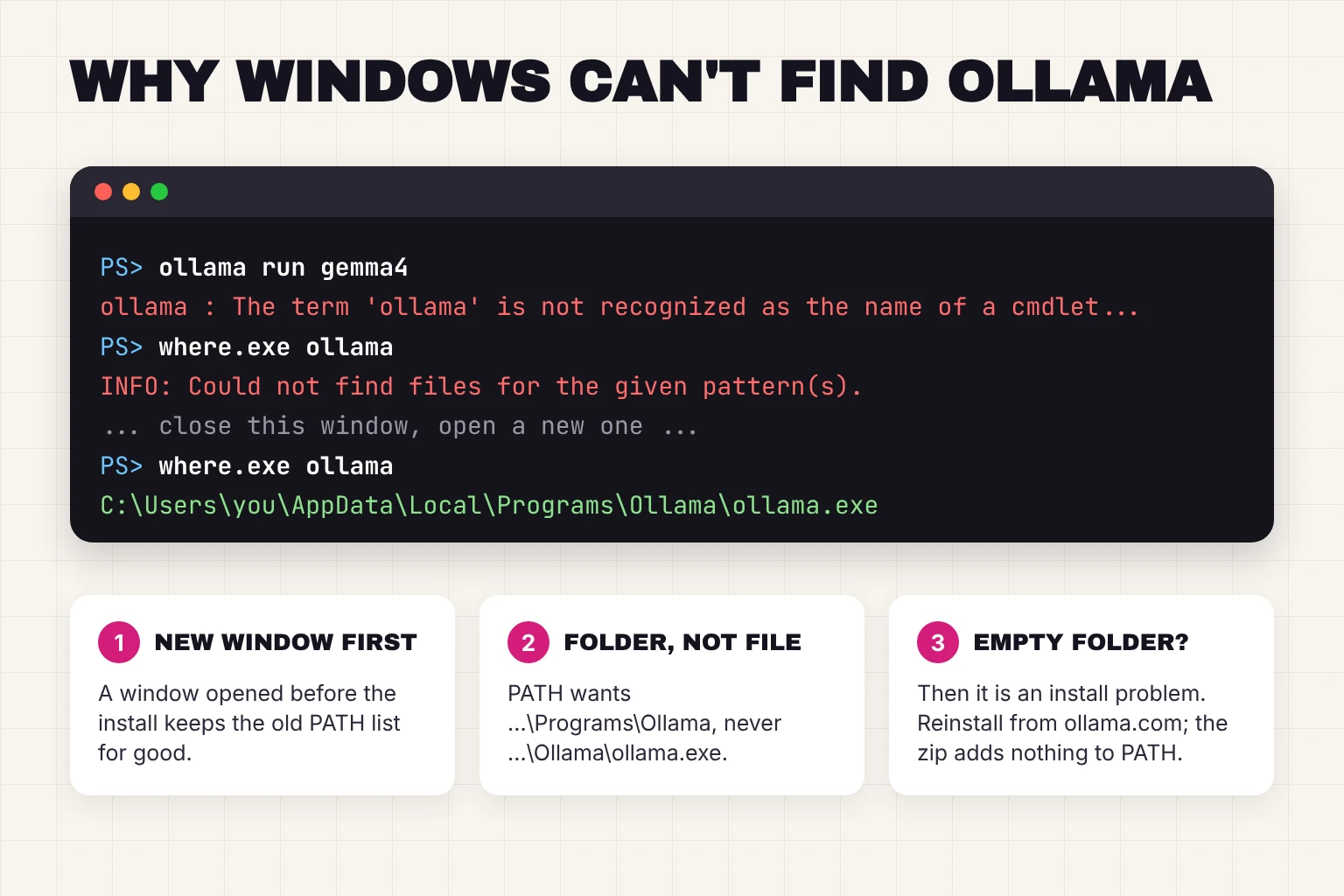
Short answer: Windows looked in every folder on its PATH list and did not find ollama.exe. The most common cause is simple: the Ollama installer adds its folder to your PATH, but a terminal window that was already open never hears about it. Close that window, open a new one, and try again. If a fresh window still fails, check that C:\Users\<you>\AppData\Local\Programs\Ollama\ollama.exe exists and that this folder, not the file itself, is on your user PATH. The sections below walk through each check in order.
This guide follows one reader: someone with a Windows 11 laptop who ran OllamaSetup.exe this afternoon, went back to the PowerShell window they already had open, typed ollama run gemma4 and got a block of red text. They have never edited a PATH and would rather not start now. Still installing? Our Ollama install guide covers the first-run steps; this page is only about the moment the command is not found.
What the error actually says
The wording depends on which terminal you typed into, but the meaning is the same. The shell searched the folders listed in your PATH environment variable, found no file called ollama.exe, and gave up. It is not a bug in Ollama and it does not mean the download failed.
| Where you typed it | What you see | What Windows means |
|---|---|---|
| Command Prompt (cmd) | 'ollama' is not recognized as an internal or external command, operable program or batch file. | No ollama.exe in any PATH folder |
| PowerShell | ollama : The term 'ollama' is not recognized as the name of a cmdlet, function, script file, or operable program. | Same thing, in PowerShell's words |
| Ubuntu or another WSL distro | ollama: command not found | Linux is looking for a Linux install; see the WSL section below |
PATH is a list of folders, separated by semicolons, that Windows searches whenever you type a command without a full path. Windows keeps two lists: a system one for everyone and a user one for your account. Microsoft's documentation describes them as "user environment variables (set for each user) and system environment variables (set for everyone)" (Environment Variables, Microsoft Learn). Ollama's installer edits the user list only.
The 60-second check: is Ollama installed, and can Windows see it?
Three commands tell you which of the fixes below you need. Open PowerShell from the Start menu and run them one at a time.
# 1. Ask Windows where it would find ollama
where.exe ollama

# 2. Open the folder the installer uses
explorer $env:LOCALAPPDATA\Programs\Ollama

# 3. Run it by its full path, skipping PATH entirely
& "$env:LOCALAPPDATA\Programs\Ollama\ollama.exe" --version
where.exe "searches the current directory and the paths that are specified in the PATH environment variable" (where, Microsoft Learn). In PowerShell, type where.exe with the extension, because plain where is an alias for a different PowerShell command. Get-Command ollama does the same job in PowerShell's own style.
| Result | What it means | Go to |
|---|---|---|
Command 1 prints a path ending in ollama.exe | Windows can see Ollama. Your problem is a different error that looks similar. | Errors that look like this one |
Command 1 fails, but command 2 opens a folder containing ollama.exe and command 3 prints a version | Ollama is installed. Your terminal or your PATH is the problem. | Fixes 1 to 3 |
| Command 2 opens an empty folder, or no folder at all | Ollama is not installed where the installer puts it. | Fix 4 |
| You installed from the zip file, not the installer | The zip does not touch your PATH. | Fix 4 |
Fix 1: close the terminal and open a new one
Every program gets its own private copy of the environment variables when it starts. Microsoft puts it plainly: "By default, a child process inherits the environment variables of its parent process" (Environment Variables, Microsoft Learn). A PowerShell window you opened before running the installer took its copy of PATH before Ollama's folder was on it, and nothing updates that copy afterwards. An Ollama maintainer gave the same answer when a user hit this error in 2024: "our installer adds the ollama executable to the PATH, but you'll need to start a new shell (powershell, cmd, others) after the install to pick that up" (ollama/ollama issue 2859).
- PowerShell or Command Prompt window: close it and open a new one from the Start menu.
- Windows Terminal: since version 1.18, "new tabs/panes will now automatically reload the system environment" (Windows Terminal 1.18 release notes), so a new tab is enough. On an older build, close the whole Terminal window.
- The terminal inside VS Code or another editor: VS Code builds its environment when it starts and "by default, the terminal inherits this environment" (VS Code terminal documentation), so restart the editor itself, not just the terminal pane.
For our reader this is the whole fix. The PowerShell window they used was open before the installer ran. A new window finds ollama straight away.
Fix 2: check the PATH entry itself
If a brand-new window still cannot find Ollama, look at what the installer wrote. Ollama's own setup script appends the install folder to the current user's PATH in the registry, under HKCU\Environment, and only if it is not already there (app/ollama.iss in the Ollama repository). You can read that list without opening the registry:
[Environment]::GetEnvironmentVariable('Path', 'User') -split ';'One line should read C:\Users\<you>\AppData\Local\Programs\Ollama. Three things go wrong here:
- The line is missing. Add it. Open Settings, search for "environment variables", choose Edit environment variables for your account, select Path in the top (user) box, click Edit, then New, and paste
%LOCALAPPDATA%\Programs\Ollama. Click OK on every dialog, then open a new terminal. - The line ends in
\ollama.exe. PATH holds folders, not files. One user added the full path to the executable and the command still failed; an Ollama contributor explained that the shell appendsollama.exeto each folder it tries, "which is not a valid path to the ollama binary" (ollama/ollama issue 16404). Edit the entry so it stops at the folder. - The line is there, but for someone else. The installer runs with the lowest privileges and installs into the profile of whoever runs it. If you right-clicked Run as administrator and signed in as a different admin account, the files and the PATH entry belong to that account. Sign in as that account, uninstall, then reinstall as yourself without elevation.
Do not fix this with setx on the whole PATH. A workaround that circulates online is setx /M PATH "%PATH%;C:\...\Ollama". Microsoft warns that setx crops values at 1,024 characters and that "it can result in loss of data previously held by the target variable" (setx, Microsoft Learn). One Ollama user who tried it reported that it erased their system variables (ollama/ollama issue 4940). The Settings dialog is slower but safe.
Fix 3: a one-window workaround
If you need Ollama working in the window you have open right now, add the folder to this session only. PowerShell's documentation notes that "when you change environment variables in PowerShell, the change affects only the current session" (about_Environment_Variables, Microsoft Learn), which is exactly what you want here: nothing permanent, nothing to undo.
$env:Path += ";$env:LOCALAPPDATA\Programs\Ollama"
ollama --version
In Command Prompt the equivalent is set PATH=%PATH%;%LOCALAPPDATA%\Programs\Ollama. Either way, the change disappears when the window closes, which is fine, because your next window will have the installer's permanent entry.
Fix 4: ollama.exe is not where it should be
Ollama's docs say that %LOCALAPPDATA%\Programs\Ollama "contains the binaries (The installer adds this to your user PATH)" (Ollama Windows documentation). If that folder is empty or missing, no PATH edit will help. The usual reasons:
- The install did not finish. One user chased this error for a while before noticing that "ollama.exe file was not present" in the Programs folder (ollama/ollama issue 4940). Download
OllamaSetup.exeagain from ollama.com and run it. It needs no administrator rights. - You chose a different folder. The installer accepts
OllamaSetup.exe /DIR="d:\some\location"(Ollama Windows documentation). Whatever folder you gave is the one that should be on PATH, so check Fix 2 against that folder instead. - You used the zip, not the installer. Ollama also publishes
ollama-windows-amd64.zip, "containing only the Ollama CLI and GPU library dependencies for Nvidia", meant for embedding Ollama in other software or running it as a service (Ollama Windows documentation). The docs credit only the installer with the PATH entry. If you unzipped Ollama somewhere, either run it from that folder or add that folder to PATH yourself as in Fix 2. - Security software removed it. If the folder existed yesterday and is empty today, check your antivirus quarantine before reinstalling. Only restore a file that came from ollama.com.
Install logs live next door: %LOCALAPPDATA%\Ollama "contains logs, and downloaded updates", including app.log for the desktop app and server.log for the server (Ollama Windows documentation). If a reinstall fails, the last lines of app.log usually say why.
If you are typing inside WSL
An Ubuntu window from the Windows Subsystem for Linux is a Linux shell. Typing ollama there looks for a Linux copy of Ollama, and command not found means you have not installed one. You have two clean options and one common mistake to avoid.
- Use the Windows install from WSL. Microsoft's docs explain that "WSL can run Windows tools directly from the WSL command line using [tool-name].exe", and that "Windows tools must include the file extension" (Working across file systems, Microsoft Learn). So
ollama.exe run gemma4works whereollama run gemma4does not. - Or install Ollama inside Linux too. Run the Linux install script from our install guide inside WSL. You then have two separate Ollamas with two separate model folders, which doubles the disk space.
- The reverse mistake: installing Ollama inside WSL, then typing
ollamain PowerShell. One early user solved it withwsl ollama run llama2(ollama/ollama issue 1568). The simpler fix is the Windows installer.
Errors that look like this one but are not
Once where.exe ollama prints a path, "not recognized" is behind you. These are the messages people mix it up with.
| Message | What is really wrong | Fix |
|---|---|---|
Warning: could not connect to a running Ollama instance | The command works; the server is not running. Ollama prints this whenever the command-line tool cannot reach the server (cmd/cmd.go). | Open Ollama from the Start menu, or run ollama serve |
Error: could not connect to ollama app, is it running? | Same cause. One user on Windows 10 saw both messages until they started the server (ollama/ollama issue 4849). | Start Ollama, then retry |
Error: listen tcp 127.0.0.1:11434: bind: Only one usage of each socket address | Ollama is already running, usually as the tray app, and you typed ollama serve on top of it. | Skip ollama serve; our install guide covers port 11434 |
'FROM' is not recognized as an internal or external command | A Modelfile was pasted into the terminal as if it were a command (ollama/ollama issue 6197). | Save the text as a file and run ollama create |
ollama run gemma4 starts, then the model is slow | Nothing is broken. A laptop without a separate graphics card runs on the processor. | See Ollama not using GPU |
Ollama installed but not opening?
A quick checklist for the desktop app
A different group of readers arrive here because the Ollama app seems to do nothing when they click it. The app runs in the background and shows only a small icon in the system tray, near the clock, so "not opening" is often "already open". Work down this list:
- Click the small arrow in the system tray to show hidden icons and look for the Ollama llama.
- Open Task Manager and search for Ollama. If it is listed, it is running; right-click the tray icon and choose Open Ollama to get the chat window.
- Paste
http://localhost:11434into a browser. The words "Ollama is running" mean the server is fine and only the window is missing. - Read the end of
%LOCALAPPDATA%\Ollama\app.log. A line about a missing file or a failed update tells you whether to reinstall. - If the tray icon offers Restart to update, take it. Ollama downloads updates in the background on Windows and applies them on restart (Ollama FAQ).
Frequently asked questions
Why does Windows say ollama is not recognized right after I installed it?
Because the terminal window you are typing into was opened before the installer ran. Each window takes its own copy of the PATH list when it starts, and the installer added Ollama to the list after that copy was made. Close the window, open a new one, and the command is found.
Where does Ollama install on Windows?
The installer puts ollama.exe and its libraries in C:\Users\(your name)\AppData\Local\Programs\Ollama and adds that folder to your user PATH. Logs are in C:\Users\(your name)\AppData\Local\Ollama, and downloaded models are in the .ollama folder in your home directory unless you changed OLLAMA_MODELS.
How do I add Ollama to PATH manually?
Open Settings, search for environment variables, choose Edit environment variables for your account, select Path in the user list, click Edit then New, and paste %LOCALAPPDATA%\Programs\Ollama. Click OK, then open a new terminal. Add the folder, not the ollama.exe file.
Is ollama not recognized the same as could not connect to a running Ollama instance?
No. Not recognized means Windows cannot find the ollama command at all. Could not connect means the command ran but the Ollama server is not running yet. Start Ollama from the Start menu or run ollama serve to fix the second one.
Why does ollama work in PowerShell but not in my Ubuntu WSL window?
A WSL window is a Linux shell, so ollama on its own looks for a Linux install. Type ollama.exe instead to use the Windows copy, or install Ollama inside WSL with the Linux script if you want a separate Linux copy.
My verdict for the laptop with the red text
For our reader, the fix was a new PowerShell window, and it took longer to read about than to do. The order that saves the most time for everyone else is: new window first, then where.exe ollama, then open the Programs folder. Only edit PATH by hand when the folder exists and a fresh window still cannot see it, and when you do, add the folder rather than the file and leave setx alone.
Your next step: open a new PowerShell window and run ollama run gemma4. When the >>> prompt appears, you are back on track, and our guide to the best Ollama models for your memory is the natural next page.
How we researched this: a documentation and source-code review, not a hands-on test on every Windows build. Sources checked November 8, 2026: Ollama Windows documentation (install folder, user PATH, /DIR, standalone zip, logs) · Ollama installer script, app/ollama.iss (lowest privileges, HKCU Path entry) · Ollama cmd/cmd.go (connection warning) · Ollama FAQ · Ollama GitHub issues 2859, 4940, 16404, 4849, 6197 and 1568 · Microsoft Learn: Environment Variables, where, setx, about_Environment_Variables, Working across Windows and Linux file systems · Windows Terminal 1.18 release notes · VS Code terminal documentation. Illustrations are editorial artwork and do not depict a tested product.