
What you actually want from a local AI server
Picture a household of four. One person wants a chat assistant for drafts, recipes and homework help. Another writes code and wants a helper inside their editor. Everyone wants to reach it from a phone or laptop without pasting family details into someone else's servers. Cloud subscriptions cover this, but each is a separate bill, and the hardware advice online is a pile of GPU names and VRAM numbers with no clear starting point.
A local AI server is a computer in your home that runs an open-weight language model and answers requests over your network. Your devices send it questions the way they would send them to a website, and the answers come from your own machine.
People run one for privacy, control, and cost. OpenAI, for example, keeps regular and archived chats until you delete them, and thumbs-up or thumbs-down feedback can make a conversation eligible for training. A local server keeps prompts and history on your own disk, and there are no per-token fees once the hardware is bought.
Cloud still wins in some cases. The largest hosted models are stronger than anything a home budget runs, and a light user may spend less on one subscription than on a server's electricity.
This guide delivers a build matched to each workload, speed figures in tokens per second, and the true cost of leaving it on all year.
The specs that decide which models your server can run
A language model is a large file of numbers called parameters, and the server must hold nearly all of them in fast memory while it answers. On a PC with a graphics card (GPU), that memory is VRAM. VRAM decides which models fit at all. A 4090 has 24 GB and a 5090 has 32 GB, while a 12 GB RTX 3060 caps you at smaller models. Our guide to the best GPU for local AI by budget compares current cards by VRAM and memory bandwidth.
Apple silicon uses unified memory, one pool shared by the CPU and GPU, so a Mac with 64 GB can give most of it to a model. System RAM runs models on the CPU alone or takes the overflow when a model doesn't fit in VRAM. It works, but slowly.
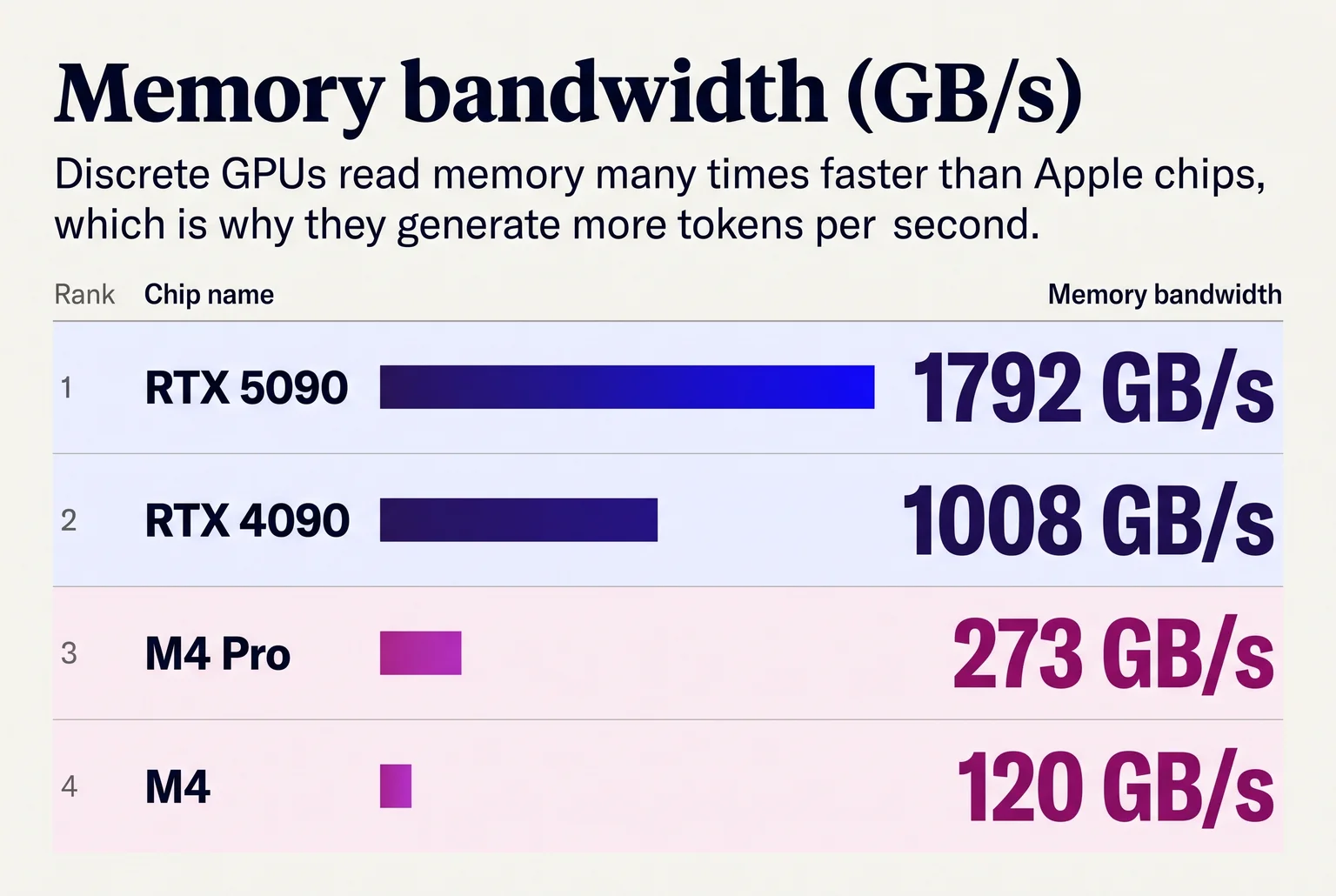
Speed comes from memory bandwidth. Each generated token (roughly three-quarters of a word) requires reading most of the model once, so higher bandwidth means more tokens per second. The RTX 4090 reads at 1,008 GB/s, the M4 Pro at 273 GB/s, and the base M4 at 120 GB/s.
Model size is quoted in billions of parameters (7B, 14B, 32B, 70B). Quantization shrinks each parameter from 16 bits to about 4, cutting file size by roughly 70 percent. The common 4-bit format, Q4_K_M, turns Llama 3.1 8B into a 4.9 GB download. In one llama.cpp test it scored 6.38 perplexity against 6.23 for Q8_0, a lower-is-better measure, so the loss is modest.
Rule of thumb: a 4-bit model needs about 0.55 to 0.65 GB per billion parameters, plus a few GB for context and overhead. That is roughly 6 GB for 8B, 10 GB for 14B, 20 to 24 GB for 32B and 40 to 48 GB for 70B.
For the household, a 7B to 14B model handles chat on a 12 GB card or a modest Mac. The coding helper does better with a 32B model, which wants a 24 GB card or 32 GB or more of unified memory.
Models download from Hugging Face or the Ollama library. Files run 5 to 45 GB each, so keep a few hundred gigabytes of SSD free.
What each workload needs: model, memory and speed
Reading speed is the bar for chat. A guide to llama.cpp on Metal calls roughly 15 to 25 generation tokens per second comfortable for ordinary chat, and says autocomplete wants 30 to 50 or more, with low latency. An 8B to 14B model at 4-bit with a few thousand tokens of context is enough for household chat, and needs 6 to 10 GB of memory.
The coding helper is heavier. Qwen3 Coder 30B-A3B has 30.5B total parameters but only 3.3B active per token, supports up to 256K context, and needs about 19.1 GB at 8K context and 21.3 GB at 32K. A 24 GB card is the practical minimum. DeepSeek-Coder-V2 Lite is a smaller option at 16B total and 2.4B active parameters.
Long context costs speed. On an M3 Ultra Mac Studio, Qwen 32B at Q4 drops from 31.2 tok/s at 1K context to 19 at 32K and 8.5 at 128K.
Concurrent users change the math in two ways. Each active conversation keeps its own context cache in memory, so four people chatting at once need the model once plus four caches. Servers also batch simultaneous requests, so total throughput rises while each person's speed falls. A machine that gives 15 tok/s to one user will feel slower to each of two simultaneous users.
The table shows llama.cpp generation speeds on Qwen3 at Q4_K_XL, from a 2026 GPU benchmark dataset.
| Hardware | Model | Tokens per second |
|---|---|---|
| RTX 5090 | Qwen3 8B | 145.34 |
| RTX 4090 | Qwen3 8B | 104.31 |
| RTX 3090 | Qwen3 8B | 87.45 |
| RTX 3060 12 GB | Qwen3 8B | 41.97 |
| RTX 3060 12 GB | Qwen3 14B | 22.66 |
For 70B models at Q4, two RTX 3090s reached 19.5 tok/s with layer split and 31.9 with tensor split, against 31.2 for the M3 Ultra at 1K context.
A 3060 covers the household's chat at 14B with room to spare. The coding helper wants the 24 GB tier.
Three builds for a household AI server, with prices and speeds
Prices were checked in October 2026 and move often. Speeds come from the benchmarks cited in the previous section.
Budget, about $300 to $500 if you already own a desktop. A used RTX 3060 12 GB drops into a spare PCIe slot. It ran Qwen3 14B at 22.66 tok/s and 8B at 41.97 tok/s. That covers chat for four people but not the coding helper. Cheap mini PCs with 8 to 32 GB of RAM only handle small models.
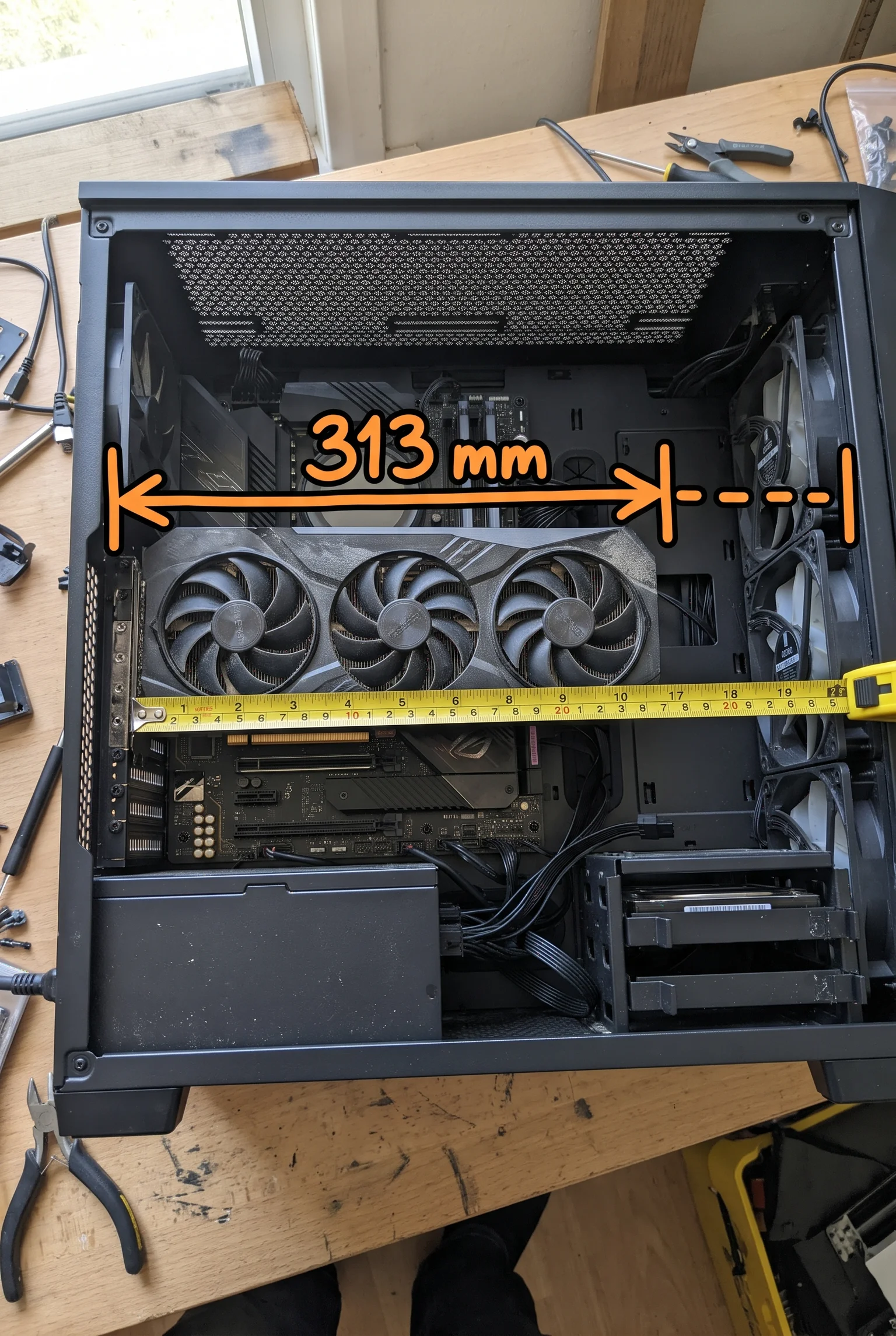
Mid, about $1,500 to $2,000. Buy a used RTX 3090 (24 GB), an 850 W PSU, 32 GB RAM, a 1 TB SSD and a roomy case, since the reference card is 3 slots and 313 mm long. The card's median sold price was $1,398, up on 2025. It ran Qwen3 8B at 87.45 tok/s, and a 32B Q4 model reaches roughly 40 tok/s on a 4090, so expect a bit less. The Apple alternative is a Mac mini, from $899 for the M6 (up to 32 GB) or $1,699 for the M5 Pro (up to 64 GB). This tier suits the whole household, coding helper included.
High-end, $2,500 and up. A Mac Studio with M5 Max starts at $2,499 and goes to 128 GB of unified memory. A Mac Studio Ultra (192 GB) managed about 17.8 tok/s on Llama 3.3 70B against 21.6 for dual 3090s. The dual-3090 rig needs a 1,200 W PSU for roughly 900 to 1,000 W peak draw, and software must split models across the two cards, because 48 GB is not one pool. You only need this for 70B models.
Nvidia or Apple. Nvidia has the broadest CUDA support and higher speed. Apple gives more memory per dollar and lower power draw. AMD unified-memory mini PCs depend on software maturity.
Used-card risks. Look for artifacts, corrosion, dead HDMI ports and overheating. Buy with return cover and run a load test in the first week.
Most households should pick the mid tier.
Install Ollama and run your first model
Four runners cover most home setups. LM Studio and Jan are desktop apps with a point-and-click interface, and LM Studio can also run headless through llmster, a standalone daemon. llama.cpp's llama-server gives the most direct control over GGUF files and runtime settings, at the cost of more manual setup. Ollama is simpler for model management, and it is the default path here because it runs as a background service on Linux, macOS and Windows, which suits a machine that stays on.
On a Linux server, the install is one line, then you pull a model and chat:
curl -fsSL https://ollama.com/install.sh | sh
ollama run qwen3:14b
The first run downloads the file, roughly 9 GB for a 14B model at 4-bit, and opens a prompt. If a reply appears, the server works. Ollama's API listens on port 11434, and it offers an OpenAI-compatible endpoint at http://localhost:11434/v1, which is what the next section uses to share it with the household.
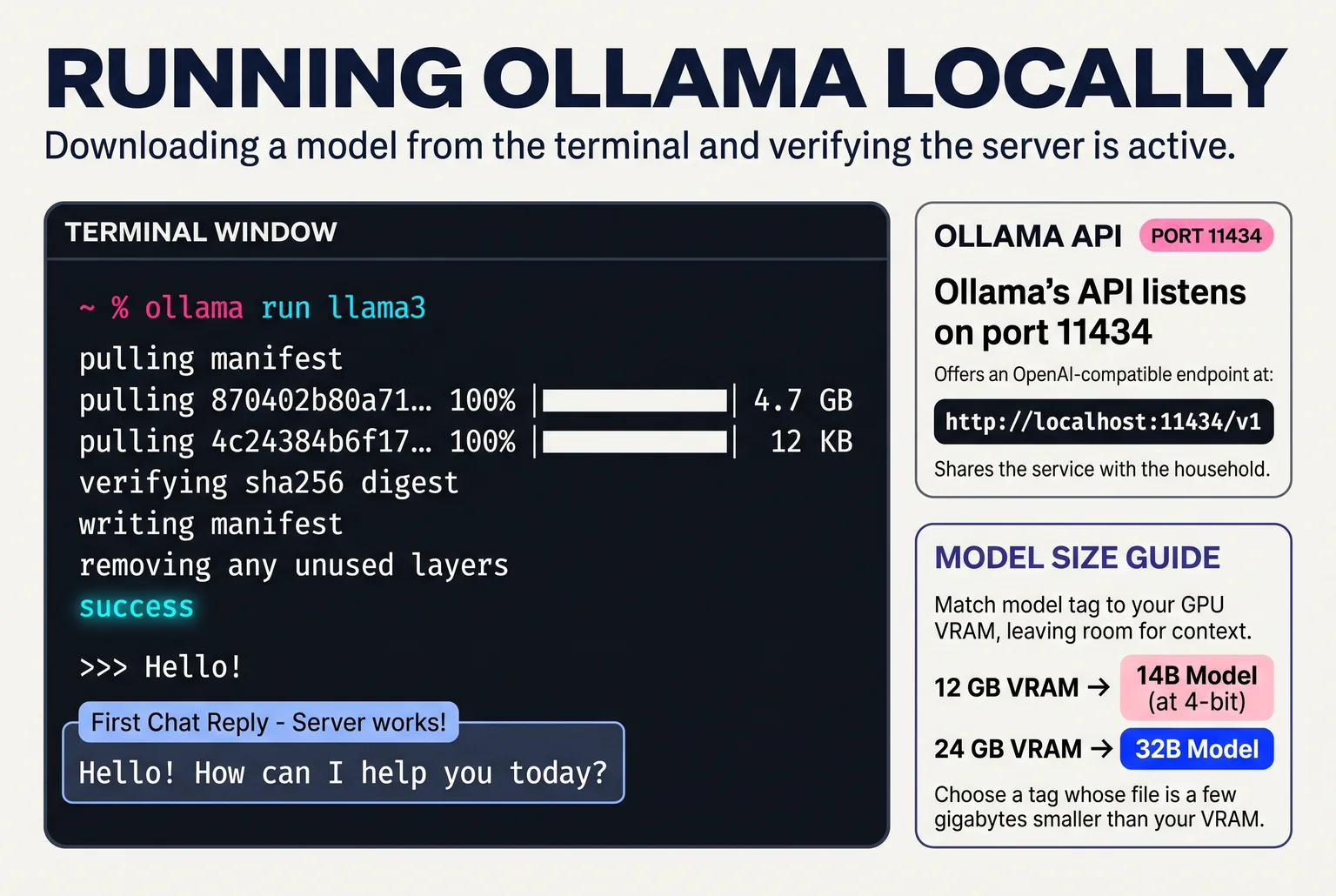
To pick a model, start from your memory. The Ollama library lists each model with its size tags, so choose a tag whose file is a few gigabytes smaller than your VRAM, leaving room for context. A 12 GB card suits a 14B model at 4-bit. A 24 GB card fits a 32B. Hugging Face has far more models in GGUF format, and Ollama can pull those too, but the library is the easier place to begin. If a model runs slowly, the file is probably too big for your VRAM, so step down a size.
Put a chat window and an API on your home network
Ollama listens only on the server itself by default. To reach it from other devices, set it to listen on the network, then limit access with a firewall rule or a private VPN. The Ollama FAQ says either is safer than forwarding the port to the internet. Never forward port 11434 on your router. The raw API has no login, so anyone who finds it can use your GPU.
For the household, run Open WebUI in Docker next to Ollama. Its connection settings take an OpenAI-compatible URL, and under Docker that address must be reachable from inside the container, for example host.docker.internal:11434/v1. A persistent volume keeps accounts and chat history across restarts. The first account you create becomes the Administrator, so register yourself before anyone else. Later sign-ups wait for your approval, so each of the four family members gets a login and a private history.

Phones and laptops just open the server's address in a browser. The coding helper uses the Continue extension in VS Code, which can point straight at the server's LAN address and port.
When two people prompt at once, Ollama's OLLAMA_NUM_PARALLEL setting defaults to one request per loaded model, so the second request waits. Raising it allows parallel replies but costs more memory. If memory runs short, Ollama queues requests, and OLLAMA_MAX_LOADED_MODELS caps how many models sit in memory. In a family of four, a short wait is the usual result. For more users at once, see when vLLM beats Ollama for several users.
Tailscale first: reaching the server from your phone away from home
Port forwarding puts the server on the public internet, where scanners find it. A year-long scan reported 152,137 cumulative IPs serving an exposed Ollama API, and a separate Cisco Talos sample of 1,139 instances found about 18.8% actively serving models. The two counts use different methods and periods, so they don't add up or compare directly. Either way, Ollama has no login of its own.
The default for beginners is Tailscale. Install it on the server and on each family phone, sign them into the same tailnet, and open the server's private name in the browser. Tailscale builds an encrypted private network for approved devices, so internet scanners never see an open port. Open WebUI's guide recommends Tailscale with tailscale serve over forwarding ports. It protects against scanning and direct exposure. It does not protect a stolen, unlocked phone that is already enrolled.

Raw WireGuard gives more manual control, but you manage keys, routing, firewall rules and revocation yourself. It suits people who enjoy that.
A reverse proxy such as Caddy fits only when someone cannot install a VPN. It handles HTTPS and a login while Open WebUI and Ollama stay private. It adds a public component you must keep updated, and HTTPS plus a password still leave room for password guessing, software flaws and misconfiguration.
Whichever you pick, give Open WebUI accounts only to people you trust. Its docs warn that users are not fully isolated from the host, so a login is not a sandbox.
What the server costs to run each year, and when cloud wins
Yearly cost is average watts divided by 1,000, times hours, times the rate. The rate is the U.S. residential average of 18.16 cents per kWh (EIA, August 2026). Assumptions: 8,760 hours a year, about 2 hours a day under load, idle the rest, cooling excluded.
| Machine | Idle / load | Average | kWh/year | Cost/year |
|---|---|---|---|---|
| Ryzen 8845HS mini PC | 9 W / 72 W | 14.3 W | 125 | $23 |
| RTX 3090 card only | 21 W / 349 W | 48.8 W | 427 | $78 |
| M4 Mac mini | 4 W / 70 W | 9.5 W | 83 | $15 |
The 3090 row covers the card alone. A single-GPU workstation can reach 350 to 500 W under load, and a four-GPU rig passes 2,000 W, about 6,800 BTU/h of heat, which needs extraction or its own room.
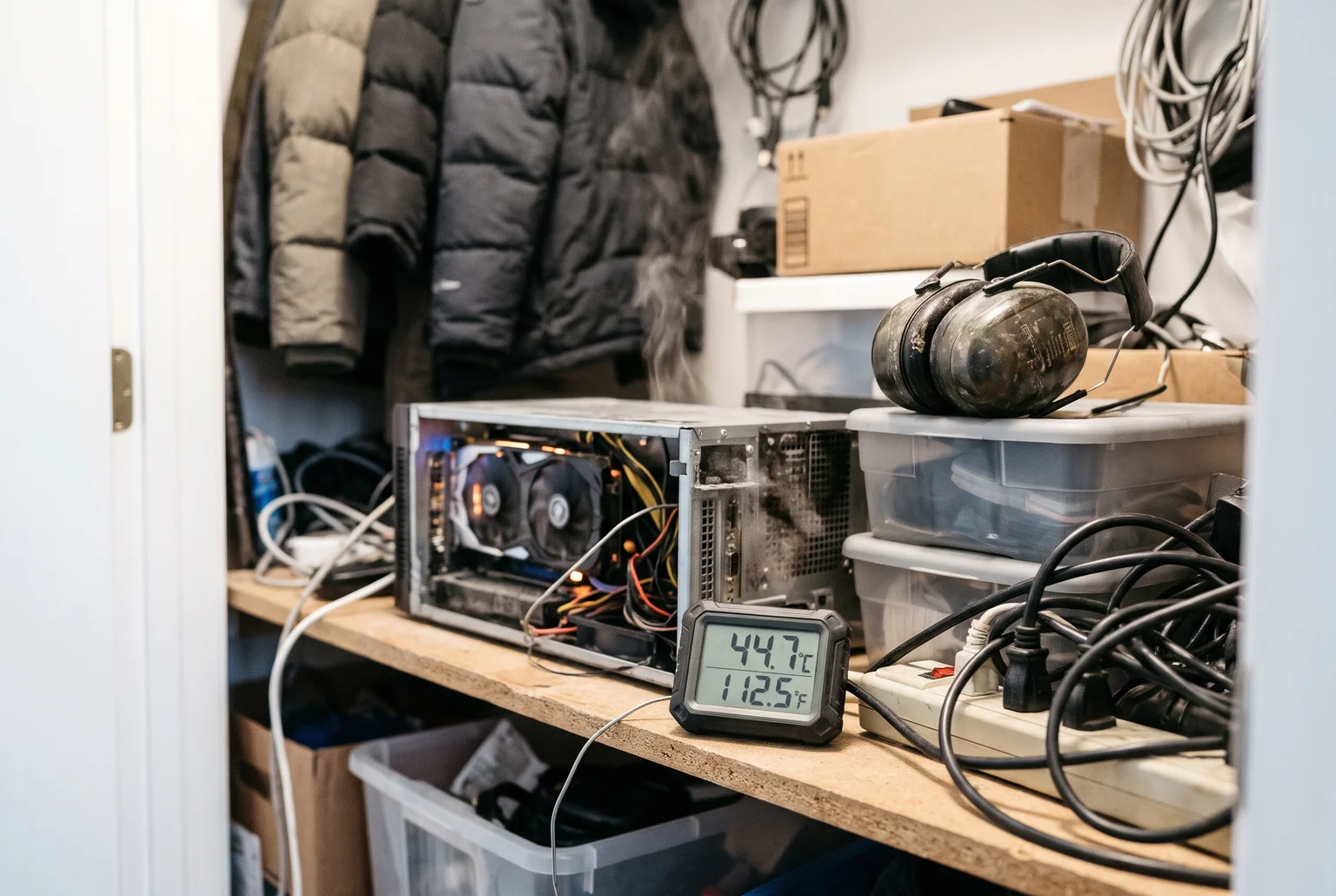
Noise is the cost people forget. A 4090 system measured about 38 dBA under stress, or 33 to 34 dBA in quiet BIOS. Four blower GPUs hit 55 to 65 dBA, which rules out a living space. Upkeep is a few hours a year for updates, dust cleaning, and eventual drive replacement.
For the household of four, hardware is the cost. A $1,000 mid-tier build plus $50 a year is about $1,150 over three years. Four $20 chat subscriptions run $960 a year, so break-even lands near 14 months. A single $20 plan for one coder never recovers that outlay, and cloud wins if you want frontier-model quality. Privacy is the reason to build when only one person is paying.
How to pick your build
Start on the PC you own. Install Ollama, try a 3B to 4B model, then a quantized 7B to 8B model if you have 16 GB of RAM, and record the speeds Ollama reports. If replies feel interactive, you may not need to buy anything. If not, an 8 GB GPU is the first upgrade.
One person chatting: budget tier. One coder: mid tier. The household of four: the $1,000 mid-tier build, about $23 to $78 a year in power depending on the machine. Recheck prices and benchmarks before you pay.
Related guides
- Local AI vs cloud AI: real token speeds, hardware and running costs, and where local models fall behind.
- Can you run ChatGPT locally?: set up gpt-oss-20b with Ollama on a 16GB PC or Mac, and see which models fit your memory.
- Private AI options ranked: from chatbot privacy settings and business plans to running models on your own laptop.
- Make AI images on your own computer: what your computer needs, which free app to start with and how to make your first picture.
Sources
- Chat and file retention policies in ChatGPT - OpenAI Help Center
- Openai
- GeForce RTX 5090 - NVIDIA
- Apple introduces M4 Pro and M4 Max - Apple Newsroom
- Mac mini (2024) - Tech Specs - Apple Support - Apple
- llama3.1:8b-instruct-q4_K_M - Ollama - Ollama
- Perplexity - 3103lab
- Huggingface
- Ollama
- Compiler and llama.cpp Metal guide - BestLLMFor
- Which Qwen model to run: versions, sizes and VRAM for 11 models - DEV Community - DEV Community
- DeepSeek-Coder-V2: Breaking the Barrier of Closed ... - GitHub - DeepSeek
- M3 Ultra Mac Studio 96 GB for local LLMs: the limits - LeCompute - LeCompute
- awesome-gpu-for-llm/benchmark/dataset.md at main · airdropkalami/awesome-gpu-for-llm · GitHub - GitHub
- Used RTX 3090 in United States - from $950 delivered | PCPrice.Watch - PCPrice.Watch
- GPU for Local LLM: RTX 4090 vs 5090 vs Mac Studio vs A5000 vs 7900 XTX - D-Central Technologies
- The new Mac mini and Mac Studio are available today - Apple - Apple
- Mac Ultra vs RTX 4090 for Local LLMs (70B Models Tested). - TechGuidePRO
- NVIDIA RTX 3090 - The Budget 24GB Value King | Awesome Agents - Awesome Agents
- LM Studio vs llmster vs lms - LM Studio
- Linux - Ollama
- Development - Ollama
- OpenAI compatibility - Ollama
- Localhost
- Ollama FAQ - Ollama
- Starting with OpenAI-Compatible Providers - Open WebUI
- Quick Start - Open WebUI
- Roles / Open WebUI - Open WebUI
- Ollama Guide - Continue
- Ollama FAQ - Ollama
- 152,137 exposed Ollama servers found in year-long scan - DeAI News
- Bleeding Llama (CVE-2026-7482): Why Self-Hosted AI Isn't Automatically Secure AI - WZ-IT
- HTTPS using Tailscale / Open WebUI - Open WebUI
- Quick Start - WireGuard
- Reverse proxy quick-start - Caddy Documentation - Caddy
- FAQ / Open WebUI - Open WebUI
- Electric Power Monthly - U.S. Energy Information Administration (EIA) - U.S. Energy Information Administration
- Local AI Server Builds, Dev Box to Rack 2026 | MyAIHardware - MyAIHardware
- Nvidia GeForce RTX 4090 Review - TechSpot
- Ollama GPU requirements: VRAM, RAM, and supported GPUs - Hostinger