What are the best Ollama models right now?
For most people, the best Ollama models in October 2026 are Google's Gemma 4 12B for everyday chat and photos, Alibaba's Qwen 3.5 9B for long documents and OpenAI's gpt-oss 20B for reasoning. All three are free and Apache 2.0 licensed. Pick by memory first: a model that fits beats a bigger one that does not.
This guide follows one reader: someone who has just installed Ollama on a 16GB Windows laptop with no graphics card, or on a PC with an 8-12GB graphics card, and wants three models worth downloading first. New to Ollama? Our guide to installing Ollama on Windows, Mac and Linux comes first. Bigger machines get upgrade picks along the way.
Choose Gemma 4 12B if:
- You want one model for writing, summaries and questions about photos or screenshots. It takes text and image input.
- You want a 7.7-8.0GB download that Google says is small enough to run locally with just 16GB of VRAM or unified memory.
Choose Qwen 3.5 9B if:
- You paste in long reports or contracts. Ollama lists a 256K context window, and Qwen says the model handles 262,144 tokens natively.
- You want a smaller file that still reads images: 6.6GB in the llama.cpp build, against 8.0GB for Gemma 4 12B.
Choose gpt-oss 20B if:
- You want step-by-step reasoning with reasoning effort you can set to low, medium or high.
- You can spare the memory. It is a 14GB download, and OpenAI says it can run within 16GB of memory, so close other apps first.
The best Ollama models in October 2026, by memory and task
Every model below was in Ollama's library on October 27, 2026, with sizes copied from its tags page. Where Ollama shows a range, the tag holds two builds: Gemma 4 12B lists a 7.7GB MLX build and an 8.0GB llama.cpp build. The MLX build is not always the smaller one: Qwen 3.5 9B's is 7.6GB, against 6.6GB for its llama.cpp build. MLX is Apple's machine learning framework for its own chips, and llama.cpp is the open-source engine that reads GGUF, the model file format most local AI apps share.
| Model | Maker | Tag to pull | Download | Memory | Best for | License |
|---|---|---|---|---|---|---|
| Gemma 4 12B | Google DeepMind | gemma4:12b | 7.7-8.0GB | 16GB | Everyday chat, photos | Apache 2.0 |
| Qwen 3.5 9B | Alibaba Qwen | qwen3.5:9b | 6.6-7.6GB | 16GB | Long documents, images | Apache 2.0 |
| gpt-oss 20B | OpenAI | gpt-oss:20b | 14GB | 16GB (tight), 24GB | Reasoning, tool use | Apache 2.0 |
| DeepSeek-R1 8B | DeepSeek | deepseek-r1:8b | 5.2GB | 16GB | Math and logic | MIT |
| Qwen 3.5 4B | Alibaba Qwen | qwen3.5:4b | 3.3-4.0GB | 8GB | Small and fast, images | Apache 2.0 |
| Llama 3.2 3B | Meta | llama3.2:3b | 2.0GB | 8GB | Older or 8GB machines | Llama 3.2 Community License |
| Phi-4-mini | Microsoft | phi4-mini | 2.5GB | 8GB | Small, MIT licensed | MIT |
| Granite 4.2 8B | IBM | granite4.2:8b | 5.3GB | 16GB | Business text, JSON output | Apache 2.0 |
| Ministral 3 14B | Mistral AI | ministral-3:14b | 9.1GB | 16GB | Chat with images | Apache 2.0 |
| Qwen 3.8 27B | Alibaba Qwen | qwen3.8:27b | 18GB | 24GB | Coding, agents | Apache 2.0 |
| Gemma 4 26B A4B | Google DeepMind | gemma4:26b | 16-19GB | 24GB | Fast all-rounder (MoE) | Apache 2.0 |
| Muse Glimmer 30B | Meta | muse-glimmer:30b | 18GB | 24-32GB | Local agents | Apache 2.0 |
| Qwen 3.6 35B A3B | Alibaba Qwen | qwen3.6:35b | 23-24GB | 32GB | Coding agents (MoE) | Apache 2.0 |
| Gemma 4 31B | Google DeepMind | gemma4:31b | 19-20GB | 32GB | Best Gemma quality | Apache 2.0 |
| Devstral Small 2 | Mistral AI | devstral-small-2:24b | 15GB | 32GB | Coding agents | Apache 2.0 |
| GLM-OCR | Z.ai | glm-ocr | 2.7GB | 8GB | Scans to text (OCR) | MIT |
| EmbeddingGemma 2 | Google DeepMind | embeddinggemma-2 | 1.3GB | Any | Document search | Apache 2.0 |
The memory column is my estimate from the download size, except where the maker gives one: Google and OpenAI give 16GB, Meta says Muse Glimmer fits a 24 GB or 32 GB envelope, and Mistral says Devstral Small 2 runs on a single RTX 4090 or a Mac with 32GB RAM. This page is reviewed monthly; the last check was on October 27, 2026.

The chart uses each pick's non-MLX size from the tags pages, which is the llama.cpp build where a tag holds both, from 2.0GB for llama3.2:3b to 23GB for qwen3.6:35b. On an Apple Silicon Mac, Ollama's blog points to tags ending in -mlx, such as gemma4:12b-mlx, and says its updated MLX engine is up to 20% faster.
How much memory does an Ollama model need?
The rule of thumb: about 0.6GB per billion parameters
Parameters are the learned numbers inside a model, and the "B" in 12B means billions of them. Most Ollama downloads use 4-bit quantization, which stores each number in about 4 bits instead of 16. As a rule of thumb, at 4-bit, budget about 0.55-0.65GB per billion parameters for the weights, plus room for context.
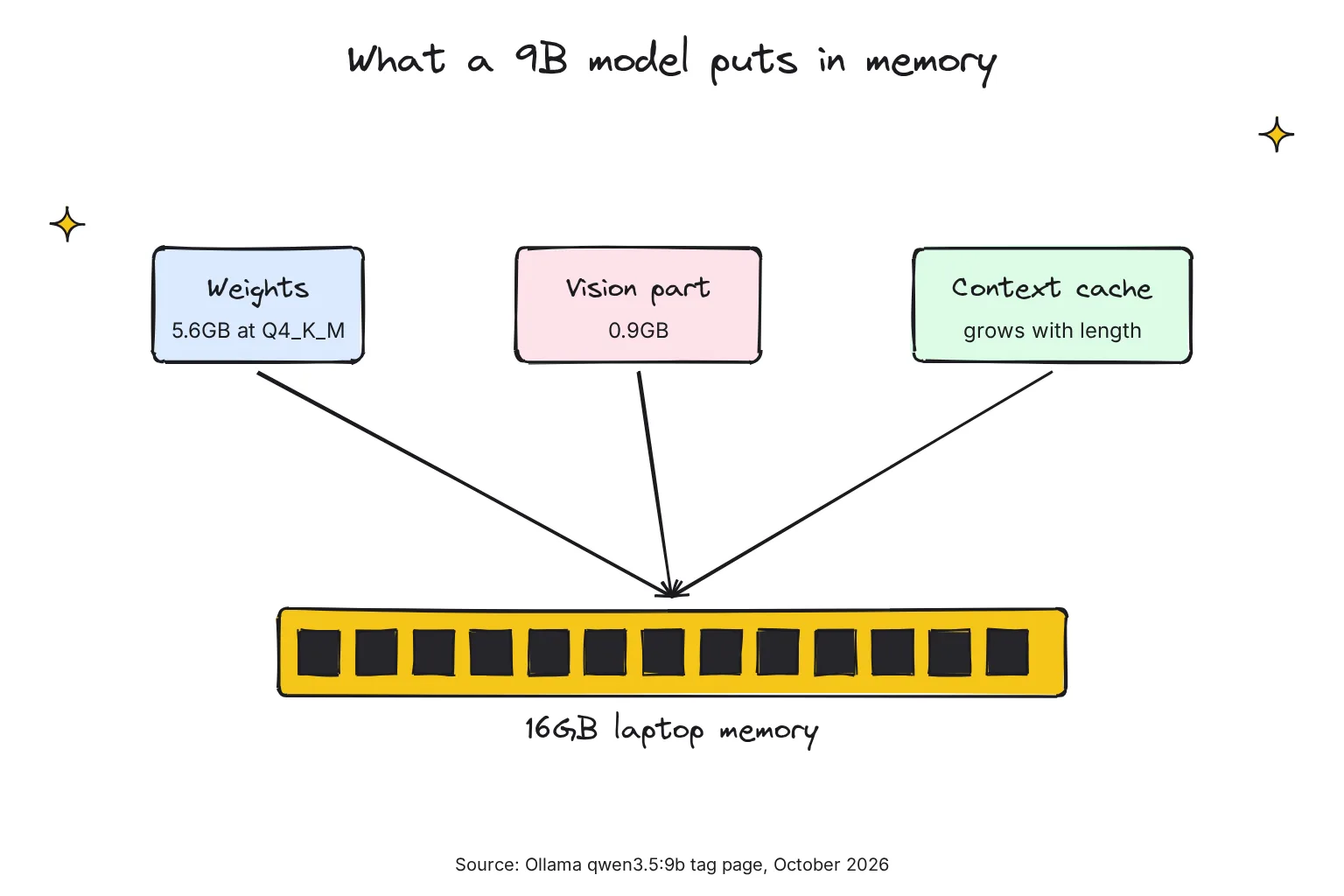
Ollama's Q4_K_M weights, a common 4-bit format, bear this out: 5.6GB for Qwen 3.5 9B's 8.95B parameters, 7.4GB for Gemma 4 12B's 11.9B and 17GB for Qwen 3.8 27B's 27.3B, about 0.62GB per billion each time.
Vision models carry a little extra: the llama.cpp build of qwen3.5:9b is 6.6GB because a 922MB vision projector sits beside the weights. Then comes the context cache, which grows as the conversation gets longer. Our guide to local AI models and model labels explains Q4_K_M and BF16 in more depth.
What fits 8GB, 16GB, 24GB and 32GB or more?
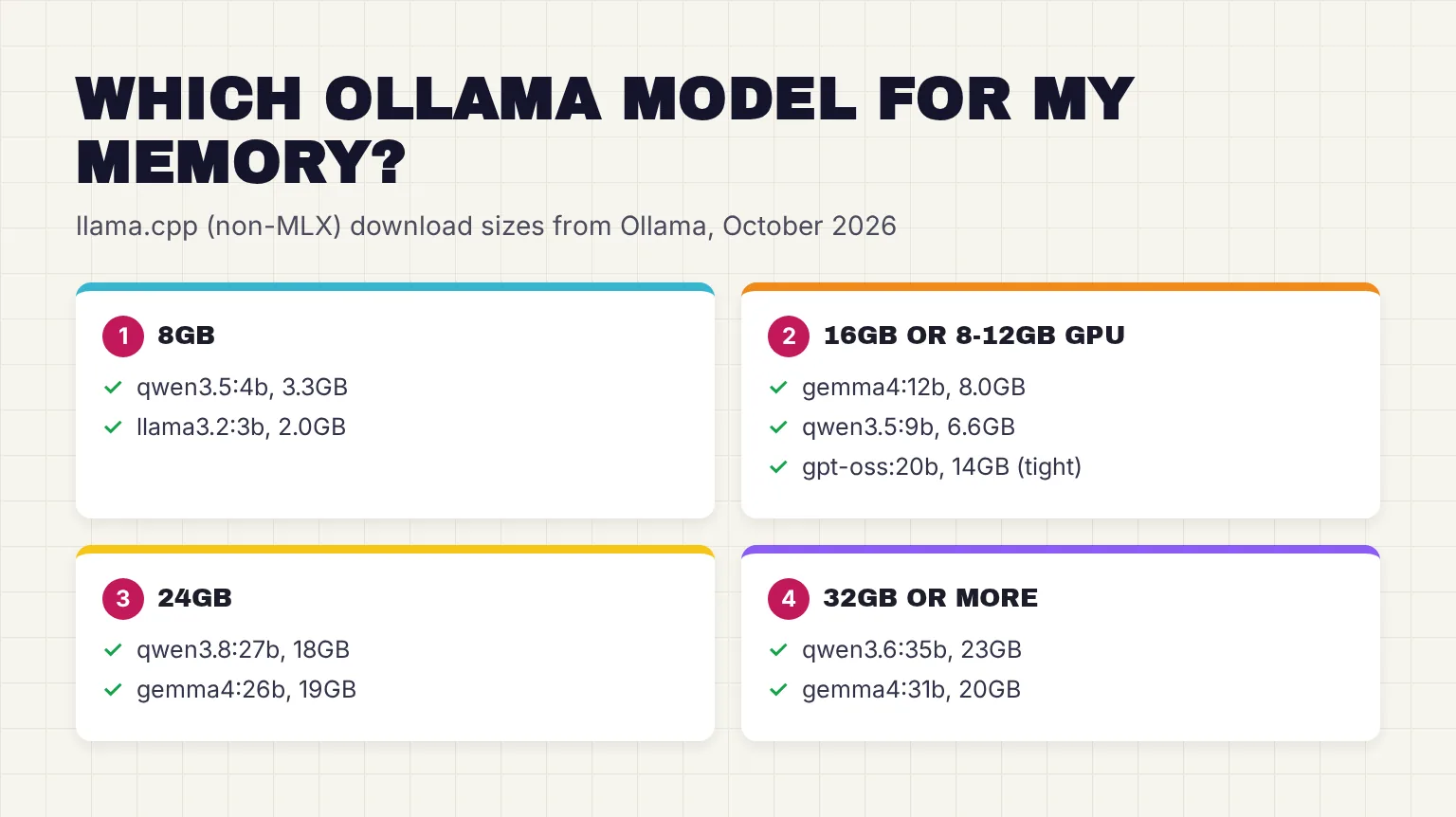
On a laptop without a graphics card, the model shares RAM with Windows and your browser, so I keep everyday downloads to about half of total memory. On a PC with a graphics card, VRAM, the card's own fast memory, is the limit that matters.
- 8GB:
qwen3.5:4borllama3.2:3b. Liquid AI's new LFM3 is a smaller option, a 1.1GB to 1.7GB download; see how to run LFM3 locally. - 16GB laptop or 8-12GB graphics card:
gemma4:12bandqwen3.5:9b, withgpt-oss:20bas the tight ceiling. On an 8GB card, Gemma's 7.7-8.0GB download is about as big as the card, so part of it will sit in system RAM. Qwen has a better chance of fitting, and itsqwen3.5:9b-q4_K_Mtag is the 6.6GB llama.cpp build on its own. - 24GB:
qwen3.8:27borgemma4:26b. - 32GB or more:
qwen3.6:35b,gemma4:31b, or a 24GB-tier model with a much longer context. Our guide on how to run Qwen 3.8 and Qwen 3.6 locally has the commands for both.
Ollama's default context, and how to raise it
Context length is how much text a model holds in view at once, counted in tokens, or word pieces. Ollama sets it from your graphics memory: 4k tokens below 24 GiB of VRAM, 32k from 24 to 48 GiB, and 256k at 48 GiB or more. Google's rule of thumb for its Gemini models is that 100 tokens is about 60-80 English words, so 4,096 tokens is roughly 2,500-3,300 words, your prompt and the answer together.
So a model with a 256K window can still lose the start of your document on the reader's laptop. Ollama says web search, agents and coding tools should be set to at least 64000 tokens, and a larger context needs more memory. Raise it with the slider in the Ollama app's settings, with num_ctx inside a chat, or for every model when the server starts:
# inside an ollama run chat
/set parameter num_ctx 16384

# for all models, macOS or Linux
OLLAMA_CONTEXT_LENGTH=64000 ollama serve
On Windows, add OLLAMA_CONTEXT_LENGTH as a user environment variable and restart Ollama, as its FAQ describes. To fit more context, set OLLAMA_KV_CACHE_TYPE to q8_0, which Ollama says uses approximately 1/2 the memory of f16, the default; it needs Flash Attention, which Ollama turns on where supported.
What are MoE models, in plain English?
Some names carry two numbers, like Gemma 4 26B A4B or Qwen 3.6 35B A3B. These are mixture-of-experts (MoE) models: the network is split into many specialist parts, and only a few work on each token. Google says the 26B model activates only 3.8 billion of its total parameters during inference to deliver fast tokens per second. Qwen 3.6 35B A3B uses 3B of its 35B, and gpt-oss 20B uses 3.6B of its 21B.
The catch is that every expert still sits in memory. An MoE model answers at closer to small-model speed but needs big-model memory, which is why gemma4:26b is a 16-19GB download. For the 16GB reader, gpt-oss 20B is the only MoE pick that fits.
Why can a smaller model with more context beat a bigger one?
A bigger model squeezed into your memory leaves no room for context, so it may see only the first pages of a report, while a smaller model can read the whole thing. Qwen's own tests make the point: on two long-context benchmarks, AA-LCR and LongBench v2, it reports its 9B model at 63.0 and 55.2, ahead of gpt-oss-20b at 30.7 and 45.6. Those are the maker's numbers from its own setup.
Open WebUI's docs warn that at Ollama's 4K default, you're often getting half the page content of a typical web page. On a 16GB laptop, I would rather run Qwen 3.5 9B with 16K-32K of context than squeeze in gpt-oss 20B at 4K.
What is the best Ollama model for each task?
The picks below put the 16GB reader first. Benchmark figures are each maker's own claims; I know of no independent leaderboard that tests all of these models the same way on Ollama.
Everyday chat and writing: Gemma 4 12B
Gemma 4 12B is the one I would keep loaded. Google reports performance nearing our larger 26B MoE model on standard benchmarks, but at less than half the total memory footprint, and Gemma 4 was natively trained on over 140 languages. With 24GB, gemma4:26b is the upgrade.
If refusals are the problem, the library also hosts community fine-tunes such as dolphin3, whose page says it does not impose its ethics or guidelines on you. Our guide to uncensored AI explains what changes in those models and what to watch for.
Coding: Gemma 4 12B now, Qwen 3.8 27B with 24GB
For code questions and short scripts on 16GB, Gemma 4 12B again: Google reports 72.0% on LiveCodeBench v6 for the 12B, against 77.1% for the 26B. On Apple Silicon, Ollama says version 0.31 makes Gemma 4 generate tokens nearly 90% faster on average across a coding-agent benchmark, using multi-token prediction; its own test ran the 12B MLX build on an M5 Max.
Coding agents, tools that read and edit a whole project, need far more context, so I would save them for 24GB or more. There, try Qwen 3.8 27B: Qwen reports 61.7 on SWE-bench Pro, against 53.5 for Qwen 3.6 27B. Mistral's Devstral Small 2 is the alternative at 15GB. Meta's Muse Glimmer is built for local agents, and each maker's chart favors its own model: Meta's shows Muse Glimmer at 75.5 on MCP Atlas, against 62.5 for Qwen 3.6 27B.
To connect a model to Claude Code, Codex or OpenCode, use ollama launch with the model you pulled:
ollama launch claude --model qwen3.5Reasoning and math: gpt-oss 20B or DeepSeek-R1 8B
Reasoning models work through a problem before answering, which helps with math and logic but costs time and context. DeepSeek-R1 8B is the lighter option at 5.2GB: a smaller model trained on a bigger model's reasoning, which DeepSeek says scores 86.0 on AIME 2024, matching the performance of Qwen3-235B-thinking.
Watch the context. DeepSeek says its full updated R1 model averages 23K tokens per question on AIME, far beyond Ollama's 4K default, so raise num_ctx first. Qwen 3.5 and Gemma 4 have thinking modes too, so you may not need a separate reasoning model.
Vision: photos, screenshots and charts
Google lists document and PDF parsing, screen and UI understanding, chart comprehension and OCR among Gemma 4's skills. Qwen 3.5 9B is the second pick; Qwen says the 3.5 family outperforms Qwen3-VL models on visual understanding, so skip the older qwen3-vl tags. To ask about an image, put its path in the prompt, using the exact tag you pulled so Ollama does not fetch the default E4B:
ollama run gemma4:12b ./image.png what is in this image?For scanned pages, OCR (optical character recognition) turns a picture of text into editable text. GLM-OCR does only that, at 2.7GB; Z.ai says it achieves a score of 94.62 on OmniDocBench V1.5 with 0.9B parameters. Run it with ollama run glm-ocr Text Recognition: ./image.png.
Documents, long context and search
For long reports, Qwen 3.5 9B with a raised context is my pick on 16GB. For a whole folder of files, chat apps use RAG, retrieval-augmented generation: an embedding model turns each passage into numbers, the app finds the passages closest to your question, and only those go to the chat model. Ollama's docs call embeddings numeric vectors you can store in a vector database.
Google's EmbeddingGemma 2, released on October 6, 2026, is a 1.3GB download. Google says it has 740 million parameters, an 8K token context window and an Apache 2.0 license. Open WebUI runs RAG for you: our guide to installing Open WebUI and connecting it to Ollama covers the install, and our Gemma 4 and Open WebUI guide walks through the setup with Gemma 4. For your own tools, IBM's Granite 4.2 8B supports RAG, tool usage and structured JSON output with 128K context.
Small and fast: Qwen 3.5 4B and Llama 3.2 3B
On 8GB, or for quick replies, Qwen 3.5 4B keeps image input and the 256K window in a 3.3-4.0GB download. Meta's Llama 3.2 3B dates from September 2024 but fits almost anything at 2.0GB. Microsoft's Phi-4-mini is a third option, though Microsoft warns it does not have the capacity to store too much factual knowledge, so check its facts.
How to try a model quickly, and remove the ones you do not use
These steps use Gemma 4 12B; swap in any tag from the table.
- Update Ollama. New families need recent versions; on Windows and macOS Ollama will automatically download updates, then offers Restart to update.
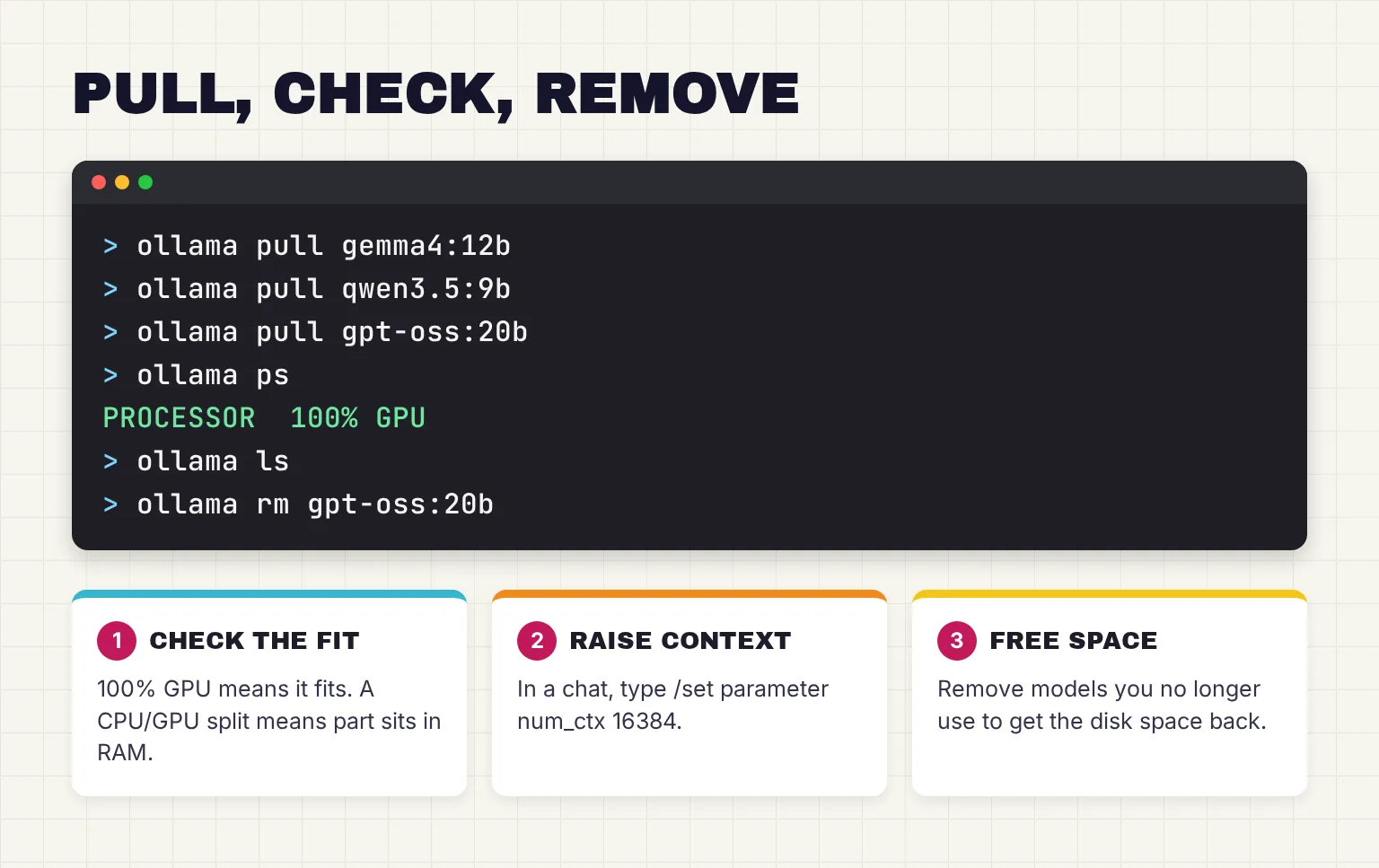
- Pull the exact tag. Run
ollama pull gemma4:12b. A bare name gets the default tag:gemma4alone downloads E4B, not 12B. - Chat with it. Run
ollama run gemma4:12b, ask something you can check, and type /bye to leave. - Check the fit. While it is loaded, run
ollama psin a second terminal. 100% GPU means the model loaded entirely into the GPU; a split such as 48%/52% CPU/GPU means part sits in system memory, so shorten the context or pick a smaller model. The CONTEXT column shows the context in use. - Unload it.
ollama stop gemma4:12bfrees the memory now. Otherwise Ollama keeps models in memory for 5 minutes after use. - Remove what you do not use.
ollama lslists your downloads andollama rmremoves a model. Our guide to deleting Ollama models and freeing disk space covers shared files and moved model folders.
Watch for cloud tags
Tags such as gemma4:cloud run on Ollama's servers, and Ollama says cloud models do not need to be downloaded. Some newer giants, such as DeepSeek-V4-Pro, list only cloud tags. For a fully private setup, pull tags without "cloud" in the name. Our guide to Ollama Cloud pricing, limits and privacy covers what those tags cost and what happens to your prompts.
Which Ollama models can you use commercially?
Every pick here allows commercial use, but the terms differ. Read the maker's license before you build a product on one.
| License | Models in this guide | What the maker says |
|---|---|---|
| Apache 2.0 | Gemma 4, EmbeddingGemma 2, Qwen 3.5, 3.6 and 3.8, gpt-oss, Ministral 3, Devstral Small 2, Granite 4.2, Muse Glimmer | OpenAI calls it ideal for experimentation, customization, and commercial deployment; IBM says it allows free use for both research and commercial purposes |
| MIT | DeepSeek-R1, Phi-4-mini, GLM-OCR | DeepSeek says R1 supports commercial use and distillation |
| Llama 3.2 Community License | Llama 3.2 | Commercial use allowed, but services with greater than 700 million monthly active users must request a license |
| Gemma Terms of Use | Gemma 3, Gemma 3n, the first EmbeddingGemma | Custom terms with a Prohibited Use Policy; Gemma 4 is not covered |
The Gemma split matters because both generations sit in the same library: Google released Gemma 4 under a commercially permissive Apache 2.0 license, while its Gemma Terms of Use still list Gemma 3, Gemma 3n and EmbeddingGemma. Llama 3.2 also asks you to show "Built with Llama" when you distribute it.
Other library models use other terms: NVIDIA's Nemotron 3 Nano, for example, ships with the NVIDIA Open Model License.
Common questions about the best Ollama models
What is the best Ollama model for 16GB of RAM?
Gemma 4 12B is the best all-round choice for 16GB. It is a 7.7 to 8.0GB download, reads text and images, and Google says it runs with 16GB of memory. Add Qwen 3.5 9B for long documents, and gpt-oss 20B, a 14GB download, for reasoning when you can close other apps.
Which Ollama model is best for coding?
On a 16GB machine, start with Gemma 4 12B, which Google reports at 72.0 percent on LiveCodeBench v6. With 24GB or more, try Qwen 3.8 27B or Mistral's Devstral Small 2 for coding agents, which Ollama says need at least 64000 tokens of context. Each benchmark figure is the maker's own claim.
How much memory does an Ollama model need?
As a rule of thumb, at 4-bit, budget about 0.55 to 0.65GB per billion parameters for the weights, plus room for context and your other apps. Ollama's 4-bit weights for Gemma 4 12B are 7.4GB, for example. A model that does not fit in graphics memory is split with system RAM and runs more slowly.
How do I increase the context length in Ollama?
Use the context slider in the Ollama app's settings, type /set parameter num_ctx followed by a number inside a chat, or start the server with the OLLAMA_CONTEXT_LENGTH environment variable. Ollama defaults to 4K tokens below 24GiB of graphics memory, and a larger context needs more memory.
Can I use Ollama models commercially?
Usually yes, but check each license. Gemma 4, Qwen 3.5, gpt-oss, Granite 4.2 and Mistral's Ministral 3 use Apache 2.0, while DeepSeek-R1 and Phi-4-mini use MIT. Llama 3.2 has its own community license, and older Gemma models such as Gemma 3 use Google's Gemma Terms of Use.
Where can I see the full Ollama model list?
The full list is the library on ollama.com, which you can sort by popular or newest. Each model's tags page lists every size with its download size and context window, so check it before you pull. To see the models already on your own computer, run ollama ls in a terminal.
My verdict for a 16GB laptop: start with Gemma 4 12B
For the reader in this guide, Gemma 4 12B is the first download: it handles writing, questions and photos, and leaves room for a longer context. Add Qwen 3.5 9B for long documents, with context raised to 16K or more, then gpt-oss 20B for reasoning; the three take about 29GB of disk. On a PC with an 8GB graphics card, start with Qwen 3.5 9B instead, since its smaller file has the best chance of fitting the card. With 24GB or more, add Qwen 3.8 27B for coding.
For a ChatGPT-style window, our guide to running a ChatGPT-like assistant locally sets up gpt-oss 20B. This page is reviewed monthly and was last checked on October 27, 2026.
Your next step: run ollama pull gemma4:12b, ask it to summarize a document you know well so you can judge the answer, and run ollama ps to confirm it fits.
Sources
- Library - Ollama
- gemma4 tags - Ollama
- gemma4:12b - Ollama
- qwen3.5 tags - Ollama
- qwen3.5:9b - Ollama
- gpt-oss tags - Ollama
- deepseek-r1 tags - Ollama
- llama3.2 tags - Ollama
- phi4-mini tags - Ollama
- granite4.2 tags - Ollama
- granite4.2 - Ollama
- ministral-3 tags - Ollama
- qwen3.8 tags - Ollama
- qwen3.8:27b - Ollama
- qwen3.6 tags - Ollama
- muse-glimmer tags - Ollama
- muse-glimmer - Ollama
- devstral-small-2 tags - Ollama
- glm-ocr tags - Ollama
- glm-ocr - Ollama
- embeddinggemma-2 tags - Ollama
- dolphin3 - Ollama
- deepseek-v4-pro tags - Ollama
- nemotron-3-nano:30b - Ollama
- Context length - Ollama
- FAQ - Ollama
- CLI Reference - Ollama
- Quickstart - Ollama
- Vision - Ollama
- Embeddings - Ollama
- Cloud - Ollama
- Ollama's highest performance on Apple Silicon yet with MLX - Ollama
- Faster Gemma 4 on MLX with multi-token prediction - Ollama
- Gemma 4: Byte for byte, the most capable open models - Google
- Introducing Gemma 4 12B: a unified, encoder-free multimodal model - Google
- EmbeddingGemma 2: an open, lightweight multimodal embedding model - Google
- gemma-4-12B-it model card - Google, Hugging Face
- Gemma Terms of Use - Google
- Understand and count tokens - Google AI for Developers
- Qwen3.5-9B model card - Qwen, Hugging Face
- Qwen3.6-35B-A3B model card - Qwen, Hugging Face
- Qwen3.8-27B model card - Qwen, Hugging Face
- gpt-oss-20b model card - OpenAI, Hugging Face
- DeepSeek-R1-0528-Qwen3-8B model card - DeepSeek, Hugging Face
- Phi-4-mini-instruct model card - Microsoft, Hugging Face
- Devstral Small 2 24B Instruct 2512 model card - Mistral AI, Hugging Face
- GLM-OCR model card - Z.ai, Hugging Face
- Granite-4.2-8B model card - IBM, Hugging Face
- Introducing Muse Glimmer: An Open Agentic Model That Runs on Your Device - Meta
- Llama 3.2 Community License Agreement - Meta
- Retrieval Augmented Generation (RAG) - Open WebUI