How do you use Gemma 4 in Open WebUI?
You run Gemma 4 inside Ollama and use Open WebUI as the chat window on top. Install Ollama, download a Gemma 4 model with one command, then start Open WebUI, which picks up Ollama on the same computer automatically. Choose the model from the menu and chat in your browser, with no outside AI service involved.
This guide follows one reader: someone who already uses ChatGPT, owns a 16GB laptop or a desktop PC with a 12GB graphics card, and wants a private ChatGPT-style window that can also read photos and screenshots. Both machines can run Gemma 4, but they suit different sizes.
Two programs share the work. Ollama is the runner: it loads the model and serves it at http://localhost:11434. Open WebUI is the interface, with chat history, uploads and presets, and it has no models of its own. Our guide to running a ChatGPT-style assistant locally uses the same setup with a different model.

Gemma 4 sizes, including the 12B
Google announced Gemma 4 on April 2, 2026 in four sizes: E2B, E4B, 26B A4B and 31B. The E stands for effective parameters, a reduced working footprint made for phones and laptops. A fifth size, Gemma 4 12B, followed on June 3, 2026, and Google says it is small enough to run locally with just 16GB of VRAM or unified memory.
The 26B A4B is a mixture-of-experts model, which uses only a few specialist sub-networks at a time: it activates 3.8 billion of its 25.2 billion parameters, but all of them must be loaded into memory.
So yes, there is a Gemma 4 12B, and it is what most people searching "gemma 4 12b" want. Gemma 3 also had a 12B, and gemma3:12b is still an 8.2GB download on Ollama, so older tutorials point at the previous generation. And Google's older Ollama page on ai.google.dev, now marked deprecated, lists only the four launch tags. The tag you want is gemma4:12b.
Every size reads text and images, and Google says the family excels at visual tasks like OCR and chart understanding, reading words and numbers inside pictures. The E2B and E4B hold 128K tokens of context, and the 12B, 26B and 31B hold 256K; context is how much text the model keeps in view, counted in tokens, which are words or word pieces. All sizes have configurable thinking modes, where the model reasons step by step before answering.
Gemma 4 ships under Apache 2.0, which Google calls a commercially permissive license, while Gemma 1, 2 and 3 stay under the Gemma Terms of Use. One gap: Google lists native audio input on the E2B, E4B and 12B, but its own guide says Ollama publishes Gemma 4 as text and image only. Through Ollama and Open WebUI, plan on text and pictures.
Which Gemma 4 size to pick for your memory
Pick by fast memory: VRAM, the memory on a graphics card, or unified memory on an Apple Silicon Mac, where processor and graphics share one pool. A model that spills into ordinary system RAM still runs, but Ollama's docs say that for best performance you should avoid offloading the model to the CPU.
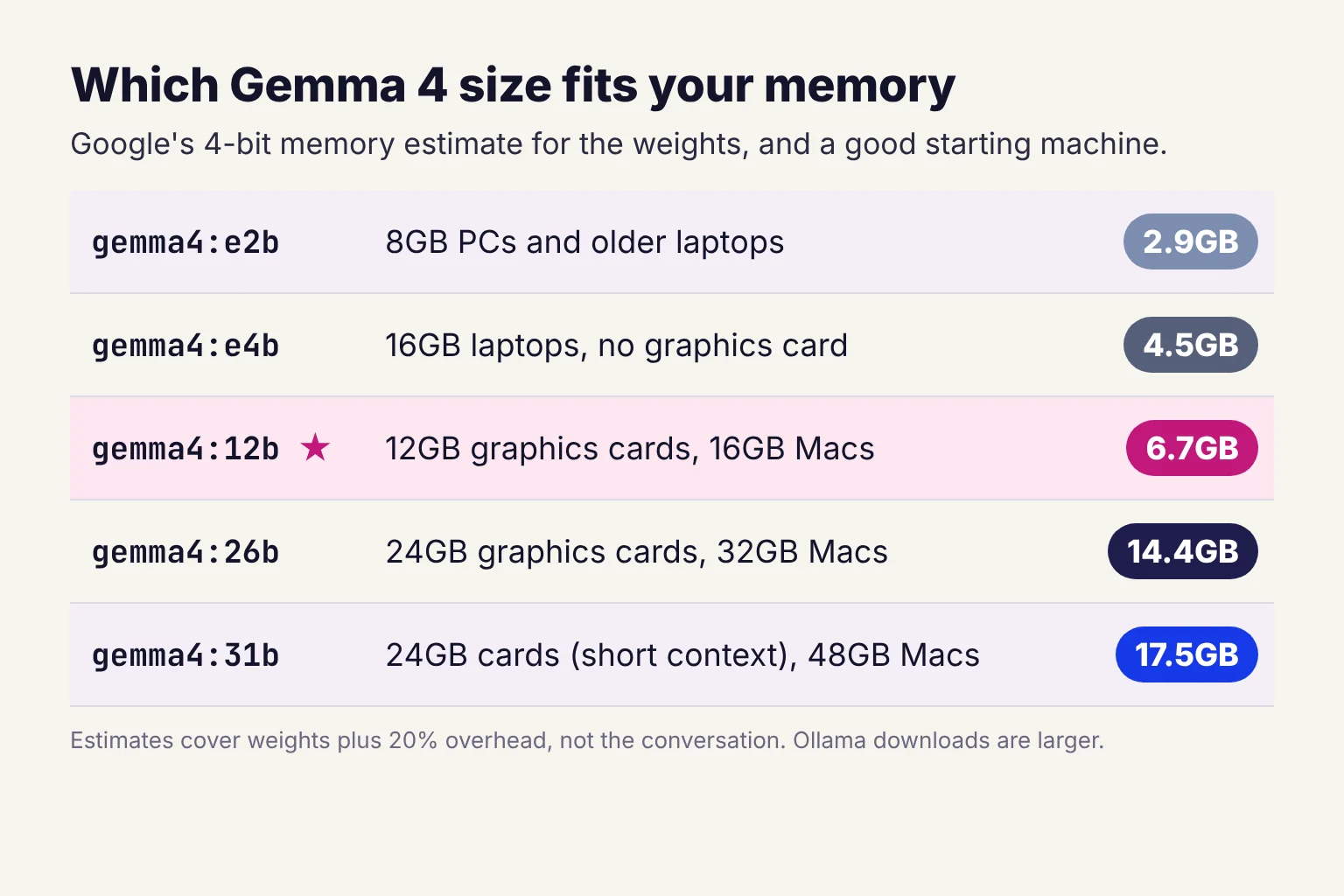
Ollama's downloads are quantized: each weight is stored in fewer bits, which shrinks the file with a small loss of quality. The standard 12B build uses Q4_K_M, a 4-bit format. Our local vs cloud AI comparison explains quantization and speed in more depth.
| Ollama tag | Download | Google's 4-bit estimate | Context | Good starting fit |
|---|---|---|---|---|
gemma4:e2b | 4.6 to 7.5GB | 2.9GB | 128K | 8GB PCs and older laptops |
gemma4:e4b (plain gemma4) | 6.6 to 9.5GB | 4.5GB | 128K | 16GB laptops with no graphics card |
gemma4:12b | 7.7 to 8.0GB | 6.7GB | 256K | 12GB graphics cards, 16GB Apple Silicon Macs |
gemma4:26b | 16 to 19GB | 14.4GB | 256K | 24GB graphics cards, 32GB Macs |
gemma4:31b | 19 to 20GB | 17.5GB | 256K | 24GB cards with short context, 48GB Macs |
Downloads and context lengths come from Ollama's tag list, which shows a range because each size has more than one build, and the MLX builds are for Apple Silicon. Plain gemma4 is an alias for e4b. Google's estimates cover the weights plus 20% overhead, not the conversation's memory. The last column is my own starting point.
For the 12GB graphics card, my pick is gemma4:12b. Its download is only about 1.4GB bigger than the E4B's, Google built it with no separate vision or audio encoder, and the 8.0GB build leaves about 4GB on the card for the conversation. A 16GB Apple Silicon Mac also suits the 12B, the class of machine Google describes. On a 16GB Windows laptop with no separate graphics card, expect Ollama to lean on the much slower processor and system RAM, so I would start with E4B and move to the 12B when quality matters more than waiting.
How to use Gemma 4 12B in Open WebUI, step by step
My route for a Gemma 4 Open WebUI setup on either machine: Ollama as a desktop app, and Open WebUI started with uv, a small tool that runs Python programs, so there is no Docker to learn. Commands are for Windows PowerShell, with Mac versions alongside. On a laptop with no graphics card, use gemma4:e4b in place of gemma4:12b.
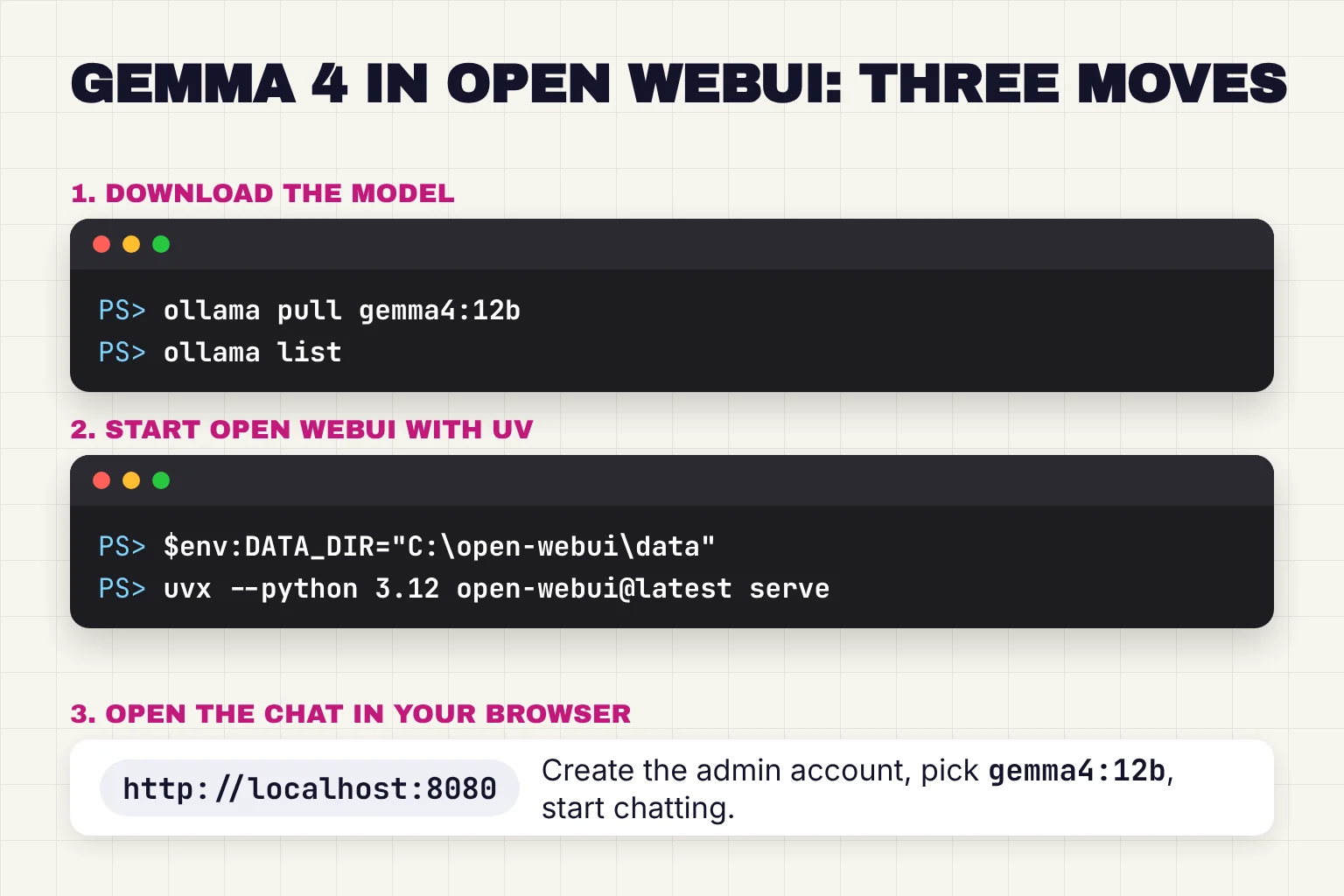
- Install Ollama. Run the installer from ollama.com/download. Ollama needs Windows 10 22H2 or newer, or macOS Sonoma 14 or newer. If Ollama is already installed, update it: the latest release as of October 29, 2026 is v0.40.13.
- Download Gemma 4 12B. In PowerShell (Terminal on a Mac), run
ollama pull gemma4:12b, which fetches the model without starting a chat. Afterwards,ollama listshould show the installed model. - Install uv. On Windows, run
powershell -ExecutionPolicy ByPass -c "irm https://astral.sh/uv/install.ps1 | iex", the installer the Open WebUI quick start gives. On a Mac, runcurl -LsSf https://astral.sh/uv/install.sh | sh. - Start Open WebUI. In a new PowerShell window, run
$env:DATA_DIR="C:\open-webui\data"; uvx --python 3.12 open-webui@latest serve, or on a MacDATA_DIR=~/.open-webui uvx --python 3.12 open-webui@latest serve. Open WebUI supports Python 3.11 and 3.12 but not 3.13, and uv downloads the Python version it needs. DATA_DIR keeps your chats in a fixed folder. Leave the window open. - Create the admin account. Open
http://localhost:8080; the first start takes a minute. Click Create Admin Account. That first account is the administrator. - Check the connection. Go to your avatar, then Settings, Admin, Connections. Ollama on the same computer is picked up automatically at http://localhost:11434 under Manage Ollama API Connections.
- Start your first chat. Click New Chat, pick the model in the selector inside the message box, choose
gemma4:12b, then type and press Enter. Expect the first reply to be slower while the model loads.
You can also skip step 2: as the admin, type a model name into the model selector and Open WebUI offers to pull it. The current Open WebUI release is v0.12.4 as of October 2026. A desktop app exists, but its README calls it early alpha, so I would wait.
Prefer Docker?
The docs call Docker officially supported and recommended for most users, and it suits an always-on household setup like the one in our home AI server guide. On Windows, the docs use Docker Desktop with the WSL 2 backend, running docker commands from the WSL terminal. The standard command is:
docker run -d -p 3000:8080 --add-host=host.docker.internal:host-gateway -v open-webui:/app/backend/data -e WEBUI_SECRET_KEY=your-secret-key --name open-webui --restart always ghcr.io/open-webui/open-webui:mainReplace your-secret-key with the output of openssl rand -hex 32 and keep it, because without a fixed key every recreated container logs everyone out. The page opens at http://localhost:3000, and the image looks for Ollama at http://host.docker.internal:11434. Our guide covers how to install, update and secure Open WebUI.
Show Gemma 4 a photo, a screenshot or a document
Drag a picture into the message box, or use Attach Files in the + menu, then ask your question. PNG, JPEG, WebP and GIF files reach the model as images, while an SVG is read as text.
For the running example, that covers what people use ChatGPT's image upload for: reading a photographed receipt, explaining an error screenshot, or pulling figures out of a chart. For small print, I would crop to the part that matters. The microphone button is separate: Open WebUI transcribes speech with its own speech-to-text engine, local Whisper by default, before Gemma sees anything.
Documents use retrieval, often called RAG: Open WebUI finds the passages that match your question and adds that retrieved text to your prompt. For one file, upload it to the chat. For a reusable set, create a knowledge base under Workspace, Knowledge, then reference it in chat with #. The matching uses an embedding model, by default sentence-transformers/all-MiniLM-L6-v2, run locally.
The catch is context: with Ollama's small default, retrieved data may not be used at all. The preset below fixes that. Before handing any AI app a sensitive file, run through our checklist on what to check before you upload a document.
Save Gemma 4 as a reusable preset with a system prompt
Open WebUI's Models are presets that sit on top of a base model, each with its own system prompt, knowledge and parameters. A system prompt is a standing instruction the model reads before every conversation, and Gemma 4 has native support for the system role.
- Go to Workspace, select Models and click Create.
- Name it, for example Private assistant, and set Base Model to
gemma4:12b. - Paste a system prompt, such as the one below.
- Under Capabilities, make sure Vision is on, which requires a vision-capable base model such as Gemma 4.
- In Advanced Params, set the context length (
num_ctx) to 16384. The control pre-fills 2048, which is very small. - Optionally set think (Ollama) to Off for faster replies. Default uses Ollama's behavior, which is thinking on for models that support it.
- Click Save & Create. The preset appears in the model selector.
A starting system prompt, using a variable Open WebUI fills with the current date:
You are a private assistant running on my own computer.
Answer in plain English, in short paragraphs.
When I share an image, describe what you see before you interpret it.
If you are not sure, say so instead of guessing.
Today is {{CURRENT_DATE}}.
Why 16384? Ollama gives machines with under 24 GiB of VRAM a 4k context by default, only a few pages, and a larger context needs more memory. On the 12GB card, run ollama ps during a long chat, and if it shows less than 100% GPU, step down to 8192.
Fixing common Gemma 4 and Open WebUI problems
Gemma 4 does not show in the model list
Run ollama list. If gemma4:12b is missing, pull it again. If it is there, check the address under Settings, Admin, Connections: http://localhost:11434 for the uv route, http://host.docker.internal:11434 for Docker. Also check the Model IDs field, which works as a whitelist and shows all models when left empty.
Connection refused or host.docker.internal errors
This is usually the Docker route: the quick start says Ollama on the host has to listen on 0.0.0.0 when Open WebUI runs in Docker. Set OLLAMA_HOST to 0.0.0.0, under Edit environment variables for your account on Windows or with launchctl setenv on a Mac, restart Ollama, and keep your firewall on. The docs' other fix, the --network=host flag, moves the page to port 8080. A third route is to run Ollama and Open WebUI together in Docker Compose, where Open WebUI reaches Ollama by its service name.
Out of memory, or replies crawl
Run ollama ps while a reply is generating. 100% GPU means the model sits entirely on the graphics card; a CPU/GPU split means it spilled into system memory. Close graphics-heavy apps, lower num_ctx, drop to E4B, or set think to Off to skip the reasoning pause. On a 16GB laptop with no graphics card, the 12B will stay slow.
Answers ignore most of a long document
A context that is too small silently truncates the prompt. Set num_ctx in the preset, and check the chat's Chat Controls panel too, because a num_ctx set in Chat Controls is the one sent, even when the model has its own.
Image upload does nothing or is refused
Check that the selected model is a Gemma 4 tag, which Ollama lists with Text, Image input, that Vision is on under its Capabilities (in Settings, Admin, Models, or in the preset if you made one), and that the file is a PNG, JPEG, WebP or GIF.
What stays on your computer, and what to lock down
With a local model, prompts, images and documents stay on your machine: Ollama says it does not see your prompts or data when you run locally, and Open WebUI's docs say everything, including the login, stays in your own volume. For the running example, a photographed bank letter never leaves the house.
Some things still go online. Model downloads do, and Open WebUI checks for new versions by default. Ollama also offers cloud models such as gemma4:31b-cloud, which run on Ollama's servers, so avoid tags ending in cloud or set OLLAMA_NO_CLOUD=1 to disable cloud features. In Open WebUI, OFFLINE_MODE disables update checks and automatic model downloads, so if the embedding model was not downloaded first, document chat may not work.
Signup is open only until the first user registers, who becomes the administrator, so create that account straight after installing, and write the password down: losing it locks you out of instance settings.
Do not put Open WebUI on the open internet. Its hardening guide says it is built for private, trusted networks and recommends a VPN such as WireGuard or Tailscale, or an authenticating proxy, in front. Ollama binds 127.0.0.1 port 11434 by default, and the local API does not require authentication, so if you set OLLAMA_HOST to 0.0.0.0 for Docker, block port 11434 from other devices.
Common questions about Gemma 4 in Open WebUI
Is there a Gemma 4 12B model?
Yes. Google added Gemma 4 12B on June 3, 2026, two months after the first four sizes. In Ollama the tag is gemma4:12b, a download of about 8GB with a 256K context window. Do not confuse it with gemma3:12b, the older Gemma 3 model that carries the same size label.
How much memory does Gemma 4 12B need?
Google estimates about 6.7GB to load the 4-bit weights, and Ollama's download is 7.7 to 8.0GB. Google says the 12B runs locally with 16GB of VRAM or unified memory. A 12GB graphics card or a 16GB Apple Silicon Mac should hold it, with some room left for a longer context.
Can Gemma 4 read images in Open WebUI?
Yes. Every Gemma 4 size accepts images, and Ollama lists text and image input for its Gemma 4 tags. Drag a PNG, JPEG, WebP or GIF into the message box and ask about it. If the upload is refused, turn on Vision under the model's Capabilities in Settings, Admin, Models, or in your preset under Workspace, Models.
Why is Gemma 4 not showing in Open WebUI?
Usually Open WebUI cannot reach Ollama, or the model never finished downloading. Run ollama list to confirm the gemma4 tag is installed, then check Settings, Admin, Connections. With Docker, Ollama must listen on 0.0.0.0 and the address should be http://host.docker.internal:11434. Leave the Model IDs filter empty to show every model.
Is Gemma 4 free for commercial use?
Yes. Gemma 4 is released under the Apache 2.0 license, which Google describes as commercially permissive. That is a change from Gemma 1, 2 and 3, which remain under Google's own Gemma Terms of Use. Ollama's gemma4:12b download carries the same Apache 2.0 license text.
My pick for the 16GB laptop and the 12GB graphics card
For the reader with a 12GB graphics card, a Gemma 4 Open WebUI setup with the 12B is the right fit: it should load fully on the card, it reads photos and screenshots, and a 16384-token preset lets it handle real documents. A 16GB Apple Silicon Mac suits the same 12B. On a 16GB Windows laptop without a graphics card, start with gemma4:e4b and keep the 12B as the slower, sharper option.
The 26B and 31B can wait until you have 24GB of video memory or a bigger Mac, and Docker, knowledge bases and remote access can wait until the chat window is part of your week.
Your next step: run ollama pull gemma4:12b tonight, build the preset above, and ask it about one real screenshot.
Sources
- Quick Start - Open WebUI
- Windows - Ollama
- Gemma 4: Byte for byte, the most capable open models - Google
- gemma4 - Ollama
- Gemma releases - Google DeepMind
- Introducing Gemma 4 12B: a unified, encoder-free multimodal model - Google
- google/gemma-4-E4B-it model card - Hugging Face / Google
- Gemma 4 model overview - Google DeepMind
- gemma3 - Ollama
- Run Gemma with Ollama - Google AI for Developers
- Gemma 4 license: Apache License 2.0 - Google DeepMind
- Gemma Terms of Use - Google DeepMind
- Ollama deployment guide - Gemma documentation, Google DeepMind
- Context length - Ollama
- gemma4:12b - Ollama
- Tags: gemma4 - Ollama
- Download Ollama - Ollama
- macOS - Ollama
- Releases: ollama/ollama - GitHub
- Installing and managing Python - uv, Astral
- Starting with Ollama - Open WebUI
- Releases: open-webui/open-webui - GitHub
- Open WebUI Desktop README - GitHub
- Chat Features - Open WebUI
- Models - Open WebUI
- Configure Speech-to-Text - Open WebUI
- Retrieval Augmented Generation (RAG) - Open WebUI
- Knowledge Bases and Document Chat - Open WebUI
- Environment Variable Configuration - Open WebUI
- Reasoning & Thinking Models - Open WebUI
- FAQ - Ollama
- Connection Errors - Open WebUI
- Chat Parameters - Open WebUI
- Hardening Open WebUI - Open WebUI
- Authentication - Ollama