How do you run Whisper locally? With a free app or whisper.cpp
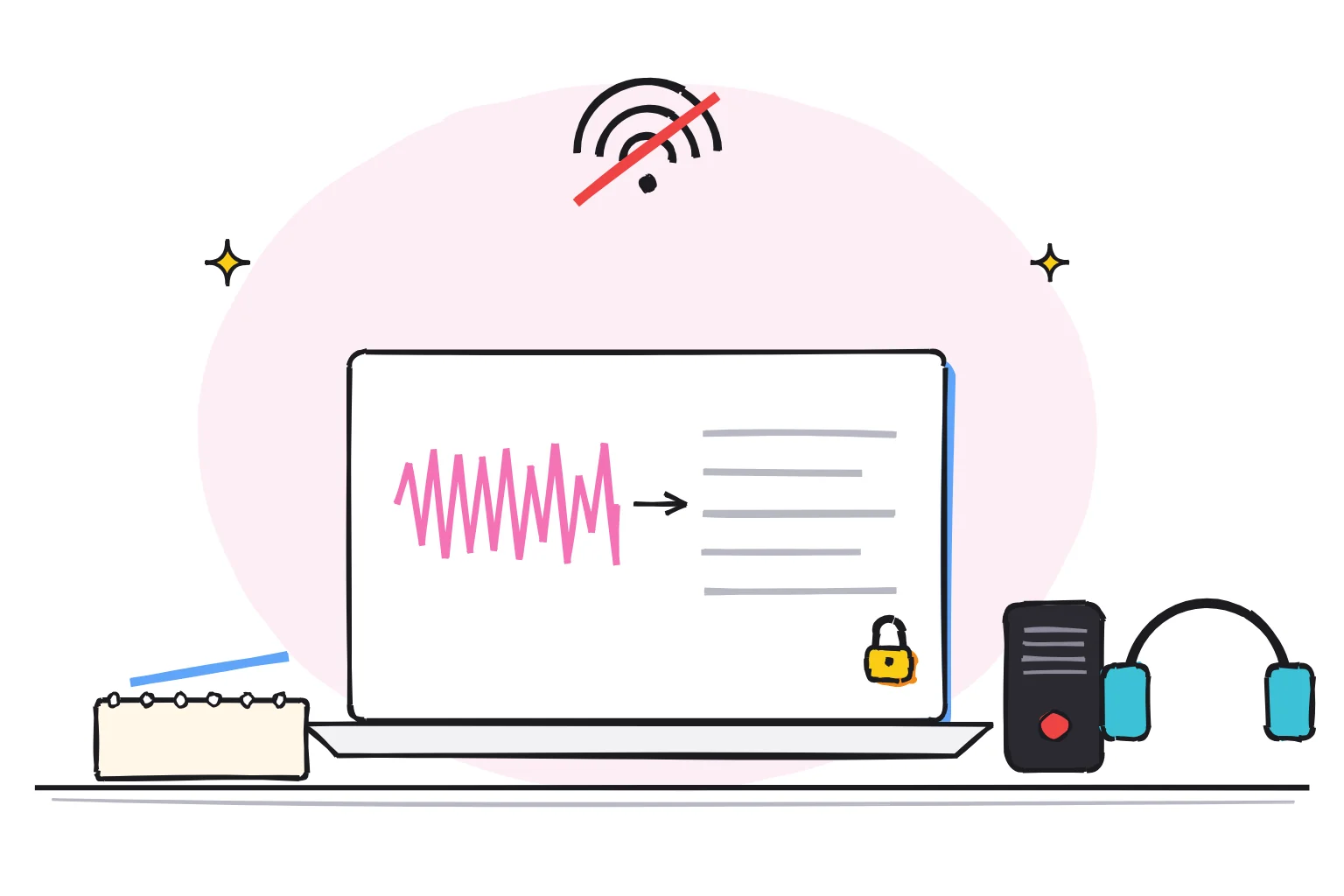
To run Whisper locally, install a free app such as Vibe, or use whisper.cpp from the command line. You download a model once, then your audio is transcribed on your own computer, with nothing uploaded. Whisper itself is free: OpenAI released the code and model weights under the MIT License.
This guide follows one reader: a freelance journalist with 30 hours of recorded interviews and a 16GB laptop with no NVIDIA graphics card. Several sources spoke on condition of anonymity, so the files cannot go to a cloud transcription service. She needs accurate transcripts, a record of who said what, and subtitles for one video clip.
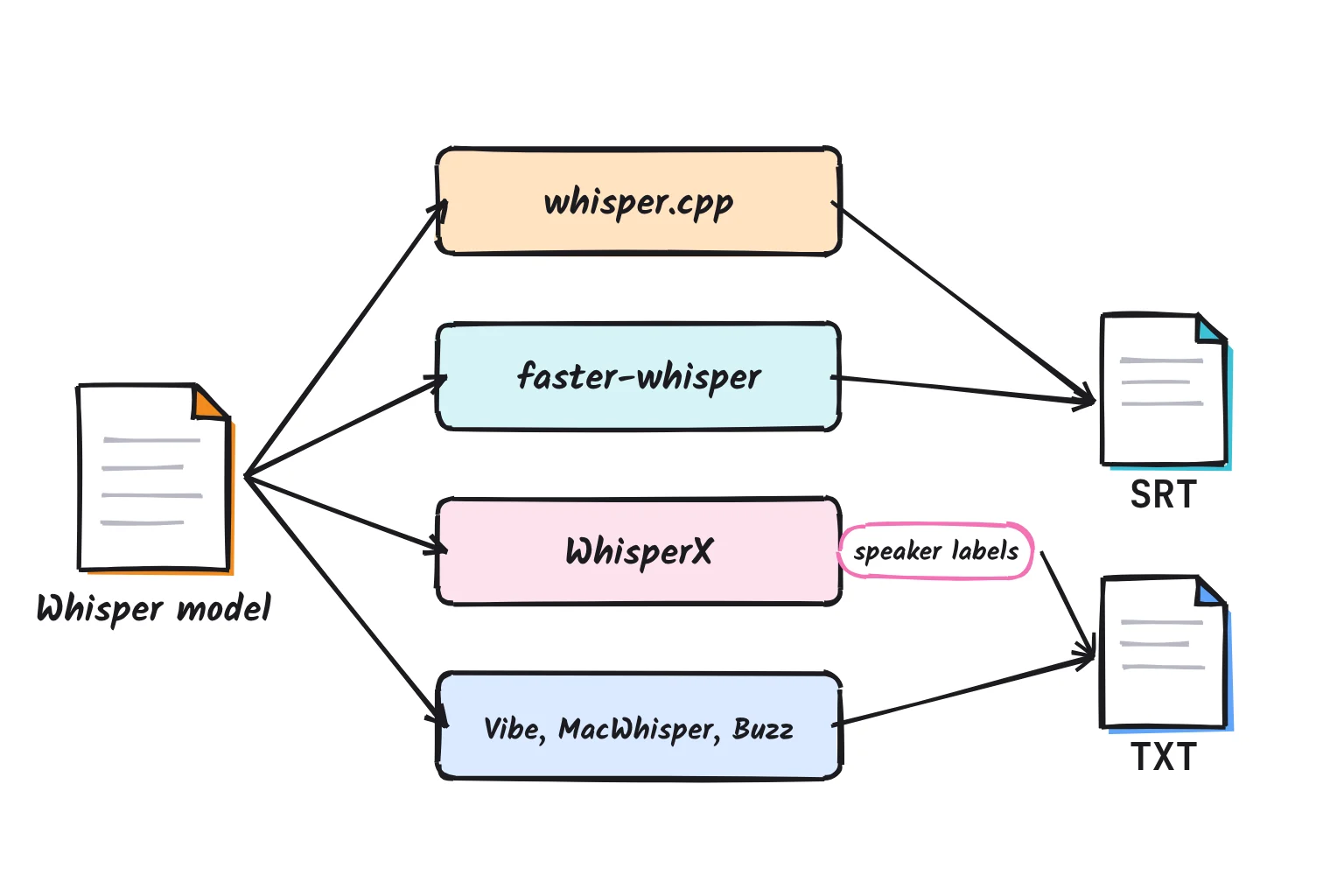
Whisper is a speech recognition model, a file of trained weights. OpenAI trained it on 680,000 hours of multilingual and multitask supervision, and the large-v3 card lists 99 languages. A model needs a runner, the program that loads it. whisper.cpp (often searched as "whisper cpp"), faster-whisper and WhisperX are runners; Vibe, MacWhisper and Buzz put a runner behind buttons.
Searches for "open ai whisper" sometimes mean OpenAI's paid cloud API. OpenAI says whisper-1 and three GPT-4o transcription models shut down on February 26, 2027, but a downloaded model is just a file on your disk. For the reverse job, text to speech, see our guide to the best local TTS models.
whisper.cpp vs faster-whisper vs WhisperX, and the easy apps
They all run the same Whisper models but differ in setup, hardware support and extras. As of October 2026:
| Tool | License | Install difficulty | Runs on | Best for |
|---|---|---|---|---|
| openai-whisper (original) | MIT | Medium: Python and ffmpeg | Windows, Mac, Linux | Reference results, translation |
| whisper.cpp | MIT | Medium: Windows zip, Mac build | Windows, Mac, Linux, phones; CPU, Metal, CUDA, Vulkan | Laptops without NVIDIA, Macs, batches |
| faster-whisper | MIT | Medium: Python library | Windows, Linux, Mac; GPU not on Mac | NVIDIA speed, 8-bit CPU runs |
| WhisperX | BSD-2-Clause | Hard: Python, CUDA, Hugging Face token | Python 3.10 to 3.13; CPU on Mac | Word timestamps, speaker labels |
| Vibe | MIT, free | Easy: signed installer | Windows, Mac, Linux | Free speaker labels for beginners |
| MacWhisper | Free plan; Pro €64 once | Easy | Mac | A polished Mac app |
| Buzz | MIT, free | Easy, unsigned on Windows | Windows, Mac, Linux | Many models in one app |
whisper.cpp is a plain C/C++ implementation without dependencies, so it runs almost anywhere. On Apple Silicon, the inference runs fully on the GPU via Metal. The current release is version 1.9.5, a maintenance release from October 2026.
faster-whisper runs Whisper on CTranslate2, a fast inference engine, and claims to be up to 4 times faster than openai/whisper for the same accuracy while using less memory. On 13 minutes of audio, its small-model benchmark took 6 minutes 58 seconds with the original and 1 minute 42 seconds in 8-bit mode on an Intel Core i7-12700K. Only the Linux and Windows Python wheels support GPU execution, so a Mac runs it on the CPU. Its last release was 1.2.1, in October 2025.
WhisperX uses faster-whisper underneath and adds accurate word-level timestamps using wav2vec2 alignment, plus speaker labels from a toolkit called pyannote. It reports 70x realtime with large-v2 on a graphics card.
Vibe promises fully offline transcription, no data ever leaves your device, MacWhisper transcribes audio, video, meetings, and system audio locally on your Mac, and Buzz aims to transcribe and translate audio offline on your personal computer. For the journalist, an app comes first.
Which Whisper model size to pick, and do you need a GPU?
You do not need a graphics card. Start with turbo if your machine handles it, and drop to small if it is too slow. OpenAI's table runs from tiny, at 39M parameters and about 1 GB of VRAM, to large, at 1,550M parameters and about 10 GB. Parameters are the learned numbers inside a model, and VRAM is the memory on a graphics card.

The README calls turbo an optimized version of large-v3 and lists it at 809M parameters, about 6 GB of VRAM and roughly 8 times the speed of large. It keeps 4 decoder layers instead of 32 and performs about like large-v2, with bigger drops in Thai and Cantonese. It is not trained for translation, so translate into English with medium or large. For English-only audio, the .en versions perform better, especially tiny.en and base.en.
Without a graphics card, everything still works, only slower. whisper.cpp lists support for CPU-only inference, faster-whisper runs in 8-bit on a processor, and openai-whisper uses CUDA if it is available and the CPU otherwise.
| Your hardware | Model to start with | Why |
|---|---|---|
| Older laptop, 8GB RAM, no graphics card | small, or small.en for English | whisper.cpp lists small at about 852 MB of memory |
| 16GB laptop, no NVIDIA card | large-v3-turbo as the quantized q5_0 file (574 MB) | Turbo's speed in a smaller file |
| Apple Silicon Mac, 16GB | large-v3-turbo (1.62 GB file) | whisper.cpp runs fully on the Mac's GPU |
| NVIDIA card, 6 to 8 GB | turbo, or large-v3 in faster-whisper 8-bit | An 8-bit large-v2 test used 2,926 MB of VRAM |
| NVIDIA card, 10 GB or more | large-v3, or WhisperX for speaker labels | Large needs about 10 GB; WhisperX under 8 GB for large-v2 |
Figures come from whisper.cpp's memory table, faster-whisper's benchmark, WhisperX's README and the whisper.cpp model page. On the journalist's laptop, start with the quantized turbo file, which stores weights in fewer bits.
Newer local speech-to-text models worth knowing in 2026
Licenses vary among the newer open models, so check before commercial use.
| Model | License | Languages | On a laptop? |
|---|---|---|---|
| NVIDIA Parakeet TDT 0.6B v3 | CC BY 4.0 | 25 European | Through MacWhisper, Vibe or Buzz |
| NVIDIA Nemotron 3.5 ASR 0.6B | OpenMDW-1.1 | 32 locales out of the box | Through Vibe; card lists NVIDIA GPUs |
| Qwen3-ASR 1.7B and 0.6B | Apache 2.0 | 52 languages and dialects | Through Buzz |
| Cohere Transcribe | Apache 2.0, gated | 14 | No timestamps, so no subtitles |
| Microsoft VibeVoice-ASR | MIT | More than 50 | Through Buzz; about 9B parameters |
The accuracy claims are the makers' own: Qwen says its 1.7B model achieves state-of-the-art performance among open-source ASR models, and Cohere claims best-in-class transcription accuracy in 14 languages without timestamps or diarization. Parakeet v3 covers 25 European languages under CC BY 4.0, Nemotron 3.5 is ready for commercial use, and VibeVoice-ASR is designed to handle 60-minute long-form audio in a single pass.
The apps fetch these for you: Vibe supports Whisper, Nemotron 3.5, and Parakeet TDT v3 models, MacWhisper uses Whisper, Parakeet and other AI models, and Buzz lists Parakeet, Qwen3-ASR and VibeVoice ASR. Whisper stays my default because every tool supports it; try Parakeet for European languages.
The easiest route: a free app on Windows or Mac
My pick for beginners on both systems, and for the journalist, is Vibe: free, MIT-licensed and signed, with speaker labels and subtitle export. These steps follow the English interface text of Vibe 3.2.2, so labels may differ in later versions.
- Open the Vibe releases page and download
vibe_3.2.2_x64-setup.exefor Windows,vibe_3.2.2_aarch64.dmgfor an Apple Silicon Mac, orvibe_3.2.2_x64.dmgfor an Intel Mac. Version 3.2.2 is signed and notarized on macOS and Windows. - Run the installer on Windows. On a Mac, open the .dmg and drag Vibe into Applications.
- Open Vibe and let it download its default model, which in version 3.2.2 is large-v3-turbo, a 1.62 GB file.
- Click More Options and turn on Recognize speakers. Vibe downloads a separate speaker model the first time, and its note says it supports up to 4 speakers.
- Leave summaries off, as they are by default, then click the drop area and choose one interview, audio or video. Transcription starts as soon as you pick the file.
- When it finishes, click Export and choose SRT for subtitles, or plain text or DOCX for editing, then click Save.
On a Mac, MacWhisper is the polished alternative, with a free plan and a one-time €64 Pro license. Its speaker recognition is a Pro feature and runs local models on the WhisperKit engine or cloud providers, so choose a local model. Buzz comes third: its Windows build is a 2.7 GB zip, the app is not signed, so Windows shows a warning, and the current 1.4.5 is the last version for Intel Macs.
The command-line route with whisper.cpp, and WhisperX for speaker labels
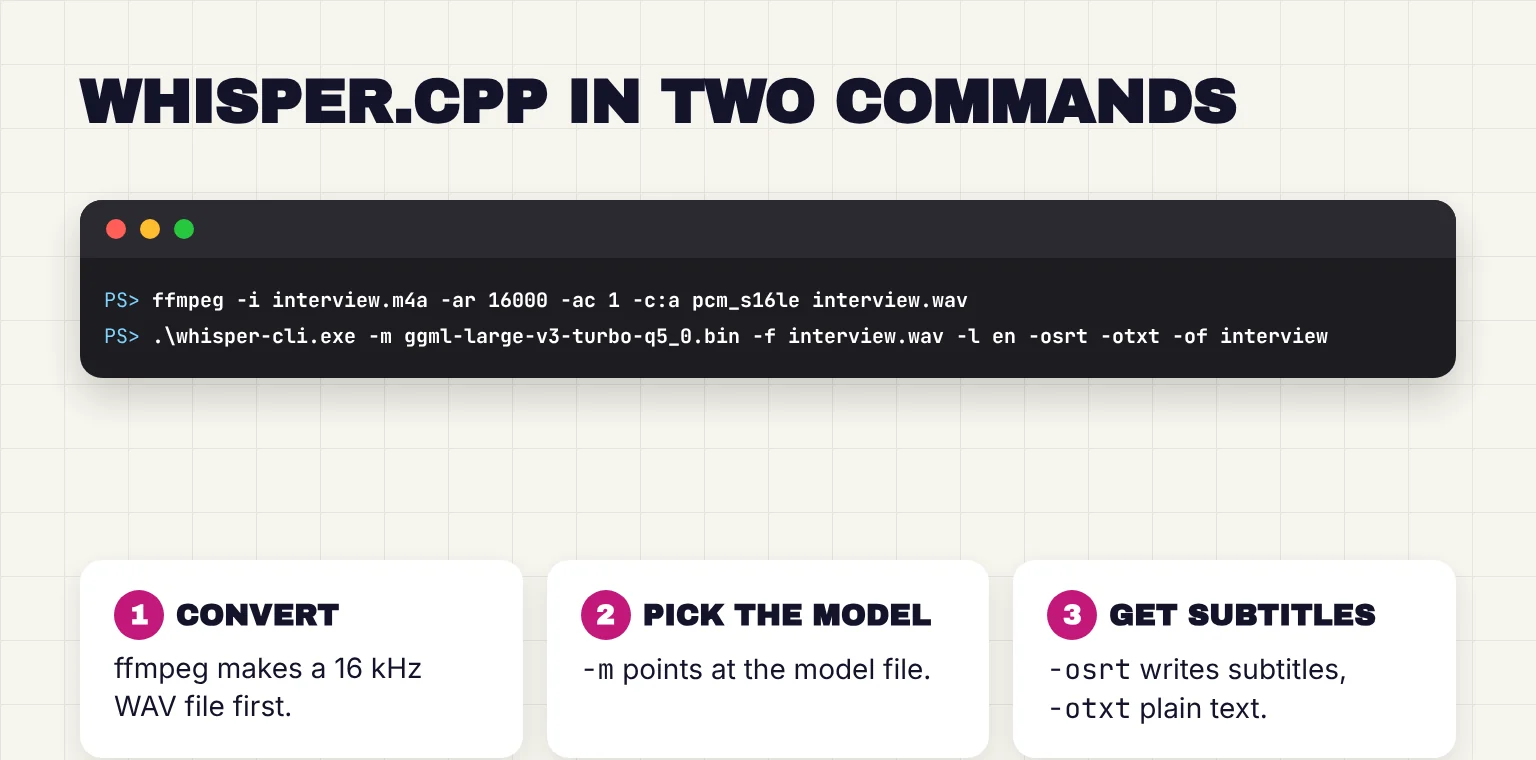
The command line suits overnight batches. whisper-cli's help lists flac, mp3, ogg and wav as supported audio formats, not m4a, and the README says to convert your input before running the tool, so both routes below convert the recording first with ffmpeg, a free audio and video converter.
On Windows
- Install ffmpeg by running
winget install ffmpegin PowerShell, a command listed on the gyan.dev FFmpeg builds page. - From the whisper.cpp build that accompanies v1.9.5, download
whisper-bin-x64.zip, orwhisper-bin-win-cuda-12.4.0-x64.zipif you have an NVIDIA card, and unzip it. A university help page notes that whisper-cli.exe is in the Release folder. - Download
ggml-large-v3-turbo-q5_0.binfrom the whisper.cpp model page into that Release folder, and copy your interview there. - Open PowerShell in the Release folder, then convert and transcribe:
ffmpeg -i interview.m4a -ar 16000 -ac 1 -c:a pcm_s16le interview.wav
.\whisper-cli.exe -m ggml-large-v3-turbo-q5_0.bin -f interview.wav -l en -osrt -otxt -of interview
On a Mac
You need Homebrew and Apple's Command Line Tools, which come from xcode-select --install. Then run the README's build steps, which fetch the full turbo model:
brew install cmake ffmpeg
git clone https://github.com/ggml-org/whisper.cpp.git
cd whisper.cpp
sh ./models/download-ggml-model.sh large-v3-turbo
cmake -B build
cmake --build build -j --config Release
ffmpeg -i ~/Desktop/interview.m4a -ar 16000 -ac 1 -c:a pcm_s16le interview.wav
./build/bin/whisper-cli -m models/ggml-large-v3-turbo.bin -f interview.wav -l en -osrt -otxt -of interview
Either way you get interview.srt and interview.txt. In the whisper-cli options, -osrt writes subtitles, -l sets the spoken language (auto detects it), and -tr translates into English. SRT is a plain text file of numbered, timed captions, and Subtitle Edit is an offline, open-source application for Windows, Mac and Linux that fixes timing.
The original openai-whisper works too (pip install -U openai-whisper, then whisper interview.m4a --model turbo --output_format srt), but it needs Python and ffmpeg installed on your system.
Add speaker labels with WhisperX
Diarization means working out who spoke when. whisper.cpp only has an experimental tinydiarize model that marks speaker changes as [SPEAKER_TURN], plus stereo audio diarization for two-channel recordings. For real speaker labels, WhisperX uses pyannote, which needs a free Hugging Face account.
- Create a read access token in your Hugging Face account settings.
- Accept the conditions on the speaker-diarization-community-1 page. It is CC BY 4.0 but gated: you share your Hugging Face details and may get emails.
- Run
pip install whisperx, which requires Python 3.10 to 3.13, then the command below, swapping in your token.
whisperx interview.wav --model large-v3-turbo --language en --diarize --hf_token YOUR_TOKEN --max_speakers 2 --device cpu --compute_type int8 --output_format srtThose flags come from the WhisperX command-line options, and large-v3-turbo is one of faster-whisper's model names. The README admits diarization is far from perfect and overlapping speech is handled poorly. For the journalist, labels speed up a first pass but do not replace listening.
What stays on your laptop, and what goes online
Once the model is on disk, your audio and transcripts stay on your computer. The network is used for downloads. openai-whisper fetches models from openaipublic.azureedge.net into ~/.cache/whisper, whisper.cpp's script pulls from Hugging Face, and faster-whisper downloads models from the Hugging Face Hub the first time you load one.
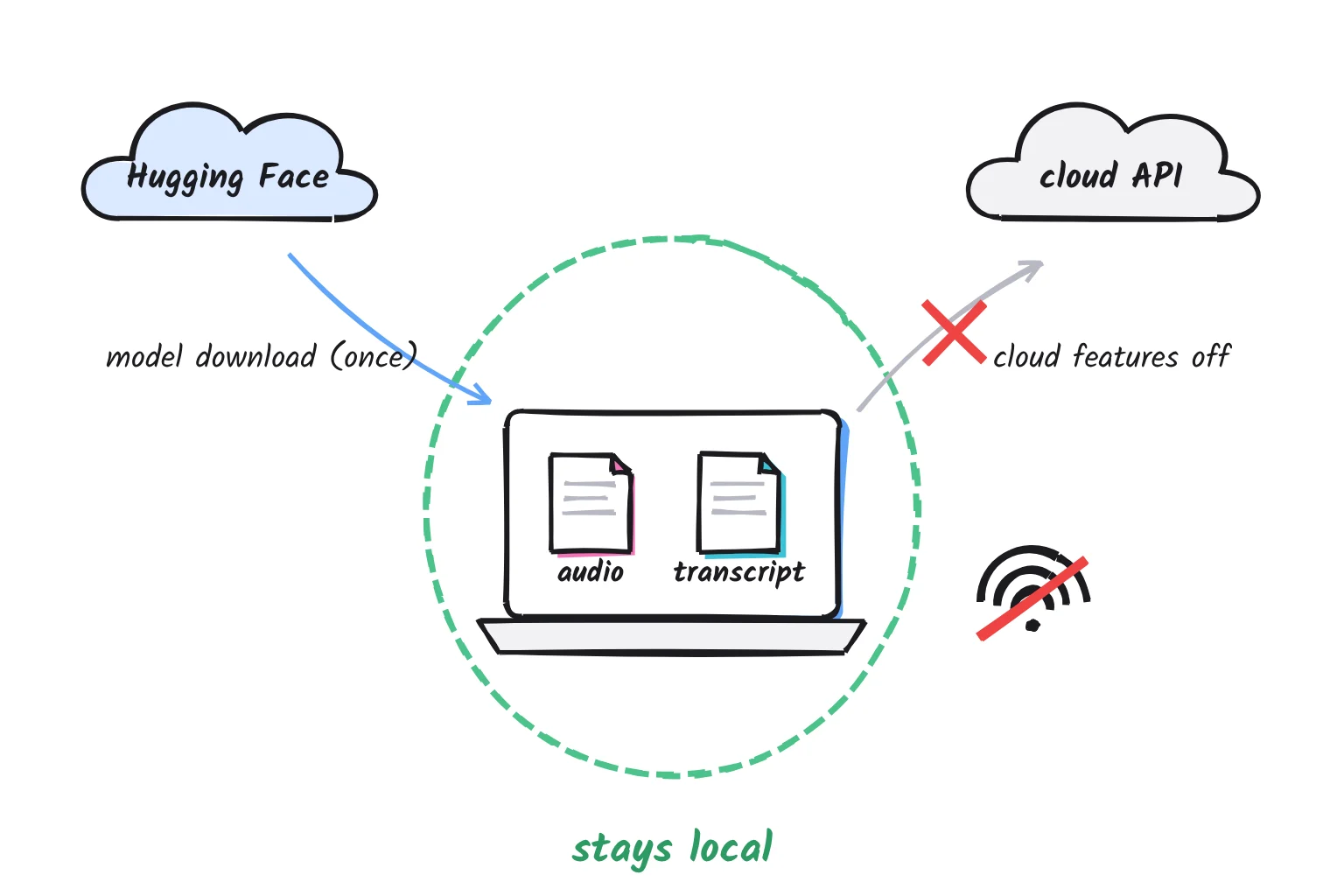
Afterward, HF_HUB_OFFLINE=1 means no HTTP calls will be made to the Hugging Face Hub, and HF_HUB_DISABLE_TELEMETRY=1 switches off Hugging Face's usage telemetry. pyannote has an optional telemetry feature that sends anonymous metrics such as file duration, and PYANNOTE_METRICS_ENABLED=0 turns it off.
The apps' cloud extras are the bigger risk. Vibe's summaries use the Claude API, and Vibe sends anonymous analytics such as error messages, OS, app version and country, never file contents, until you switch them off in Settings. MacWhisper can bring your own API keys to connect to AI providers, and Buzz lists the OpenAI Whisper API as one model choice. Stick to local models. If you run whisper.cpp's server, it listens on 127.0.0.1 by default, your own machine only.
For the journalist, two habits matter: test once with Wi-Fi off, and protect transcripts like the recordings. Our guide to private AI options covers more, and the checklist before you upload a document applies if a cloud service tempts you.
Accuracy limits, and fixing common Whisper problems
Whisper can write words nobody said. Its model card warns of texts that are not actually spoken in the audio input and repetitive text. A 2024 study found roughly 1% of audio transcriptions contained entire hallucinated phrases or sentences, more often for speakers with longer pauses. For the journalist, every printed quote gets checked against the audio, which SRT timestamps make quick.
Repeated lines or invented text over silence
Voice activity detection (VAD) skips silence before Whisper sees it. In whisper.cpp on a Mac, run sh ./models/download-vad-model.sh silero-v6.2.0, then add --vad -vm models/ggml-silero-v6.2.0.bin to your command, as the README's VAD section shows. On Windows, download ggml-silero-v6.2.0.bin from ggml-org/whisper-vad into the Release folder and add --vad -vm ggml-silero-v6.2.0.bin. faster-whisper has vad_filter=True, and WhisperX applies VAD preprocessing, which reduces hallucination. In openai-whisper, --condition_on_previous_text False makes the model less prone to getting stuck in a failure loop, such as repetition looping.
"ffmpeg not found"
openai-whisper and WhisperX call ffmpeg, so an error such as No such file or directory: 'ffmpeg' means it is missing or not on your PATH, the folders your terminal searches. Install it with winget install ffmpeg or brew install ffmpeg, close and reopen the terminal, and check with ffmpeg -version. faster-whisper alone does not need it, because PyAV bundles the FFmpeg libraries.
CUDA or cuDNN errors with faster-whisper
GPU mode needs cuBLAS for CUDA 12 and cuDNN 9 for CUDA 12, NVIDIA's math libraries. Errors such as Unable to load any of {libcudnn_cnn.so.9.1.0...} mean they are missing or mismatched. On Linux, the README's fix is pip install nvidia-cublas-cu12 nvidia-cudnn-cu12==9.*, plus pointing LD_LIBRARY_PATH at those libraries before Python starts. On Windows, it points to Purfview's whisper-standalone-win libraries, placed in a folder on your PATH. To rule out the GPU, use device="cpu", compute_type="int8".
Painfully slow on a laptop
Buzz's FAQ suggests using a lower Whisper model size first. Then try a quantized file and turn on VAD. On an Apple Silicon Mac, whisper.cpp can add Core ML, which the README calls more than x3 faster compared with CPU-only execution, though the first run is slow.
Common questions about running Whisper locally
Is OpenAI Whisper free to use offline?
Yes. OpenAI released Whisper's code and model weights under the MIT License, which allows personal and commercial use. After a one-time model download, transcription runs on your own computer with no internet connection. OpenAI's paid cloud API is separate, and its whisper-1 model shuts down on February 26, 2027.
Does Whisper need a GPU?
No. whisper.cpp supports CPU-only inference, faster-whisper runs in 8-bit mode on a processor, and openai-whisper falls back to the CPU without an NVIDIA card. A graphics card or an Apple Silicon Mac is much faster. On a CPU-only laptop, start with small or a quantized turbo file.
Which Whisper model is the most accurate?
Among standard Whisper models, large-v3 is the most accurate. Turbo, a slimmed version with 4 decoder layers instead of 32, performs about like large-v2 at roughly eight times the speed of large, so it is the best default for most people. For translation into English, use medium or large.
Is faster-whisper better than whisper.cpp?
It depends on your hardware. faster-whisper claims up to four times the speed of the original Whisper and suits NVIDIA cards, but it is a Python library without Mac GPU support. whisper.cpp is a standalone program that uses Metal on Apple Silicon and also runs on CPU-only machines.
Can Whisper tell different speakers apart?
Not on its own. Whisper writes text and timestamps, not speaker names. WhisperX adds speaker labels through pyannote, which needs a free Hugging Face token. Vibe, Buzz and MacWhisper Pro have speaker recognition built in. Treat labels as a first draft, because overlapping speech still causes mistakes.
How do I make SRT subtitles with Whisper?
Every route in this guide writes SRT files. In Vibe, MacWhisper or Buzz, export the finished transcript as SRT. With whisper.cpp, add -osrt; with openai-whisper or WhisperX, add --output_format srt. Then fix timing and line breaks in a subtitle editor such as Subtitle Edit.
My verdict for the journalist with 30 hours of interviews
For the journalist, I would install Vibe, switch off its anonymous analytics in Settings, keep Summarize off and turn speaker recognition on. That gives private transcripts, speaker labels and the clip's SRT with no terminal, and a smaller model fixes slow runs. whisper.cpp comes later for overnight batches, and WhisperX only if the app's labels fall short.
Your next step: once Vibe has downloaded its models, turn off Wi-Fi, transcribe one 30-minute interview, and check five quotes against the audio. To turn a transcript into a tidy summary or to-do list with a local model, see our voice-notes-to-text guide.
Sources
- Whisper README - OpenAI on GitHub
- Robust Speech Recognition via Large-Scale Weak Supervision - Radford et al., OpenAI, arXiv
- openai/whisper-large-v3 model card - Hugging Face
- Deprecations - OpenAI
- large-v3-turbo model announcement - OpenAI on GitHub
- whisper/transcribe.py - OpenAI on GitHub
- whisper/__init__.py model download URLs - OpenAI on GitHub
- FileNotFoundError: No such file or directory: 'ffmpeg' - openai/whisper discussions
- whisper.cpp README - ggml-org on GitHub
- whisper.cpp v1.9.5 release - ggml-org on GitHub
- whisper.cpp build b5454 with Windows binaries - ggml-org on GitHub
- whisper-cli options - ggml-org on GitHub
- whisper.cpp server - ggml-org on GitHub
- ggerganov/whisper.cpp models - Hugging Face
- ggml-org/whisper-vad VAD models - Hugging Face
- Transcribe audio with free and open source software on Windows - Temple University HBG Help
- Installation - Homebrew Documentation
- FFmpeg builds - gyan.dev
- faster-whisper README - SYSTRAN on GitHub
- faster_whisper/utils.py model list - SYSTRAN on GitHub
- faster-whisper release history - PyPI
- CTranslate2 installation - OpenNMT
- Issue 1806: cuDNN library load error - OpenNMT/CTranslate2 on GitHub
- WhisperX README - m-bain on GitHub
- whisperx/__main__.py command-line options - m-bain on GitHub
- whisperx - PyPI
- pyannote/speaker-diarization-community-1 - pyannote on Hugging Face
- pyannote.audio README - pyannote on GitHub
- Environment variables - Hugging Face
- Vibe README - thewh1teagle on GitHub
- Vibe releases - thewh1teagle on GitHub
- Vibe 3.2.2 English interface text - thewh1teagle on GitHub
- Vibe 3.2.2 default model settings (config.ts) - thewh1teagle on GitHub
- Vibe Privacy Policy - thewh1teagle on GitHub
- MacWhisper - Good Snooze
- Automatic Speaker Recognition in MacWhisper - MacWhisper Docs
- Buzz README - chidiwilliams on GitHub
- Buzz documentation - Buzz
- Buzz installation - Buzz
- Buzz FAQ - Buzz
- Buzz files - SourceForge
- Subtitle Edit - SubtitleEdit on GitHub
- nvidia/parakeet-tdt-0.6b-v3 - NVIDIA on Hugging Face
- nvidia/nemotron-3.5-asr-streaming-0.6b - NVIDIA on Hugging Face
- Qwen/Qwen3-ASR-1.7B - Qwen on Hugging Face
- CohereLabs/cohere-transcribe-03-2026 - Cohere Labs on Hugging Face
- microsoft/VibeVoice-ASR - Microsoft on Hugging Face
- Careless Whisper: Speech-to-Text Hallucination Harms - Koenecke et al., arXiv