How do you install a local LLM on Windows?
The easiest route is one app and one model: install LM Studio, search for Gemma 4 E4B in its Discover tab, download the 5.90 GB file, load it and chat, with no terminal. Expect about 8 minutes of download on a 100 Mbps line. LM Studio needs a processor with AVX2, or a Windows on Arm chip.
This guide follows one reader who wants a private assistant for drafting and everyday questions, on one of three Windows PCs: a 16GB laptop with no graphics card, a desktop with an NVIDIA RTX 4060, which has 8 GB of memory, or a PC with a 12-16GB graphics card. Memory on the graphics card is called VRAM, and it decides most of what follows.
What your PC needs first
- Windows version: Ollama needs Windows 10 22H2 or newer, Home or Pro, and Jan runs on Windows 10 and higher. Windows 10 works, though Microsoft ended its support on October 14, 2025. Check yours under Settings, System, About.
- Processor: LM Studio requires AVX2 instruction set support on x64 PCs, which Jan's docs date to Intel Haswell (2013+) and AMD Excavator (2015+). Microsoft's Coreinfo tool marks it with an asterisk if present. Ollama has slower, more compatible CPU libraries for older chips.
- Memory: LM Studio recommends at least 16GB of RAM and 4GB of dedicated VRAM.
- Disk space: Ollama needs at least 4GB for the app, and models can run to tens or hundreds of GB; Jan asks for 10GB free. This guide's first models are 3-8 GB each.
- Drivers: Ollama needs NVIDIA driver 551.61 or newer, and a ROCm v7 or Vulkan-capable driver for AMD Radeon cards. Jan bundles its CUDA 13 engine, so you do not need NVIDIA's CUDA Toolkit.
Which app should you use: LM Studio, Ollama or Jan?
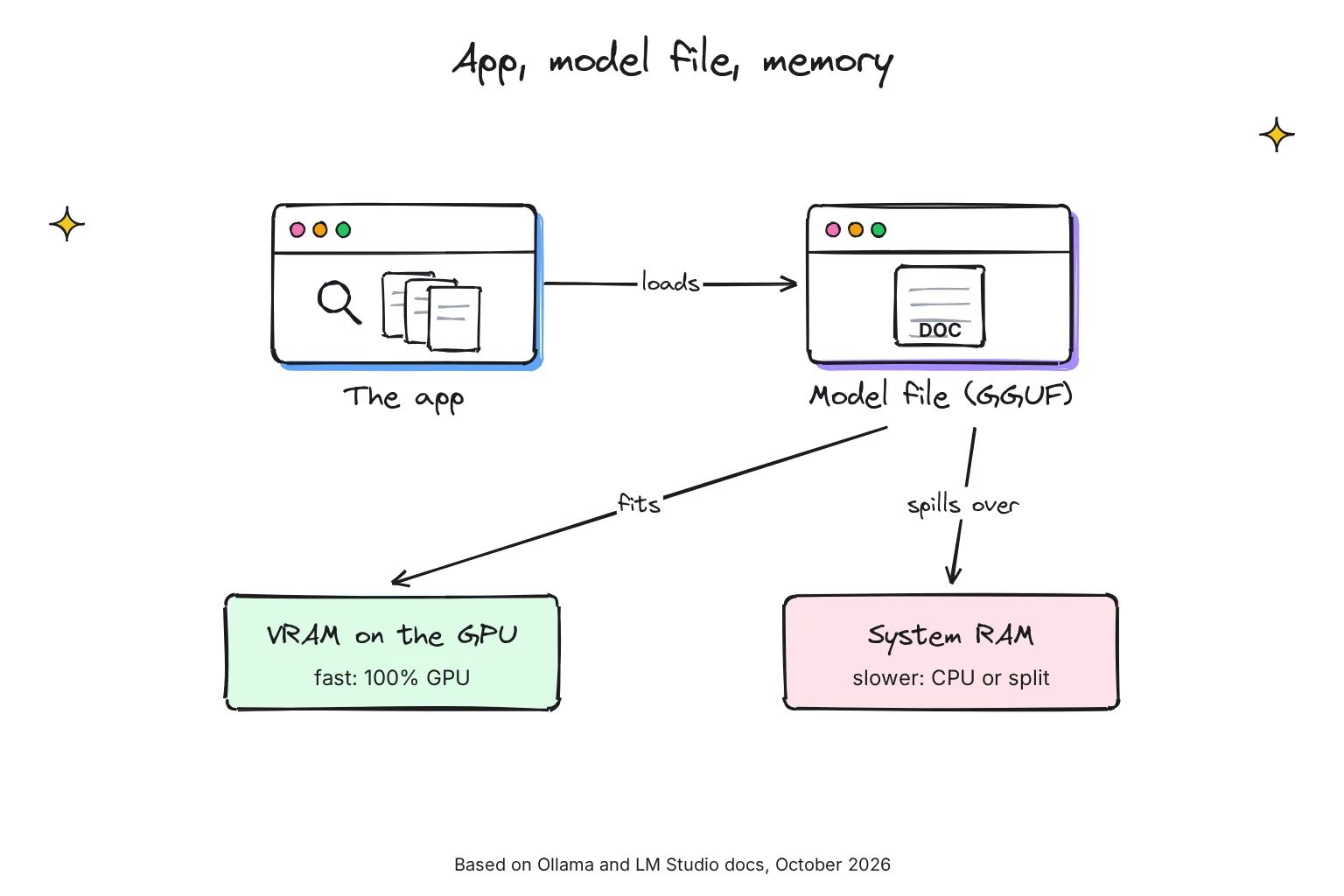
Every option has three parts. The app loads a model, a file of trained weights, into memory and gives you a chat window. These apps use GGUF, the file format of the open-source llama.cpp engine, and quantization, which stores each weight in about 4 bits instead of 16. Where the file sits decides the speed: VRAM, or slower system RAM.
Choose LM Studio if:
- You want no terminal: User mode shows only the chat interface and auto-configures everything.
- You want a GPU offload slider that shows how much of a model goes on the graphics card.
- You have a Snapdragon laptop: LM Studio supports Windows on x64 and Arm, and Jan has an ARM64 installer too.
Choose Ollama if:
- You want an engine for tools such as Open WebUI: it runs in the background and serves its API on localhost:11434.
- You want open-source software under the MIT license.
- Your older processor lacks AVX2, which LM Studio requires.
Choose Jan if:
- You want an open-source app built around chat, licensed under Apache 2.0, that downloads a default model on first launch.
- You have an AMD or Intel Arc card: Jan uses its bundled Vulkan backend for both, with no extra download.
How the three compare on Windows in October 2026:
| On Windows | LM Studio | Ollama | Jan |
|---|---|---|---|
| Current version | 0.4.26, October 13 | 0.40.13, October 28 | 0.8.7, October 20 |
| How you use it | One app: model search and chat | Background engine, chat app, commands | Chat app with a model Hub |
| License | Closed source, free at home and at work | MIT | Apache 2.0 |
| Needs | x64 with AVX2, or Arm | Windows 10 22H2+ | Windows 10+, AVX2 or Arm64, 8GB RAM minimum |
| GPU engines | CUDA, Vulkan and ROCm runtimes | CUDA; ROCm v7 or Vulkan | CUDA 13 bundled; Vulkan for AMD and Intel Arc |
| Local server | localhost:1234 | localhost:11434 | 127.0.0.1:1337 |
| Models folder | .lmstudio\models in your user folder | C:\Users\%username%\.ollama\models | %APPDATA%\Jan\data |
For speed, APIs and running two apps side by side, see our LM Studio vs Ollama comparison.
How to install LM Studio on Windows, step by step
- Download LM Studio. On lmstudio.ai/download, click Download LM Studio, not the Bionic agent app above it.
- Install and open it. Run the installer. User mode is the best choice for beginners, LM Studio says. For everything the app can do after setup, see our LM Studio guide.
- Find your model. Open Discover with Ctrl+2 and search for your PC's model from the table below. Given several files, choose a 4-bit option or higher if your machine is capable.
- Load it. In the Chat tab, open the model loader and pick it. You can choose load configuration parameters, such as GPU offload, first.
- Chat. Type a request, such as a reply to a real email.
Prefer a terminal? LM Studio's lms command works after you run the app once. These lines download the laptop's model, print a memory estimate, then load it:
lms get google/gemma-4-e4b
lms load --estimate-only google/gemma-4-e4b
lms load google/gemma-4-e4b
Where LM Studio keeps models, and how to move them to D:
LM Studio saves downloads in publisher and model folders under ~/.lmstudio/models, a .lmstudio folder in your Windows user profile. To use another drive, change the models directory in the My Models tab. It reads models placed in that folder structure, so move the whole folder to D: first.
How to make LM Studio's server start automatically
Open settings with Ctrl+comma and check the box to run the LLM server on login. Closing the app then leaves the server running in the system tray on http://localhost:1234. Without the app window at all, LM Studio's background service, llmster, installs and starts from PowerShell:
irm https://lmstudio.ai/install.ps1 | iex
lms daemon up
How to install Ollama on Windows
Our Ollama install guide covers SmartScreen warnings, PATH errors and port conflicts. Here are the Windows choices.
- Pick a drive. If C: is small, set OLLAMA_MODELS first, as shown below, so downloads land on D:.
- Install. Click Download manually on ollama.com/download/windows and run OllamaSetup.exe, or use the PowerShell line below. It does not require Administrator, and
/DIRinstalls the app elsewhere. - Download and chat. In PowerShell, run your PC's tag from the model table, such as
ollama run gemma4:e4b. Ollama downloads the model and starts a chat; type/byeto leave. - Keep it local. To rule out cloud models, set OLLAMA_NO_CLOUD=1 or turn off Cloud in Settings.
# PowerShell: one-line install
irm https://ollama.com/install.ps1 | iex

# Or, in Command Prompt in the installer's folder:
OllamaSetup.exe /DIR="d:\some\location"

# Download and chat, then check where the model runs
ollama run gemma4:e4b
ollama ps
Move Ollama models to the D: drive with OLLAMA_MODELS
Ollama stores models in C:\Users\%username%\.ollama\models. Its Windows docs move them with an environment variable, a setting programs read at startup:
- Quit Ollama from its tray icon.
- Open Settings (Windows 11) or Control Panel (Windows 10) and search for environment variables.
- Click Edit environment variables for your account.
- Create OLLAMA_MODELS with the new folder, such as D:\OllamaModels, and click OK.
- Relaunch Ollama from the Start menu.
The app's Settings also has a Model location field. Move existing models first, or Ollama will not find them; our guide to deleting and moving Ollama models has the robocopy command.
Stop Ollama starting at login
Ollama registers as a login item during installation. To stop that, open Task Manager's Startup apps tab, search for ollama and click Disable; the choice survives upgrades.
Jan, the open-source alternative
Jan installs from a downloaded .exe. Its Hub shows whether each model fits your hardware. Turn on your graphics card under Settings, Hardware, GPUs, and move its data under Settings, General, Jan Data Folder.
Which model should you download first?
At 4-bit, a model needs roughly 0.55-0.65 GB per billion parameters, plus room for context, the text it keeps in view. llama.cpp's figures fit: Llama 3.1 8B is 4.9 GB at Q4_K_M, a 4-bit format averaging 4.89 bits per weight, and NVIDIA puts the overhead at 1-5GB.
Some newer models run heavier: Ollama's gemma4:e4b packs 7.52B parameters into 6.6GB and qwen3.5:9b 8.95B into 6.6GB, so trust the download size over the name. Below 24GiB of VRAM, Ollama starts with a 4k-token context, which keeps memory down. My first picks, with sizes checked on October 27, 2026:
| Your PC | First model | LM Studio download | Ollama tag, Windows download | Step down or up |
|---|---|---|---|---|
| 16GB laptop, no graphics card | Gemma 4 E4B | google/gemma-4-e4b, 5.90 GB | gemma4:e4b, 6.6GB | Too slow: Qwen 3.5 4B, 3.75 GB or qwen3.5:4b, 3.3GB |
| RTX 4060 desktop, 8GB VRAM | Qwen 3.5 9B | qwen/qwen3.5-9b, 7.00 GB | qwen3.5:9b, 6.6GB | If it splits: Gemma 4 E2B, 4.20 GB or gemma4:e2b, 4.6GB |
| 12-16GB VRAM | Gemma 4 12B | google/gemma-4-12b, 7.40 GB | gemma4:12b, 8.0GB | On 16GB: gpt-oss-20b, 12.00 GB or gpt-oss:20b, 14GB |
All use the Apache 2.0 license, per the Gemma 4, Qwen 3.5 and gpt-oss pages. Ollama often lists two sizes because a tag also holds an MLX build, the format Ollama prefers on Apple silicon Macs; Windows picks the llama.cpp build first, the size shown here.
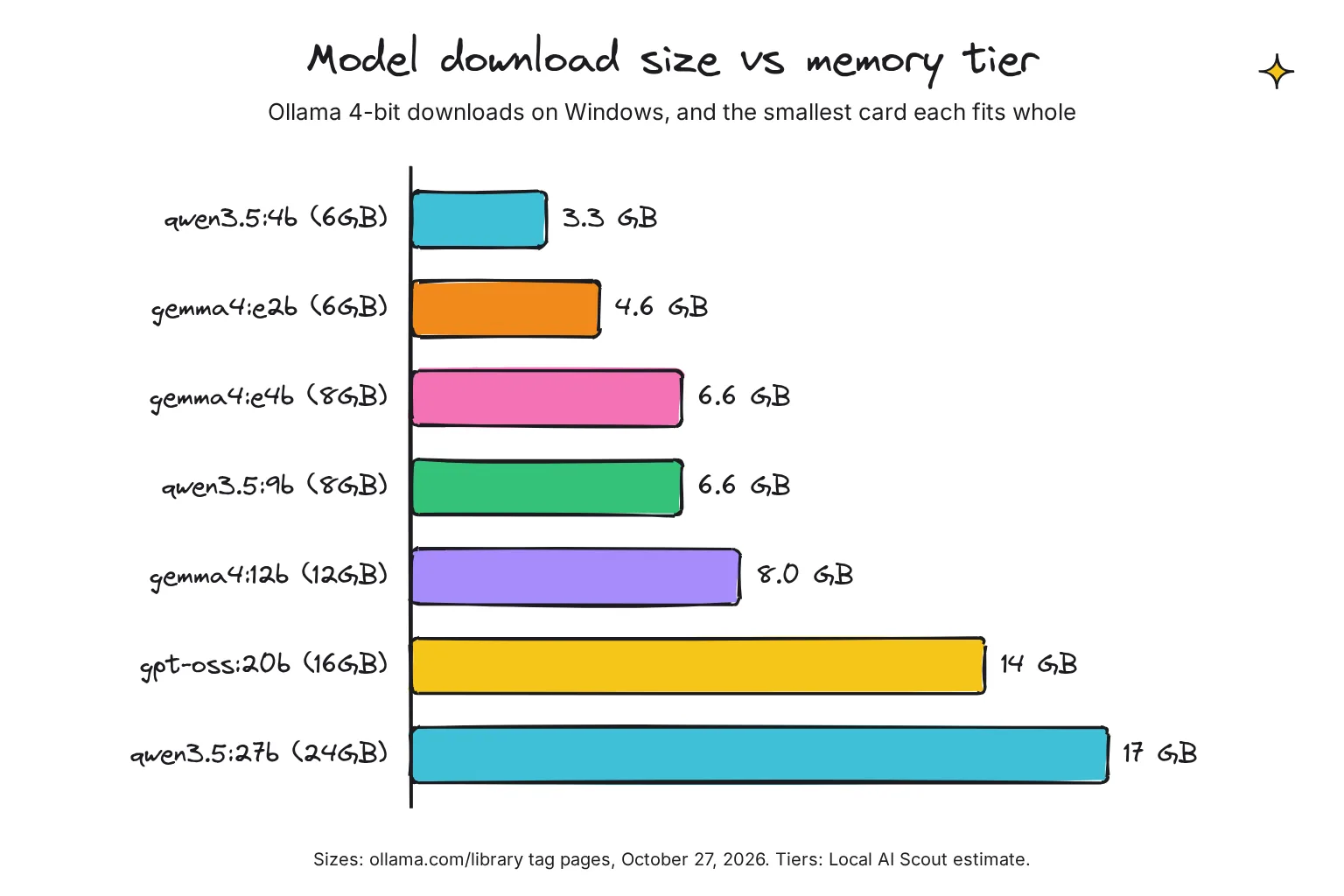
The chart adds qwen3.5:27b at 17GB; its card tiers are my estimates. Our best local LLMs by RAM list has more picks.
The 16GB laptop runs on the processor, so close other apps. On the RTX 4060, the 6.6GB Qwen 3.5 9B is a tight fit at the default 4k context, by my estimate; ollama ps will tell you. On 12-16GB, Google says Gemma 4 12B is small enough to run locally with just 16GB of VRAM, and LM Studio's page says gpt-oss-20b can run with just 16 GB of memory. See our guides to Gemma 4 in Open WebUI and running gpt-oss locally.
Is 6GB of VRAM enough for a local LLM?
For small models, yes. Jan lists 6GB as its GPU minimum, and the 3.3GB qwen3.5:4b fits with room for context; a 6.6GB model spills into RAM. In NVIDIA's October 2024 table, the 6GB RTX 4050 Laptop GPU took 90% of Llama 3.1 8B. Ollama recommends 8 GB of available VRAM even for Gemma 4 E2B, so treat 6GB as the floor.
Is 8GB of VRAM enough?
Yes, for 7-9B models at 4-bit with a short context, the RTX 4060's sweet spot. In the same table, the 8GB RTX 4060 Laptop GPU took all of Llama 3.1 8B but 80% of Mistral Nemo, listed at 13B. The 8.0GB gemma4:12b cannot fit whole, and I would rather run a 9B model fully on the card than a 12B model partly.
AMD and Intel graphics on Windows
Ollama uses ROCm, AMD's GPU software, on Radeon RX 7600 to 7900-series and Radeon PRO W7000 cards, and Vulkan, a cross-vendor graphics interface, elsewhere. Vulkan has been on by default since Ollama 0.30 in June 2026, including AMD and Intel devices, and is the recommended fallback for some RX 6000 cards. LM Studio offers ROCm and Vulkan runtimes; Jan uses Vulkan.
Built-in graphics start switched off: LM Studio shows iGPUs under Vulkan but disables them by default, and Ollama drops most integrated GPUs. None of the three apps' docs mention the NPU in an AI PC; our AI PC explainer covers what it does instead.
How do you check the model is using your GPU?
Check while a long answer is being written. On the 16GB laptop, CPU-only is normal.

In Ollama: ollama ps
The PROCESSOR column shows where the model loaded: 100% GPU means entirely on the graphics card, 100% CPU means system memory, and a split such as 48%/52% CPU/GPU means both. On the RTX 4060, a split means the model and context outgrew 8GB, and Ollama advises you to avoid offloading the model to CPU, so pick a smaller tag. If it reads 100% CPU even though the model should fit, our guide to Ollama using CPU instead of GPU walks through the driver and log checks.
GPU offload in LM Studio: the slider and the runtime picker
GPU offload is the share of a model's layers on the graphics card. LM Studio's GPU offloading slider sets it, and NVIDIA's guide says to drag it to the right to put every layer there. Otherwise LM Studio determines GPU usage automatically; lms load takes --gpu max, --gpu off or a fraction.
The runtime picker, Ctrl+Shift+R, shows the engine: on NVIDIA, pick a CUDA llama.cpp runtime, as NVIDIA's May 2025 guide shows. The GPU controls, Ctrl+Shift+H, include a CUDA-only option to limit model offload to dedicated GPU memory.
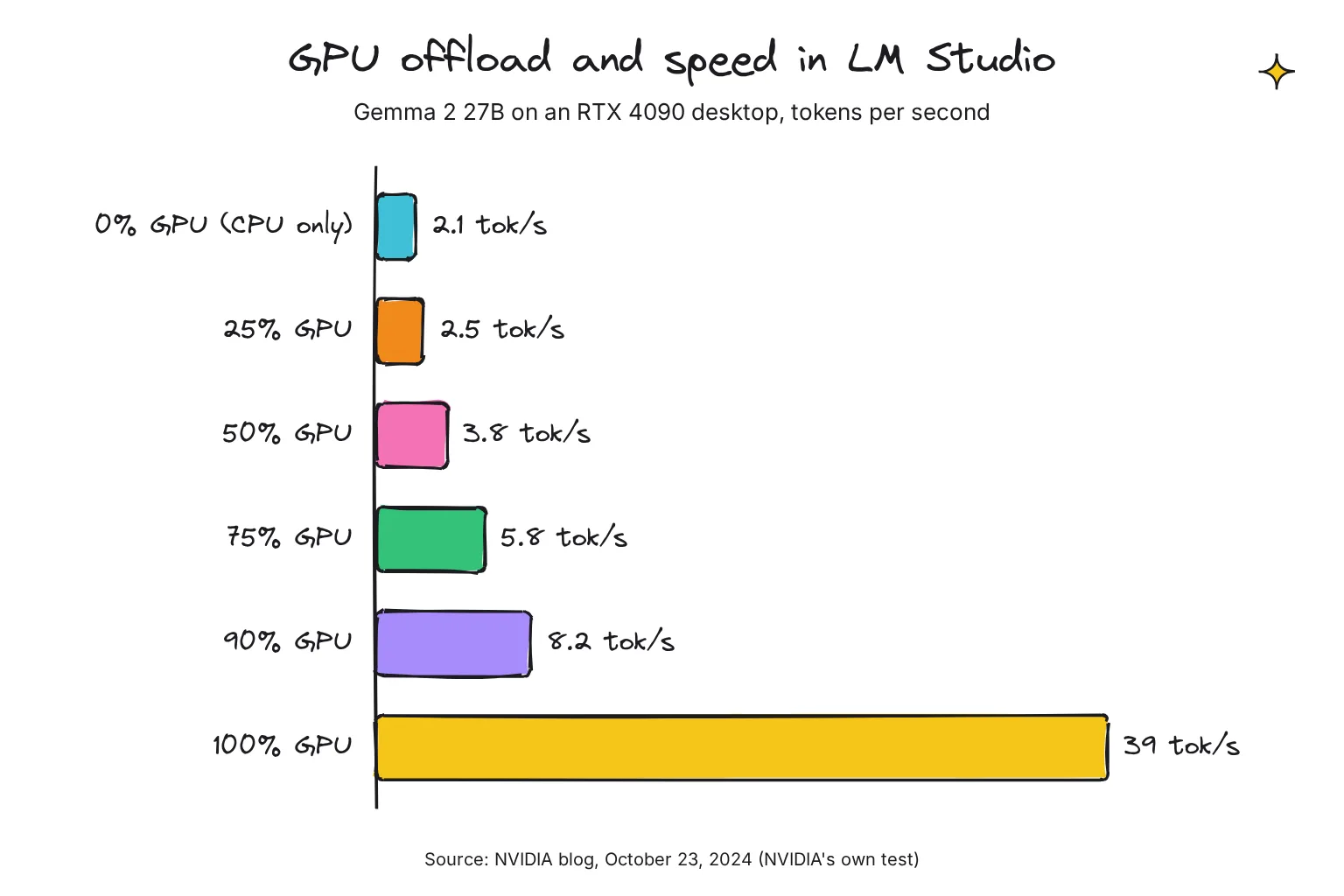
In NVIDIA's own test, published October 23, 2024, Gemma 2 27B on an RTX 4090 desktop ran at 2.1 tokens per second on the CPU alone, 2.5 at 25% GPU, 3.8 at 50%, 5.8 at 75%, 8.2 at 90% and 39 at 100%. A model that fits whole beats a bigger one that does not.
In Task Manager: dedicated vs shared GPU memory
Open Task Manager, then Performance, then GPU. Microsoft splits video memory into dedicated memory, which on a graphics card is its VRAM, and shared memory, ordinary RAM the GPU can borrow, up to half of it. When a model loads, dedicated memory should rise by roughly its file size. If shared memory climbs instead, it has spilled into RAM, which LM Studio says can slow things down quite a bit.
With nvidia-smi
On NVIDIA cards, type nvidia-smi in PowerShell and watch used memory jump as the model loads; nvidia-smi -l 1 repeats every second until Ctrl+C. Per-process memory is not available on Windows in WDDM mode, the Windows Display Driver Model, so watch the total.
How fast should it be?
Speed is counted in tokens per second; a token is a word or part of one. Add the --verbose flag to ollama run and Ollama prints an eval rate in tokens/s after each answer. In LM Studio, the command below prints prediction stats, which include tok/sec.
ollama run qwen3.5:9b --verbose
lms log stream --source model --filter output --stats
In llama.cpp's community CUDA scoreboard, started in August 2025, users reported about 64 tokens per second for a 4-bit Llama 2 7B on an RTX 4060 Ti and about 76 on an RTX 3060.
Those are engine benchmarks on an older model, not app results. For the CPU-only laptop, our no-GPU laptop guide collects the published figures, which run from about 9 to 24 tokens a second for a 3B model depending on the memory, so measure yours against those; our local vs cloud speed guide explains what feels comfortable.
Is a local LLM on Windows private?
With a downloaded model, prompts stay on the PC. LM Studio says nothing you enter when chatting with LLMs leaves your device and the app does not include telemetry; Ollama says it does not see your prompts or data when you run locally; Jan stores all your data locally.
Still online: LM Studio's model search, downloads, runtimes and update checks, Ollama's automatic updates and optional cloud models, and Jan's built-in web search and cloud providers.
Windows Firewall may ask whether to allow an app the first time it tries to communicate on the network, and your answer becomes inbound rules for connections arriving from the network. Microsoft advises to only allow an app when you really need to. If no other device needs your model, I would not allow it; you can change that later under Windows Security, Firewall & network protection.
Keep the servers on 127.0.0.1, an address only your own PC can reach. Ollama binds there by default, Jan's server defaults to 127.0.0.1, and LM Studio warns that any other bind exposes the server beyond localhost.
Do you need WSL to run a local LLM on Windows?
No. WSL, the Windows Subsystem for Linux, runs a Linux environment on your Windows machine, and none of these apps need it.
Ollama runs as a native Windows application, including NVIDIA and AMD Radeon GPU support, LM Studio supports Windows on x64 and Arm, and Jan runs on Windows 10 and higher. Ollama's FAQ mentions WSL2 only for Docker with GPU acceleration and a networking fix. For these three PCs, the native apps are simpler.
Common questions about running a local LLM on Windows
What is the easiest way to run a local LLM on Windows?
Install LM Studio, search its Discover tab for a model such as Gemma 4 E4B, download it, load it and chat, with no terminal. On an x64 PC the processor must support AVX2, and LM Studio recommends at least 16GB of RAM.
Can I run a local LLM on Windows without a graphics card?
Yes. LM Studio, Ollama and Jan run models on the processor and system RAM when there is no usable graphics card, only more slowly. On a 16GB laptop, start with a 3-7 GB download such as Gemma 4 E4B or Qwen 3.5 4B.
Is 8GB of VRAM enough for a local LLM?
Yes, for models of about 7-9 billion parameters at 4-bit with a short context. Qwen 3.5 9B is a 6.6GB download in Ollama, a tight but workable fit on an 8GB RTX 4060. Gemma 4 12B, at 8.0GB, will spill into slower system RAM.
How do I know if my local LLM is using the GPU?
In Ollama, run ollama ps while the model answers: 100% GPU means it sits entirely on the graphics card, and a CPU/GPU split means part is in system memory. In Task Manager, dedicated GPU memory should rise by roughly the model's size.
How do I move Ollama or LM Studio models to the D drive?
For Ollama, quit the app, search Windows for environment variables, create OLLAMA_MODELS for your account pointing to a folder on D, then relaunch Ollama. For LM Studio, change the models directory in the My Models tab. Move existing models first so neither app downloads them again.
Do I need WSL to run a local LLM on Windows?
No. Ollama runs as a native Windows application with NVIDIA and AMD Radeon support, LM Studio supports Windows on x64 and Arm, and Jan runs on Windows 10 and higher. WSL, the Windows Subsystem for Linux, matters only for setups such as Docker.
My verdict for these three Windows PCs: start with LM Studio
LM Studio is the easiest first install on all three: one window, a model search that shows file sizes, and a visible GPU offload slider. Start with Gemma 4 E4B on the 16GB laptop, Qwen 3.5 9B on the RTX 4060, and Gemma 4 12B on a 12-16GB card. Add Ollama when Open WebUI or a coding tool needs an engine, choose Jan if open source matters most, and skip WSL.
Your next step: install LM Studio and download your PC's model. On an RTX desktop, keep Task Manager's GPU page open as it loads to see it land in dedicated memory.
Sources
- Download LM Studio - LM Studio
- Gemma 4 - LM Studio
- System Requirements - LM Studio
- GeForce RTX 4060 Ti and 4060 Graphics Cards - NVIDIA
- Windows - Ollama docs
- Windows Installation - Jan docs
- Windows 10 support has ended on October 14, 2025 - Microsoft Support
- Find information about your Windows device - Microsoft Support
- Coreinfo - Microsoft Learn
- Troubleshooting - Ollama docs
- User or Developer - LM Studio
- ollama/LICENSE - Ollama on GitHub
- Overview - Jan docs
- QuickStart - Jan docs
- LM Studio 0.4.26 release notes - LM Studio
- Release v0.40.13 - Ollama on GitHub
- Jan v0.8.7: Shell Switch, Image Size Limit, Project Threads & Agent Subagents - Jan changelog
- LM Studio App Terms of Service - Element Labs
- LM Studio is free for use at work - LM Studio
- Download an LLM - LM Studio
- Get started with LM Studio - LM Studio
- lms: LM Studio's CLI - LM Studio
- lms load - LM Studio
- Import Models - LM Studio
- Run LM Studio as a service (headless) - LM Studio
- LM Studio app, llmster, and lms - LM Studio
- Download Ollama on Windows - Ollama
- Quickstart - Ollama docs
- FAQ - Ollama docs
- Desktop app settings screen (Settings.tsx) - Ollama on GitHub
- Jan Data Folder - Jan docs
- quantize README - llama.cpp on GitHub
- How to Accelerate Larger LLMs Locally on RTX With LM Studio - NVIDIA Blog
- gemma4:e4b - Ollama library
- qwen3.5:9b - Ollama library
- Context length - Ollama docs
- gemma4 tags - Ollama library
- Qwen3.5 - LM Studio
- qwen3.5 tags - Ollama library
- gpt-oss - LM Studio
- gpt-oss tags - Ollama library
- manifest/manifest.go (build selection) - Ollama on GitHub
- Introducing Gemma 4 12B - Google
- GeForce RTX 40 Series Gaming Laptops - NVIDIA
- Hardware support - Ollama docs
- Improved performance and model support with GGUF - Ollama Blog
- LM Studio 0.3.0 - LM Studio
- LM Studio 0.4.17 release notes - LM Studio
- discover/runner.go (GPU discovery) - Ollama on GitHub
- LM Studio Accelerates LLM Performance With NVIDIA GeForce RTX GPUs and CUDA 12.8 - NVIDIA Blog
- Welcome to LM Studio Docs - LM Studio
- LM Studio 0.3.14: Multi-GPU Controls - LM Studio
- GPUs in the Task Manager - Microsoft DirectX Developer Blog
- nvidia-smi documentation - NVIDIA
- cmd/cmd.go (CLI flags) - Ollama on GitHub
- api/types.go (timing output) - Ollama on GitHub
- lms log stream - LM Studio
- LM Studio 0.3.26 - LM Studio
- Performance of llama.cpp with CUDA - llama.cpp on GitHub
- Offline Operation - LM Studio
- LM Studio Desktop App Privacy Policy - Element Labs
- Windows Firewall rules - Microsoft Learn
- Risks of Allowing Apps Through Windows Firewall - Microsoft Support
- Local API Server - Jan docs
- Serve on Local Network - LM Studio
- What is the Windows Subsystem for Linux? - Microsoft Learn