What is Ollama Cloud, and is it free?
Ollama Cloud runs open models on Ollama's servers instead of your computer, for any model tagged cloud. Local models stay free and unlimited. Cloud use is mostly paid: the $0 plan is pay per token plus a small starter allowance of unpublished size, and Pro costs $20 a month with $60 of usage.
This guide follows one reader: someone with a 16GB Windows laptop and no separate graphics card who already chats with gemma4 in the Ollama app. One day the model menu shows names ending in :cloud, and picking one brings up a Sign In button and the line "Cloud models require an Ollama account". They want to know what it costs, what the limits are, and whether their prompts leave the laptop.
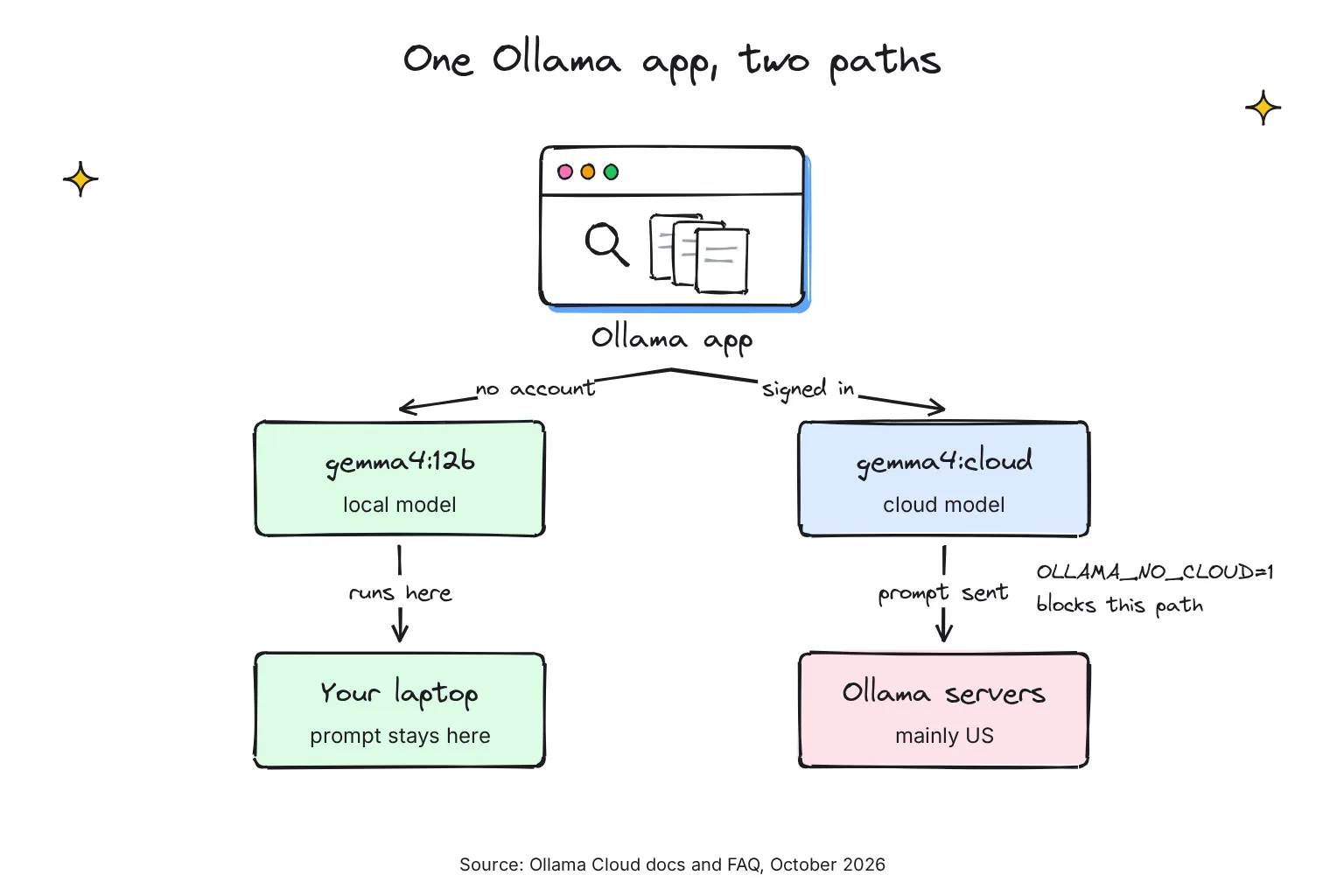
The short version: prompts leave the laptop only if you sign in and choose a cloud model or web search, Ollama says it does not log or store them, and one setting blocks both.
Choose a cloud model if:
- You need a model too big for 16GB, such as gemma4:31b, a 19 to 20GB download when run locally, or Kimi K3 with 2.81T parameters.
- You work with long documents or coding agents. Cloud models run at their maximum context length by default, while a local model on a machine with under 24 GiB of graphics memory (VRAM) starts at a 4K context, the amount of text it can keep in view.
- The text is not sensitive, and you accept Ollama's own no-logging policy.
Stay local if:
- The text is private: client files, contracts, health or money matters.
- You need to work offline, or you want no running cost beyond electricity.
- A model that fits in 16GB does the job, such as gemma4:12b at 7.7 to 8.0GB.
How much does Ollama Cloud cost in October 2026?
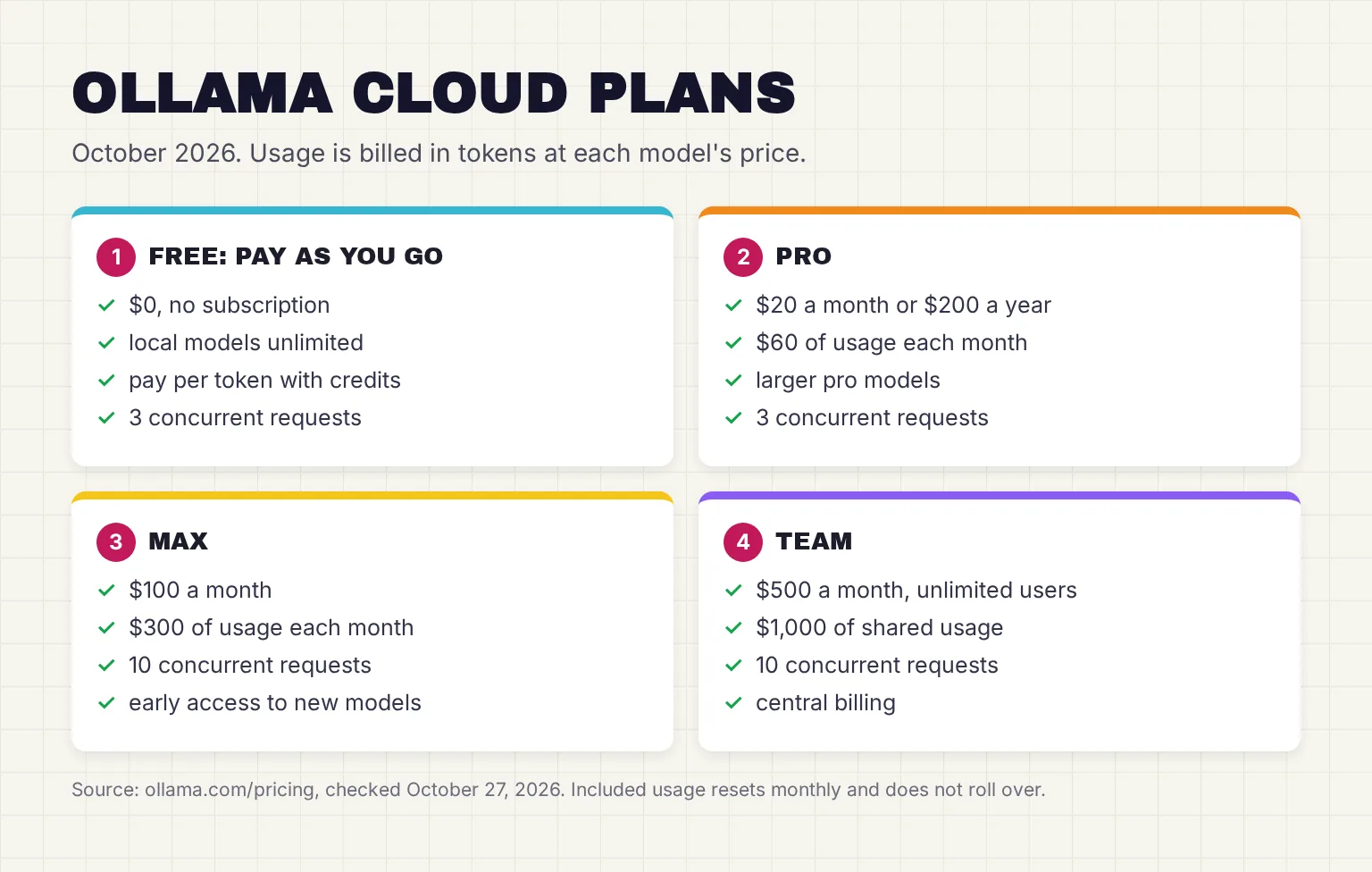
Ollama moved to per-token pricing on August 31, 2026, after feedback that GPU-time based billing was difficult to predict. Each paid plan includes a monthly pool of usage credits, a dollar balance that requests draw down. These are the plans on Ollama's pricing page on October 27, 2026.
| Plan | Price | Usage included each month | Requests at once | Also included |
|---|---|---|---|---|
| Pay as you go (free) | $0, no subscription | Not published; Ollama's blog mentions a small starter allowance but gives no amount | 3 | Run models locally, no service fees |
| Pro | $20 a month, or $200 a year ($16.67 a month) | $60 | 3 | Larger pro models; fast mode listed as coming soon |
| Max | $100 a month | $300 | 10 | Early access to the newest models |
| Team (early access) | $500 a month | $1,000, shared by unlimited users | 10 | Central billing and administration, priority support |
| Enterprise | Custom | Volume pricing | Not listed | Model access controls, budgets per user and API key |
How is Ollama Cloud usage measured?
In tokens, the small chunks of text a model reads and writes. Ollama says usage is measured in tokens at each model's rates, priced per million tokens for input, cached input (prompt text read from the cache) and output. Plan credits go first, then credits you bought, which expire one year after they are added.
The model you pick moves the bill far more than the plan. These are a sample of rates from Ollama's pricing page on October 27, 2026. Two DeepSeek models cost half as much off-peak, which the pricing page defines as "outside 12:00 and 18:00 UTC on weekdays and all day on weekends."
| Cloud model (October 2026) | Input, per million tokens | Cached input | Output |
|---|---|---|---|
| gpt-oss:20b | $0.07 | $0.035 | $0.30 |
| gemma4 | $0.14 | $0.05 | $0.40 |
| glm-5.3-flash | $0.15 | $0.03 | $0.50 |
| gpt-oss:120b | $0.15 | $0.014 | $0.60 |
| deepseek-v4-pro (peak) | $1.32 | $0.044 | $3.96 |
| glm-5.3 | $1.40 | $0.26 | $4.40 |
| kimi-k3 | $3.00 | $0.30 | $15.00 |

What does $60 of Pro usage buy?
Here is my own arithmetic from those prices, ignoring caching. A chat reply that reads 2,000 tokens and writes 500 costs about $0.0005 on gemma4 and $0.0135 on kimi-k3. Pro's $60 would cover roughly 125,000 such replies on gemma4, or about 4,400 on kimi-k3.
Agents burn through far more. Ollama recommends at least 64,000 tokens of context for agents and coding tools, so an all-day coding agent on kimi-k3 can outrun $60.
When does Ollama Cloud usage reset?
Pro, Max and Team allowances reset on the same day of each month your subscription started, even on annual billing, and unused usage does not roll over. On the free plan, Ollama's pricing post says usage resets monthly from the date you signed up. Paid plans also send an email reminder at 90% of included usage.
Is Ollama Cloud free? What the free tier includes
Partly, and Ollama's own pages are not fully in step. The pricing page lists the $0 tier as pay as you go, which charges per token for every cloud model, with no included usage shown. Ollama's August pricing post adds that the free plan now includes a small amount of monthly usage for a set of starter models. Ollama does not publish how much that allowance is or which models it covers, so do not plan around it.
Ollama's API reference lists an error for requests where the cloud model isn't included in the Free plan, with the advice to add usage credits or upgrade. The pricing post says adding credits gives access to all models on the free plan, yet the pricing page lists larger pro models as a Pro feature. Ollama's download page puts it plainly: cloud models need usage credits or a paid plan. Expect to buy credits or subscribe for regular cloud use.
One model costs nothing right now: Reflection's Beam is free on Ollama's cloud for a limited time from October 16, 2026, and it is the only model marked free on the cloud catalog page. Web search needs only a free Ollama account, and at launch Ollama promised a generous free tier of web searches, without giving a number.
What are the Ollama Cloud usage limits?
The new plans have no service fees and no 5-hour or weekly limits: when the monthly pool runs out, you can keep going with bought credits at the same per-token rate. Guides that mention session and weekly limits describe legacy plans, which existing subscribers can keep as long as they auto-renew.
The limit you are most likely to meet is concurrency, the number of requests running at once. Pay as you go and Pro allow 3 concurrent requests, and Max and Team 10. Extra requests wait in a queue, and if the queue is full, the request is rejected until a slot opens. Rate-limit errors come back as HTTP 429, Too Many Requests.
For the 16GB reader chatting in the app, 3 slots is plenty; it matters for agent tools that fire requests in parallel.
Which models run on Ollama Cloud?
Ollama's cloud catalog page listed 21 models on October 27, 2026, all open models from other labs. They include Moonshot's kimi-k3 and kimi-k2.7-code, Z.ai's glm-5.3 and glm-5.3-flash, deepseek-v4-pro and deepseek-v4.1-flash, Google's gemma4, NVIDIA's nemotron-3 models, mistral-large-4, minimax-m3, Reflection's beam, and OpenAI's gpt-oss in 20b and 120b sizes.
How do you spot a cloud model?
By the tag, which ends in cloud: either :cloud, as in gemma4:cloud, or a size plus -cloud, as in gpt-oss:120b-cloud. The desktop app treats any model name ending in cloud as a cloud model. In ollama ls, cloud models show a dash instead of a size, because nothing is downloaded. Direct API calls to ollama.com use the name from the cloud model list, such as gemma4:31b.
Why use a cloud model instead of a local one?
Size. Ollama launched cloud models in preview in September 2025 so people could run larger models that wouldn't fit on a personal computer. Locally, gpt-oss:120b is a 65GB download and gemma4:31b needs 19 to 20GB, both beyond a 16GB laptop. Kimi K3, with 2.81T parameters and a 1M-token context window, is far past any home machine.
Ollama says its cloud models use native weights, as released by the model provider, rather than the smaller quantized versions (weights stored with fewer bits) that laptops usually run, though on modern NVIDIA hardware they may use accelerated data formats such as NVFP4. It gives no speed figures, saying only that it targets low time-to-first-token and high throughput.
What cloud models cannot do
Ollama's cloud currently does not support structured outputs, which force replies into a fixed JSON format. Cloud models can also be retired, and usage settings show upcoming retirements; downloaded local models are not affected.
How to use Ollama Cloud from the app, the terminal and the API
You need a free Ollama account. These steps assume Ollama is installed; our Ollama install guide covers Windows, Mac and Linux.
- Sign in. Use the Settings page in the Mac or Windows app, or run
ollama signinin a terminal, which adds this computer's Ollama public key to your account. - Pick a cloud model. Choose a name ending in cloud from the app's model menu, or browse the cloud catalog. Nothing is downloaded.
- Run it from a terminal if you prefer. Type
ollama run gemma4:31b-cloud, the command on the gemma4 model page. - Check what it cost. Open your usage page on ollama.com after a session.
- Sign out when you are done. Run
ollama signoutto stay signed out, and cloud models stop working until you sign in again.
ollama signin
ollama run gemma4:31b-cloud
ollama signout
Once you are signed in, any app pointed at your local server on localhost:11434 can call a cloud model through the local API and spend your credits.
The Ollama Cloud API and API key
An API (application programming interface) is the address programs send requests to. To call Ollama Cloud from code, with no Ollama installed, create an API key in your ollama.com settings. Keys do not expire, so revoke unused ones and keep them outside browser code and source control. In Windows PowerShell, use $env:OLLAMA_API_KEY = "your_api_key"; on a Mac or Linux:
export OLLAMA_API_KEY="your_api_key"

curl https://ollama.com/api/chat \
  -H "Authorization: Bearer $OLLAMA_API_KEY" \
  -H "Content-Type: application/json" \
  -d '{
    "model": "gemma4:31b",
    "messages": [{"role": "user", "content": "Why is the sky blue?"}],
    "stream": false
  }'
Ollama's docs list three base URLs for direct cloud access: https://ollama.com/api for its own API, https://ollama.com/v1 for OpenAI clients and https://ollama.com for Anthropic clients. Every direct cloud request sends the key in an Authorization: Bearer header, and https://ollama.com/api/tags lists the cloud models.
Ollama web search API
Web search is a separate cloud endpoint, POST https://ollama.com/api/web_search, that returns titles, URLs and snippets: 5 results by default, up to 10. A companion web_fetch endpoint returns the text of a single page. Both use the same API key:
curl https://ollama.com/api/web_search \
  --header "Authorization: Bearer $OLLAMA_API_KEY" \
  -d '{
    "query":"what is ollama?"
  }'
Check your balance and usage from the terminal
Balance shows your remaining included and bought credits, and usage breaks down requests and tokens over 24 hours, 7 days or 30 days.
curl https://ollama.com/api/balance \
  -H "Authorization: Bearer $OLLAMA_API_KEY"

curl 'https://ollama.com/api/usage?range=24h' \
  -H "Authorization: Bearer $OLLAMA_API_KEY"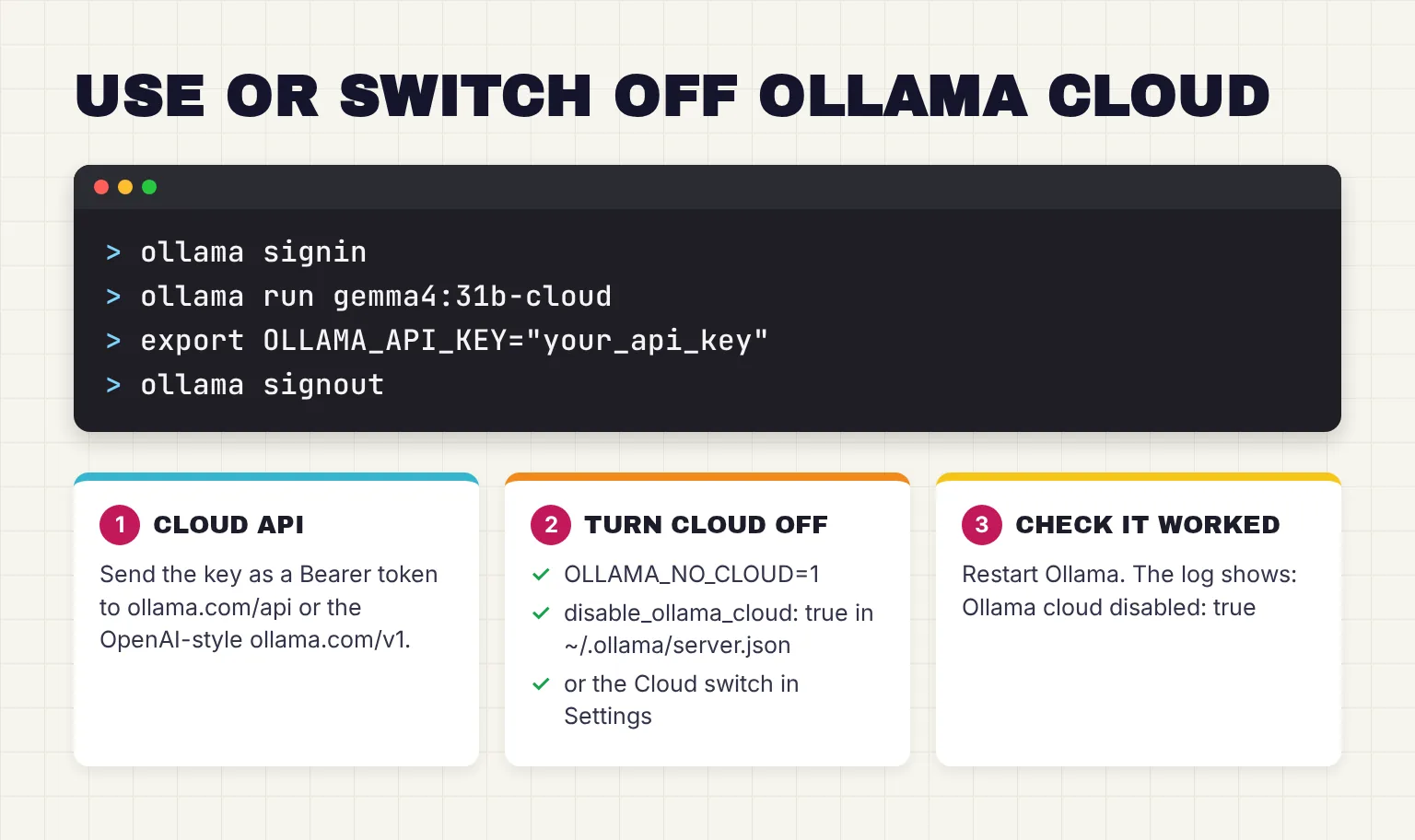
Does Ollama Cloud keep your prompts? Privacy compared with local
With local models, Ollama says "We don't see your prompts or data when you run locally." Cloud models are different by design, because the prompt has to reach Ollama's servers. For those, its FAQ says "we process your prompts and responses to provide the service but do not store or log that content and never train on it."
The privacy policy, last updated in March 2026, says cloud content "is not stored beyond the time required to fulfill the request" and that Ollama uses "technical measures designed to minimize retention of prompt and response content." Models run primarily in the United States, and Ollama may route to Europe for additional capacity, on NVIDIA cloud partners that Ollama says must have no logging, no training, and zero data retention policies.
Ollama does keep account details, payment information through Stripe, your IP address and general location, plus usage metadata such as request and token counts per model. All of this is Ollama's own description. Only a local model spares you from taking a provider's word for it, which is why our private AI guide ranks on-device AI as the most private option.
How to turn off Ollama Cloud
There are three switches. In the app, Settings has a Cloud toggle, described as Enable cloud models and web search. For a setting that holds whatever app you use, set the environment variable OLLAMA_NO_CLOUD=1, or put this in ~/.ollama/server.json, then restart Ollama:
{
  "disable_ollama_cloud": true
}
Set the variable as Ollama's FAQ describes for server settings: launchctl on a Mac, the environment variables panel on Windows, systemd on Linux. After a restart the log shows Ollama cloud disabled: true, and the app's switch says the variable is forcing cloud off. Ollama then runs in local only mode, which turns off cloud models and web search. It is not an offline switch: the FAQ says the macOS and Windows apps download updates automatically.
Ollama Cloud vs local models: how they compare in October 2026
| Factor | Local model on a 16GB laptop | Ollama cloud model |
|---|---|---|
| Cost | Unlimited and free; you pay for hardware and electricity | Per token from credits; Pro is $20 a month with $60 included |
| Privacy | Ollama says it does not see local prompts | Prompts reach Ollama's servers; Ollama says it does not store or log them |
| Speed | Depends on the hardware; large models are slow without a strong GPU | Ollama says fast on any computer; no figures published |
| Model size | What fits in memory, such as gemma4:12b at 7.7 to 8.0GB | Models as large as kimi-k3, with 2.81T parameters |
| Context window | 4K by default under 24 GiB of VRAM | The model's maximum by default, up to 1M tokens |
| Offline use | Yes, once the model is downloaded | No |
| Limits | Only your hardware | Monthly credits; 3 or 10 requests at once |
| Account | Not needed | Required; API key for direct access |
For what tokens per second feel like in practice, our local vs cloud AI comparison collects measured speeds for laptops, graphics cards and cloud services.
When is Ollama Cloud worth paying for?
For the 16GB reader, cloud earns its place on occasional big jobs: a long report that a 4K local context would cut short, a hard coding problem, or a model like gpt-oss:120b that will never fit. It is not worth it for private documents or everyday chat. Our guide to running gpt-oss on a 16GB laptop shows how far the local 20b model goes.
Choose pay as you go if:
- You want a big model now and then, and would rather buy credits than subscribe.
- You mostly use low-cost models such as gemma4.
Choose Pro if:
- You use cloud models most weeks: $20 buys $60 of usage, three times the fee, if you spend it all.
- You want the larger pro models the pricing page lists as a Pro feature.
Choose Max if:
- You run coding agents in parallel and keep hitting the 3-request limit; Max allows 10 and includes $300 of usage.
Two outside prices, as listed on October 27, 2026. LM Studio's Bionic+ plan also costs $20 a month for US-hosted open models such as Kimi K3, GLM 5.3 and DeepSeek V4 Flash; our LM Studio vs Ollama guide compares the two apps. DeepSeek's own API charges $1.32 and $3.96 per million input and output tokens for deepseek-v4-pro at peak, the same as Ollama, though their off-peak hours differ.
Common questions about Ollama Cloud
Is Ollama Cloud free?
Partly. Local models are free and unlimited. For cloud models, the $0 plan is pay as you go, charged per token from credits you buy. Ollama says it includes a small monthly allowance for some starter models but does not publish the amount. Web search needs only a free account, and Reflection's Beam is free for a limited time.
How much does Ollama Cloud Pro cost?
Ollama Pro costs $20 a month, or $200 a year, and includes $60 of usage credits each month, spent per token at each model's published rate. It allows 3 requests at once and adds larger pro models. Max costs $100 a month with $300 of usage and 10 concurrent requests.
What are the Ollama Cloud usage limits?
Paid plans include a monthly dollar allowance that resets on your subscription day and does not roll over. The new plans have no 5-hour or weekly caps, and you can keep going with bought credits at the same rates. Pay as you go and Pro allow 3 concurrent requests, Max and Team allow 10.
Does Ollama Cloud store my prompts?
Ollama says it processes cloud prompts and responses only to answer the request, does not store or log that content, and never trains on it. Models run mainly in the United States and may be routed to Europe for extra capacity. Ollama does keep account details, payment records, IP address and usage metadata such as request and token counts.
How do I turn off Ollama Cloud?
Switch off Cloud in the Ollama app's Settings, set the environment variable OLLAMA_NO_CLOUD=1, or set disable_ollama_cloud to true in the server.json file inside the .ollama folder in your home directory. Restart Ollama afterward. The log then confirms cloud is disabled, and cloud models and web search stop working.
How do I get an Ollama Cloud API key?
Sign in at ollama.com, open the API keys page in your account settings and create a key. Store it in the OLLAMA_API_KEY environment variable and send it as a Bearer token to ollama.com/api, or to ollama.com/v1 for OpenAI-style clients. Keys do not expire, so revoke any you stop using.
My verdict for a 16GB laptop: keep local as the default, use cloud for big jobs
For the reader in this guide, Ollama Cloud is a useful extra, not a replacement. Keep gemma4 on the laptop for anything private and for daily chat, and use bought credits, or the free plan's small starter allowance if it covers the model, when a task needs a model or a context window the laptop cannot hold. Pay for Pro only once you reach for cloud models most weeks, and set OLLAMA_NO_CLOUD=1 on any machine that handles client files.
Your next step: open the Ollama app's Settings and decide on the Cloud switch today. If you leave it on, sign in, run ollama run gemma4:31b-cloud on one long, non-private document you know well, and check the usage page afterward to see what it cost. If Ollama says the model is not included in the Free plan, add usage credits first.
Sources
- Cloud - Ollama
- Pricing - Ollama
- Ollama's transparent pricing - Ollama
- app/ui/app/src/components/DisplayLogin.tsx - ollama/ollama, GitHub
- gemma4 tags - Ollama
- kimi-k3 - Ollama
- Context length - Ollama
- Usage - Ollama
- Terms of Service - Ollama
- System One - Ollama
- Reflection's Beam is freely available on Ollama for a limited time - Ollama
- Cloud models - Ollama
- Web search - Ollama
- Web search (blog post, September 24, 2025) - Ollama
- Balance - Ollama
- Errors - Ollama
- gpt-oss - Ollama
- app/ui/app/src/api.ts - ollama/ollama, GitHub
- Cloud models (blog post, September 19, 2025) - Ollama
- Structured Outputs - Ollama
- FAQ - Ollama
- gemma4 - Ollama
- Authentication - Ollama
- Quickstart - Ollama
- API Introduction - Ollama
- Cloud usage - Ollama
- Privacy Policy - Ollama
- app/ui/app/src/components/Settings.tsx - ollama/ollama, GitHub
- Download Ollama - Ollama
- Bionic Pricing - LM Studio
- Models & Pricing - DeepSeek API Docs