
What is the best GPU for local AI in October 2026?
For most people it is a 16GB card: the NVIDIA GeForce RTX 5060 Ti 16GB, with 448 GB/s of memory bandwidth and a 600 W power supply requirement. It launched at $429 but sold for over $600 in October 2026. Step up to a used 24GB RTX 3090 for bigger models and video, or the 32GB RTX 5090 for speed.
This guide follows one reader: a US desktop owner with a 650 W power supply, a mid-size case, an older 8GB graphics card and $300 to $2,000 to spend. They want a private chat assistant and images, and are curious about AI video. Every pick is checked against that power supply.
Choose the RTX 5060 Ti 16GB if:
- You want the widest app support in NVIDIA's cheapest 16GB card: its CUDA software works in Ollama, LM Studio, llama.cpp and ComfyUI.
- Your power supply meets the 600 W NVIDIA lists for this card, as the reader's 650 W unit does.
- Chat models up to about 20B and image models such as SDXL cover your needs.
Choose a used RTX 3090 24GB if:
- You want 32B chat models or AI video, which need the extra 8GB.
- You can fit a 313 mm, three-slot card and a 750 W power supply, and buy with return cover.
Choose the RTX 5090 32GB if:
- You can add a new power supply, because NVIDIA lists 1,000 W of required system power.
- You want the fastest consumer card at any price.
Choose AMD or Intel if:
- You run Linux, or accept the Vulkan route on Windows, for more VRAM per dollar, such as the Radeon RX 9060 XT 16GB ($349 launch) or Arc B580 ($249).
Best GPU for AI by budget in October 2026
Launch prices are the makers' official US prices. Brackets show the spread of October 2026 US street prices, pushed up by a memory shortage, across Tom's Hardware, BuySellRam and videocardprices.com, with PCPrice.Watch's used median for the RTX 3090.
| Card | VRAM | Memory bandwidth | Launch price (October street) | Board power | Best for |
|---|---|---|---|---|---|
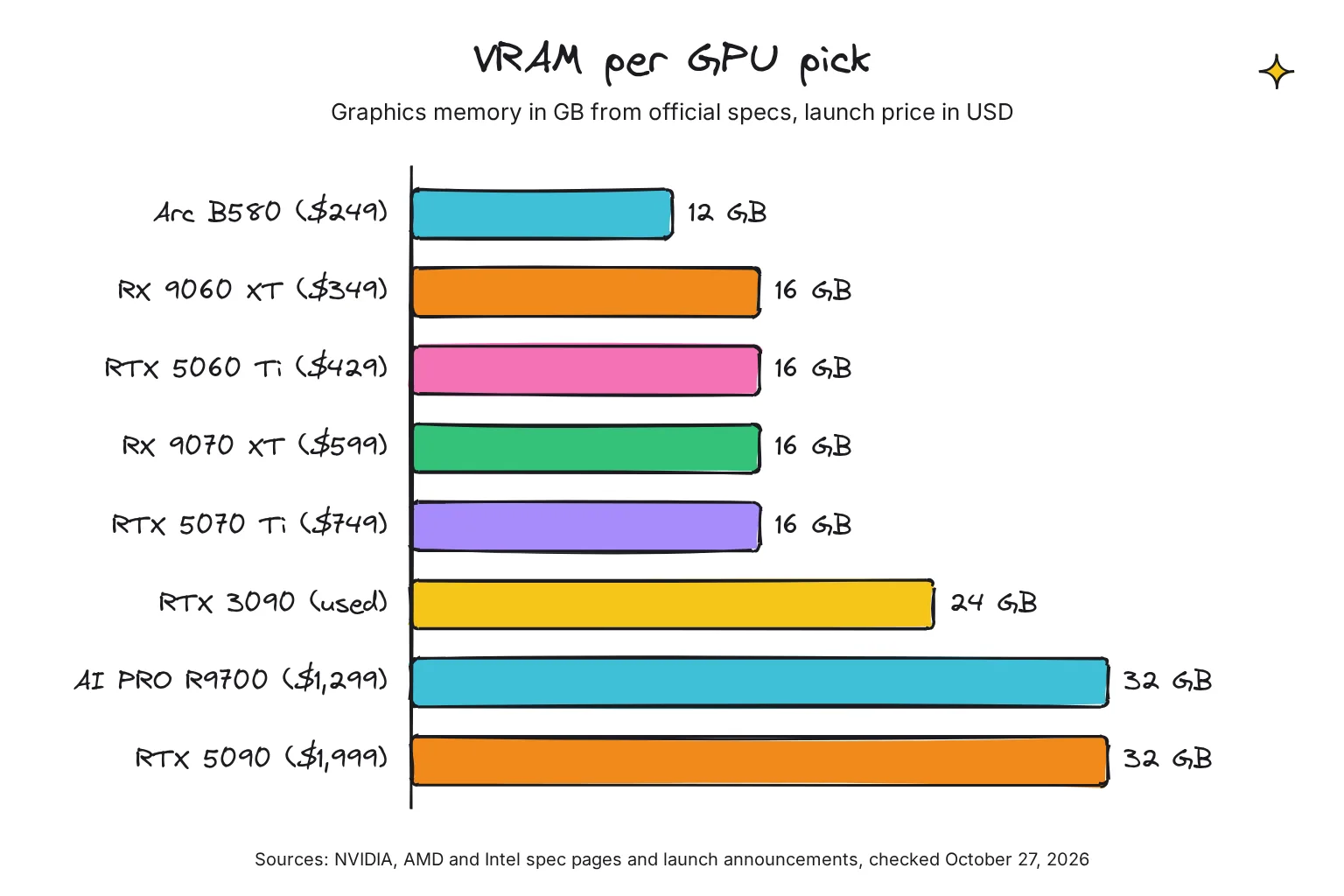
| Intel Arc B580 | 12 GB | 456 GB/s | $249 ($370) | 190 W | Cheapest 12GB, chat up to 14B, if you accept extra setup |
| AMD Radeon RX 9060 XT 16GB | 16 GB | 320 GB/s | $349 ($590-$600) | 160 W | Cheapest 16GB, slowest replies of the group |
| NVIDIA RTX 5060 Ti 16GB | 16 GB | 448 GB/s | $429 ($620-$770) | 180 W | Our pick for chat and images |
| AMD Radeon RX 9070 XT | 16 GB | 640 GB/s | $599 ($870-$930) | 304 W | Faster 16GB for Linux users |
| NVIDIA RTX 5070 Ti | 16 GB | 896 GB/s | $749 ($1,010-$1,320) | 300 W | Fastest 16GB, images and short video |
| NVIDIA RTX 3090 (used) | 24 GB | 936 GB/s | $1,499 in 2020 ($1,400 used) | 350 W | 32B models and video on a budget |
| AMD Radeon AI PRO R9700 | 32 GB | 640 GB/s | $1,299 | 300 W | New 32GB card, Linux first |
| NVIDIA RTX 5090 | 32 GB | 1,792 GB/s | $1,999 ($4,900-$8,500) | 575 W | Fastest card for every task |

What is the best budget GPU for AI?
The RTX 5060 Ti 16GB. It has the same 16GB as AMD's RX 9060 XT but 448 GB/s against 320 GB/s, and better app support, though it cost more in October 2026. Skip the 8GB Ti, which launched just $50 cheaper.
Which cards should you skip?
Skip any new 8GB card for AI. I would also skip the RTX 5070, which has 12 GB for a $549 launch price, and the RTX 5080, which has the same 16 GB as the RTX 5070 Ti for $999 instead of $749.
Is a used RTX 3090 still worth it for AI?
Yes, if you need 24GB, but it is no longer cheap. PCPrice.Watch put the median sold price at $1,409 across 237 eBay sales in seven countries in the 90 days to October 28, 2026. Prices move monthly. Our home AI server guide covers a 3090 build and used-card checks.
A new alternative is AMD's 32GB Radeon AI PRO R9700, which AMD's David McAfee announced on X at $1,299 from October 27, 2025. It has more memory than the 3090 but less bandwidth, and runs best on Linux.
How much VRAM do I need for local AI?
VRAM is the graphics card's own memory, and it decides which models fit. A model is a file of parameters, counted in billions (8B, 14B, 32B), and quantization stores each in fewer bits; most people download 4-bit versions. Our rule of thumb: a 4-bit model needs about 0.55 to 0.65 GB per billion parameters, plus a few GB for context, the text the model keeps in view. When a model and its context outgrow VRAM, part of it moves to slower system memory, so it pays to check whether Ollama is using your GPU.
Ollama's downloads match. Qwen3 8B is 5.2GB, Qwen3 14B is 9.3GB and Qwen3 32B is 20GB, and Llama 3.3 70B is 43GB. Context matters too: Ollama defaults to a 4K context below 24 GiB of VRAM and 32K from 24 GiB.
| VRAM | Chat models that fit (4-bit) | Images and video | Example cards |
|---|---|---|---|
| 8 GB | 8B, such as Qwen3 8B (5.2GB), with a short context | SDXL (6.94GB file); Wan 2.2 5B video with ComfyUI offloading | RTX 5060, RX 9060 XT 8GB |
| 12 GB | 14B, such as Qwen3 14B (9.3GB); Gemma 4 12B (7.7 to 8.0GB) | FLUX.2 [klein] 4B in ComfyUI (8.4 to 9.2GB) | Arc B580, RTX 5070 |
| 16 GB | gpt-oss-20b (14GB) | Z-Image-Turbo; FLUX.2 [klein] 4B in about 13GB | RTX 5060 Ti 16GB, RX 9060 XT 16GB, RX 9070 XT, RTX 5070 Ti |
| 24 GB | 32B, such as Qwen3 32B (20GB); Gemma 4 31B (19 to 20GB) | Wan 2.2 5B with Wan's own script; FLUX.2 [dev] at 4-bit with a remote text encoder | Used RTX 3090, RX 7900 XTX |
| 32 GB | 32B with a longer context; 70B (43GB) still does not fit | More headroom; Wan 2.2 14B still needs 80GB in Wan's own script | RTX 5090, Radeon AI PRO R9700 |
For the reader, 16GB is the floor I would buy today. It holds gpt-oss-20b, which OpenAI says runs within 16GB of memory (our guide to running ChatGPT-style AI locally sets it up), and most current image models.
Is 6GB VRAM enough for a local LLM?
For small models, yes. A 6GB card such as the RTX 3050 6GB holds Qwen3 4B, a 2.5GB download, with room for context. An 8B model at 5.2GB barely fits, so context stays short or the model spills into slower system memory. Treat 6GB as a way to try local AI, not a card to buy.
Is 8GB VRAM enough?
It works, with limits. 8GB holds 8B chat models and the 6.94GB SDXL image model, and ComfyUI says Wan 2.2 5B video should fit well on 8GB with its native offloading. It will not hold Gemma 4 12B fully, gpt-oss-20b or most newer image models. If you own one, as our reader does, start on it and upgrade when you hit the wall.
Why memory bandwidth sets your tokens per second
A token is a word or part of one, and speed is quoted in tokens per second. Each new token means reading the model's weights from memory again. NVIDIA's engineers say that in this decode phase, the speed at which data is transferred to the GPU from memory dominates the latency. So memory bandwidth, in gigabytes per second, sets the pace once a model fits.
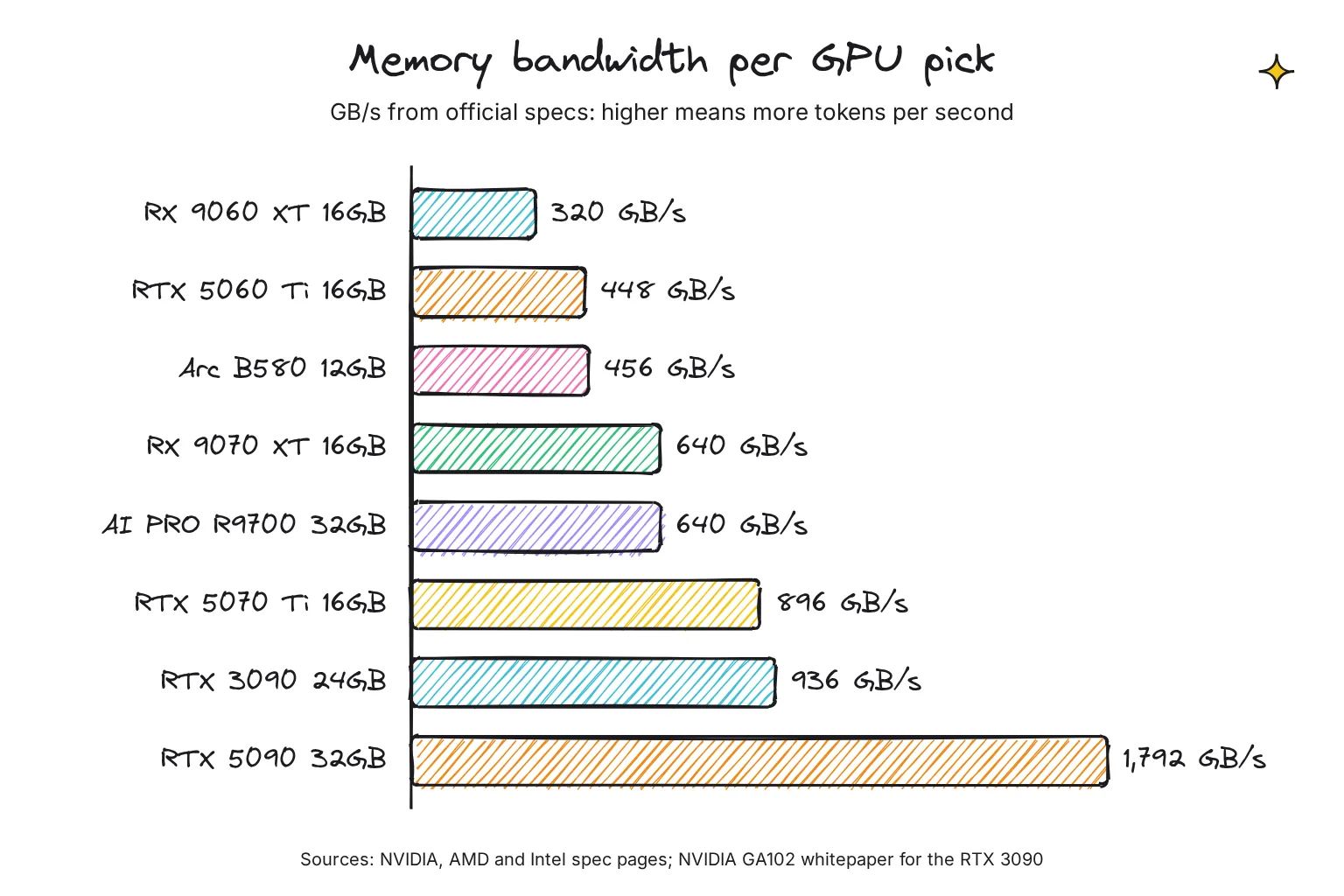
Real results follow bandwidth, but not exactly. These generation speeds come from llama.cpp's community Vulkan scoreboard, which runs Llama 2 7B at 4-bit on every brand (flash attention off).
| Card | Memory bandwidth | Tokens per second (Llama 2 7B, 4-bit, Vulkan) |
|---|---|---|
| RTX 5090 | 1,792 GB/s | 263.63 |
| RTX 3090 | 936 GB/s | 164.05 |
| RX 9070 XT | 640 GB/s | 137.11 |
| RTX 5070 Ti | 896 GB/s | 135.63 |
| RTX 5060 Ti | 448 GB/s | 93.51 |
| RX 9060 XT | 320 GB/s | 70.54 |
| Arc B580 | 456 GB/s | 70.14 |
The Arc B580 out-reads the RTX 5060 Ti but is slower here, and on llama.cpp's separate CUDA scoreboard the RTX 5070 Ti reached 176.85 tokens per second against 135.63 on Vulkan, from separate submissions. Software is the third factor; our local vs cloud AI comparison explains what each speed feels like.
GPU vs CPU for AI: how much does a graphics card help?
A lot. The Ryzen 9 9950X uses two channels of DDR5-5600, about 90 GB/s (2 channels x 8 bytes x 5,600 million transfers a second), under a third of the slowest card above. llama.cpp can split a model between the two, CPU+GPU hybrid inference to partially accelerate models larger than the total VRAM capacity, but the part left in system memory sets the pace. A laptop NPU does not change this, as our AI PC explainer covers.
NVIDIA vs AMD vs Intel: which works best with local AI apps?
Each brand reaches AI apps through its own software layer: CUDA for NVIDIA, ROCm for AMD, SYCL for Intel. Vulkan is a cross-brand standard that works on all three. llama.cpp lists CUDA for Nvidia, HIP for AMD, SYCL for Intel and Vulkan for any GPU.

| App | NVIDIA | AMD | Intel Arc |
|---|---|---|---|
| Ollama | CUDA, compute capability 5.0 and newer | ROCm on Linux (RX 9000 listed); ROCm on Windows for RX 7000 only; Vulkan otherwise | Vulkan |
| LM Studio | CUDA; RTX 50 since 0.3.15 | ROCm and Vulkan runtimes; R9700 since 0.4.17 | Vulkan backend; its docs name no Intel cards |
| llama.cpp | CUDA, Vulkan | HIP (ROCm), Vulkan | SYCL (B580 verified), Vulkan |
| ComfyUI | Top tier in its own GPU guide | ROCm on Linux and Windows | PyTorch XPU on Windows and Linux |
NVIDIA: the safe choice
Ollama supports NVIDIA GPUs with compute capability 5.0 and newer on driver 550 or later, which covers every card here. LM Studio added support for RTX 50-series GPUs with CUDA 12 in version 0.3.15. ComfyUI's buying guide puts NVIDIA in its top tier, says 3000 series and above are recommended for best performance, and lists FP8, a compact format many image models ship in, as native on the 40 and 50 series.
AMD: more memory per dollar, best on Linux
AMD's ROCm 10.1 compatibility matrix lists the RX 9070 XT, RX 9060 XT and Radeon AI PRO R9700 for Linux and Windows, but apps lag behind. Ollama uses ROCm for RX 9000 cards on Linux, but its Windows ROCm list stops at the RX 7000 series, so on Windows they use Vulkan. LM Studio has offered a ROCm runtime since version 0.3.0 and added the R9700 in version 0.4.17. ComfyUI documents ROCm installs for RX 9070 and RX 9060 cards on Windows, but rates AMD a tier below NVIDIA, saying it can be a bit slow compared to price equivalent Nvidia GPUs.
For 24GB from AMD, the older RX 7900 XTX has 24 GB, up to 960 GB/s and an 800 W PSU minimum, and is on Ollama's Windows ROCm list.
Intel: cheap VRAM, more setup
llama.cpp lists the Arc B580 as a verified device for its SYCL backend, and Ollama reaches Intel cards through Vulkan, with separate driver steps on Linux. ComfyUI runs on Arc through PyTorch's XPU build, and says people seem to get it working fine. The B580 is a sound first card near its $249 launch price, but it was the slowest in the scoreboard above.
Best GPU for AI image and video generation
Image and video models want more VRAM per billion parameters than chat models: ComfyUI says they are inferenced in fp16 or bf16 for best quality, 16 bits per weight instead of about 4. ComfyUI also claims it can run big models on as low as 4GB vram + 8GB ram by streaming weights.
| Model | What the model card or docs say | License |
|---|---|---|
| SDXL 1.0 | 6.94GB main file; CPU offloading if you are limited by GPU VRAM | OpenRAIL++ |
| FLUX.2 [klein] 4B | About 13GB VRAM, RTX 3090 or 4070 and above; 8.4GB distilled in ComfyUI | Apache 2.0 |
| Z-Image-Turbo (6B) | Fits comfortably within 16G VRAM consumer devices | Apache 2.0 |
| FLUX.1 [dev] (12B) | About 23GB original file; an FP8 version for limited VRAM | Non-commercial |
| FLUX.2 [dev] (32B) | A 4-bit version with a remote text encoder on an RTX 4090 | Non-commercial |
| Wan 2.2 TI2V 5B (video) | 720P at 24fps; Wan's script needs at least 24GB VRAM with offloading | Apache 2.0 |
| Wan 2.2 T2V A14B (video) | Wan's script needs at least 80GB VRAM; ComfyUI offers FP8 files | Apache 2.0 |
Best GPU for AI image generation and AI art
A 16GB NVIDIA card covers SDXL, FLUX.2 [klein] 4B and Z-Image-Turbo. The RTX 5060 Ti 16GB is the value pick and the RTX 5070 Ti, with twice the bandwidth, the faster one. NVIDIA says the RTX 50 series' FP4 support boosts AI image generation performance for models such as FLUX by 2x, its own claim. Our guide to making AI images locally covers your first picture.
Best GPU for AI video generation
Video is where 24GB and 32GB pay off. Wan 2.2 5B should fit on 8GB in ComfyUI with offloading, but Wan's own script asks for 24GB, and 80GB for the 14B model. A used RTX 3090 is the cheapest NVIDIA 24GB, and the RTX 5090 is the card I would buy for video if the budget allows.
Will it fit? Power supply and case checks
Power supply (PSU) figures are for a whole PC, not just the card; NVIDIA bases its RTX 50 figures on a PC with a Ryzen 9 9950X processor. The RTX 5090 page's setup checklist says 850 W minimum, but I would plan on its 1,000 W spec figure.
| Card | Board power | PSU the maker lists | Length and slots | Power connector |
|---|---|---|---|---|
| RX 9060 XT 16GB | 160 W | 450 W | Not listed by AMD; check the board maker | 1x 8-pin |
| RTX 5060 Ti 16GB | 180 W | 600 W | Varies by manufacturer | 1x 8-pin or 300 W PCIe Gen 5 cable |
| Arc B580 | 190 W | 600 W | 272 mm, 2 slots (Intel reference card) | 1x 8-pin |
| RTX 5070 Ti | 300 W | 750 W | Varies by manufacturer | 2x 8-pin or 300 W PCIe Gen 5 cable |
| RX 9070 XT | 304 W | 750 W | Not listed by AMD; check the board maker | 2x 8-pin |
| Radeon AI PRO R9700 | 300 W | 750 W | Double slot | 12V-2x6 |
| RTX 3090 Founders Edition | 350 W | 750 W | 313 mm, 3 slots | 2x 8-pin to 12-pin adapter |
| RTX 5090 Founders Edition | 575 W | 1,000 W | 304 mm; NVIDIA asks for 3 free slots | 4x 8-pin adapter or 600 W PCIe Gen 5 cable |
For the 650 W reader, only the first three rows fit without a new power supply. Sources: NVIDIA, AMD's RX 9060 XT, RX 9070 XT and R9700 pages, and Intel.
- Read your power supply label. Compare the wattage on its side with the table, and replace the supply if it is lower.
- Measure the case from the back to the front fans along the graphics card slot. For the RTX 5090, NVIDIA asks for room for a 304 mm by 137 mm, 3-slot card plus 36 mm for power cables. For partner cards, use the board maker's length.
- Count the power cables. Check your supply has the connectors in the table's last column.
- Install the card and driver, then check the system sees it. On NVIDIA,
nvidia-smi -Llists the GPUs, as Ollama's hardware page shows. - Run a model and confirm it is on the GPU. Load a model, then run
ollama psand check the PROCESSOR column. Ollama's FAQ says 100% GPU means the model was loaded entirely into the GPU.
nvidia-smi -L
ollama run qwen3:8b
ollama ps
Common questions about the best GPU for local AI
Is 6GB VRAM enough for a local LLM?
For small models, yes. A 6GB card runs 4B models such as Qwen3 4B, a 2.5GB download, with room for context. An 8B model at 4-bit is a 5.2GB download, so it barely fits and the context stays short. Use a 6GB card to try local AI, not as a card to buy for it.
Is 8GB VRAM enough for local AI?
It works with limits. 8GB holds 8B chat models at 4-bit and the SDXL image model, and ComfyUI says Wan 2.2 5B video fits with its offloading. It will not hold gpt-oss-20b or most newer image models. If you own an 8GB card, start on it, but buy 16GB if you are shopping now.
How much VRAM do I need for local AI?
Allow about 0.55 to 0.65 GB per billion parameters for a 4-bit model, plus a few GB for context. That means about 6GB for an 8B model, 10GB for 14B and 20 to 24GB for 32B. For chat and images together, 16GB is a sensible floor, and 24GB opens 32B models and video.
Is NVIDIA or AMD better for local AI?
NVIDIA is the safer choice because every major app supports CUDA first, especially on Windows. AMD often gives more VRAM per dollar and works well on Linux through ROCm, but Ollama on Windows reaches the new RX 9000 cards through Vulkan, and ComfyUI rates AMD a tier below NVIDIA.
Is a used RTX 3090 still worth it for AI?
Yes, if you need 24GB of VRAM for 32B models or video. It has 936 GB/s of bandwidth, more than any other pick in this guide except the RTX 5090. Used prices are high, with a median near $1,400 in October 2026, and it needs a 750 W power supply and a long case.
Do I need a GPU for local AI, or will a CPU do?
A CPU can run small models, but slowly. Generating text is limited by memory speed, and a desktop with two channels of DDR5-5600 memory reads at roughly 90 GB/s, under a third of the slowest pick in this guide. A graphics card with enough VRAM makes chat feel interactive and image generation practical.
My verdict for a $300 to $2,000 upgrade: buy 16GB now, 24GB for video
For the reader with a 650 W power supply and an 8GB card, the RTX 5060 Ti 16GB is the best GPU for local AI. It doubles their VRAM, fits their power supply and works in every app. If video or 32B models are the goal, save for a used RTX 3090 and a 750 W supply. The RTX 5090 now sells far above its $1,999 launch price and this budget.
Your next step: before you buy, run ollama run qwen3:8b on your current card and check ollama ps. If it shows 100% GPU and the speed suits you, the upgrade can wait.
Sources
- NVIDIA Blackwell GeForce RTX Arrives for Every Gamer, Starting at $299 - NVIDIA Newsroom
- Compare Current and Previous GeForce Series of Graphics Cards - NVIDIA
- NVIDIA Blackwell GeForce RTX 50 Series Opens New World of AI Computer Graphics - NVIDIA Newsroom
- GeForce RTX 5060 Family Graphics Cards - NVIDIA
- GeForce RTX 5070 Family Graphics Cards - NVIDIA
- GeForce RTX 5090 Graphics Cards - NVIDIA
- 3090 and 3090 Ti Graphics Cards - NVIDIA
- NVIDIA Delivers Greatest-Ever Generational Leap with GeForce RTX 30 Series GPUs - NVIDIA Newsroom
- NVIDIA Ampere GA102 GPU Architecture whitepaper - NVIDIA
- Mastering LLM Techniques: Inference Optimization - NVIDIA Technical Blog
- AMD Unveils Next-Generation AMD RDNA 4 Architecture - AMD Newsroom
- AMD Introduces New Radeon Graphics Cards and Ryzen Threadripper Processors - AMD Newsroom
- AMD Radeon RX 9060 XT (16GB) - AMD
- Radeon RX 9070 XT - AMD
- AMD Radeon AI PRO R9700 - AMD
- Radeon RX 7900 XTX - AMD
- AMD Ryzen 9 9950X - AMD
- Radeon AI PRO R9700 availability and price post - David McAfee, AMD, on X
- GPU price tracking 2026: Lowest price on every graphics card from Nvidia, AMD, and Intel today - Tom's Hardware
- NVIDIA Consumer GPU Market Update, October 2026 - BuySellRam
- GPU and AI Hardware Prices, October 2026 - videocardprices.com
- Intel Arc B580 Graphics specifications - Intel
- Used RTX 3090 in United States - PCPrice.Watch
- Hardware support - Ollama
- Context length - Ollama
- FAQ - Ollama
- qwen3 tags - Ollama
- gemma4 tags - Ollama
- gpt-oss:20b - Ollama
- llama3.3 tags - Ollama
- gpt-oss-20b model card - OpenAI, Hugging Face
- LM Studio 0.3.15: RTX 50-series GPUs and improved tool use in the API - LM Studio
- LM Studio 0.3.0 - LM Studio
- LM Studio 0.4.17 release notes - LM Studio
- llama.cpp README - ggml-org, GitHub
- llama.cpp for SYCL - ggml-org, GitHub
- Performance of llama.cpp with Vulkan - ggml-org, GitHub
- Performance of llama.cpp on Nvidia CUDA - ggml-org, GitHub
- ROCm 10.1.0 compatibility matrix - AMD ROCm documentation
- ComfyUI README - comfyanonymous, GitHub
- Which GPU should I buy for ComfyUI - ComfyUI wiki, GitHub
- ComfyUI FLUX.2 Klein 4B Guide - ComfyUI
- ComfyUI Flux.1 Text-to-Image Workflow Example - ComfyUI
- Wan2.2 Video Generation ComfyUI Official Native Workflow Example - ComfyUI
- SD-XL 1.0-base Model Card - Stability AI, Hugging Face
- FLUX.2 [klein] 4B - Black Forest Labs, Hugging Face
- FLUX.2 [dev] - Black Forest Labs, Hugging Face
- Z-Image-Turbo - Tongyi-MAI, Hugging Face
- Wan2.2-TI2V-5B - Wan-AI, Hugging Face
- Wan2.2-T2V-A14B - Wan-AI, Hugging Face