
What is an AI PC? A laptop with an NPU, mostly
An AI PC is a computer with a neural processing unit (NPU), a chip built to run AI tasks at low power, alongside the usual processor and graphics. Microsoft's stricter Copilot+ PC label adds an NPU rated at 40+ TOPS, 16GB of RAM and 256GB of storage. For running a chatbot privately, memory and graphics matter more.
This guide follows one reader: someone with about $1,000 or £1,000 to spend on a new laptop, who keeps seeing AI PC stickers in shops and wants a private assistant that runs on the laptop itself, for drafting emails and summarizing documents that should never leave the machine.
The sticker has no single definition. Intel applies it to any PC with a CPU, GPU and integrated NPU, while AMD's small print requires at least a 40 TOPS NPU. Only Microsoft's Copilot+ PC also sets a memory and storage floor: a PC with a 40+ TOPS NPU but less than 16GB of RAM is not a Copilot+ PC.
Even that label is fading from new hardware. In September 2026 a Microsoft Surface executive told Windows Central of the new Surface models, "these are not called Copilot+ PCs", though they meet the same requirements. Microsoft still uses the name for upcoming Copilot features. Read the spec sheet, not the sticker.
CPU, GPU, NPU and memory in plain English
A laptop has three kinds of processor. The CPU (central processing unit) is the general-purpose brain. The GPU (graphics processing unit) does thousands of small calculations at once. The NPU is a narrow AI specialist that sips power. Intel's own summary gives the CPU fast response, the GPU high throughput for large AI workloads, and the NPU sustained AI tasks at lower power.
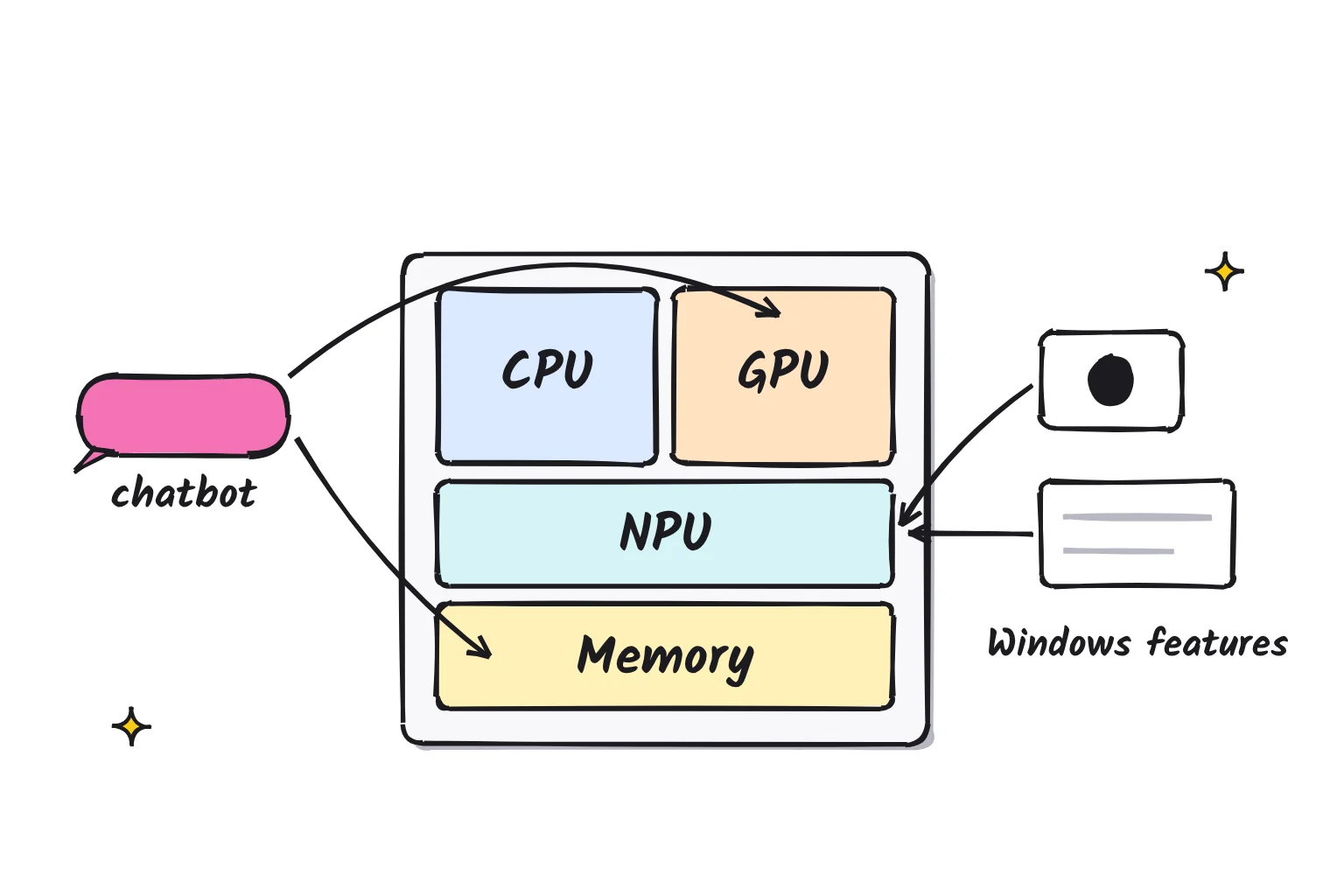
Memory sits under all three. A chatbot model is one large file of learned numbers, called weights, and the whole file has to fit in fast memory while it runs. On a PC with a graphics card, that means VRAM, the card's own memory. On an Apple Silicon Mac it means unified memory, a single large pool the whole chip can reach. Laptops without a graphics card share ordinary RAM with their built-in graphics.
| Part | What it is good for in local AI | What to look for |
|---|---|---|
| CPU | Runs any model as a fallback; fine for small models, slow for larger ones | Any recent chip; it is rarely the first limit |
| GPU | Where most local chat apps run models fastest | 8GB or more of VRAM, or a Mac's unified memory |
| NPU | Low-power background AI: captions, camera effects, Recall, built-in Windows models | 40+ TOPS for Copilot+ features |
| Memory | Decides which model fits, and its speed sets how fast replies appear | 16GB minimum, 32GB if the budget allows |
For the $1,000 shopper, that means the NPU runs Windows features, and the GPU and memory run the assistant.
What TOPS means, and why it does not predict chatbot speed
TOPS stands for trillions of operations per second, a count of simple math steps, and it is a peak rating. Intel's spec pages list NPU Peak TOPS (Int8), meaning 8-bit whole-number math, and AMD's footnote says its figure is the maximum "in an optimal scenario and may not be typical".
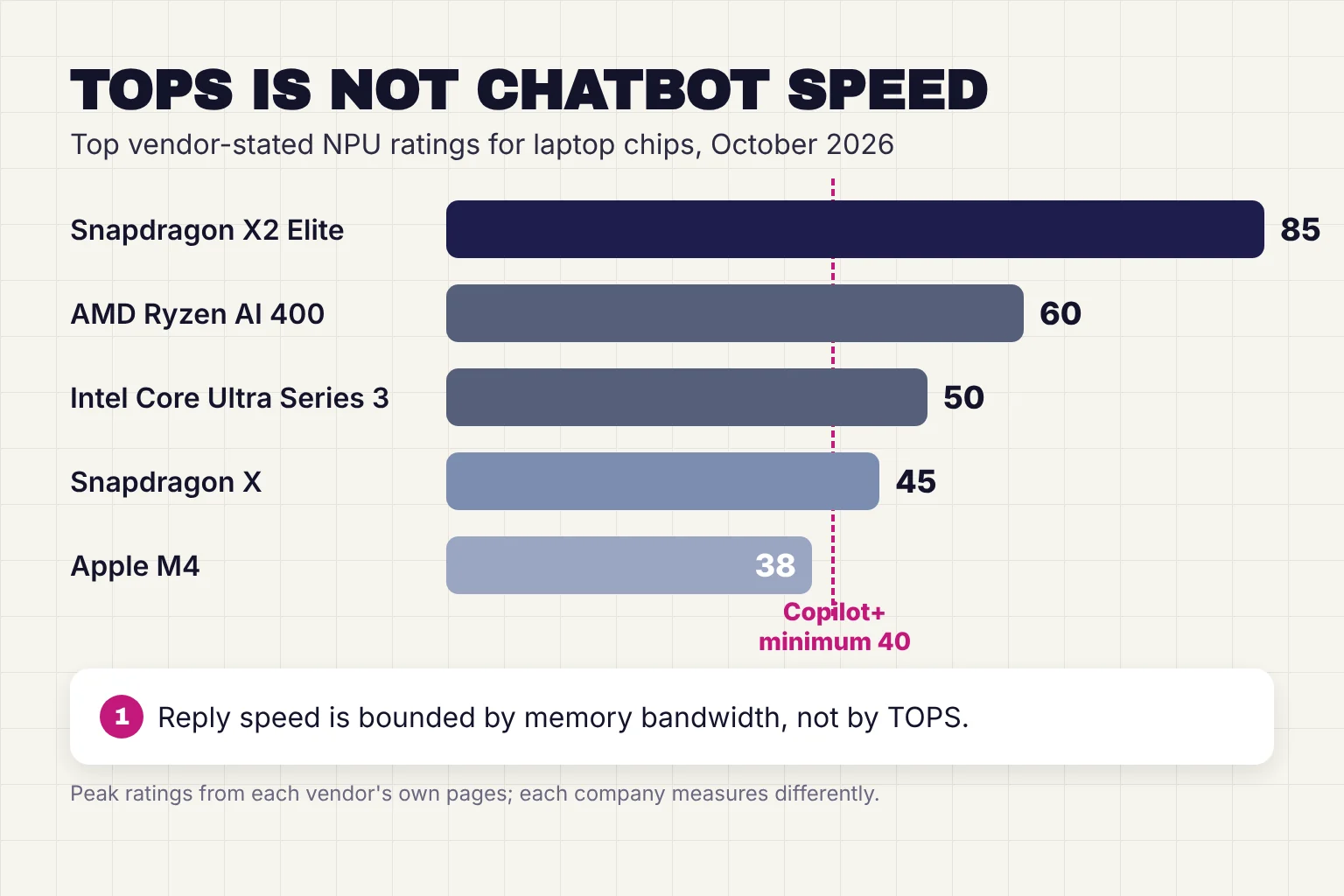
Chatbot speed depends mostly on memory. Apple's machine learning team explains that producing the first token of a reply is compute-bound, but "generating subsequent tokens is bounded by memory bandwidth, rather than by compute ability". A token is a word or part of a word, and bandwidth is how fast memory can feed the chip. In Apple's tests, M5 generated text 19 to 27 percent faster than M4, which Apple credits to its 28 percent higher memory bandwidth.
NVIDIA rates its GeForce RTX 5060 Laptop GPU at 572 AI TOPS, several times the rating of any laptop NPU, and each company measures in its own way. Read the TOPS sticker as a yes or no for Windows features, not as a speed rating. For real tokens-per-second figures, see our local vs cloud AI comparison.
What makes a Copilot+ PC, and which chips qualify in 2026
Microsoft sets three minimums for a Copilot+ PC: a processor with an NPU capable of 40+ TOPS, 16GB of DDR5 or LPDDR5 memory, and 256GB of SSD or UFS storage. Its list of qualifying families currently reads AMD Ryzen AI 300 and 400 series, Intel Core Ultra 200V and 300V series (Intel sells the newer chips as Core Ultra Series 3, with no V in the model number), and Snapdragon X series.
NPU ratings below come from each vendor's own pages; the last column is my reading for a local chatbot.
| Chip family | NPU TOPS (vendor-stated) | Copilot+ class | What it means for local chatbots |
|---|---|---|---|
| Qualcomm Snapdragon X, X Plus, X Elite (first generation) | 45 | Yes | Windows on Arm, so check that your chat app supports it |
| Qualcomm Snapdragon X2 Plus, X2 Elite | 80 to 85 | Yes | Highest NPU ratings; top X2 Elite models list up to 228 GB/s of memory bandwidth |
| Intel Core Ultra 200V (Lunar Lake) | 40 to 48 | Yes | Memory is fixed at purchase, 32GB at most |
| Intel Core Ultra Series 3 (Panther Lake) | 46 to 50 | Yes | Built-in graphics share system RAM, so memory size decides model size |
| AMD Ryzen AI 300 and 400 | 50 to 60 | Yes | Built-in Radeon graphics share system RAM; 32GB helps |
| AMD Ryzen AI Max+ and Max 400 | 50 to 55 | Yes | Up to 128GB of unified memory, or 192GB on the newer Max 400 chips, for much larger models |
| Intel Core Ultra 200H and 200U, Intel Core Series 3, AMD Ryzen 200 | 13, 17 and 16 on the chips checked | No | Below the Copilot+ bar; chatbots run as on any laptop |
| Apple M4 and M5 (Mac) | 38 on M4; no figure for M5 | Not applicable | Unified memory makes Macs strong local chat machines |
Apple gives no TOPS figure for M5, only that it has a faster Neural Engine and a Neural Accelerator in each GPU core. Google's new Googlebooks advertise NPUs capable of over 45 TOPS but run Googlebook OS, so check app support.
What the NPU actually does in Windows, and what Recall saves
Microsoft's developer docs say that on a Copilot+ PC, supported APIs always run on the NPU. The features you will notice:
- Live Captions translates audio from over 40 languages into English and 27 into Chinese (Simplified), and Microsoft says it processes audio on your device.
- Windows Studio Effects adds automatic framing, eye contact correction, background blur and voice focus to video calls.
- Click to Do's Summarize and Rewrite actions use Phi Silica, a small language model that runs locally on the NPU. Its web search actions send your selection to Bing.
- Recall, still labeled a preview, keeps a searchable timeline of your screen.
Some AI features still go online. Microsoft says its Copilot assistant uses cloud-based AI and requires an internet connection, and Cocreator in Paint needs a Microsoft account and a connection too. One change is due: Microsoft says Phi Silica is being replaced by Aion Instruct, a new on-device model that starts rolling out to Insiders in November 2026 and to retail PCs in January 2027, when Phi Silica is removed.
Recall and your privacy
Recall is opt-in. If you turn it on, a snapshot of your active screen is saved every few seconds and when the content of the active window changes, so you can search it later. Microsoft says the snapshots are encrypted on your local drive and not shared with Microsoft or third parties. Recall needs BitLocker or Device Encryption, a biometric Windows Hello sign-in, and 50GB of free space. Its encryption keys are tied to your Windows Hello identity and used inside a secure area called a VBS Enclave, so other users cannot read your snapshots.
A sensitive information filter is on by default and aims to keep passwords, ID numbers and card numbers out. Private browsing is skipped in supported browsers, but parts of filtered websites can still appear through embedded content, browser history or open background tabs. Other people's messages on your screen are captured too, which is why Signal turns on screen security by default on Windows 11 to keep chats out of Recall.
For the $1,000 shopper handling client documents, I would leave Recall off until you decide you want it. Our private AI options ranked guide covers what stays private with other tools. To check or change Recall:
- Open Settings > Privacy & security > Recall & snapshots and turn saving snapshots off. Windows asks you to confirm with Windows Hello.
- On the same page, delete any snapshots already saved.
- To remove the feature, search the Start menu for Turn Windows features on or off and clear the Recall box, which Microsoft lists as a way to remove Recall.
Do Ollama and LM Studio use the NPU? Mostly not yet
The popular local chat apps run models on the GPU or CPU. Ollama's hardware page lists NVIDIA and AMD graphics, Apple's Metal and Vulkan, with no NPU, and a request for Intel NPU support has been open since March 2024. LM Studio supports Windows on Snapdragon X Elite, but a request for NPU support has been open since May 2024. Even AMD's own guide to running gpt-oss on Ryzen AI chips uses LM Studio and has you move the GPU Offload slider to the maximum. Our guide to running ChatGPT locally follows that GPU route step by step.
NPU routes do exist, mostly for tinkerers:
| App | Where chat runs | NPU support, October 2026 |
|---|---|---|
| Ollama | NVIDIA, AMD, Apple and Vulkan GPUs, or CPU | None; request open |
| LM Studio | GPU or CPU | None; request open |
| llama.cpp | CPU and many GPU backends | Experimental Hexagon backend for Snapdragon; OpenVINO backend in progress for Intel |
| Foundry Local (Microsoft) | Picks a CPU, GPU or NPU version of each model | Yes, through Qualcomm, Intel and AMD plug-ins |
| Lemonade (AMD) | GPU or CPU through llama.cpp | Yes, on Ryzen AI XDNA2 NPUs |
| OpenVINO GenAI (Intel) | Intel CPU, GPU or NPU | Yes, with models exported for the NPU |
On Windows, llama.cpp's Snapdragon path needs HTP libraries signed with a trusted certificate, which means building it yourself. OpenVINO's NPU route needs specially exported models, and its docs warn that more than 16GB of RAM may be required for prompts over 1,024 tokens with models larger than 7B on Core Ultra Series 2. Foundry Local offers a curated catalog of models, so you pick from what Microsoft has prepared.
Try a chatbot on the NPU with Foundry Local
If you already own a Copilot+ PC and want to see the NPU at work, Foundry Local is the shortest route. Its command-line tool is in preview, so expect changes. In PowerShell:
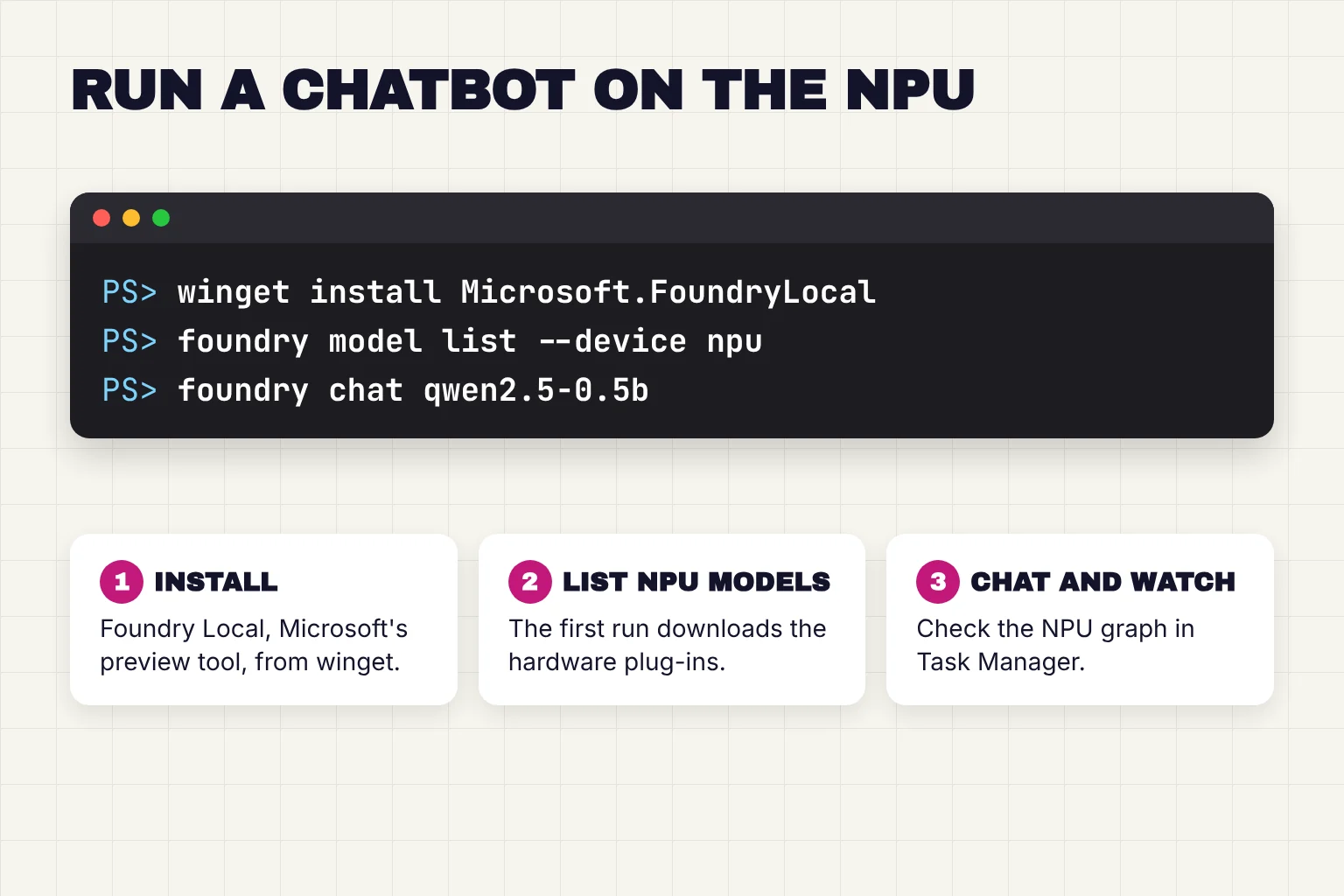
- Install it with
winget install Microsoft.FoundryLocal, then check it withfoundry --version. - Run
foundry model list --device nputo see models with an NPU version. The first run downloads the execution providers, the hardware plug-ins, for your machine. - Start a chat with an alias from that list, such as the docs' example
foundry chat qwen2.5-0.5b. With an alias, Foundry Local picks the best version for your hardware, including the NPU one when your NPU is supported. - Open Task Manager. On some newer devices the Processes tab can show NPU use per app: right-click the column area and add the NPU column. The Performance tab shows overall NPU use.
winget install Microsoft.FoundryLocal
foundry model list --device npu
foundry chat qwen2.5-0.5b
If something goes wrong
A "Request to local service failed" error: run foundry server restart, the fix the docs give for a port binding problem.
No NPU models, or a flat NPU graph: on Intel, install the Intel NPU driver, which the docs list as a prerequisite. The AMD plug-in names specific Adrenalin and NPU driver versions, and the Qualcomm plug-in is documented for Snapdragon X Elite and X Plus.
Replies feel limited: switch to Ollama or LM Studio on the GPU for a far wider choice of models.
More on what Foundry Local is, and who it suits: Foundry Local on an AI PC.
What to buy for local AI: memory first, then GPU, then NPU
For a private assistant, spend in this order:
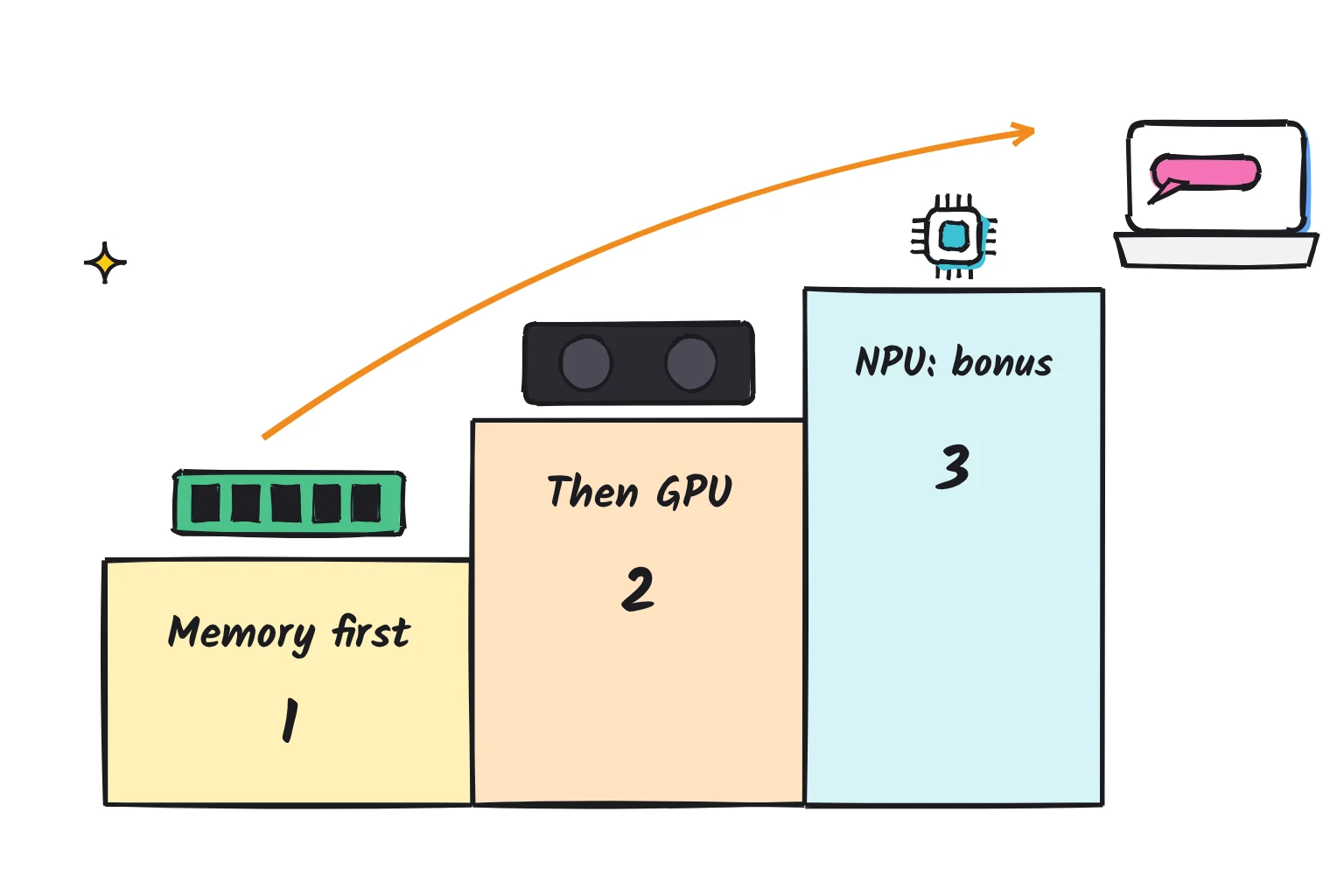
- Memory first. 16GB is the floor, and LM Studio recommends at least 16GB on Windows. Model sizes give the scale: Ollama lists Gemma 4 E4B at 6.6 to 9.5GB, the 12B at 7.7 to 8.0GB and the 26B at 16 to 19GB. 32GB opens the larger models. Check whether memory can be upgraded later: Intel's Core Ultra 200V uses memory on the chip package, with no external memory interface.
- Then the GPU or unified memory. A laptop GPU with its own VRAM, such as an RTX 5050 or 5060 Laptop GPU with 8GB of GDDR7, runs any model that fits in that 8GB from its own fast memory. On a Mac, unified memory does the same job. AMD's Ryzen AI Max+ 395 goes further, with up to 96GB of its 128GB convertible to graphics memory.
- Then the NPU. A 40+ TOPS NPU earns you the Copilot+ features and low-power background AI. Treat it as a bonus.
- Storage of 512GB or more, since Ollama warns that models can be tens to hundreds of GB.
- App support. Snapdragon laptops run Windows on Arm, so confirm that your chat app lists it.
Memory got expensive in 2026, which squeezes a $1,000 budget. TrendForce reports that conventional DRAM contract prices rose about 93 to 98 percent in the first quarter, and it projects a further 10 to 15 percent for the fourth. Apple raised MacBook prices in June, citing memory costs: the 13-inch MacBook Air with M5 launched at $1,099 and, as of October 2026, starts at $1,299 in the US and £1,299 in the UK, with 16GB of unified memory. The MacBook Neo is cheaper but has 8GB, and LM Studio says 8GB Macs should stick to smaller models and modest context sizes.
If a desktop is an option, our guide to building a local AI server at home shows what a dedicated box costs to run. UK readers buying this month can see which Mac mini Black Friday deals and 128GB AI mini PC offers are worth it for local AI, and which 16GB bargains to skip.
Common questions about AI PCs
Is an AI PC worth it?
It is worth it for the Windows features, such as live caption translation, camera effects and Recall, plus longer battery life during AI tasks. It is not worth paying extra for local chatbots, because popular apps like Ollama and LM Studio run models on the graphics chip and memory, not the NPU. Prioritize RAM first.
Do I need an NPU to use ChatGPT?
No. ChatGPT runs on OpenAI's servers, so any laptop with a web browser can use it, and the NPU plays no part. OpenAI's Mac app even supports Intel Macs. An NPU only matters for AI that runs on the computer itself, such as Windows Copilot+ features or a local model running in Foundry Local.
Can my old laptop run local AI?
Usually, yes, with small models. Ollama runs on Windows 10 22H2 or newer and can run models on the processor alone, slowly. With 8GB of RAM, choose a small model such as Gemma 4 E2B, whose smallest download is 4.6GB, and expect slow replies. With 16GB, mid-size models become practical.
Is a Mac or an AI PC better for local AI?
For local chatbots at the same memory size, an Apple Silicon Mac is usually the easier pick, because its unified memory gives the graphics chip the same pool as everything else, and Ollama and LM Studio both support it. Windows AI PCs win on Copilot+ features and price range. Either way, buy at least 16GB.
What does an NPU do in a laptop?
An NPU, or neural processing unit, is a chip built to run AI math at low power. In Windows it handles features such as live caption translation, camera background blur and eye contact, Recall and Click to Do text tools. Most local chatbot apps do not use it yet; they rely on the graphics chip.
My verdict for the $1,000 laptop shopper
The AI PC sticker tells you a laptop can run Windows' built-in AI features, not how well it will run a private assistant. For the $1,000 shopper, I would treat the NPU as a bonus and make the decision on memory: 32GB if the budget stretches, 16GB as the minimum, and a GPU with 8GB of VRAM if one fits the price, before paying extra for a higher TOPS rating. A Mac with 16GB is a fair alternative, though the MacBook Air now starts above this budget.
Your next step: open the spec sheet of the laptop you are considering, find the memory figure and whether it can be upgraded, and keep looking if it says 8GB.
Sources
- What Is an AI PC? - Intel
- Windows 11 Specs and System Requirements - Microsoft
- AMD Ryzen Processors for Laptops - AMD
- The Copilot+ PC brand is dead: Microsoft and PC makers quietly pull back on tarnished Windows 11 AI PC branding - Windows Central
- Building Windows for hybrid intelligence - Windows Experience Blog
- Apple unleashes M5, the next big leap in AI performance for Apple silicon - Apple Newsroom
- Intel Core Ultra 7 Processor 258V Specifications - Intel
- AMD Ryzen AI Halo for AI Developers - AMD
- Exploring LLMs with MLX and the Neural Accelerators in the M5 GPU - Apple Machine Learning Research
- Compare GeForce RTX Laptops - NVIDIA
- Snapdragon X Elite - Qualcomm
- Intel Core Ultra 5 Processor 226V Specifications - Intel
- Intel Core Ultra 9 Processor 288V Specifications - Intel
- Intel Core Ultra 5 Processor 322 Specifications - Intel
- CES 2026: Intel Core Ultra Series 3 Debut as First Built on Intel 18A - Intel Newsroom
- Intel Core Ultra Series 3 Processors - Intel
- AMD Ryzen AI 9 HX 370 - AMD
- AMD Expands AI Leadership Across Client, Graphics, and Software with New Ryzen, Ryzen AI, and AMD ROCm Announcements at CES 2026 - AMD
- AMD Ryzen AI Max+ 395 - AMD
- How AMD Ryzen AI Max PRO 400 Series Processors Bring Local Agentic AI to Business Customers - AMD
- Intel Core Ultra 9 Processor 285H Specifications - Intel
- Intel Core 7 Processor 350 Specifications - Intel
- AMD Ryzen 7 260 - AMD
- Apple introduces M4 chip - Apple Newsroom
- Googlebook: The laptop your Android phone has been waiting for - Google
- What are Windows AI APIs? - Microsoft Learn
- Use live captions to better understand audio - Microsoft Support
- 2026 AI PC and Laptop Buying Guide - Microsoft Store
- Windows Studio Effects - Microsoft Support
- Click to Do: do more with what's on your screen - Microsoft Support
- Retrace your steps with Recall - Microsoft Support
- Manage Recall for Windows clients - Microsoft Learn
- Privacy and control over your Recall experience - Microsoft Support
- By Default, Signal Doesn't Recall - Signal
- Hardware support - Ollama
- Does ollama support accelerated running on Intel npu? (issue 3004) - GitHub
- FAQ - Ollama
- System Requirements - LM Studio
- Is there a plan to support NPU? (issue 30) - GitHub
- How To Run OpenAI's GPT-OSS 20B and 120B Models on AMD Ryzen AI Processors and Radeon Graphics Cards - AMD
- llama.cpp README - ggml-org/llama.cpp
- Snapdragon-based devices - ggml-org/llama.cpp
- Snapdragon-based Windows devices - ggml-org/llama.cpp
- Foundry Local CLI reference - Microsoft Learn
- What is Foundry Local? - Microsoft Learn
- Lemonade - lemonade-sdk
- OpenVINO GenAI on NPU - Intel OpenVINO
- Task Manager features for visibility into AI workloads - Microsoft Tech Community
- gemma4 - Ollama
- Intel Core Ultra 200V Series Processors datasheet - Intel
- AMD Ryzen AI MAX+ 395 Processor: Breakthrough AI Performance in Thin and Light - AMD
- Windows - Ollama
- Rapid Contract Price Surge Drives 1Q26 DRAM Industry Up 81% QoQ - TrendForce
- AI Server Demand Sustains Memory Contract Price Increases in 4Q26 - TrendForce
- Apple posts worst day in over a year after MacBook and iPad price hikes - CNBC
- Apple introduces the new MacBook Air with M5 - Apple Newsroom
- MacBook Air 13-inch and MacBook Air 15-inch - Apple
- MacBook Air 13-inch and MacBook Air 15-inch (UK) - Apple
- MacBook Air (13-inch, M5) Tech Specs - Apple Support
- MacBook Neo Tech Specs - Apple
- Downloading the ChatGPT macOS app - OpenAI Help Center