What AI can a Raspberry Pi 5 really run?
A Raspberry Pi 5 runs small chat models such as Llama 3.2 3B and Gemma 4 E2B on its own CPU, at about 4 to 9 tokens per second in published tests. For vision, the AI Camera and AI HAT+ handle object detection, and only the AI HAT+ 2 also runs small language models.
This guide follows one reader: a hobbyist with a Raspberry Pi 5 8GB, or about to buy one, who wants a private chat assistant that never touches the cloud, or a camera that spots people and pets at home, and wants to know which add-on is worth buying.
Choose the Pi 5 on its own if:
- You want a private chat assistant. LLMs (large language models, the kind behind chat assistants) run on the CPU and are not supported on the AI HAT+.
- You can live with replies of a few words a second: Llama 3.2 3B generated 4.61 tokens per second on an 8GB board.
Choose the AI Camera if:
- You want object detection or pose estimation from one camera; its sensor runs the network and sends the results to the Pi.
- You want the cheapest vision add-on: it lists at $70 and works with all Raspberry Pi models.
Choose the AI HAT+ if:
- You want vision with a camera of your choice, such as Camera Module 3 from $25, or several vision models at once.
Choose the AI HAT+ 2 if:
- You need vision and a small language model on one board, with 8GB of its own memory, at $200.
- You accept young software: Tom's Hardware's January 2026 review suggested waiting for it to mature.
Which Raspberry Pi AI accessory does what in October 2026?
All four accessories run neural networks so the Pi's CPU does not have to. The boards carry a Hailo NPU (neural processing unit, a chip built for AI math), and the camera has an accelerator in its sensor. Ratings are in TOPS, trillions of operations per second, a peak figure that, as our guide to AI PCs and NPUs explains, does not predict chat speed. INT8 and INT4 (8-bit or 4-bit whole numbers) ratings are not like for like.
| Accessory | Chip and rating | Memory | Speeds up | Chat models? | Official US price |
|---|---|---|---|---|---|
| AI Kit | Hailo-8L, 13 TOPS (INT8) | Uses the Pi's | Vision | No | $70 at launch; no longer in production |
| AI HAT+ (13 TOPS) | Hailo-8L, 13 TOPS (INT8) | Uses the Pi's | Vision | No | From $70 |
| AI HAT+ (26 TOPS) | Hailo-8, 26 TOPS (INT8) | Uses the Pi's | Vision, parallel models | No | $110 at launch |
| AI HAT+ 2 | Hailo-10H, 40 TOPS (INT4); 20 TOPS (INT8) per Hailo | 8GB on board | Vision, LLMs and VLMs up to about 6B parameters by Raspberry Pi's figure | Yes, small ones | $200 |
| AI Camera | Sony IMX500 sensor with accelerator | 16MB flash caches models | Vision | No | $70 |

Is the Raspberry Pi AI Kit still worth buying?
Only if it is cheap secondhand. The AI Kit, a Hailo-8L module on an M.2 HAT+ board, launched at $70 on June 4, 2024 and is now out of production. The 13 TOPS AI HAT+ has the same specs and replaces it.
What does the AI HAT+ do, and does it help chat?
The AI HAT+ comes in 13 TOPS (Hailo-8L) and 26 TOPS (Hailo-8) versions, launched at $70 and $110 in October 2024. It plugs into the Pi 5's PCIe connector, a fast data link, and runs object detection, image segmentation and pose estimation through the camera software. It borrows the Pi's memory, and Raspberry Pi marks LLMs and VLMs as not supported, so it does nothing for Ollama or any chat model. Our AI HAT+ buying guide compares the 13 and 26 TOPS boards.
What does the AI HAT+ 2 add, and is it faster for chat?
The AI HAT+ 2, launched on January 15, 2026, pairs a Hailo-10H with 8GB of dedicated on-board RAM. Raspberry Pi says that lets it run LLMs and VLMs up to about 6 billion parameters; a VLM, or vision-language model, describes images in words. Raspberry Pi calls its vision performance broadly equivalent to the 26 TOPS AI HAT+.
Hailo's ready-made models are far smaller than 6 billion parameters. Raspberry Pi's launch post listed five LLMs of 1 to 1.5 billion parameters, and the 5.1.1 release Raspberry Pi installs tops out at Llama 3.2 3B. Hailo's current Hailo-10H model list adds Qwen3-1.7B, Qwen3-VL-2B and three Whisper speech models, but nothing above 2 billion parameters, and the two Qwen3 models need a newer Hailo runtime than Raspberry Pi ships.
Chat speed is disputed. Jeff Geerling, testing on an 8GB Pi 5, wrote that "the Pi's built-in CPU trounces the Hailo 10H": the CPU was faster on all five models he ran, such as 12.47 against 8.25 tokens per second on Qwen2 1.5B, and the Hailo chip is limited to 3W against the Pi chip's 10W. Tom's Hardware timed two qwen2:1.5b answers and found the HAT quicker both times, 13.58 seconds against 22.93 seconds on the CPU for a general-knowledge question, though every answer was wrong. Both tests date from the January launch. The HAT does free the CPU, and its models run through hailo-ollama, Hailo's Ollama-compatible server on port 8000, not Ollama itself. Our AI HAT+ 2 deep dive covers its models, setup and limits.
How fast does a Raspberry Pi 5 run a chat model?
Speed is measured in tokens per second; a token is a word or part of one. The work falls on the Pi 5's 2.4GHz quad-core Arm Cortex-A76 CPU, and published figures are few. In Jeff Geerling's open benchmark table, whose Pi 5 CPU runs were added between November 2024 and January 2025, Llama 3.2 3B generated 4.61 tokens per second on an 8GB Pi 5 and 4.88 on a 16GB one, and DeepSeek R1 14B managed 1.20 on the 16GB board.
In August 2026, Raspberry Pi and Google measured Gemma 4 E2B on an 8GB Pi 5 at 9 tokens per second with Google's LiteRT-LM runtime, against 4 with llama.cpp, with peak memory use of 1,432MB against 4,406MB. Treat that as the makers' claim: the same post's appendix lists llama.cpp at 7 tokens per second.

At 4.61 tokens per second a 100-token reply takes about 22 seconds. The newest CPU figure I found is from Geerling's January 2026 AI HAT+ 2 review, which ran Llama 3.2 3B at 5.55 tokens per second on an 8GB Pi 5 with Ollama. I found no Pi 5 Ollama figures from Raspberry Pi itself, and none on the October 2026 OS release.
Third-party boards are arriving too. A Raspberry Pi post written with Sixfab and DEEPX reports 4.64 tokens per second on Qwen3-1.7B for Sixfab's 25 TOPS board, built on DEEPX's DX-M1M chip, and 11.60 for DEEPX's DX-M1 chip, which the post does not tie to a Pi board. Both are the makers' own figures.
Which models fit on an 8GB or 16GB Pi 5?
Downloads are quantized: weights are stored as smaller numbers, often 4-bit, to save memory. Ollama's default llama3.2:3b is its 4-bit q4_K_M build, 2.0GB, with the 1B version at 1.3GB. The library also lists gemma3:1b at 806MB and gemma3:4b at 3.4GB, and gemma4:e2b at 4.6GB in the llama.cpp build Ollama prefers on Linux.
On the 8GB board I would stay with 1 to 4 billion parameter models. The 16GB board can load a 14B model, but at 1.20 tokens per second. Our Raspberry Pi LLM guide covers which models fit each board, their speeds and tuning.
How do you run a local chat model on a Raspberry Pi 5?
The quickest route to the private assistant is Ollama, a free, open-source model runner, on the 64-bit Raspberry Pi OS released October 6, 2026, based on Debian 13 Trixie.
- Flash Raspberry Pi OS (64-bit). Write it to the microSD card with Raspberry Pi Imager. The desktop version needs 6,432MB of storage and Lite needs 2,936MB.
- Fit the cooler and the right power supply. Clip on the Active Cooler and use the 27W USB-C supply; a 5V 3A supply limits USB peripherals to 600mA.
- Update the system with
sudo apt updateandsudo apt full-upgrade -y, as Raspberry Pi's AI software guide does. - Install Ollama. Run the one-line Linux install command; the install script picks Ollama's arm64 build for the Pi's 64-bit Arm chip and creates a systemd background service. Our Ollama install guide covers first errors.
- Chat with a model. Run
ollama run llama3.2:3band ask a question. In a second terminal,ollama psshould show 100% CPU in the Processor column.
sudo apt update
sudo apt full-upgrade -y
curl -fsSL https://ollama.com/install.sh | sh
ollama run llama3.2:3b
ollama ps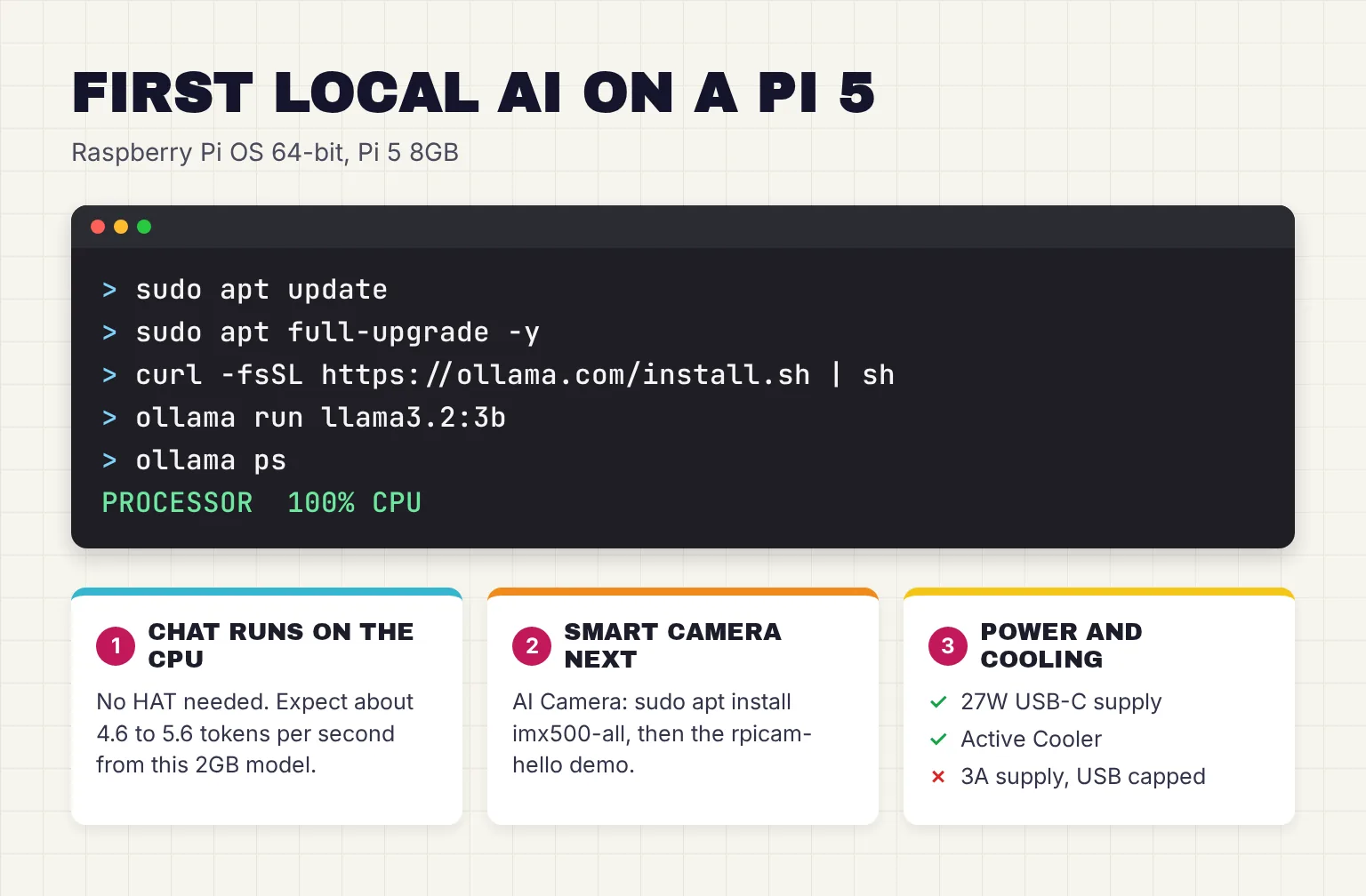
Ollama listens only on the Pi by default, at 127.0.0.1 port 11434; set OLLAMA_HOST to reach it from a browser chat app such as Open WebUI on another machine. Prefer llama.cpp? Its build guide compiles it with cmake -B build and cmake --build build --config Release.
How do you start a smart camera project with the AI Camera?
For the reader's second goal, the AI Camera is the shortest path. Its 12.3MP Sony IMX500 sensor runs the network and sends the output tensors to the Raspberry Pi. Raspberry Pi's model zoo for it covers classification, object detection, pose estimation and segmentation.
- Connect the camera to the Pi 5 with its camera connector cable.
- Install the camera's firmware and models with
sudo apt install imx500-all, then reboot. - Run the object detection demo. The first run might take several minutes while the model firmware uploads; after that, boxes appear around recognized objects.
sudo apt update && sudo apt full-upgrade
sudo apt install imx500-all
sudo reboot
rpicam-hello -t 0s --post-process-file /usr/share/rpi-camera-assets/imx500_mobilenet_ssd.json --viewfinder-width 1920 --viewfinder-height 1080 --framerate 30
With an AI HAT+ and a normal camera, the AI software guide installs dkms and hailo-all (hailo-h10-all for the AI HAT+ 2), then runs a YOLOv8 demo with rpicam-hello -t 0 --post-process-file /usr/share/rpi-camera-assets/hailo_yolov8_inference.json. Our Raspberry Pi AI Camera guide goes further, with its bundled models, Python examples and project ideas.
Can a Raspberry Pi 5 be an offline voice assistant?
Yes for simple commands, slowly for open conversation. A voice assistant chains speech-to-text, a language model and text-to-speech, and each step is documented on Pi hardware, though not always on a Pi 5.
For listening, Home Assistant's Speech-to-Phrase, which understands only a fixed set of home-control phrases, takes 150 milliseconds per command on a Raspberry Pi 5. Open-ended transcription with Whisper, OpenAI's speech model, takes around 8 seconds on a Raspberry Pi 4; I found no official Pi 5 figure. whisper.cpp lists Raspberry Pi as a supported platform, and our guide to running Whisper locally compares the runners.
For speaking, Home Assistant says Piper is optimized for the Raspberry Pi 4 and generates 1.6 seconds of voice in a second with medium-quality models; our local text-to-speech guide compares it with Kokoro and others. The slow link is the language model: at 4.61 tokens per second, a 50-token answer takes about 11 seconds. Our offline Raspberry Pi voice assistant guide builds one two ways, with Home Assistant or a Python script.
How much does a Raspberry Pi AI build cost in October 2026?
Memory costs have pushed prices up four times since late 2025. The 8GB Pi 5 launched at $80 in 2023, rose to $95 in December 2025, then went up $30 in February 2026 and $50 in April 2026, to $175. The 16GB board is now $305, and the latest rise, on October 1, 2026, only touched 2GB boards. Raspberry Pi sells through resellers rather than direct, so the store prices below come from PiShop.us, one of Raspberry Pi's official Approved Resellers, checked on October 27 and 28, 2026, before tax and shipping. Raspberry Pi says these resellers abide by its published maximum prices.
| Part | Needed for | PiShop.us (Approved Reseller), October 27 and 28, 2026 | Official price |
|---|---|---|---|
| Raspberry Pi 5 8GB | Every build | $175.00 | $175 after the April 2026 rise |
| Raspberry Pi 5 16GB | Larger chat models | $305.00 | $305 |
| Raspberry Pi 5 4GB | Camera-only builds | $110.00 | $110 after the April 2026 rise |
| 27W USB-C Power Supply | Every build | $12.95 | $12 at launch |
| Active Cooler | Every build | $10.95 | $5 at launch |
| Official 64GB microSD card with Raspberry Pi OS | Every build | $20.95 | Not listed |
| AI Camera | Smart camera | $74.95 | $70 |
| AI HAT+ 13 TOPS | Vision with any camera | $76.95 | From $70 |
| AI HAT+ 26 TOPS | Heavier vision | $119.95 | $110 at launch |
| AI HAT+ 2 | Vision plus small LLMs | $200.00 | $200 |
| M.2 HAT+ | An NVMe drive | $12.00 | From $12 |
| SSD Kit 256GB | NVMe storage | $99.00 (out of stock) | Not listed |

Totals at those PiShop.us prices: the 8GB chat build (board, 27W supply, Active Cooler, 64GB card) is $219.85, or $294.80 with the AI Camera. The 16GB chat build is $349.85, and the 8GB board with the AI HAT+ 2 is $419.85 before a camera. The AI HAT+ 2 launched at $130 on January 15, 2026, went up $50 on April 1, 2026, and is $200 on its product page and in its July 2026 product brief; I found no announcement for the last $20.
The 64GB card is enough, since Raspberry Pi recommends at least 32GB for the desktop OS. The Pi 5 has one PCIe 2.0 x1 interface, used by an NVMe drive on the M.2 HAT+ and by every AI HAT, and Raspberry Pi's AI guide does not cover using both at once.
Raspberry Pi 5 vs an N100 mini PC vs a used laptop for local AI
If chat is the main job, compare first. An N100 or N150 mini PC is a small desktop on a low-power Intel chip. I could not verify a current official price for a mini PC or a used laptop, so the table leaves prices out.
| October 2026 | Raspberry Pi 5 8GB | Intel N100 or N150 mini PC | Laptop, used or new |
|---|---|---|---|
| Processor | 4 Arm Cortex-A76 cores at 2.4GHz | 4 cores, up to 3.4GHz (N100) or 3.6GHz (N150), 6W | Varies by model |
| Memory | 8GB LPDDR4X (16GB version available) | Up to 16GB, one memory channel | Varies by model |
| Llama 3.2 3B, published speed | 4.61 tokens/s | 9.06 tokens/s (N150, 16GB) | 13.10-23.88 tokens/s on three laptops; no used-laptop result |
| Peak power in that test | 13.9W | 26.4W | 14W-51.1W |
| Raspberry Pi AI accessories | AI Camera, AI HAT+, AI HAT+ 2 | Not designed for it | Not designed for it |
Speed and power figures come from Geerling's benchmark table. The N150 mini PC was nearly twice as fast as the Pi 5 at nearly twice the peak power, and a Dell XPS 13 using its built-in graphics was about five times faster at a similar 14W. The Pi wins on size, camera connectors and AI add-ons; a mini PC or laptop wins on chat speed. Our home AI server guide covers bigger builds.
How much power does a Raspberry Pi 5 use for AI, and what are the limits?
Raspberry Pi specifies 5V/5A DC power via USB-C and recommends its 27W supply, whose 5.1V, 5A output is 25.5W; with it, the board raises the USB current limit to 1.6A. That is a ceiling: in Geerling's table the 8GB Pi 5 peaked at 13.9W and the 16GB board at 11.9W while generating text.
Running costs are small. Drawing its 13.9W peak around the clock, a Pi 5 would use about 122kWh a year, roughly $22 at the August 2026 US residential average of 18.16 cents per kWh; the N150 mini PC's 26.4W peak works out to about $42. The Arm cores are progressively throttled between 80°C and 85°C, and Raspberry Pi recommends the Active Cooler under an AI HAT.
The honest limits for the reader in this guide:
- Small models know less: Raspberry Pi says they are not designed to match the knowledge set of large cloud models.
- Ollama keeps a 4,096-token context window by default, the text the model holds in view, so long documents get cut.
- One PCIe connector means one AI HAT, and at launch Geerling hit errors running two models at once on the AI HAT+ 2.
- 16GB lets a 14B model load, not run quickly: 1.20 tokens per second.
Common questions about Raspberry Pi AI
Can a Raspberry Pi 5 run an LLM?
Yes, on its CPU. Published tests show Llama 3.2 3B at about 4.6 to 5.6 tokens per second on the 8GB board, and Raspberry Pi and Google measured Gemma 4 E2B at 9 tokens per second with LiteRT-LM. Models of about 1 to 4 billion parameters suit it best; a 14B model managed only 1.20 tokens per second.
Does the Raspberry Pi AI HAT+ speed up chat models?
No. The AI HAT+, in its 13 and 26 TOPS versions, and the older AI Kit accelerate vision models such as object detection and pose estimation. Raspberry Pi's documentation lists large language models and vision-language models as not supported on the AI HAT+, so chat models still run on the Pi 5 CPU.
Is the AI HAT+ 2 worth it for a chat assistant?
Not for most people. It costs $200, and Raspberry Pi says its own 8GB fits language models of up to about 6 billion parameters, but Jeff Geerling found the Pi 5 CPU faster on every model he tested, while Tom's Hardware timed quicker replies on the HAT with one model. It makes most sense for vision plus a small model.
What is the difference between the Raspberry Pi AI Kit and the AI HAT+?
The AI Kit was a Hailo-8L module on an M.2 HAT+ board, rated at 13 TOPS (INT8) and launched at $70 in June 2024; it is no longer in production. The 13 TOPS AI HAT+ puts the same chip on a single board, and a 26 TOPS version uses the more powerful Hailo-8.
Should I buy the 8GB or 16GB Raspberry Pi 5 for AI?
For most home projects the 8GB board, $175 in October 2026, is enough: it runs 3B chat models and works with every AI accessory. The 16GB board, at $305, can load larger models, but a published test shows a 14B model at 1.20 tokens per second, so the extra $130 mostly buys room, not speed.
Do I need an AI HAT for object detection on a Raspberry Pi?
No. The $70 AI Camera runs detection models on its Sony IMX500 sensor and sends the results to the Pi, and it works with all Raspberry Pi models. An AI HAT+ makes sense on a Pi 5 when you want a different camera, bigger vision models or several networks running at once.
My verdict for a Pi 5 owner: use the CPU for chat, add the AI Camera for vision
For the reader in this guide, the 8GB Pi 5 with the 27W supply, Active Cooler and a 64GB card, $219.85 in October 2026, is the whole private chat assistant: Ollama and a 3B model, no accelerator. For a smart camera, add the AI Camera ($70 list, $74.95 at PiShop.us), the cheapest and simplest vision add-on. I would not buy any accelerator to speed up chat, and would only pick the AI HAT+ 2 if you need vision and a small language model on one board while the CPU does other work. If chat speed matters more than size, an N150 mini PC ran the same 3B model at nearly twice the Pi's speed in Geerling's table.
Your next step: flash Raspberry Pi OS (64-bit), install Ollama, run ollama run llama3.2:3b, and ask it something you can check, so you know how about 5 tokens per second feels before you buy anything else.
Sources
- ai-benchmarks - Jeff Geerling, GitHub
- Mastering edge AI on Raspberry Pi with LiteRT and Gemma - Raspberry Pi
- Raspberry Pi AI Camera - Raspberry Pi
- AI HATs documentation - Raspberry Pi
- AI Camera documentation - Raspberry Pi
- Raspberry Pi AI Camera on sale now at $70 - Raspberry Pi
- Introducing the Raspberry Pi AI HAT+ with up to 26 TOPS - Raspberry Pi
- Raspberry Pi AI HAT+ 2 - Raspberry Pi
- Raspberry Pi AI HAT+ 2 Review: The brains and the brawn - Tom's Hardware
- Raspberry Pi AI Kit - Raspberry Pi
- Raspberry Pi AI HAT+ - Raspberry Pi
- Raspberry Pi AI Kit available now at $70 - Raspberry Pi
- AI software documentation - Raspberry Pi
- Introducing the Raspberry Pi AI HAT+ 2: Generative AI on Raspberry Pi 5 - Raspberry Pi
- Model Explorer: generative AI - Hailo
- Hailo-10H AI Accelerator - Hailo
- hailo_model_zoo_genai - Hailo, GitHub
- Model Zoo GenAI models, 5.1.1 - hailo-ai, GitHub
- Model Zoo GenAI models, 5.4.0 - hailo-ai, GitHub
- Raspberry Pi's new AI HAT adds 8GB of RAM for local LLMs - Jeff Geerling
- Seeing, understanding, and responding: low-power CNN, VLM and SLM workloads on Raspberry Pi 5 - Raspberry Pi
- Raspberry Pi 5 - Raspberry Pi
- llama3.2 tags - Ollama
- gemma3 tags - Ollama
- gemma4 tags - Ollama
- manifest/manifest.go (runner preference) - Ollama, GitHub
- Raspberry Pi OS - Raspberry Pi
- Raspberry Pi software and Imager - Raspberry Pi
- Getting started with your Raspberry Pi - Raspberry Pi
- Linux - Ollama
- install.sh - Ollama
- FAQ - Ollama
- Build llama.cpp locally - ggml-org, GitHub
- imx500-models - Raspberry Pi, GitHub
- Speech-to-Phrase brings voice home - Voice chapter 9 - Home Assistant
- Set up a fully local voice assistant - Home Assistant
- whisper.cpp - ggml-org, GitHub
- Introducing: Raspberry Pi 5! - Raspberry Pi
- 1GB Raspberry Pi 5 now available at $45, and memory-driven price rises - Raspberry Pi
- More memory-driven price rises - Raspberry Pi
- A new 3GB Raspberry Pi 4 for $83.75, and more memory-driven price increases - Raspberry Pi
- Price increases for 2GB Raspberry Pi 4 and Raspberry Pi 5 - Raspberry Pi
- Approved Resellers - Raspberry Pi
- Raspberry Pi 5 boards - PiShop.us
- Raspberry Pi 27W USB-C Power Supply White US - PiShop.us
- Raspberry Pi Active Cooler - PiShop.us
- Official Raspberry Pi microSD Card with Raspberry Pi OS 64-bit - 64GB - PiShop.us
- Raspberry Pi AI Camera - PiShop.us
- Raspberry Pi AI HAT+ 13 TOPS - PiShop.us
- Raspberry Pi AI HAT+ 26 TOPS - PiShop.us
- Raspberry Pi AI HAT+ 2 - PiShop.us
- Raspberry Pi Camera Module 3 - Raspberry Pi
- Raspberry Pi M.2 HAT for Pi 5 - PiShop.us
- Raspberry Pi M.2 HAT+ - Raspberry Pi
- Raspberry Pi M.2 HAT+ SSD Kit for Raspberry Pi 5 - 256GB - PiShop.us
- Raspberry Pi AI HAT+ 2 product brief - Raspberry Pi
- Intel Processor N100 specifications - Intel
- Intel Processor N150 specifications - Intel
- Raspberry Pi 27W USB-C Power Supply - Raspberry Pi
- Electric Power Monthly, Table 5.3: Average price of electricity to ultimate customers - U.S. Energy Information Administration
- Raspberry Pi hardware documentation - Raspberry Pi