What is the best local TTS model in 2026?
For an ordinary laptop in October 2026, the best local TTS model to start with is Pocket TTS from Kyutai. It is designed to run efficiently on CPUs, takes two short commands to set up, and can read in your own voice. Kokoro-82M is my pick for polished stock voices, and Piper suits a Raspberry Pi.
This guide follows one reader: a blogger with a few years of posts and a 30,000-word short book, on a 16GB laptop with no dedicated graphics card. She wants audio versions, ideally in her own voice, without a monthly fee or sending drafts to the cloud. Every pick below is judged against that laptop.
Local text to speech means the voice is generated on your own computer: you download a model once, and after that it turns text into audio without an internet connection.
A TTS model is not the same as a TTS app
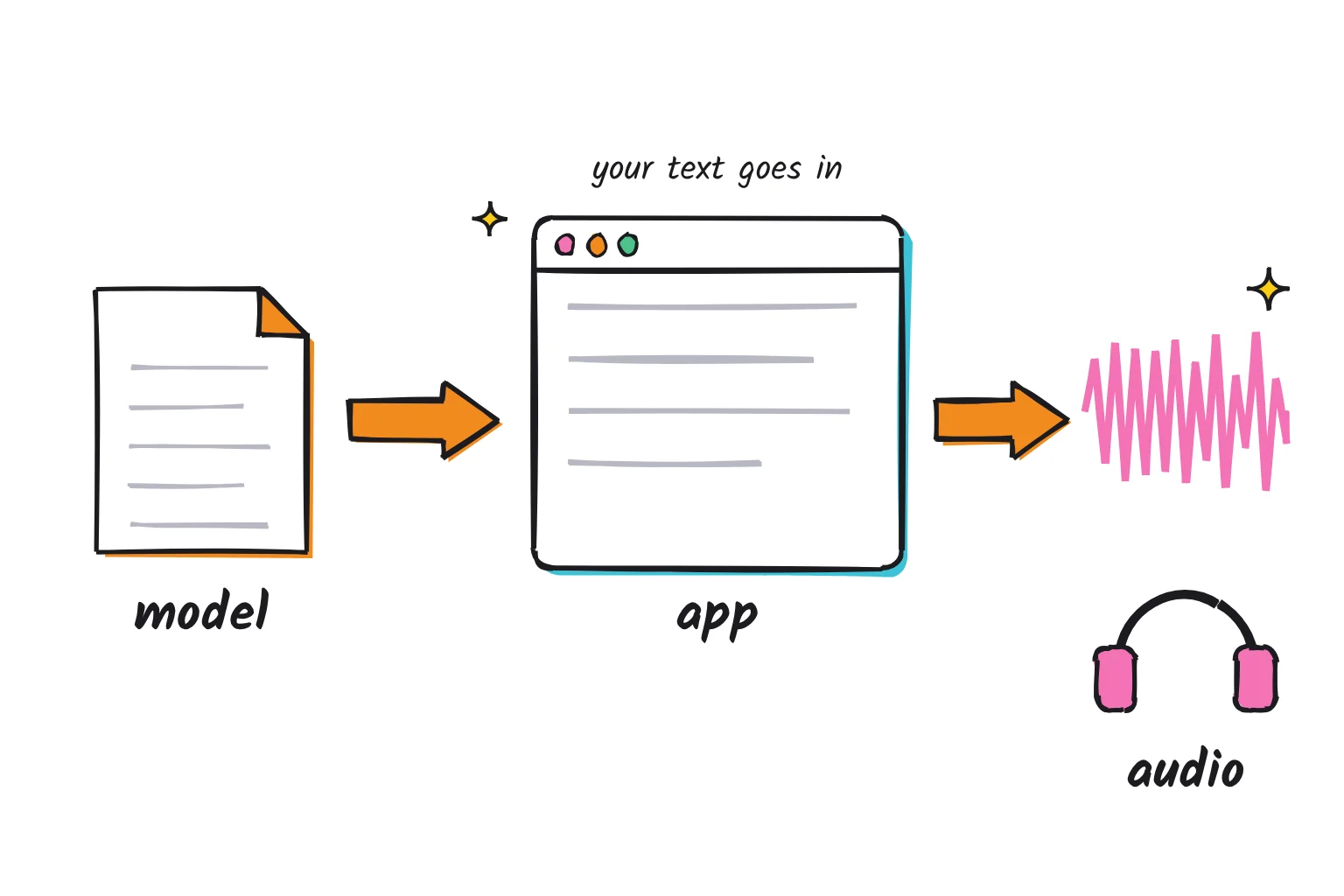
A text-to-speech setup has two parts. The model is a file of trained weights that has learned how speech sounds. The app is the program that loads that file, takes your text and saves the audio. The model's license, not the app's, decides what you may do with the audio. Local chat assistants split the same way, as our guide to running ChatGPT locally explains.
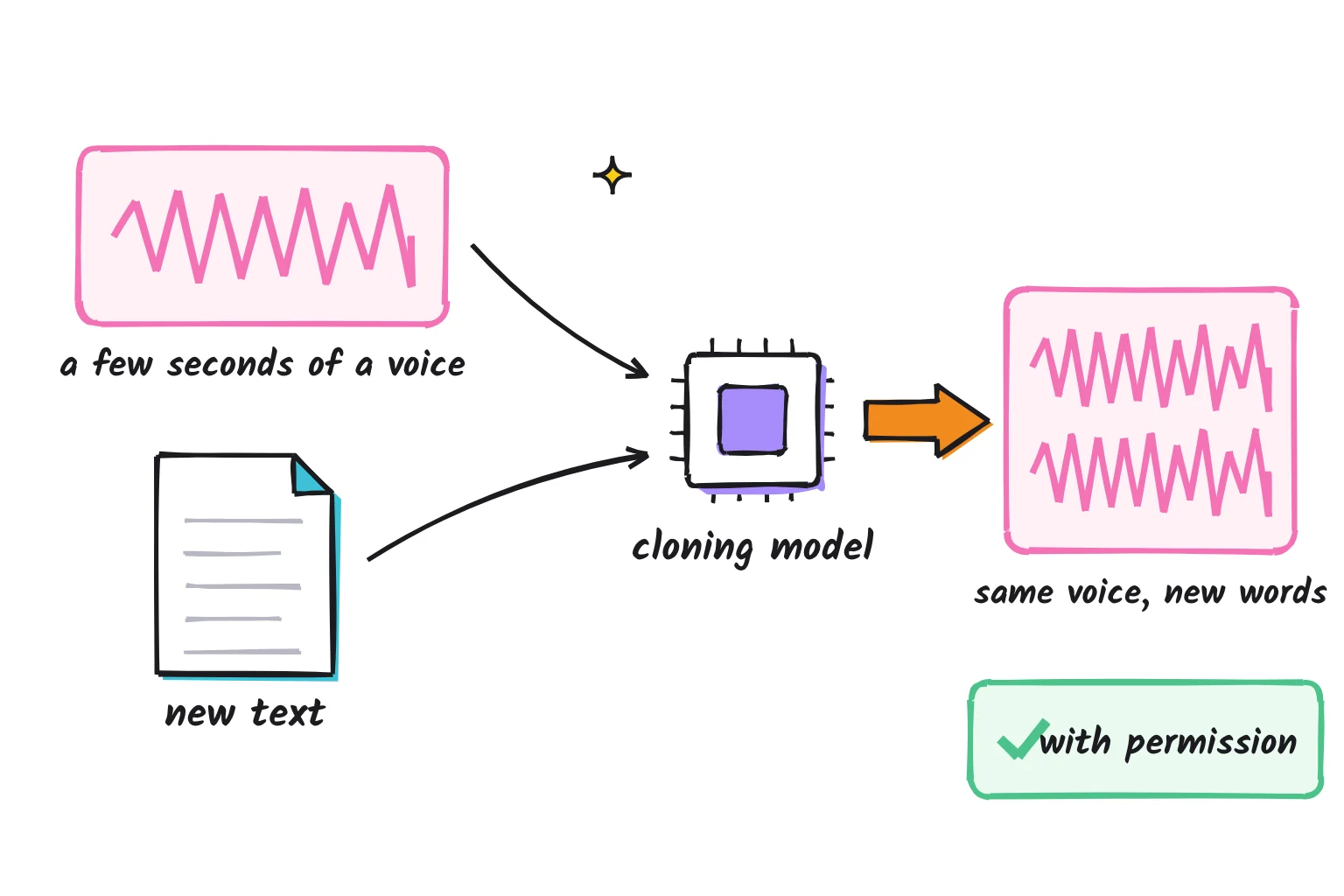
Voice cloning means giving a model a short recording of a person and having it speak new text in that voice. The recordings can be tiny: Qwen3-TTS advertises a 3-second rapid voice clone, and Chatterbox Nano works from a 5-second reference clip. Models without cloning offer a fixed set of voices.
A parameter is one of the learned numbers inside a model, so 82M means 82 million. A GPU is a graphics card; the CPU is your main processor. "6x real time" means a minute of audio takes about ten seconds to make.
The best local text-to-speech models compared
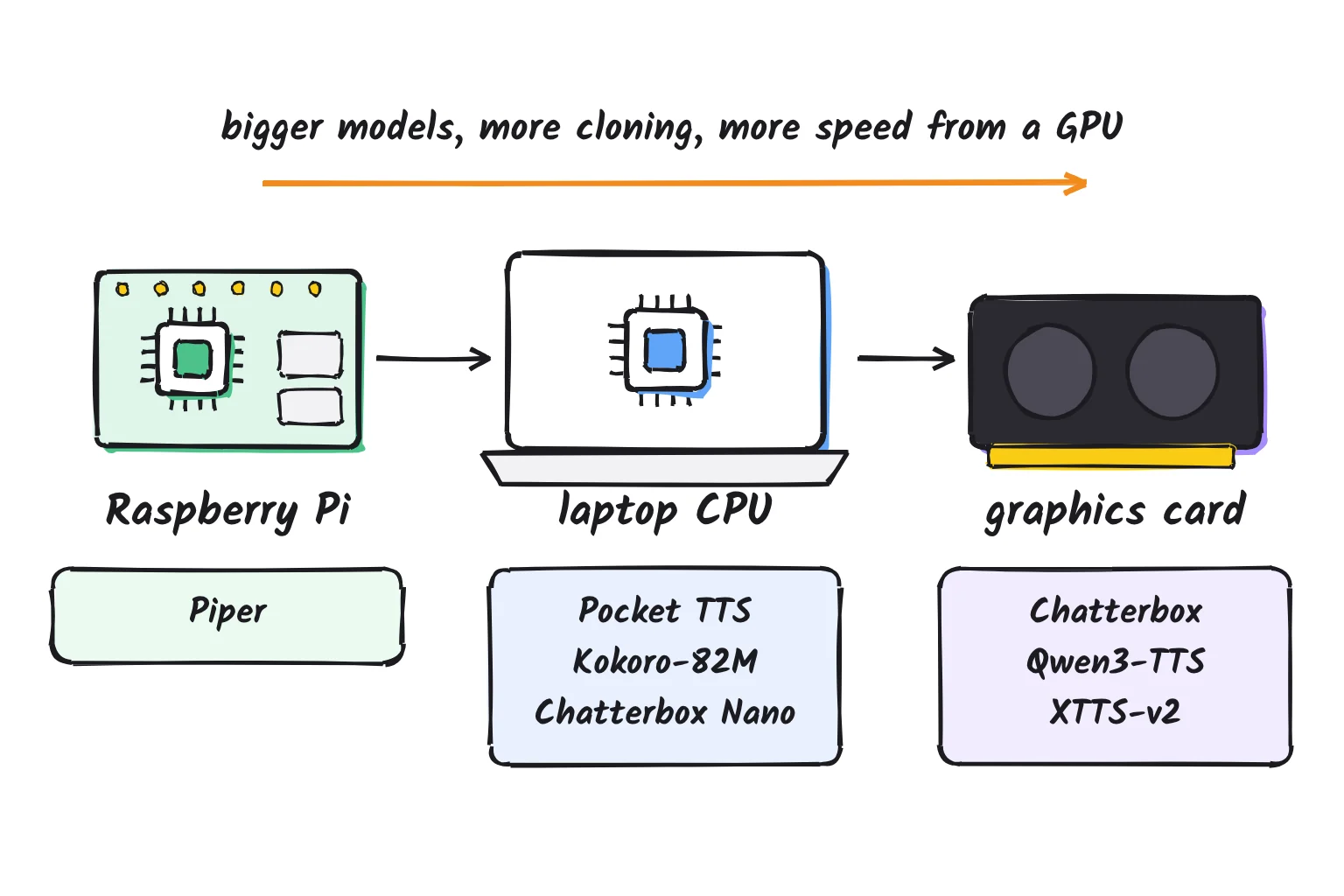
Six models matter most for a beginner in October 2026. Three run well on a laptop CPU, and three prefer a graphics card, though Chatterbox has a small CPU version.
| Model | License | Size and hardware | Languages | Voice cloning | Best for |
|---|---|---|---|---|---|
| Pocket TTS (Kyutai) | CC BY 4.0, credit required | About 100M; laptop CPU | 7 | Yes, from a WAV clip | Easiest start, your own voice |
| Kokoro-82M | Apache 2.0 | 82M; laptop CPU | 8, with 54 voices | No | Polished narration with stock voices |
| Piper | Engine GPL-3.0; each voice has its own license | Small voice files; built for a Raspberry Pi 4 | 39 | No | Raspberry Pi, old PCs, many languages |
| Chatterbox (Resemble AI) | MIT | 500M, 350M Turbo, 110M Nano for CPU | English; 23 in Multilingual | Yes, short clip, watermarked | Cloning with commercial use allowed |
| Qwen3-TTS (Alibaba Qwen) | Apache 2.0 | 0.6B and 1.7B; NVIDIA GPU in the docs | 10 | Yes, 3 seconds | Multilingual cloning on a GPU |
| XTTS-v2 (Coqui) | Coqui Public Model License, non-commercial | GPU in the docs | 17 | Yes, 6 seconds | Personal projects only |
Pocket TTS is a recent model. Kyutai published version 1.0.0 on January 13, 2026 and version 4.0.1 on October 21, 2026, so it is actively maintained. It speaks English, French, German, Portuguese, Italian, Spanish and Dutch, and it uses only 2 CPU cores and runs about 6x real time on a MacBook Air M4's CPU. The model card says it can handle infinitely long text inputs, which suits long posts.
Kokoro-82M is the most-liked text-to-speech model on Hugging Face. Version 1.0 arrived on January 27, 2025, with 8 languages and 54 voices, and its card claims quality comparable to larger models while being significantly faster. The Python package has not changed since version 0.9.4 in April 2025. One packaged version is about 300MB, or 80MB quantized, and runs near real time on an M1 Mac.
Piper began as a fast, local neural text to speech system optimized for the Raspberry Pi 4. The original repository was archived on October 6, 2025 when development moved to the Open Home Foundation, which shipped version 1.8.0 on September 4, 2026 with packages for Windows, macOS and 64-bit ARM Linux. The engine is licensed under GPL-3.0, and its voices cover 39 languages, each with its own license.
Chatterbox from Resemble AI is MIT licensed and comes in a 500M original, a 350M Turbo, a 110M Nano and a 23-language Multilingual V3. Nano, released in July 2026, runs 3x real time on a CPU using 8 threads. Every file carries Resemble's Perth watermark, described as imperceptible.
Qwen3-TTS was released on January 22, 2026 in 0.6B and 1.7B sizes under Apache 2.0, covering 10 languages. It can clone a voice or design one from a natural-language description. Its examples assume an NVIDIA card, so it is not one for the blogger's laptop.
XTTS-v2 appears in many older tutorials. It clones from a 6-second audio clip in 17 languages, but its license allows only non-commercial use of the model and its outputs. Coqui, the company, announced it was shutting down in January 2024. A community fork lives on as the coqui-tts package, last released on October 19, 2026.
Models I left out, and why
- F5-TTS and OmniVoice both clone voices, but their weights are non-commercial: F5's pretrained models are CC-BY-NC, as is OmniVoice's model covering over 600 languages.
- Microsoft removed the VibeVoice-TTS code in September 2025 after misuse. The smaller VibeVoice-Realtime-0.5B is still listed.
- Supertonic is fast on a CPU, but its maker says the repository is archived and development has ended.
- Orpheus, Dia, Sesame CSM, Higgs TTS 3, IndexTTS-2 and Voxtral TTS want a graphics card or carry restrictive licenses: Dia is tested only on GPUs, Voxtral needs a GPU with at least 16 GB, and Higgs TTS 3 has a research and non-commercial license, though a Creator Use Grant lets creators monetize podcasts and audiobooks if they credit Boson AI.
My pick for each job
My default pick is Pocket TTS: the shortest path from text to a usable audio file on a laptop CPU, with your own voice as an option. For specific jobs, I would choose differently.
| If you want | My pick | Why |
|---|---|---|
| Fast speech on a CPU or Raspberry Pi | Piper | Built for the Raspberry Pi 4, small voices, 39 languages |
| The most natural English narration on a laptop | Kokoro-82M | Polished stock voices, Apache 2.0, apps such as Abogen |
| Voice cloning | Pocket TTS on a CPU; Chatterbox with a GPU | Both clone from a short clip; Chatterbox watermarks every file |
| Many languages | Piper on a CPU; Chatterbox Multilingual with a GPU | 39 languages without cloning, or 23 with it |
| Commercial use allowed | Kokoro-82M | Apache 2.0, with Chatterbox's MIT license as the cloning option |
Apache 2.0 grants a no-charge, royalty-free copyright license, so Kokoro is the safest choice for anything you plan to sell. On a Raspberry Pi, install Piper with pip install piper-tts inside a Python virtual environment, because Raspberry Pi OS only lets pip install into one. Then python3 -m piper.download_voices en_US-lessac-medium fetches a voice, and python3 -m piper -m en_US-lessac-medium -f test.wav -- 'This is a test.' writes a file.
For the blogger, that means Pocket TTS for weekly posts in her own voice, and Kokoro through the Abogen app for the book, where chapter markers matter more. Kokoro's card estimates 1,000 characters is about one minute of output, so her book of roughly 180,000 characters runs near three hours. That takes a while on a CPU, and our local vs cloud AI comparison explains why CPUs trail graphics cards.
How to get speech out of Pocket TTS on Windows or Mac
You need an internet connection for the first run, but no graphics card. The installer is uv, a small tool that automatically downloads Python when it is required. Pocket TTS supports Python 3.10 to 3.14 and requires PyTorch 2.5+, and PyTorch stopped producing macOS x86_64 binaries with release 2.3.0, so on a Mac these steps need Apple silicon (M1 or later). On an Intel Mac, use the standalone binary that Kyutai's README says comes with each release.
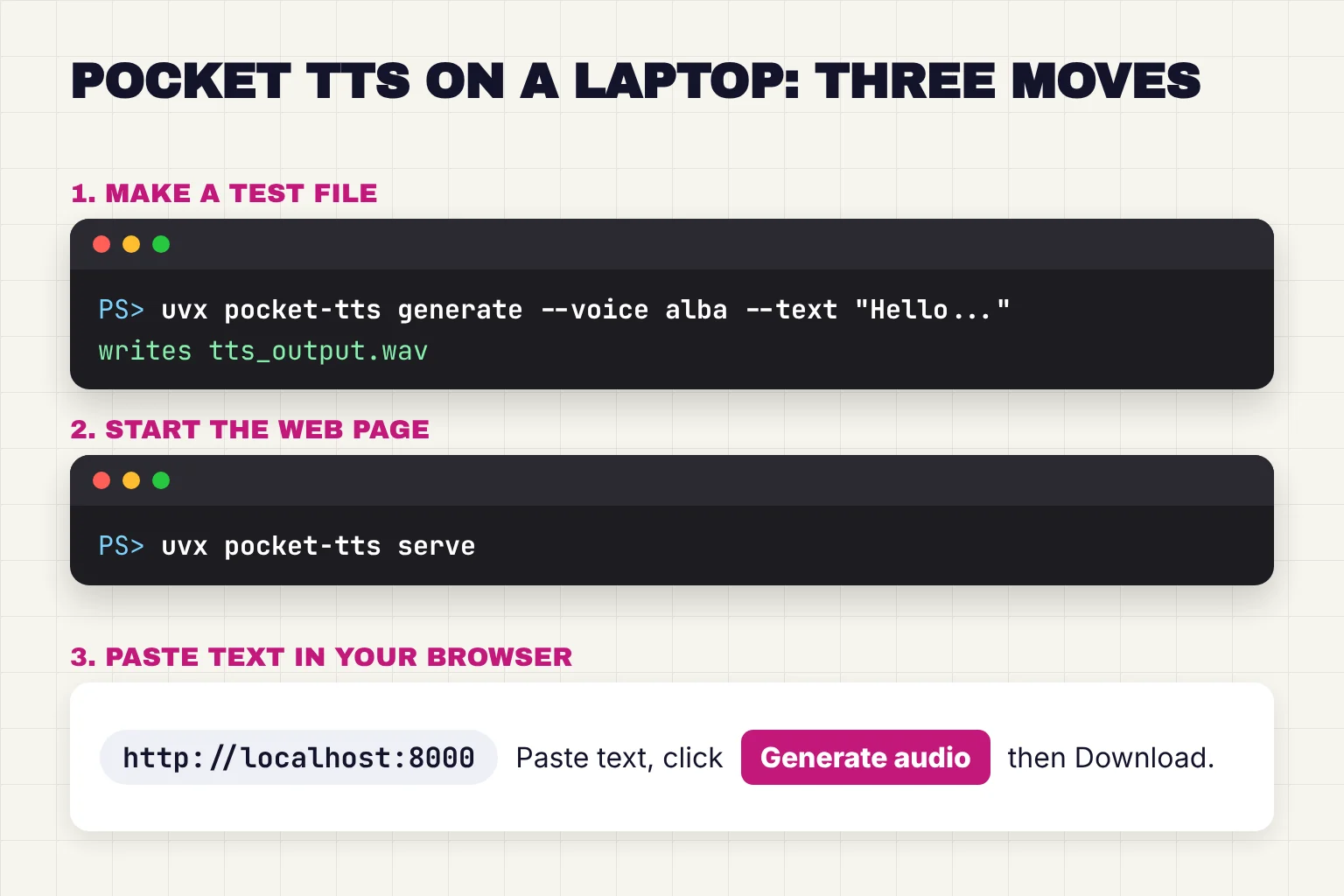
- Install uv. On Windows, open PowerShell and run
powershell -ExecutionPolicy ByPass -c "irm https://astral.sh/uv/install.ps1 | iex". On a Mac, open Terminal and runcurl -LsSf https://astral.sh/uv/install.sh | sh. Both commands come from uv's installation page. - Close the terminal window and open a new one, so it can find the new
uvxcommand. - Make a test file with
uvx pocket-tts generate --voice alba --text "Hello, this is my blog, read aloud on my own laptop."The first run downloads the software and model, then writes tts_output.wav in the terminal's current folder. - Start the web page with
uvx pocket-tts serveand leave that window open. - Open
http://localhost:8000in your browser. Paste a paragraph into the box marked "Enter your text here...", leave the voice field empty to use the default voice, and click Generate audio. - Click Download to save the result as tts-audio.wav. Press Ctrl+C in the terminal to stop the server when you finish.
Use the web page for a batch of posts: it is faster than the command line because the model is kept in memory between requests.
Read a post in your own voice
Record yourself reading in a quiet room and save it as a WAV file. On the web page, use the field labeled "Or upload an audio file for voice cloning". Or pass it on the command line: uvx pocket-tts generate --voice my-voice.wav --text "Your paragraph here." Kyutai warns that the audio quality of the sample is also reproduced and recommends cleaning the sample first, so a hiss in the recording becomes a hiss in every post.
If something goes wrong
- "uvx" is not recognized. Open a new terminal window after installing uv, or restart the computer.
- The first run looks stuck. It is downloading PyTorch and the model. Later runs start from the saved copy.
- Cloning complains about access or a login. The full Pocket TTS model is gated on Hugging Face. Log in on the site, agree to share your details on the model page, then sign in on your computer with
uvx hf auth login. - You want longer pauses. The model card lists adding silence in the text input to generate pauses as unsupported, so add gaps afterward in an audio editor.
- Kokoro will not install. Its package needs Python 3.10 to 3.12, so a newer Python fails. It also uses espeak-ng for out-of-vocabulary English words, so install that first.
Easier app routes for non-coders
For long texts, the friendliest free option is Abogen, a desktop app that turns EPUB, PDF, text and Markdown files into audio with Kokoro-82M. It saves WAV, FLAC, MP3, Opus and M4B audiobooks with chapters, and it can write matching subtitles. Its latest release, version 1.3.1, came out on February 6, 2026.
On Windows, the README says to download the project ZIP from GitHub, extract it and double-click WINDOWS_INSTALL.bat, which installs Python for you. Then install espeak-ng, a free pronunciation helper, from the .msi file on its releases page. On a Mac, the route is uv plus brew install espeak-ng, then the one-line install command in the README. Without an NVIDIA graphics card, Abogen runs on the CPU, only more slowly.
For the blogger's book, this is the route I would take: export the manuscript as EPUB, pick a Kokoro voice, choose M4B, and leave it running overnight.
To audition many models in one window, TTS WebUI has extensions for Kokoro, Piper, Chatterbox, XTTS and others and installs on Windows with winget install TTS-WebUI.Ignition, but the base install is about 10.7 GB. If you already use Ollama, Liquid AI's 2B lfm3-audio model can chat and speak; our guide covers LFM3-Audio text-to-speech in Ollama.
Licenses, consent and privacy before you publish
Free to download does not mean free to sell, and a cloned voice needs permission.
Read the model license, not only the code license
- Permissive: Apache 2.0 (Kokoro, Qwen3-TTS) and MIT (Chatterbox) allow commercial use.
- Credit required: Pocket TTS weights are CC BY 4.0, which lets you use material for any purpose, even commercially, if you give appropriate credit. Its README adds that voice licenses vary and are listed separately.
- Non-commercial: XTTS-v2 has its own non-commercial license, and F5-TTS, OmniVoice and Voxtral TTS use CC BY-NC, which rules out any use primarily intended for commercial advantage or monetary compensation.
- Custom terms: Kitten TTS 2 is free for limited commercial use until you exceed $1 million in annual revenue or total funding.
Code and weights can differ: F5-TTS has MIT code but CC-BY-NC models, and OmniVoice Apache 2.0 code but a CC-BY-NC model. Image models work the same way, as our guide to making AI images locally explains. A paid audiobook or sponsored podcast would likely count as commercial, so I would keep the blogger on Kokoro, Chatterbox or Pocket TTS, with the model credited in the show notes.
Only clone voices you have permission to use
Cloning your own voice is the simple case. Anyone else's needs explicit consent, and the model makers say so. Pocket TTS prohibits voice impersonation or cloning without explicit and lawful consent, and Microsoft's VibeVoice card rules out cloning a real person's voice without explicit, recorded consent. Get it in writing, with the intended use spelled out.
The law is catching up. In the US, the FCC confirmed that robocall rules on "artificial or prerecorded voice" cover current AI technologies that generate human voices. In the EU, the AI Act's transparency rules have applied since August 2, 2026, and anyone deploying AI that makes deep fake audio must disclose that it was artificially generated. For the blogger, a show-notes line such as "narrated by an AI voice made from my own recordings" is an easy habit.
What stays on your laptop when TTS runs offline
Once a model is downloaded, your text and audio stay on your computer; the network is needed only for downloads and updates. Abogen can pre-download everything and disable Kokoro's internet access to run completely offline. Tools that fetch models through Hugging Face's library also respect HF_HUB_OFFLINE=1, which means no HTTP calls will be made to the Hub. Test once with Wi-Fi off before you rely on it.
Download only from the official project pages linked here. Hugging Face stores its cache in ~/.cache/huggingface by default, which is where to look when you want disk space back. Our private AI guide covers what else stays private on your devices.
Common questions about local text-to-speech
What is the best local TTS model?
For an ordinary laptop in October 2026, Pocket TTS from Kyutai is the easiest strong start: it runs on the CPU, sets up with two short commands and can clone your own voice. Kokoro-82M is the pick for polished stock voices, and Piper suits a Raspberry Pi.
Which TTS runs on CPU without a GPU?
Pocket TTS, Kokoro-82M, Piper and Chatterbox Nano all run on an ordinary processor. Pocket TTS reports about six times real time on a MacBook Air M4 CPU, Chatterbox Nano three times real time on eight threads, and Piper was built for the Raspberry Pi 4. Larger models expect a graphics card.
Can I clone my voice locally for free?
Yes. Pocket TTS and Chatterbox Nano both clone a voice from a short recording on a laptop CPU, and Qwen3-TTS does it from three seconds of audio on a graphics card. Use a clean recording, because noise carries into the result, and only clone voices you have permission to use.
Is offline text to speech AI private?
Mostly. Once the model is downloaded, the text you convert and the audio you create stay on your computer, and the tools keep working with Wi-Fi off. The internet is still used for downloads and updates. Abogen even has a setting that blocks Kokoro from going online.
Which local TTS is best for audiobooks?
For a whole book, I would use Kokoro-82M through the free Abogen app. It reads EPUB, PDF and text files and saves M4B audiobooks with chapters. Kokoro's Apache 2.0 license allows commercial use, which matters if you sell the audiobook. Expect a long book to take hours on a laptop CPU.
Is Coqui XTTS still free to use?
Free to download, but not for commercial work. Coqui announced it was shutting down in January 2024, and XTTS-v2 remains under the Coqui Public Model License, which allows only non-commercial use of the model and its outputs. A community fork, the coqui-tts package, was updated in October 2026.
My verdict for the blogger, and one next step
Start with Pocket TTS. It runs on a CPU laptop, sets up with two commands, reads in your own voice, and its license allows commercial use with credit. Move to Kokoro through Abogen for the finished audiobook, use Piper on a Raspberry Pi, and look at Chatterbox or Qwen3-TTS once a graphics card is in the picture.
Your next step: install uv, run uvx pocket-tts serve, and have it read the opening paragraph of your latest post in the default voice.
Sources
- Pocket TTS on GitHub - Kyutai
- Qwen3-TTS on GitHub - Qwen, Alibaba
- Chatterbox Nano and Flash: speed at the edge, throughput at scale - Resemble AI
- pocket-tts release history - PyPI
- kyutai/pocket-tts model card - Hugging Face / Kyutai
- Text-to-speech models sorted by likes - Hugging Face
- hexgrad/Kokoro-82M model card - Hugging Face / hexgrad
- kokoro release history - PyPI
- kokoro-onnx on GitHub - thewh1teagle
- Piper README (2023.11.14-2 release) - Rhasspy
- rhasspy/piper (archived) - Rhasspy
- piper-tts release history - PyPI
- piper1-gpl: Fast and local neural text-to-speech engine - Open Home Foundation
- Piper voices - Open Home Foundation
- Chatterbox on GitHub - Resemble AI
- Qwen3-TTS-12Hz-1.7B-CustomVoice model card - Hugging Face / Qwen
- coqui/XTTS-v2 model card - Hugging Face / Coqui
- Coqui Public Model License - Coqui
- Coqui is shutting down (discussion #3489) - GitHub, coqui-ai/TTS
- coqui-tts release history - PyPI
- F5-TTS on GitHub - SWivid
- k2-fsa/OmniVoice model card - Hugging Face / k2-fsa
- VibeVoice on GitHub - Microsoft
- Supertonic on GitHub - Supertone
- Dia on GitHub - Nari Labs
- Voxtral-4B-TTS-2603 model card - Hugging Face / Mistral AI
- higgs-tts-3-4b model card - Hugging Face / Boson AI
- Apache License, Version 2.0 - Apache Software Foundation
- Raspberry Pi OS documentation - Raspberry Pi
- Piper command-line usage - Open Home Foundation
- Installing Python - uv documentation, Astral
- PyTorch macOS x86 builds deprecation starting January 2024 - PyTorch Dev Discussions
- Installing uv - uv documentation, Astral
- Pocket TTS web interface source - Kyutai
- Gated models - Hugging Face
- Command Line Interface (CLI) - Hugging Face
- kokoro on GitHub - hexgrad
- Abogen on GitHub - denizsafak
- abogen release history - PyPI
- eSpeak NG releases - espeak-ng on GitHub
- TTS WebUI on GitHub - rsxdalv
- Attribution 4.0 International (CC BY 4.0) deed - Creative Commons
- Attribution-NonCommercial 4.0 International (CC BY-NC 4.0) deed - Creative Commons
- KittenML/kitten-tts-2 model card - Hugging Face / KittenML
- microsoft/VibeVoice-1.5B model card - Hugging Face / Microsoft
- FCC confirms that TCPA applies to AI technologies that generate human voices - Federal Communications Commission
- Timeline for the implementation of the EU AI Act - AI Act Service Desk, European Commission
- Article 50: Transparency obligations - AI Act Service Desk, European Commission
- Environment variables - Hugging Face