
Which Raspberry Pi AI HAT should you buy?
For camera projects on a Raspberry Pi 5, buy the AI HAT+: the 13 TOPS version at $70 for one camera, or the 26 TOPS version at $110 for more cameras and bigger models. The AI Kit is no longer in production. Only the $200 AI HAT+ 2, with 8GB of its own memory, runs language models.
This page is part of our guide to AI on a Raspberry Pi 5. It compares the three Hailo boards and sets up the AI HAT+ for object detection. The AI HAT+ 2 has its own deep dive on running LLMs on the HAT.
This guide follows one reader: someone with an 8GB Raspberry Pi 5, the official 27W power supply and a Camera Module 3, who wants a driveway camera that tells people from cars, and maybe a private chat assistant later. They want to buy one board, once.
Choose the AI HAT+ 13 TOPS if:
- You run one camera with the stock models and want the cheapest current board. Raspberry Pi says it capably runs neural networks for applications including object detection, semantic and instance segmentation, pose estimation.
Choose the AI HAT+ 26 TOPS if:
- You want headroom: the 26 TOPS board can handle larger networks, can run them more quickly, and can more effectively run multiple networks simultaneously.
- You plan to use both of the Pi 5's two camera connectors, or the Frigate video recorder, whose docs support the Hailo-8 and Hailo-8L.
Choose the AI HAT+ 2 if:
- You want the board itself to run large language models (LLMs, the models behind chat assistants) and vision-language models (VLMs, which answer questions about images), up to about 6 billion parameters by Raspberry Pi's figure, while the Pi's processor stays free. Hailo's ready-made models are smaller, 3 billion parameters at most.
- You accept the $200 price for that one extra ability.
Choose the AI Camera instead if:
- You want one smart camera with the AI built in: the $70 AI Camera runs detection directly on the camera. Our Raspberry Pi AI Camera guide explains when on-sensor AI is the better fit.
How the AI HAT+, AI Kit and AI HAT+ 2 compare in October 2026
All three add an NPU, a neural processing unit: a chip built to run neural networks more efficiently than the main processor, as our explainer on NPUs and TOPS describes for laptops. Each connects through PCIe, the Pi 5's high-speed add-on port, which runs at Gen 2.0 speed by default. A HAT is a board that stacks on the Pi's pin header.
| Board | Chip | TOPS | Own memory | PCIe link | Speeds up | US price | Status | Best for |
|---|---|---|---|---|---|---|---|---|
| AI Kit | Hailo-8L M.2 module on an M.2 HAT+ | 13 (INT8) | None | Gen 2 by default; Gen 3 by hand | Vision models | $70 at launch | No longer in production | Nothing new; keep one you own |
| AI HAT+ 13 TOPS | Hailo-8L | 13 (INT8) | None; uses the Pi's memory | Gen 3, set automatically | Vision models | $70 | Current; made until at least January 2030 | One camera, stock models |
| AI HAT+ 26 TOPS | Hailo-8 | 26 (INT8) | None; uses the Pi's memory | Gen 3, set automatically | Vision models, several at once | $110 | Current; made until at least January 2030 | Two cameras, bigger models, Frigate |
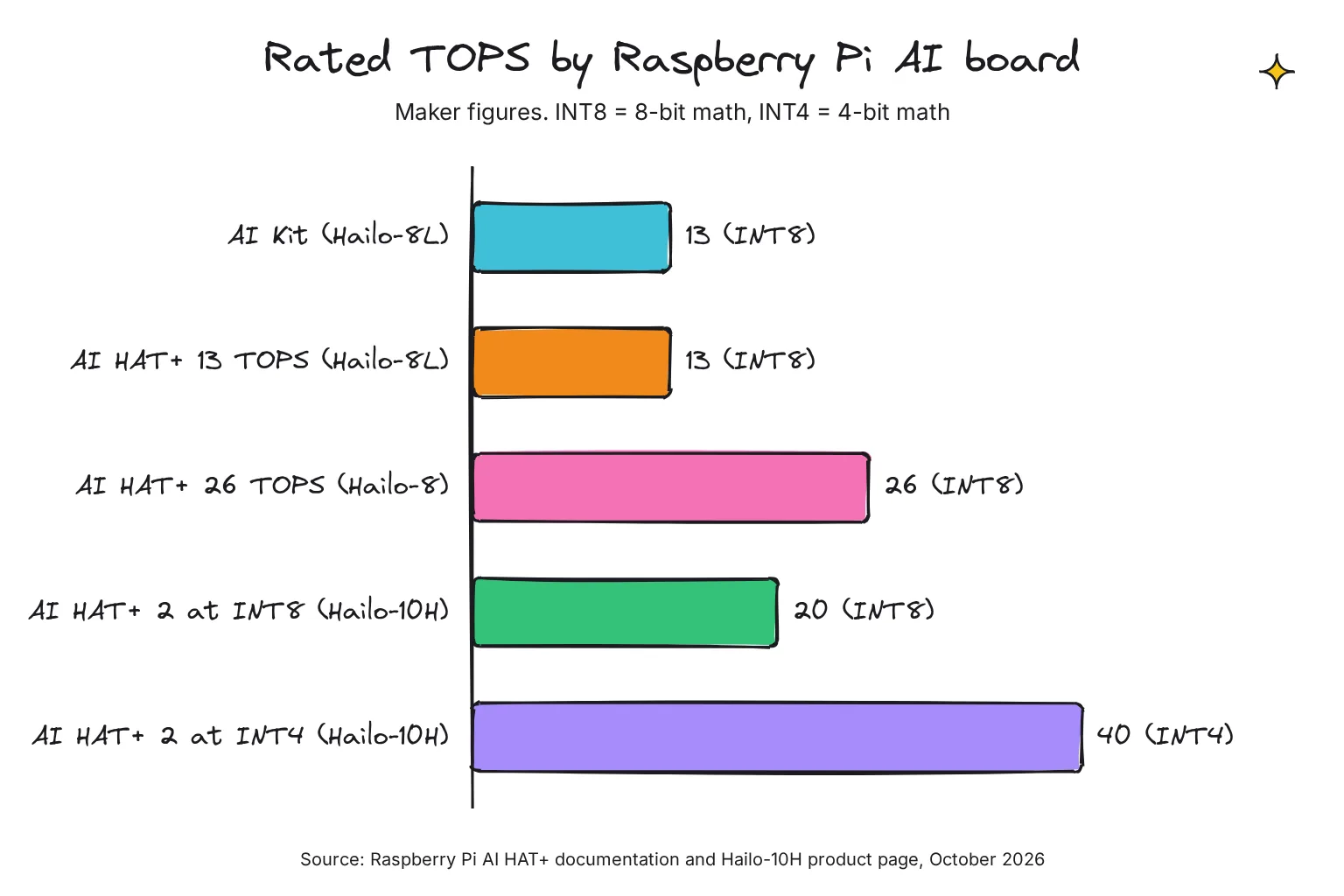
| AI HAT+ 2 | Hailo-10H | 40 (INT4); 20 (INT8) | 8GB LPDDR4X | Gen 3, set automatically | Vision, plus LLMs and VLMs up to about 6B parameters by Raspberry Pi's figure | $200 | Current; made until at least January 2036 | A small assistant that leaves the CPU free |
Prices are Raspberry Pi's US list prices. The AI HAT+ 2 launched at $130 on January 15, 2026, rose $50 in Raspberry Pi's April 1, 2026 round of memory-driven price increases, and now lists at $200 on its product page and July 2026 product brief; I found no announcement for the last $20. The AI HAT+ page still says from $70.
Is the Raspberry Pi AI Kit still sold?
No. Raspberry Pi's product page says the AI Kit is no longer in production. New customers should instead purchase the Raspberry Pi AI HAT+. The kit was an M.2 HAT+ with a 13 TOPS Hailo-8L module pre-fitted, and the docs call the 13 TOPS AI HAT+ functionally equivalent. A kit you already own runs the same software and demos.
Can I use a Hailo-8 M.2 module instead?
Hailo sells the Hailo-8 as an M.2 module with a PCIe Gen-3.0 interface, and Raspberry Pi's M.2 HAT+ takes M key devices in the 2230 or 2242 size. Raspberry Pi's AI guide does not cover that pairing, while the 26 TOPS AI HAT+ puts the same chip on a supported board. I would buy the HAT unless you already own the module.
Hailo-8L vs Hailo-8 vs Hailo-10H: what is the difference?
Hailo makes all three chips. The Hailo-8L is the entry model: 13 TOPS, no external memory, and a typical power consumption of 1.5W. The Hailo-8 doubles that to 26 TOPS at a typical 2.5W, and Hailo says it works by integrating all required memory directly on the processor die.
The Hailo-10H is the second generation, which Hailo calls the industry's first edge AI accelerator to bring immersive generative AI capabilities directly to edge devices. It is rated at 40 TOPS at INT4 and 20 TOPS at INT8, at a typical 2.5W, and adds an interface to external memory, which is where the AI HAT+ 2's 8GB comes in.
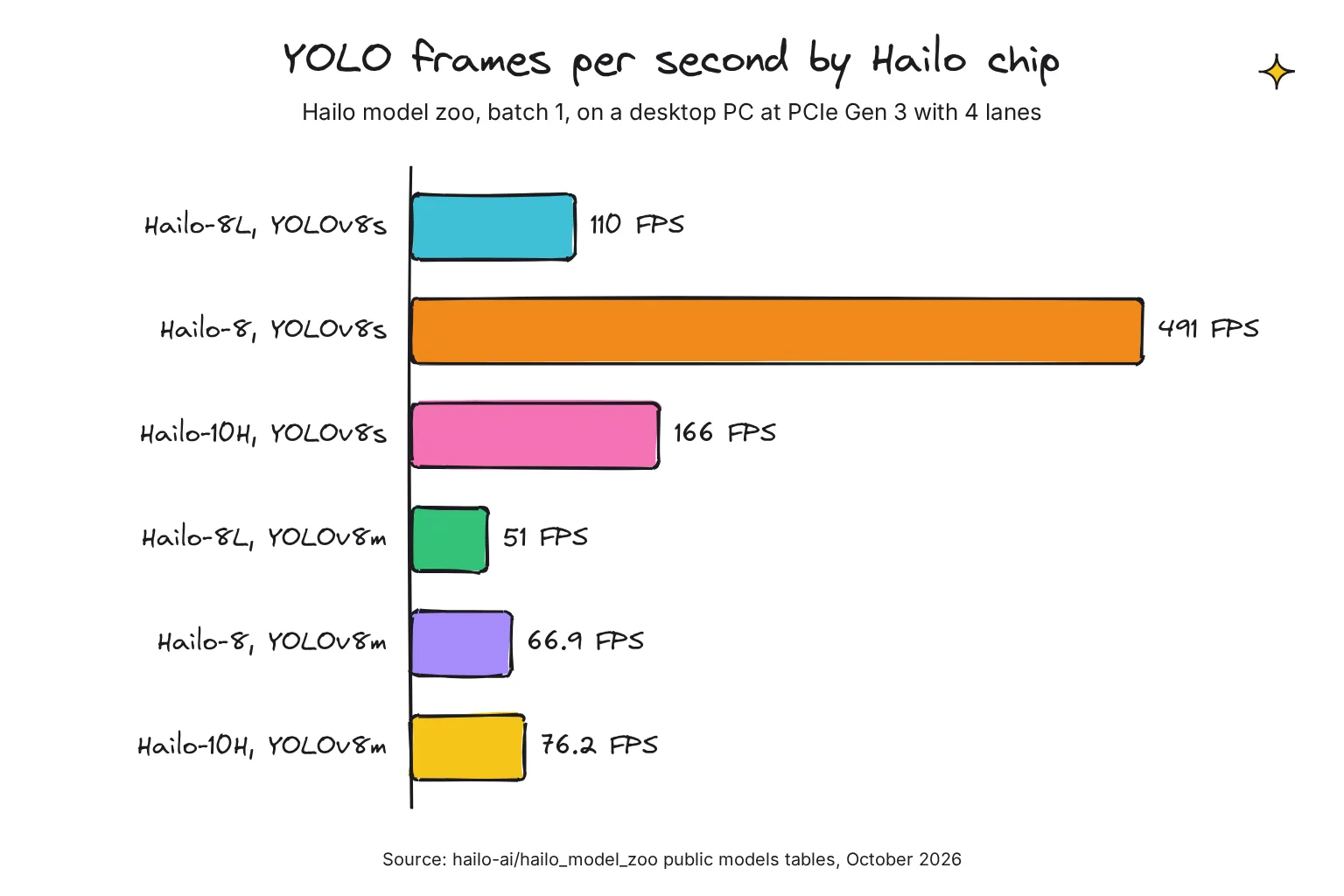
Hailo publishes speed tables for each chip in frames per second (FPS), using YOLO, a common family of object detectors. On its test PC, YOLOv8s runs at 110 FPS on the Hailo-8L, 491 on the Hailo-8 and 166 on the Hailo-10H. With the larger YOLOv8m the order flips: 51, 66.9 and 76.2 FPS. Hailo measured over PCIe Gen 3 with four lanes, and the Pi 5 offers a single lane, so compare chips with these figures, not expected Pi speeds.
Is the AI HAT+ 2 better for vision than the 26 TOPS AI HAT+?
It depends on the model, and the makers' own words differ. Raspberry Pi called its vision performance broadly equivalent to that of its 26-TOPS predecessor, and the product brief says equivalent or superior. A Hailo-written post on Raspberry Pi's blog claims as much as 100% faster for demanding vision work. For vision only, the $110 board is the better buy.
What TOPS means, and why it does not predict chat speed
TOPS means trillions of operations per second: a chip's peak rate at simple math, at a stated precision. INT8 means 8-bit whole numbers and INT4 means 4-bit ones, and fewer bits give a bigger headline. The AI HAT+ 2's 40 TOPS is quoted at INT4, the AI HAT+ figures at INT8, and at INT8 the Hailo-10H is rated at 20 TOPS.
For chat, TOPS says even less. A language model writes one token at a time (a token is a word or part of one), and for each token it reads its weights, the learned numbers that make up the model, from memory. NVIDIA's engineers call that step a memory-bound operation: memory speed, not math, sets the pace. Our plain-English guide to tokens and weights and guide to local AI speeds explain more.
Hailo's own post says the AI HAT+ 2 is strongest on workloads that are compute-heavy up front, such as reading a long prompt, not on token-by-token writing. Reading 96 prompt tokens with Qwen2.5 1.5B took 2,039 milliseconds on the Pi 5's processor and 320 on the Hailo-10H. Running the same models on both, Jeff Geerling's independent review found the Pi's built-in CPU trounces the Hailo 10H, which came close only on Qwen2.5 Coder 1.5B.
Why can't the Hailo-8 and Hailo-8L run LLMs?
Raspberry Pi lists LLM support on the AI HAT+ as Not supported, and its launch post for the successor says the original lacks the capability to run the increasingly popular generative AI (GenAI) models. The difference the makers point to is memory. The AI HAT+ uses the memory on a Raspberry Pi 5, while the AI HAT+ 2 has its own 8 GB onboard memory, allowing it to run LLMs and VLMs.
Scale shows why. The YOLOv8s detector has 11.2 million parameters, while the LLMs in the AI HAT+ 2's launch post had 1 to 1.5 billion, about a hundred times as many. Hailo says its memory interface lets the Hailo-10H scale for large models such as LLMs, VLMs and more.
How to set up the AI HAT+ for object detection
These steps follow Raspberry Pi's AI HAT documentation and AI software guide. You need a Pi 5 with 64-bit Raspberry Pi OS (Trixie), a camera such as the Camera Module 3, a Phillips screwdriver and, ideally, the Active Cooler. Attach the camera first, as the docs recommend.
- Power off and fit the Active Cooler. Disconnect power, peel the paper off the thermal pads, press the two push pins in until they click, and plug in the fan. Raspberry Pi advises against removing the cooler later.
- Fit the spacers and header. Screw the four spacers to the Pi with the long screws, then press the GPIO stacking header fully onto the pins.
- Connect the ribbon cable to the Pi. Release the cable from the HAT's PCIe connector, insert the free end into the Pi 5's PCIe connector with the metal contacts facing the USB ports, and push the clip closed.
- Mount the HAT. Chip facing up, fix the HAT to the spacers with the four short screws, and clip the ribbon cable into its connector.
- Update the system. Run the first block of commands below; the last one reboots the Pi. There is no PCIe setting to change, because for the AI HAT+ the setting is automatically applied.
- Install the Hailo software. Install
dkmsandhailo-all(the Hailo driver, runtime and post-processing libraries), then reboot. The AI HAT+ 2 needshailo-h10-allinstead; these packages can't co-exist. - Check that the chip is found. Run the two check commands. The AI HAT+ might show <N/A> for serial number, part number and product name, which the docs say is expected.
sudo apt update
sudo apt full-upgrade -y
sudo rpi-eeprom-update -a
sudo reboot
sudo apt install dkms
sudo apt install hailo-all
sudo reboothailortcli fw-control identify
dmesg | grep -i hailoRun the object detection demos with rpicam-hello
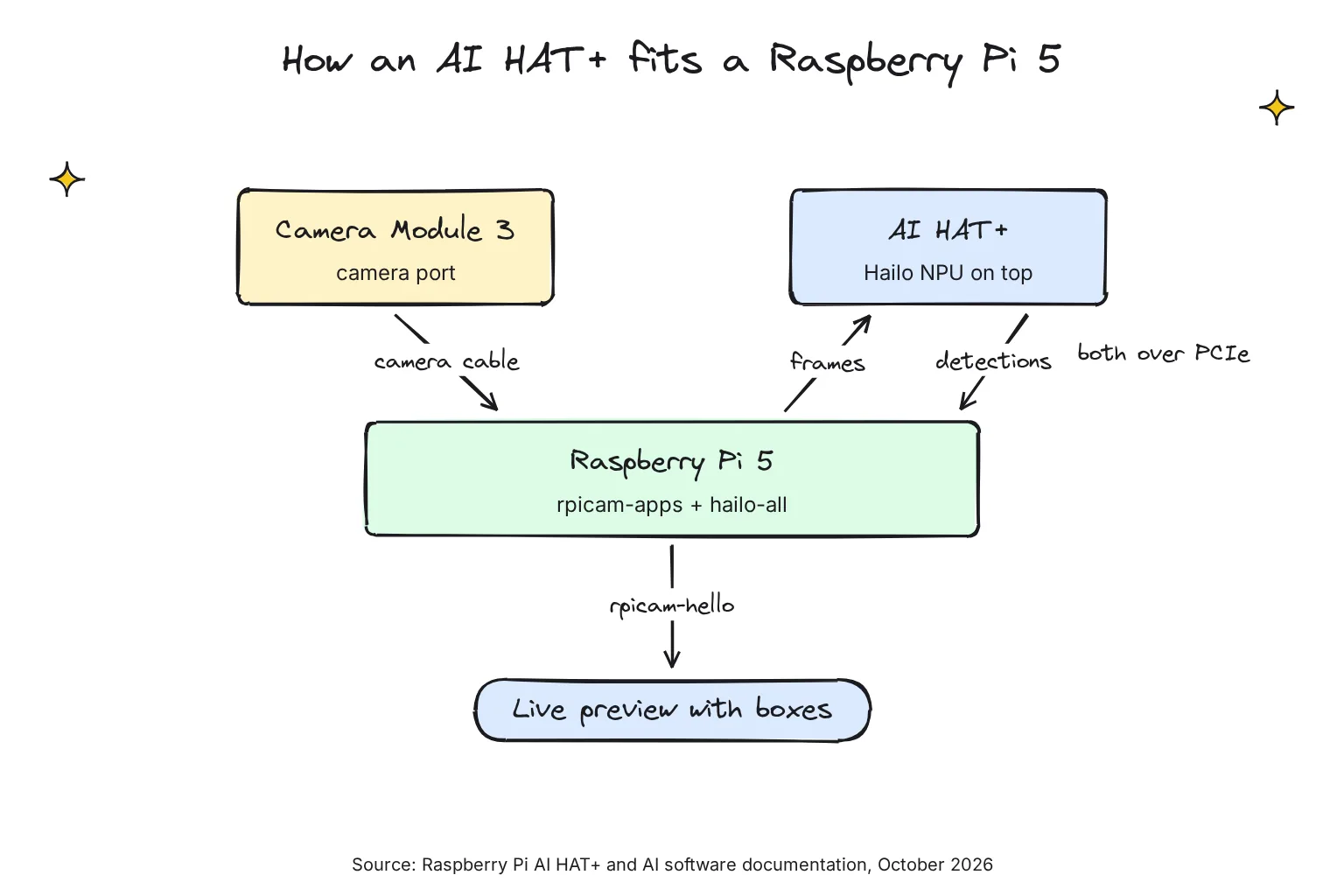
The demos run through rpicam-apps, Raspberry Pi's camera programs, which include the Hailo post-processing software demo stages: steps that pass each frame to the NPU and draw the results. Install them and check the preview:
sudo apt update && sudo apt install rpicam-apps
rpicam-hello
Then start live object detection. Each file is a JSON settings file that names the model to load. Add -n to hide the preview or -v 2 to display textual output only:
rpicam-hello -t 0 --post-process-file /usr/share/rpi-camera-assets/hailo_yolov6_inference.json
rpicam-hello -t 0 --post-process-file /usr/share/rpi-camera-assets/hailo_yolov8_inference.json
rpicam-hello -t 0 --post-process-file /usr/share/rpi-camera-assets/hailo_yolox_inference.json
YOLOX is the lightweight and fast option. On an AI HAT+ the YOLOv8 file loads a YOLOv8s model (YOLOv8m on an AI HAT+ 2), which Hailo scores at 44.6 mAP against 34.3 for YOLOv6n (mAP is a standard accuracy score), so I would keep it for the driveway.
Two more demos show image segmentation, which colors in each detected object, and 17-point pose estimation:
rpicam-hello -t 0 --post-process-file /usr/share/rpi-camera-assets/hailo_yolov5_segmentation.json --framerate 20
rpicam-hello -t 0 --post-process-file /usr/share/rpi-camera-assets/hailo_yolov8_pose.json
The docs also list a YOLOv5 people-and-face demo as hailo_yolov5_inference.json, but rpicam-apps installs it as hailo_yolov5_personface.json, so use that name.
Python examples: use hailo-apps, not hailo-rpi5-examples
For your own code, Hailo's older examples repository now says This repository is outdated and points to hailo-apps, an MIT-licensed project with 30+ ready-to-run applications for all three chips. Its installer builds a Python environment on top of hailo-all:
git clone https://github.com/hailo-ai/hailo-apps.git
cd hailo-apps
./install.sh
source setup_env.sh
hailo-detect --input rpi
Run source setup_env.sh in every new terminal session. hailo-detect adds object tracking, and its example Python function, app_callback, filters for only detected persons: that is where a driveway alert would go.
AI Kit owners: turn on PCIe Gen 3
The AI Kit is the one board that needs a setting. Raspberry Pi highly recommends enabling PCIe Gen 3.0 for it, under Advanced Options, then PCIe Speed, in sudo raspi-config, or by adding this line to /boot/firmware/config.txt and rebooting. The docs warn the Pi 5 isn't certified for Gen 3.0 speeds. The other steps match the AI HAT+.
dtparam=pciex1_gen=3Power and cooling for a Pi 5 with an AI HAT
Raspberry Pi publishes no power figure for the HATs. Hailo rates its chips at a typical 1.5W for the Hailo-8L and 2.5W for the Hailo-8 and Hailo-10H. Use the 27W USB-C Power Supply recommended for the Pi 5: on other supplies it restricts downstream USB devices to 600 mA.
Heat matters more than watts. Each HAT ships with a 16mm stacking header so it fits above the Active Cooler, and the Pi progressively throttles its processor between 80°C and 85°C. The AI HAT+ is rated for 0°C to 50°C ambient and needs a well-ventilated spot, with any case left uncovered.
For a driveway camera, that 50°C ceiling is the number to plan around, so I would keep the Pi indoors or in a shaded, vented box. On an AI HAT+ 2, fit the bundled heatsink, which Raspberry Pi says prevents your AI HAT+ 2 from slowing down due to overheating.
Which AI board to buy for your project
For a single smart camera
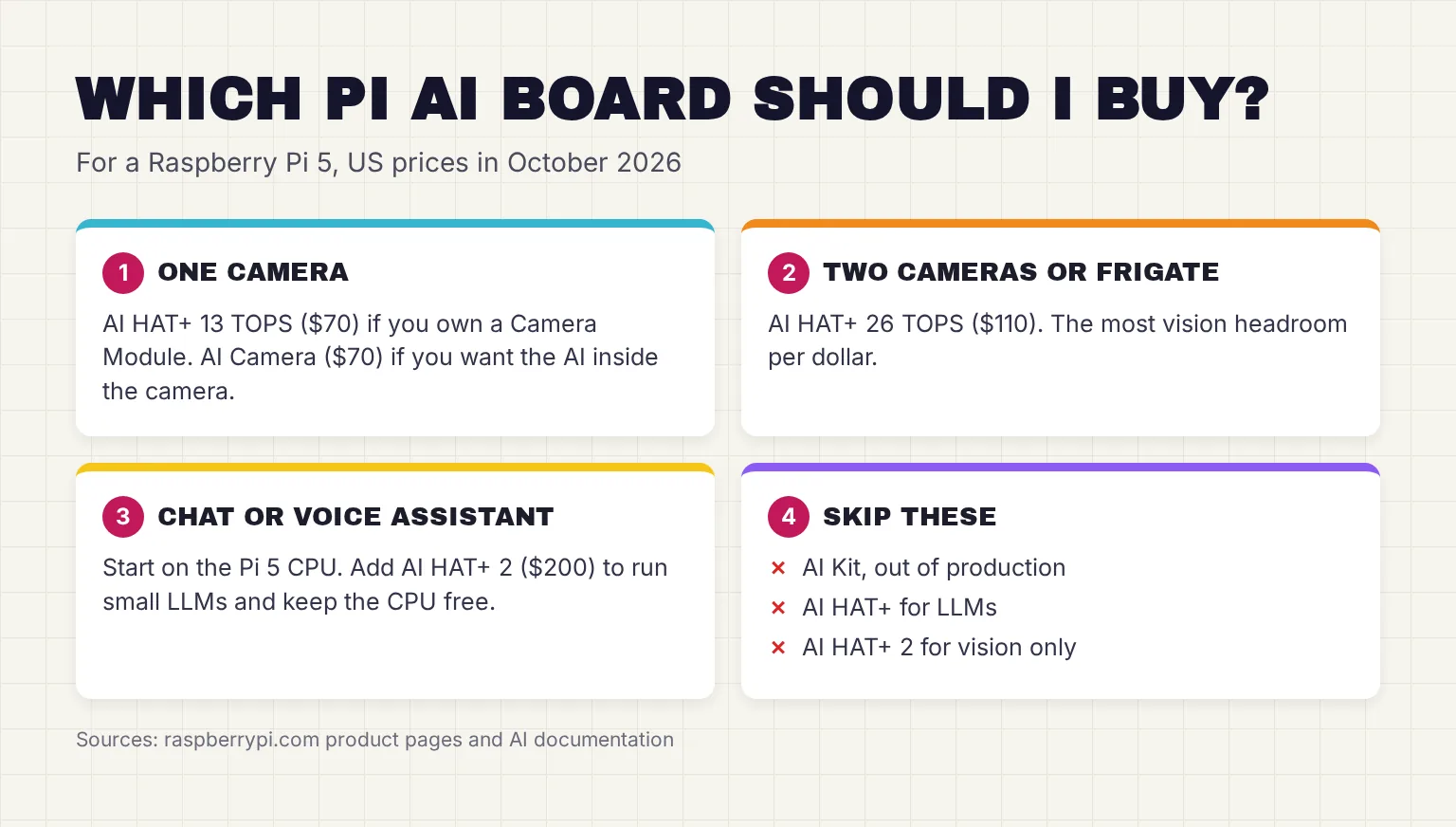
One camera and the stock models are well within the AI HAT+ 13 TOPS. No camera yet? Compare the AI Camera first.
For several cameras or a Frigate recorder
A Pi 5 can connect two cameras directly to the board, and hailo-apps has a hailo-multisource demo for several streams, including network (RTSP) cameras. Hailo's chips support simultaneous processing of multi-streams and multi-models, and the Hailo-8 has the most room for it.
Frigate, a complete and local NVR designed for Home Assistant with AI object detection, has a detector for both Hailo-8 and Hailo-8L and calls its CPU detector not recommended for general use. Its docs did not list the Hailo-10H in October 2026, though Hailo called that support upcoming. Here the 26 TOPS board earns its extra $40.
For a private assistant
Start on the Pi 5's own processor. The AI HAT+ and AI Kit cannot help with chat, and the AI HAT+ 2's benefit is narrower than its 40 TOPS suggests. If a small assistant must run beside a busy camera pipeline, it is the board to consider; our AI HAT+ 2 deep dive covers its models and limits. For bigger models than any Pi can hold, see our home AI server builds.
When the AI Camera, or no accelerator, is enough
The AI Camera has the same $70 list price as the 13 TOPS HAT, sends each frame directly into the AI accelerator within the camera, and works with all Raspberry Pi models. It suits a Pi 4, or a Pi 5 whose single PCIe connector already holds an SSD. The trade-off is a smaller accelerator: models must be quantized (stored in fewer bits) to fit the resources available on the IMX500. Our AI Camera guide covers which projects suit it.
You may need no accelerator at all. For a snapshot when something moves, rpicam-apps has a motion_detect stage that runs on the Pi alone. Add an AI board when you need to know what moved.
Common questions about the Raspberry Pi AI HAT
Is the Raspberry Pi AI Kit still sold?
No. Raspberry Pi says the AI Kit is no longer in production and tells new buyers to get the AI HAT+ instead. The 13 TOPS AI HAT+ uses the same Hailo-8L chip and is functionally equivalent, so a kit you already own still runs the same software and demos.
What is the difference between the 13 TOPS and 26 TOPS AI HAT+?
The 13 TOPS board uses the Hailo-8L chip and lists at $70, while the 26 TOPS board uses the Hailo-8 and lists at $110. Both run the same vision software. The 26 TOPS version handles larger models, runs them faster and copes better with several at once, which suits two cameras or Frigate.
Can the Raspberry Pi AI HAT+ run LLMs?
No. Raspberry Pi lists language and vision-language models as not supported on the AI HAT+, which has no memory of its own for them. The AI HAT+ 2 adds 8GB of onboard memory, which Raspberry Pi says fits models up to about 6 billion parameters, though Hailo's ready-made ones have 3 billion or fewer.
Do I need to enable PCIe Gen 3 for the AI HAT+?
No. Raspberry Pi says the setting is applied automatically for the AI HAT+ and AI HAT+ 2. Only the older AI Kit needs it, either through raspi-config under Advanced Options and PCIe Speed, or by adding dtparam=pciex1_gen=3 to the config.txt file and rebooting.
Should I buy the AI HAT+ or the AI Camera?
Buy the AI Camera for one smart camera, for a Pi 4, or for a Pi 5 whose PCIe port holds an SSD, since its AI runs inside the camera. Buy the AI HAT+ for larger or several models, more than one camera, or tools such as Frigate that support Hailo chips.
Which Raspberry Pi works with the AI HAT+?
Only the Raspberry Pi 5. The AI HAT+ connects through the Pi 5 PCIe connector, and Raspberry Pi's AI software guide requires a Pi 5 running 64-bit Raspberry Pi OS Trixie. It also recommends the Active Cooler, and the HAT ships with a 16mm stacking header so it fits above the cooler.
My verdict for a Pi 5 driveway camera: buy the AI HAT+ 26 TOPS
For the reader in this guide, the AI HAT+ 26 TOPS at $110 is the board to buy. It runs every Raspberry Pi demo, has room for a second camera or Frigate later, and in Hailo's tables is the fastest of the three chips on small detectors. If one camera and the stock models are all you need, the 13 TOPS version saves $40. Skip the AI Kit, and skip the AI HAT+ 2 unless an LLM must run on the board; try the assistant on the Pi's own processor first.
Your next step: fit the HAT over the Active Cooler, install hailo-all, and run the YOLOv8 demo pointed at your driveway, so you see what it detects before writing any code. Then head back to our Raspberry Pi AI hub for the next project.
Sources
- Buy a Raspberry Pi AI HAT+ - Raspberry Pi
- Raspberry Pi AI HAT+ product brief - Raspberry Pi Ltd
- Buy a Raspberry Pi AI Kit - Raspberry Pi
- Raspberry Pi AI Kit product brief - Raspberry Pi Ltd
- Buy a Raspberry Pi AI HAT+ 2 - Raspberry Pi
- Raspberry Pi AI HAT+ 2 product brief - Raspberry Pi Ltd
- Buy a Raspberry Pi AI Camera - Raspberry Pi
- Raspberry Pi 5 - Raspberry Pi
- AI HATs - Raspberry Pi Documentation
- AI software - Raspberry Pi Documentation
- AI Kit - Raspberry Pi Documentation
- Raspberry Pi hardware: PCIe, power supply and cooling - Raspberry Pi Documentation
- M.2 HAT+ - Raspberry Pi Documentation
- Camera software - Raspberry Pi Documentation
- AI Camera - Raspberry Pi Documentation
- Raspberry Pi AI Kit available now at $70 - Raspberry Pi
- Introducing the Raspberry Pi AI HAT+ 2: Generative AI on Raspberry Pi 5 - Raspberry Pi
- When and why you might need the Raspberry Pi AI HAT+ 2 - Raspberry Pi (written by Hailo)
- A new 3GB Raspberry Pi 4 for $83.75, and more memory-driven price increases - Raspberry Pi
- Hailo-8L Entry-Level AI Accelerator - Hailo
- Hailo-8 AI Accelerator - Hailo
- Hailo-10H AI Accelerator - Hailo
- Hailo-8 M.2 AI Acceleration Module - Hailo
- Hailo-8L public models: object detection - hailo-ai/hailo_model_zoo, GitHub
- Hailo-8 public models: object detection - hailo-ai/hailo_model_zoo, GitHub
- Hailo-10H public models: object detection - hailo-ai/hailo_model_zoo, GitHub
- Model Zoo GenAI models, 5.1.1 - hailo-ai, GitHub
- hailo-apps - hailo-ai, GitHub
- Hailo-Apps Installation Guide - hailo-ai, GitHub
- Running Applications - hailo-ai, GitHub
- Detection Application - hailo-ai, GitHub
- hailo-rpi5-examples - hailo-ai, GitHub
- assets/hailo_yolov8_inference.json - raspberrypi/rpicam-apps, GitHub
- post_processing_stages/hailo/meson.build - raspberrypi/rpicam-apps, GitHub
- Introduction - Frigate
- Object Detectors - Frigate
- Mastering LLM Techniques: Inference Optimization - NVIDIA Technical Blog
- Raspberry Pi's new AI HAT adds 8GB of RAM for local LLMs - Jeff Geerling