How do you run Qwen locally, and which Qwen fits your PC?
Install Ollama and type ollama run qwen3.8: that pulls Qwen3.8 27B, an 18GB download, so plan on 32GB of memory. With 16GB, run qwen3.5:9b (6.6GB) instead; on 8GB, qwen3.5:4b (3.3GB). Qwen 3.8 and 3.6 come in no small sizes.
This guide follows one reader: someone with a Windows desktop that has 32GB of RAM and a graphics card with 12GB of video memory (VRAM), who saw Qwen 3.8 trending and wants it for coding help and questions about their own files. I come back to that machine at each step, and say what changes if you have 8GB, 16GB or 64GB instead, or a Mac.
Choose Qwen3.8 27B if:
- You have 32GB of memory or more and want the newest Qwen that fits a desktop, which Qwen calls a compact, deployment-friendly dense model.
- You want image input and adjustable thinking in one model, under the Apache 2.0 license.
Choose Qwen3.6 35B-A3B if:
- You have 32GB or more and care about speed on a modest GPU: it has 35B parameters in total but only 3B activated for each word it writes.
- You can spare a slightly bigger download: 23-24GB in Ollama against 18GB for Qwen3.8.
Choose Qwen3.5 if:
- Your PC or laptop has 8GB or 16GB. Qwen3.5 is the newest Qwen family with small sizes, from 0.8B to 9B in Ollama.
- You searched for qwen 3.5 9b: it is a 9B model with a 262,144-token context, and LM Studio lists 7 GB as its minimum system memory.
Which Qwen 3.8 and Qwen 3.6 models exist?
Qwen 3.8 is real, and it is not one model. Qwen announced Qwen3.8-Max on August 3, 2026, a 2.4 trillion parameter model with open weights to follow. The Qwen organization on Hugging Face now lists three Qwen 3.8 open-weight models and two Qwen 3.6 models. Only some of them are realistic on a home computer.
Two terms first. A dense model uses all its parameters (the learned numbers inside it) for every word. A mixture-of-experts (MoE) model has many small expert blocks and switches on only a few per word, so its active parameters are far fewer than its total. All the weights still have to sit in memory, but each word needs less work.
| Model (October 2026) | Type and parameters | License | Context | Smallest Ollama download |
|---|---|---|---|---|
| Qwen3.8-27B | Dense, 27B, text and image in | Apache 2.0 | 262,144 tokens, extensible to 1M | qwen3.8:27b, 18GB |
| Qwen3.8-Flash-Next | MoE, 125B with 6B activated, plus 51B n-gram embedding | Qwen Community License 1.0 | 262,144 tokens, extensible to 1M | qwen3.8-flash-next:125b-mlx, 105GB |
| Qwen3.8-2.4T-A95B (open Qwen3.8-Max) | MoE, 2.4T with 95B activated, text only | Qwen's own Max license | 262,144 tokens, extensible to 1,010,000 | Not in Ollama's library |
| Qwen3.6-35B-A3B | MoE, 35B with 3B activated, text and image in | Apache 2.0 | 262,144 tokens, extensible to 1,010,000 | qwen3.6:35b, 23-24GB |
| Qwen3.6-27B | Dense, 27B, text and image in | Apache 2.0 | 262,144 tokens, extensible to 1,010,000 | qwen3.6:27b, 18-19GB |
| Qwen3.5-9B | Dense, 9B, text and image in | Apache 2.0 | 262,144 tokens, extensible to 1,010,000 | qwen3.5:9b, 6.6-7.6GB |
Sizes come from the qwen3.8, qwen3.8-flash-next, qwen3.6 and qwen3.5 tag pages on October 29, 2026. Ollama's search shows no entry for the 2.4T model; Qwen offers it as the hosted Qwen3.8-Max.
Is there a small Qwen 3.8 or Qwen 3.6?
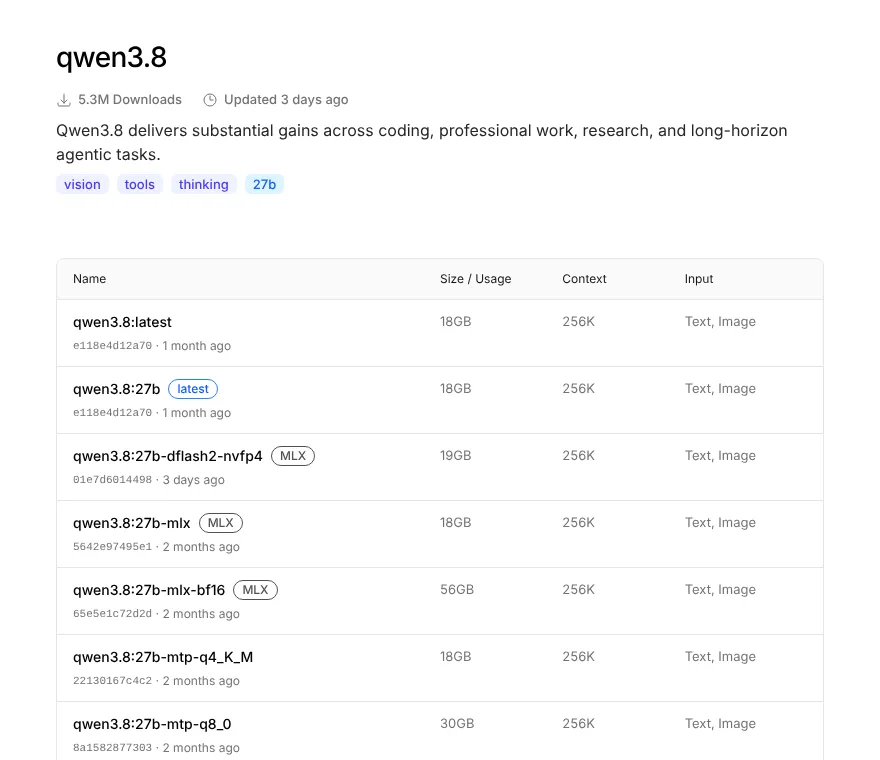
No. Every qwen3.8 tag in Ollama is the 27B model, and the qwen3.6 tags are 27B or 35B. LM Studio's catalog agrees: to run the smallest Qwen3.8, you need at least 16 GB of RAM. So the newest Qwen models that can run locally on 8GB or 16GB are the Qwen3.5 small sizes.
What is Qwen3.8-Flash-Next?
Qwen calls it an experimental preview of the architecture that will underpin Qwen4. Its smallest Ollama build is 105GB as MLX and 120GB as q4_K_M, so it is for 128GB-class workstations, not the 32GB desktop in this guide. Its license is not Apache: firms running a model-as-a-service or AI work assistant business need a separate license from Qwen for commercial use.
Which Qwen size fits 8, 16, 32 and 64GB machines?
A model needs its whole file in memory plus room for its context, the text it keeps in view, and for your operating system. My rule of thumb is a download no bigger than about two thirds of your RAM. Quantization (storing each weight in fewer bits, such as 4-bit or 8-bit) is why one model comes in several sizes.
| Your memory | Best Qwen in October 2026 | Ollama tag and download | Notes |
|---|---|---|---|
| 8GB | Qwen3.5 4B | qwen3.5:4b, 3.3-4.0GB | Qwen 3.8 and 3.6 will not fit |
| 16GB | Qwen3.5 9B | qwen3.5:9b, 6.6-7.6GB | LM Studio minimum: 7 GB |
| 32GB | Qwen3.8 27B, or Qwen3.6 35B-A3B | qwen3.8:27b, 18GB; qwen3.6:35b, 23-24GB | Close other big apps |
| 64GB | Qwen3.8 27B at 8-bit | qwen3.8:27b-q8_0, 30GB; qwen3.6:35b-a3b-q8_0, 39GB | Room for long context |
| 128GB or more | Qwen3.8-Flash-Next | qwen3.8-flash-next:125b-mlx, 105GB | MLX build is for Macs |
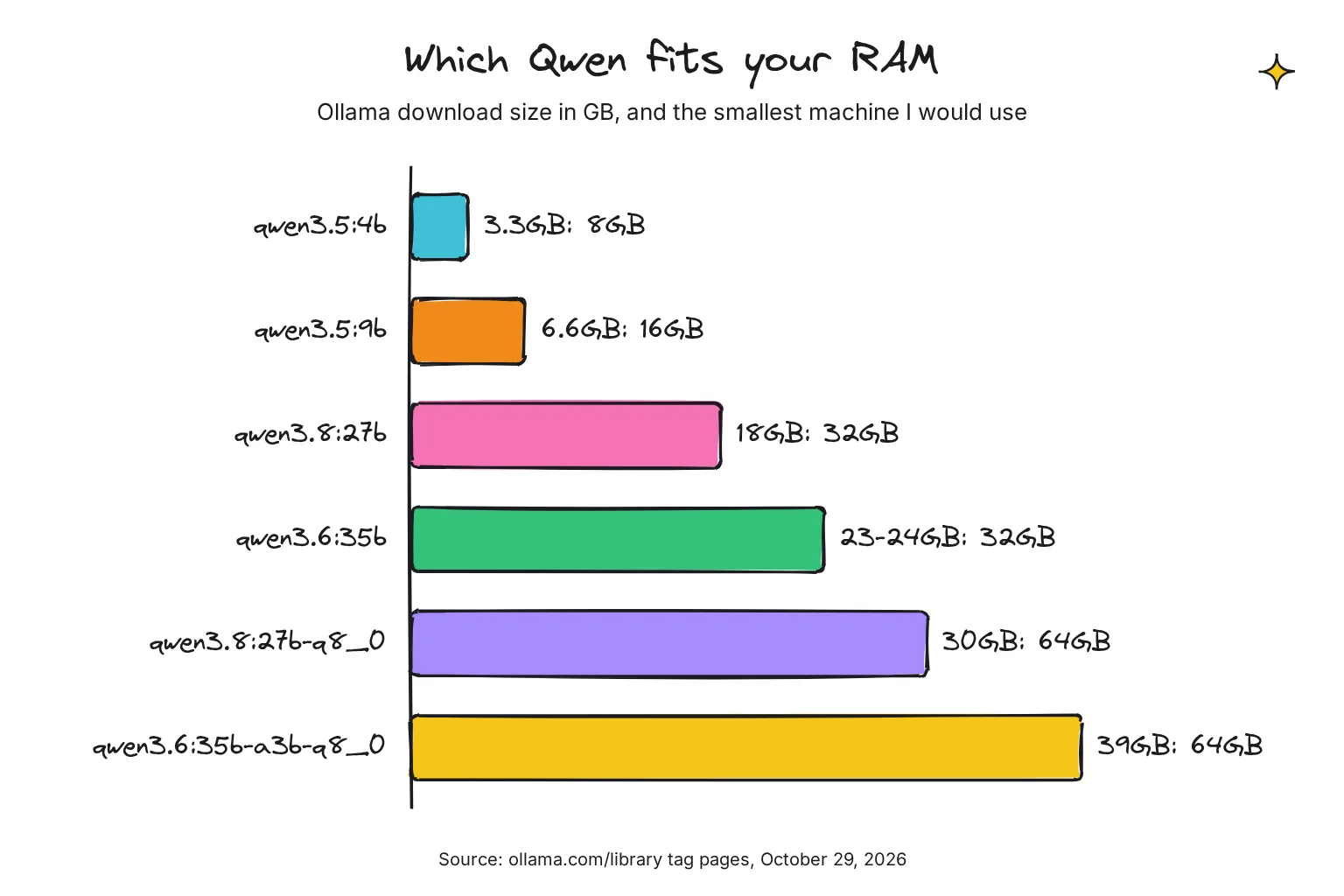
LM Studio quotes lower floors: 16 GB minimum system memory for Qwen3.8 27B, whose download it lists at 16.10 GB, and 20 GB for Qwen3.6 35B-A3B, a 20.40 GB download. A 16GB machine would have nothing left for Windows and your browser, so I would treat 32GB as the real starting point for either.
RAM or VRAM: what counts on a PC with a graphics card?
Both. The part of the model that fits in VRAM runs fast; the rest runs from system RAM on the processor, which is slower. On our reader's 12GB card, the 18GB Qwen3.8 file is split between the two. That works, but expect slower replies than on a 24GB card, which holds the whole file. On a Mac, the memory is shared, so the RAM figure is the one that matters.
The MoE model eases this. Qwen3.6 35B-A3B is the bigger file, but it activates only 3B parameters per word, against 27B for the dense Qwen3.8, so the slow, CPU-held part has much less to do per word. If speed on the 12GB card bothers you, try both and keep the one you can live with.
How to run Qwen 3.8 with Ollama
Ollama is a free app that downloads open models and runs them on your own computer. If it is new to you, our guide to installing Ollama on Windows, Mac and Linux covers first-run errors.
- Install or update Ollama. Download it from ollama.com/download, or use the one-line installers from the same page, shown below. Ollama added Qwen 3.8 27B support in version 0.32.12, released on August 14, 2026, so any older install needs updating. The newest release is v0.40.13, from October 28, 2026.
- Check the version. Run
ollama -v, the check Ollama's docs use. - Run the model. Type
ollama run qwen3.8, the command on Ollama's qwen3.8 page. The first run downloads 18GB, then opens a chat. - Check where it loaded. In a second terminal, run
ollama ps. Under PROCESSOR, 100% GPU means it fits in VRAM, and a CPU/GPU split means part sits in system memory. On the 12GB card, expect a split. - Try Qwen3.6 for comparison. Run
ollama run qwen3.6, which on Ollama's qwen3.6 page points to the 35B MoE model by default. Useollama run qwen3.6:27bfor the dense one.
# Windows (PowerShell)
irm https://ollama.com/install.ps1 | iex

# macOS or Linux
curl -fsSL https://ollama.com/install.sh | sh

ollama -v
ollama run qwen3.8
ollama ps
Which Qwen 3.8 Ollama tag should I pick?
For most people, the default. qwen3.8:latest and qwen3.8:27b are the same 18GB file, a 27.3B model at Q4_K_M plus a 931MB image encoder. Other tags trade size for quality or speed:
qwen3.8:27b-q8_0is the 8-bit build at 30GB, closer to the original, for 64GB machines.qwen3.8:27b-mtp-q4_K_M(18GB) andqwen3.8:27b-mtp-q8_0(30GB) are named for the model's multi-token prediction (MTP) layer, which Qwen trained with multiple steps. I would leave them to people who know they want them.qwen3.8:27b-mlx(18GB) and the other tags marked MLX use Apple's machine learning framework, which Ollama runs on Apple silicon. Skip them on Windows.qwen3.8:27b-bf16is the unquantized model at 56GB; few home machines need it.
Ollama is slow or ignores my graphics card
Run ollama ps first. A split is expected on a 12GB card with a 27B model; 100% CPU means the GPU is not used at all, usually a driver problem. Our guide to fixing Ollama when it is not using your GPU covers Nvidia, AMD and Docker cases. If the split is the issue, step down to qwen3.5:9b, which fits in 12GB of VRAM.
How to run Qwen 3.8 in LM Studio
LM Studio is a free desktop app with model search, chat and document upload in one window. Version 0.4.27 came out on October 29, 2026. I found no minimum LM Studio version stated for Qwen 3.8 on LM Studio's pages, so update the app and its runtimes before you download. Our LM Studio vs Ollama comparison helps if you are choosing between them.
- Install LM Studio. Get it from lmstudio.ai/download, using the Download LM Studio button rather than Bionic's, its separate agent app. On x64 Windows it needs AVX2 instruction set support.
- Search for the model. Open the Discover tab, which you can reach with Ctrl + 2 on Windows or Cmd + 2 on a Mac, and search for
qwen/qwen3.8-27b. - Pick a download. LM Studio's catalog entry is based on GGUF and on MLX builds from 4-bit to 8-bit. Take the GGUF on Windows and MLX on a Mac; LM Studio's advice is a 4-bit option or higher if your machine is capable.
- Load it and chat. Pick the model at the top of the chat window. For Qwen3.6, the catalog offers
qwen/qwen3.6-35b-a3b(20.40 GB) andqwen/qwen3.6-27b(16.10 GB).
If you prefer the terminal, LM Studio's lms get command downloads by name. LM Studio's docs use the catalog name in lms get openai/gpt-oss-20b, and Qwen 3.8's catalog name is qwen/qwen3.8-27b:
lms get qwen/qwen3.8-27bWhere to get Qwen GGUF and MLX files
GGUF is the single-file model format used by llama.cpp, the engine inside Ollama and LM Studio on most PCs; our explainer on what GGUF is goes further. Qwen's own Hugging Face pages hold the original weights in Hugging Face Transformers format, aimed at server engines such as vLLM and SGLang, not GGUF.

For a Qwen GGUF, you have three good routes, all built from Qwen's weights:
- Ollama packages its own builds, so
ollama runneeds no separate file. - LM Studio's community repo offers Qwen3.8-27B in Q4_K_M, Q6_K and Q8_0, plus the image encoder file, made with llama.cpp release b10430.
- llama.cpp's own team publishes ggml-org/Qwen3.8-27B-GGUF, and Unsloth offers a wider range of quantizations.
Hugging Face also lists many renamed remixes, some sold as uncensored. I would stay with the sources above, because a stranger's merge can behave very differently from the model Qwen tested. On a Mac, MLX builds come from LM Studio's catalog or Ollama's MLX tags.
How does thinking mode work in Qwen 3.8?
Qwen 3.8 thinks by default: it writes a hidden reasoning trace before its answer. That helps with code and hard questions but costs time, and on a split CPU and GPU setup the wait adds up. Qwen 3.6 and 3.5 also think by default, per their model cards.
Qwen 3.8 adds two controls. Reasoning effort sets how hard it thinks: xhigh (the default), medium or low. Preserved thinking keeps reasoning from earlier messages in the conversation, on by default, which Qwen says helps agents stay consistent.
How do I turn thinking off in Ollama?
Ollama's run command has the switches built in: --think=false to disable thinking and --hidethinking to hide the trace, and /set think or /set nothink inside a chat. Run ollama run --help to see them on your machine. With Qwen they look like this:
ollama run qwen3.8 --think=false
ollama run qwen3.8 --hidethinking
ollama run qwen3.8 --think=low
The last line asks for low effort. Ollama's thinking docs say levels vary by model, and its source code maps low and medium to Qwen 3.8's matching levels, with xhigh, high or no level meaning xhigh. In LM Studio, the model page lists Reasoning Effort, Enable Thinking and Preserve Thinking as custom fields you can change.
How much context should I give Qwen?
The models handle 262,144 tokens natively, but Ollama starts small to save memory: 4k context below 24 GiB of VRAM, 32k from 24 to 48 GiB. Our 12GB reader gets 4k, which is short for a long document. Qwen advises at least 128K tokens to preserve thinking capabilities for Qwen 3.6, and Ollama suggests at least 64000 for agents and coding tools. Raise it with the app's context slider or OLLAMA_CONTEXT_LENGTH, then check ollama ps again, because a longer context needs more memory.
Is Qwen 3.8 better than Qwen 3.6? The maker's benchmarks
Every score here is Qwen's own, from its model cards, often on in-house tests or with Qwen's chosen settings. Treat them as the maker's claims, not independent results. On the Qwen3.8-27B model card, Qwen reports these results against Qwen3.6-27B:
| Benchmark (Qwen's own figures) | Qwen3.8-27B | Qwen3.6-27B |
|---|---|---|
| SWE-bench Pro (agentic coding) | 61.7 | 53.5 |
| Terminal Bench 2.1 (terminal coding) | 73.0 | 63.4 |
| LiveCodeBench v6 (competitive coding) | 90.3 | 83.9 |
| GPQA Diamond (science reasoning) | 89.2 | 87.8 |
| OSWorld-Verified (computer use) | 84.3 | 63.9 |
| OmniDocBench 1.5 (documents) | 91.1 | 89.4 |
Qwen notes that its SWE-bench Pro runs used the Claude Code harness at temp=1.0, top_p=0.95, and a 256K context window, with problem tasks corrected and baselines re-run. That 256K context is far more than our reader's default 4k, so home results can differ.
For the MoE model, the Qwen3.6-35B-A3B card reports 73.4 on SWE-bench Verified, against 75.0 for the dense Qwen3.5-27B and 70.0 for Qwen3.5-35B-A3B. On Ollama's Flash-Next page, Qwen's table gives Flash-Next 62.5 on SWE-bench Pro, a little above Qwen3.8-27B's 61.7.
Which settings does Qwen recommend?
For thinking mode, Qwen suggests temperature 1.0, top_p 0.95 and top_k 20; with thinking off, temperature 0.7, top_p 0.80, top_k 20 and presence_penalty 1.5. LM Studio's Qwen3.8 entry ships with temperature 1, top_k 20 and top_p 0.95 already set, so most readers can leave these alone.
My take on Qwen 3.8, 3.6 and 3.5 for a home PC
This is opinion, not a test. Qwen3.8 27B looks like the strongest Qwen you can run on a single home machine, and its Apache 2.0 license makes it easy to use at work. The jumps Qwen reports over Qwen3.6 are biggest in agent and computer-use tasks, which matter most if you plan to plug it into a coding agent.
The catch is hardware. At 18GB it is a 32GB-machine model, and on a 12GB graphics card it will run partly on the processor. For chat and drafting on that setup, I would keep Qwen3.6 35B-A3B installed too, because its 3B active parameters should make it the easier of the two on a split setup.
On 8GB or 16GB, do not chase the 3.8 name. Qwen3.5 9B and 4B are the right tools, and our roundup of the best Ollama models for your hardware sets them against other families. I would skip Flash-Next unless you own a 128GB workstation, and treat the 2.4T model as a cloud service.
Common questions about running Qwen locally
Does Qwen 3.8 exist, and can I run it locally?
Yes. Qwen released Qwen3.8 open-weight models in August 2026. The one that fits a home computer is Qwen3.8-27B, an 18GB download in Ollama under the Apache 2.0 license. The larger Flash-Next needs about 105GB or more, and the 2.4 trillion parameter model is for data centers.
How much RAM do I need for Qwen 3.8 27B?
Plan on 32GB. The default Ollama build is 18GB and LM Studio's is 16.10 GB, and you also need room for the context and your operating system. LM Studio lists 16 GB as a minimum, but that leaves almost nothing spare. With 64GB you can use the 30GB 8-bit build.
What is the Ollama command for Qwen 3.8?
Type ollama run qwen3.8 after installing or updating Ollama. It downloads the 27B model, 18GB at 4-bit, and opens a chat. Support for Qwen3.8 first shipped in Ollama 0.32.12 in August 2026, so update older installs first. For the 8-bit build, use ollama run qwen3.8:27b-q8_0.
Which Qwen model runs on a 16GB laptop?
Qwen3.5 9B is the best fit. In Ollama it is qwen3.5:9b, a 6.6GB download, and LM Studio lists 7 GB as its minimum memory. Qwen 3.8 and 3.6 have no small sizes, so on 8GB pick qwen3.5:4b, a 3.3GB download, instead.
Where can I download a Qwen GGUF file?
Qwen publishes its weights in Hugging Face Transformers format, not GGUF. For GGUF files, use Ollama, which packages its own, or the lmstudio-community, ggml-org and Unsloth repositories on Hugging Face. LM Studio's repository offers Qwen3.8-27B in Q4_K_M, Q6_K and Q8_0, plus the image encoder.
How do I stop Qwen from thinking before it answers?
In Ollama, add --think=false to the run command, or type /set nothink inside a chat. In LM Studio, switch off the Enable Thinking field for the model. With Qwen 3.8 you can also lower the reasoning effort to low or medium instead of turning thinking off completely.
My verdict for a 32GB PC with a 12GB graphics card: run Qwen3.8 27B, keep Qwen3.6 as backup
For the reader in this guide, ollama run qwen3.8 is the right first move: the newest Qwen that fits, Apache 2.0, with images and adjustable thinking. Expect it to split between the 12GB card and system memory. If replies feel too slow, pull qwen3.6 and compare, and for quick tasks set thinking to low. On 16GB, start with qwen3.5:9b; on 64GB, go for qwen3.8:27b-q8_0. Want other apps to run these models in? See our guide to local AI apps.
Your next step: update Ollama, run ollama run qwen3.8, then ollama ps to see how much sits on the GPU. Ask it to explain a script or document you know well, so you can judge the answer.
Sources
- qwen3.8 - Ollama
- qwen3.8 tags - Ollama
- qwen3.8:27b - Ollama
- qwen3.8-flash-next - Ollama
- qwen3.8-flash-next tags - Ollama
- qwen3.6 - Ollama
- qwen3.6 tags - Ollama
- qwen3.5 tags - Ollama
- Model search: qwen - Ollama
- Download Ollama - Ollama
- Linux - Ollama
- FAQ - Ollama
- Thinking - Ollama
- Context length - Ollama
- Ollama is now powered by MLX on Apple Silicon in preview - Ollama
- Release v0.32.12 - ollama/ollama, GitHub
- Release v0.40.13 - ollama/ollama, GitHub
- model/renderers/qwen35.go at v0.40.12 - ollama/ollama, GitHub
- cmd/cmd.go at v0.40.12 - ollama/ollama, GitHub
- cmd/interactive.go at v0.40.12 - ollama/ollama, GitHub
- Qwen3.8-Max: A New Bar for Coding and Cowork - Qwen
- Qwen3.8-27B - Qwen, Hugging Face
- Qwen3.8-Flash-Next - Qwen, Hugging Face
- Qwen Community License 1.0 - Qwen, Hugging Face
- Qwen3.8-2.4T-A95B - Qwen, Hugging Face
- Qwen3.8-2.4T-A95B license - Qwen, Hugging Face
- Qwen3.6-35B-A3B - Qwen, Hugging Face
- Qwen3.6-27B - Qwen, Hugging Face
- Qwen3.5-9B - Qwen, Hugging Face
- Qwen3.8-27B-GGUF - lmstudio-community, Hugging Face
- Qwen3.8-27B-GGUF - ggml-org, Hugging Face
- Qwen3.8-27B-GGUF - Unsloth, Hugging Face
- Qwen3.8 - LM Studio
- qwen/qwen3.8-27b - LM Studio
- Qwen3.6 - LM Studio
- qwen/qwen3.5-9b - LM Studio
- LM Studio 0.4.27 release notes - LM Studio
- Download LM Studio - LM Studio
- System Requirements - LM Studio
- Download an LLM - LM Studio
- lms get - LM Studio
- LM Studio, llmster, and lms - LM Studio