
LM Studio vs Ollama: which should you choose?
Choose LM Studio if you want everything in one window: it finds, downloads and runs models, and lets you attach documents, with no terminal needed. Choose Ollama if you want a free, open-source engine running in the background for other apps such as Open WebUI. Both are free for local use, and both can sit on one computer.
This guide follows one reader: someone with a 16GB laptop, either a Windows machine with no separate graphics card or an M-series MacBook Air, who wants a private assistant for drafting and for questions about their own documents, and who is unsure whether they need a terminal.
Choose LM Studio if:
- You want model search, chat and document upload in one app, with a User mode that shows only the chat interface and auto-configures everything.
- You use an Apple Silicon Mac and want MLX models, which LM Studio runs alongside GGUF files.
- You want to plug MCP tools into a local model, and a closed-source app that is free at home and at work suits you.
Choose Ollama if:
- You want open-source software under the MIT license.
- You plan to use Open WebUI or a coding agent:
ollama launchsets up Claude Code, Codex or OpenCode. - You are happy with short commands, or you run Linux, where Ollama is a terminal tool because its desktop app is for macOS and Windows.
- You want optional cloud models in the same app, with a setting to switch them off.
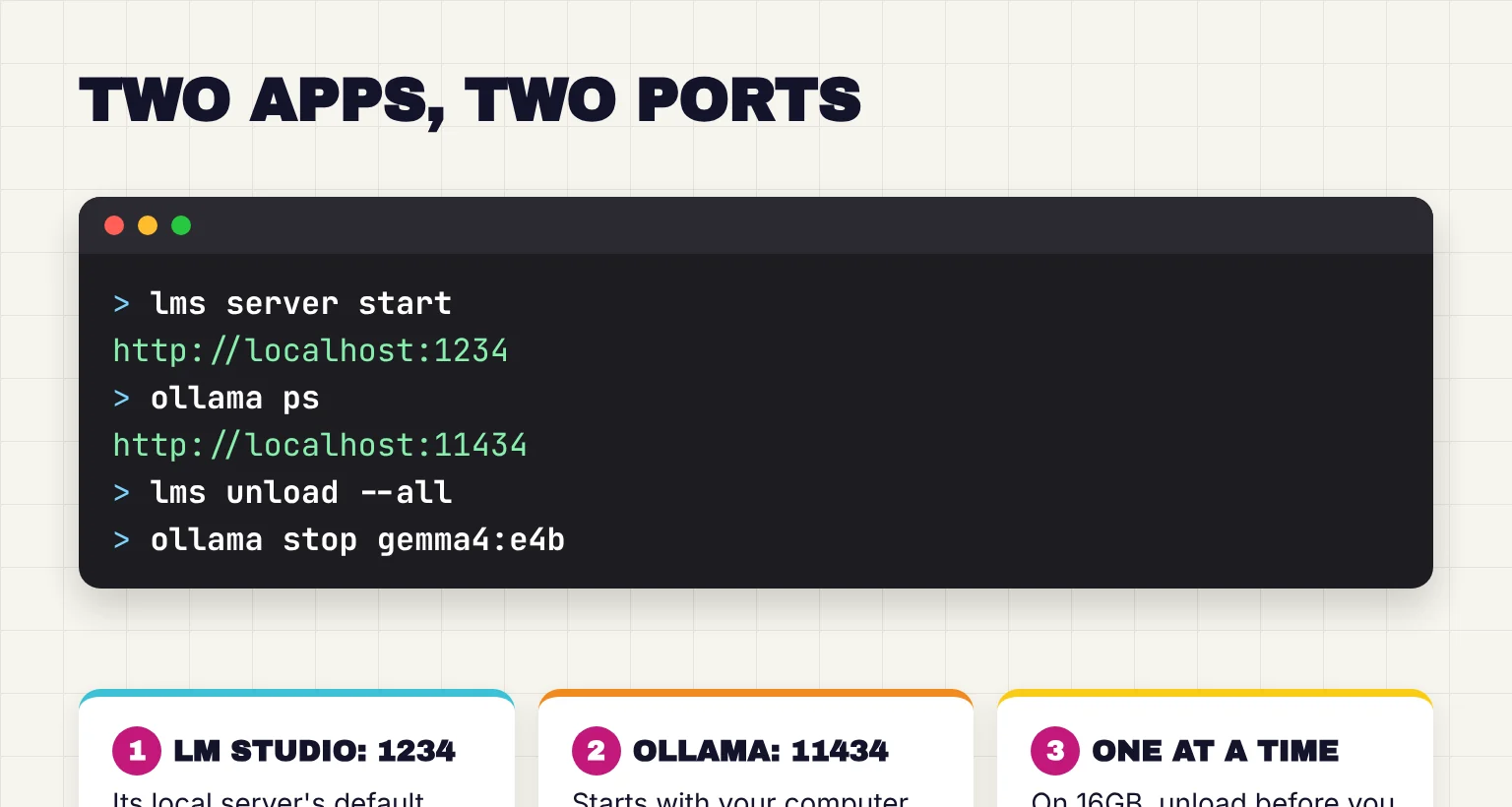
Use both when LM Studio is your model tester and Ollama is the background engine for another tool. Their servers use port 1234 and port 11434, so they do not collide, but on 16GB keep only one model loaded at a time.
How LM Studio and Ollama compare in October 2026
Both are runners: programs that load an open-weight model, a downloadable file of trained weights, and let you chat with it or call it from other software. Our guide to running ChatGPT-like AI locally explains more. GGUF is the model format of llama.cpp, an open-source engine for Windows, Mac and Linux, and MLX is Apple's machine learning framework for its own chips. In October 2026, the current versions are LM Studio 0.4.27, released October 29, and Ollama v0.40.13, the latest release as of October 29.
| Feature | LM Studio | Ollama |
|---|---|---|
| License | Closed-source app; lms, SDKs and MLX engine are MIT | MIT |
| Price and work use | Free, including at work; cloud on paid Bionic plans | Free, with starter cloud credits; Pro is $20 a month |
| Interface | App with model search, chat and document upload | macOS and Windows chat app with file drag and drop |
| Systems | macOS 14+ on Apple Silicon; Windows x64 (AVX2) or ARM; Linux x64 or ARM64 | macOS 14+ (Intel on CPU only); Windows 10 22H2+; Linux |
| Models and formats | Hugging Face search in the app; GGUF, plus MLX on Apple Silicon | Ollama's library; GGUF, plus MLX tags on Apple Silicon; Modelfile imports |
| API | localhost:1234; OpenAI, Anthropic and native APIs | localhost:11434; native, OpenAI and Anthropic APIs |
| MCP and tools | MCP host since 0.3.17 | Tool calling; MCP through the app you connect |
| Headless use | llmster daemon since 0.4.0 | Background service; systemd on Linux; Docker image |
| What goes online | Model search, downloads and updates; no telemetry | Downloads and updates; cloud models and web search if you sign in |
Is LM Studio free for work?
Yes. LM Studio dropped its separate commercial license on July 8, 2025, and its terms, dated August 23, 2026, cover personal and internal business use. They bar reselling it or running it as a hosted service. Paid plans buy Bionic's cloud models and web search, at $20 or $100 a month, not the local app.
Is LM Studio open source?
No. Its terms say the source code constitutes valuable trade secrets. Some pieces are open: the lms command-line tool, the JavaScript and Python SDKs and its MLX engine are MIT licensed.
Which is faster, and which uses less memory?
Expect similar speed when both run the same model file with the same settings, because the work happens in shared engines. Ollama 0.30, in June 2026, brought GGUF model compatibility through llama.cpp, and its source now pins build b11963 and wraps llama.cpp's server program, while LM Studio 0.4.26 ships a llama.cpp runtime built from upstream b11337. Bigger swings come from model size, quantization (how many bits store each weight), context length, and whether the model fits in fast memory.

Published numbers point the same way. Ollama's own test of its new Mac engine showed decode speed rising from 58 to 112 tokens per second on a 35B model, a change of engine and format, not app. A 2025 study on an M2 Ultra Mac Studio found MLX had the highest sustained throughput of five runtimes and Ollama lagged, before Ollama adopted MLX. I know of no recent like-for-like test of the two apps that I trust, so I would not choose on speed; our local vs cloud AI comparison explains tokens per second.
Memory use is mostly the model plus its context, the text it keeps in view. Gemma 4 12B is a 7.40 GB download in LM Studio and 7.7 to 8.0GB in Ollama, and Google says it is small enough to run locally with just 16GB of VRAM or unified memory. Ollama defaults to a 4K context below 24 GiB of VRAM, saving memory but limiting document length, and unloads idle models after 5 minutes. LM Studio unloads models other apps loaded after 60 idle minutes, and lms load --estimate-only prints a memory estimate first.
LM Studio and Ollama on a Mac with MLX
On Apple Silicon, LM Studio runs GGUF and MLX models, and Gemma 4 is available in gguf and mlx. It needs macOS 14 or newer and does not support Intel Macs. Ollama needs macOS 14 too, and added an MLX engine in 2026, in preview from March 30 and now used by tags such as gemma4:12b-mlx. On the MacBook Air, pick the MLX build in either app.
APIs, MCP, Open WebUI and agent mode
Which has an API?
Both do, and both accept OpenAI-style and Anthropic-style requests so existing tools can connect. LM Studio's server starts from the Developer tab or with lms server start and offers OpenAI-compatible endpoints at http://localhost:1234/v1, plus an Anthropic-compatible /v1/messages endpoint since 0.4.1. Ollama serves its own API, OpenAI compatibility at /v1 and an Anthropic-style base URL on localhost:11434. For a machine with no screen, LM Studio's llmster is the app's core packaged as a standalone daemon since 0.4.0, and Ollama on Linux runs as a startup service.
MCP and tool support
MCP, the Model Context Protocol, is a standard way to plug tools such as a file reader or a browser into an AI app. LM Studio has been an MCP host since 0.3.17 in June 2025. You add servers by editing mcp.json from the Program tab, and its docs warn that some MCP servers can run arbitrary code, access your local files, and use your network connection. Ollama supports tool calling through its API, but its docs mention MCP mainly as a way to give other MCP clients its web search.
Ollama with Open WebUI
Open WebUI is a separate browser chat interface that sits on top of a runner. It automatically attempts to connect to your Ollama instance, can use LM Studio through an OpenAI-compatible connection to http://localhost:1234/v1, and supports MCP natively from v0.6.31, for Streamable HTTP servers, the simplest route to MCP tools for Ollama models. Our Gemma 4 and Open WebUI guide walks through the setup, and our Open WebUI setup guide covers installing, updating and securing it. The 16GB reader can skip it at first.
What agent mode in LM Studio actually is
If you searched for agent mode, the agent is a new, separate app from LM Studio: LM Studio Bionic, launched on July 16, 2026 for coding, research and document work. Sessions can use local, remote or cloud models, and the free plan includes the agent and local models.
How to try both on one machine, and whether they can share models
Running both is safe if you treat them as two libraries. These steps use Gemma 4: E4B on a Windows laptop with no graphics card, 12B on a 16GB MacBook Air. If you would rather try Qwen, our guide to running Qwen 3.8 in Ollama or LM Studio shows which size fits your RAM.
- Install LM Studio. Use the Download LM Studio button on lmstudio.ai/download, below Bionic's. On x64 Windows it needs AVX2 instruction set support.
- Download a model and add a document. In Discover, search for Gemma 4 and get
google/gemma-4-e4b(5.90 GB) orgoogle/gemma-4-12b(7.40 GB), picking MLX on a Mac. Load it and attach a .docx, .pdf or .txt file; LM Studio adds a short file in full and retrieves passages from a long one. - Install Ollama from ollama.com/download. On Windows and macOS it registers as a login item, so its server starts with your computer.
- Pull a model. Run
ollama pull gemma4:e4bon Windows orollama pull gemma4:12b-mlxon a Mac, then chat in the app or withollama run. For long documents, raise the context length in the app's settings, which will require more memory. - Unload before you switch. Eject the model in LM Studio or run
lms unload --all, and runollama stop gemma4:e4b(orollama stop gemma4:12b-mlxon a Mac) when you leave Ollama. Two 7GB models plus your other apps will not fit comfortably in 16GB.
Everyday terminal jobs map closely, per LM Studio's CLI docs and Ollama's CLI reference.
| Job | LM Studio | Ollama |
|---|---|---|
| Download a model | lms get | ollama pull |
| List downloaded models | lms ls | ollama ls |
| See what is loaded | lms ps | ollama ps |
| Unload a model | lms unload --all | ollama stop <model> |
| Start the server | lms server start | ollama serve |
| Default address | http://localhost:1234 | http://localhost:11434 |
Can LM Studio and Ollama share models?
Not directly. LM Studio keeps GGUF files in publisher and model folders under ~/.lmstudio/models, Ollama keeps its own store, such as ~/.ollama/models on a Mac, and neither reads the other's. To feed one GGUF file to both, link it into LM Studio, then put one FROM line in a text file named Modelfile and build an Ollama model from it:

lms import /path/to/my-model.Q4_K_M.gguf --symbolic-link

# Modelfile contents:
FROM /path/to/my-model.Q4_K_M.gguf

ollama create -f Modelfile my-model
Keep the flag: without it, lms import moves the file by default, and --copy is the fallback. Ollama's create step copies the file into its own store, so expect to use the space twice. For the 16GB reader, downloading inside each app is simpler.
What stays private, and what still goes online
Both keep chats on your computer with local models. LM Studio's policy says that, run locally, none of your messages, chat histories, and documents are ever transmitted, and that the app does not include telemetry. It goes online to search for and download models, fetch runtimes and check for updates, and its paid cloud requests are processed transiently and not retained.
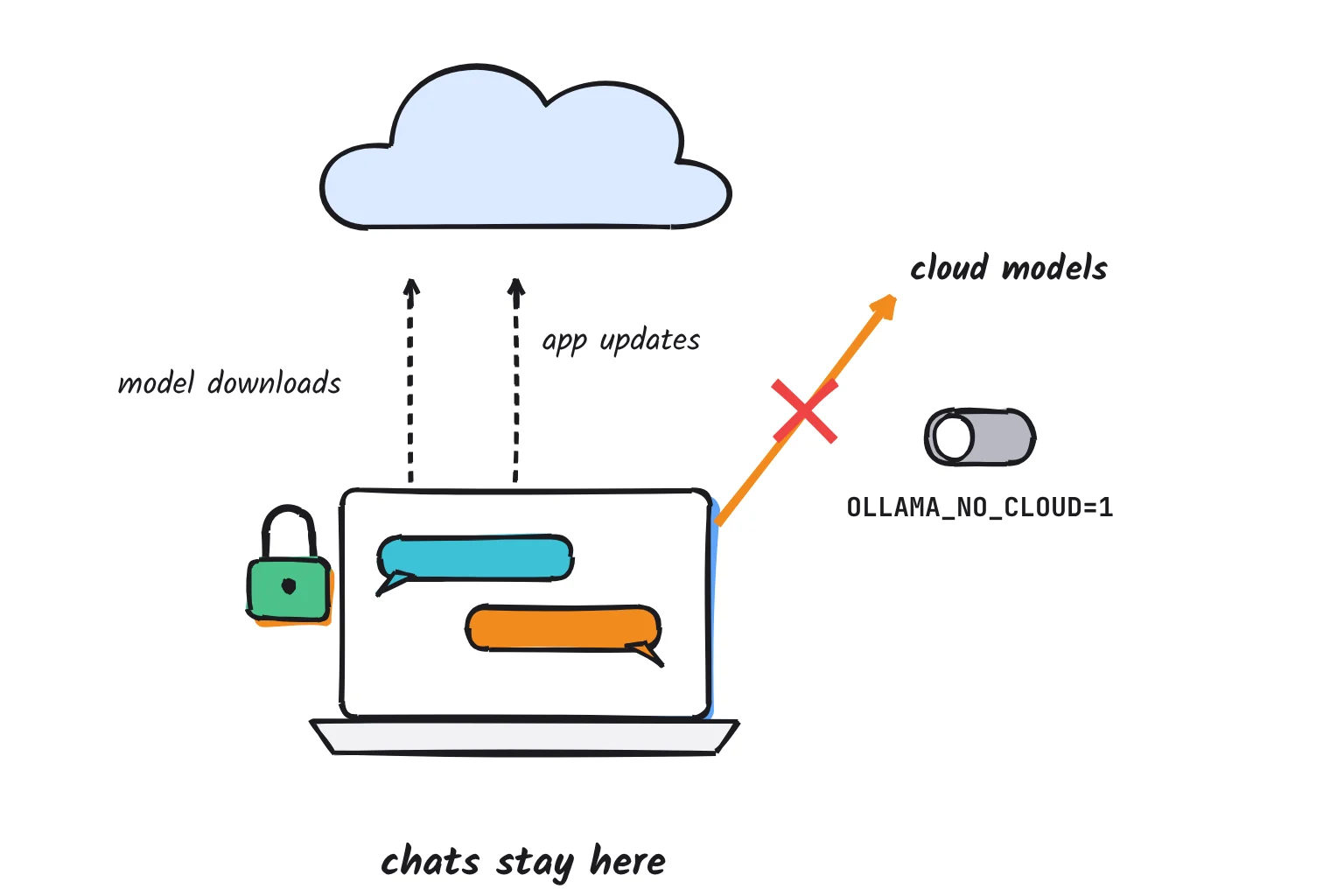
Ollama says it does not see your prompts or data when you run locally. The catch is its cloud: a name such as gemma4:cloud means a cloud model that is not downloaded, so it runs on Ollama's servers, and web search needs a free Ollama account. To rule both out, set OLLAMA_NO_CLOUD=1, or disable_ollama_cloud in ~/.ollama/server.json, and restart. On macOS and Windows, Ollama also downloads updates automatically.
Both servers start reachable from your own machine only. Ollama binds 127.0.0.1 port 11434 by default, and its local API does not require authentication, so setting OLLAMA_HOST to 0.0.0.0 opens it to your network. LM Studio warns that any bind other than 127.0.0.1 exposes the server, and its API tokens are off by default. Models come under different licenses, so check before commercial use. For private documents, stay on localhost, turn off Ollama's cloud, and install the apps only from lmstudio.ai or ollama.com.
Fixing port clashes, models that will not load, and GPU offload
Port already in use
The apps use different ports, so they do not block each other. If another program holds 1234, start LM Studio's server with lms server start --port 3000 (the port flag) and update the connecting app. If ollama serve says 11434 is busy, Ollama is probably already running from the tray or menu bar. To move it, set OLLAMA_HOST, for example to 127.0.0.1:11435, as its FAQ describes.
A model will not load
The usual cause is memory. Unload the model in the other app, then try a smaller size, or a 4-bit download if you picked a bigger file; LM Studio suggests a 4-bit option or higher if your machine is capable. New model families can need newer engines, so update LM Studio's runtimes with Ctrl+Shift+R, or Cmd+Shift+R on a Mac, and update Ollama. Ollama logs errors to server.log, in ~/.ollama/logs on a Mac or %LOCALAPPDATA%\Ollama on Windows.
Slow replies, or the GPU sits idle
In Ollama, run ollama ps while a model is loaded: 100% GPU means it fits, and a CPU/GPU split means part sits in system memory, so shorten the context or pick a smaller model. In LM Studio, lms load takes --gpu max, --gpu off or a fraction. On Windows laptops with integrated graphics, LM Studio's Vulkan engine shows iGPUs but disables them by default, while Ollama enabled Vulkan by default in 0.30 for AMD and Intel graphics. On the MacBook Air, slow replies usually mean the model and context are too big for 16GB. For driver, AMD and Docker fixes, see our full guide to Ollama GPU problems.
Common questions about LM Studio vs Ollama
Is LM Studio free for work use?
Yes. Since July 8, 2025, LM Studio has been free to use at work without a separate commercial license. Its terms allow personal and internal business use but not reselling it or offering it as a hosted service. Its $20 and $100 a month plans add optional cloud models and web search, not the local app.
Is LM Studio open source?
No. The LM Studio desktop app is closed source, and its terms call the source code a trade secret. Some parts are open: the lms command-line tool, the JavaScript and Python SDKs, and its MLX engine are MIT licensed. Ollama, by contrast, is open source under the MIT license.
Which is faster, LM Studio or Ollama?
Probably neither by much. Both use the same engines, llama.cpp for GGUF files and Apple's MLX on Macs, so the same model and settings should run at similar speed. Model size, quantization, context length and GPU fit matter far more. On a Mac, an MLX build is often quicker in either app.
Can LM Studio and Ollama share models?
Not directly. Each app keeps its own library and neither reads the other's folder. You can reuse one GGUF file by linking it into LM Studio with the lms import command's symbolic-link option, then importing it into Ollama with a Modelfile and ollama create, which makes a second copy.
Do LM Studio and Ollama support MCP?
LM Studio does: since version 0.3.17 it is an MCP host, so you can add local or remote MCP servers in its mcp.json file. Ollama supports tool calling through its API but is not documented as an MCP host, so pair it with one, such as Open WebUI.
What is agent mode in LM Studio?
LM Studio's agent is a separate app, LM Studio Bionic, released on July 16, 2026. It handles coding, research and document tasks with local or paid cloud models, and its free plan includes the agent and local models. The classic LM Studio app remains the place to chat with and configure models.
My verdict for a 16GB laptop: start with LM Studio
For the reader in this guide, LM Studio is the better first app. It puts search, download, chat and document upload in one window, never needs a terminal, and offers MLX builds on the MacBook Air. For a full walkthrough of the app, see our beginner's guide to LM Studio. Add Ollama when you want Open WebUI, a coding agent or another tool built around it; the two coexist as long as only one has a model loaded. Weighing GPT4All too? Our GPT4All guide explains why its stalled development makes it a weaker start. If open source matters most, look at Jan, the open-source alternative.
Your next step: install LM Studio, download Gemma 4 E4B on Windows or the MLX build of Gemma 4 12B on a Mac, and ask it to summarize a document you know well, so you can judge the answer.
Sources
- Welcome to LM Studio Docs - LM Studio
- Chat with Documents - LM Studio
- ollama/LICENSE - GitHub
- User or Developer - LM Studio
- Quickstart - Ollama
- Ollama's new app - Ollama
- LM Studio app, llmster, and lms - LM Studio
- Windows - Ollama
- LM Studio 0.4.26 release notes - LM Studio
- LM Studio 0.4.27 release notes - LM Studio
- Release v0.40.13 - ollama/ollama, GitHub
- Pricing - Ollama
- System Requirements - LM Studio
- macOS - Ollama
- Linux - Ollama
- Download an LLM - LM Studio
- Importing a Model - Ollama
- ollama/ollama README - GitHub
- LM Studio is free for use at work - LM Studio
- LM Studio Desktop App Terms of Service - Element Labs
- Bionic Pricing - LM Studio
- lms: LM Studio's CLI - LM Studio
- lmstudio-js - lmstudio-ai, GitHub
- lmstudio-python - lmstudio-ai, GitHub
- mlx-engine: Apple MLX LLM Engine for LM Studio - lmstudio-ai, GitHub
- LLAMA_CPP_VERSION at v0.40.13 - ollama/ollama, GitHub
- llm/llama_server.go at v0.40.11 - ollama/ollama, GitHub
- Ollama is now powered by MLX on Apple Silicon in preview - Ollama
- Production-Grade Local LLM Inference on Apple Silicon: A Comparative Study of MLX, MLC-LLM, Ollama, llama.cpp, and PyTorch MPS - arXiv
- Gemma 4 - LM Studio
- gemma4 tags - Ollama
- Introducing Gemma 4 12B - Google
- Context length - Ollama
- FAQ - Ollama
- Idle TTL and Auto-Evict - LM Studio
- lms load - LM Studio
- Ollama's highest performance on Apple Silicon yet with MLX - Ollama
- OpenAI Compatibility Endpoints - LM Studio
- LM Studio as a Local LLM API Server - LM Studio
- Use your LM Studio Models in Claude Code - LM Studio
- API Introduction - Ollama
- Authentication - Ollama
- Introducing LM Studio 0.4.0 - LM Studio
- MCP in LM Studio - LM Studio
- Use MCP Servers - LM Studio
- Tool calling - Ollama
- Web search - Ollama
- Starting with Ollama - Open WebUI
- Open WebUI and LM Studio - Open WebUI
- Model Context Protocol (MCP) - Open WebUI
- Introducing LM Studio Bionic: the AI agent for open models - LM Studio
- Bionic - LM Studio
- Download LM Studio - LM Studio
- Download Ollama - Ollama
- CLI Reference - Ollama
- Import Models - LM Studio
- lms import - LM Studio
- cmd/cmd.go at v0.40.11 - ollama/ollama, GitHub
- LM Studio Desktop App Privacy Policy - Element Labs
- Offline Operation - LM Studio
- Cloud - Ollama
- Serve on Local Network - LM Studio
- Authentication - LM Studio
- Get started with LM Studio - LM Studio
- lms server start - LM Studio
- Troubleshooting - Ollama
- LM Studio 0.4.17 release notes - LM Studio
- Improved performance and model support with GGUF - Ollama