
Can you run ChatGPT locally? Yes, with a different model
You can't download ChatGPT itself. It is a hosted service, and its weights are not public. You can, though, run a ChatGPT-like assistant on your own computer using a local harness and an open-weight model, one whose trained weights are published so anyone can download them. A harness is the app that loads the model and gives you a place to chat, such as Ollama, LM Studio, or Open WebUI.
The model most people start with is OpenAI's own. In August 2025 the company released gpt-oss-120b and gpt-oss-20b under the Apache 2.0 license. The 20b version is designed to run on devices with 16 GB of memory, while the 120b version needs about 80 GB.
This guide follows one reader: someone with a mid-range Windows machine, 16GB of RAM, and a modest GPU, who wants a private assistant for drafting emails and summarizing documents. That hardware fits the 20b model. The sections ahead cover setup, matching hardware to model size, speed and quality against ChatGPT, privacy, and cost.
Two parts: the model and the app that runs it
A local setup has two pieces. The model is a large file of trained weights, the part that actually writes text. The harness is the program that loads that file into memory and gives you a chat window or a terminal prompt. Ollama, LM Studio, and Open WebUI are harnesses. You can swap models inside the same harness without reinstalling anything.
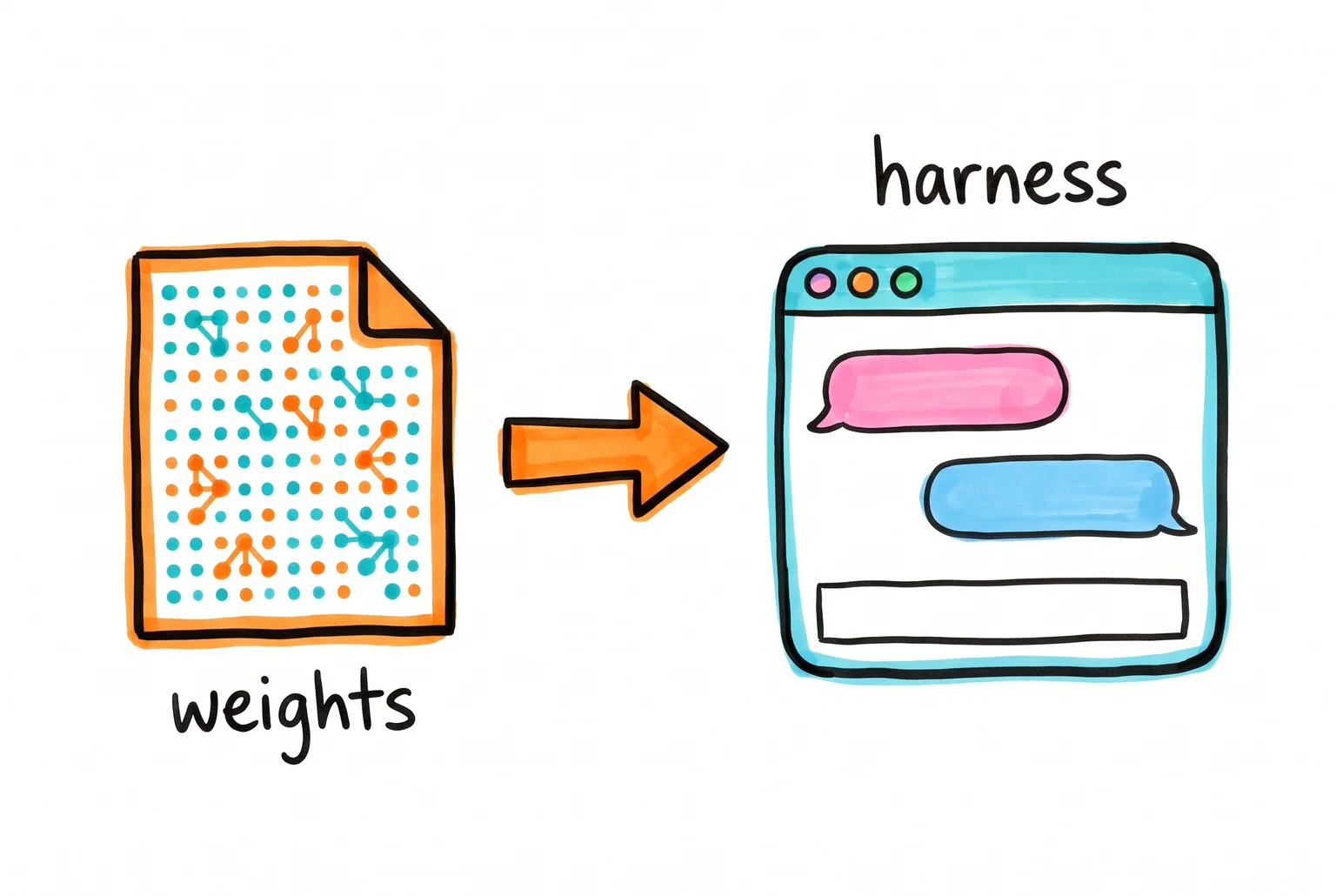
What you end up with is ChatGPT-like, not ChatGPT. The interface looks familiar, but the model behind it is a different one, usually smaller, and it runs without ChatGPT's browsing, image tools, or voice.
For the 16GB reader, my default is gpt-oss-20b. Ollama lists it as a 14 GB download with a 128K context window, and says the quantized 20B model runs in as little as 16 GB of memory. The plain gpt-oss tag pulls this one. It suits drafting, summarizing, and general questions.
The alternatives each fit a different machine:
- gpt-oss-120b is a 65 GB download that needs a single 80 GB GPU. It suits workstations and servers.
- Qwen3 is an Apache 2.0 family released in April 2025, with dense sizes of 0.6B, 1.7B, 4B, 8B, 14B, and 32B. The 4B and 8B fit 8GB machines, and the 30B-A3B mixture-of-experts model activates only 3B parameters per token.
- Gemma 3 from Google, released in March 2025 in 1B, 4B, 12B, and 27B sizes. The 4B and 12B are good choices for modest hardware.
Llama and Mistral are also widely used. Licenses vary by model family, so read the one on the model page before using a model for commercial work. gpt-oss and Qwen3 both use Apache 2.0.
How much memory decides which model you can run
The number that matters is memory the model can use: VRAM on a dedicated graphics card, or unified memory on an Apple Silicon Mac. System RAM works too, but it is slower, and a model running mostly from RAM generates text much more slowly than one that fits in VRAM. Apple Silicon shares one memory pool between CPU and GPU, so a 16GB Mac can load larger models than a 16GB PC with a small graphics card. The pool is shared with macOS and your other apps, though, and not all of it is available for model weights. Our GPU guide explains how much VRAM you need and which GPU to buy.
Quantization stores each weight in fewer bits. A 4-bit model needs roughly a quarter of the space of a 16-bit one, with some quality loss. Real files run a bit larger than the nominal figure: llama.cpp lists an 8B model at 4.9 GB in Q4_K_M.
These tiers are approximate starting points. File size is not the whole bill, because runtime overhead and the context cache grow with conversation length.
| Memory | Model size and quantization | Example models |
|---|---|---|
| 8GB | 3B to 8B at 4-bit; an 8B leaves little headroom | Qwen3 4B or 8B, Gemma 3 4B |
| 16GB | Up to about 20B in native or 4-bit form | gpt-oss-20b, Gemma 3 12B |
| 24GB | Some 30B to 32B at 4-bit, depending on context | Qwen3 30B (19 GB), Qwen3 32B (20 GB) |
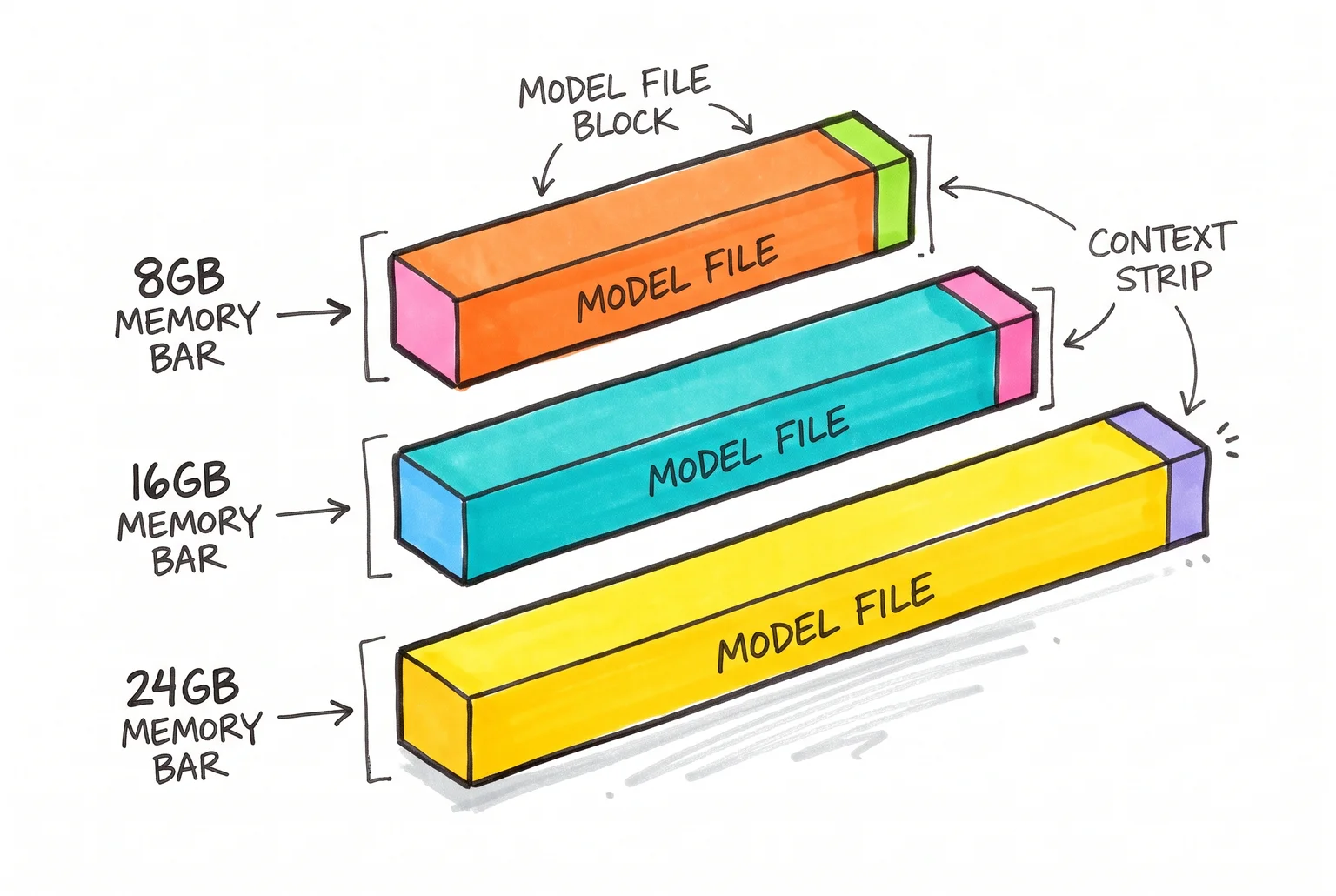
For the 16GB reader, gpt-oss-20b is the fit. Its MXFP4 format runs in as little as 16 GB, and it activates 3.6 billion of its 21 billion parameters per token. Expect a tight fit if you also have a browser and other apps open. The 30B and 32B models and gpt-oss-120b are out of reach.
With no usable GPU, Ollama and LM Studio fall back to the CPU. Small models still run, only slowly. Plan for disk space too: the gpt-oss-20b download is 14 GB, and trying a few models adds up quickly.
Install Ollama and chat with gpt-oss-20b in five steps
Windows is the main path here, using the 16GB machine from the last section. To compare LM Studio, Ollama and Jan first, see how to install a local LLM on Windows.
- Download the installer from ollama.com/download and run it. Ollama needs Windows 10 22H2 or newer, Home or Pro. It installs as a normal app and runs in the background.
- Open PowerShell or Command Prompt and run
ollama run gpt-oss:20b. The first run downloads the 14 GB model, then opens a chat prompt. Later runs start from the saved copy. - Type a prompt at the
>>>marker, such asDraft a three-sentence email asking a client for a project update.Type/byeto exit. - While the model is loaded, open a second terminal and run
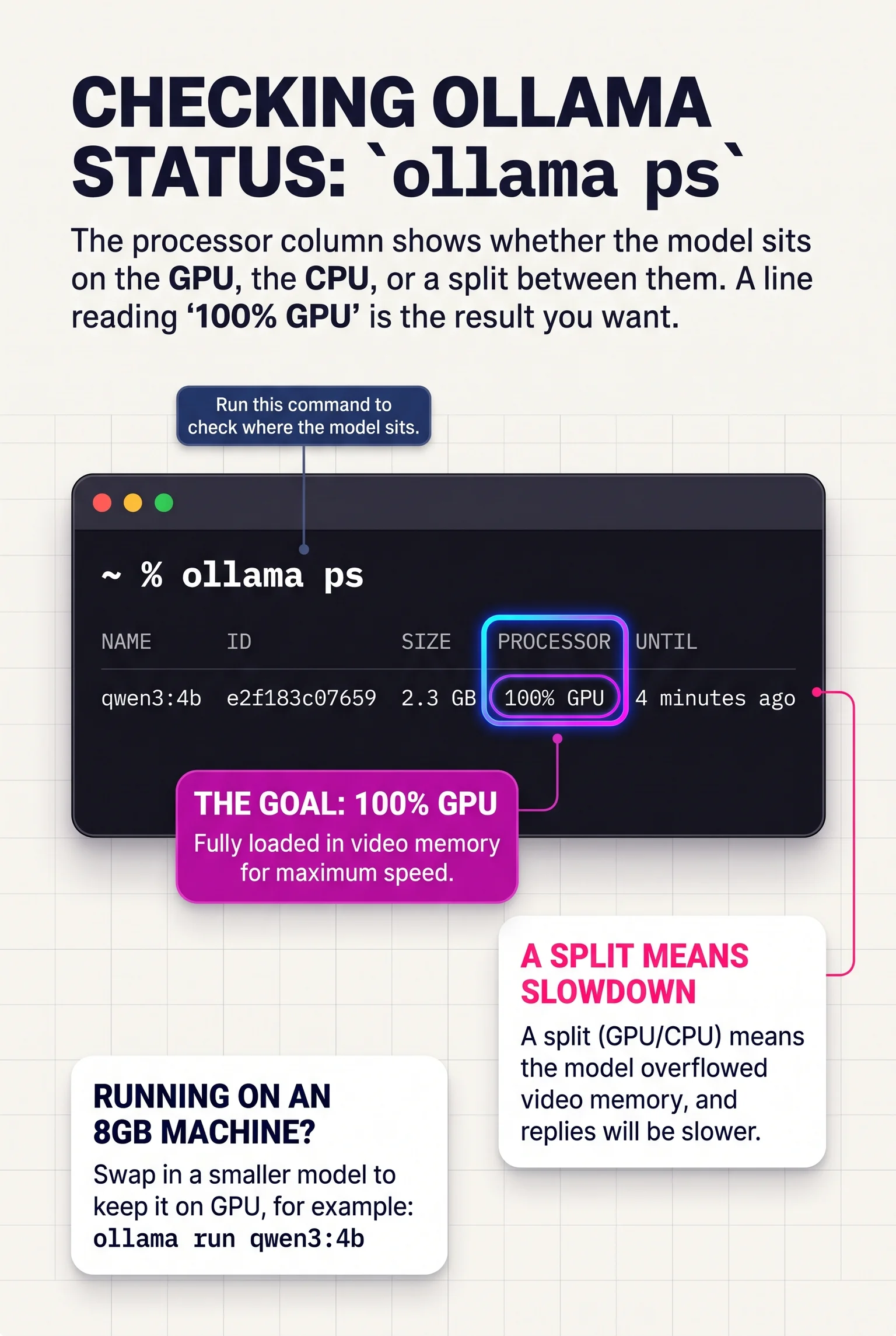
ollama ps. The processor column shows whether the model sits on the GPU, the CPU, or a split between them. A line reading 100% GPU is the result you want. A split means the model overflowed video memory, and replies will be slower. - On an 8GB machine, swap in a smaller model, for example
ollama run qwen3:4b.
Mac and Linux differ only at the start.
- Mac: Ollama requires macOS Sonoma 14 or newer. Apple Silicon runs models on the GPU through Metal, while Intel Macs run on the CPU only, so expect slow replies there.
- Linux: Install with
curl -fsSL https://ollama.com/install.sh | sh. Compatible NVIDIA and AMD cards are supported. Steps 2 to 5 are identical.
Ollama also serves a local API at http://localhost:11434. Scripts and other apps can call endpoints such as /api/generate, and OpenAI-compatible clients can point at http://localhost:11434/v1/ with any placeholder API key. The API has no authentication by default, which comes up again in the privacy section.
Get a chat window with LM Studio or Open WebUI
The terminal works, but most people want something that looks like ChatGPT. Two free options cover it.
LM Studio is a single desktop app with a built-in model browser. You search for a model such as gpt-oss-20b, download it, and chat in the same window, with no separate Ollama install. It supports Windows, macOS on Apple Silicon (macOS 14 or newer), and Linux, including Ubuntu 20.04 or newer. For a first-timer on the 16GB machine, this is the shortest path.
Open WebUI is a browser interface that connects to Ollama, so it builds on what you already installed. It offers more: document chat through a RAG workflow, reusable document collections, and shared access for other people. The cost is complexity. The docs recommend Docker for the fastest deployment, with Python as a lighter manual route. Document retrieval also needs a compatible embedding provider.
To connect it, start Open WebUI and point it at Ollama. With Docker, the endpoint for Ollama on the same machine is http://host.docker.internal:11434. A Python install on the same machine uses http://localhost:11434. For Ollama on another server, set the OLLAMA_BASE_URL variable in your Docker run command. The quick-start page has the exact command.
Choose LM Studio if you want a chat window in ten minutes. Choose Open WebUI if you already use Ollama and want document chat, several users, or more settings.
Speed and quality compared with hosted ChatGPT
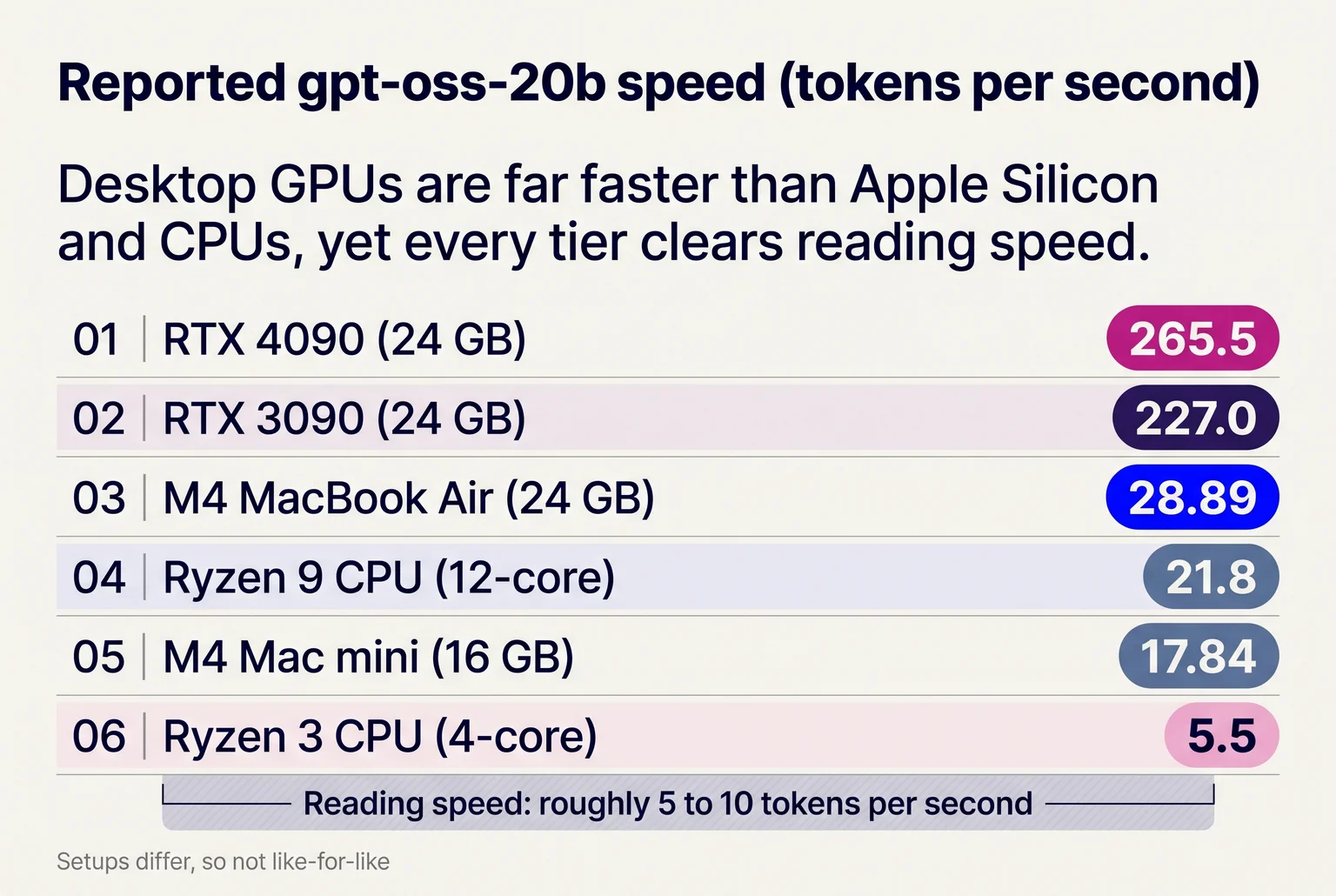
Reported speeds for gpt-oss-20b vary by hardware, runtime and context length, so treat them as examples. On a 24GB card, one source lists 265.5 tokens per second on an RTX 4090 and 227 on an RTX 3090. An 8GB RTX 4060 reportedly manages 19 when the model spills into system memory, and other split-layer tests report 25 to 40. On Apple Silicon, 17.84 tok/s on a 16GB M4 Mac mini and 28.89 on a 24GB MacBook Air were measured on a short email prompt. CPU-only results range from 21.8 on a 12-core Ryzen 9 to 5.5 on a 4-core Ryzen 3. Reading speed is roughly 5 to 10 tokens per second, so most tiers feel usable. I have no like-for-like figure for ChatGPT's apps.
On quality, the model card puts gpt-oss-20b at 85.3 on MMLU and 71.5 on GPQA Diamond, against 93.0 and 81.4 for o4-mini. Current ChatGPT models are stronger still. Our local vs cloud AI comparison covers speeds, costs and quality across more hardware.
On the running example, I would expect a drafted client email or a one-page summary to be close enough that you edit a phrase or two. Expect a larger gap on a 40-page report, where hosted models keep more of the document in view, or on a multi-step reasoning problem.
Hosted ChatGPT also wins on browsing, image generation, voice, and current knowledge. A local setup has none of these built in. You can add web search through Ollama's web search, but you configure it yourself.
What stays on your machine, and what doesn't
Once a model is downloaded, your prompts and replies stay on your computer. Ollama says it does not see your prompts or data when models run locally, and LM Studio says local chats and documents used for retrieval remain on the device. For the running example, that means client emails and draft documents never reach a third party's server.
Offline use follows from this. Download the model first, then disconnect, and chat and document work continue. Test it once by turning off Wi-Fi before you rely on it. In Ollama, setting OLLAMA_NO_CLOUD=1 disables cloud models and web search, so nothing you type can go out by accident.
Local does have caveats. LM Studio's policy says it receives information tied to model searches, downloads and update checks, so the app is not silent on the network. Your chats are also saved on disk, and other users of the machine or malware could read them. Ollama keeps models in ~/.ollama/models on macOS, with equivalent folders on Linux and Windows.

Network exposure is the larger risk. Ollama listens on 127.0.0.1:11434 by default, reachable only from your own machine. Changing OLLAMA_HOST opens it to other devices, and an exposed API can allow unauthenticated access. Keep it on localhost, and if you put Open WebUI on a network, firewall it and require logins.
Model files can also be hostile. Pickle-based files can run arbitrary code by design. Stick to well-known publishers, and avoid pickle-format files from unknown uploaders.
What local costs against a ChatGPT subscription
The software is free. Ollama, LM Studio and Open WebUI cost nothing, and gpt-oss is open-weight. You pay for hardware, electricity and your own setup time. ChatGPT Plus adds expanded messages and uploads, deep research, memory, projects and custom GPTs over the free tier. I'm leaving out the monthly price here, so plug in the current figure from OpenAI's pricing page.
Electricity is small. A 165 W RTX 4060 Ti 16GB at the 18.3¢/kWh US residential average costs about 3¢ per hour at full load (0.165 kW x $0.183).
Hardware is the real expense. As of October 2026, an RTX 5060 Ti 16GB has a median sold price of $684, and a used RTX 3090 24GB runs around $1,700 asking. Divide by your subscription price to get months until break-even. At $684 that is a long wait.
For the running example, the 16GB machine already runs gpt-oss-20b, so the extra cost is zero. Go local if you already own capable hardware, use it heavily, or handle private documents. Keep the subscription if you would have to buy a GPU just to match it, or if you need top-tier reasoning, browsing and the Plus features above.
Picking a setup and your first week
You cannot download ChatGPT, but you can run a capable ChatGPT-like assistant on your own machine. At 8GB, start with Gemma 3 4B or Qwen3 4B. At 16GB, try gpt-oss-20b or Qwen3 8B. At 24GB, move to 27 to 32B quantized models.
Day one, install Ollama, plus Open WebUI or LM Studio for a chat window. Day two, pull one model for your tier. Days three to six, run real tasks and note speed, errors and context limits. Day seven, decide.
Local for private work and ChatGPT for hard problems is a fair split.
Related guides
- Local AI vs cloud AI: real token speeds, hardware and running costs, and where local models fall behind.
- Private AI options ranked: from chatbot privacy settings and business plans to running models on your own laptop.
- Building a local AI server at home: three parts lists with prices, tokens-per-second speeds, safe remote access and yearly power costs.
- Make AI images on your own computer: what your computer needs, which free app to start with and how to make your first picture.
Sources
- Introducing gpt-oss | OpenAI - OpenAI
- gpt-oss - Ollama - Ollama
- WWDC 2025 session 315 - Apple
- llama.cpp quantization documentation - ggml-org/llama.cpp
- Cache explanation - Hugging Face
- gpt-oss:20b - Ollama - Ollama
- Ollama for Windows - Ollama
- macOS - Ollama - Ollama
- Ollama Linux install script - Ollama
- Localhost
- Localhost
- System Requirements - LM Studio
- Retrieval-Augmented Generation (RAG) - Open WebUI
- Getting Started / Open WebUI - Open WebUI
- Docker
- Quick Start / Open WebUI - Open WebUI
- GPT-OSS 20B VRAM: 12.1GB at MXFP4, ~266 tok/s on RTX 4090 ... - Will It Run AI
- AI PC Benchmarks - AI PCs Store
- Can Your PC Run GPT-OSS AI? - Micro Center
- gpt-oss-120b & gpt-oss-20b Model Card - OpenAI
- Web Search - Ollama
- FAQ - Ollama - Ollama
- Offline Operation | LM Studio - Element Labs
- Privacy policy - LM Studio
- Security: Unauthenticated arbitrary model injection from untrusted ... - Ollama
- Ollama server exposure - Twingate
- Securing Hugging Face Models: A Practical Safety Guide - Safeguard
- ChatGPT Pricing - OpenAI
- Electricity Prices by State - Electric Choice
- GPU Sold - used GPU prices from eBay sold listings - GPU Sold
- NVIDIA GeForce RTX 3090 used price today: $1,700 | RigPrice - RigPrice