
What is the Raspberry Pi AI HAT+ 2, and is it worth buying?
The Raspberry Pi AI HAT+ 2 is a $200 add-on board for the Raspberry Pi 5 with a Hailo-10H accelerator rated at 40 TOPS (INT4) and 8GB of its own RAM, so it runs small LLMs, vision-language models and speech models offline. It suits camera and low-power projects, but for chat speed the Pi 5's own CPU was faster.
This guide follows one reader: someone with an 8GB Raspberry Pi 5 running Raspberry Pi OS who wants either a private assistant that answers questions with no internet connection, or a camera project that can describe what it sees, and who is weighing $200 for the HAT against running a model on the Pi's own processor. It is part of our guide to AI on a Raspberry Pi, which maps every route.
Choose the AI HAT+ 2 if:
- You want a camera that detects objects and answers questions about a frame, while the Pi's CPU and memory stay free for your app. The HAT runs Raspberry Pi's rpicam-apps camera demos, such as YOLOv8 object detection, plus Hailo's vision-language chat app.
- Power matters: in one test the whole Pi peaked at 7.1W with the HAT doing the work, against 12.3W on the CPU.
- You are prototyping a product around the Hailo-10H, which Hailo also sells as M.2 modules.
Skip it and use the Pi 5 CPU if:
- Chat speed comes first: the CPU won on every model in the only like-for-like test I know of.
- You want to choose any model, or a bigger one; our guide to running an LLM on the Raspberry Pi 5's CPU covers Ollama and llama.cpp.
- You only need object detection: Raspberry Pi says the HAT+ 2's vision performance is broadly equivalent to the 26 TOPS AI HAT+. Our AI HAT+ vs AI HAT+ 2 comparison covers that choice.
AI HAT+ 2 specs and price in October 2026
An NPU, or neural processing unit, is a chip built only for running AI models, the same idea as the NPU in an AI PC. TOPS means trillions of operations per second, and the number depends on precision: INT4 means 4-bit whole numbers, which are faster but coarser than 8-bit (INT8). Hailo rates the chip at 40 TOPS at INT4 and 20 TOPS at INT8.
| Feature | Raspberry Pi AI HAT+ 2 |
|---|---|
| Accelerator | Hailo-10H NPU |
| AI performance | 40 TOPS (INT4); 20 TOPS (INT8) per Hailo |
| Memory | 8GB on the board, separate from the Pi's RAM |
| Model size | LLMs and VLMs up to about 6 billion parameters, per Raspberry Pi |
| Connection | Pi 5 PCIe port by ribbon cable, plus GPIO stacking header; PCIe Gen 3.0 applied automatically |
| Works with | Raspberry Pi 5 only, on 64-bit Raspberry Pi OS Trixie |
| Chip power | 2.5W typical (Hailo's figure for the chip) |
| Size | About 66 x 56.5 mm; about 14 mm high with the heatsink's push pins |
| Operating temperature | 0°C to 50°C ambient |
| In the box | Optional heatsink, 16mm stacking header, spacers and screws |
| Price | $130 at launch; $200 listed in October 2026 |
| Launched | January 15, 2026 |
| In production until | At least January 2036 |
The price has moved. Raspberry Pi launched it at $130 on January 15, 2026, and its April 1, 2026 round of memory-driven price increases added $50. Its product page and July 2026 product brief now list $200; I found no announcement for the last $20. Raspberry Pi says its Approved Resellers abide by its published maximum prices.
Does the AI HAT+ 2 work with a Raspberry Pi 4 or other boards?
No. The product brief says it shall only be connected to a Raspberry Pi 5 via the PCIe interface and GPIO header. Raspberry Pi does not publish a power figure for the whole board; Hailo's own write-up lists 2.1W average power for the chip running Qwen2 1.5B.
How the AI HAT+ 2 runs a model
An LLM, or large language model, predicts text one token (a word or word piece) at a time; our explainer on how LLMs work covers the basics. On the HAT+ 2, Hailo says the entire LLM pipeline is offloaded to the accelerator, and the model loads into the HAT's own memory, leaving the host Raspberry Pi 5 free to handle other tasks.
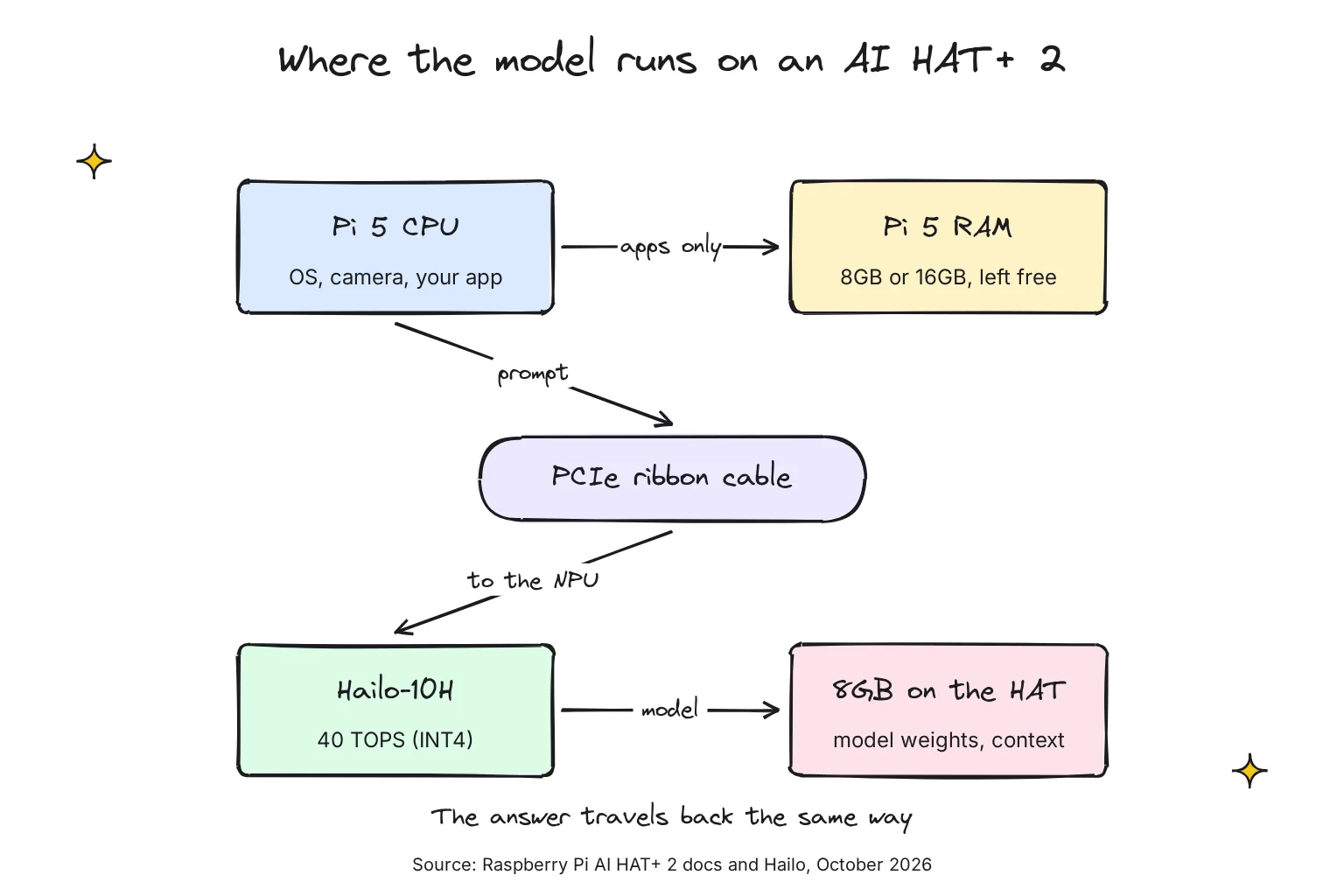
Models are squeezed to fit through quantization, storing each weight in fewer bits. Hailo's LLMs use A8W4, 8-bit activations with 4-bit weights, and a 2,048-token context, the text a model can keep in view at once. Hailo says that is about 1,536 words, and a 1.5B model with that context needs about 1.2GB.
Which models does the AI HAT+ 2 run?
Only models Hailo has compiled for the chip. They come as HEF files, Hailo's own executable format, not the GGUF files Ollama and llama.cpp use, and Hailo's server does not let users upload models. Raspberry Pi's launch post listed five LLMs of 1 to 1.5 billion parameters and promised more, and larger, models soon after.
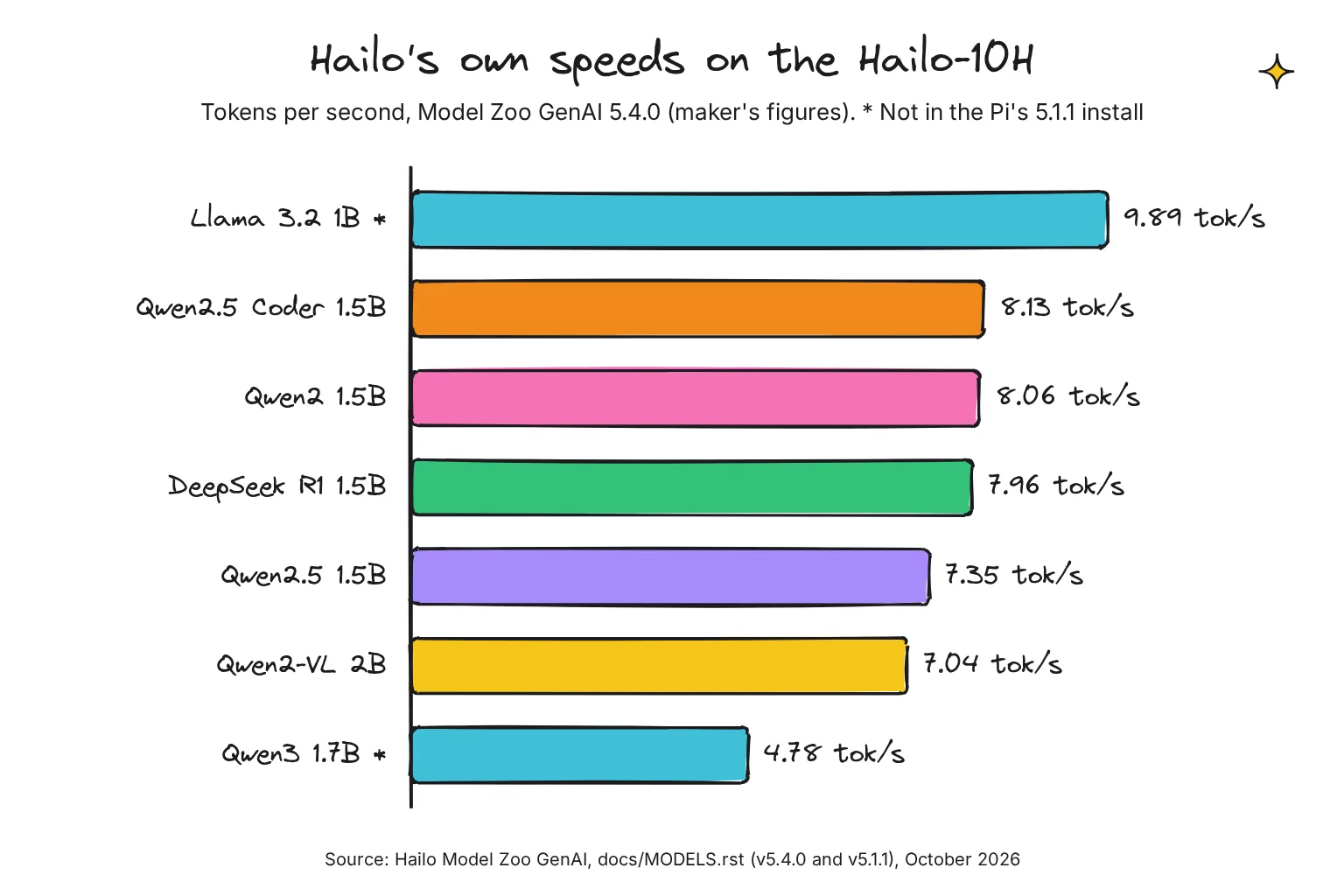
Versions matter here. Raspberry Pi's docs install version 5.1.1 of Hailo's GenAI package, and its software repository ships HailoRT 5.1.1 for the Hailo-10H. Hailo's current Model Zoo GenAI is 5.4.0, and it notes that some precompiled models are compatible only with v5.4.0. The table shows Hailo's list in October 2026, and its last column shows what runs on Raspberry Pi's standard install: the 5.1.1 release serves five LLMs through hailo-ollama and runs Qwen2-VL 2B and Whisper Base through Hailo's own apps, while the other models need a newer HailoRT than Raspberry Pi ships.
| Model (parameters) | Type | Size | Hailo's speed, 5.4.0 | Runs on the Pi's 5.1.1 install |
|---|---|---|---|---|
| Qwen2 1.5B Instruct | Chat LLM | 1.56 GB | 8.06 tok/s | Yes, hailo-ollama |
| Qwen2.5 1.5B Instruct | Chat LLM | 1.64 GB | 7.35 tok/s | Yes, hailo-ollama |
| Qwen2.5 Coder 1.5B Instruct | Coding LLM | 1.64 GB | 8.13 tok/s | Yes, hailo-ollama |
| DeepSeek R1 Distill Qwen 1.5B | Reasoning LLM | 2.37 GB | 7.96 tok/s | Yes, hailo-ollama |
| Llama 3.2 1B Instruct | Chat LLM | 1.79 GB | 9.89 tok/s | No |
| Qwen3 1.7B Instruct | Chat LLM | 1.79 GB | 4.78 tok/s | No |
| Qwen2 1.5B Function Calling | Tool-use LLM | 2.99 GB | 6.69 tok/s | No |
| Llama 3.2 3B Instruct | Chat LLM | 3.13 GB | 2.67 tok/s (5.1.1) | Yes, hailo-ollama; removed in 5.2.0 |
| Qwen2-VL 2B Instruct | Vision-language | 2.18 GB | 7.04 tok/s | Yes, Hailo apps |
| Qwen3-VL 2B Instruct | Vision-language | 2.18 GB | 4.74 tok/s | No |
| Whisper Tiny (39M) | Speech to text | 78 MB | 48.14 tok/s | No |
| Whisper Base (74M) | Speech to text | 155 MB | 25.32 tok/s | Yes, Hailo apps |
| Whisper Small (244M) | Speech to text | 388 MB | 10.61 tok/s | No |
These speeds are Hailo's own figures, in tokens per second of output, and the list does not state the host system or prompt length. Its blog lists Qwen2 1.5B at 9.45 tokens per second, with time to first token measured on a 96-token prompt. Time to first token, the wait before text starts, is 0.32 to 0.73 seconds for the LLMs. The changelog also shows Stable Diffusion 1.5 was dropped in 5.1.1, so Hailo's current list has no image generator.
Can the AI HAT+ 2 run vision-language models?
Yes. A VLM, or vision-language model, takes an image plus a question and answers in text. Qwen2-VL 2B reads a 336 x 336 pixel image, and Hailo lists a 1.02-second time to first token for it. Qwen3-VL 2B supports single-frame image input only, not video. VLMs do not run through Hailo's Ollama-style server, which is limited to LLMs; Raspberry Pi points to Hailo's hailo-apps repository instead.
Its VLM Chat app shows a live camera feed; you press Enter to freeze a frame and type a question about it, and the app uses Qwen2-VL-2B-Instruct on the Hailo-10H. These commands come from Hailo's installation guide and the app's README, run after the driver setup below:
git clone https://github.com/hailo-ai/hailo-apps.git
cd hailo-apps
./install.sh
source setup_env.sh
python -m pip install -e ".[gen-ai]"
python -m hailo_apps.python.gen_ai_apps.vlm_chat.vlm_chat --input rpi
Does it handle speech, and do the vision models still work?
Speech to text, yes: Whisper Tiny, Base and Small are on Hailo's list, and Whisper Base is the one in the 5.1.1 release. Hailo's Voice-to-Action demo runs Whisper-Base on the Hailo chip and Piper text to speech on the CPU, and was tested with the Raspberry Pi apt packages. Vision models such as YOLO object detection also work, as Raspberry Pi's rpicam-apps instructions cover the AI HAT+ 2. Not every demo file has a Hailo-10H model yet: the YOLOv8 file loads a YOLOv8m model on the Hailo-10H, while the YOLOv6 file lists only Hailo-8 and Hailo-8L models, so start with YOLOv8. Hailo's guide supports a vision pipeline and a GenAI app running together, but not two GenAI apps.
How to set up the AI HAT+ 2 and run your first LLM
These steps follow Raspberry Pi's AI HAT guide and AI software page. You need 64-bit Raspberry Pi OS Trixie, an internet connection for downloads, and spare storage for models.
- Fit the cooler, heatsink and HAT. With the Pi unplugged, fit the Active Cooler and press the HAT's heatsink on; Raspberry Pi recommends both, the heatsink to stop the HAT slowing down from overheating. Screw on the spacers, press on the stacking header, plug the ribbon cable into the Pi with its metal contacts facing the USB ports, then screw the HAT down and clip the cable into it.
- Update the system and firmware. Run the first block of commands below, which includes
rpi-eeprom-updatefor the latest firmware, then reboot. - Install the Hailo-10H package. Install
dkmsandhailo-h10-all, then reboot. The AI HAT+ and AI Kit usehailo-allinstead, and the two packages can't co-exist. - Check the HAT is detected.
hailortcli fw-control identifyshould print a firmware version and device architecture. Serial number, part number and product name may show N/A, which the docs call expected.
sudo apt update
sudo apt full-upgrade -y
sudo rpi-eeprom-update -a
sudo reboot

sudo apt install dkms
sudo apt install hailo-h10-all
sudo reboot

hailortcli fw-control identify
dmesg | grep -i hailo
Run your first model with hailo-ollama
hailo-ollama is Hailo's model server: it downloads models from Hailo and runs them on the HAT. With the drivers working, three steps get you a reply.
- Install the hailo-ollama server. Download the 5.1.1 Hailo Model Zoo GenAI package that Raspberry Pi's docs link, and install it with
dpkg. - Start the server and pull a model. Run
hailo-ollamain one terminal. In a second, list the available models and download one; the docs useqwen2:1.5bas the example. - Ask it something. Send a chat request with
curl. The first answer takes a few seconds while the model loads; Hailo lists a 7.37-second load time for Qwen2 1.5B in 5.1.1.
sudo dpkg -i hailo_gen_ai_model_zoo_5.1.1_arm64.deb
hailo-ollama

# in a second terminal
curl --silent http://localhost:8000/hailo/v1/list

curl --silent http://localhost:8000/api/pull \
     -H 'Content-Type: application/json' \
     -d '{ "model": "qwen2:1.5b", "stream" : true }'

curl --silent http://localhost:8000/api/chat \
     -H 'Content-Type: application/json' \
     -d '{"model": "qwen2:1.5b", "messages": [{"role": "user", "content": "Translate to French: The cat is on the table."}]}'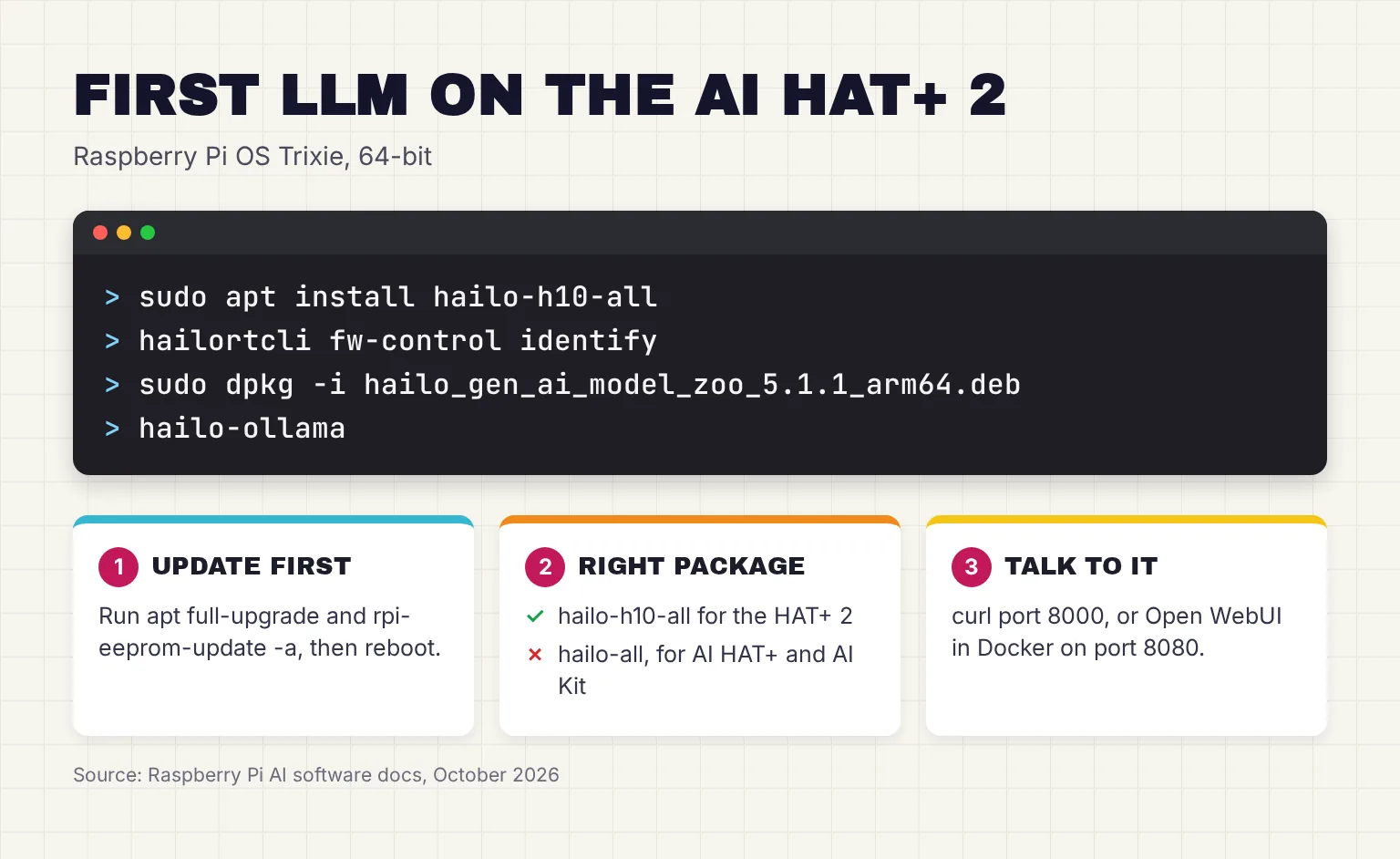
Model names change between releases: Hailo renamed qwen2.5-instruct:1.5b to qwen2.5:1.5b in 5.2.0, so copy names from the list command rather than from a tutorial.
Add a chat window with Open WebUI
Open WebUI is a browser chat interface; our Open WebUI setup guide explains it. On the Pi it must run in Docker, a tool for running apps in sealed containers, because Open WebUI is incompatible with Python 3.13, which Trixie uses. After installing Docker as the docs describe, start it with hailo-ollama already running, then open http://127.0.0.1:8080:
docker pull ghcr.io/open-webui/open-webui:main
docker run -d -e OLLAMA_BASE_URL=http://127.0.0.1:8000 -v open-webui:/app/backend/data --name open-webui --network=host --restart always ghcr.io/open-webui/open-webui:main
docker logs open-webui -f
Does the AI HAT+ 2 have an Ollama or OpenAI-compatible API?
Partly. An API is the address other programs send requests to. hailo-ollama is an Ollama-compatible API written in C++, on port 8000 rather than Ollama's 11434, with endpoints such as /api/chat and /api/generate. Hailo's blog calls the runtime's REST API compatible with Ollama and OpenAI, and the server's source has an OpenAI-style /v1/chat/completions route, but the usage guide documents only the Ollama-style endpoints.
Its usage guide lists the limits: a single simultaneous connection with one pending request, no LoRA adapters and no Ollama CLI. For a private assistant, note that the 5.1.1 server listens on 0.0.0.0, port 8000, meaning every network interface, so other devices on your network can connect unless something blocks them. I found no login or API key in Hailo's docs. In 5.1.1 the address is set in a config file, hailo-ollama.json; release 5.3.0 replaced it with an OLLAMA_HOST setting.
Is the AI HAT+ 2 faster than the Pi 5 CPU for LLMs?
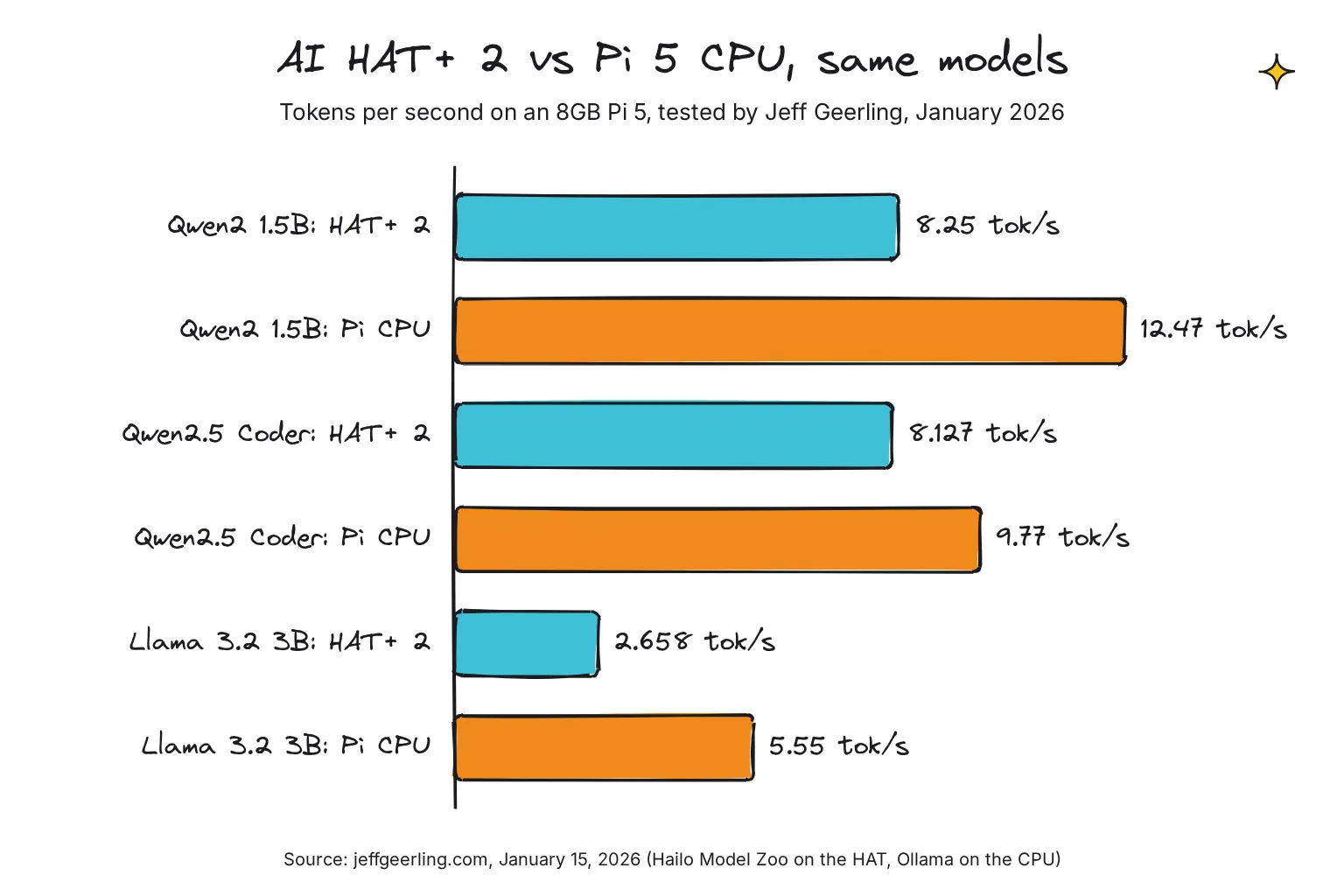
No, on the published evidence. The one like-for-like test I know of is Jeff Geerling's, on an 8GB Pi 5 on launch day. He ran the same models on the HAT, using Hailo's model files, and on the CPU, using Ollama's, and measured power at the wall for the whole Pi. Tokens per second is how fast text appears; our local vs cloud speed guide explains what feels usable.
| Model (January 2026 test) | AI HAT+ 2 | Pi 5 CPU (8GB) | Tokens per watt, HAT vs CPU |
|---|---|---|---|
| Qwen2 1.5B | 8.25 tok/s | 12.47 tok/s | 1.196 vs 1.014 |
| Qwen2.5 Instruct 1.5B | 6.864 tok/s | 11.41 tok/s | 0.967 vs 0.975 |
| Qwen2.5 Coder 1.5B | 8.127 tok/s | 9.77 tok/s | 1.145 vs 0.872 |
| DeepSeek R1 Distill Qwen 1.5B | 6.851 tok/s | 10.99 tok/s | 0.993 vs 0.931 |
| Llama 3.2 3B | 2.658 tok/s | 5.55 tok/s | 0.409 vs 0.5 |
The CPU won every speed test, and the HAT was slightly more efficient on most models. Power explains it: the whole Pi peaked at 7.1W with the HAT working and 12.3W with the CPU working, and idled at 4.2W in the HAT setup against 3.1W in the CPU setup. His HAT numbers closely match Hailo's own, 8.25 tokens per second against Hailo's 8.18 for Qwen2 1.5B in release 5.1.1, so the chip performs as advertised. The CPU is just quicker at these sizes.
Two caveats: the test is from January, and Hailo's newer releases list different speeds for some models; and each side used its platform's default model files, not identical ones. Raspberry Pi's own blog introduced an October 2026 partner post from Sixfab and DEEPX with the line that most edge AI/ML workloads belong on the CPU, but accelerators are important for the small minority of workloads that the CPU can't accommodate.
Beyond speed: model size, memory, power and ease
Model size. The HAT is capped by its 8GB and by Hailo's list. The 5.1.1 package Raspberry Pi links tops out at Llama 3.2 3B; in Hailo's current list the largest LLM has 1.7 billion parameters and the vision-language models 2 billion. On the CPU, the limit is the Pi's RAM: Geerling ran Qwen3 30B A3B compressed to fit in about 10GB on a 16GB Pi 5 with llama.cpp.
Memory. On an 8GB Pi 5, a CPU model shares RAM with the system and your apps. The HAT keeps the model off the Pi's RAM entirely, which is its clearest advantage for a camera project that also needs memory.
Power. In Geerling's test the HAT setup peaked about 5W lower than the CPU but idled about 1W higher, so the saving only counts on a device that is busy most of the time.
Ease. The CPU route uses ordinary Ollama with any model that fits in RAM. The HAT route means Hailo's packages and model names, a separate server and a fixed 2,048-token context. For a private chat assistant, the CPU is simpler and faster.
What are the AI HAT+ 2's limits?
- Small models only. Raspberry Pi says the 8GB fits models up to about 6 billion parameters, but Hailo has compiled nothing that big; it removed Llama 3.2 3B in release 5.2.0.
- Hailo's list or nothing. You cannot load GGUF files or upload models to hailo-ollama. The customization Raspberry Pi describes is LoRA fine-tuning of the language models, with adapters compiled using the Hailo Dataflow Compiler; LoRA adapters are small add-on weights that adapt a model to one task.
- One language model at a time. Hailo says running multiple LLM or VLM models simultaneously on the same device is not supported.
- Young software. Raspberry Pi's HailoRT packages and docs sit at 5.1.1 while Hailo is on 5.4.0. At launch, Geerling hit segmentation faults running vision and an LLM together; Hailo added device sharing between hailo-ollama and other Hailo apps in release 5.3.0, newer than the version Raspberry Pi's docs install.
- Heat. The board is rated for 0°C to 50°C ambient; fit the heatsink for long runs.
Common questions about the Raspberry Pi AI HAT+ 2
How much does the Raspberry Pi AI HAT+ 2 cost?
Raspberry Pi launched the AI HAT+ 2 at $130 on January 15, 2026. Its April 1, 2026 round of memory-driven price increases added $50, and its product page and July 2026 product brief now list $200; I found no announcement for the last $20. Raspberry Pi says its Approved Resellers abide by its published maximum prices.
Does the AI HAT+ 2 work with a Raspberry Pi 4?
No. Raspberry Pi says the AI HAT+ 2 shall only be connected to a Raspberry Pi 5, through its PCIe interface and GPIO header. Its software instructions also assume a Raspberry Pi 5 running the 64-bit version of Raspberry Pi OS Trixie with up-to-date firmware.
Can the AI HAT+ 2 run models from the Ollama library?
No. It runs only models Hailo has compiled for the Hailo-10H, served by Hailo's own hailo-ollama server on port 8000. That server speaks the Ollama API, so tools such as Open WebUI can connect, but you cannot pull ordinary GGUF models or upload your own.
Is the AI HAT+ 2 faster than the Raspberry Pi 5 CPU for LLMs?
Not in the one like-for-like test I know of. Jeff Geerling ran the same models on an 8GB Pi 5 in January 2026, and the CPU was faster every time, for example 12.47 against 8.25 tokens per second on Qwen2 1.5B. The HAT drew less power and left the CPU free.
What is the difference between the AI HAT+ and the AI HAT+ 2?
The AI HAT+ uses a Hailo-8L or Hailo-8 rated at 13 or 26 TOPS (INT8), relies on the Pi's own memory and does not support LLMs or vision-language models. The AI HAT+ 2 has a Hailo-10H rated at 40 TOPS (INT4), or 20 at INT8, with its own 8GB of memory, and runs both. Vision performance is broadly similar.
What is the biggest model the AI HAT+ 2 can run?
Raspberry Pi says its 8GB of memory fits LLMs and vision-language models of up to about 6 billion parameters. In practice you are limited to Hailo's compiled models. The 5.1.1 package that Raspberry Pi links includes Llama 3.2 3B, while Hailo's current list tops out at 2 billion parameters, all with a 2,048-token context.
My verdict for an 8GB Pi 5 owner: buy it for camera projects, not for chat
If you want a private offline assistant, keep your $200. The Pi 5's CPU ran every model in the comparison faster, runs any Ollama model that fits in its RAM, and needs no add-on board. If your project is a camera that spots things and answers questions about them, the AI HAT+ 2 earns its place: the vision model and a 2B vision-language model run on the HAT while the Pi's CPU and 8GB stay free for your code.
Your next step: try a 1.5B model on the CPU first with our Raspberry Pi LLM guide, and if you still want a camera that understands what it sees, compare boards in the AI HAT buying guide. For every other route, from the AI Camera to voice projects, go back to the Raspberry Pi AI hub.
Sources
- Raspberry Pi AI HAT+ 2 - Raspberry Pi
- AI HATs - Raspberry Pi Documentation
- AI software - Raspberry Pi Documentation
- Introducing the Raspberry Pi AI HAT+ 2: Generative AI on Raspberry Pi 5 - Raspberry Pi
- Raspberry Pi AI HAT+ 2 Product Brief - Raspberry Pi
- A new 3GB Raspberry Pi 4 for $83.75, and more memory-driven price increases - Raspberry Pi
- Price increases for 2GB Raspberry Pi 4 and Raspberry Pi 5 - Raspberry Pi
- Seeing, understanding, and responding: low-power CNN, VLM and SLM workloads on Raspberry Pi 5 - Raspberry Pi
- h10-hailort package pool - Raspberry Pi apt repository
- assets/hailo_yolov8_inference.json - raspberrypi/rpicam-apps, GitHub
- assets/hailo_yolov6_inference.json - raspberrypi/rpicam-apps, GitHub
- Hailo-10H AI Accelerator - Hailo
- Hailo-10H AI Accelerator Product Brief - Hailo
- Bringing Generative AI to the Edge: LLM on Hailo-10H - Hailo
- Qwen2-VL-2B-Instruct, Model Explorer GenAI - Hailo
- hailo_model_zoo_genai - hailo-ai, GitHub
- Model Zoo GenAI models, 5.4.0 - hailo-ai, GitHub
- Model Zoo GenAI models, 5.1.1 - hailo-ai, GitHub
- Model Zoo GenAI changelog - hailo-ai, GitHub
- Model Zoo GenAI usage - hailo-ai, GitHub
- Model Zoo GenAI usage, 5.1.1 - hailo-ai, GitHub
- hailo-ollama.json, 5.1.1 - hailo-ai, GitHub
- controller.hpp, 5.1.1 - hailo-ai, GitHub
- hailo_gen_ai_model_zoo_5.1.1_arm64.deb - Hailo
- Hailo-Apps Installation Guide - hailo-ai, GitHub
- Hailo VLM Interactive Application - hailo-ai, GitHub
- resources_config.yaml - hailo-ai, GitHub
- Voice-to-Action demo - hailo-ai, GitHub
- Running Multiple Hailo Applications in Parallel - hailo-ai, GitHub
- Raspberry Pi's new AI HAT adds 8GB of RAM for local LLMs - Jeff Geerling
- FAQ - Ollama