Checked November 6, 2026 · Labels: Local and cloud compared
Short answer: not on home hardware. Kimi K3.1 Pro has 2.8T parameters and its published weights take 1,561GB. One uploader got it working on a 512GB Mac Studio at about 0.37 tokens per second, which is more than two seconds a word. The Ollama version is cloud only, so your prompts leave your computer.
This guide follows one reader: someone who saw Kimi K3.1 Pro at the top of Hugging Face, read the words "open-weight" and wondered whether a good PC could run it privately. Open weights mean you are allowed to download it. They say nothing about whether it fits.
What is Kimi K3.1 Pro?
Kimi K3.1 Pro is an open-weight agentic model from Moonshot AI, uploaded to Hugging Face on November 2, 2026. The model card lists 2.8T total parameters, 104B active per token, a 1-million-token context window, and text and image input. It is built for coding, 3D creation, financial research and long agent tasks.
Moonshot recommends server engines such as vLLM, SGLang and TokenSpeed. Those are for data centers, and none of them is a home app. Its benchmark table compares the model with Claude Opus 5.5 and GPT-6 Astra, which tells you the class of machine it was built for.
How much memory does Kimi K3.1 Pro need?
All 1,561GB has to live somewhere fast. In a Mixture-of-Experts model, only 104B works on each token, but which experts wake changes from word to word, so they all need to be within reach. Your memory is what limits you, as our memory formula explains.
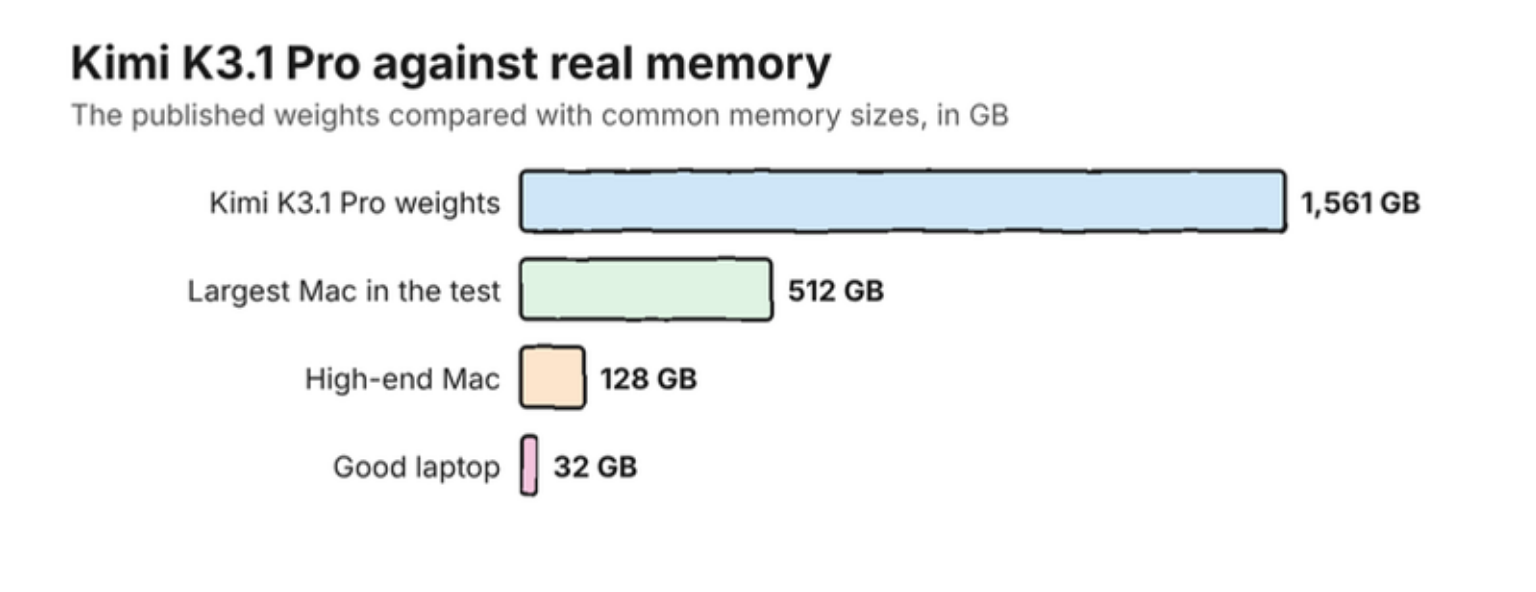
The 512GB test only worked because inferencerlabs moved the experts to storage, using a modified MLX and the Inferencer app. At 0.37 tokens per second, a 500-word reply would take around half an hour. It is an impressive stunt, and nobody should buy a Mac for it.
Can you run Kimi K3.1 Pro with Ollama?
Only in the cloud. The Ollama tags page lists a single tag, kimi-k3.1-pro:cloud, priced at $2.00 per million input tokens and $10.00 per million output tokens. The command looks local, but the model runs on Ollama's servers.
Takeaway: if you came to local AI for privacy, the :cloud tag does not give you that. Our guides to Ollama Cloud and what still goes online explain the difference.
What should you run instead?
Pick by the memory you have. These three all run on your own machine.
| Your memory | Try this | Why |
|---|---|---|
| 16GB | MiMo V2.6 9B | One Ollama command, reads screenshots |
| 24GB to 32GB | Qwen 3.8 27B or Xing4.0 29B | Strong all-rounders that fit |
| 48GB to 64GB | Ripple-65B | The largest new coding model that fits at home |
Unsure whether you need the biggest model at all? When not to run AI locally is an honest place to start.
Is Kimi K3.1 Pro free for commercial use?
Mostly, with limits for big companies. The Kimi K3.1-Pro License asks a business that sells model access and earns over $20 million in 12 months to sign a separate agreement. Products with over 100 million monthly users, or over $20 million in monthly revenue, must display the model's name. Internal use is exempt from both. This is a summary, not legal advice.
Common questions about running Kimi K3.1 Pro locally
Can I run Kimi K3.1 Pro on my computer?
Not in any practical way. The weights take 1,561GB, and the published test on a 512GB Mac managed about 0.37 tokens per second by moving parts of the model to storage.
Is Kimi K3.1 Pro on Ollama?
Yes, but only as the cloud tag kimi-k3.1-pro:cloud, which runs on Ollama's servers and costs $2.00 per million input tokens and $10.00 per million output tokens.
Is there a GGUF of Kimi K3.1 Pro?
We found no full GGUF on Hugging Face on November 6, 2026, only a tiny test file. The large uploads we checked are full-size repacks of the 1,561GB weights.
What is a good local alternative to Kimi K3.1 Pro?
MiMo V2.6 9B on 16GB, Qwen 3.8 27B or Xing4.0 29B on 24GB to 32GB, and Ripple-65B on 48GB to 64GB.
My verdict: admire it, rent it if you must, and run something smaller
Kimi K3.1 Pro is open in license and out of reach in practice. If you need its power, use it through a cloud service with your eyes open about where your data goes. For private work, the table above will serve you better.
How we researched this: a documentation-based guide, not a hands-on test. Illustrations are original artwork and do not depict a tested product. Charts use the figures on the linked pages.
Sources
- moonshotai/Kimi-K3.1-Pro - Hugging Face
- Kimi K3.1-Pro License - Moonshot AI, Hugging Face
- Kimi K3.1 Pro tech blog - Moonshot AI
- inferencerlabs/Kimi-K3.1-Pro-MLXse - Hugging Face
- kimi-k3.1-pro - Ollama