Checked November 6, 2026 · Updated November 13, 2026 · Label: Local
Short answer: you can run Ripple-65B Preview today in two ways. As of Ollama v0.40.16 (November 9, 2026), the one-command path is ollama run ripple-preview. Ollama lists the default download at 39GB to 46GB. You can still use llama.cpp instead: download a 40.4GB GGUF file, use a llama.cpp build from November 5, 2026 or later, and start it with llama-server. Comfortable memory is still in the region this guide already gives: about 48GB or more, with 64GB the comfortable target. We have not run either path.
This guide follows one reader: someone with a Mac Studio or a two-GPU PC who saw Ripple-65B trending on Hugging Face and wants to know whether it is a real coding model for their desk or a headline. We have not run it ourselves. Every size and score below comes from the linked model pages.
Ripple Preview is now in Ollama (v0.40.16)

When this guide was first checked, on November 6, 2026, Ripple-65B Preview was not in the Ollama library. That changed on November 9, 2026, when Ollama shipped v0.40.16. The release notes add Ripple Preview, "a 65B dense model built for agentic coding," with:
ollama run ripple-previewThe Ollama library page, checked November 10, 2026, describes the same model: Ripple-65B Preview from Ricursive Intelligence, Apache 2.0, built for agentic coding, with a listed context of up to 1 million tokens in the page blurb. The tag table on that same page, and on the tags listing, shows a 2M context window for every tag we opened. We have not run the model, so we cannot say which figure you will get in practice. Treat the context length as disputed between those two lines on Ollama's own pages.‡
Ollama's listed tags, checked November 10, 2026 (listed download sizes, not measured RAM):
| Tag | Listed size | Notes from the library page |
|---|---|---|
ripple-preview:latest and ripple-preview:65b | 39GB–46GB | Same digest on the tags page when we checked; text input |
ripple-preview:65b-q4_K_M | 39GB | Text input |
ripple-preview:65b-nvfp4 | 46GB | Labelled MLX |
ripple-preview:65b-gguf-bf16 | 130GB | Text input |
ripple-preview:65b-mlx-bf16 | 138GB | Labelled MLX |
ripple-preview:65b-bf16 | 130GB–138GB | Text input |
A 39GB download is still a large-machine model. It does not make Ripple a 32GB-laptop option. If you have 32GB or less, the "choose something smaller" advice later on this page still stands.
The library page also lists helper commands such as ollama launch claude --model ripple-preview for Claude Code, and similar ollama launch lines for OpenCode, Hermes Agent and OpenClaw. Those are Ollama's listed commands. We have not tried them.
The llama.cpp instructions in the rest of this guide remain valid if you prefer that route, or if you already downloaded the 40.4GB GGUF. We have not compared that file with Ollama's 39GB q4_K_M tag, and we are not saying they are the same build.
‡ Ollama's model blurb says "up to 1M tokens of context"; the tag table on the same library pages lists a 2M context window. Recheck both lines before you plan a 1M-token or 2M-token job.
Checked November 10, 2026; tags rechecked November 13, 2026, and the 1M vs 2M disagreement was still present (Europe/London). Evidence: Documentation review of the Ollama v0.40.16 release notes (November 9, 2026) and the Ollama library and tags pages for ripple-preview. We have not downloaded or run the model. Listed sizes are Ollama's published figures, not measured memory use. Editorial policy.
Choose Ripple-65B if:
- You have 48GB or more of memory for the model, and your main job is coding with an agent.
- You want an Apache 2.0 license, which the model page lists.
- You are happy to build llama.cpp yourself and read a command line.
Choose something smaller if:
- You have 32GB or less. Qwen 3.8 27B or MiMo V2.6 9B will serve you far better.
- You want pictures as input. Ricursive says Ripple was pretrained on a text-only corpus of mostly English and code.
- You want an app with a download button. Wait for Ollama or LM Studio support.
What is Ripple-65B Preview?
Ripple-65B Preview is a 65B-parameter open-weight language model from Ricursive Intelligence, tuned for agentic coding and uploaded to Hugging Face on November 4, 2026. Ricursive, which raised $335 million at a $4 billion valuation, describes it as a general-purpose variant of the model behind its chip design platform.
Two things make it unusual. It is dense, so all 65B parameters work on every token, while its rivals use Mixture-of-Experts designs that wake only part of a much larger model. The company also says the full research and training bill was $32 million, and the model card says the team grew from 1 to 5 people during development. Context reaches 1,048,576 tokens on paper, though your memory will set the real limit.
How much memory does Ripple-65B need?
Plan for 48GB as the minimum for a good-quality file and 64GB for room to work. The 4-bit files are about 36GB to 40GB, and our memory formula adds conversation memory and headroom on top. A dense model gives you no shortcut here, because every parameter is used on every token.
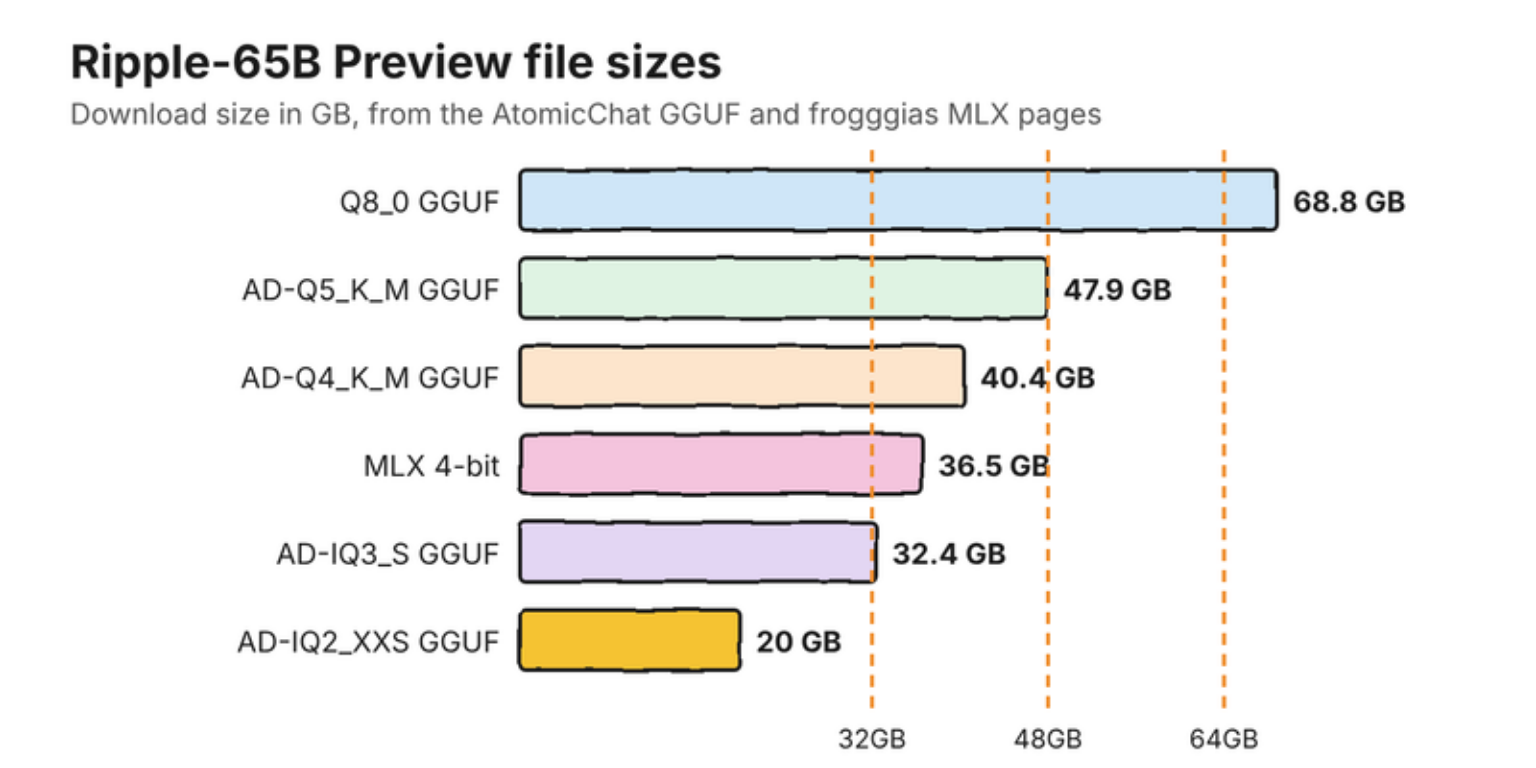
| File | Download | Suggested by uploader | Same top token as original |
|---|---|---|---|
| Q8_0 | 68.8GB | 128GB Macs, DGX Spark | 99.0% |
| AD-Q5_K_M | 47.9GB | 64GB Macs | 97.3% |
| AD-Q4_K_M | 40.4GB | 48GB Macs, 2x 24GB GPUs | 95.9% |
| AD-IQ3_S | 32.4GB | 36-48GB | 93.4% |
| AD-IQ3_XXS | 28.0GB | 32GB (RTX 5090) | 91.2% |
| AD-IQ2_XXS | 20.0GB | 24GB (RTX 3090 / 4090) | 80.8% |
From the AtomicChat GGUF page, checked November 6, 2026. These are the uploader's measurements, on its own test corpus.
Takeaway: the 24GB file exists, but it picks the same next word as the original only 80.8% of the time. For a model you want for careful code, that is a poor trade. Unsure what the letters mean? Our GGUF guide explains them.
How do you run Ripple-65B with llama.cpp?
Build llama.cpp from the current source, download one GGUF file, then start the server. Ripple support was merged as pull request 31692 on November 5, 2026, so older builds will not load the model. The commit keeps files made before the merge working.
- Get the source:
git clone https://github.com/ggml-org/llama.cpp, thencd llama.cpp. - Build it on a Mac, where Metal is on by default:
cmake -B build, thencmake --build build -j --config Release --target llama-server. On an NVIDIA PC, add-DGGML_CUDA=ONto the first command. - Download
Ripple-65B-Preview-AD-Q4_K_M.gguffrom the AtomicChat page. - Start it:
./build/bin/llama-server -m Ripple-65B-Preview-AD-Q4_K_M.gguf --jinja -c 32768 -ngl 99. - Open the address the server prints in your browser and send a test prompt.
The -c 32768 part sets a 32K window, which keeps memory in check. Raise it slowly, and read why context length costs memory first. The --jinja flag loads the chat template inside the file, which the uploader says is needed for tools and reasoning.
Can you run Ripple-65B on a Mac with MLX?
Yes, through an unofficial conversion, with one safety catch. The frogggias MLX 4-bit build is a 36.5GB download, and its author recommends a Mac with 64GB or more. Stock mlx-lm does not know Ripple yet, so the repo carries its own model file and needs the --trust-remote-code flag.
That flag runs Python code from the download. The author says it is about 280 lines and asks you to read it first, and we agree. Our guide to safe model downloads explains why. If you would rather not run outside code, use llama.cpp, which reads a data file.
Does Ripple-65B work in Ollama or LM Studio?
In Ollama, yes: Ripple Preview was added in Ollama v0.40.16 on November 9, 2026, so you can run it with one command (see the update below and the section above). In LM Studio, not confirmed. When we first checked, on November 6, 2026, a search of the Ollama library shows no Ripple model, and we found no upload from lmstudio-community, unsloth, bartowski or mlx-community. LM Studio's Bionic 1.2.0 shipped new llama.cpp packs on November 5, but its changelog does not mention Ripple. We will update this page if LM Studio adds it. Update, November 13, 2026: Ripple Preview was added to Ollama in v0.40.16 on November 9; see Ripple Preview is now in Ollama above. We have not rechecked LM Studio.
How good is Ripple-65B at coding?
On Ricursive's own table, Ripple-65B scores 80.5 on Terminal-Bench 2.1, ahead of much larger US open models. Treat that as a strong claim from the maker. Ricursive itself says replicating modern agentic scores has been challenging and calls its results a best-effort comparison.
| Benchmark (higher is better) | Ripple-65B | Reflection Beam 501B | Muse Spark Open 816B |
|---|---|---|---|
| Terminal-Bench 2.1 (self-reported) | 80.5 | 80.1 | 76.4 |
| SWE-bench Verified | 76.5 | 81.6 | 78.7 |
| SWE-bench Pro v2.0 Hard | 79.1 | 76.5 | 72.4 |
| DeepSWE 1.1 | 44.3 | 43.3 | 60.0 |
| GPQA Diamond | 85.2 | 90.6 | 89.0 |
From the Ripple-65B model card. All models were tested at full precision, and some figures are Ricursive's own runs. A compressed file on your machine will score lower.
The card shows a mixed picture: Ripple wins some coding tests and loses others, and the Preview has had what Ricursive calls relatively light posttraining. We found no published speed for a Mac. The nearest figure is the uploader's 40.6 tokens per second on a 96GB GH200 server, which tells a Mac owner very little.
Common questions about running Ripple-65B locally
What is Ripple-65B?
Ripple-65B Preview is a 65B-parameter dense open-weight model from Ricursive Intelligence, tuned for agentic coding and released in November 2026 under the Apache 2.0 license.
How much RAM do I need for Ripple-65B?
About 48GB for the 40.4GB 4-bit GGUF file with a moderate context window, and 64GB for comfort. Smaller files fit 24GB to 32GB, but they drift further from the original model.
Can I run Ripple-65B on a Mac?
Yes. Use llama.cpp from November 5, 2026 or later with a GGUF file, or an unofficial MLX 4-bit build that needs the trust-remote-code flag. Plan on 48GB to 64GB of unified memory.
Is Ripple-65B on Ollama?
Yes. As of Ollama v0.40.16 (November 9, 2026), the one-command path is ollama run ripple-preview. Ollama lists the default download at 39GB to 46GB. You can still use llama.cpp instead. We have not run either path.
Is Ripple-65B free for commercial use?
The model page lists the Apache 2.0 license, which allows commercial use. Check the license file in the repository before you ship anything.
My verdict: worth a try on 64GB, and worth waiting for on anything less
If you already own a 64GB Mac or a pair of 24GB GPUs, try the AD-Q4_K_M file this weekend. Do not buy hardware for it yet. It is a preview with self-reported scores, no independent Mac speeds, and one-command app support so far only in Ollama.
How we researched this: a documentation-based guide, not a hands-on test. Illustrations are original artwork and do not depict a tested product. Charts use the figures on the linked model pages.
Sources
- ricursiveAI/Ripple-65B-Preview - Hugging Face
- Introducing Ripple-65B Preview - Ricursive Intelligence
- AtomicChat/Ripple-65B-Preview-GGUF - Hugging Face
- frogggias/Ripple-65B-Preview-MLX-4bit - Hugging Face
- model: add Ripple (ricursiveai), pull request 31692 - llama.cpp, GitHub
- How Ricursive Intelligence raised $335M at a $4B valuation in 4 months - TechCrunch
- Bionic changelog - LM Studio