
Checked November 6, 2026 · Label: Local
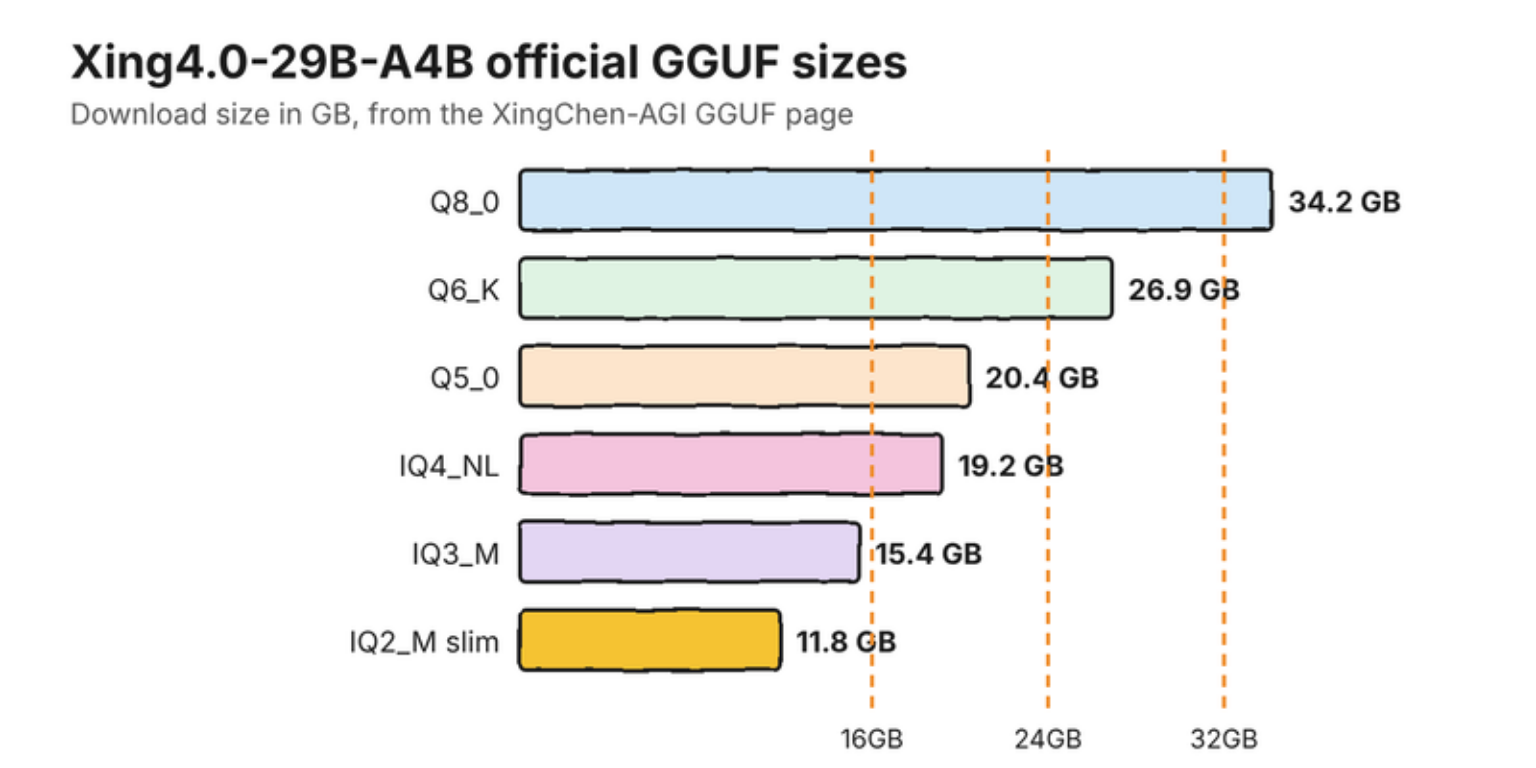
Short answer: download the official 19.2GB IQ4_NL GGUF file and run it with a llama.cpp build from November 5, 2026 or later, when support for Xing4.0 was merged. Plan on 24GB of graphics memory or 32GB of Mac memory. Xing4.0-29B-A4B is China Telecom's open model with 29B parameters, of which only 4B work on any one token.
This guide follows one reader: someone with an RTX 3090 or a 32GB Mac who wants a strong agent model and keeps seeing Xing in the Hugging Face charts. We have not run it ourselves, so every figure links to its source.
Choose Xing4.0 if:
- You have 24GB of VRAM or 32GB of unified memory, and want a model built for agents and tools.
- You want a long context: the model page lists 256K, extensible to 512K, under Apache 2.0.
Choose something else if:
- You want one command. Ollama has no Xing entry yet, so MiMo V2.6 or Qwen 3.8 are easier.
- You have 16GB. The 11.8GB file fits, but with little room left for context.
What is Xing4.0-29B-A4B?
Xing4.0-29B-A4B is the newest model in the Xing series, formerly called TeleChat, from China Telecom Artificial Intelligence Technology Co., Ltd. It reached Hugging Face in September 2026. The maker says it is the first model of this scale trained entirely on Ascend chips with the MindSpore framework.
It uses a Mixture-of-Experts design. Think of 64 specialists in a room, with 4 called on for each word. All of them still have to sit in memory, so plan around the 29B figure and not the 4B one. Because the weights run on your own machine, your prompts stay there whoever built the model. Our guide to what local apps send online covers the rest of that picture.
How much memory does Xing4.0 need?
The maker's own test machine was an RTX 3090 with 24GB, running the file of about 19GB. That is the sensible target. On a Mac, 32GB leaves room for the system and your apps, while a 24GB Mac will be tight. Our memory formula shows how to check your own machine.
| Your memory | Our suggested file | Download |
|---|---|---|
| 16GB | IQ2_M slim | 11.8GB |
| 24GB GPU | IQ4_NL | 19.2GB |
| 32GB Mac or PC | IQ4_NL or Q5_0 | 19.2GB to 20.4GB |
| 48GB or more | Q8_0 | 34.2GB |
Sizes from the official GGUF page, checked November 6, 2026. The suggestions are our estimates.
How do you run Xing4.0 with llama.cpp?
Build a current llama.cpp, then point it at the GGUF. The files came out before upstream support did, using a custom build, so we can't promise that every older file loads in stock llama.cpp. If one fails, the official tutorial has a Windows package for NVIDIA cards.
- Clone and build llama.cpp, adding
-DGGML_CUDA=ONon an NVIDIA PC. - Download
xing4_0-29b-iq4_nl.gguffrom the official page. - Start it:
./build/bin/llama-server -m xing4_0-29b-iq4_nl.gguf --jinja -c 32768 -ngl 99. - Open the address the server prints and send a test prompt.
Those flags are the general llama.cpp ones, and -c 32768 sets a 32K window. Our context length guide explains how to raise it safely.
Can you run Xing4.0 on a Mac with MLX?
Yes, with one extra package. mlx-community's 20.6GB OptiQ build needs pip install "mlx-optiq>=0.5.13", because its page says stock mlx-lm has no xing4_0 class yet. Then run optiq serve --model mlx-community/Xing4.0-29B-A4B-OptiQ-4bit.
How good is Xing4.0-29B-A4B?
On the maker's table, Xing leads Gemma4-26B and Qwen3.6-35B on Terminal-Bench 2.1 and sits level on SWE-bench Verified. These are the maker's own figures, and it loses some rows too.
| Benchmark (higher is better) | Xing4.0-29B-A4B | Gemma4-26B-A4B | Qwen3.6-35B-A3B |
|---|---|---|---|
| Terminal-Bench 2.1 | 57.5 | 30.0 | 51.5 |
| SWE-bench Verified | 75.0 | 53.0 | 76.0 |
| Claw-Eval | 76.6 | 71.5 | 74.5 |
| AIME2026 | 90.0 | 88.3 | 92.7 |
| IFBench | 69.7 | 72.7 | 65.5 |
From the Xing4.0-29B-A4B model card, as reported by the maker, rounded to one decimal place.
Common questions about running Xing4.0 locally
Who makes Xing4.0?
China Telecom Artificial Intelligence Technology Co., Ltd. The Xing series was formerly called TeleChat.
How much memory does Xing4.0 need?
Plan on 24GB of VRAM or 32GB of Mac memory for the 19.2GB IQ4_NL file. The smallest official file is 11.8GB, and it fits a 16GB machine with little room for context.
Is Xing4.0 on Ollama?
Not as of November 6, 2026. A search of the Ollama library shows no Xing model, so use llama.cpp or MLX.
Can I run Xing4.0 on a Mac?
Yes. Use a current llama.cpp build with a GGUF file, or the mlx-community OptiQ build, which needs the mlx-optiq package. 32GB of memory is the comfortable target.
Is Xing4.0 free to use?
The model page lists the Apache 2.0 license, which allows commercial use.
My verdict: a good fit for a 24GB GPU, if you don't mind a command line
If you own a 3090 or 4090, this is a sensible agent model to try this week. If you want an app with a button, wait until Ollama or LM Studio lists it.
How we researched this: a documentation-based guide, not a hands-on test. Illustrations are original artwork and do not depict a tested product. Charts use the figures on the linked pages.
Sources
- XingChen-AGI/Xing4.0-29B-A4B - Hugging Face
- XingChen-AGI/Xing4.0-29B-A4B-GGUF - Hugging Face
- llama.cpp deployment tutorial - XingChen-AGI, GitHub
- model: Add support for the xing4_0, pull request 31589 - llama.cpp, GitHub
- mlx-community/Xing4.0-29B-A4B-OptiQ-4bit - Hugging Face