
What does on-device AI really mean on your phone?
On-device AI means the model runs on your phone's own chip, so your words, photos or audio are processed without leaving it. Google describes Gemini Nano as working "without needing a network connection or sending data to the cloud". Most phones mix this with a private cloud and with partner chatbots such as ChatGPT.
Each maker draws that line in a different place. Apple says its models run entirely on device in many cases, not all, and Samsung says that apart from translation and Gallery edit suggestions, most other features require a network connection.
This guide follows one reader: a privacy-minded freelancer with an iPhone 16 for personal use and a Samsung Galaxy S25 for client work. They want summaries, translation and help with replies, but they do not want client names or contract details leaving either phone without knowing it. Everything below is checked against the makers' pages in October 2026.
Choose on-device only if:
- You handle client, medical or legal details and want nothing sent anywhere, not even to a maker's private servers.
- You can do without image generation and the heavier photo edits, which Apple runs on Private Cloud Compute and Samsung runs with an internet connection.
Choose the maker's private cloud if:
- You want Siri AI, Image Playground or the newest photo tools, which Apple says rely on server-side models.
- You accept the maker's published design as good enough for everyday requests: Apple says independent researchers can verify its promise at any time, and Google says not even Google can access data in its private cloud.
Choose a partner chatbot such as ChatGPT or the Gemini app only if:
- The request holds nothing you would mind a company keeping: signed in to ChatGPT, your account settings and OpenAI's policies apply, which Apple says means OpenAI may log your request and use it to train its models.
- You have read the partner's own privacy terms, because those apply, not Apple's or Samsung's.
On-device, private cloud or cloud: the three paths a request can take
An AI model is a large file of learned numbers, called parameters, that turns your input into an answer. Where that file runs decides who could ever see your data. On the phone, the model sits in storage and runs on the chip: Apple Intelligence needs up to 8 GB of storage on most supported iPhones, and up to 14 GB on iPhone 17 Pro models and later, iPhone Air and iPhone Duo, and Apple notes that new models download with software updates.
A private cloud is the maker's own server system, built so that the maker says even it cannot read your request. The phone encrypts the request for specific servers it has checked through attestation, a cryptographic proof of exactly which software a server runs, as Apple describes for Private Cloud Compute. Google's equivalent is Private AI Compute, announced in November 2025, which Google says also uses remote attestation and encryption to connect your phone to a sealed, hardware-secured cloud space.
A partner cloud is an ordinary AI service such as ChatGPT or the Gemini app. Your request goes to that company's servers, and its own privacy policy applies.
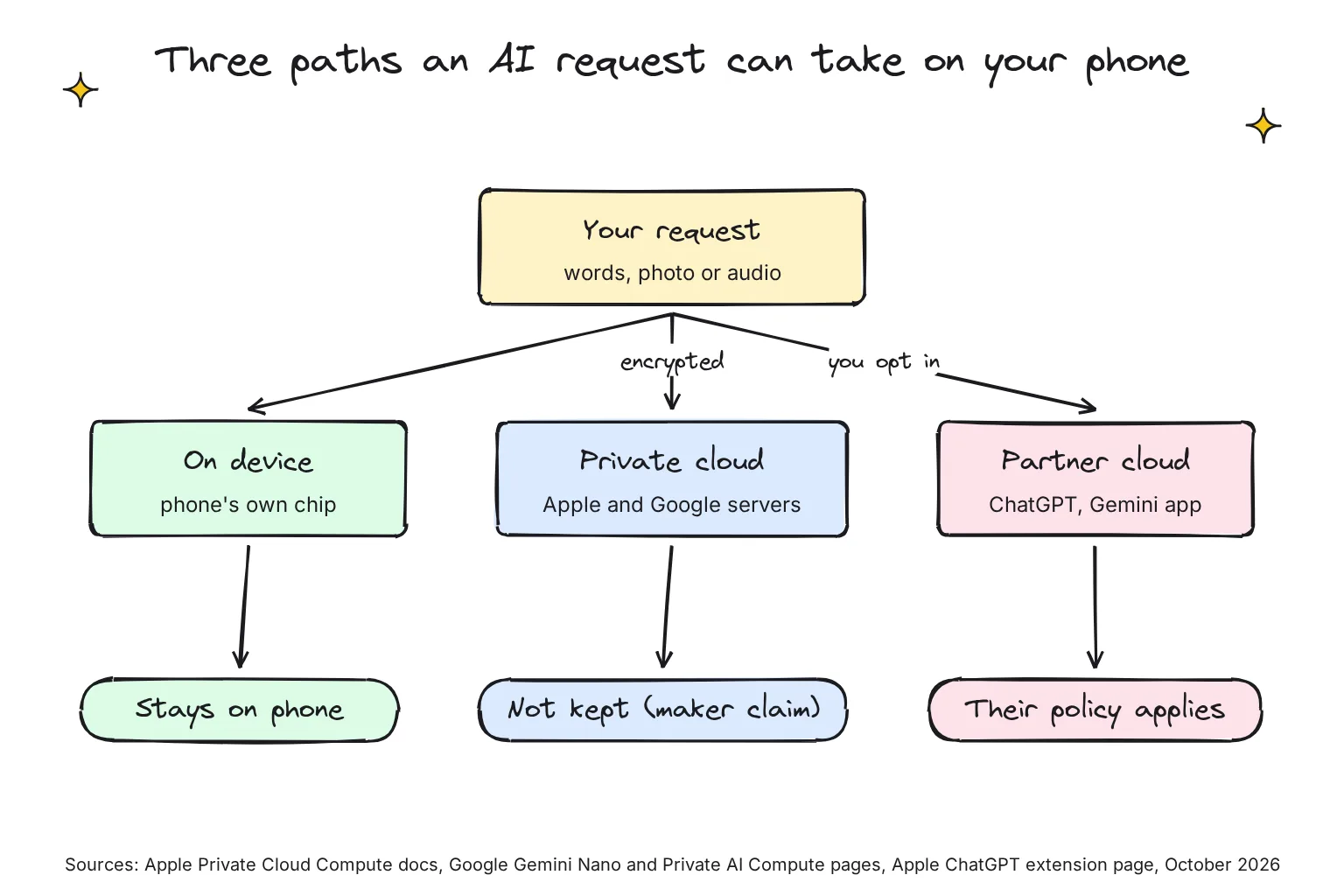
Is a private cloud as private as on-device?
Not quite, and Apple's own security post explains why on-device is the stronger baseline: data kept only on a device is "by definition disaggregated and not subject to any centralized point of attack". Private Cloud Compute is Apple's attempt to get close to that in a data center. Apple also says it may collect the approximate size of a request, which features were used and how long it took, though not the content, and not linked to your Apple Account.
How does Apple Intelligence split work between your iPhone and Private Cloud Compute?
Apple Intelligence runs on a family of five models, AFM 3, which Apple says it custom-built in collaboration with Google. Two run on the device: AFM 3 Core, a 3-billion-parameter model, and AFM 3 Core Advanced, a 20-billion-parameter model that activates 1 to 4 billion parameters at a time. The other three run on Private Cloud Compute.
Among iPhones, Apple lists the bigger on-device model, which powers expressive Siri voices and better dictation, only for the iPhone Air, iPhone 17 Pro and 17 Pro Max, iPhone 18 Pro and 18 Pro Max, and iPhone Duo. Our reader's iPhone 16 is not on that list. Apple does not spell out which model each iPhone runs, so this is my reading of its two pages: the iPhone 16 should rely on the smaller AFM 3 Core model on the phone, plus Private Cloud Compute.
Here is what Apple says runs where:
- On the iPhone: Priority Notifications; Call Context, which Apple says "runs entirely on device"; and the Spotlight index and App Toolbox that Siri AI draws on, which work entirely on device.
- On Private Cloud Compute: Image Playground, which sends your description to a server model, and the features Apple says rely on server-side models and carry daily limits: Siri AI, the intelligent photo editing tools, Image Playground and AFM 3 Cloud models in Shortcuts.
- On the open web: for current facts, Apple Intelligence can use Search to go out to the web.
Apps can use Apple's on-device model too. Apple says any app can tap it through the Foundation Models framework and that the features you build work offline. The same framework can also call Private Cloud Compute or any server model provider, so an app built on it is not local by definition.
What Apple promises about Private Cloud Compute
These are Apple's claims, in Apple's words. Data processed in Private Cloud Compute "is not stored or made accessible to Apple" and is "processed only to fulfill your request". Apple's security post adds that "User data is never available to Apple", even to staff with administrative access, and that the server deletes it once the answer is returned.
Apple says the design enforces this technically. Requests pass through a relay operated by a third party that hides your IP address, and the iPhone only sends data to servers that can prove they run software published for security researchers to inspect.
One 2026 change matters. On June 8, Apple said it is extending Private Cloud Compute to Google Cloud systems using NVIDIA GPUs for AFM 3 Cloud Pro, its most capable server model, under the same core requirements. Apple also said that setup would be "gradually ramping towards the complete set of protections throughout the summer preview period". As of late October 2026, Apple's Security Research blog had no later post saying that ramp is complete.
Which iPhones get Apple Intelligence in October 2026?
With iOS 27, Apple Intelligence runs on the iPhone 15 Pro and 15 Pro Max, iPhone 16 models or later, iPhone Air and iPhone Duo. It is not available in China mainland. Siri AI, the rebuilt Siri, is still in beta and not initially available in the EU on iOS, and Apple says Private Cloud Compute is not available in all regions.
Apple Intelligence privacy concerns worth weighing
Three deserve a look. First, Siri itself: Apple says it stores transcripts of your interactions with Siri and may review a subset, tied to a random identifier rather than your Apple Account. It may keep them for up to two years, and reviewed ones for longer. Apple says the audio itself is not stored unless you opt in to Improve Siri and Dictation.
Second, opt-ins. Apple updated its model notes on September 9, 2026, to reflect that people can now opt in to help improve Siri and Apple Intelligence; Apple says personal data is not used to train its models unless you choose to. If you share Device Analytics, Apple may also collect aggregated trends, including about the content processed by Apple Intelligence. Check Settings, Privacy & Security, Analytics & Improvements.
Third, server features are rationed: Apple sets daily limits and says expanded access will be available for a fee in the future.
When does ChatGPT or another partner get your request on iPhone?
Only when you switch it on. Apple says the ChatGPT extension is off by default and that you are asked before any of your information is shared. To set it up in iOS 27, go to Settings, Siri, ChatGPT, then Set Up; with Siri AI, the path is Set Up Extensions, ChatGPT, Use Extension.
How it asks depends on which Siri you use. Siri Classic may suggest ChatGPT and ask first, and a Confirm Requests switch lets Siri send requests without asking; leave it on. Siri AI has no such switch: Apple says you must first ask ChatGPT before a prompt, photos or files are sent. In Writing Tools and Visual Intelligence, you choose ChatGPT for each feature separately.
When a request does go, Apple says it carries your request and attachments, plus your time zone, country, device type, language and the feature used. Your IP address is hidden from OpenAI, but your general location is shared. Without a ChatGPT account, OpenAI must not store your information, unless the law requires it, or use it to train its models. Signed in, OpenAI's own policies apply, and it may log your request, attachments and session history.
To close the door, turn off Use ChatGPT (Use Extension under Siri AI), turn off Setup Prompts so Siri Classic stops suggesting it, or block the extension in Screen Time. Apple's privacy page also mentions Apple Intelligence Extensions in general, but the Apple support pages I read in October 2026 only document ChatGPT. Treat any other chatbot extension the same way: a partner cloud with its own policy.
How does Gemini Nano work on Android, and which features use it?
Gemini Nano is Google's on-device model. It runs inside AICore, an Android system service that manages the model and its updates. Google says AICore has no direct internet access, fetches models through the open-source Private Compute Services app, and "doesn't store any record of the input data or the resulting outputs".
On Pixel phones, Google names these Gemini Nano features:
- Pixel Studio, Call Notes and Pixel Screenshots, which Google says work offline on the Pixel 9 and later.
- Summarize in the Recorder app, which uses Gemini Nano, and Magic Compose in Google Messages, which Google says no longer requires an internet or cellular connection.
- Scam Detection, which Google says uses on-device processing to spot conversation patterns common in scam calls.
- Call Notes on the Pixel 9 and later in select countries, except A-series phones, where an on-device Gemini model transcribes and summarizes the call. Everyone on the call is notified, and Google says the contents are stored on your device and aren't shared with Google.
The Pixel 11's Tensor G6 chip runs the latest Gemini Nano, and Google claims it handles on-device AI tasks up to 3.5 times faster while using up to 3.5 times less energy than the previous chip.
Other Android phones offer Gemini Nano to apps through Google's ML Kit GenAI APIs; an API is the hook an app uses to call the model. Google's October 2026 list for summarizing, proofreading, rewriting and image description includes the Galaxy S25 and S26 families, OnePlus 15, Xiaomi 17 and others. So our reader's Galaxy S25 can run those Gemini Nano tasks for apps that use them, though it is not on Google's separate list for direct model access.
Google's private cloud, Private AI Compute, announced on November 11, 2025, sends some Pixel requests to Gemini models on Google servers, which Google says keep data "accessible only to you and no one else, not even Google". It powers more timely Magic Cue suggestions on the Pixel 10 and lets Recorder summarize across a wider range of languages, so those features are not purely on-device.
Is the Gemini app on-device AI?
No. The Gemini app is Google's cloud assistant; Gemini Nano is a separate model inside the phone. Google's Gemini Apps Privacy Hub now says that with the History setting off, chats are still kept with your account for around two months. Human reviewers read a subset of chats, and reviewed chats are kept for up to three years. With History on, history auto-deletes after 18 months by default. Whether your chats train Google's models is now a separate setting, and it needs History on.
Android settings that keep AI local
I found no single on-device switch for Android in Google's help pages. If you use the Gemini app, check Settings → History: Google says AI training is becoming a separate choice from History (rolling out from November 16, 2026), and temporary chats aren't used to train its AI models. The old setting lived in Gemini Apps Activity. Call Notes stays off until you set it up in the Phone app settings. Our Gemini History and training guide walks through both settings.
What does Samsung's "Process data only on device" setting change?
Galaxy AI is hybrid by design: Samsung says it chose "a hybrid approach, introducing a powerful combination of on-device and cloud-based AI". Its support page is blunt: "Most translations are handled on the device itself. Edit Suggestions within the Gallery are handled on-device. Most other features require a network connection and will utilize the cloud in some way."
The control is a master switch. Samsung's current support page says to go to Settings, Galaxy AI, and turn on Process data only on device, which Samsung says disables all cloud-based processing for Galaxy AI features. In Samsung's 2024 instructions it sat under Settings, Advanced features, Advanced intelligence. Samsung also says Galaxy AI features may be limited or unavailable unless you sign in to your Samsung and Google accounts.
Which Galaxy AI features keep working, and which stop?
Samsung does not publish one complete list, but its own pages sort features like this:
- On device, per Samsung: translation, time and weather Ambient wallpapers, and Magic Compose, message suggestions and rewrite suggestions in Google Messages, plus Live Translate, Interpreter and Audio Eraser, whose inputs Samsung says are kept within the phone.
- Cloud, per Samsung: auto formatting, auto summarizing, auto corrections and image editing.
- Needs a network, per Samsung's footnotes: Writing Assist, Transcript Assist transcription and summaries, and Creative Studio, plus Generative Edit in Photo Assist.
Samsung's pages differ on Generative Edit: the support page says Photo Assist needs internet, while its newsroom says Generative Edit has on-device capabilities and uses the cloud for heavier edits.
Expect the cloud and network-only features to be limited or unavailable when the switch is on; Samsung's own wording is that blocking server access "will limit the functionality of some AI features". Samsung publishes no per-model list, so this is my reading of its pages: on our reader's Galaxy S25, translation and the Interpreter should keep working, while note and recording summaries, which Samsung says need a network, are likely to stop. Check before you rely on it.
When features do use the cloud, Samsung's newsroom says "Samsung does not save user input or output data" and that personal data is "never stored long-term or used for AI training". Samsung's Knox admin documentation, updated in September 2026, is more cautious: features that process data in the cloud "may be used for model training".
The switch covers Galaxy AI, not every AI on the phone. Circle to Search requires an internet connection, Samsung notes that different terms may apply for AI features provided by third parties, and the Gemini app follows Google's policy above.
Is Galaxy AI on device?
Partly. Samsung says translation, Interpreter, Audio Eraser and some writing suggestions run on the phone; summaries, writing help and heavier generative photo edits use the cloud, and Samsung says blocking the cloud limits some features.
Which phone AI features run where in October 2026?
"None needed" means the maker says the feature already runs on the phone.
| Feature | Where it runs, per the maker | Setting to keep it local |
|---|---|---|
| iPhone Priority Notifications | On device | None needed |
| iPhone Call Context | On device | None needed |
| iPhone Translate app | On device with downloaded languages; otherwise may use Apple servers | Settings, Apps, Translate: On-Device Translation set to Always |
| Image Playground, Spatial Reframing and Extend photo tools | Private Cloud Compute | No local option documented |
| Siri AI (beta) | On device plus Private Cloud Compute; web for current facts | No local-only mode documented |
| ChatGPT extension | OpenAI's servers | Off by default; keep Use ChatGPT off |
| Pixel Call Notes | On-device Gemini model | None needed; off until you set it up |
| Pixel Scam Detection | On device | None needed |
| Pixel Magic Cue (Pixel 10) | On device, plus Private AI Compute for more timely suggestions | None documented |
| Gemini app | Google's servers | None; History off still keeps chats about two months |
| Galaxy translation and Interpreter | On device with language packs | Download language packs |
| Galaxy Writing Assist, Transcript Assist summaries, Generative Edit | Cloud, needs a network | Process data only on device blocks the cloud step; expect them to be limited or unavailable |
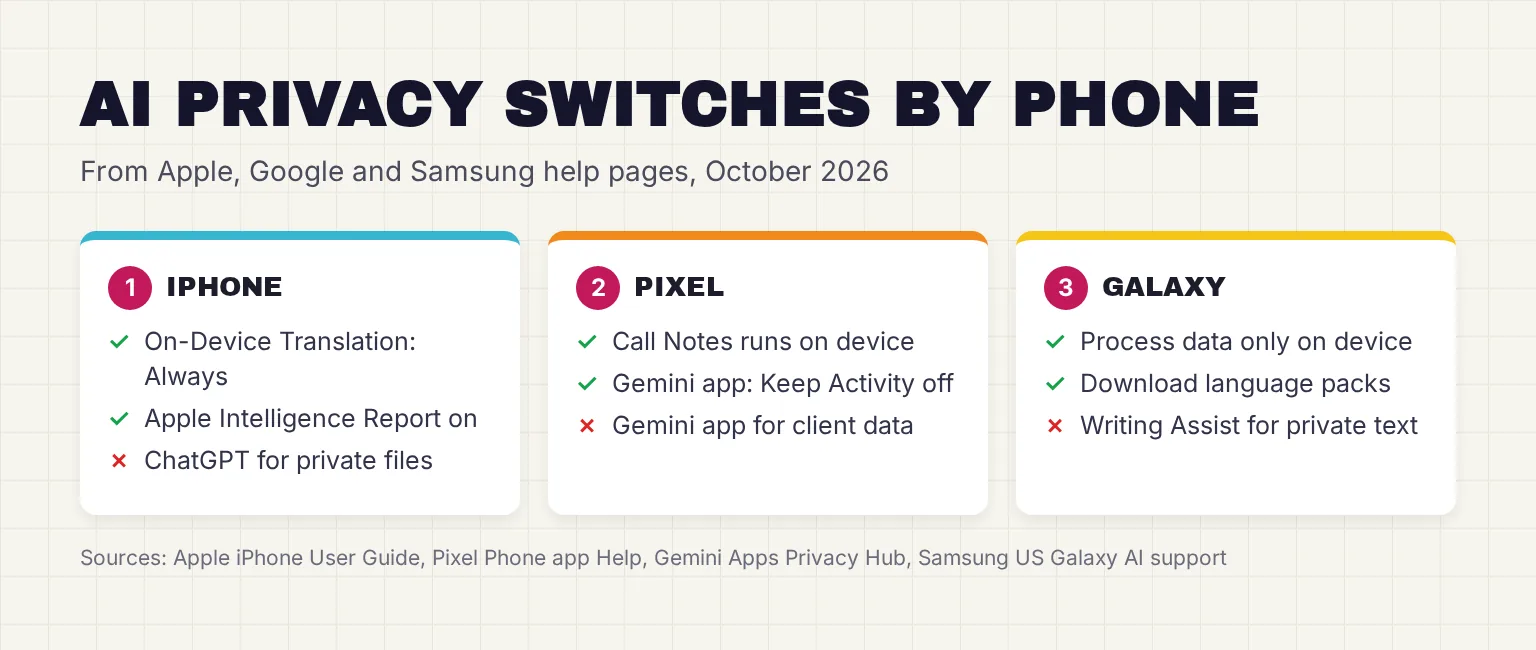
How can you check what leaves your phone?
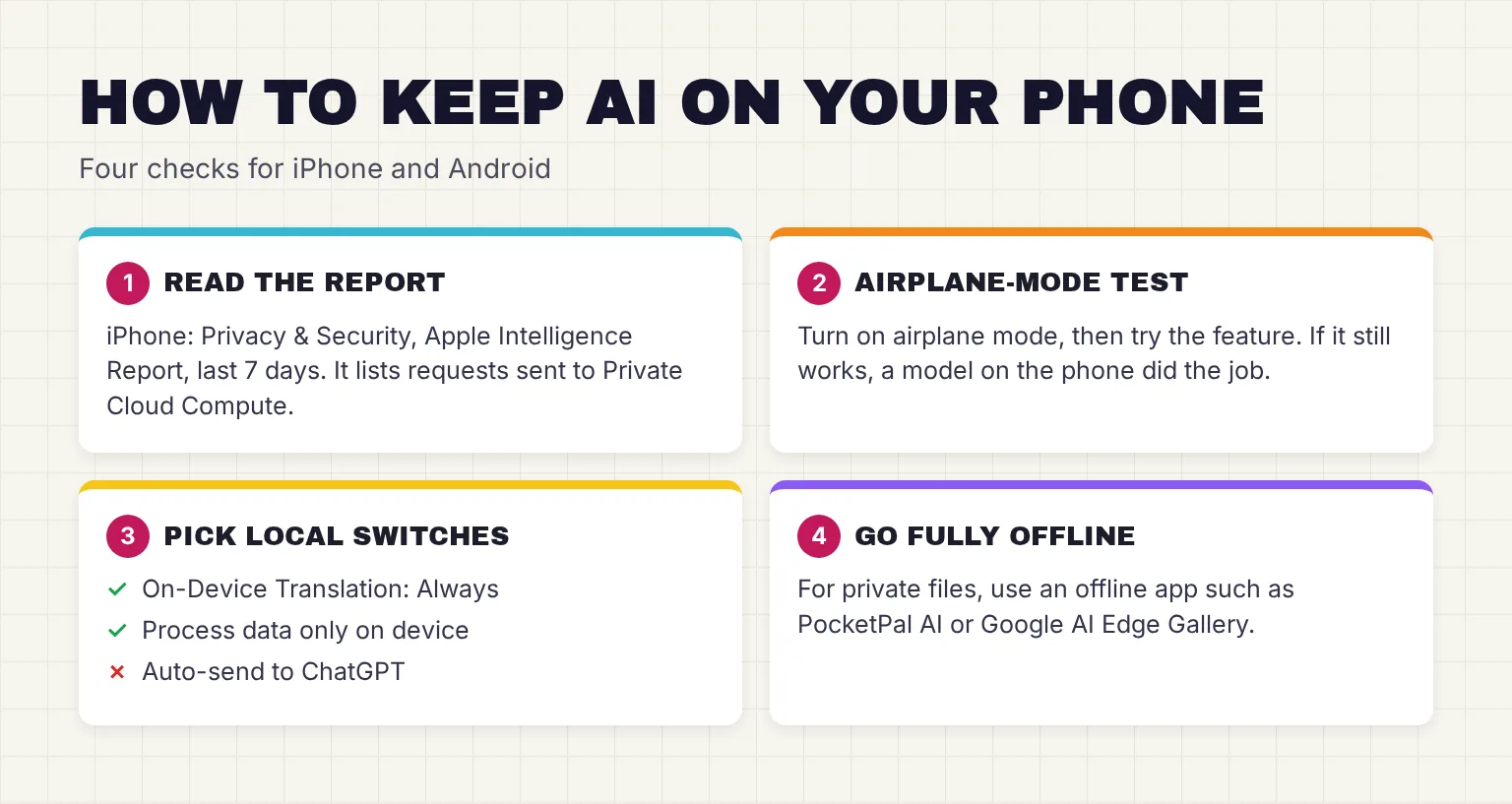
You do not have to take any maker's word for it; these checks work on both of our reader's phones.
- Turn on the Apple Intelligence Report. On the iPhone, go to Settings, Privacy & Security, Apple Intelligence Report (Apple's privacy page calls it Apple Intelligence & PCC Report) and choose the last 7 days instead of the default 15 minutes. A few days later, tap Export Activity: the file, Apple_Intelligence_Report.json, lists requests sent to Private Cloud Compute and, per Apple, requests sent to Apple Intelligence Extensions such as ChatGPT.
- Run an airplane-mode test. Download any language packs or models first, then turn on airplane mode and try the feature. If it still works, a model on the phone did the job; if it fails or asks for a connection, it needs a server.
- Lock translation to the phone. In iPhone Settings, Apps, Translate, set On-Device Translation to Always, because Automatic may still use Apple servers when a language is missing. On the Galaxy, download the Interpreter languages you need.
- Check Siri and Dictation. Apple says your device indicates in Siri Settings and Keyboard Settings whether what you say is processed on the device.
- Flip Samsung's switch and retest. Turn on Process data only on device in Settings, Galaxy AI, then try every feature you rely on, so you learn what you lose before a client deadline does.
- Tidy the Gemini app. In Settings → History, untick AI training if the option has reached you, or turn History off, and set auto-delete to 3 months, as Google's privacy hub describes.
One caution: the airplane-mode test proves a feature can run locally, not that it always does online. Apple's Automatic translation setting and Pixel's Recorder, which can use Private AI Compute, are examples.
How do you get full control? Run an open model offline
Built-in AI follows the maker's rules. For full control, use an app that downloads an open model, one whose files anyone can download, and runs it with no server at all. Google's AI Edge Gallery runs models "fully offline" on Android and iPhone, and PocketPal AI says it needs "no account, no cloud, no internet". Both are open source; the quotes are the makers' claims.
Our guide to running AI on your phone offline compares the apps, with deeper guides to local LLM apps on Android, local LLM apps on iPhone and Google AI Edge Gallery. Before you hand any cloud AI a file, read what is safe to upload; for the bigger picture, see our guide to private AI options.
Serving customers in other languages? See offline translation for a small business.
Common questions about on-device AI
What does on-device AI mean on a phone?
On-device AI means the AI model runs on the phone's own chip, so text, photos or audio are processed without being sent to a server. Features built this way usually work in airplane mode. Many phones combine on-device models with cloud models, so each feature can behave differently, even inside one app.
Is Apple Intelligence private?
Apple says many Apple Intelligence tasks run entirely on the iPhone, and heavier ones go to Private Cloud Compute, where Apple says data is not stored or made accessible to Apple. Those are Apple's claims, and Apple says researchers can inspect the server software to verify them. ChatGPT requests are separate and follow OpenAI's terms when you sign in.
Does Apple Intelligence send my data to ChatGPT?
Only if you turn on the ChatGPT extension, which Apple says is off by default. Siri Classic asks before sending a request unless you turn off Confirm Requests, and with Siri AI you must ask for ChatGPT yourself. Without a ChatGPT account, OpenAI must not store requests or train on them; signed in, OpenAI's own policies apply.
Is Galaxy AI on device?
Partly. Samsung says most translations and Gallery edit suggestions run on the phone, while most other Galaxy AI features use the cloud in some way, including summaries, writing help and generative photo edits. A setting called Process data only on device blocks that cloud processing, and Samsung says this limits some features.
What happens when I turn on Process data only on device?
Samsung says the switch disables all cloud-based processing for Galaxy AI. Features Samsung says run on the phone, such as translation and Interpreter with downloaded languages, should keep working, while features it says need a network, such as Writing Assist and Transcript Assist summaries, are likely to stop. Find it in Settings under Galaxy AI.
Does Gemini Nano work offline?
Yes. Gemini Nano is Google's on-device model, run by an Android system service called AICore, and Google says it works without a network connection. Google also says features such as Call Notes, Pixel Studio and Pixel Screenshots work offline on the Pixel 9 and later. The Gemini app itself is a separate cloud service.
My verdict for a privacy-minded iPhone and Galaxy owner: keep client work offline
On the iPhone 16, leave Apple Intelligence on, keep the ChatGPT extension off, set translation to Always on-device and run the Apple Intelligence Report for a week. Apple's private cloud is the most documented in this guide, but it is still a server, so I would not send it client contracts. On the Galaxy S25 work phone, turn on Process data only on device and accept that cloud summaries will be limited or gone; translation and the Interpreter, which Samsung says run on the phone, should keep working. For summarizing client documents on either phone, use an offline app instead of any built-in assistant.
Your next step: turn on the Apple Intelligence Report today with the 7-day setting, use your phone as normal, and export the report next week to see exactly what left it.
Sources
- Apple Intelligence & Privacy - Apple
- Private Cloud Compute: A new frontier for AI privacy in the cloud - Apple Security Research
- Expanding Private Cloud Compute - Apple Security Research
- Blog - Apple Security Research
- Get started with the next generation of Apple Intelligence - Apple Support
- Apple Intelligence and Siri - Apple
- Introducing the Third Generation of Apple's Foundation Models - Apple Machine Learning Research
- Apple Intelligence and privacy on iPhone - Apple Support
- Turn on ChatGPT on iPhone - Apple Support
- ChatGPT Extension & Privacy - Apple
- Change your Translate settings on iPhone - Apple Support
- Apple Intelligence brings powerful AI capabilities into everyday experiences - Apple Newsroom
- Siri AI, a profoundly more capable and personal assistant, is here - Apple Newsroom
- Siri, Dictation & Privacy - Apple
- Foundation Models - Apple Developer Documentation
- Apple Intelligence - Apple Developer
- Turn off and restrict access to Apple Intelligence features on iPhone - Apple Support
- Gemini Nano - Android Developers
- Overview of the ML Kit GenAI APIs - Google for Developers
- Gemini Nano Multimodal Capabilities on Pixel Phones - Google Store
- Use Call Notes in Phone app - Phone app Help, Google
- The Pixel 11 series: Your most personal Pixel yet - Google
- Private AI Compute: our next step in building private and helpful AI - Google
- Gemini Apps Privacy Hub - Gemini Apps Help, Google
- Use features with Galaxy AI on your Galaxy phone and tablet - Samsung US Support
- Your Privacy, Secured: How Galaxy AI Empowers You to Take Control of Your Data - Samsung Newsroom
- The Knox Journals: Stay in Control of Your Security - Samsung Newsroom US
- Data processing for Galaxy AI - Samsung Knox Documentation
- Galaxy AI - Samsung US
- google-ai-edge/gallery - GitHub
- a-ghorbani/pocketpal-ai - GitHub
- Google, "We're updating controls in the Gemini app", November 16, 2026, opened November 19, 2026: https://blog.google/innovation-and-ai/products/gemini-app/updated-controls/
- Gemini Apps Help, "Manage & delete your Gemini history", opened November 19, 2026: https://support.google.com/gemini/answer/13278892