
What is Hob AI, and should you install it?
Hob is a free, MIT-licensed desktop assistant from Frigade that works on your files, runs code and searches the web using open models on your own computer. It is days old: six releases, all between October 25 and 28, 2026. Try it if you like early software; otherwise wait.
This review follows one reader: someone with a 16GB laptop, either a Windows machine with no graphics card or an M-series MacBook Air, who saw Hob on Hacker News and wants a private helper for spreadsheets, PDFs and folders of documents without paying for a cloud assistant. I have not installed Hob for this page. Everything below comes from its GitHub repository, its releases, its license and its website, read on October 29, 2026.
Try Hob now if:
- You want an agent that reads and changes files on your computer, with the model running locally and no account or subscription.
- You use an Apple Silicon Mac or Linux, where its code sandbox is tightest (details below).
- You are happy to report bugs on a project that ships several updates a week.
Wait, or pick something else, if:
- You need software with a track record for work files today.
- You are on Windows and want the code it writes fully fenced in, or you have an Intel Mac, which its build settings do not cover.
- You want to choose your own models or engine, such as Ollama, rather than Hob's curated list.
What Hob does
Hob calls itself "the full AI coworker experience. None of the cloud." In other words, it is an agent, not just a chat window: you describe a job, and it plans the steps, uses tools and hands back files. Our explainer on what an AI harness is covers this layer between you and the model.
Its feature table lists:
- Files and projects: work on attached files, or on folders grouped into projects with their own instructions.
- Code: Python with pandas, numpy, openpyxl, python-docx, pypdf and Pillow, plus packages from PyPI (Python's package index), sandboxed to the chat's folder.
- Images, charts and PDFs: reads photos and screenshots, draws charts you can save as PNG, reads PDFs including scans, and fills in PDF forms on the Mac only.
- Web, dictation and plugins: search through a metasearch engine on your computer, speech to text, and plugins that add skills, Python tools and MCP connectors.
MCP, the Model Context Protocol, is a standard way to plug outside tools into an AI app. Hob's plugins can connect to any MCP server, including .mcpb bundles, and on a Mac its website lists Mail and Calendar as built in. The Mac permission text says Hob reads email and writes drafts and "never sends email itself". The interface comes in 32 languages.
Which models and engine does Hob use?
Hob runs models with llama.cpp, the open-source engine behind many local apps, using Metal on Mac, CUDA or Vulkan elsewhere. The app depends on node-llama-cpp 3.22.1. It does not use Ollama or Apple's MLX: neither appears in its source, so Mac users get GGUF files, the llama.cpp model format our GGUF explainer covers.
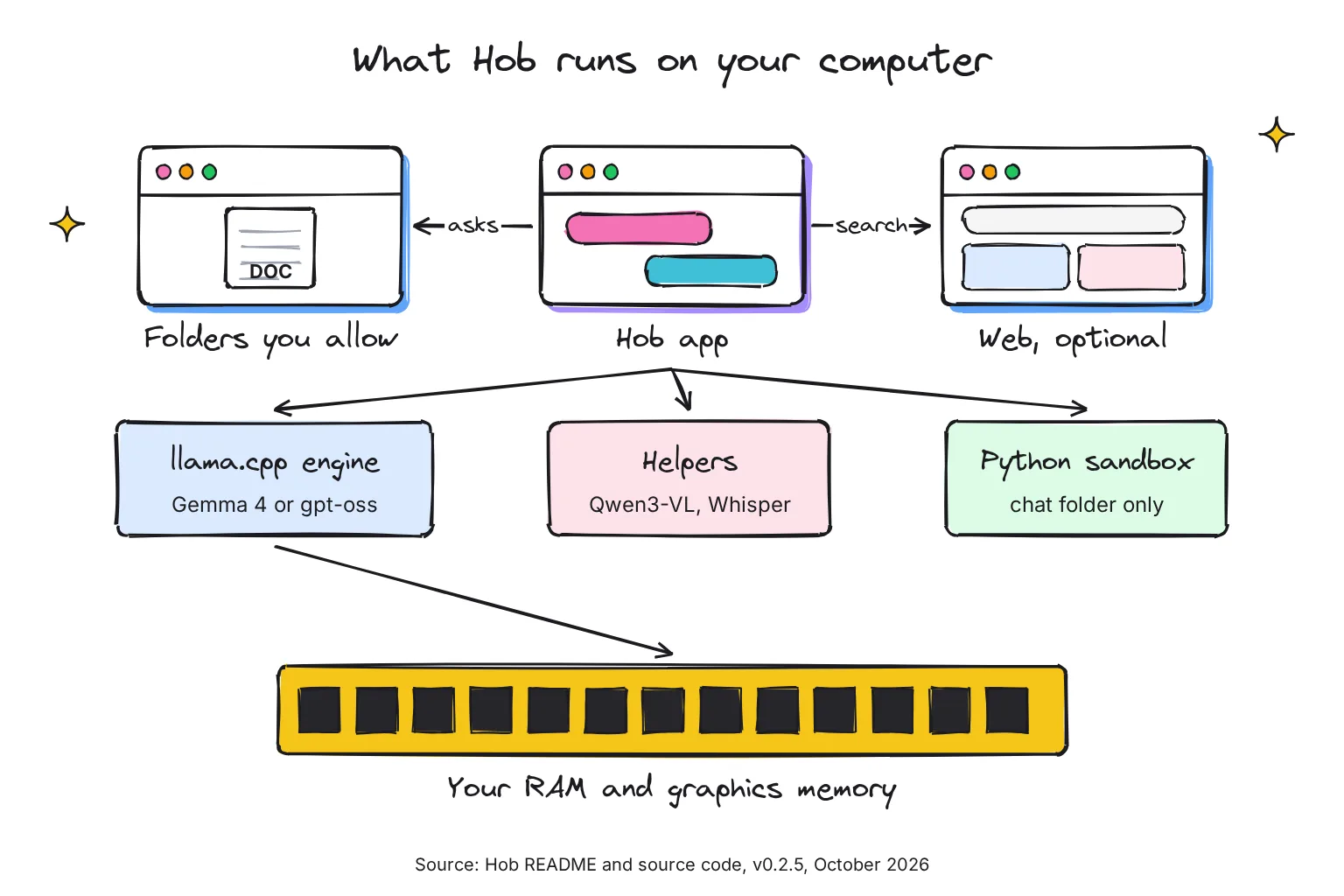
You do not pick a model at the start. The docs say Hob checks your hardware and downloads the best model it can run well: Gemma 4 E4B Compact on 8GB Macs, E4B on 16GB, Gemma 4 26B from 24GB, and OpenAI's gpt-oss 120B for workstations. Models are ranked on agent work, meaning multi-step tasks and tool use, and you can switch at any time.
The model catalog also lists Qwen3 1.7B, Gemma 4 E2B, gpt-oss 20B and a squeezed Gemma 4 26B Compact for 16GB machines. Every entry is Apache 2.0 licensed. Images go to a separate small Qwen3-VL model (Qwen3-VL 4B, or a 2B version where the 4B will not fit on the graphics chip, per its vision code), and dictation uses Whisper base, both downloaded after the main model.
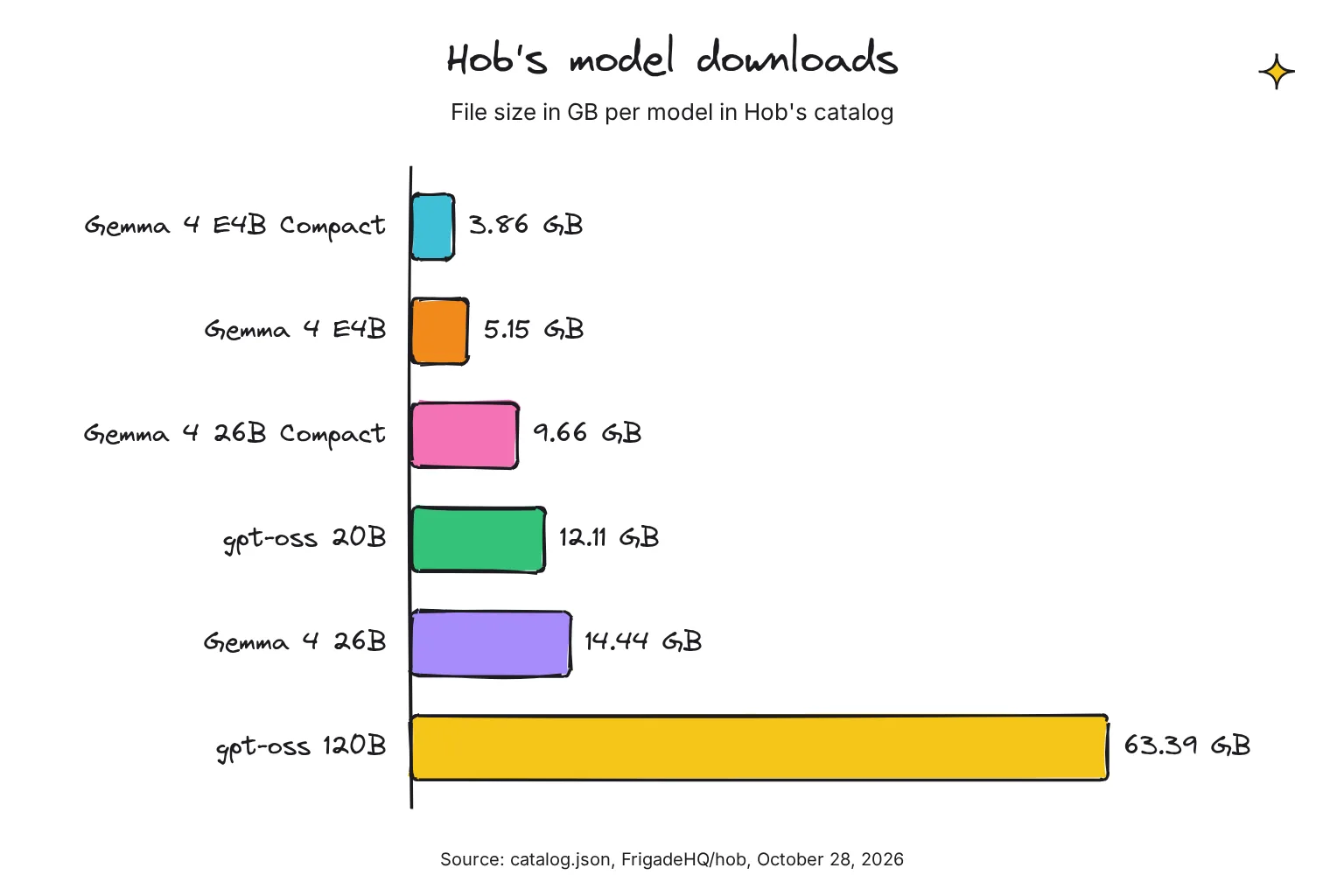
The catalog's file sizes are 3.86 GB for E4B Compact, 5.15 GB for E4B, 9.66 GB for 26B Compact, 12.11 GB for gpt-oss 20B, 14.44 GB for Gemma 4 26B and 63.39 GB for gpt-oss 120B. For the 16GB MacBook Air, that means E4B by default, with 26B Compact as the catalog's suggestion "if E4B feels too simple". On a 16GB Windows laptop with no graphics card, Hob's model picker estimates full E4B runs just under its 15 tokens per second floor, so expect E4B Compact (3.86 GB) as the pick, with full E4B offered as a slower, smarter option.
What runs on your device, and what goes online?
The model, your chats and your files stay local, and the docs say there is no telemetry, meaning no usage data sent back to the maker. That is the maker's claim, but the code is public, so anyone can check it. Hob goes online for these jobs:
- Always: to download models and check for new ones. The model list itself comes from the GitHub repository.
- App updates: installed copies download the new version and install it when they quit.
- With Web access on: web searches, code that fetches data, and Python packages from PyPI. Search runs through SearXNG, an open-source metasearch engine Hob runs on your computer at 127.0.0.1; your queries still reach engines such as Google, Bing and DuckDuckGo.
- Connectors you add: these go online only when you use them, under each service's own privacy policy.
To keep everything offline, turn off Web access under Settings, Privacy. Hob then works fully offline, apart from downloading its models and updates. Our guide to private AI options explains why local models change the privacy picture.
How Hob guards your files and your computer
An agent that edits files needs fences. Hob promises approval before anything in your folders changes, Undo for every task, and code in a sandbox. The website's mock-up shows the prompt: Hob asks to use a folder, then "asks before changing any" file.
The permission code adds detail. Reading files in a folder you shared needs no extra click, while changes ask unless you said always allow, and new files inside a project folder do not ask. After the model has read web content in a turn, Hob asks again even where you chose always allow. Hob refuses your whole home folder, system folders and hidden folders such as .ssh, which hold keys. Running sandboxed code needs no approval.
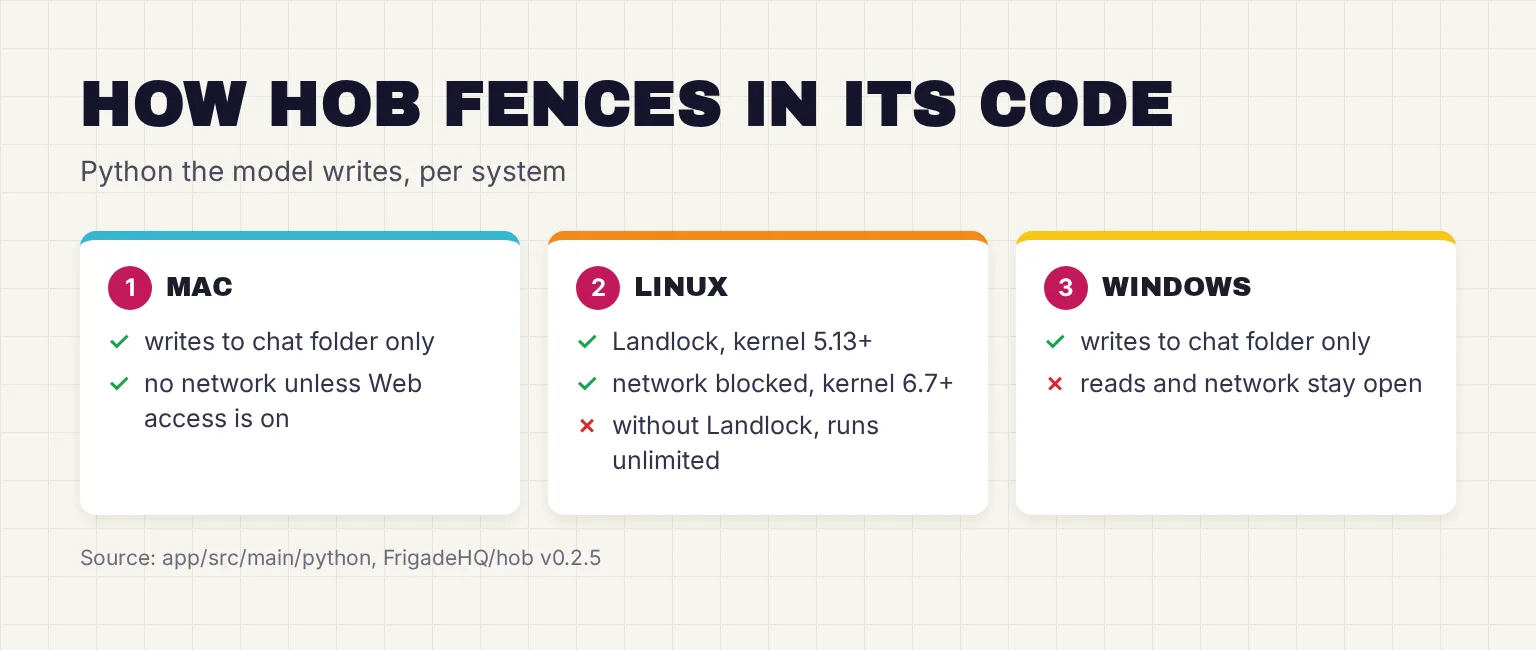
The sandbox differs by system, per run.ts and landlock.ts:
- Mac: Apple's sandbox-exec lets code write only in the chat folder and temp, read only the folders you allowed among your own files, start no other programs, and reach the network only when Web access is on and the code asks for it.
- Linux: Landlock, a kernel security feature, limits which files the code can write and read and which programs it can start, from kernel 5.13; blocking the network needs kernel 6.7. The file's header comment is plain about the fallback: "Without Landlock (older kernels) the code runs unlimited."
- Windows: Python runs at low integrity, the level browsers use for their sandboxes, so it can only write to the chat folder and temp. The code comment adds: "Reads and network stay open (Windows has no simple way to limit them)."
For the Windows reader, that means the sandbox does not stop code Hob writes from reading other files your account can read or from going online. That is a limit the maker documents in its own code, not a known exploit, and the folder approvals above still cover Hob's file tools. Treat MCP connectors with the same care as any add-on: they run with the access you give them.
Hob system requirements and install steps
Hob's website says it runs on Apple Silicon Macs, Windows PCs, and Linux, with at least 8 GB of memory: "16 GB is good for everyday tasks, and 32 GB or more gets you the best ones." Keep 10 to 25 GB of disk free, or about 75 GB for the largest model. The release builds are an Apple Silicon (arm64) disk image, a 64-bit Windows installer and an x86_64 Linux AppImage, per the build settings.
- Download the file for your system. The README links Hob-mac-arm64.dmg, Hob-windows-x64.exe and Hob-linux-x86_64.AppImage from the latest release, v0.2.5 on October 28, 2026.
- On Windows, get past the warning. The FAQ's exact advice for "Windows protected your PC" is "Click More info, then Run anyway." Windows shows it because the app is not yet signed with a Microsoft certificate. The Mac disk image is notarized by Apple, per its build notes.
- Pick where models go. On Windows and Linux you can choose another drive on the first screen, "Saves to … → Change…". On a Mac they go in Hob's app data folder.
- Let Hob choose the model. It checks your hardware and downloads a model; on the 16GB MacBook Air that should be Gemma 4 E4B, about 5 GB, and on a 16GB Windows laptop with no graphics card, Gemma 4 E4B Compact, about 3.9 GB.
Developers can build it instead. The docs say it requires Node.js 24 and pnpm 10, then:
pnpm install
pnpm dev              # run Hob
pnpm -C app test      # unit tests
pnpm -C app e2e       # end-to-end tests (hidden window, stand-in model)
pnpm -C app dist      # installer for this computer
How do you uninstall Hob and its models?
Use Settings, Files & storage, Remove Hob, which deletes Hob, its models, your chats and settings. Dragging it to the Trash on a Mac, or deleting the AppImage on Linux, leaves the models behind in ~/Library/Application Support/Hob or ~/.config/Hob. Remove Hob arrived in release 0.2.3 on October 27; before that, Settings already let you remove individual model downloads.
How mature is Hob?
Very new. The public history starts with a "Hob 0.1.0" commit on October 19, 2026. The six releases, v0.2.0 to v0.2.5, came out between October 25 and 28, and their release notes are only changelog links. When I checked on October 29, 2026, the repository showed 254 stars, 14 forks and just over 200 commits, most of them by one developer.
In his own Show HN post on Hacker News, the developer, Christian, calls it "a new OSS project I've been noodling on for the last couple of weeks". He writes that the hardest part was getting small models to use tools reliably, since 4B models would claim "here's your chart" without calling the chart tool. The website says the company is backed by Y Combinator. Fast fixes are a good sign; a two-week history is not a track record.
Hob vs Jan, LM Studio, GPT4All and Open WebUI
Hob's pitch is that other local apps are mostly chat windows. Its FAQ says most are a chat window: "at best they paste a plain text file into a small context window", and many default to hosted models. That is the maker's view, and it is no longer the whole picture: LM Studio launched Bionic, a separate agent app for open models that edits files in a sandbox, in July 2026. Here is what each project's own pages say in October 2026.
| App | License | Engine and models | Tools and MCP | Status, October 2026 |
|---|---|---|---|---|
| Hob | MIT | llama.cpp; curated Gemma 4, gpt-oss and Qwen list, picked for you | Files, Python sandbox, charts, PDF forms (Mac), MCP connectors | v0.2.5, October 28, 2026; first release that week |
| Jan | Apache 2.0 | Local models plus optional cloud models | MCP host; you approve each tool call unless you allow all | Established |
| LM Studio | Closed source; free for local models, optional paid cloud plans | llama.cpp (GGUF), plus MLX on Apple Silicon | MCP host since 0.3.17; Bionic agent app since July 2026 | Established |
| GPT4All | MIT | llama.cpp | LocalDocs for your documents | Last release v3.10.0, February 2025 |
| Open WebUI | Open WebUI License (BSD-3 plus branding clause) | Browser interface over a runner such as Ollama | MCP since v0.6.31 | Established |
The practical difference for the 16GB reader is setup. Jan, LM Studio and GPT4All give you a model browser and leave the choice to you; Hob picks one and builds its tools around it. If you want an open-source app with a longer track record, our Jan review is the place to start, and LM Studio vs Ollama covers the two most popular runners. If you want a local agent for files and do not need open source, LM Studio's Bionic is the closest established alternative. Our GPT4All guide explains its stalled development.
Open WebUI suits people who already run Ollama and want a browser interface with many features; our Open WebUI guide covers setup. Hob does not connect to Ollama, so it will download its own copy of any model. If PDFs are your main job, compare Hob with the tools in our guide to chatting with a PDF locally.
Is Hob an alternative to Claude Cowork and ChatGPT agent?
Partly. Claude Cowork is for paid Claude plans, and its help page says "Claude's work runs on Anthropic's servers, in an isolated environment", with an internet connection "required throughout the session". It can read and write only folders you connect. OpenAI's July 2025 launch post says ChatGPT agent works on "its own virtual computer" and requests permission before consequential actions.
Hob offers the same idea with the model and your files staying on your laptop, no fee, and no internet needed once set up if you turn Web access off. The trade is model strength. Hob's FAQ is candid about it: on a powerful computer it is "close to it", meaning 32GB of memory or more, while smaller computers get "a lighter model that's great for quick tasks". On a 16GB laptop, expect Gemma 4 E4B or its Compact version, not a frontier cloud model.
Common questions about Hob AI
Is Hob free and open source?
Yes. Hob is released under the MIT license by Frigade, and its website says there is no account, no subscription and no paid tier. The models it downloads are also free, under Apache 2.0 licenses. Optional outside services you connect to it may charge their own fees.
Does Hob work offline?
Yes, once Hob and its model are downloaded. Turn off Web access under Settings, Privacy, and chat and file work run without internet. Hob still goes online to download models and app updates, and any connectors you add go online when you use them.
Which models does Hob use?
Hob picks from a curated list. Gemma 4 E4B Compact suits 8GB Macs and 16GB PCs without a graphics card, Gemma 4 E4B suits 16GB Macs, Gemma 4 26B needs 24GB or more, and gpt-oss 120B is for workstations. A small Qwen3-VL model reads images and Whisper handles dictation. You can switch models in Settings.
Does Hob use Ollama or MLX?
No. Hob runs models with llama.cpp through the node-llama-cpp library, using Metal on Macs and CUDA or Vulkan elsewhere. It does not connect to an existing Ollama install or use Apple's MLX, so it downloads its own GGUF model files, even if you already have them.
What do I need to run Hob?
An Apple Silicon Mac, a 64-bit Windows PC or an x86_64 Linux machine with at least 8GB of memory. Hob's site says 16GB is good for everyday tasks and 32GB or more runs the best models. Keep 10 to 25GB of disk free, or about 75GB for the largest model.
Is Hob safe to let near my files?
Hob asks before changing files in folders you share, offers Undo for each task and refuses your whole home folder and hidden folders. Its code sandbox is strong on Mac and recent Linux, but on Windows the code it writes can still read files and use the network.
My verdict for a 16GB laptop: try Hob on a Mac, wait on Windows
Hob is the most direct attempt I have seen at a local, open-source version of Claude Cowork, and its file permissions and Undo show care. But it is under two weeks old in public, and on 16GB it picks Gemma 4 E4B or E4B Compact, so expect quick tasks rather than cloud-level work. On the MacBook Air, I would try it on a copy of a test folder now. On the Windows laptop, I would wait for a stronger sandbox and a signed installer, and use Jan or LM Studio meanwhile.
Your next step: on a Mac, download v0.2.5, share one folder holding copies of a spreadsheet and a PDF, and ask Hob to summarize them; on Windows, bookmark the releases page and check back in a month.
Sources
- FrigadeHQ/hob - GitHub
- Hob documentation (docs/README.md) - FrigadeHQ/hob, GitHub
- hob/LICENSE - FrigadeHQ/hob, GitHub
- Releases - FrigadeHQ/hob, GitHub
- Latest release - FrigadeHQ/hob, GitHub
- Hob 0.2.5 - FrigadeHQ/hob, GitHub
- catalog/catalog.json - FrigadeHQ/hob, GitHub
- app/electron-builder.yml - FrigadeHQ/hob, GitHub
- app/package.json - FrigadeHQ/hob, GitHub
- app/src/main/catalog.ts - FrigadeHQ/hob, GitHub
- app/src/main/search/searxng.ts - FrigadeHQ/hob, GitHub
- app/src/main/agent/permissions.ts - FrigadeHQ/hob, GitHub
- app/src/main/python/run.ts - FrigadeHQ/hob, GitHub
- app/src/main/python/landlock.ts - FrigadeHQ/hob, GitHub
- app/src/main/vision/catalog.ts - FrigadeHQ/hob, GitHub
- packages/picker/src/pick.ts - FrigadeHQ/hob, GitHub
- Hob: An easier way to use AI on your own computer - Frigade
- Show HN: Hob - Open-source, on device alternative to Claude Cowork and ChatGPT - Hacker News
- llama.cpp - ggml-org, GitHub
- SearXNG - searxng, GitHub
- Qwen3-VL-4B-Instruct-GGUF - Qwen, Hugging Face
- whisper-base - onnx-community, Hugging Face
- Jan Desktop - Jan
- MCP - Jan
- LM Studio Desktop App Terms of Service - Element Labs
- MCP in LM Studio - LM Studio
- LM Studio Docs - LM Studio
- Introducing LM Studio Bionic: the AI agent for open models - LM Studio
- Bionic Pricing - LM Studio
- nomic-ai/gpt4all - GitHub
- GPT4All v3.10.0 - nomic-ai/gpt4all, GitHub
- LocalDocs - GPT4All
- License - Open WebUI
- Model Context Protocol (MCP) - Open WebUI
- Get started with Claude Cowork - Anthropic
- Introducing ChatGPT agent - OpenAI