What is Draw Things, and is it really free?
Draw Things is a free app from Draw Things, Inc. that makes AI images, and short videos, on an iPhone, iPad or Mac. Generation runs on your own device, with no ads or token limits, and it needs no account. The main paid option, Draw Things+ at $8.99 a month, buys optional cloud computing, not the app.
This guide follows one reader: someone with an iPhone 16 Pro, which has 8GB of memory according to 9to5Mac, and perhaps an M-series iPad or a 16GB MacBook Air, who wants to make pictures without a subscription and without sending prompts to a company's servers.
Choose Draw Things if:
- You want one app on iPhone, iPad and Mac: the App Store listing covers all three, plus Apple Vision Pro.
- You want current open models rather than one house style: the listing names SDXL, FLUX.1, FLUX.2, Qwen Image, Z Image, Wan 2.2 and LTX-2.3.
- You want to import models and LoRAs from Hugging Face or Civitai, or train LoRAs on the device.
Choose another tool if:
- You have a Windows PC with a graphics card: see making AI images on your own computer.
- You use Android: see offline AI image generators for phones.
- You want a chatbot, not pictures: see how to run a local LLM on an iPhone, or our guide to running AI on your phone offline.
Draw Things at a glance in October 2026
Checked on the App Store listing and downloads page in late October 2026:
| Item | Draw Things |
|---|---|
| Developer | Draw Things, Inc. |
| Price | Free; US in-app purchases are Draw Things+ at $8.99 a month and Boost Bundles at $0.99, $4.99 and $19.99 |
| Latest version | 26.1020.0, released October 22, 2026 |
| Requirements | iOS and iPadOS 15.4 or later, macOS 12.4 or later, visionOS 1.0 or later |
| App size | 342.3 MB, before any models |
| What it makes | Images, edits, upscales and video, some with sound |
| Where it runs | On your device by default; Cloud Compute is optional and needs sign-in |
| Source code | Engine, samplers and trainer under GPL-v3; the app is built from a private repository |
| App Store age rating | 18+ |
What does Draw Things+ cost, and what do you get?
The pricing page lists a Free Edition that generates locally and trains LoRAs on your device; a free account that adds Cloud Compute, meaning generation on Draw Things' own servers; and Draw Things+ at $8.99 a month, with higher cloud limits, your own LoRAs in the cloud and Privacy Pass. A March 31, 2026 update renamed the tiers Local Only, Free and Draw Things+.
Cloud jobs are measured in Compute Units, which grow with image size, steps and frames. The pricing page gives no limits, but the team-endorsed, volunteer-run wiki listed 15,000 units per job free and 40,000 on Draw Things+ in June 2026. Draw Things+ members can also spend Boosts, each worth 60,000 units and used only when a job completes. The iPhone 16 Pro reader needs none of this to make pictures.
Is Draw Things open source?
Partly. The draw-things-community repository holds the app's re-implementation of image models, samplers, data models and trainer under GPL-v3. The app itself lives in a private repository that syncs with the public one, so the public code covers the engine, not the whole app.
Which models does Draw Things support?
A model is the downloaded file of learned weights that does the drawing; the app only runs it, a split our guide to local AI images on a PC explains. The App Store listing names seven model families, and 2026 updates kept adding: FLUX.2 [klein] in January, LTX-2 video with audio in March, Krea 2 and Ideogram 4 in July, MiniMax H3 and Qwen Image 2.1 in September, and FLUX.3 [klein] 5.6B on October 22.
Most models come in several sizes thanks to quantization, which stores each weight in fewer bits, such as 6-bit or 8-bit, so the file needs less memory at a small cost in quality; Exact versions keep full precision. The developer says its 6-bit Z Image Turbo takes about 4 GiB of memory, against about 11 GiB for Qwen Image. An April 2026 update brought 8-bit S versions to M4 and A18 Pro devices, with up to 2x speed-up, and the A18 Pro is the iPhone 16 Pro's chip, so pick 8-bit S when it is offered.
How do you download a model in Draw Things?
Following the wiki's install guide, open the Settings tab (on iPhone, tap the three-bar menu at top left first), tap the Model dropdown, look in the Official and Community sections and tap the cloud icon beside the model you want. The app documentation says to keep the app open on iOS until every file finishes. The Community list is maintained in public on GitHub, with a license file for each model.
Can Draw Things make videos?
Yes. The wiki's video guide covers Wan 2.1 and 2.2, Hunyuan, SkyReels and Stable Video Diffusion, and the app has since added LTX-2.3 with audio and MiniMax H3. The guide asks for 8GB or more of memory and points iPhone owners to the small Wan 2.1 1.3B model. In the developer's test, an M5 iPad with 16GB took 1,166.62 seconds, about 19 minutes, for an 81-frame Wan 2.2 A14B clip at 448 x 768, with a speed-up LoRA. On the iPhone 16 Pro, treat video as a Mac or Cloud Compute job.
Which iPhones, iPads and Macs are fast enough for Draw Things?
Memory decides what fits. Apple's chips share one pool of unified memory between processor and graphics, and the wiki estimates that 8GB on an M1 leaves about 6-7GB for Draw Things. Its April 2025 device table rates common setups.
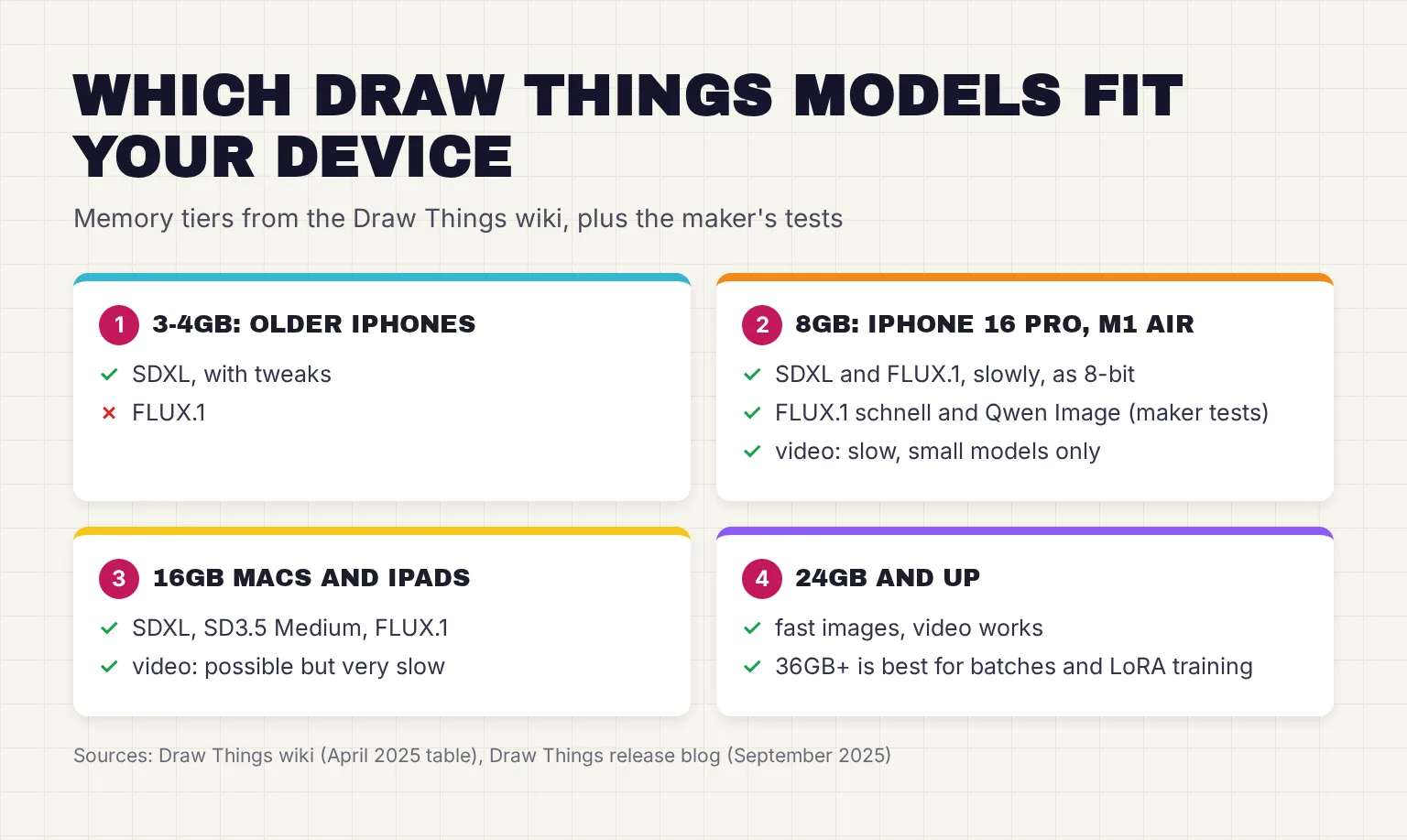
In short, 3-4GB devices struggle and cannot run FLUX.1, 8GB devices run larger models slowly as 8-bit files, 16GB is good and 24GB or more is fast, with 36GB or more ideal for batches and LoRA training. By memory, the iPhone 16 Pro sits in the 8GB row. The table predates small newer models such as Z Image Turbo.
How fast is Draw Things on an iPhone 16 Pro?
The only figures naming this phone come from the developer. In its September 2025 tests, an iPhone 16 Pro made a 2-step FLUX.1 [schnell] image in 69.5 seconds at 768 x 768 and 131.93 seconds at 1024 x 1024, including the time to load the model. The same post notes that at a room temperature of 70°F the iPhone 16 Pro starts thermal throttling after about a minute, which slows larger images.
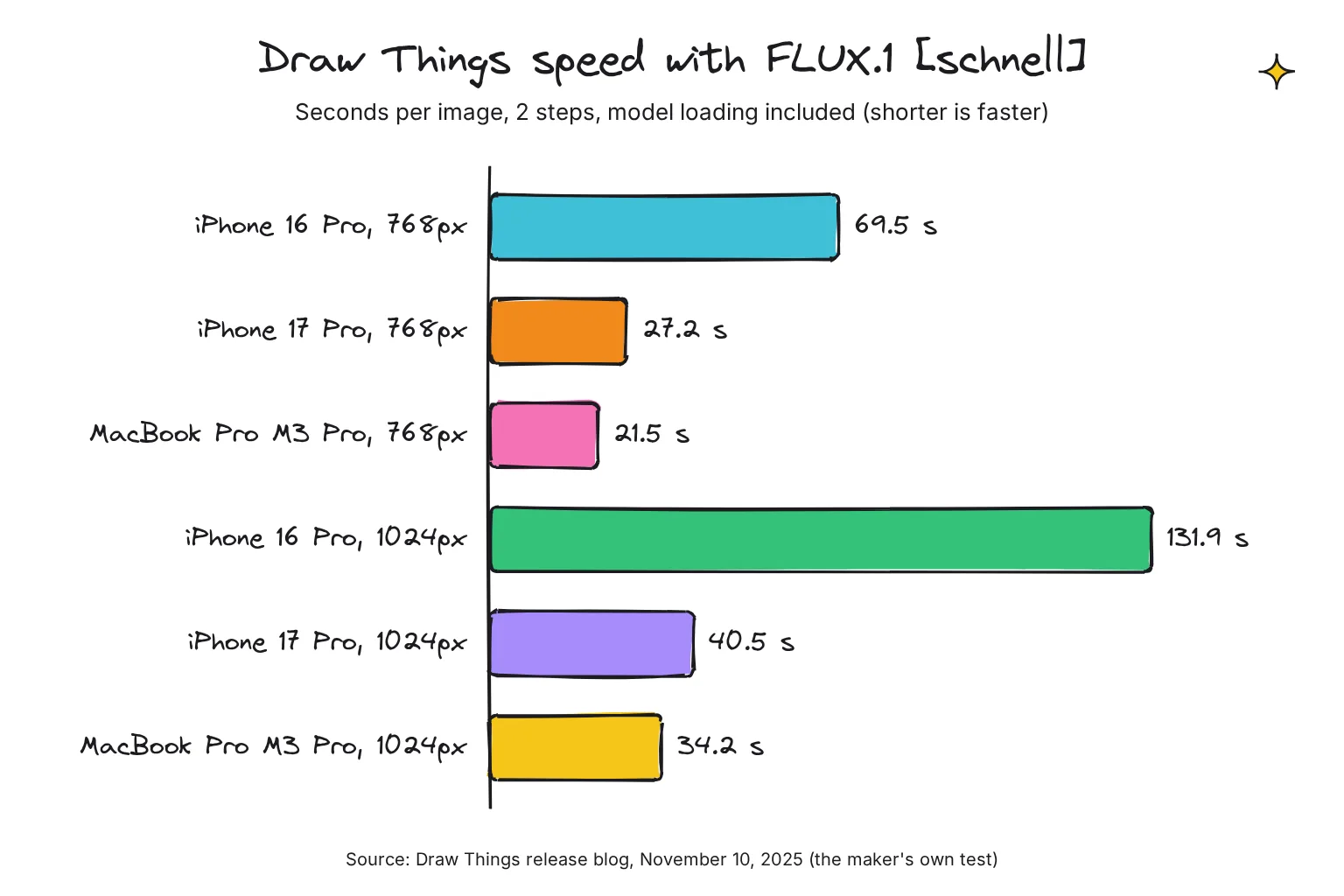
Newer hardware is much quicker. After the developer's November 2025 engine update, the iPhone 17 Pro took 27.2 and 40.5 seconds for the same two images, and a MacBook Pro with an M3 Pro took 21.5 and 34.2 seconds. For Z Image Turbo at 8 steps and 1024 x 1024 it measured 55.7 seconds on an M5 iPad and 71.0 seconds on a Mac mini with M4 Pro, and on an M5 Max its Lightning Draft mode runs FLUX.2 [klein] and Z Image Turbo at around or under one second.
These are the maker's own tests; against the mflux, mlx-serve and vpipe engines it reported Draw Things 1.11 to 1.97 times as fast on three Macs, and 0.89 to 1.25 times their speed on a base M6. I know of no independent test I trust, so read the numbers as a guide to scale.
Does Draw Things run on an Intel Mac?
The Mac version needs macOS 12.4 or later, and a March 2026 release note that turned off High-Quality Preview for Intel Macs shows they still run it, but every published speed figure is for Apple silicon. If the App Store will not cooperate, the downloads page offers each release as a direct Mac download. Per the draw-things-community README, Mac models live in ~/Library/Containers/com.liuliu.draw-things/Data/Documents/Models.
How to make your first image in Draw Things
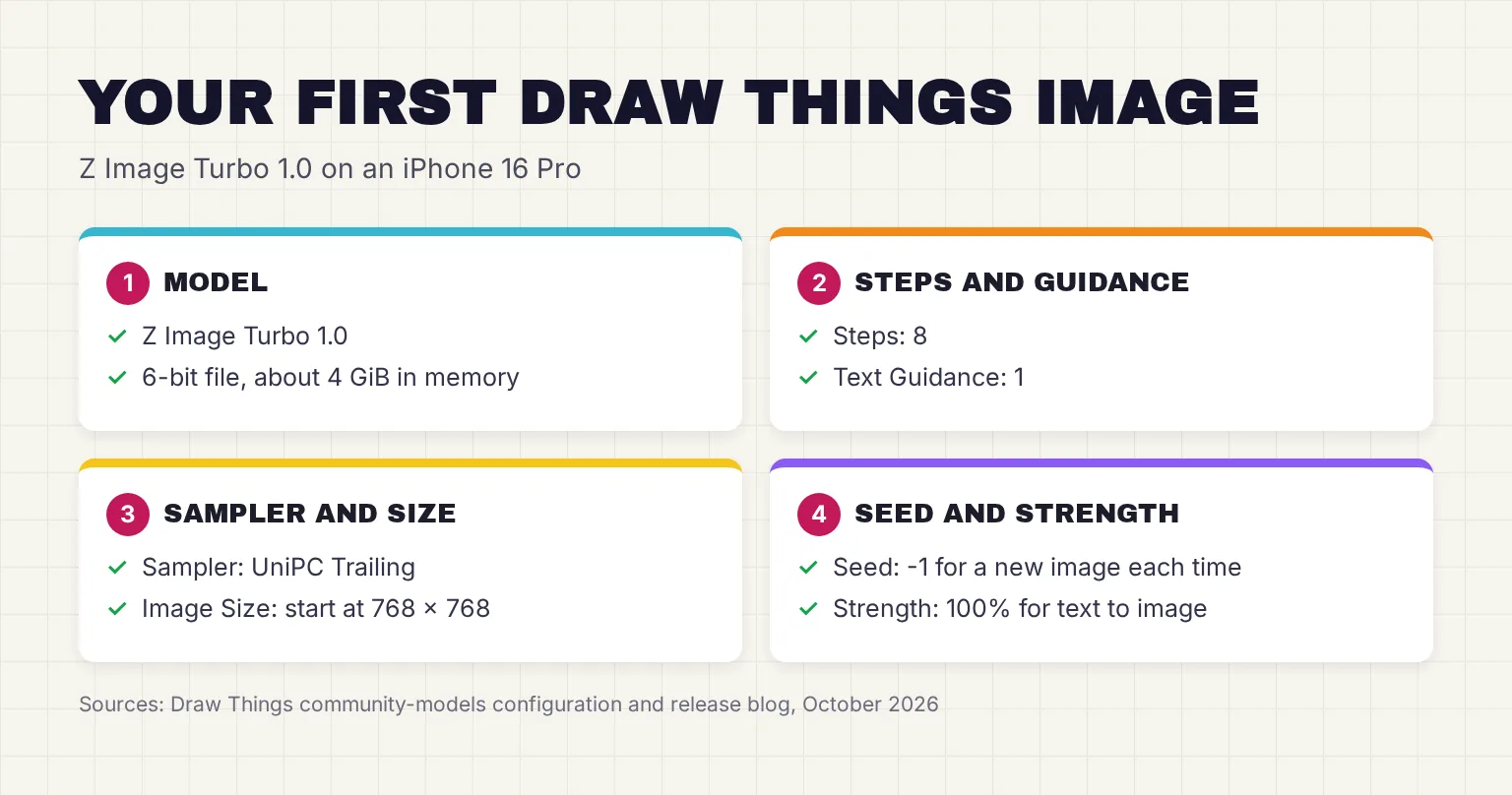
For the iPhone 16 Pro, I would start with Z Image Turbo. Its model card lists 6 billion parameters and the Apache 2.0 license, it is step-distilled, so no speed-up LoRA is needed, and the 6-bit version leaves room on an 8GB phone. FLUX.2 [klein] 4B, also Apache 2.0, is the alternative.
- Install Draw Things. Get it from the App Store; the download is 342.3 MB and needs iOS 15.4 or later. You can skip signing in, because on-device features work without an account.
- Open the settings. On iPhone, tap the three-bar menu at top left, then the Settings tab, as the wiki describes.
- Download Z Image Turbo. Tap the Model dropdown, find Z Image Turbo 1.0 and tap the cloud icon. Keep the app open until the download finishes.
- Use the recommended settings. The community configuration for Z Image Turbo sets 8 steps, Text Guidance 1, the UniPC Trailing sampler and Shift 3. Keep Strength at 100%, which the wiki calls Text to Image.
- Pick a modest size. Start at 768 x 768; the wiki notes that image size usually changes generation time more than steps do.
- Write a prompt and tap Generate. Describe the subject, setting and style in a sentence or two; orange squares turn blue as the image forms. Long-press Generate on iPhone to queue up to 10 images.
- Save the picture. The save menu sends it to Photos or Files, or copies it.
What if Draw Things crashes or runs slowly?
Memory is the usual cause. The wiki's speed guide suggests closing background apps and keeping 10-20GB of storage free for swap, and its device guide suggests smaller sizes, fewer steps and 8-bit models. If settings get tangled, the troubleshooting page says to tap Reset to default in Settings and again under the processor icon, then start a new project.
Draw Things settings explained simply
Image models start from random noise and remove it step by step until a picture matching your prompt appears; the settings steer that process. The wiki's Basic Settings page covers the first four.
- Steps: how many clean-up passes run. The wiki calls 20-30 standard, but fast distilled models need fewer: 8 for Z Image Turbo and 4 in the configuration for FLUX.2 [klein] 4B.
- Text Guidance: Draw Things' name for CFG scale, how closely the image follows your prompt. The wiki gives 4.0-7.0 as typical; Z Image Turbo and FLUX.2 [klein] 4B use 1.
- Sampler: the method used at each step. The wiki finds Euler Ancestral and Euler A Trailing faster than DPM++, and Z Image Turbo's note says trailing samplers give the best results.
- Image Size: the canvas in pixels, set in 64-pixel steps. Smaller is faster, and each model has sizes it was trained for.
- Seed: the random number behind each image; -1 means a new one every time.
- Strength: for editing an existing picture, where 100% makes a totally new image and 0% changes nothing.
- Negative prompt: things to avoid, such as blurry. On iPhone, swipe the prompt box left to reach it. Fast models may ignore it: the wiki notes that for one, Text Guidance 1 disables the negative prompt.
Image to image, inpainting and editing
To change an existing picture, load it from the lower right of the canvas with Select from Photos, Select from Files or Paste, then lower Strength to keep more of the original. To inpaint, redrawing only part of an image, remove the area with the Eraser or Magic Wand and generate again with a prompt for what should fill it.
Newer models edit from instructions: FLUX.3 [klein] and Qwen Image 2.1 take reference images through the canvas and moodboard, per Draw Things' model notes, and a May 2026 update added a mode selector for Auto, Generation and Edit. The app also gained SeedVR2 for one-step upscaling and restoration; for a dedicated tool, see our guide to local AI upscalers.
How to import models and LoRAs into Draw Things
A LoRA is a small add-on file that teaches a base model a style, character or object without replacing it. Civitai has a button that opens a model straight in Draw Things.
- Get the file. Download it from Hugging Face or Civitai, or copy its link; the wiki finds a downloaded file more reliable than a URL.
- Open Manage. In the Settings tab, open the Model dropdown, or the LoRA dropdown for a LoRA, and tap Manage at the top.
- Import it. Tap Import Model, then choose Select from Files or Enter URL.
- Check the base model. If the import fails because the base model is unclear, pick the right one from the dropdown and retry. If a model needs a separate VAE, the part that turns the model's output into pixels, add it before importing.
- Set the trigger word and weight. For a LoRA, enter its trigger word, which the app adds to your prompt, then set its strength with the slider; the plus button adds more LoRAs.
Imported files work for local generation but not on Cloud Compute, unless you pay for Draw Things+ and use Bring Your Own LoRA. Download only from sources you trust.
Can you train a LoRA on an iPhone or Mac?
Yes, on the device. The wiki's June 2026 table lists LoRA training for Stable Diffusion 1.x and 2.x, SDXL, FLUX.1, FLUX.2 [klein] 4B and 9B, Qwen Image, Z Image and ERNIE Image. The older app documentation sets the floor at an iPad with 8GB for Stable Diffusion 1.5 LoRAs and warns that iPhone 15 Pro models can crash while training. For this reader, I would train on a Mac and import the LoRA on the phone.
Is there a Draw Things API?
Yes, in several forms, and none of them needs the cloud.
- API Server in the app. A setting lets one device render for another Draw Things device on your network, over gRPC or HTTP. With Server Offload set to Other Devices, the iPhone can send jobs to a Mac on the same Wi-Fi with no Apple account.
- gRPCServerCLI. An open-source server for Macs and for Linux PCs with NVIDIA cards that the app connects to in the same way.
- draw-things-cli. A command-line tool for generation and LoRA training on a Mac, released under GPL-v3 and installed with Homebrew.
- Scripts. JavaScript that runs inside the app, with canvas, pipeline and filesystem objects for automating multi-step jobs.
- MediaGenerationKit. A Swift package, in preview since April 2026, that puts generation inside your own app, locally, on your server or on Draw Things' cloud; the default cloud API key covers 20 tasks a month free and 200 on Draw Things+.
On a Mac with Homebrew, the repository README installs the tool and lists its options with these commands. It defaults to the same model folder as the app, so models you already downloaded are ready to use.
brew install --HEAD drawthingsai/draw-things/draw-things-cli
draw-things-cli --help
The --HEAD flag builds the newest source; the developer's launch post omits it, which installs the official tap's prebuilt release. Both routes need macOS 13 Ventura or later.
What stays on your device, and what goes online?
For local generation, the App Store listing says your prompts and images stay on your device, and the privacy policy rules out third-party analytics or advertising frameworks for tracking. Model downloads still come from Draw Things' servers.

The App Store privacy label lists purchase history, other user content and a user ID as data not linked to you, unverified by Apple. That matches the optional cloud account in the policy: Sign in with Apple supplies an opaque ID, uploaded LoRAs stay stored until you delete them, and purchases are checked with Apple. A May 2026 update added Sign in with Google, which the policy still did not mention in late October 2026.
Cloud Compute is where prompts leave the phone. The developer says its servers handle requests ephemerally in RAM only, and Draw Things+ adds Privacy Pass so that even someone with full access to the backend cannot link a generation to a customer, up to 500 passes a day. Those are the maker's claims; the wiki says the cloud lacks attestation, so privacy is not fully guaranteed. Models in the app's Remote API Providers section, such as OpenAI GPT Image 1, or Veo 3.1 and Sora 2 via WaveSpeedAI, send your prompt and any input image to that company.
To keep everything on the phone:
- Do not sign in; the on-device features work without it.
- Turn off Cloud Compute & Sharing in Machine Settings, which is on by default.
- Avoid models from the Remote API Providers section.
- For heavier jobs, use Other Devices so the work stays on your own network.
Can you sell images you make with Draw Things?
Each model's license decides that, not the app. The model cards say, in October 2026:
| Model | License | Commercial use |
|---|---|---|
| Z Image Turbo | Apache 2.0 | Yes |
| FLUX.2 [klein] 4B | Apache 2.0 | Yes |
| FLUX.1 [schnell] | Apache 2.0 | Yes: personal, scientific and commercial |
| SDXL Base 1.0 | CreativeML Open RAIL++-M | Yes, within its use restrictions |
| SDXL Turbo | Stability AI Community License | Free below US$1 million annual revenue |
| FLUX.3 [klein] 5.6B | FLUX Kommunity License v1.0 | Non-commercial, plus commercial output for users under US$5M revenue |
| FLUX.2 [klein] 9B | FLUX Non-Commercial License | No |
| Qwen Image 2.1 Turbo | Qwen Research License | No: research or evaluation only |
| LTX-2.3 | LTX-2 Community License | Paid license needed at US$10 million or more annual revenue |
For the iPhone 16 Pro reader who might sell prints, Z Image Turbo and FLUX.2 [klein] 4B are the simplest choices. Licenses change, so recheck the card first.
Common questions about Draw Things
Is Draw Things free?
Yes. Draw Things is free on the App Store for iPhone, iPad and Mac, with no ads and no limit on images made on your device. Paying is optional: Draw Things+ costs $8.99 a month for higher Cloud Compute limits, cloud LoRAs and Privacy Pass, and members can buy Boost bundles at $0.99 to $19.99 in the US.
Does Draw Things work offline?
Yes, once your models are downloaded. Local generation runs on your device's own chip and memory, and the developer says prompts and images stay there. You need a connection to download models and updates, or if you choose Cloud Compute, which requires signing in and sends the job to Draw Things servers.
Which iPhone do you need for Draw Things?
The app installs on iOS 15.4 or later, but memory matters more. The Draw Things wiki says 3 to 4GB devices struggle, 8GB devices such as the iPhone 16 Pro run larger models slowly as 8-bit files, and 16GB or more is good. Newer chips such as the A19 Pro are much faster.
Is Draw Things private?
For local generation, the developer says prompts and images stay on your device, and its privacy policy rules out third-party tracking frameworks. Data leaves the device when you use Cloud Compute or a remote API model. The developer says its cloud works in memory only, but the community wiki notes this is not independently attested.
Can Draw Things make videos?
Yes. Draw Things supports text-to-video and image-to-video with models such as Wan 2.2, Hunyuan, LTX-2.3, which adds sound, and MiniMax H3. Video needs far more memory and time than images: the developer measured about 19 minutes for one short Wan 2.2 clip on an M5 iPad, so most people use a Mac or Cloud Compute.
Does Draw Things have an API?
Yes. The app can act as a gRPC or HTTP API server for other Draw Things devices on your network, and the open-source gRPCServerCLI and draw-things-cli tools run on a Mac. Developers can also use the MediaGenerationKit Swift package, which runs models locally, on their own server or on the Draw Things cloud.
My verdict for an iPhone 16 Pro owner: install it and start with Z Image Turbo
Draw Things is the app I would recommend to this reader. It is free, works without an account, runs current open models on the phone itself, and the same app on an M-series Mac can take heavy jobs over Wi-Fi. The trade-offs are real: there are many settings to learn, a large model takes one to two minutes per image on the iPhone 16 Pro while the phone warms up, and video belongs on a Mac. For the wider picture, see our guide to running AI on your phone.
Your next step: install Draw Things, download Z Image Turbo 1.0, make one 768 x 768 image with 8 steps and Text Guidance 1, then lock its seed and change one word at a time.
Sources
- Draw Things: Offline AI Art - Apple App Store
- Draw Things: AI-assisted Image Generation - Draw Things
- Pricing - Draw Things
- Privacy Policy - Draw Things
- Downloads - Draw Things
- draw-things-community - drawthingsai, GitHub
- community-models - drawthingsai, GitHub
- Apple's Johny Srouji confirms all iPhone 16 models have 8GB RAM - 9to5Mac
- Main Page - Draw Things Wiki
- Quick Start - Draw Things Wiki
- Basic Settings - Draw Things Wiki
- How Powerful Is My Device - Draw Things Wiki
- How can I generate faster - Draw Things Wiki
- Install a Model or LoRA - Draw Things Wiki
- Cloud Compute - Draw Things Wiki
- Server Offload - Draw Things Wiki
- Other Devices - Draw Things Wiki
- Glossary - Draw Things Wiki
- Images and Layers - Draw Things Wiki
- Video Generation Basics - Draw Things Wiki
- Supported model bases - Draw Things Wiki
- Base Model Prompting Basics - Draw Things Wiki
- Basic UI - Draw Things Documentation
- Models - Draw Things Documentation
- Lora - Draw Things Documentation
- Others - Draw Things Documentation
- Scripts - Draw Things Documentation
- iPhone 17 Pro doubles AI performance for the next wave of generative models - Releases @ Draw Things
- Metal FlashAttention v2.5 w/ Neural Accelerators: delivering breakthrough performance on the Apple M5 chip - Releases @ Draw Things
- Quantify Z Image Turbo efficiency gains - Releases @ Draw Things
- Introducing Lightning Draft: interactive image generation on M5 Max - Releases @ Draw Things
- Harvest Season: New Hardware, New Inference Engines - Releases @ Draw Things
- Privacy Pass and Draw Things+ Cloud Compute - Releases @ Draw Things
- Introducing Boost: a new way for flexible media generation with Cloud Compute - Releases @ Draw Things
- draw-things-cli: local media generation from command-line on your Mac - Releases @ Draw Things
- homebrew-draw-things: Formula/draw-things-cli.rb - drawthingsai, GitHub
- Introducing MediaGenerationKit: Hybrid Media Generation for Production Apps - Releases @ Draw Things
- Tongyi-MAI/Z-Image-Turbo - Hugging Face
- black-forest-labs/FLUX.2-klein-4B - Hugging Face
- black-forest-labs/FLUX.2-klein-9B - Hugging Face
- black-forest-labs/flux-3-image-klein - Hugging Face
- black-forest-labs/FLUX.1-schnell - Hugging Face
- stabilityai/stable-diffusion-xl-base-1.0 - Hugging Face
- stabilityai/sdxl-turbo - Hugging Face
- Qwen/Qwen-Image-2.1-Turbo - Hugging Face
- Lightricks/LTX-2.3 - Hugging Face