What is Docling?
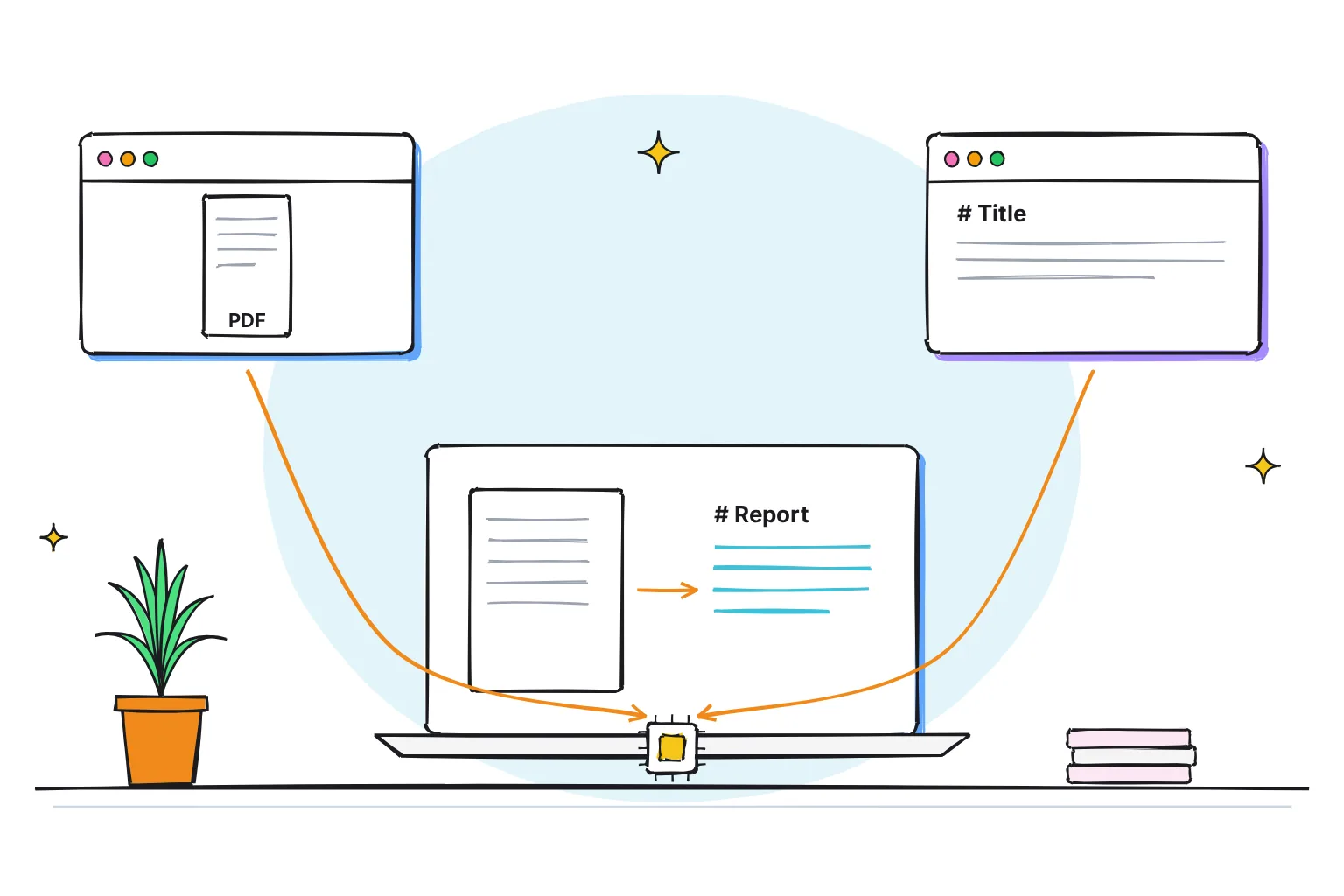
Docling is a free, open-source tool that turns PDFs, Word files, slides, spreadsheets, web pages and images into clean Markdown or JSON that AI models can read. It was started by IBM Research Zurich and is MIT licensed, and its FAQ says it is not using any remote service, so your documents can stay on your computer.
This guide follows one reader: someone with a 16GB laptop, either Windows with no graphics card or an M-series Mac, who has a folder of reports, contracts and scanned letters and wants clean text for a local model in Open WebUI or LM Studio, without uploading anything.
Choose Docling if:
- You want one tool for PDF, Word, PowerPoint, Excel, HTML and images, giving Markdown, JSON, HTML or plain text.
- Your PDFs hold tables that must keep their rows and columns, which its TableFormer table model rebuilds.
- Privacy matters: it can run in completely isolated air-gapped environments, with no internet connection.
Choose something else if:
- You never want a terminal: LM Studio reads .docx, .pdf and .txt files and Open WebUI has its own document extraction.
- Your PDFs are simple text and you want a lighter library: PyMuPDF4LLM needs no GPU, though its AGPL license matters if you build software on it.
Docling in October 2026: version, license and file formats
The current release is Docling 2.143.1, published on October 27, 2026, and new versions ship every few days. IBM open-sourced it in July 2024, and it is now hosted by the LF AI & Data Foundation. The code is on GitHub at docling-project/docling, and the official documentation at docling-project.github.io/docling.
| Docling in October 2026 | Details |
|---|---|
| Maker | Started by IBM Research Zurich; code on GitHub under docling-project |
| License | MIT for the code; Apache 2.0 for the Heron layout model and Granite-Docling |
| Version | 2.143.1, October 27, 2026 |
| Needs | Python 3.10 or newer; macOS, Linux and Windows, x86_64 and arm64 |
| Reads | PDF, DOCX, XLSX, PPTX, ODT, EPUB, HTML, Markdown, CSV, PNG, JPEG, TIFF, email and Apple iWork files; old DOC, XLS and PPT need LibreOffice |
| Audio and video | WAV, MP3, M4A and MP4 among others, transcribed with Whisper (needs the asr extra and ffmpeg) |
| Writes | Markdown, lossless JSON, HTML, plain text, DocTags, WebVTT, LaTeX and chunks for RAG |
Every export comes from the DoclingDocument, Docling's structured record of a file: text, tables, pictures, headings, page headers kept apart from the body, and where each item sits. JSON is the complete copy; Markdown is the readable one chat apps want.
How does Docling work?
A PDF stores where each letter sits, not which lines form a paragraph or a table cell. Docling rebuilds that structure in stages, as its technical report describes:
- PDF parser: docling-parse reads every word with its position and renders an image of each page.
- Layout model: an object detector, by default the Heron model, labels each block as text, title, heading, list item, table, picture or caption.
- OCR: optical character recognition, which reads text from images, runs on the scanned or picture parts of a page.
- TableFormer: a vision model that predicts the rows, columns and header cells of each table, then matches them back to the PDF's own text.
- Assembly: it sets the reading order, links captions to figures and builds the DoclingDocument.

Word and PowerPoint files skip the models, which are needed only for PDFs and images: other document types do not have any such requirement.
Which OCR engine does Docling use?
An automatic setting picks the first engine it finds installed. The standard install includes RapidOCR, an open-source engine, and on a Mac Docling tries Apple's built-in Vision text recognition first if you add the ocrmac extra. EasyOCR and Tesseract are options too; Tesseract must be installed separately. On the Mac, add Apple's engine with the docs' extras syntax:
pip install "docling[ocrmac]"What is Granite-Docling?
Granite-Docling-258M is IBM's small vision-language model (VLM), an AI model that reads an image of a page and writes out its content. It has 258 million parameters, an Apache 2.0 license and a September 17, 2025 release date. It converts a page in one pass into DocTags, a markup Docling turns into Markdown or JSON. IBM says it handles equations, code and tables, and is meant to complement the Docling library, rather than replace or supersede it.
The model is 515 MB, with an MLX version for M-series Macs (MLX is Apple's machine learning framework), and its card calls Japanese, Arabic and Chinese support experimental. Install the vlm extra and switch pipeline, as the quickstart and vision models page show:
pip install "docling[vlm]"
docling --pipeline vlm --vlm-model granite_docling FILE
The docs give no laptop timing for it; its predecessor SmolDocling took 6.15 seconds a page with MLX and 102 with Transformers on a MacBook M3 Max. I would try it on the Mac for pages the standard pipeline garbles, and skip it on the Windows laptop.
How to install Docling and convert your first PDF
Docling needs Python 3.10 or newer (3.9 support was dropped in version 2.70.0) and installs PyTorch, the library its models depend on. These steps work in Windows PowerShell or the Mac Terminal:
- Create a virtual environment. This private folder keeps Docling's packages separate. Run
python -m venv docling-env(orpython3if your Mac has nopythoncommand), then activate it withdocling-env\Scripts\Activate.ps1in PowerShell orsource docling-env/bin/activateon a Mac. If PowerShell blocks the script, Python's venv docs give the Set-ExecutionPolicy fix. - Install Docling with
pip install docling. - Download the models once with
docling-tools models download. It fetches the layout, table, picture and OCR models into $HOME/.cache/docling/models. - Convert one PDF with
docling myfile.pdf. You get a Markdown file, the default output, named after the PDF. - Convert the whole folder with
docling ./input/dir --from pdf, putting your folder's path in place of./input/dir;--output ./scratchsets where results go. Subfolders are included. - Check before you scale. Compare a table, a two-column page and a scan with their PDFs before converting hundreds.
pip install docling
docling-tools models download
docling myfile.pdf
docling ./input/dir --from pdf --from docx --to md --to json --output ./scratch
Docling in Python
For scripts, the quickstart example converts a file path or URL and prints Markdown. Replace the source with the path of one of your PDFs:
from docling.document_converter import DocumentConverter

source = "https://arxiv.org/pdf/2408.09869"  # file path or URL
converter = DocumentConverter()
doc = converter.convert(source).document

print(doc.export_to_markdown())  # output: "### Docling Technical Report[...]"
How do I OCR a scanned PDF with Docling?
OCR is on by default for the image parts of a page, so a plain scan needs no flag. Three cases do:
- Text that copies out as gibberish: add
--replace-broken-text-layer, which detects these pages and reads them with OCR instead. - Every page should be OCR'd: add
--ocr-mode full_page, which reads every page with OCR. Docling's example calls it often slower than hybrid detection. - Set the language: RapidOCR runs a single language per conversion, and with none set it uses its Simplified Chinese default. Add
--ocr-lang iso:enfor English: the CLI reference accepts a standard language tag behind the iso: prefix for any engine.
docling report.pdf --replace-broken-text-layerTables and images in the output
Tables use TableFormer in accurate mode by default (--table-mode fast is quicker), and Markdown repeats a spanning header for each column, so every value keeps its headings. Pictures are embedded as base64 text by default, which bloats what a chatbot reads: --image-export-mode placeholder only marks their place, and referenced saves PNG files. --enrich-picture-description adds captions from a small local model, SmolVLM-256M by default.
How do I run Docling fully offline?
Models are downloaded automatically upon first usage. To never fetch anything while converting, prefetch them, then point Docling at the folder with --artifacts-path or the DOCLING_ARTIFACTS_PATH environment variable:
docling-tools models download
docling --artifacts-path="/local/path/to/models" FILE
Use the folder the download printed. Optional models such as Granite-Docling are downloaded by name, for example docling-tools models download granitedocling. The default download includes only RapidOCR's Chinese default, so if you add --ocr-lang iso:en, prefetch that model too with docling-tools models download rapidocr --rapidocr-backend-lang torch:en (the standard install runs RapidOCR on PyTorch).

How fast is Docling, and does it need a GPU?
No GPU is needed. The best like-for-like figures come from the team's January 2025 paper: Docling 2.5.2, run on 89 PDFs (4,008 pages) with OCR and tables on, averaged 3.1 seconds a page on an 8-thread x86 server CPU, 1.27 on an Apple M3 Max and 0.49 on an Nvidia L4 graphics card. Switching OCR off saved 60% of the time on CPU and Mac.

The docs' GPU guide, with benchmarks added in late 2025, timed a 192-page PDF without OCR on a Windows 11 desktop (16-thread AMD Ryzen 7 9800): 1.2 pages a second on the CPU alone and 4.2 with an RTX 5070. Granite-Docling ran at 2.0 pages a second on that card through an inference server, a separate program that hosts the model.
These figures come from a server, a desktop and a 64GB MacBook Pro M3 Max, so expect a thin 16GB laptop to be slower; at 3.1 seconds a page, 300 pages take about 15 minutes. The first report measured a 6.20 GB memory peak on an M3 Max with OCR off in August 2024, so on 16GB unload your chat model during a big batch. The docs show settings that cap memory on image-heavy PDFs.
How to use Docling with Open WebUI, LM Studio and docling-serve
The simple route: convert your folder with the CLI, then add the Markdown files to an Open WebUI knowledge base under Workspace, Knowledge. The integrated route: make Docling Open WebUI's document reader, so every upload passes through it. If you have not picked a chat app yet, our comparison shows which app to chat with your PDFs in.
For LM Studio, which attaches .docx, .pdf and .txt files, export plain text with --to text. Docling's docs also show how to add its MCP server to LM Studio; MCP, the Model Context Protocol, lets a model call tools such as Docling. Our LM Studio vs Ollama comparison explains where each app fits.
Set Docling as Open WebUI's content extraction engine
Open WebUI lists Docling as a built-in content extraction engine. The setup page, a community contribution the Open WebUI team does not support, uses Docker:
- Start docling-serve, Docling's own server, with
docker run -p 5001:5001 -e DOCLING_SERVE_ENABLE_UI=true quay.io/docling-project/docling-serve. The image is 8.7 GB on Intel and AMD machines and 4.4 GB on ARM. - Open the settings in Open WebUI: Settings, Admin, Documents.
- Pick Docling as the content extraction engine and set the Docling Server URL to
http://host.docker.internal:5001if Open WebUI runs in Docker, orhttp://localhost:5001if not. - Test it at
http://127.0.0.1:5001/ui, then upload a PDF to a knowledge base and check that processing completes.
From Open WebUI v0.12.0, citations take page numbers from Docling's JSON, so re-upload older files. Our Gemma 4 and Open WebUI guide covers installing Open WebUI itself.
What is docling-serve, and does Docling have an API?
docling-serve (version 1.38.2, October 27, 2026) runs Docling as an API, a way for other programs to send it work, on port 5001, with interactive docs at /docs and a demo page at /ui. Without Docker, its README gives two commands:
pip install docling-serve
docling-serve run --enable-ui
Programs post files to /v1/convert/file or URLs to /v1/convert/source. One default matters: docling-serve run serves on 0.0.0.0, every network address, and Docker's docs warn that a published port is available not only to the Docker host, but to the outside world. If only your laptop uses it, add --host 127.0.0.1 to docling-serve run, or in Docker publish the port as -p 127.0.0.1:5001:5001, which Docker says only the Docker host can access; otherwise set DOCLING_SERVE_API_KEY and enter the same key in Open WebUI's API Key field.
How do I chunk Docling output for RAG?
RAG, retrieval-augmented generation, means the app finds passages matching your question and adds them to the prompt. It searches chunks sized in tokens (pieces of words) for an embedding model, which turns text into numbers. Docling's HybridChunker cuts along the document's structure, splits pieces too long for the tokenizer, merges small neighbors under one heading, and repeats a table's header row across chunks.
To convert chunks to JSON on the command line, use --to chunks. It writes one .chunks.jsonl file per document, a JSON object per line with the text, headings, captions, page numbers and token count. Its default tokenizer, sentence-transformers/all-MiniLM-L6-v2, is also Open WebUI's default embedding model.
docling ./input/dir --from pdf --to chunksIn Python, the hybrid chunking example chunks a converted doc; contextualize() adds each chunk's headings, giving the text to embed:
from docling.chunking import HybridChunker

chunker = HybridChunker()
chunk_iter = chunker.chunk(dl_doc=doc)
for i, chunk in enumerate(chunk_iter):
    enriched_text = chunker.contextualize(chunk=chunk)
    print(enriched_text)
A warning that a token sequence is too long is, per the FAQ, a known and anticipated false alarm.
Docling vs Marker, MinerU, PyMuPDF4LLM and Unstructured
All of these turn PDFs into text for AI, but differ in license, what goes online and hardware. Each cell comes from the project's own pages, October 2026.
| Tool | License | Runs locally | OCR | Tables | GPU needed |
|---|---|---|---|---|---|
| Docling 2.143.1 | MIT code; models Apache 2.0 or CDLA-Permissive | Yes; remote services only if you opt in | Yes: RapidOCR, EasyOCR, Tesseract, macOS Vision | Yes, TableFormer | No; CPU, Apple GPU or Nvidia |
| Marker 2.0.0 | Apache 2.0 code; modified OpenRAIL-M weights, free for research, personal use and startups under $5M | Yes, via a local llama.cpp or vLLM server; optional LLM mode defaults to Gemini | Yes, surya model | Yes | No; works on GPU, CPU or MPS |
| MinerU 4.0.12 | Apache 2.0 plus terms: a license above 100M monthly users or $20M monthly revenue | Yes; remote only with --remote; telemetry can be disabled | Yes | Yes | No; basic tier runs on CPU with 2GB RAM |
| PyMuPDF4LLM (now inside PyMuPDF 2.0) | AGPL 3.0 or commercial | Yes; no telemetry calls | Yes: RapidOCR (recommended) or Tesseract | Yes, find_tables() | No |
| Unstructured 0.27.35 | Apache 2.0 | Yes; sends usage analytics unless DO_NOT_TRACK is set | Yes, Tesseract installed separately | Yes, with the hi_res strategy | No; GPU is not supported |
| LlamaParse (cloud) | Hosted service; needs an API key | No: files upload to LlamaParse; self-hosting is an Enterprise option | Yes | Yes | Not applicable, cloud |
Each maker's benchmark favors its own tool. Docling's paper, testing late-2024 versions, put Docling fastest on CPU at 3.1 seconds a page against 3.3 for MinerU, 4.2 for Unstructured and over 16 for Marker, but on the Nvidia L4 GPU MinerU led at 0.21 seconds a page against Docling's 0.49. Marker's README scores Marker 76.0 against Docling's 50.3 on olmocr-bench. I know of no independent test I trust, so try ten of your own pages in two tools.
Where Docling falls short
- Complex layouts: the first report shows a paragraph wrapping over a column end broken in two by a table. Every PDF heading comes out at level 1 unless you switch on heading-level recovery, and bold or italic is not yet kept for PDFs.
- Handwriting: neither Docling's docs nor Granite-Docling's model card claim handwriting recognition, so read the output of handwritten letters against the originals.
- First-run downloads: the layout model is 172 MB and the accurate TableFormer 213 MB, plus OCR models and PyTorch. Granite-Docling adds 515 MB, and the standard docling-serve image runs 4.4 GB to 8.7 GB.
- Memory and odd files: expect several gigabytes in use during a batch, and embedded WMF images in Word and PowerPoint files are handled only on Windows.
- Fast change: commands and defaults move often, so pin a version that works, such as
pip install docling==2.143.1.
Is Docling private? What it downloads and what it sends
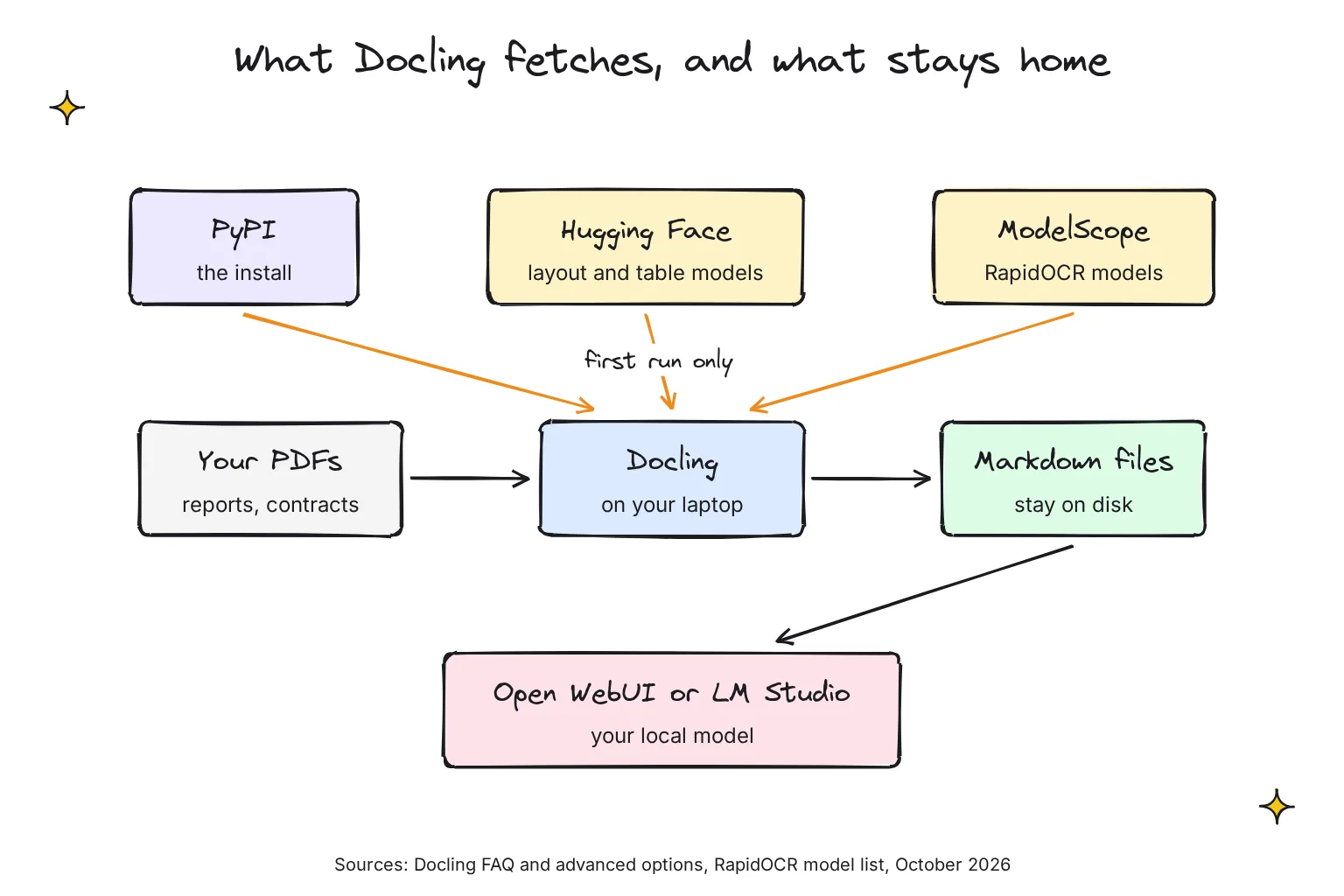
Docling converts documents on your own machine. Its docs say its purpose is to run local models which are not sharing any user data with remote services; options that would call one, such as cloud OCR, raise an error unless you set enable_remote_services.
What goes online: the install from PyPI, model weights from Hugging Face such as the TableFormer models, RapidOCR's models, which its model list hosts on ModelScope, and any document you give as a URL. With models prefetched and the artifacts path set, conversion needs no network.
Docling's docs describe no usage telemetry; docling-serve's OpenTelemetry settings are for your own monitoring, with OTLP export off by default. Unstructured sends lightweight analytics by default until you set DO_NOT_TRACK, MinerU may collect anonymous telemetry you can disable, and PyMuPDF makes no telemetry calls.
Two habits keep it private: keep docling-serve on 127.0.0.1, and if you turn on picture descriptions in Open WebUI's API mode, which calls an external service and needs DOCLING_SERVE_ENABLE_REMOTE_SERVICES, point it at a model on your own machine. Our guides on what to check before you upload a document and on private AI options explain why this matters for contracts.
Common questions about Docling
What is Docling and who makes it?
Docling is a free, open-source document converter that turns PDFs, Word files, slides, spreadsheets, HTML and images into Markdown or JSON for AI models. It was started by IBM Research Zurich, is hosted by the LF AI and Data Foundation, and its code is MIT licensed. Version 2.143.1 was released on October 27, 2026.
Does Docling need a GPU?
No. Docling runs on an ordinary CPU, on Apple Silicon and on Nvidia graphics cards. In its developers' January 2025 benchmark, a page took 3.1 seconds on average on an 8-thread x86 CPU, 1.27 seconds on an Apple M3 Max and 0.49 seconds on an Nvidia L4 GPU, with OCR and tables switched on.
Can Docling read scanned PDFs?
Yes. OCR is on by default and runs on the scanned or picture parts of each page, using RapidOCR in the standard install or Apple's text recognition on a Mac if you add it. For pages whose text copies out as gibberish, add the replace broken text layer option, or use full-page OCR mode to read every page.
Does Docling send my documents online?
No. Docling converts files on your own computer and refuses to call remote services unless you explicitly enable them. It does download its models from Hugging Face and RapidOCR's models from ModelScope on first use. Prefetch them with docling-tools and set the artifacts path, and it can then run with no internet connection.
What is Granite-Docling?
Granite-Docling-258M is a small vision-language model from IBM, released under Apache 2.0 in September 2025. It reads an image of each page and outputs its text, tables, code and equations in one pass, instead of Docling's chain of separate models. It is optional and runs through Docling's VLM pipeline, with an MLX version for Apple Silicon Macs.
My verdict for a 16GB laptop: Docling's standard pipeline, offline
For this reader, Docling is the right first converter: free, MIT licensed, no graphics card needed, tables kept as tables, and fully offline once its models are downloaded. On the Windows laptop, use the standard pipeline with RapidOCR; on the Mac, add the ocrmac engine and keep Granite-Docling for pages that come out wrong. Start with the CLI and Markdown files, and set up docling-serve for Open WebUI once you trust the output.
Your next step: install Docling in a virtual environment, run docling-tools models download, then convert five PDFs you know well, including one scan and one with a table, and read the Markdown against the originals before you hand the folder to your local model.
Sources
- Supported formats - Docling
- docling-project/docling - GitHub
- FAQ - Docling
- Docling Technical Report - arXiv
- Chat with Documents - LM Studio
- Document Extraction - Open WebUI
- PyMuPDF4LLM - PyMuPDF documentation
- docling - PyPI
- Releases, docling-project/docling - GitHub
- IBM is open-sourcing a new toolkit for document conversion - IBM Research
- Docling documentation - Docling
- docling-project - GitHub
- docling-project/docling-layout-heron - Hugging Face
- ibm-granite/granite-docling-258M - Hugging Face
- Installation - Docling
- Processing audio and video - Docling
- Docling document - Docling
- auto_ocr_model.py - docling-project/docling, GitHub
- pyproject.toml - docling-project/docling, GitHub
- IBM Granite-Docling: End-to-end document understanding with one tiny model - IBM
- granite-docling-258M files - Hugging Face
- ibm-granite/granite-docling-258M-mlx - Hugging Face
- Quickstart - Docling
- Vision Models - Docling
- venv: Creation of virtual environments - Python documentation
- Advanced options - Docling
- Docling v2 - Docling
- docling/cli/main.py - docling-project/docling, GitHub
- CLI reference - Docling
- OCR in Docling - Docling
- Full page OCR example - Docling
- Pipeline options - Docling
- Model Catalog - Docling
- Docling: An Efficient Open-Source Toolkit for AI-driven Document Conversion - arXiv
- GPU support - Docling
- CHANGELOG.md - docling-project/docling, GitHub
- Retrieval Augmented Generation (RAG) - Open WebUI
- Docling MCP - Docling
- Environment Variable Configuration - Open WebUI
- Docling Document Extraction - Open WebUI
- docling-project/docling-serve - GitHub
- docling-serve - PyPI
- Deployment - Docling
- REST API - Docling
- docling-serve configuration - docling-project/docling-serve, GitHub
- Port publishing and mapping - Docker Docs
- Chunking - Docling
- Hybrid chunking - Docling
- datalab-to/marker - GitHub
- marker-pdf - PyPI
- opendatalab/MinerU - GitHub
- mineru - PyPI
- MinerU Open Source License - opendatalab/MinerU, GitHub
- pymupdf4llm - PyPI
- PyMuPDF - PyPI
- pymupdf/PyMuPDF - GitHub
- Unstructured-IO/unstructured - GitHub
- unstructured - PyPI
- Partitioning - Unstructured
- Overview - Unstructured
- Overview of Parse - LlamaIndex
- Deployment & Data Residency - LlamaIndex
- TableFormer accurate model files - Hugging Face
- docling-project/docling-models - Hugging Face
- default_models.yaml - RapidAI/RapidOCR, GitHub