What is GGUF?
GGUF is a single-file format for running AI models on your own computer. One .gguf file holds the model's weights, usually shrunk by quantization, plus the metadata an app needs to load them. Llama.cpp's developer created it, and Ollama, LM Studio, Jan and GPT4All all run it. Tags like Q4_K_M name the compression level.
This guide follows one reader: someone with a 16GB laptop, a Windows machine with no graphics card or an M-series MacBook Air, staring at 20-odd Hugging Face files named like gemma-4-12b-it-Q4_K_M.gguf and gemma-4-12b-it-Q8_0.gguf. The running example is Unsloth's GGUF build of Google's Gemma 4 12B, whose file list shows every common quant side by side.
Choose Q4_K_M if:
- You have 16GB of RAM or Mac unified memory and want a 7B to 14B model. Gemma 4 12B at Q4_K_M is a 7.12 GB file.
- You want the default: llama.cpp defaults to Q4_K_M when you name no quant, and so does Ollama when the repo has one.
Choose Q5_K_M, Q6_K or Q8_0 if:
- The file is still several GB smaller than your memory, as on a 32GB machine, or with a smaller model such as Gemma 4 E4B, whose Q8_0 file is 8.19 GB.
- You want answers closer to the original. In llama.cpp's test, Q8_0 picked the same top next token as the 16-bit model 97.7% of the time, against 91.9% for Q4_K_M.
Choose IQ4_XS, Q3_K_M or a smaller model if:
- Q4_K_M will not fit with room to spare. Gemma's IQ4_XS is 6.38 GB and Q3_K_M 5.69 GB, but quality falls faster below 4 bits, so I would usually rather run a smaller model at Q4_K_M.
What does GGUF stand for, and where did it come from?
The GGUF specification never spells out the letters. It calls GGUF a binary format for running models with GGML, the tensor library llama.cpp is built on, and the successor to the older GGML, GGMF and GGJT formats. Hugging Face says GGUF was developed by @ggerganov (Georgi Gerganov), who also develops llama.cpp.
The old files could not say which architecture they held, and adding a setting broke existing files, the spec explains. GGUF uses key-value metadata instead, so new information never breaks old models. llama.cpp merged GGUF support on August 21, 2023, and TheBloke's model cards say llama.cpp no longer supports the old GGML files.
What is inside a GGUF file?
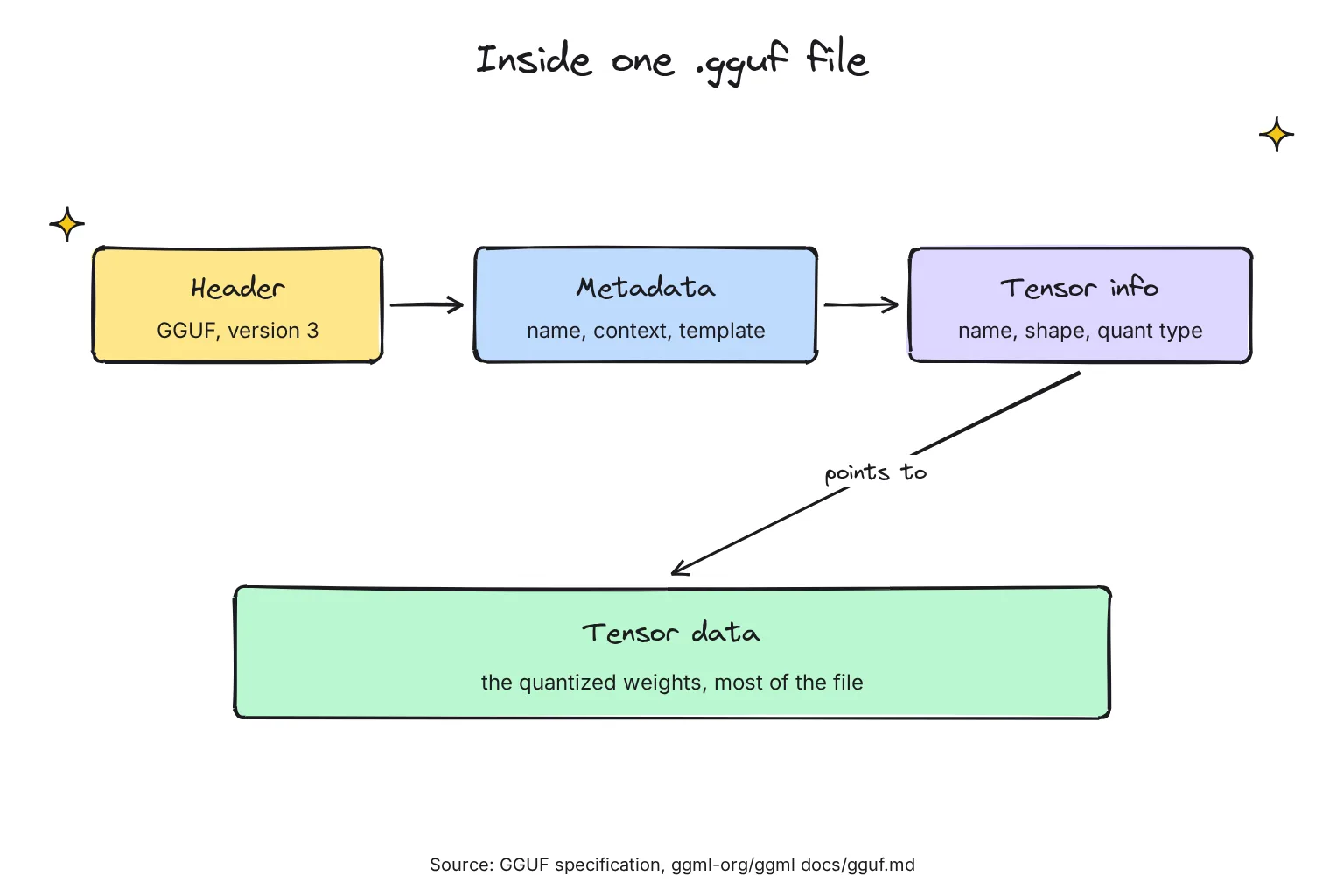
A model's weights, or parameters, are the numbers it learned in training (see how LLMs work), stored as tensors, which are grids of numbers. A GGUF file has four parts:
- A header: the bytes GGUF and a version number, currently 3.
- Metadata as key-value pairs, such as the architecture, the training context length and the chat template, the prompt format the model expects.
- Tensor info: each tensor's name, shape, quantization type and position.
- Tensor data: the weights, almost all of the file.
Hugging Face reads that metadata too: its viewer shows each file's metadata and tensors, and the Gemma page lists architecture gemma4 and 12B params.
Which apps can open GGUF files?
- llama.cpp, the open-source engine for LLM inference in C/C++ that GGUF was made for.
- Ollama, based on llama.cpp, with wider GGUF compatibility since version 0.30 in June 2026.
- LM Studio, which runs GGUF models on Mac, Windows and Linux, and MLX models on Apple Silicon; our LM Studio vs Ollama comparison helps you choose.
- Jan, whose local models are managed through llama.cpp in GGUF format, and GPT4All, which downloads GGUF models from the Hub.
- ComfyUI, the image app, through the ComfyUI-GGUF custom node, plus vLLM and Transformers, with caveats covered below.
What is quantization, and how do you read Q4_K_M?
Quantization stores each weight with fewer bits. llama.cpp calls it reducing precision, for example from 32-bit floats to 4-bit integers, which shrinks the file and can speed it up at some cost in accuracy: Llama 3.1 8B drops from 32.1 GB to 4.9 GB at Q4_K_M. Models usually ship at 16 bits, and Google's Gemma 4 12B is a 23.9 GB file, too big for 16GB. Each part of a quant name means something:
- The number after Q is the main bits per weight; files average a bit more, since blocks store scales and some tensors get extra bits.
- K marks a k-quant, added to llama.cpp in June 2023, which groups weights into super-blocks: Q4_K uses 8 blocks of 32 weights, for 4.5 bits per weight.
- S, M and L are mixes. Originally, Q4_K_S used Q4_K for every tensor, while Q4_K_M gave half of two tensor types the more precise Q6_K. L, offered for Q3_K, adds more.
- _0 and _1 are older types with one scale per block of 32 weights, plus a minimum for _1. Hugging Face calls them legacy, but repos like this one still offer Q8_0.
- IQ marks an i-quant, whose weights are derived using an importance matrix. IQ4_XS works out at 4.25 bits per weight.
- F16 and BF16 are unquantized 16-bit numbers.
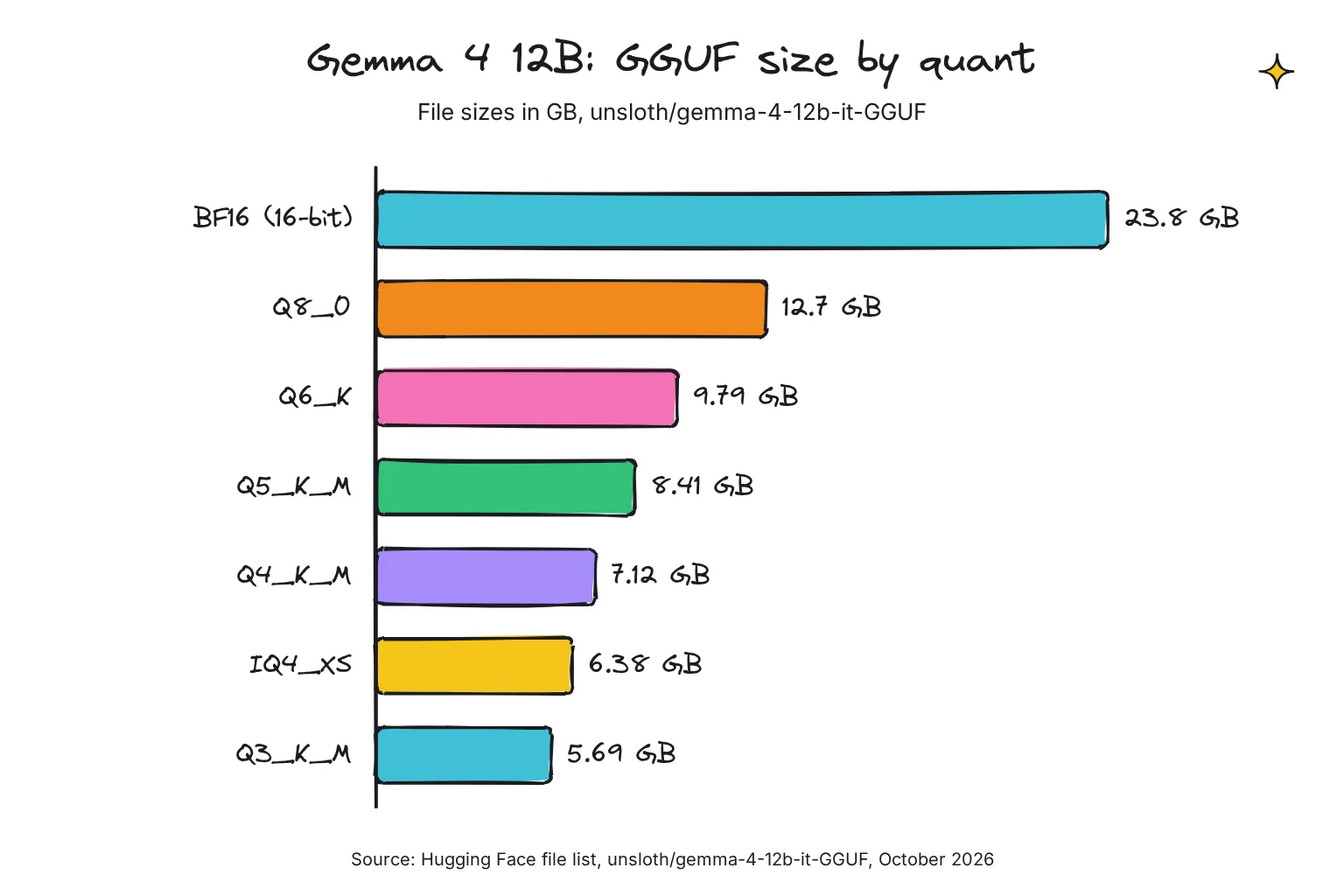
How the common types compare in October 2026, with bits per weight from llama.cpp's Llama 3.1 8B test, quality from its Llama 3 8B scoreboard, and sizes from the Gemma 4 12B file list:
| Quant | Bits per weight (Llama 3.1 8B) | Gemma 4 12B file | KL divergence vs 16-bit (Llama 3 8B) | Best for |
|---|---|---|---|---|
| BF16 / F16 | 16.0 | 23.8 GB | Reference | Converting and re-quantizing |
| Q8_0 | 8.50 | 12.7 GB | 0.0014 | 32GB machines, or small models |
| Q6_K | 6.56 | 9.79 GB | 0.0055 | Near-original quality with spare memory |
| Q5_K_M | 5.70 | 8.41 GB | 0.0108 | A step up when Q4 fits easily |
| Q4_K_M | 4.89 | 7.12 GB | 0.0313 | The default for 16GB |
| UD-Q4_K_XL | Varies by layer | 7.37 GB | Not in llama.cpp's table | Unsloth's pick for this model |
| IQ4_XS | 4.46 | 6.38 GB | 0.0363 (with imatrix) | Squeezing 4-bit into less memory |
| Q3_K_M | 4.00 | 5.69 GB | 0.1019 | Last stop before a smaller model |
KL divergence (Kullback-Leibler) measures how far the quantized model's next-token predictions drift from the 16-bit model's; 0 means identical. A token is a word or word piece.
It is a gentle slope, then a cliff. Perplexity, a lower-is-better score of how surprised a model is by real text, was 6.233 at 16-bit, 6.234 for Q8_0 and 6.407 for Q4_K_M. Below 4 bits, Q3_K_M's KL divergence is over three times Q4_K_M's, and 2-bit types pass 0.3.
Q4_K_M vs Q4_K_S: which is better?
Q4_K_M, if it fits. llama.cpp measured it at 4.58 GiB and a KL divergence of 0.031, against 4.37 GiB and 0.043 for Q4_K_S. For Gemma 4 12B that is 7.12 GB against 6.76 GB: a third of a gigabyte for a closer match.
What are IQ quants and imatrix files?
An importance matrix, or imatrix, is computed for a model from a sample text dataset and flags the weights that matter most, so the quantizer can protect them. llama.cpp says quality loss can be minimized by using a suitable imatrix file; in its scoreboard one cut Q4_K_M's KL divergence from 0.0313 to 0.0282 at the same size. The lowest-bit IQ types require one, and other types can use one too.
What are Unsloth dynamic quants (UD-Q4_K_XL)?
Unsloth, which publishes this guide's example repo, marks its own method, Unsloth Dynamic, with UD. Rather than one recipe, it adjusts the quantization type of every possible layer, differently for each model, and upcasts important layers. I found no definition of XL in its docs; here UD-Q4_K_XL is 7.37 GB, a quarter-gigabyte above Q4_K_M.
The quality claims are Unsloth's own, such as more than 10% better top-1 accuracy at the same size than every other provider for its Dynamic 3.0 Qwen3.8-27B quants. Its guide runs the 12B at UD-Q4_K_XL, but I know of no independent test of these files that I trust. If Qwen is the model you want, our guide explains where to get Qwen GGUF files and which size fits your RAM.
Which GGUF quant fits 16GB of RAM or VRAM?
RAM is main memory; VRAM is a graphics card's faster memory. An Apple silicon Mac has unified memory, one pool the processor and graphics share.
Our rule of thumb, from the home AI server guide, is about 0.55 to 0.65 GB per billion parameters at 4-bit, plus room for context. Gemma 4 12B has 11.95 billion parameters, so the rule predicts 6.6 to 7.8 GB; the real Q4_K_M is 7.12 GB. Unsloth recommends 7 to 8 GB of total memory at 4-bit, 13 to 14 GB at 8-bit and 25 GB at 16-bit.
Context, the text the model keeps in view, costs extra memory. Ollama warns that a larger context length will increase the amount of memory required; Gemma 4 12B supports up to 262,144 tokens, so keep that setting modest.
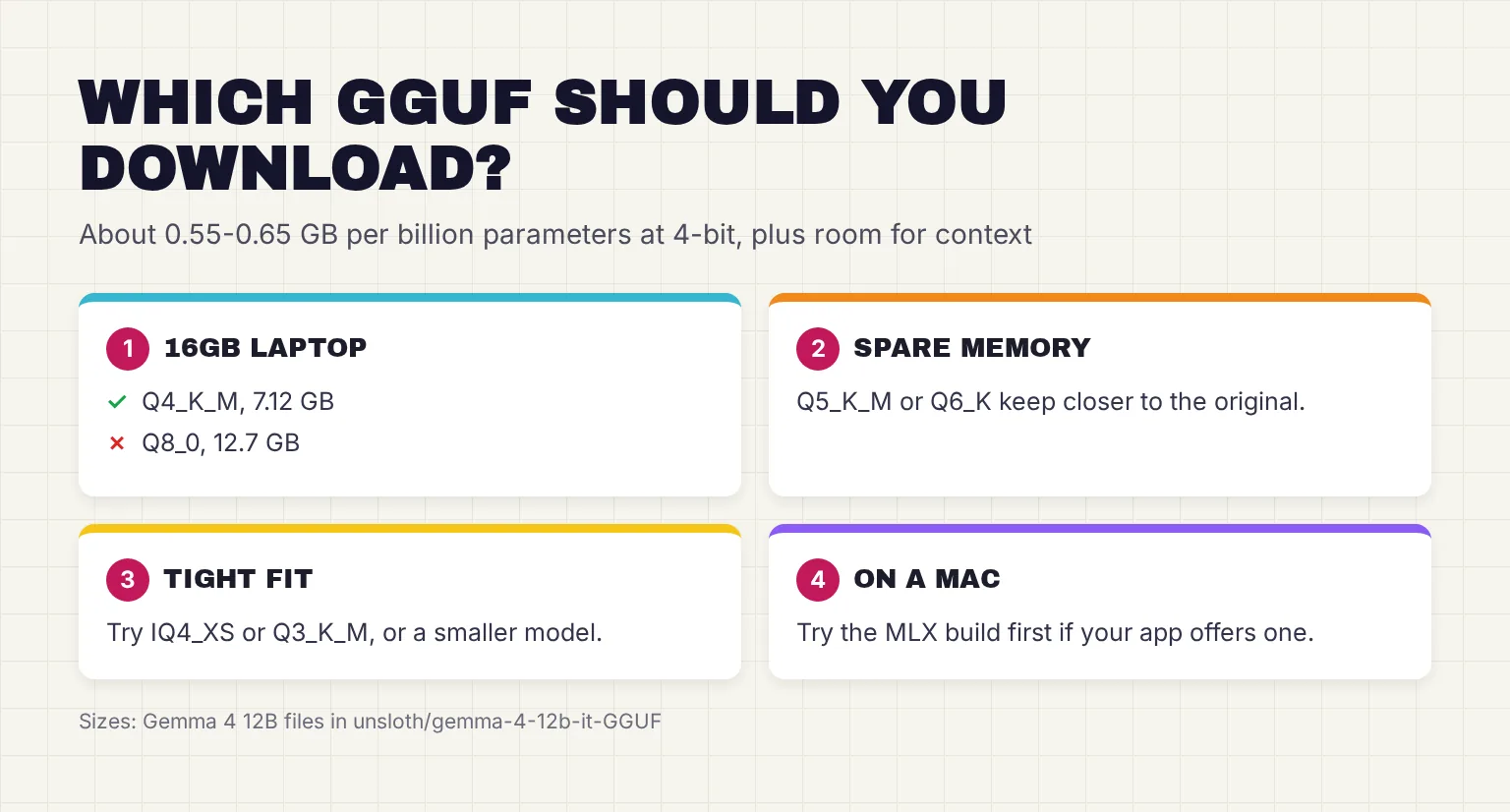
On the 16GB laptop, Q4_K_M at 7.12 GB leaves roughly 9GB for the system, your browser and the context; Q8_0 at 12.7 GB leaves almost nothing. Google says the 12B is small enough to run locally with just 16GB of VRAM or unified memory, a maker's claim that names no precision.
If a file outgrows your VRAM, llama.cpp splits the work with CPU+GPU hybrid inference, but generation will be slower. LM Studio highlights the recommended choice for your hardware to save you the sums. One exception: Olala mini has no 4-bit file, and its maker says to use its own 5-, 6- or 8-bit files instead.
How do I download one GGUF file instead of the whole repo?
Filter Hugging Face's model list by GGUF to find builds, then never clone a whole repo: the Gemma one holds about 178 GB. You want one .gguf file. In the file list:
- gemma-4-12b-it is the model. Google releases pre-trained and instruction-tuned variants; it marks the chat-ready instruction-tuned one.
- mmproj-BF16.gguf is a multimodal projector for image and audio input, 175 MB here. llama.cpp's -hf option fetches it automatically.
- mtp- files are draft modules for speculative decoding, an optional speed-up, and the imatrix file is a build input. Skip both.
- Names ending -00001-of-00003 are shards of one split model. Download every shard.
Download a single GGUF with the Hugging Face CLI
- Install the hf command with the standalone installer below. It also adds an hf-cli skill for AI agents unless you pass --exclude-skill (-ExcludeSkill on Windows).
- Copy the exact file name from Files and versions, such as gemma-4-12b-it-Q4_K_M.gguf.
- Download that one file with hf download, the repo, the file name and --local-dir. It prints the file's path last.
- Point your app at it. Jan's Import button links a GGUF file in place without copying it; Ollama needs a Modelfile, shown below.
# macOS or Linux
curl -LsSf https://hf.co/cli/install.sh | bash

# Windows (PowerShell)
powershell -ExecutionPolicy ByPass -c "irm https://hf.co/cli/install.ps1 | iex"

# Download one quant into a folder called models
hf download unsloth/gemma-4-12b-it-GGUF gemma-4-12b-it-Q4_K_M.gguf --local-dir models
Pick a quant in LM Studio
Press Ctrl+2, or Cmd+2 on a Mac, to jump to Discover, then search or paste the Hugging Face URL. Each result expands to show its quantization options, and LM Studio advises a 4-bit option or higher if your machine is capable enough. Its lms tool takes the quant after an @, as in lms get https://huggingface.co/unsloth/gemma-4-12b-it-GGUF@Q4_K_M.
How does Ollama use GGUF files?
Ollama 0.30, released June 5, 2026, expanded its GGUF model compatibility through llama.cpp. There are three routes:
- Ollama's library, where
gemma4:12bis 7.7 to 8.0GB and gemma4:12b-it-q8_0 13GB. - Straight from Hugging Face, with hf.co/ before the repo and a colon before the quant. Ollama uses Q4_K_M by default when present and picks the chat template from the file's metadata.
- A file you downloaded, via a one-line Modelfile and ollama create. Ollama does not quantize GGUF models during import, so pick the quant first; split models take a wildcard matching every shard.
# Pull one quant straight from Hugging Face
ollama run hf.co/unsloth/gemma-4-12b-it-GGUF:Q4_K_M

# Or import a file you already have. Modelfile contents:
FROM ./models/gemma-4-12b-it-Q4_K_M.gguf

ollama create -f Modelfile my-gemma
ollama run my-gemma
If a new model fails with unable to load model, update Ollama.
GGUF vs MLX vs safetensors vs FP8: what is the difference?
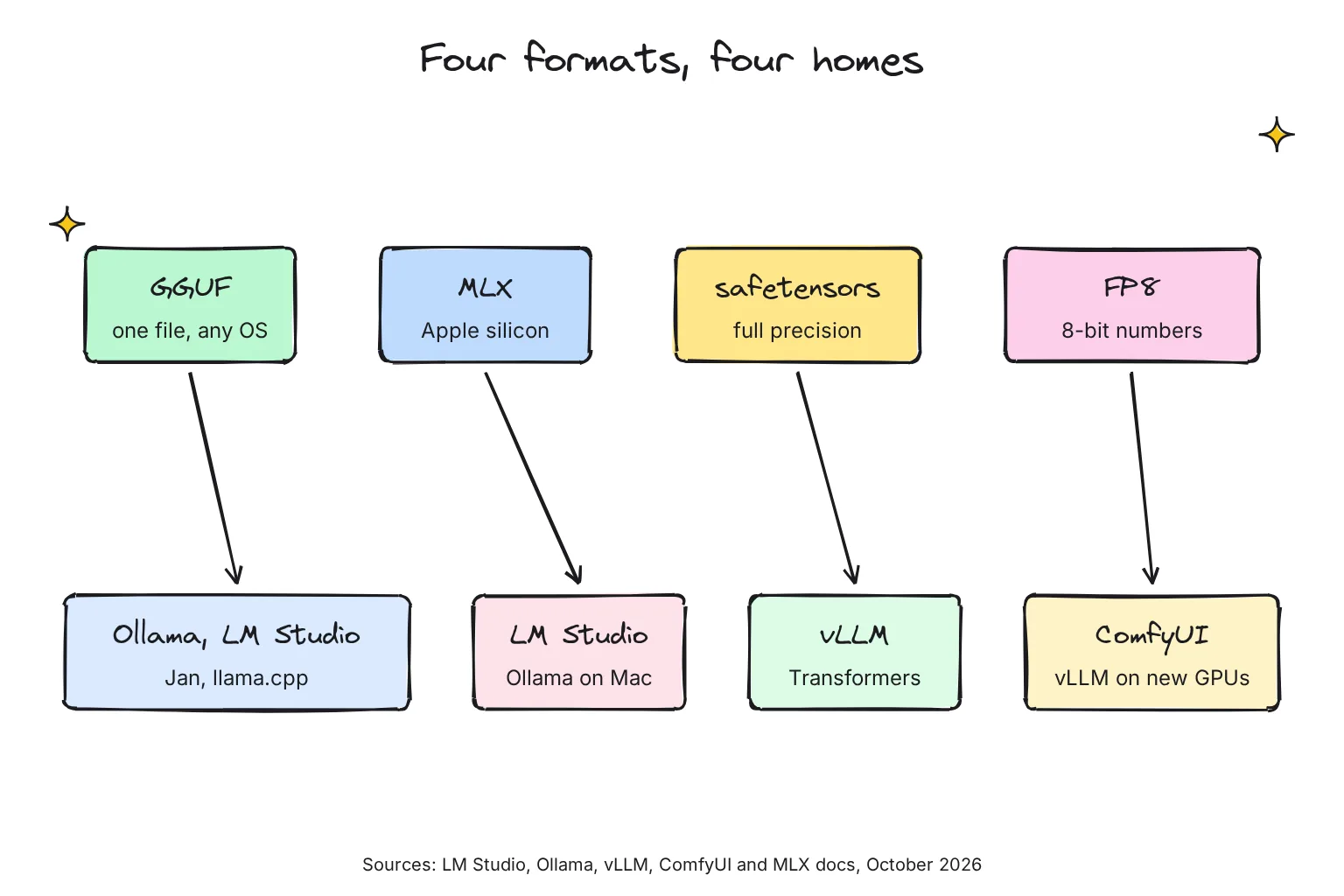
The other formats matter on a Mac, a server or in image generation. In October 2026 they line up like this:
| Format | What it is | Main apps | Example size |
|---|---|---|---|
| GGUF | One file: quantized weights plus metadata | llama.cpp, Ollama, LM Studio, Jan, GPT4All | Gemma 4 12B Q4_K_M: 7.12 GB |
| MLX | Apple's machine learning framework; models ship as folders of safetensors files | LM Studio and Ollama on Apple silicon | Gemma 4 12B 4-bit: 6.77 GB |
| safetensors | Hugging Face's tensor-only file, the usual home of full-precision originals | vLLM, Transformers | Gemma 4 12B BF16: 23.9 GB |
| FP8 | An 8-bit floating-point number type, stored inside safetensors files | vLLM on recent GPUs; ComfyUI image models | Qwen-Image: 20.4 GB, against 40.9 GB at BF16 |
GGUF vs MLX on a Mac
MLX is an array framework for machine learning on Apple silicon, from Apple machine learning research. LM Studio runs MLX models on Apple Silicon Macs, and Ollama added an MLX engine in preview on March 30, 2026, with gemma4:12b-mlx at 7.7GB. Ollama's own test found its updated MLX engine, with NVIDIA's NVFP4 4-bit format, roughly halves the quality loss of q4_K_M on Gemma 4 12B and generates about 20% faster. On the MacBook Air, I would try MLX first and keep GGUF for apps that need it.
GGUF vs safetensors
Safetensors is Hugging Face's format for storing tensors safely, as opposed to pickle, and fast. It holds tensors only, while GGUF encodes both the tensors and a standardized set of metadata. Originals ship as safetensors, like Google's 23.9 GB model.safetensors; the GGUF-my-repo Space converts and quantizes one into GGUF.
Server tools start from safetensors: vLLM's default load format tries safetensors first. Transformers can open a GGUF, but for most architectures it unpacks every weight at load into a plain dense model; only Qwen3.5 models stay packed, and only with the optional kernels package installed.
Can vLLM load GGUF files?
Yes, with a plugin. vLLM, a serving engine for LLMs, at 0.32.0 since October 18, 2026, calls GGUF support highly experimental and under-optimized; it now lives in the separate vllm-gguf-plugin, which needs a CUDA or ROCm toolkit. vLLM lists GGUF on NVIDIA and AMD GPUs, not CPUs, and suggests the base model's tokenizer:
uv pip install vllm-gguf-plugin
vllm serve unsloth/Qwen3-0.6B-GGUF:Q4_K_M --tokenizer Qwen/Qwen3-0.6B
The plugin's tests include a Gemma 4 Q4_K_M build; on the 16GB laptop, vLLM is the wrong tool.
FP8 vs GGUF: which is better for ComfyUI image models?
FP8 is a number type, not a file format: 8-bit floating point, in E4M3 and E5M2 flavors, where GGUF stores small integers with shared scales. For language models, vLLM claims a 2x reduction in model memory and up to 1.6x throughput with minimal impact on accuracy, with full FP8 math on Ada Lovelace (the GeForce RTX 40 series), Hopper and Blackwell GPUs.
In ComfyUI, FP8 is the built-in saver: the FP8 Flux checkpoint requires less VRAM, at lower quality than fp16, and fp8 weights cut memory by half but might reduce quality a tiny bit. GGUF needs the ComfyUI-GGUF node, whose Unet Loader (GGUF) replaces the stock loader. Its README notes models such as Flux seem less affected by quantization. To install it, clone it into custom_nodes, install gguf, and put .gguf files in ComfyUI/models/unet:
cd ComfyUI/custom_nodes
git clone https://github.com/city96/ComfyUI-GGUF
pip install --upgrade gguf
GGUF's advantage is reach. Comfy's FP8 Qwen-Image is 20.4 GB, close to city96's Q8_0 GGUF at 21.8 GB, while Q5_K_M is 14.9 GB and Q4_K_M 13.1 GB. Unsloth advises at least 3-bit quantization for diffusion models. My rule: use FP8 if it fits your VRAM, otherwise GGUF Q5_K_M, then Q4_K_M. Our guide to generating AI images locally covers what a laptop can manage.
Ready to try one? Here is how to run a GGUF file with llama.cpp.
Common questions about GGUF
What does GGUF stand for?
The official GGUF specification never spells out the letters. It calls GGUF a single-file binary format for running models with GGML, the library behind llama.cpp, and the successor to the older GGML, GGMF and GGJT formats. Georgi Gerganov, who develops llama.cpp, created it.
Which GGUF quant should I download for 16GB of RAM?
Start with Q4_K_M for a 7B to 14B model. Gemma 4 12B at Q4_K_M is a 7.12 GB file, which leaves room for the system, other apps and the context, while its 12.7 GB Q8_0 file is too tight. If memory runs short, try IQ4_XS or a smaller model.
What does Q4_K_M mean in a GGUF file name?
Q4 means about 4 bits per weight. K marks a k-quant, which groups weights into super-blocks with shared scales. The M mix gives a few tensors more bits than the S mix, for a slightly bigger file. In llama.cpp's test on an 8B model, Q4_K_M averaged 4.89 bits per weight.
Is GGUF or MLX better on a Mac?
On an Apple silicon Mac, try MLX first if your app offers it. LM Studio runs both formats, and Ollama added an MLX engine in 2026 that it says is much faster on Apple silicon. GGUF runs in every app in this guide, including on Windows and Linux, so it is more portable.
FP8 vs GGUF: which should I use in ComfyUI?
FP8 files load with ComfyUI's built-in nodes and halve memory compared with 16-bit, at a small cost in quality. GGUF needs the ComfyUI-GGUF custom node but comes in smaller sizes: Qwen-Image is 20.4 GB in FP8 and 13.1 GB at GGUF Q4_K_M. Use FP8 when it fits your VRAM.
Can vLLM run GGUF models?
Yes, but vLLM calls its GGUF support highly experimental and under-optimized. You install the separate vllm-gguf-plugin and serve a repo and quant name, ideally with the base model's tokenizer. It targets NVIDIA and AMD graphics cards, so a laptop without one suits llama.cpp, Ollama or LM Studio better.
My verdict for a 16GB laptop: download Q4_K_M
For this guide's reader, the file to click is gemma-4-12b-it-Q4_K_M.gguf, or the Q4_K_M of any 7B to 14B model. At 7.12 GB it leaves room for your apps and context, it is the default in llama.cpp and Ollama, and its measured loss is small. Go up to Q5_K_M or Q6_K only with memory to spare, and try IQ4_XS or a smaller model before going below 4 bits. Unsloth's UD-Q4_K_XL is a fair alternative, but its edge rests on Unsloth's own tests. On a MacBook Air, try MLX first.
Your next step: in LM Studio, search for unsloth/gemma-4-12b-it-GGUF, download Q4_K_M, and ask it to summarize a document you know well. In a terminal, ollama run hf.co/unsloth/gemma-4-12b-it-GGUF:Q4_K_M does the same. Then see our guide to running ChatGPT-like AI locally.
Sources
- GGUF specification (docs/gguf.md) - ggml-org/ggml, GitHub
- GGUF - Hugging Face Hub docs
- Use Ollama with any GGUF Model on Hugging Face Hub - Hugging Face
- Welcome to LM Studio Docs - LM Studio
- Model Management - Jan
- GGUF usage with GPT4All - Hugging Face
- unsloth/gemma-4-12b-it-GGUF model card - Unsloth, Hugging Face
- unsloth/gemma-4-12b-it-GGUF, Files and versions - Hugging Face
- llama.cpp/tools/cli - ggml-org/llama.cpp, GitHub
- unsloth/gemma-4-E4B-it-GGUF, Files and versions - Hugging Face
- Perplexity (LLaMA 3 8b Scoreboard) - ggml-org/llama.cpp, GitHub
- llama.cpp README - ggml-org/llama.cpp, GitHub
- GGUF, pull request #2398 - ggml-org/llama.cpp, GitHub
- TheBloke/Mixtral-8x7B-Instruct-v0.1-GGUF - Hugging Face
- Improved performance and model support with GGUF - Ollama
- ComfyUI-GGUF - city96, GitHub
- quantize - ggml-org/llama.cpp, GitHub
- google/gemma-4-12B-it, Files and versions - Hugging Face
- k-quants, pull request #1684 - ggml-org/llama.cpp, GitHub
- llama.cpp/tools/imatrix - ggml-org/llama.cpp, GitHub
- Unsloth Dynamic 3.0 GGUFs - Unsloth
- How to Run Diffusion Image GGUFs in ComfyUI - Unsloth
- Gemma 4: How to Run Locally - Unsloth
- Unified Memory - MLX documentation
- google/gemma-4-12B-it model card - Google, Hugging Face
- Context length - Ollama
- Introducing Gemma 4 12B - Google
- GGUF usage with LM Studio - Hugging Face
- Models filtered by GGUF - Hugging Face
- Command Line Interface (CLI) - Hugging Face
- Local AI Engine (llama.cpp) - Jan
- Download an LLM - LM Studio
- gemma4 tags - Ollama
- Importing a Model - Ollama
- lmstudio-community/gemma-4-12B-it-MLX-4bit - Hugging Face
- Comfy-Org/Qwen-Image, diffusion_models folder - Hugging Face
- MLX - ml-explore, GitHub
- Ollama is now powered by MLX on Apple Silicon in preview - Ollama
- Ollama's highest performance on Apple Silicon yet with MLX - Ollama
- Safetensors - Hugging Face
- GGUF My Repo - ggml-org, Hugging Face Spaces
- Engine Arguments - vLLM
- GGUF - Hugging Face Transformers docs
- vllm - PyPI
- GGUF - vLLM
- vLLM GGUF Quantization Plugin - vllm-project, GitHub
- Quantization - vLLM
- FP8 W8A8 - vLLM
- GeForce RTX 40 Series - NVIDIA
- ComfyUI Flux.1 Text-to-Image Workflow Example - ComfyUI
- Flux Examples - ComfyUI_examples
- city96/Qwen-Image-gguf, Files and versions - Hugging Face