
How do you delete Ollama models? Use ollama list, then ollama rm
To delete Ollama models, open a terminal (PowerShell on Windows, Terminal on a Mac or Linux), run ollama list to see each model's exact name, then run ollama rm followed by that name. Ollama deletes the model and any files no other model still uses. Removing Ollama itself takes an uninstall plus a short cleanup.
Quick answer. Two commands, in this order:
ollama list
ollama rm gpt-oss:20b
Swap in a name from the NAME column; ollama rm accepts several names at once.
This guide follows one reader: someone on a Windows laptop with a 512GB drive who read about local AI, tried four or five models, and now has a nearly full C: drive. They want the space back, and may remove Ollama altogether. For scale, gpt-oss:20b is a 14GB download and gemma4:26b is listed at 16 to 19GB, so a few experiments can pass 50GB. If you followed our guide to running ChatGPT locally, gpt-oss is probably your biggest file.
This guide reflects Ollama 0.40.13, the latest release as of October 29, 2026.
The command to remove an Ollama model in PowerShell
On Windows, the ollama command works in PowerShell or Command Prompt once the app is installed.
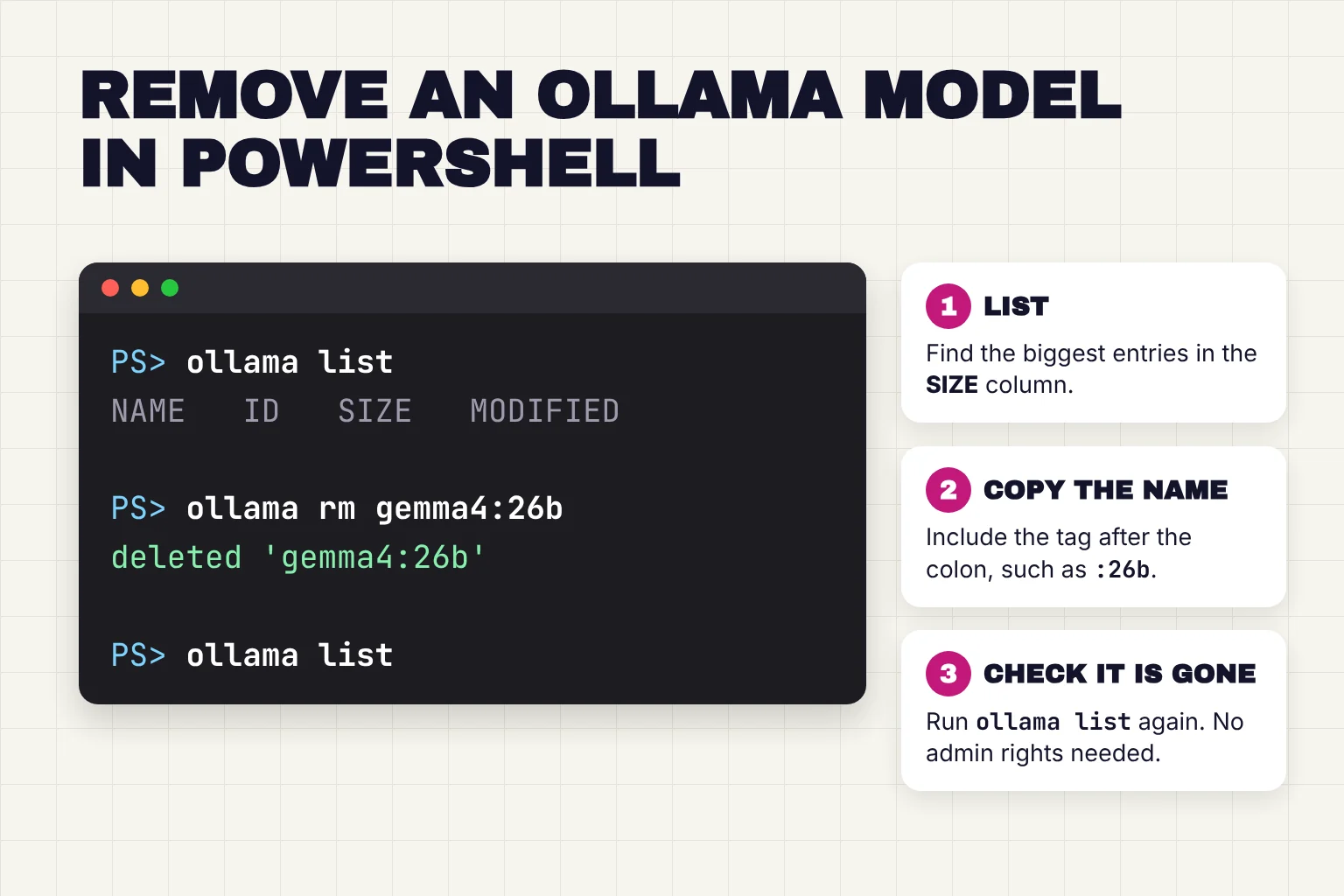
- Open PowerShell from the Start menu. You do not need administrator rights, because Ollama installs in your home folder without them.
- Run
ollama list. It prints four columns: NAME, ID, SIZE and MODIFIED. Cloud models, which run on Ollama's servers, show a dash for size, so deleting them frees nothing. - Copy the full name, such as
gemma4:26b. The part after the colon is the tag, a label for one size or version. If you leave it off, Ollama assumes the tag is latest. - Run
ollama rm gemma4:26b. Ollama repliesdeleted 'gemma4:26b'. To remove two at once, list both:ollama rm gemma4:26b gemma4:e4b. - Run
ollama listagain. The model should no longer appear. - Check your free space: open File Explorer and select This PC.
For our reader, the biggest entries in the SIZE column are the place to start. You do not need to stop a model first, because ollama rm unloads a running model before deleting it. To free memory but keep the files, ollama stop unloads a model immediately.
On a Mac or Linux, the same commands work in Terminal. Linux users need no sudo for ollama rm, because it asks the running Ollama server to delete the model.
Ollama model commands at a glance
| Command | What it does | Example |
|---|---|---|
ollama list (or ollama ls) | Lists downloaded models with name, ID, size and date | ollama list |
ollama ps | Shows models loaded in memory right now | ollama ps |
ollama stop | Unloads a model from memory, keeps the files | ollama stop gpt-oss:20b |
ollama rm | Deletes one or more models from disk | ollama rm gpt-oss:20b |
ollama show | Shows details such as parameters, context length and quantization | ollama show gpt-oss:20b |
ollama pull | Downloads a model again if you change your mind | ollama pull gpt-oss:20b |
Table details come from the CLI reference and the CLI source.
Deleting models without the terminal
The Ollama desktop app has no delete button for models: its interface code only deletes chats. Open WebUI can do it under Settings, Admin, Connections, Manage, then Delete a model, and our home AI server guide covers setting it up.
Where does Ollama store models on Windows, Mac and Linux?
In a .ollama folder in your home directory on Windows and Mac, and under /usr/share/ollama on Linux. The FAQ lists the default model folders, and the Windows, macOS and Linux pages name the other files:

| System | Default models folder | Other Ollama files |
|---|---|---|
| Windows | C:\Users\your-name\.ollama\models | Program in %LOCALAPPDATA%\Programs\Ollama; logs and updates in %LOCALAPPDATA%\Ollama |
| macOS | ~/.ollama/models | /Applications/Ollama.app, logs in ~/.ollama/logs, plus folders under ~/Library |
| Linux (install script) | /usr/share/ollama/.ollama/models | Service file /etc/systemd/system/ollama.service, plus the binary and libraries |
| Docker | A volume named ollama, mounted at /root/.ollama | Inside the container |
Inside the models folder are two kinds of files. Blobs are the large files that hold the weights, the trained numbers that make up a model, and they are named after a checksum, not the model. Manifests are small files that record which blobs belong to which model name. That is why ollama rm is safer than deleting by hand.
On Linux the path depends on how Ollama runs. The setup steps create an ollama user whose home is /usr/share/ollama, so the service stores models there. If you start ollama serve yourself, it runs as you and uses $HOME/.ollama/models by default.
Check how much space your models use
On Windows, paste this into PowerShell to total the models folder in gigabytes with Measure-Object's Sum option:
(Get-ChildItem "$env:USERPROFILE\.ollama\models" -Recurse -File | Measure-Object -Property Length -Sum).Sum / 1GBOn a Mac or Linux, du -sh prints one human-readable total for a folder, and df -h reports used and available space on each drive. Line one is for a Mac, line two for a Linux service install:
du -sh ~/.ollama/models
sudo du -sh /usr/share/ollama/.ollama/models
df -h
Mac users can also open System Settings, then General, then Storage. On the full laptop, run the PowerShell total before and after deleting.
Why deleting an Ollama model did not free up space
Usually the files were shared, or something else holds the space. In the source's words, Ollama only removes blobs that were reachable only from that object, so a second name for the same files keeps them on disk.
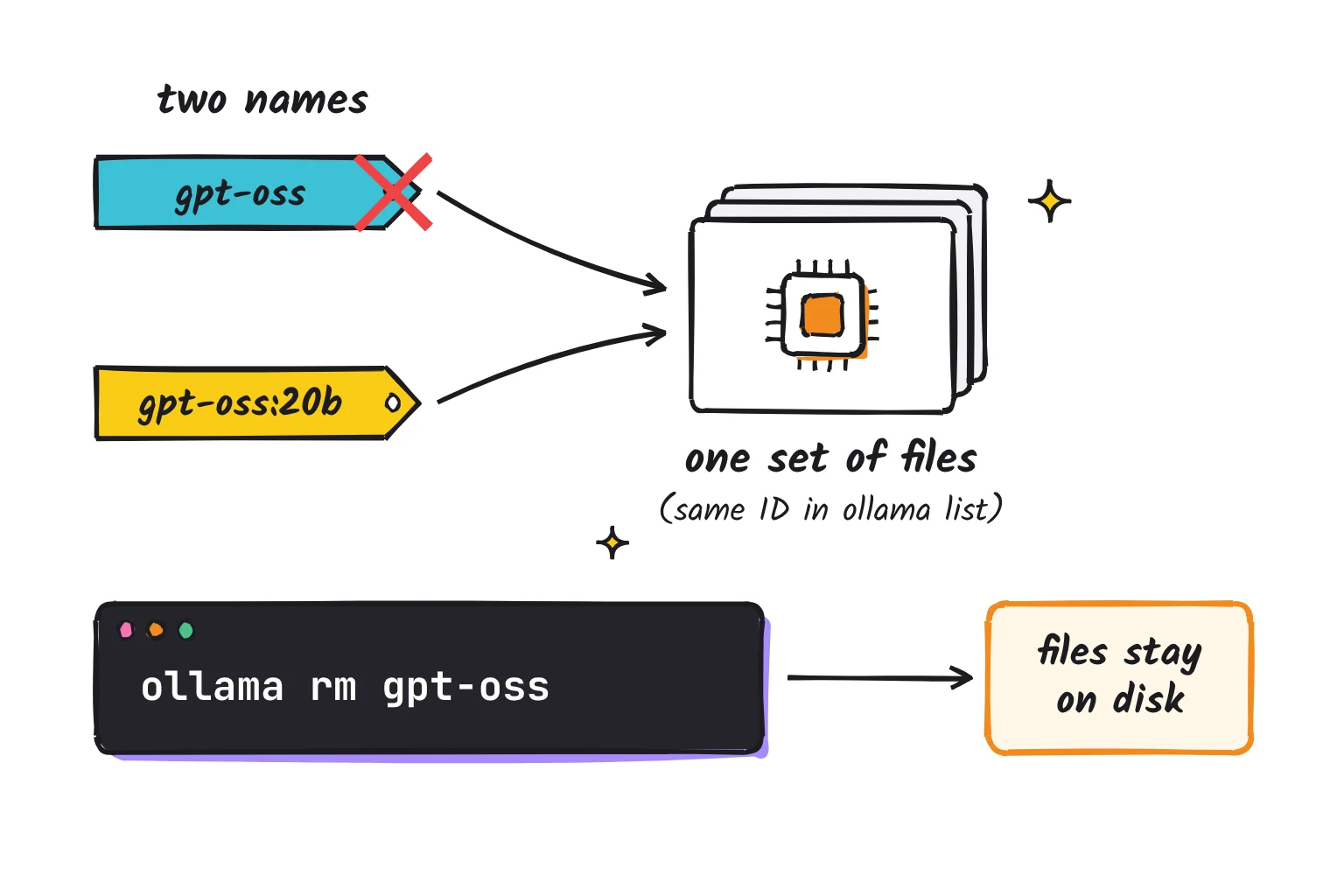
Check the ID column in ollama list: two names with the same ID are the same files. Pulling gpt-oss and later gpt-oss:20b does this, since the library lists them as the same 14GB model. So does ollama cp, which writes only a new manifest. Delete every name to get the space back.
Interrupted downloads come next. They sit in the blobs folder as files ending in -partial, and pulling the same model again resumes them. On startup, Ollama removes partial files and unused blobs older than an hour, unless OLLAMA_NOPRUNE is set, so restarting Ollama often clears the rest.
One cause is new in October 2026. The Ollama 0.40.2 release notes say models downloaded with earlier versions are upgraded in the background the first time you run them, with the original kept as a backup, so they temporarily take extra space. Ollama 0.40.3 paused that background upgrade, but backups made before then stay on disk. The 0.40.2 notes give a Mac and Linux cleanup command (it needs the jq tool) and say a future release will remove backups automatically. Deleting a model by name already removes its backup, because deletion covers every version listed under that name.
Finally, files you deleted by hand still use space until you empty the Recycle Bin on Windows or empty the Trash on a Mac. The ollama rm command deletes files directly, so there is nothing to empty. On a laptop like our reader's, a duplicate gpt-oss name and a canceled pull are the usual culprits.
Move Ollama models to another drive with OLLAMA_MODELS
To keep your models but get them off drive C:, point Ollama at another folder with the OLLAMA_MODELS environment variable, a named setting programs read when they start. Move the existing models folder first, or you will have to download everything again. For our reader, the new home is usually a USB drive.
On Windows
The desktop app is simplest: its settings have a Model location field with a Browse button, which the app passes to Ollama as OLLAMA_MODELS. If that folder is missing, say an unplugged USB drive, the same code falls back to the default folder, and your models seem to vanish until the drive is back. The documented route:
- Quit Ollama from its taskbar icon.
- Move the folder. In File Explorer, cut
C:\Users\your-name\.ollama\modelsand paste it as, say,D:\OllamaModels, or use robocopy with /E and /MOVE:robocopy "$env:USERPROFILE\.ollama\models" "D:\OllamaModels" /E /MOVE. - Open Settings, search for environment variables, choose Edit environment variables for your account, and create
OLLAMA_MODELSwith the valueD:\OllamaModels. A System variable also works, since Ollama inherits user and system variables. - Start Ollama from the Start menu, open a new PowerShell window, and run
ollama listto confirm your models are there.
Step 3 as one PowerShell line, using SetEnvironmentVariable with the User scope:
[Environment]::SetEnvironmentVariable('OLLAMA_MODELS', 'D:\OllamaModels', 'User')On a Mac or Linux
On a Mac, the app's Model location setting works the same way. Or quit Ollama, move the folder, set the variable with launchctl setenv, and restart the app:
mv ~/.ollama/models /Volumes/External/ollama-models
launchctl setenv OLLAMA_MODELS /Volumes/External/ollama-models
On Linux, the ollama user needs read and write access to the new folder. Stop the service, move the folder, change its owner, then open sudo systemctl edit ollama:
sudo systemctl stop ollama
sudo mv /usr/share/ollama/.ollama/models /mnt/data/ollama-models
sudo chown -R ollama:ollama /mnt/data/ollama-models
sudo systemctl edit ollama
In the editor, add these two lines and save, then run sudo systemctl daemon-reload and sudo systemctl restart ollama, as the FAQ's Linux steps describe:
[Service]
Environment="OLLAMA_MODELS=/mnt/data/ollama-models"
How to fully delete Ollama on Windows, Mac and Linux
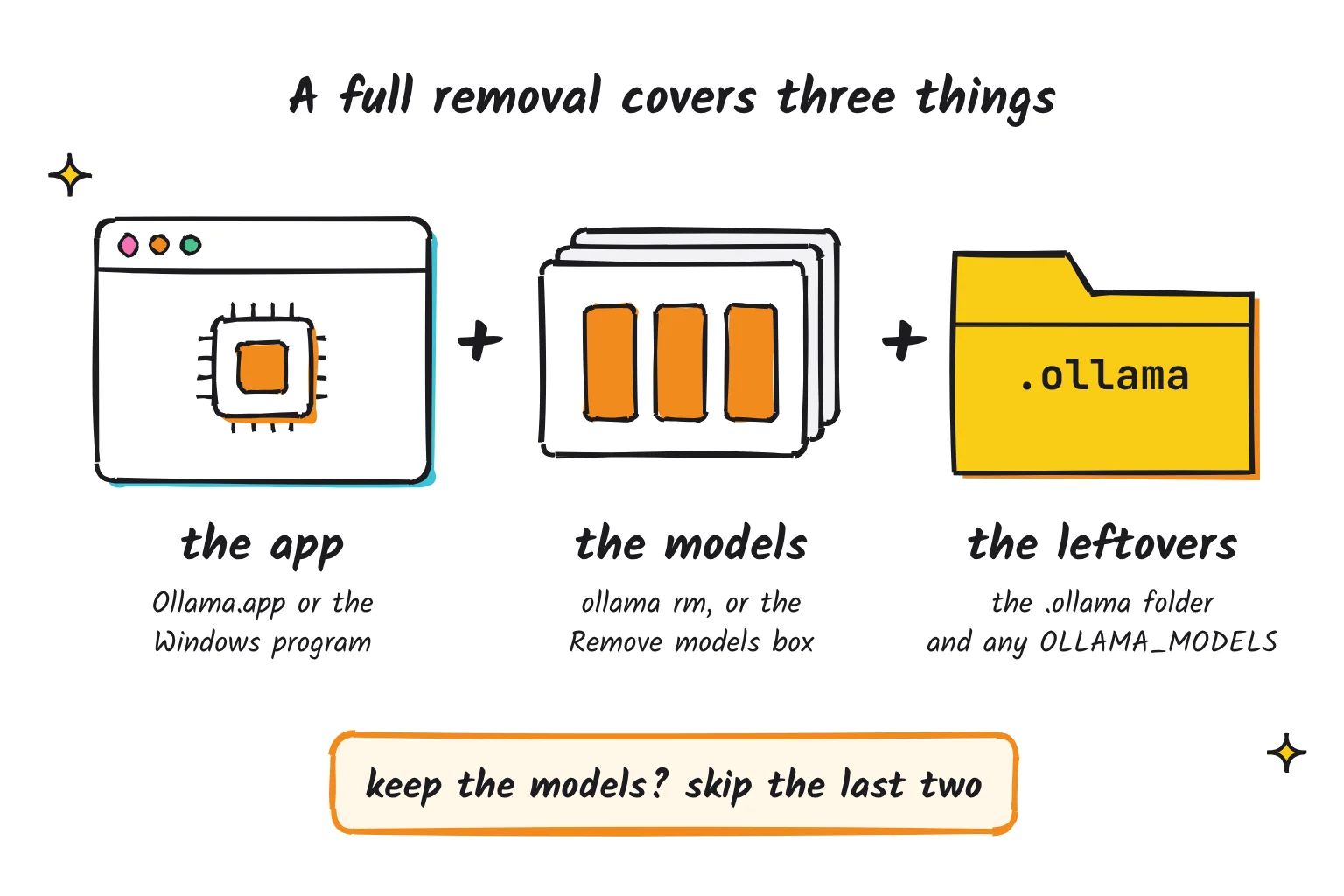
Fully deleting Ollama means removing the program, the models and the leftover .ollama folder. On Windows the uninstaller handles the first two; on a Mac and Linux, the docs list commands.
Uninstall Ollama on Windows
- Quit Ollama by clicking its icon in the taskbar.
- Go to Start, Settings, Apps, Installed apps, find Ollama, and select More, then Uninstall.
- The uninstaller shows a Remove models box with the folder and its size, checked by default. Leave it checked to delete your models, or uncheck it to keep them, then click Uninstall. For our reader, this box is where most of the space comes back.
- Delete the leftover folder with Remove-Item and its Recurse option:
Remove-Item -Recurse -Force "$env:USERPROFILE\.ollama". - If you set OLLAMA_MODELS, delete that folder, then clear the variable. Setting it to an empty string deletes it:
[Environment]::SetEnvironmentVariable('OLLAMA_MODELS', '', 'User').
Prefer a command for step 2? The official install script has an uninstall switch that launches the same uninstaller window. It runs a script from ollama.com, so read it first:
$env:OLLAMA_UNINSTALL=1; irm https://ollama.com/install.ps1 | iexWhat the uninstaller removes and leaves, per its script and the Windows docs:
| Item | Removed by the uninstaller? |
|---|---|
Program files in %LOCALAPPDATA%\Programs\Ollama | Yes |
Logs and updates in %LOCALAPPDATA%\Ollama | Yes |
Temporary ollama* folders in %TEMP% and the startup shortcut | Yes |
Models in C:\Users\your-name\.ollama\models | Only if Remove models stays checked |
The rest of .ollama, including your Ollama public key | No |
| A custom OLLAMA_MODELS folder and the variable itself | No |
| Ollama's entry in your user Path | No uninstall step removes it; it is harmless |
Uninstall Ollama on a Mac
Quit Ollama from the menu bar, then run the eight commands the macOS docs list to fully remove Ollama. Two of them put ~ inside double quotes, and shells only expand an unquoted tilde (zsh too), so as written those two lines do nothing. This version uses $HOME there:
sudo rm -rf /Applications/Ollama.app
sudo rm /usr/local/bin/ollama
rm -rf "$HOME/Library/Application Support/Ollama"
rm -rf "$HOME/Library/Saved Application State/com.electron.ollama.savedState"
rm -rf ~/Library/Caches/com.electron.ollama/
rm -rf ~/Library/Caches/ollama
rm -rf ~/Library/WebKit/com.electron.ollama
rm -rf ~/.ollama
Skip the last line to keep your models. Dragging Ollama.app to the Trash alone leaves them, because ~/.ollama holds models and configuration.
Uninstall Ollama on Linux
These are the Linux uninstall commands exactly as the docs give them: service, libraries, binary, then user, group and models. Run the library line before the binary line, since both find Ollama through which ollama.
sudo systemctl stop ollama
sudo systemctl disable ollama
sudo rm /etc/systemd/system/ollama.service
sudo rm -r $(which ollama | tr 'bin' 'lib')
sudo rm $(which ollama)
sudo userdel ollama
sudo groupdel ollama
sudo rm -r /usr/share/ollama
If you moved models with OLLAMA_MODELS, delete that folder too. If you used systemctl edit, also remove the /etc/systemd/system/ollama.service.d override folder, then run sudo systemctl daemon-reload.
Troubleshooting and safety checks
Error: model not found
The name does not match. Copy it from ollama list, tag included. A bare ollama rm gemma4 looks for gemma4:latest, so it fails if you only have gemma4:26b, and the server replies model 'gemma4' not found.
Could not connect to the Ollama server
The commands need Ollama running. On Windows and Mac, the CLI tries to start the app for you. On Linux it prints could not connect to ollama server, run 'ollama serve' to start it. For the service install, run sudo systemctl start ollama instead.
A file is in use, or the model is still loaded
Run ollama ps to see what is loaded, then ollama stop with that name. Before deleting files by hand, quit Ollama from the taskbar so nothing holds them open; the uninstaller's script likewise force-closes Ollama's processes first.
Permission denied on Linux
The /usr/share/ollama folder belongs to the ollama user, so du, ls and rm there need sudo. A new models folder must belong to that user too, which is why the FAQ gives sudo chown -R ollama:ollama for it.
Space still not freed
Check for duplicate IDs, restart Ollama, and empty the Recycle Bin or Trash. If Ollama runs in Docker, run the commands inside the container, for example docker exec -it ollama ollama list, as in the Docker docs.
Before you delete any folder
Do not delete the whole .ollama folder unless you want every model gone: it holds your models, your Ollama public key and settings such as server.json. To keep some models, remove the others with ollama rm. Before any rm -rf or Remove-Item -Recurse, read the full path twice, and never point either at an unchecked variable. Use install and uninstall scripts only from ollama.com.
Common questions about deleting Ollama models
What is the command to remove an Ollama model in PowerShell?
Run ollama list to see the exact names, then ollama rm followed by a name, for example ollama rm gpt-oss:20b. Include the tag after the colon, because Ollama assumes latest if you leave it off. Several names after rm delete several models in one command.
How do I fully delete Ollama?
Quit Ollama, then uninstall it. On Windows, use Settings, Apps, Installed apps, and leave Remove models checked. On a Mac, delete Ollama.app, the CLI link and the Library folders the docs list. On Linux, remove the service, libraries, binary, user and /usr/share/ollama. Finally delete any leftover .ollama folder.
Does uninstalling Ollama delete my models?
On Windows, the uninstaller offers a Remove models box for the default models folder, and it is checked by default. Models in a custom OLLAMA_MODELS folder are kept. On a Mac, deleting the app alone leaves models in ~/.ollama. On Linux, the last documented step, removing /usr/share/ollama, deletes them.
Where are Ollama models stored on Windows?
By default in C:\Users\your-name\.ollama\models, which PowerShell reaches as $env:USERPROFILE\.ollama\models. The folder holds blobs, the large weight files, and manifests, which map model names to blobs. If you set OLLAMA_MODELS or changed Model location in the app's settings, your models live in that folder instead.
How do I delete all Ollama models at once?
Name them all in one command, such as ollama rm gpt-oss:20b gemma4:26b, because rm accepts several names. To wipe every model but keep Ollama installed, quit Ollama and delete the models folder inside .ollama. Ollama creates a fresh, empty models folder the next time it starts.
Can I delete Ollama models without using the terminal?
Not in the Ollama desktop app, which as of October 2026 has no delete button for models. Open WebUI can do it: open Settings, Admin, Connections, select Manage on your Ollama connection, pick the model under Delete a model and confirm. Otherwise, use ollama rm.
My verdict for the full 512GB laptop
Delete with ollama rm, not by hand, and keep only the model you use. For the 512GB laptop, I would keep gpt-oss:20b if it runs well, remove the rest, and move models to a second drive only if you plan to keep collecting. Not sure which one to keep? Our list of the best Ollama models worth keeping sorts them by memory and task. If local AI was a passing experiment, uninstall with Remove models checked and delete the leftover .ollama folder.
If you keep one model, a smaller quantized version saves space, and our local vs cloud AI comparison explains how quantization trades size for quality.
Your next step: open PowerShell, run ollama list, and remove every model you have not used in the past week.
Sources
- CLI Reference - Ollama
- manifest/manifest.go (model and blob removal) - Ollama on GitHub
- cmd/cmd.go (CLI commands) - Ollama on GitHub
- gpt-oss - Ollama
- gemma4 - Ollama
- Releases - Ollama on GitHub
- Windows - Ollama
- FAQ - Ollama
- API documentation - Ollama on GitHub
- Free up drive space in Windows - Microsoft Support
- Delete a model - Ollama
- Desktop app settings screen (Settings.tsx) - Ollama on GitHub
- Desktop app interface API (api.ts) - Ollama on GitHub
- Starting with Ollama - Open WebUI
- macOS - Ollama
- Linux - Ollama
- manifest/paths.go (blobs and manifests folders) - Ollama on GitHub
- envconfig/config.go (environment variables) - Ollama on GitHub
- Docker - Ollama
- Measure-Object - Microsoft Learn
- du invocation - GNU Coreutils manual
- df invocation - GNU Coreutils manual
- Free up storage space on Mac - Apple Support
- server/images.go (copy and prune logic) - Ollama on GitHub
- server/download.go (partial downloads) - Ollama on GitHub
- Release v0.40.2 - Ollama on GitHub
- Release v0.40.3 - Ollama on GitHub
- Desktop app server launcher (server.go) - Ollama on GitHub
- robocopy - Microsoft Learn
- about_Environment_Variables - Microsoft Learn
- Uninstall or remove apps and programs in Windows - Microsoft Support
- Windows installer and uninstaller script (ollama.iss) - Ollama on GitHub
- Remove-Item - Microsoft Learn
- Windows install script (install.ps1) - Ollama
- Tilde Expansion - GNU Bash manual
- Expansion - zsh documentation
- server/routes.go (API handlers) - Ollama on GitHub
- cmd/start_default.go (Linux server check) - Ollama on GitHub